Preventive Maintenance
Preventive maintenance can be described as maintenance
of equipment or systems before fault occurs. It can be
divided into two subgroups: Planned Maintenance and
Conditioned-Based Maintenance.
Planned Maintenance (PM) is any variety of scheduled
maintenance to an object or item of equipment. Specifically, PM is
a scheduled service visit carried out by a competent and suitable
agent, to ensure that an item of equipment is operating correctly
to avoid any unscheduled breakdown and downtime of an
equipment.
Condition Based Maintenance (CBM) is a maintenance strategy
that uses the actual condition of the asset to decide what
maintenance needs to be done. CBM dictates that maintenance
should only be performed when certain indicators show
decreasing performance or upcoming failure. Checking a machine
for these indicators may include non-invasive measurements,
visual inspection, performance data and scheduled tests.
Condition data can be gathered at certain intervals, or
continuously.
Maintenance is divided into two (2) general type. Preventive
maintenance is given for maintaining equipment and facilities in
satisfactory operating condition to extend the life of the
equipment. Corrective maintenance is task performed to identify,
isolate, and rectify a fault so that the failed equipment or system
can be restored to an operational condition within the tolerances
or limits.
Maintenance Procedures In preparing maintenance procedure,
you also must consider designing a systematic plan for both for
hardware and software. This saves time, money and frustration
and ensures safe conditions to prevent injury to people and
damage to computer equipment.
Computer Inspection
Planning Maintenance Procedures for Computer System
and Networking:
A. Design a systematic maintenance plan for hardware.
1. Design a monitoring, evaluating, and updating plan.
2. Place your computer in a well-ventilated area.
3. Schedule the use of computer for its longer life.
4. Move the computer only when it is turned off and
unplugged.
5. Treat your computer properly.
B. Design a systematic maintenance plan for your
software.
1. Backup your files.
2. Install or secure passwords.
3. Delete temporary files.
4. Update anti-virus and spyware.
Design a systematic monitoring, evaluating, and updating plan
for hardware.
Computers have significantly changed the working environment,
simplifying, and speeding up many tasks across many work areas.
However, with these advances are some potential problems and
maintenance issues. These guidelines describe how computer
technicians, students and computer users can work together to
achieve a productive workplace environment. The guidelines reflect
current knowledge and best practice for the use of computers so you
can achieve maximum efficiency and safety in your workplace.
Guidelines for systematic monitoring, evaluating, and
updating plan for hardware
Place your computer in a
well-ventilated area.
•This will allow proper
circulation of air inside the
computer unit.
Computer Laboratory
Guidelines for systematic monitoring, evaluating, and
updating plan for hardware
Schedule the use of
computer for its longer
life.
•This will help lessen the
attacks of viruses and
increases the life span of
your computer
Computer Usage
Guidelines for systematic monitoring, evaluating, and
updating plan for hardware
Move the computer only
when it is turned off and
unplugged.
•To avoid damage to the
computer unit always turn
off and unplug it when
transferring the computer
to another location.
Unplugged Power Cable
Guidelines for systematic monitoring, evaluating, and
updating plan for hardware
Treat your computer
properly.
•This means taking care of
your computer. PCs and
laptops should be
properly turned off.
Computer Care
Do systematic maintenance plan for your computer
software
Back-up your files
•Protecting your files
means creating
backups, storing your file
backups on your hard
drive or any removable
storage device regularly.
Backup Media
Do systematic maintenance plan for your computer
software
Install or secure
passwords.
•Installing passwords
makes your files more
secure.
Installing Passwords
Do systematic maintenance plan for your computer
software
Delete temporary files.
•Deleting the temporary
files on your computer will
enhance its speed and will
create more disk space for
your files.
Deleting Temporary Files
Do systematic maintenance plan for your computer
software
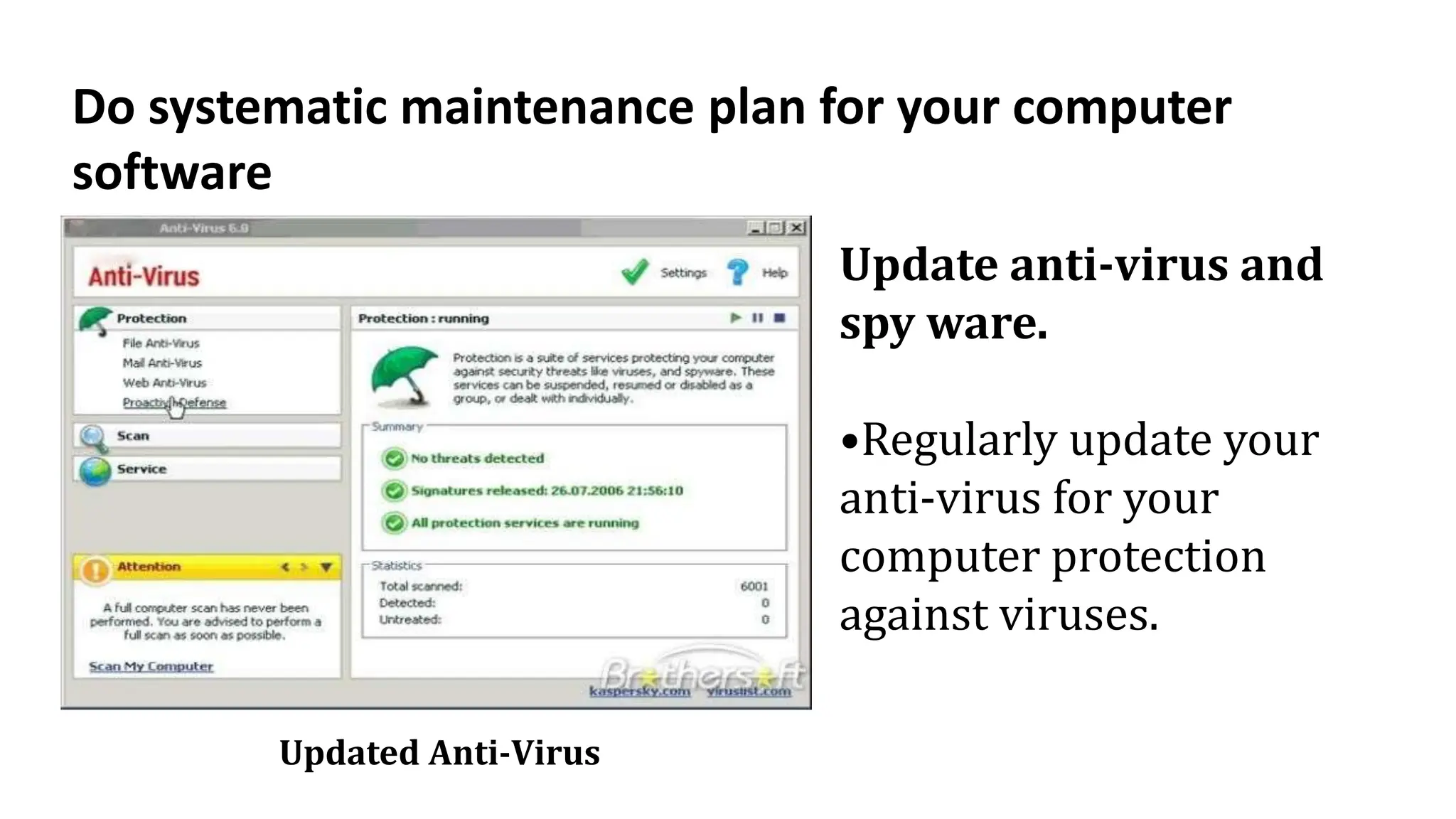
Update anti-virus and
spy ware.
•Regularly update your
anti-virus for your
computer protection
against viruses.
Updated Anti-Virus
Test I. Identify the following statement either Planned Maintenance
or Condition based maintenance. Write “PM” for Planned
maintenance and “CBM” for Condition based maintenance
1. scheduled service
2. maintenance should only be performed when certain
indicators.
3. data can be gathered at certain intervals, or continuously.
4. to ensure that an item of equipment is operating correctly to
avoid any unscheduled breakdown and downtime of an equipment.
5. include non-invasive measurements, visual inspection,
performance data and scheduled tests.
Test II. Identify the following Planning Maintenance Procedures for
Computer System and Networking:
Directions: Write “Software” if the statement pertains to
maintenance for software and “Hardware” if the statement pertains
maintenance for hardware.
1. Design a monitoring, evaluating, and updating plan.
2. Backup your files.
3. Delete temporary files.
4. Place your computer in a well-ventilated area.
5. Treat your computer properly.

Procedures in Planning and Conducting Maintenance.pptx

  • 1.
    Preventive Maintenance Preventive maintenancecan be described as maintenance of equipment or systems before fault occurs. It can be divided into two subgroups: Planned Maintenance and Conditioned-Based Maintenance. Planned Maintenance (PM) is any variety of scheduled maintenance to an object or item of equipment. Specifically, PM is a scheduled service visit carried out by a competent and suitable agent, to ensure that an item of equipment is operating correctly to avoid any unscheduled breakdown and downtime of an equipment.
  • 2.
    Condition Based Maintenance(CBM) is a maintenance strategy that uses the actual condition of the asset to decide what maintenance needs to be done. CBM dictates that maintenance should only be performed when certain indicators show decreasing performance or upcoming failure. Checking a machine for these indicators may include non-invasive measurements, visual inspection, performance data and scheduled tests. Condition data can be gathered at certain intervals, or continuously.
  • 3.
    Maintenance is dividedinto two (2) general type. Preventive maintenance is given for maintaining equipment and facilities in satisfactory operating condition to extend the life of the equipment. Corrective maintenance is task performed to identify, isolate, and rectify a fault so that the failed equipment or system can be restored to an operational condition within the tolerances or limits.
  • 4.
    Maintenance Procedures Inpreparing maintenance procedure, you also must consider designing a systematic plan for both for hardware and software. This saves time, money and frustration and ensures safe conditions to prevent injury to people and damage to computer equipment. Computer Inspection
  • 5.
    Planning Maintenance Proceduresfor Computer System and Networking: A. Design a systematic maintenance plan for hardware. 1. Design a monitoring, evaluating, and updating plan. 2. Place your computer in a well-ventilated area. 3. Schedule the use of computer for its longer life. 4. Move the computer only when it is turned off and unplugged. 5. Treat your computer properly.
  • 6.
    B. Design asystematic maintenance plan for your software. 1. Backup your files. 2. Install or secure passwords. 3. Delete temporary files. 4. Update anti-virus and spyware.
  • 7.
    Design a systematicmonitoring, evaluating, and updating plan for hardware. Computers have significantly changed the working environment, simplifying, and speeding up many tasks across many work areas. However, with these advances are some potential problems and maintenance issues. These guidelines describe how computer technicians, students and computer users can work together to achieve a productive workplace environment. The guidelines reflect current knowledge and best practice for the use of computers so you can achieve maximum efficiency and safety in your workplace.
  • 9.
    Guidelines for systematicmonitoring, evaluating, and updating plan for hardware Place your computer in a well-ventilated area. •This will allow proper circulation of air inside the computer unit. Computer Laboratory
  • 10.
    Guidelines for systematicmonitoring, evaluating, and updating plan for hardware Schedule the use of computer for its longer life. •This will help lessen the attacks of viruses and increases the life span of your computer Computer Usage
  • 11.
    Guidelines for systematicmonitoring, evaluating, and updating plan for hardware Move the computer only when it is turned off and unplugged. •To avoid damage to the computer unit always turn off and unplug it when transferring the computer to another location. Unplugged Power Cable
  • 12.
    Guidelines for systematicmonitoring, evaluating, and updating plan for hardware Treat your computer properly. •This means taking care of your computer. PCs and laptops should be properly turned off. Computer Care
  • 13.
    Do systematic maintenanceplan for your computer software Back-up your files •Protecting your files means creating backups, storing your file backups on your hard drive or any removable storage device regularly. Backup Media
  • 14.
    Do systematic maintenanceplan for your computer software Install or secure passwords. •Installing passwords makes your files more secure. Installing Passwords
  • 15.
    Do systematic maintenanceplan for your computer software Delete temporary files. •Deleting the temporary files on your computer will enhance its speed and will create more disk space for your files. Deleting Temporary Files
  • 16.
    Do systematic maintenanceplan for your computer software Update anti-virus and spy ware. •Regularly update your anti-virus for your computer protection against viruses. Updated Anti-Virus
  • 17.
    Test I. Identifythe following statement either Planned Maintenance or Condition based maintenance. Write “PM” for Planned maintenance and “CBM” for Condition based maintenance 1. scheduled service 2. maintenance should only be performed when certain indicators. 3. data can be gathered at certain intervals, or continuously. 4. to ensure that an item of equipment is operating correctly to avoid any unscheduled breakdown and downtime of an equipment. 5. include non-invasive measurements, visual inspection, performance data and scheduled tests.
  • 18.
    Test II. Identifythe following Planning Maintenance Procedures for Computer System and Networking: Directions: Write “Software” if the statement pertains to maintenance for software and “Hardware” if the statement pertains maintenance for hardware. 1. Design a monitoring, evaluating, and updating plan. 2. Backup your files. 3. Delete temporary files. 4. Place your computer in a well-ventilated area. 5. Treat your computer properly.