cloud.analogy info@cloudanalogy.com +1(415)830-3899
It is tool in Salesforce that is capable of doing some activities
like making complex logical decisions, data query, update and
delete records. The user input is in the form of a preconceived
logic. It is here that the user needs to use a Lightning runtime
and this what gives flow an engaging look. The Lightning
runtime gives the appearance of the Lightning experience.
What is Flow ?
cloud.analogy info@cloudanalogy.com +1(415)830-3899
Just Navigate to setup and arrive at process
automation settings - for putting on the
Lightning runtime.
How to Set Up
Lightning Runtime ?
cloud.analogy info@cloudanalogy.com +1(415)830-3899
Afterall, Lightning components are codes, so what then is
the point to use them in flow. Flows are not good at
displaying of lists say an account list. So, it becomes
easier for the Lightning component to display.
Why Use Lightning
Components in Flow?
cloud.analogy info@cloudanalogy.com +1(415)830-3899
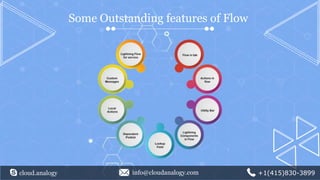
Some Outstanding features of Flow
cloud.analogy info@cloudanalogy.com +1(415)830-3899
Flow in tab
We can create a dedicated page which
has an embedded flow in it. There is no
Visualforce side involved into this.
cloud.analogy info@cloudanalogy.com +1(415)830-3899
Actions in Flow
They are predefined fields but looks like a button. You need to
create a new action In the objects section and a flow type.
You need to use a variable named as recordId, case sensitive
and can be used inside the flow variable. The action then
recognizes this automatically as an input variable.
cloud.analogy info@cloudanalogy.com +1(415)830-3899
Actions as used in the Mobile Client
We can use a flow at the bottom of the screen for a flow,
while we use a mobile client and this way we can avoid
loading time.
cloud.analogy info@cloudanalogy.com +1(415)830-3899
Utility Bar
Although meant for the Service Console it can also be used in
any app or a collection of apps. This can be used in the form
of recent items/notes of the user. It is possible to run the
utility bar in a flow.
cloud.analogy info@cloudanalogy.com +1(415)830-3899
Lightning Components in Flow
In any Lightning components, there is a base component. These can be added to
a collection of other Lightning Components. We have a Lightning flow.net page.
It comprises of the Lightning Components - to be added to
any instance.
Lookup Field
We can have lookup field in a flow - with
a Lightning Components.
cloud.analogy info@cloudanalogy.com +1(415)830-3899
Dependent Picklist
This is new in Winter 19 which has a dependent
picklist - that when checked with an answer shows a
dynamic content like another question that pops up.
cloud.analogy info@cloudanalogy.com +1(415)830-3899
Local Actions
The local actions interact with the browser and
resides in your flow and is capable of accessing the
tabs, databases within VPN or intranet.
Custom Messages
Custom messages can popup on the screen in
Salesforce with a toast. You can now access an URL
with a flow - with no need to have a Visualforce
page.
cloud.analogy info@cloudanalogy.com +1(415)830-3899
Lightning Flow for Service
What was earlier known as Guided Engagement is
now known by the name of Lightning flow for
service. It is a user access that enables an user to
navigate to flow.
cloud.analogy info@cloudanalogy.com +1(415)830-3899
THANK
YOU

Magnify your user experience with lightning flow