





cloud.analogy info@cloudanalogy.com +1(415)830-3899
Deepali Kulshrestha
Senior Salesforce
Consultant
Going Social
cloud.analogy info@cloudanalogy.com +1(415)830-3899
https://www.linkedin.com/in/deepali-kulshrestha-a6b992b4
deepali.kulshrestha@cloudanalogy.com
https://twitter.com/Deepali032
+91 9716875336
http://www.kdeepali.com/
cloud.analogy info@cloudanalogy.com +1(415)830-3899
Salesforce & Conga
Composer Integration
TM
Have Questions
● Don’t wait until the end to ask your questions.
● Type your questions and we will answer those at end of
session.
cloud.analogy info@cloudanalogy.com +1(415)830-3899
Today’s Agenda:
● What Is Conga Composer?
● Reasons for Integrating Salesforce and Conga Composer
● Technical Requirements
● Customizing Composer with Parameters
● Conga Queries
● Template Builder
● Conga Template Manager
● Hands on
● Q/A
cloud.analogy info@cloudanalogy.com +1(415)830-3899
What Is Conga Composer?
● Conga Composer allows Salesforce users to create, customize,
automate and generate documents and quotes by a single click on
a button.
● It can also select richly-formatted templates with data from any
kind of object in Salesforce.
● We can create a Conga Template through Template builder and that
I’ll discuss further.
● Conga Composer is a Salesforce app that automates manual
document generation methods to make your Salesforce users more
productive.
cloud.analogy info@cloudanalogy.com +1(415)830-3899
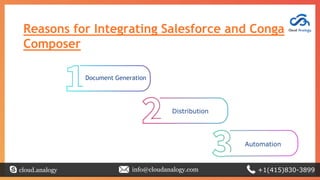
Reasons for Integrating Salesforce and Conga
Composer
cloud.analogy info@cloudanalogy.com +1(415)830-3899
Document Generation
Distribution
Automation
Document Generation
● Conga Composer allows using Salesforce data, so that any document,
report or presentation can be generated.
● Any field from any of the object from Salesforce can be accessed easily by
placing a single button on any object’s layout.
● It allows fetching around 50 other objects additional data in Salesforce
using Salesforce reports or SOQL queries.
cloud.analogy info@cloudanalogy.com +1(415)830-3899
Distribution
Conga Composer allows a variety of options for downloading, storing, and delivering
our document:
● Immediately downloaded
● Saved directly in Salesforce, Google Drive, or SpringCM
● Automatically emailed
● Sent for e-Signature
Users can build documents from their web browser or
mobile device.
cloud.analogy info@cloudanalogy.com +1(415)830-3899
Automation
● We can automate our whole business processes by using parameters to
control the behavior of the Composer button.
● You have a wide variety of options – and can preselect up to 10
templates to generate one or more output files.
● We can use parameters to restrict options in the user
interface or enable background mode to neglect it completely.
cloud.analogy info@cloudanalogy.com +1(415)830-3899
Technical Requirements
To install and successfully use Conga Composer, you must have one of the following
from each category:
❖ Salesforce Edition:
➢ Performance / Unlimited
➢ Enterprise
➢ Professional (limitations may exist)
➢ Developer
cloud.analogy info@cloudanalogy.com +1(415)830-3899
❖ Salesforce Products:
➢ Sales Cloud
➢ Service Cloud
➢ App Cloud
➢ Health Cloud
➢ Financial Services Cloud
➢ Quote-to-Cash
cloud.analogy info@cloudanalogy.com +1(415)830-3899
❖ Internet Browsers:
➢ Firefox
➢ Chrome (you may have to enable redirects from Composer in
Chrome version 64 or higher)
➢ Internet Explorer (version 11 or the latest version supported
by Salesforce)
➢ Safari (Mac only)
➢ Microsoft Edge
cloud.analogy info@cloudanalogy.com +1(415)830-3899
❖ Template Software:
➢ Microsoft Office 2016 and earlier (Mac or PC)
➢ Adobe Acrobat XI and earlier, Acrobat Reader
cloud.analogy info@cloudanalogy.com +1(415)830-3899
Customizing Composer with
Parameters
● Composer can be customized by adding parameters to the Conga Composer
button URL.
● Parameters are added using the following convention:
&ParameterName=Value
cloud.analogy info@cloudanalogy.com +1(415)830-3899
Conga Queries
We can use Queries instead of reports in Salesforce. Conga Queries
contain a SOQL SELECT statement that is specially tuned to work in
combination with Conga Composer and Conga Mail Merge.
cloud.analogy info@cloudanalogy.com +1(415)830-3899
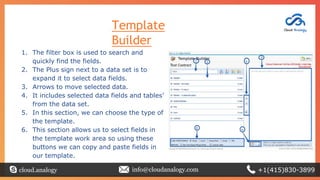
Template
Builder
1. The filter box is used to search and
quickly find the fields.
2. The Plus sign next to a data set is to
expand it to select data fields.
3. Arrows to move selected data.
4. It includes selected data fields and tables’
from the data set.
5. In this section, we can choose the type of
the template.
6. This section allows us to select fields in
the template work area so using these
buttons we can copy and paste fields in
our template.
cloud.analogy info@cloudanalogy.com +1(415)830-3899
Conga Template
Manager
● After we built a template through template builder, we can store it
to the Conga Template Manager to make it available for Conga
component.
● It is the storage location for Conga templates.
● It is a custom object that is added with the Conga Composer
component.
● It provides an ability to cover security, source control, ability to use
the Master Field To Set operation on a per-template basis, and also
reduced the need of using parameters to update IDs in button
URLs.
cloud.analogy info@cloudanalogy.com +1(415)830-3899
Hands On
Now let’s create a Template using Template builder. For that we need to :
● Install Conga Composer through Salesforce AppExchange,
● Configure Conga Composer,
● Create Conga Composer button on desired object and add the button
to Page-Layout.
● Now Create a template through template builder,
● Attach the created document in Conga Template Manager,
● Download the template.
cloud.analogy info@cloudanalogy.com +1(415)830-3899
Q & A
cloud.analogy info@cloudanalogy.com +1(415)830-3899
Thank
You
cloud.analogy info@cloudanalogy.com +1(415)830-3899

Salesforce and conga composer integration

  • 1.
    cloud.analogy info@cloudanalogy.com +1(415)830-3899 DeepaliKulshrestha Senior Salesforce Consultant
  • 2.
    Going Social cloud.analogy info@cloudanalogy.com+1(415)830-3899 https://www.linkedin.com/in/deepali-kulshrestha-a6b992b4 deepali.kulshrestha@cloudanalogy.com https://twitter.com/Deepali032 +91 9716875336 http://www.kdeepali.com/
  • 3.
  • 4.
    Have Questions ● Don’twait until the end to ask your questions. ● Type your questions and we will answer those at end of session. cloud.analogy info@cloudanalogy.com +1(415)830-3899
  • 5.
    Today’s Agenda: ● WhatIs Conga Composer? ● Reasons for Integrating Salesforce and Conga Composer ● Technical Requirements ● Customizing Composer with Parameters ● Conga Queries ● Template Builder ● Conga Template Manager ● Hands on ● Q/A cloud.analogy info@cloudanalogy.com +1(415)830-3899
  • 6.
    What Is CongaComposer? ● Conga Composer allows Salesforce users to create, customize, automate and generate documents and quotes by a single click on a button. ● It can also select richly-formatted templates with data from any kind of object in Salesforce. ● We can create a Conga Template through Template builder and that I’ll discuss further. ● Conga Composer is a Salesforce app that automates manual document generation methods to make your Salesforce users more productive. cloud.analogy info@cloudanalogy.com +1(415)830-3899
  • 7.
    Reasons for IntegratingSalesforce and Conga Composer cloud.analogy info@cloudanalogy.com +1(415)830-3899 Document Generation Distribution Automation
  • 8.
    Document Generation ● CongaComposer allows using Salesforce data, so that any document, report or presentation can be generated. ● Any field from any of the object from Salesforce can be accessed easily by placing a single button on any object’s layout. ● It allows fetching around 50 other objects additional data in Salesforce using Salesforce reports or SOQL queries. cloud.analogy info@cloudanalogy.com +1(415)830-3899
  • 9.
    Distribution Conga Composer allowsa variety of options for downloading, storing, and delivering our document: ● Immediately downloaded ● Saved directly in Salesforce, Google Drive, or SpringCM ● Automatically emailed ● Sent for e-Signature Users can build documents from their web browser or mobile device. cloud.analogy info@cloudanalogy.com +1(415)830-3899
  • 10.
    Automation ● We canautomate our whole business processes by using parameters to control the behavior of the Composer button. ● You have a wide variety of options – and can preselect up to 10 templates to generate one or more output files. ● We can use parameters to restrict options in the user interface or enable background mode to neglect it completely. cloud.analogy info@cloudanalogy.com +1(415)830-3899
  • 11.
    Technical Requirements To installand successfully use Conga Composer, you must have one of the following from each category: ❖ Salesforce Edition: ➢ Performance / Unlimited ➢ Enterprise ➢ Professional (limitations may exist) ➢ Developer cloud.analogy info@cloudanalogy.com +1(415)830-3899
  • 12.
    ❖ Salesforce Products: ➢Sales Cloud ➢ Service Cloud ➢ App Cloud ➢ Health Cloud ➢ Financial Services Cloud ➢ Quote-to-Cash cloud.analogy info@cloudanalogy.com +1(415)830-3899
  • 13.
    ❖ Internet Browsers: ➢Firefox ➢ Chrome (you may have to enable redirects from Composer in Chrome version 64 or higher) ➢ Internet Explorer (version 11 or the latest version supported by Salesforce) ➢ Safari (Mac only) ➢ Microsoft Edge cloud.analogy info@cloudanalogy.com +1(415)830-3899
  • 14.
    ❖ Template Software: ➢Microsoft Office 2016 and earlier (Mac or PC) ➢ Adobe Acrobat XI and earlier, Acrobat Reader cloud.analogy info@cloudanalogy.com +1(415)830-3899
  • 15.
    Customizing Composer with Parameters ●Composer can be customized by adding parameters to the Conga Composer button URL. ● Parameters are added using the following convention: &ParameterName=Value cloud.analogy info@cloudanalogy.com +1(415)830-3899
  • 16.
    Conga Queries We canuse Queries instead of reports in Salesforce. Conga Queries contain a SOQL SELECT statement that is specially tuned to work in combination with Conga Composer and Conga Mail Merge. cloud.analogy info@cloudanalogy.com +1(415)830-3899
  • 17.
    Template Builder 1. The filterbox is used to search and quickly find the fields. 2. The Plus sign next to a data set is to expand it to select data fields. 3. Arrows to move selected data. 4. It includes selected data fields and tables’ from the data set. 5. In this section, we can choose the type of the template. 6. This section allows us to select fields in the template work area so using these buttons we can copy and paste fields in our template. cloud.analogy info@cloudanalogy.com +1(415)830-3899
  • 18.
    Conga Template Manager ● Afterwe built a template through template builder, we can store it to the Conga Template Manager to make it available for Conga component. ● It is the storage location for Conga templates. ● It is a custom object that is added with the Conga Composer component. ● It provides an ability to cover security, source control, ability to use the Master Field To Set operation on a per-template basis, and also reduced the need of using parameters to update IDs in button URLs. cloud.analogy info@cloudanalogy.com +1(415)830-3899
  • 19.
    Hands On Now let’screate a Template using Template builder. For that we need to : ● Install Conga Composer through Salesforce AppExchange, ● Configure Conga Composer, ● Create Conga Composer button on desired object and add the button to Page-Layout. ● Now Create a template through template builder, ● Attach the created document in Conga Template Manager, ● Download the template. cloud.analogy info@cloudanalogy.com +1(415)830-3899
  • 20.
    Q & A cloud.analogyinfo@cloudanalogy.com +1(415)830-3899
  • 21.