anthesis Outlook Add-In
für SAP Business ByDesign
Ettlingen 09.02.2016
 Assignment of E-Mails in SAP Business ByDesign to:
• Customers, Contacts, Campaigns, Leads, Opportunities, Sales Quotes, Sales Orders, Projects
 User specified rule engine for automatic mail assignments
 Full service integration for service requests in SAP Business ByDesign
 Bidirectional synchronization for Customers and Contacts between Microsoft Outlook
and SAP Business ByDesign
 Bidirectional synchronization for Calendar-Items and Tasks between Microsoft
Outlook und SAP Business ByDesign
 Upload-Queue for specific Uploads
 Offline availibility
Customer Requirements for an Outlook/ByD Integration
 Comfortable integration for Mails,
Meetings, Tasks, Customers,
Contacts and Service-Requests
 Quick-View on Customer details
 Consistent mapping between
Microsoft Outlook and SAP
Business ByDesign
 Automatic synchronization leads to
reduced manual effort and
minimized sources of errors
Benefits of the anthesis Oulook Add-In
 Intelligent suggestions based on the mail sender address and
domain for auto-assignments and customer quick views
Umsetzung anthesis – die Verknüpfung
 Based on the suggestions, the user select connected business
data like customer, contact or business transaction documents
 The decision gets stored locally (Outlook database / Cache)
 optional
 higher performance
 From now on further e-mails of the same sender can
automatically be assigned to the appropriate SAP Business
ByDesign master data record
 rule engine
anthesis Implementation – Mail usage
 The SideBar provides all
relevant customer information of
the selected mail in Outlook
 Corresponding data will be
retrieved directly and instantly
from your SAP Business
ByDesign system
 Drag & Drop E-Mail directly into
the SideBar
anthesis Implemetation - SideBar
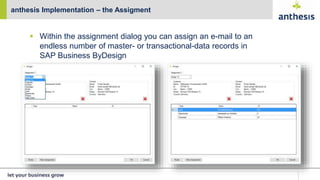
 Within the assignment dialog you can assign an e-mail to an
endless number of master- or transactional-data records in
SAP Business ByDesign
anthesis Implementation – the Assigment
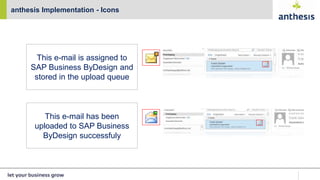
anthesis Implementation - Icons
This e-mail is assigned to
SAP Business ByDesign and
stored in the upload queue
This e-mail has been
uploaded to SAP Business
ByDesign successfuly
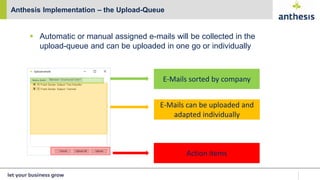
 Automatic or manual assigned e-mails will be collected in the
upload-queue and can be uploaded in one go or individually
Anthesis Implementation – the Upload-Queue
E-Mails sorted by company
E-Mails can be uploaded and
adapted individually
Action items
anthesis Implementation – The Rule-Engine
 Users can define endless SAP Business ByDesign upload-rules
easily on the front-end
anthesis Implementation – Rule-Engine / Assignments
Auto-Assignment?
yes no
Manual-Assignment?
 Receiption of new e-mails
 Alignment with the local
Outlook database
 Store the mail in the upload-
queue
Umsetzung anthesis - Synchronisation
Activate the synchronization
Countdown to the next
synchronization / manual start
Folders which gets
synchronized with SAP
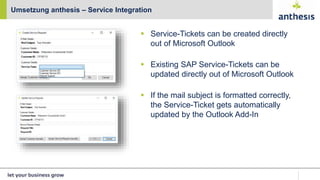
Umsetzung anthesis – Service Integration
 Service-Tickets can be created directly
out of Microsoft Outlook
 Existing SAP Service-Tickets can be
updated directly out of Microsoft Outlook
 If the mail subject is formatted correctly,
the Service-Ticket gets automatically
updated by the Outlook Add-In
 The implementation will be available for the most current Outlook
versions
 Outlook 2010
 Outlook 2013
 Outlook 2016
 Office 365
 Technical details
 C# Programming
 Local Outlook database (sqlite)
 The interface to SAP is realized using standardized and
individually developed SOAP-WebServices (via SAP Cloud
Applications Studio)
Technical details
Roadmap ‘anthesis Outlook-Add-In‘ 2015-2016
Q1 (Jan – Mar 2015):
• Conception Phase
• Requirements-Engineering
• Development Start
Q2 (Apr – Jun 2015):
• Development Mail Synchronization
• Development Mail Rule Engine
• Development Service Integration
Q3 (Jul – Sep 2015):
• Pilot Project Start (Service Integration)
• Bug Fixing (Service Integration)
• Development Start Task Synchronization
• Development Start Calendar Synchronization
• Development Start Contact Synchronization
• Pilot Project Start (Mail Synchronization)
Q4 (Oct – Dec 2015):
• Bug Fixing (Mail Synchronization)
• Pilot Project Start (Task Synchronization)
• Customer Feedback collection
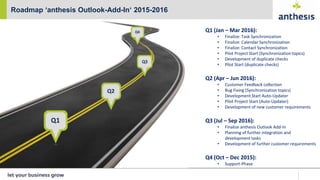
Roadmap ‘anthesis Outlook-Add-In‘ 2015-2016
Q1 (Jan – Mar 2016):
• Finalize: Task Synchronization
• Finalize: Calendar Synchronization
• Finalize: Contact Synchronization
• Pilot Project Start (Synchronization topics)
• Development of duplicate checks
• Pilot Start (duplicate checks)
Q2 (Apr – Jun 2016):
• Customer Feedback collection
• Bug Fixing (Synchronization topics)
• Development Start Auto-Updater
• Pilot Project Start (Auto-Updater)
• Development of new customer requirements
Q3 (Jul – Sep 2016):
• Finalize anthesis Outlook Add-In
• Planning of further integration and
development tasks
• Development of further customer requirements
Q4 (Oct – Dec 2015):
• Support-Phase
Customer information
• Pricing
• Possible customers / branches for the Outlook Add-In:
• all branches
• all SAP Business ByDesign customers
• Requirements on customer side:
• User needs Windows Installation
• User needs Outlook Installation
• Supported versions: Office 2010, 2013, 2016, 365
• SAP Business ByDesign System / User
Customer information
© 2016 anthesis GmbH. All rights reserved
No part of this publication may be reproduced in any form or
for any purpose without the express permission of anthesis
GmbH. The information contained herein may be changed
without prior notice. anthesis GmbH
Zehntwiesenstraße 31e
76275 Ettlingen
T +49 7243 60597-0
F +49 7243 60597-11
www.anthesis.de
THANK YOU !
Michael Kaupp
Head of Development
micheal.kaupp@anthesis.de

anthesis Outlook-Add-In (EN)

  • 1.
    anthesis Outlook Add-In fürSAP Business ByDesign Ettlingen 09.02.2016
  • 2.
     Assignment ofE-Mails in SAP Business ByDesign to: • Customers, Contacts, Campaigns, Leads, Opportunities, Sales Quotes, Sales Orders, Projects  User specified rule engine for automatic mail assignments  Full service integration for service requests in SAP Business ByDesign  Bidirectional synchronization for Customers and Contacts between Microsoft Outlook and SAP Business ByDesign  Bidirectional synchronization for Calendar-Items and Tasks between Microsoft Outlook und SAP Business ByDesign  Upload-Queue for specific Uploads  Offline availibility Customer Requirements for an Outlook/ByD Integration
  • 3.
     Comfortable integrationfor Mails, Meetings, Tasks, Customers, Contacts and Service-Requests  Quick-View on Customer details  Consistent mapping between Microsoft Outlook and SAP Business ByDesign  Automatic synchronization leads to reduced manual effort and minimized sources of errors Benefits of the anthesis Oulook Add-In
  • 4.
     Intelligent suggestionsbased on the mail sender address and domain for auto-assignments and customer quick views Umsetzung anthesis – die Verknüpfung
  • 5.
     Based onthe suggestions, the user select connected business data like customer, contact or business transaction documents  The decision gets stored locally (Outlook database / Cache)  optional  higher performance  From now on further e-mails of the same sender can automatically be assigned to the appropriate SAP Business ByDesign master data record  rule engine anthesis Implementation – Mail usage
  • 6.
     The SideBarprovides all relevant customer information of the selected mail in Outlook  Corresponding data will be retrieved directly and instantly from your SAP Business ByDesign system  Drag & Drop E-Mail directly into the SideBar anthesis Implemetation - SideBar
  • 7.
     Within theassignment dialog you can assign an e-mail to an endless number of master- or transactional-data records in SAP Business ByDesign anthesis Implementation – the Assigment
  • 8.
    anthesis Implementation -Icons This e-mail is assigned to SAP Business ByDesign and stored in the upload queue This e-mail has been uploaded to SAP Business ByDesign successfuly
  • 9.
     Automatic ormanual assigned e-mails will be collected in the upload-queue and can be uploaded in one go or individually Anthesis Implementation – the Upload-Queue E-Mails sorted by company E-Mails can be uploaded and adapted individually Action items
  • 10.
    anthesis Implementation –The Rule-Engine  Users can define endless SAP Business ByDesign upload-rules easily on the front-end
  • 11.
    anthesis Implementation –Rule-Engine / Assignments Auto-Assignment? yes no Manual-Assignment?  Receiption of new e-mails  Alignment with the local Outlook database  Store the mail in the upload- queue
  • 12.
    Umsetzung anthesis -Synchronisation Activate the synchronization Countdown to the next synchronization / manual start Folders which gets synchronized with SAP
  • 13.
    Umsetzung anthesis –Service Integration  Service-Tickets can be created directly out of Microsoft Outlook  Existing SAP Service-Tickets can be updated directly out of Microsoft Outlook  If the mail subject is formatted correctly, the Service-Ticket gets automatically updated by the Outlook Add-In
  • 14.
     The implementationwill be available for the most current Outlook versions  Outlook 2010  Outlook 2013  Outlook 2016  Office 365  Technical details  C# Programming  Local Outlook database (sqlite)  The interface to SAP is realized using standardized and individually developed SOAP-WebServices (via SAP Cloud Applications Studio) Technical details
  • 15.
    Roadmap ‘anthesis Outlook-Add-In‘2015-2016 Q1 (Jan – Mar 2015): • Conception Phase • Requirements-Engineering • Development Start Q2 (Apr – Jun 2015): • Development Mail Synchronization • Development Mail Rule Engine • Development Service Integration Q3 (Jul – Sep 2015): • Pilot Project Start (Service Integration) • Bug Fixing (Service Integration) • Development Start Task Synchronization • Development Start Calendar Synchronization • Development Start Contact Synchronization • Pilot Project Start (Mail Synchronization) Q4 (Oct – Dec 2015): • Bug Fixing (Mail Synchronization) • Pilot Project Start (Task Synchronization) • Customer Feedback collection
  • 16.
    Roadmap ‘anthesis Outlook-Add-In‘2015-2016 Q1 (Jan – Mar 2016): • Finalize: Task Synchronization • Finalize: Calendar Synchronization • Finalize: Contact Synchronization • Pilot Project Start (Synchronization topics) • Development of duplicate checks • Pilot Start (duplicate checks) Q2 (Apr – Jun 2016): • Customer Feedback collection • Bug Fixing (Synchronization topics) • Development Start Auto-Updater • Pilot Project Start (Auto-Updater) • Development of new customer requirements Q3 (Jul – Sep 2016): • Finalize anthesis Outlook Add-In • Planning of further integration and development tasks • Development of further customer requirements Q4 (Oct – Dec 2015): • Support-Phase
  • 17.
  • 18.
    • Possible customers/ branches for the Outlook Add-In: • all branches • all SAP Business ByDesign customers • Requirements on customer side: • User needs Windows Installation • User needs Outlook Installation • Supported versions: Office 2010, 2013, 2016, 365 • SAP Business ByDesign System / User Customer information
  • 19.
    © 2016 anthesisGmbH. All rights reserved No part of this publication may be reproduced in any form or for any purpose without the express permission of anthesis GmbH. The information contained herein may be changed without prior notice. anthesis GmbH Zehntwiesenstraße 31e 76275 Ettlingen T +49 7243 60597-0 F +49 7243 60597-11 www.anthesis.de THANK YOU ! Michael Kaupp Head of Development micheal.kaupp@anthesis.de