Join us in Ibiza September 24th – 27th 2012
Prepare yourself for a new way of module development
Magento 2.0:
Ivan Chepurnyi
About Me
• Devoted to Magento Platform, since May 2007
• Former Magento Core Team member
• More than 5 Years of Magento Development
Experience
• Technical Director at EcomDev
• Magento Coach for European developers
Magento 1.x Issues
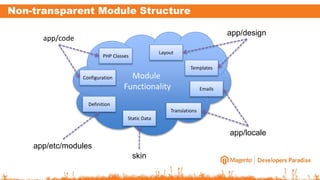
Module
Functionality
Non-transparent Module Structure
Layout
PHP Classes
Static Data
Translations
Emails
Definition
Configuration
Templates
app/design
app/locale
app/etc/modules
skin
app/code
Excessive Configurations
• Info for building
classes names of
• Models
• Blocks
• Helpers
• Info about file
path
• Layout
• Translate
Performance
• Timings for app
initialization
• Excessive memory
usage for building of
page layout
• Loading of redundant
XML configurations for
each request
Magento 2.0 Module Changes
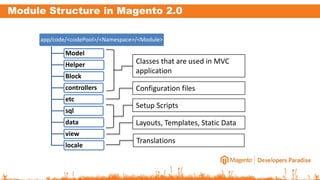
Module Structure in Magento 2.0
app/code/<codePool>/<Namespace>/<Module>
Model
Helper
Block
controllers
etc
sql
data
view
locale
Classes that are used in MVC
application
Configuration files
Setup Scripts
Layouts, Templates, Static Data
Translations
Refactored Configuration
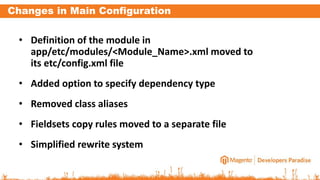
Changes in Main Configuration
• Definition of the module in
app/etc/modules/<Module_Name>.xml moved to
its etc/config.xml file
• Added option to specify dependency type
• Removed class aliases
• Fieldsets copy rules moved to a separate file
• Simplified rewrite system
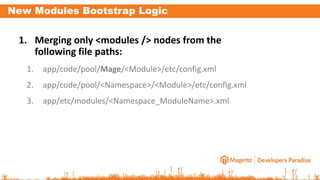
New Modules Bootstrap Logic
1. Merging only <modules /> nodes from the
following file paths:
1. app/code/pool/Mage/<Module>/etc/config.xml
2. app/code/pool/<Namespace>/<Module>/etc/config.xml
3. app/etc/modules/<Namespace_ModuleName>.xml
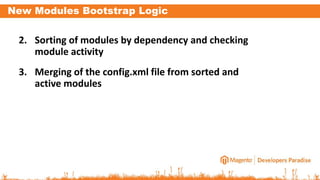
New Modules Bootstrap Logic
2. Sorting of modules by dependency and checking
module activity
3. Merging of the config.xml file from sorted and
active modules
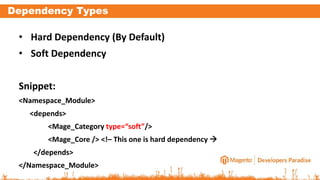
Dependency Types
• Hard Dependency (By Default)
• Soft Dependency
Snippet:
<Namespace_Module>
<depends>
<Mage_Category type=“soft”/>
<Mage_Core /> <!– This one is hard dependency 
</depends>
</Namespace_Module>
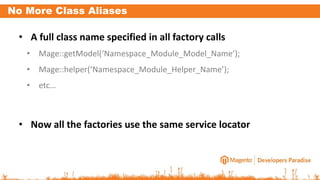
No More Class Aliases
• A full class name specified in all factory calls
• Mage::getModel(‘Namespace_Module_Model_Name’);
• Mage::helper(‘Namespace_Module_Helper_Name’);
• etc…
• Now all the factories use the same service locator
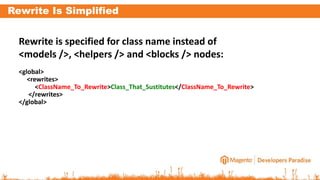
Rewrite Is Simplified
Rewrite is specified for class name instead of
<models />, <helpers /> and <blocks /> nodes:
<global>
<rewrites>
<ClassName_To_Rewrite>Class_That_Sustitutes</ClassName_To_Rewrite>
</rewrites>
</global>
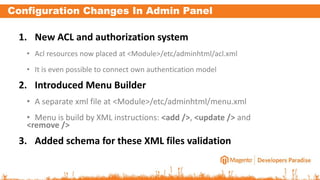
Configuration Changes In Admin Panel
1. New ACL and authorization system
• Acl resources now placed at <Module>/etc/adminhtml/acl.xml
• It is even possible to connect own authentication model
2. Introduced Menu Builder
• A separate xml file at <Module>/etc/adminhtml/menu.xml
• Menu is build by XML instructions: <add />, <update /> and
<remove />
3. Added schema for these XML files validation
View Layer Changes
View Structure in Module
• Layout, templates, module CSS and JS files moved
from <area>/base/default theme and skin to the
module directory
• There is no more template and layout directories
on view level
• Module has a view configuration file for defining
own variables
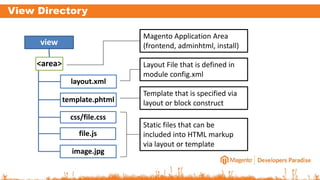
View Directory
view
<area>
layout.xml
template.phtml
css/file.css
file.js
image.jpg
Magento Application Area
(frontend, adminhtml, install)
Layout File that is defined in
module config.xml
Template that is specified via
layout or block construct
Static files that can be
included into HTML markup
via layout or template
View Configuration
• File is merged from all modules and current
theme:
• <Module>/etc/view.xml
• <theme>/view.xml
• It has XML scheme for the validation of its content
• Can be used in feature for Design Editor
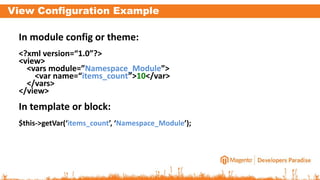
View Configuration Example
In module config or theme:
<?xml version=“1.0”?>
<view>
<vars module=”Namespace_Module”>
<var name=“items_count”>10</var>
</vars>
</view>
In template or block:
$this->getVar(‘items_count’, ‘Namespace_Module’);
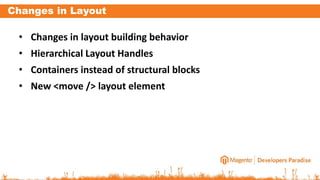
Changes in Layout
• Changes in layout building behavior
• Hierarchical Layout Handles
• Containers instead of structural blocks
• New <move /> layout element
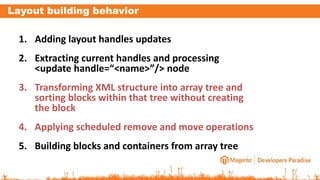
Layout building behavior
1. Adding layout handles updates
2. Extracting current handles and processing
<update handle=“<name>”/> node
3. Transforming XML structure into array tree and
sorting blocks within that tree without creating
the block
4. Applying scheduled remove and move operations
5. Building blocks and containers from array tree
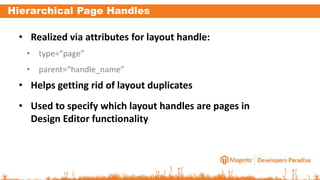
Hierarchical Page Handles
• Realized via attributes for layout handle:
• type=“page”
• parent=“handle_name”
• Helps getting rid of layout duplicates
• Used to specify which layout handles are pages in
Design Editor functionality
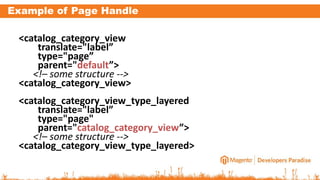
Example of Page Handle
<catalog_category_view
translate="label”
type="page”
parent="default”>
<!– some structure -->
<catalog_category_view>
<catalog_category_view_type_layered
translate="label”
type="page"
parent="catalog_category_view”>
<!– some structure -->
<catalog_category_view_type_layered>
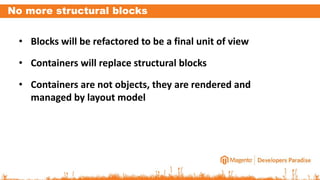
No more structural blocks
• Blocks will be refactored to be a final unit of view
• Containers will replace structural blocks
• Containers are not objects, they are rendered and
managed by layout model
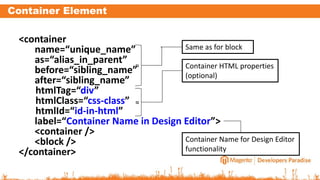
Container Element
<container
name=“unique_name”
as=“alias_in_parent”
before=“sibling_name”
after=“sibling_name”
htmlTag=“div”
htmlClass=“css-class”
htmlId=“id-in-html”
label=“Container Name in Design Editor”>
<container />
<block />
</container>
Same as for block
Container HTML properties
(optional)
Container Name for Design Editor
functionality
≈
≈
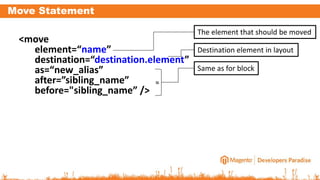
Move Statement
<move
element=“name”
destination=“destination.element”
as=“new_alias”
after=”sibling_name”
before="sibling_name” />
The element that should be moved
Destination element in layout
Same as for block
≈
Themes
Simplified Themes
• Themes become more simple and flexible
• Only one configuration field in the admin panel
• It is possible to create as many inherited themes as you
need
• Skin become a style/locale variation on theme level
• Strict files relation in theme to the module
Theme Definition
• Every theme is defined by theme.xml in its
directory
• app/design/<area>/<package>/<theme>/theme.xml
• It contains:
• Requirements for Magento version
• Fallback information
• Name of the theme for admin user
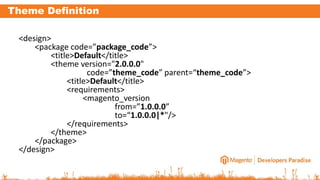
Theme Definition
<design>
<package code=”package_code”>
<title>Default</title>
<theme version="2.0.0.0"
code=”theme_code” parent=“theme_code”>
<title>Default</title>
<requirements>
<magento_version
from=”1.0.0.0”
to=“1.0.0.0|*"/>
</requirements>
</theme>
</package>
</design>
Theme Definition
• package/title – package name, that is visible to
admin user
• theme/title – theme name, that is visible to admin
user
• package/@code – unique identifier of a package
• theme/@code – unique identifier of a theme
within the package
Theme Definition
• theme/@version – internal version of theme
• theme/@parent – theme name that the current
one is inherited
• magento_version/@from – minimal required
Magento version for theme
• magento_version/@to - maximum compatible
version of Magento for theme (can be a wildcard)
Theme Fallbacks
Fallback structure for dynamic files looks quite
simple, but you should consider theme inheritance:
1. <theme>/<Namespace_Module>/layout.xml
2. <parent_theme>/<Namespace_Module>/layout.x
ml
3. <Module>/view/layout.xml
Skin Fallbacks
• Static files (JS, CSS, Images) should be placed in theme skin directory
• Theme can have multiple skins, the default skin is “default”
• Skin directory allows fallbacks on locale level
• <theme>/skin/<skin_code>/<locale_code>/file.js
• <theme>/skin/<skin_code>/file.js
• <theme>/skin/<skin_code>/<locale_code>/<Namespace_Module>/file.js
• <theme>/skin/<skin_code>/<Namespace_Module>/file.js
Localization Inheritance
It is possible to define inheritance between locales in
any xml file that is merged for global configuration:
<global>
<locale>
<inheritance>
<!-- Inheritance of UK Locale from US one -->
<en_GB>en_US</en_GB>
</inheritance>
</locale>
</global>
Developer Stuff
Developer Stuff
• dev/shell – same as Magento 1 shell directory
• dev/tests – set of different test suites:
• integration – tests that require Magento initialization
• js – Java Script UnitTests
• unit – test that can be run without Magento
• performance – load tests
• static – code analysis tools
Developer Stuff
• dev/tools – tools for developer
• migration – a set of tools for migration of Magento 1.x
module to 2.0
• classmap – generator of the class map
• batch_tests – batch test runner
Thank You
Your Questions
E-mail: ivan@ecomdev.org

Magento mega menu extension

  • 1.
    Join us inIbiza September 24th – 27th 2012
  • 2.
    Prepare yourself fora new way of module development Magento 2.0: Ivan Chepurnyi
  • 3.
    About Me • Devotedto Magento Platform, since May 2007 • Former Magento Core Team member • More than 5 Years of Magento Development Experience • Technical Director at EcomDev • Magento Coach for European developers
  • 4.
  • 5.
    Module Functionality Non-transparent Module Structure Layout PHPClasses Static Data Translations Emails Definition Configuration Templates app/design app/locale app/etc/modules skin app/code
  • 6.
    Excessive Configurations • Infofor building classes names of • Models • Blocks • Helpers • Info about file path • Layout • Translate
  • 7.
    Performance • Timings forapp initialization • Excessive memory usage for building of page layout • Loading of redundant XML configurations for each request
  • 8.
  • 9.
    Module Structure inMagento 2.0 app/code/<codePool>/<Namespace>/<Module> Model Helper Block controllers etc sql data view locale Classes that are used in MVC application Configuration files Setup Scripts Layouts, Templates, Static Data Translations
  • 10.
  • 11.
    Changes in MainConfiguration • Definition of the module in app/etc/modules/<Module_Name>.xml moved to its etc/config.xml file • Added option to specify dependency type • Removed class aliases • Fieldsets copy rules moved to a separate file • Simplified rewrite system
  • 12.
    New Modules BootstrapLogic 1. Merging only <modules /> nodes from the following file paths: 1. app/code/pool/Mage/<Module>/etc/config.xml 2. app/code/pool/<Namespace>/<Module>/etc/config.xml 3. app/etc/modules/<Namespace_ModuleName>.xml
  • 13.
    New Modules BootstrapLogic 2. Sorting of modules by dependency and checking module activity 3. Merging of the config.xml file from sorted and active modules
  • 14.
    Dependency Types • HardDependency (By Default) • Soft Dependency Snippet: <Namespace_Module> <depends> <Mage_Category type=“soft”/> <Mage_Core /> <!– This one is hard dependency  </depends> </Namespace_Module>
  • 15.
    No More ClassAliases • A full class name specified in all factory calls • Mage::getModel(‘Namespace_Module_Model_Name’); • Mage::helper(‘Namespace_Module_Helper_Name’); • etc… • Now all the factories use the same service locator
  • 16.
    Rewrite Is Simplified Rewriteis specified for class name instead of <models />, <helpers /> and <blocks /> nodes: <global> <rewrites> <ClassName_To_Rewrite>Class_That_Sustitutes</ClassName_To_Rewrite> </rewrites> </global>
  • 17.
    Configuration Changes InAdmin Panel 1. New ACL and authorization system • Acl resources now placed at <Module>/etc/adminhtml/acl.xml • It is even possible to connect own authentication model 2. Introduced Menu Builder • A separate xml file at <Module>/etc/adminhtml/menu.xml • Menu is build by XML instructions: <add />, <update /> and <remove /> 3. Added schema for these XML files validation
  • 18.
  • 19.
    View Structure inModule • Layout, templates, module CSS and JS files moved from <area>/base/default theme and skin to the module directory • There is no more template and layout directories on view level • Module has a view configuration file for defining own variables
  • 20.
    View Directory view <area> layout.xml template.phtml css/file.css file.js image.jpg Magento ApplicationArea (frontend, adminhtml, install) Layout File that is defined in module config.xml Template that is specified via layout or block construct Static files that can be included into HTML markup via layout or template
  • 21.
    View Configuration • Fileis merged from all modules and current theme: • <Module>/etc/view.xml • <theme>/view.xml • It has XML scheme for the validation of its content • Can be used in feature for Design Editor
  • 22.
    View Configuration Example Inmodule config or theme: <?xml version=“1.0”?> <view> <vars module=”Namespace_Module”> <var name=“items_count”>10</var> </vars> </view> In template or block: $this->getVar(‘items_count’, ‘Namespace_Module’);
  • 23.
    Changes in Layout •Changes in layout building behavior • Hierarchical Layout Handles • Containers instead of structural blocks • New <move /> layout element
  • 24.
    Layout building behavior 1.Adding layout handles updates 2. Extracting current handles and processing <update handle=“<name>”/> node 3. Transforming XML structure into array tree and sorting blocks within that tree without creating the block 4. Applying scheduled remove and move operations 5. Building blocks and containers from array tree
  • 25.
    Hierarchical Page Handles •Realized via attributes for layout handle: • type=“page” • parent=“handle_name” • Helps getting rid of layout duplicates • Used to specify which layout handles are pages in Design Editor functionality
  • 26.
    Example of PageHandle <catalog_category_view translate="label” type="page” parent="default”> <!– some structure --> <catalog_category_view> <catalog_category_view_type_layered translate="label” type="page" parent="catalog_category_view”> <!– some structure --> <catalog_category_view_type_layered>
  • 27.
    No more structuralblocks • Blocks will be refactored to be a final unit of view • Containers will replace structural blocks • Containers are not objects, they are rendered and managed by layout model
  • 28.
    Container Element <container name=“unique_name” as=“alias_in_parent” before=“sibling_name” after=“sibling_name” htmlTag=“div” htmlClass=“css-class” htmlId=“id-in-html” label=“Container Namein Design Editor”> <container /> <block /> </container> Same as for block Container HTML properties (optional) Container Name for Design Editor functionality ≈ ≈
  • 29.
  • 30.
  • 31.
    Simplified Themes • Themesbecome more simple and flexible • Only one configuration field in the admin panel • It is possible to create as many inherited themes as you need • Skin become a style/locale variation on theme level • Strict files relation in theme to the module
  • 32.
    Theme Definition • Everytheme is defined by theme.xml in its directory • app/design/<area>/<package>/<theme>/theme.xml • It contains: • Requirements for Magento version • Fallback information • Name of the theme for admin user
  • 33.
    Theme Definition <design> <package code=”package_code”> <title>Default</title> <themeversion="2.0.0.0" code=”theme_code” parent=“theme_code”> <title>Default</title> <requirements> <magento_version from=”1.0.0.0” to=“1.0.0.0|*"/> </requirements> </theme> </package> </design>
  • 34.
    Theme Definition • package/title– package name, that is visible to admin user • theme/title – theme name, that is visible to admin user • package/@code – unique identifier of a package • theme/@code – unique identifier of a theme within the package
  • 35.
    Theme Definition • theme/@version– internal version of theme • theme/@parent – theme name that the current one is inherited • magento_version/@from – minimal required Magento version for theme • magento_version/@to - maximum compatible version of Magento for theme (can be a wildcard)
  • 36.
    Theme Fallbacks Fallback structurefor dynamic files looks quite simple, but you should consider theme inheritance: 1. <theme>/<Namespace_Module>/layout.xml 2. <parent_theme>/<Namespace_Module>/layout.x ml 3. <Module>/view/layout.xml
  • 37.
    Skin Fallbacks • Staticfiles (JS, CSS, Images) should be placed in theme skin directory • Theme can have multiple skins, the default skin is “default” • Skin directory allows fallbacks on locale level • <theme>/skin/<skin_code>/<locale_code>/file.js • <theme>/skin/<skin_code>/file.js • <theme>/skin/<skin_code>/<locale_code>/<Namespace_Module>/file.js • <theme>/skin/<skin_code>/<Namespace_Module>/file.js
  • 38.
  • 39.
    Localization Inheritance It ispossible to define inheritance between locales in any xml file that is merged for global configuration: <global> <locale> <inheritance> <!-- Inheritance of UK Locale from US one --> <en_GB>en_US</en_GB> </inheritance> </locale> </global>
  • 40.
  • 41.
    Developer Stuff • dev/shell– same as Magento 1 shell directory • dev/tests – set of different test suites: • integration – tests that require Magento initialization • js – Java Script UnitTests • unit – test that can be run without Magento • performance – load tests • static – code analysis tools
  • 42.
    Developer Stuff • dev/tools– tools for developer • migration – a set of tools for migration of Magento 1.x module to 2.0 • classmap – generator of the class map • batch_tests – batch test runner
  • 43.
  • 44.