Java Beans
JavaBeans
• An introduction to component-based
  development in general
• Introduction to JavaBeans
  – Java components
  – client-side
• Working with the BDK
• The beans development life cycle
• Writing simple and advanced beans
Java Components
• JavaBeans -- portable, platform-independent
  component model
• Java components are known as beans
• A bean: a reusable software component that
  can be manipulated visually in a builder tool
JavaBeans vs. Class Libraries
• Beans are appropriate for software
  components that can be visually manipulated

• Class libraries are good for providing
  functionality that is useful to
  programmers, and doesn’t benefit from visual
  manipulation
JavaBeans Concepts
• A component is a self-contained reusable
  software unit
• Components expose their features (public
  methods and events) to builder tools
• A builder tool maintains Beans in a palette or
  toolbox.
Concepts...
• You can select a bean from the toolbox, drop it
  in a form, and modify its appearance and
  behavior.
• Also, you can define its interaction with other
  beans
• ALL this without a line of code.
JavaBean Characteristics
•   a public class with 0-argument constuctor
•   it has properties with accessory methods
•   it has events
•   it can customized
•   its state can be saved
•   it can be analyzed by a builder tool
Key Concepts
• A builder tool discover a bean’s features by a
  process known as introspection.
  – Adhering to specific rules (design pattern) when
    naming Bean features.
  – Providing property, method, and event
    information with a related Bean Information class.
• Properties (bean’s appearance and behavior
  characteristics) can be changed at design-
  time.
Key Concepts….
• Properties can be customized at design-time.
  Customization can be done:
  – using property editor
  – using bean customizers
• Events are used when beans want to
  intercommunicate
• Persistence: for saving and restoring the state
• Bean’s methods are regular Java methods.
Security Issues
• JavaBeans are sbject to the standard Java
  security model
• The security model has neither extended nor
  relaxed.
• If a bean runs as an untrusted applet then it
  will be subject to applet security
• If a bean runs as a stand-alone application
  then it will be treated as a normal Java
  application.
Creating jar files
• c-create an archive
• C-change the directory during the execution
• f-first name in the file names listing is the name of the
  archive that has to be created
• M-the file name in the listing is a manifest file name which
  is present externally
• u-Update existing jar file
• t-The contents of archieve can be arranged in tabular form
• v-It gives the verbose output
• M-The manifest file is not created
• o-the compression should not be used
Create Sample.java file
class Sample extends Canvas -to make it visible
Create manifest file
MyFirstBean
• import java.awt.*;
• import java.io.Serializable;
• public class FirstBean extends Canvas implements Serializable
  {
•   public FirstBean() {
•    setSize(50,30);
•    setBackground(Color.blue);
• }
• }
First Bean
• Compile: javac FirstBean.java
• Create a manifest file:
• mani.mft
  – Name: FirstBean.class
  – Java-Bean: True
• Create a jar file:
• jar cfm FirstBean.jar mani.mft FirstBean.class
Using Beans in hand-written app
• Use Beans.instantiate
•     Frame f;
•     f = new Frame("Testing Beans");
•     try {
•      ClassLoader cl = this.getClass().getClassLoader();
•      fb =(FirstBean)Beans.instantiate(cl,"FirstBean");
•     } catch(Exception e) {
•       e.printStackTrace();
•     }
•    f.add(fb);
Properties
• Bean’s appearance and behavior -- changeable
  at design time.
• They are private values
• Can be accessed through getter and setter
  methods
• getter and setter methods must follow some
  rules -- design patterns (documenting
  experience)
Properties
• A builder tool can:
  – discover a bean’s properties
  – determine the properties’ read/write attribute
  – locate an appropriate “property editor” for each
    type
  – display the properties (in a sheet)
  – alter the properties at design-time
Types of Properties
• Simple
• Index: multiple-value properties
• Bound: provide event notification when value
  changes
• Constrained: how proposed changes can be
  okayed or vetoed by other object
Simple Properties
• When a builder tool introspect your bean it
  discovers two methods:
  – public Color getColor()
  – public void setColor(Color c)
• The builder tool knows that a property named
  “Color” exists -- of type Color.
• It tries to locate a property editor for that type
  to display the properties in a sheet.
Simple Properties….
• Adding a Color property
  – Create and initialize a private instance variable
     • private Color color = Color.blue;
  – Write public getter & setter methods
     • public Color getColor() {
          – return color;
     •}
     • public void setColor(Color c) {
          – color = c;
          – repaint();
     •}
Events “Introspection”
• For a bean to be the source of an event, it
  must implement methods that add and
  remove listener objects for the type of the
  event:
  – public void add<EventListenerType>(<EventListenerType> elt);

  – same thing for remove
• These methods help a source Bean know
  where to fire events.
Events “Introspection”
• Source Bean fires events at the listeners using
  method of those interfaces.
• Example: if a source Bean register
  ActionListsener objects, it will fire events at
  those objects by calling the actionPerformed
  method on those listeners
Events “using BeanInfo”
• Implementing the BeanInfo interface allows
  you to explicitly publish the events a Bean
  fires
BeanInfo interface
• Bean exposes its features in a property sheet
using java.beans.Introspector class (which uses
  Core Reflection API)
• The discovery process is named
  “introspection”
• OR you can associate a class that implements
  the BeanInfo with your bean
Bean Customization
• The appearance and behavior of a bean can
  be customized at design time.
• Two ways to customize a bean:
  – using a property editor
     • each bean property has its own editor
     • a bean’s property is displayed in a property sheet
  – using customizers
     • gives you complete GUI control over bean
       customization
Property Editors
• A property editor is a user interface for editing
  a bean property. The property must have
  both, read/write accessor methods.
• A property editor must implement the
  PropertyEditor interface.
• PropertyEditorSupport does that already, so
  you can extend it.
Property Editors
• If you provide a custom property editor
  class, then you must refer to this class by
  calling
  PropertyDescriptor.setPropertyEditorClass in a
  BeanInfo class.
• Each bean may have a BeanInfo class which
  customizes how the bean is to appear.
  SimpleBeanInfo implements that interface
Enterprise Java Beans
• Introduction
   – Application Server
   – Java 2 Enterprise Edition
• What is an Enterprise Bean ?
   – EJB Properties
   – EJB Overview
   – Deployment Phase
   – Type of beans
• Client access with interfaces
   – Remote access
   – Local Access
Introduction

• Enterprise Java Beans ( EJB ) is
   – a middleware component model for Java and CORBA
   – a specification for creating server-
     side, scalable, transactional, multi-user and secure
     enterprise-level applications
   – one of several Java APIs in the Java
• Presented by Sun in the 1999, they are easier than
  other technologies as RMI or Corba
Introduction

• This is the three level structure for Application Server
Applicaton Server

• Presentation
  – HTML Application
  – Java Application
• Business Logic
• Data Access
Presentation

• HTML                       • Java
  – Generated server-side      – Required Java virtual
    HTML                         Machine
  – Runs on any Web            – More client side power
    browser                    – Runned on a page
  – Less client-side power     – Security (Applet)
                               – Launched from a
                                 browser or a standalone
                                 application
Business Logic

• Implements the logic of the application defining all
  the function that may be used from a client
   –   Change Business Rules Easily
   –   Re-use components
   –   Make complex applications manageable
   –   Secure Data hiding
Data Access

• Utility to access external datas such as Database or
  other Web component
• Access other SOA
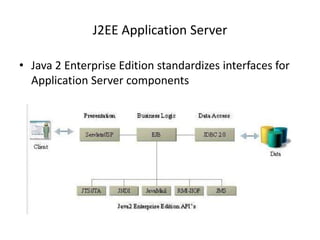
J2EE Application Server

• Java 2 Enterprise Edition standardizes interfaces for
  Application Server components
What is an Enterprise Bean ?
• Is a server side component written in Java Language
• Industry standard distribuited component model
• Incorporates the business logic of an application ( the
  code that implements the purpose of the
  application)
• Replicates the table model as objects
EJB Overview
Deployment Phase
Deployment Phase
Type of beans
•   Session Bean
•   Entity Bean
•   Message Driven Bean
Session Bean
• Represents a single client inside the server
• The client calls the session bean to invoke methods
  of an application on the server
• Perform works for its client, hiding the complexity of
  interaction with other objects in the server
• Is not shared
• Is not persistent
• When the client stops the session,the bean can be
  assigned to another client from the server
• Unique to each client
Session Bean


•   Stateful session bean

•   Stateless session bean
Stateful Session Bean

• Contains the state of a single client session:
   – Information on the client
   – On method called
   – Return values
     This state is called conversational state and is not
     retained when the session ends, also if the client
     not removes the bean
Stateless Session Bean

• Not maintain a conversational state for a particular
  client
• Contains values only for the duration of the single
  invocation
• Except during method invocation, all instances of
  stateless session bean are equivalent
• Pooled
Entity Bean
•   Represents a business object in a persistent storage
    mechanism such as a relational database
•   Usually is a table in the database and each instance of that
    entity bean is a row in that table
    Properties:
      •       Persistent
      •       Allow shared access
      •       Have primary key
      •       Have relationship with other entity beans.
      •       Auto commit.
Entity Bean persistent


•   Bean managed persistence

•   Container managed persistence
Bean managed
                   persistence
• Who write the bean’s code must access the database
  and save his own data
• you will have more control over how the entity bean
  accesses a database
Container managed persistence

• The container save the data
• There is no code in the bean for access the database
• The container handles all database access required
  for the bean
• the EJB container transparently and implicitly
  manages the persistent state
Entity bean’s shared access
•   Entity beans can be used by different clients
•   It’s important that they work whithin transactions
•   The EJB container provides transaction management
•   The transaction’s attribute are specified in the bean’s
    deployment description
•   Concurrency management
Entity bean’s primary key

• Each entity bean has a unique object identifier like a
  key in a database table
• Each instance represents as Row in table
Entity bean’s relationship

• Container managed persistent
  – The container performs all the operation to create
    relationship
• Bean managed persistent
  – The code to perform relations must be written in the bean
Message Driven bean

• Allows applications to process messages
  asynchronously
• The messages may be sent by :
   – An application client
   – Another enterprise bean
   – A Web component
   – A JMS Client
Message Driven bean
• Retain no data or conversational state for a specific
  client
• The instance variables of the message-driven bean e
  can contain some state across the handling of client
  messages--for example, a JMS API connection, an
  open database connection, or an object reference to
  an ejb.
Message Driven bean

• A client can’t access directly to a message driven
  bean
• When a message arrive, the container gives it to a
  message driven bean
• The bean process the message
• The onMessage method may call helper
  methods, or it may invoke a session or entity bean to
  process the information in the message or to store it
  in a database
Client access with interfaces

• A client may access a session or an entity bean only
  through the methods defined in the bean's interfaces
• They define the client's view of a bean
• Public business methods declared in Bean interface’s
  can be visible to client, to invoke
• Types of access:
   – Remote access
   – Local access
Remote access

• A remote client of an enterprise bean has the
  following traits:
   – It may run on a different machine and a different Java
     virtual machine than the enterprise bean it accesses (It is
     not required to run on a different JVM )
   – It can be a Web component
   – It can be another enterprise bean
   – It can be RMI object
Remote access

• To create an enterprise bean with remote access, you
  must :
   – Code a remote interface
      • Business methods
   – Code a home interface
      • Finder methods
      • Home methods
      • Utility methods (to get home)
Remote access example
Local access

• A local client has these characteristics
  – It must run in the same JVM as the enterprise
    bean it accesses
  – It may be a Web component or another enterprise
    bean
  – To the local client, the location of the enterprise
    bean it accesses is not transparent
  – It is often an entity bean that has a container-
    managed relationship with another entity bean
Local access

• To create an enterprise bean with local access, you
  must :
   – Code the local interface
      • Bean's business methods
   – Code the local home interface
      • Life cycle
      • Finder methods
      • Utility methods
Local interfaces

• If an entity bean is the target of a container managed
  relationship it MUST have local interfaces
• An EJB can use local client view only if it is really
  guaranteed that other enterprise beans or clients will
  only address the bean within a single JVM
Contents of an Enterprise Bean

• Deployment descriptor
   – Persistence type
   – Transaction attribute
• Enterprise bean class
• Interfaces
• Helper classes
   – Exception
   – Utility classes
EJB Example

• The OnLine Bank
  We will take a not completed system to give an idea to how
  choose if a component is an entity, session or message driven
  bean.
A few EJB implementations

•   WebLogic
•   Bluestone
•   Novera
•   Persistence
•   Oracle AS
•   Oracle8i
The EJB architecture

• Consists of:
   –   An EJB server
   –   EJB containers that run within the server
   –   Home objects
   –   Remote EJBObjects
   –   Enterprise Beans
   –   EJB clients
   –   Auxiliary systems like
        •   Java Naming and Directory Interface (JNDI)
        •   Java Transaction Service (JTS)
        •   Security services
        •   Threading
        •   Pooling
EJB Architecture
Naming Service

                      Server


                       Home Interface         Container
                         (Factory)
               RMI
 Client
               RMI
                        Remote          EJB Object
                       Interface        (Wrapper)
                                                          Enterprise
                                                          Java Bean
     Implements
                                                          (Biz Logic)
     Invokes
     Creates / uses
Stateful session bean’s
                       life cycle
• The client invoke the create method
• The EJB container :
   – Instantiates the bean
   – Invokes the setSessionContext
   – Invokes ejbCreate
• The bean is ready
• Business methods ready to be called
Stateful session bean’s
                       life cycle
• While in the ready state
   – EJB container may passivate the bean moving it from
     memory to secondary storage
   – A client may invoke a business method
   – EJB container may activate a bean,moving it back to the
     ready stage, and then calls the bean's ejbActivate method
   – A client may invoke the remove method and the container
     calls the bean's ejbRemove method
   – Client cannot invoke passivate
Stateful session bean’s
       life cycle
Stateless session bean’s
                       life cycle
• The client invoke the create method
• The EJB container :
   – Instantiates the bean
   – Invokes the setSessionContext
   – Invokes ejbCreate
• The bean is ready
Stateless session bean’s
                       life cycle
• While in the ready state
   – A client may invoke a business method
   – A client may invoke the remove method and the container
     calls the bean's ejbRemove method
   – It’s never passivate
   – It’s can be pooled
Stateless session bean’s
        life cycle
Entity bean’s life cycle

• The EJB container :
   – Creates the instance
   – Calls the setEntityContext
• The entity bean moves to a pool of available
  instances
Entity bean’s life cycle

• While in the pool :
   – Instance is not associated with any particular object
     identity
   – All instances in the pool are identical
   – EJB container may assign an identity to an instance when
     moving it to the ready stage invoking the ejbActivate
     method
   – A client may invoke the create method
      • EJB container calls ejbCreate and ejbPostCreate
   – EJB container may remove the instance invoking
     unsetEntityContext
   – Same bean instance (row) shared by all client
Entity bean’s life cycle

• While in the ready state :
   – A client may invoke entity bean's business methods
   – A client may invoke the remove method
      • EJB container calls the ejbRemove method
   – EJB container may invoke the ejbPassivate method
Entity bean’s life cycle
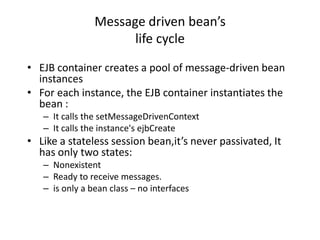
Message driven bean’s
                      life cycle
• EJB container creates a pool of message-driven bean
  instances
• For each instance, the EJB container instantiates the
  bean :
   – It calls the setMessageDrivenContext
   – It calls the instance's ejbCreate
• Like a stateless session bean,it’s never passivated, It
  has only two states:
   – Nonexistent
   – Ready to receive messages.
   – is only a bean class – no interfaces
Message driven bean’s
                      life cycle
• While in the ready state :
   – EJB container may call onMessage
   – EJB container may call the ejbRemove
Message driven bean’s
      life cycle

Unit4wt

  • 1.
  • 2.
    JavaBeans • An introductionto component-based development in general • Introduction to JavaBeans – Java components – client-side • Working with the BDK • The beans development life cycle • Writing simple and advanced beans
  • 3.
    Java Components • JavaBeans-- portable, platform-independent component model • Java components are known as beans • A bean: a reusable software component that can be manipulated visually in a builder tool
  • 4.
    JavaBeans vs. ClassLibraries • Beans are appropriate for software components that can be visually manipulated • Class libraries are good for providing functionality that is useful to programmers, and doesn’t benefit from visual manipulation
  • 5.
    JavaBeans Concepts • Acomponent is a self-contained reusable software unit • Components expose their features (public methods and events) to builder tools • A builder tool maintains Beans in a palette or toolbox.
  • 6.
    Concepts... • You canselect a bean from the toolbox, drop it in a form, and modify its appearance and behavior. • Also, you can define its interaction with other beans • ALL this without a line of code.
  • 7.
    JavaBean Characteristics • a public class with 0-argument constuctor • it has properties with accessory methods • it has events • it can customized • its state can be saved • it can be analyzed by a builder tool
  • 8.
    Key Concepts • Abuilder tool discover a bean’s features by a process known as introspection. – Adhering to specific rules (design pattern) when naming Bean features. – Providing property, method, and event information with a related Bean Information class. • Properties (bean’s appearance and behavior characteristics) can be changed at design- time.
  • 9.
    Key Concepts…. • Propertiescan be customized at design-time. Customization can be done: – using property editor – using bean customizers • Events are used when beans want to intercommunicate • Persistence: for saving and restoring the state • Bean’s methods are regular Java methods.
  • 10.
    Security Issues • JavaBeansare sbject to the standard Java security model • The security model has neither extended nor relaxed. • If a bean runs as an untrusted applet then it will be subject to applet security • If a bean runs as a stand-alone application then it will be treated as a normal Java application.
  • 11.
    Creating jar files •c-create an archive • C-change the directory during the execution • f-first name in the file names listing is the name of the archive that has to be created • M-the file name in the listing is a manifest file name which is present externally • u-Update existing jar file • t-The contents of archieve can be arranged in tabular form • v-It gives the verbose output • M-The manifest file is not created • o-the compression should not be used
  • 12.
    Create Sample.java file classSample extends Canvas -to make it visible Create manifest file
  • 13.
    MyFirstBean • import java.awt.*; •import java.io.Serializable; • public class FirstBean extends Canvas implements Serializable { • public FirstBean() { • setSize(50,30); • setBackground(Color.blue); • } • }
  • 14.
    First Bean • Compile:javac FirstBean.java • Create a manifest file: • mani.mft – Name: FirstBean.class – Java-Bean: True • Create a jar file: • jar cfm FirstBean.jar mani.mft FirstBean.class
  • 15.
    Using Beans inhand-written app • Use Beans.instantiate • Frame f; • f = new Frame("Testing Beans"); • try { • ClassLoader cl = this.getClass().getClassLoader(); • fb =(FirstBean)Beans.instantiate(cl,"FirstBean"); • } catch(Exception e) { • e.printStackTrace(); • } • f.add(fb);
  • 16.
    Properties • Bean’s appearanceand behavior -- changeable at design time. • They are private values • Can be accessed through getter and setter methods • getter and setter methods must follow some rules -- design patterns (documenting experience)
  • 17.
    Properties • A buildertool can: – discover a bean’s properties – determine the properties’ read/write attribute – locate an appropriate “property editor” for each type – display the properties (in a sheet) – alter the properties at design-time
  • 18.
    Types of Properties •Simple • Index: multiple-value properties • Bound: provide event notification when value changes • Constrained: how proposed changes can be okayed or vetoed by other object
  • 19.
    Simple Properties • Whena builder tool introspect your bean it discovers two methods: – public Color getColor() – public void setColor(Color c) • The builder tool knows that a property named “Color” exists -- of type Color. • It tries to locate a property editor for that type to display the properties in a sheet.
  • 20.
    Simple Properties…. • Addinga Color property – Create and initialize a private instance variable • private Color color = Color.blue; – Write public getter & setter methods • public Color getColor() { – return color; •} • public void setColor(Color c) { – color = c; – repaint(); •}
  • 21.
    Events “Introspection” • Fora bean to be the source of an event, it must implement methods that add and remove listener objects for the type of the event: – public void add<EventListenerType>(<EventListenerType> elt); – same thing for remove • These methods help a source Bean know where to fire events.
  • 22.
    Events “Introspection” • SourceBean fires events at the listeners using method of those interfaces. • Example: if a source Bean register ActionListsener objects, it will fire events at those objects by calling the actionPerformed method on those listeners
  • 23.
    Events “using BeanInfo” •Implementing the BeanInfo interface allows you to explicitly publish the events a Bean fires
  • 24.
    BeanInfo interface • Beanexposes its features in a property sheet using java.beans.Introspector class (which uses Core Reflection API) • The discovery process is named “introspection” • OR you can associate a class that implements the BeanInfo with your bean
  • 25.
    Bean Customization • Theappearance and behavior of a bean can be customized at design time. • Two ways to customize a bean: – using a property editor • each bean property has its own editor • a bean’s property is displayed in a property sheet – using customizers • gives you complete GUI control over bean customization
  • 26.
    Property Editors • Aproperty editor is a user interface for editing a bean property. The property must have both, read/write accessor methods. • A property editor must implement the PropertyEditor interface. • PropertyEditorSupport does that already, so you can extend it.
  • 27.
    Property Editors • Ifyou provide a custom property editor class, then you must refer to this class by calling PropertyDescriptor.setPropertyEditorClass in a BeanInfo class. • Each bean may have a BeanInfo class which customizes how the bean is to appear. SimpleBeanInfo implements that interface
  • 28.
    Enterprise Java Beans •Introduction – Application Server – Java 2 Enterprise Edition • What is an Enterprise Bean ? – EJB Properties – EJB Overview – Deployment Phase – Type of beans • Client access with interfaces – Remote access – Local Access
  • 29.
    Introduction • Enterprise JavaBeans ( EJB ) is – a middleware component model for Java and CORBA – a specification for creating server- side, scalable, transactional, multi-user and secure enterprise-level applications – one of several Java APIs in the Java • Presented by Sun in the 1999, they are easier than other technologies as RMI or Corba
  • 30.
    Introduction • This isthe three level structure for Application Server
  • 31.
    Applicaton Server • Presentation – HTML Application – Java Application • Business Logic • Data Access
  • 32.
    Presentation • HTML • Java – Generated server-side – Required Java virtual HTML Machine – Runs on any Web – More client side power browser – Runned on a page – Less client-side power – Security (Applet) – Launched from a browser or a standalone application
  • 33.
    Business Logic • Implementsthe logic of the application defining all the function that may be used from a client – Change Business Rules Easily – Re-use components – Make complex applications manageable – Secure Data hiding
  • 34.
    Data Access • Utilityto access external datas such as Database or other Web component • Access other SOA
  • 35.
    J2EE Application Server •Java 2 Enterprise Edition standardizes interfaces for Application Server components
  • 36.
    What is anEnterprise Bean ? • Is a server side component written in Java Language • Industry standard distribuited component model • Incorporates the business logic of an application ( the code that implements the purpose of the application) • Replicates the table model as objects
  • 37.
  • 38.
  • 39.
  • 40.
    Type of beans • Session Bean • Entity Bean • Message Driven Bean
  • 41.
    Session Bean • Representsa single client inside the server • The client calls the session bean to invoke methods of an application on the server • Perform works for its client, hiding the complexity of interaction with other objects in the server • Is not shared • Is not persistent • When the client stops the session,the bean can be assigned to another client from the server • Unique to each client
  • 42.
    Session Bean • Stateful session bean • Stateless session bean
  • 43.
    Stateful Session Bean •Contains the state of a single client session: – Information on the client – On method called – Return values This state is called conversational state and is not retained when the session ends, also if the client not removes the bean
  • 44.
    Stateless Session Bean •Not maintain a conversational state for a particular client • Contains values only for the duration of the single invocation • Except during method invocation, all instances of stateless session bean are equivalent • Pooled
  • 45.
    Entity Bean • Represents a business object in a persistent storage mechanism such as a relational database • Usually is a table in the database and each instance of that entity bean is a row in that table Properties: • Persistent • Allow shared access • Have primary key • Have relationship with other entity beans. • Auto commit.
  • 46.
    Entity Bean persistent • Bean managed persistence • Container managed persistence
  • 47.
    Bean managed persistence • Who write the bean’s code must access the database and save his own data • you will have more control over how the entity bean accesses a database
  • 48.
    Container managed persistence •The container save the data • There is no code in the bean for access the database • The container handles all database access required for the bean • the EJB container transparently and implicitly manages the persistent state
  • 49.
    Entity bean’s sharedaccess • Entity beans can be used by different clients • It’s important that they work whithin transactions • The EJB container provides transaction management • The transaction’s attribute are specified in the bean’s deployment description • Concurrency management
  • 50.
    Entity bean’s primarykey • Each entity bean has a unique object identifier like a key in a database table • Each instance represents as Row in table
  • 51.
    Entity bean’s relationship •Container managed persistent – The container performs all the operation to create relationship • Bean managed persistent – The code to perform relations must be written in the bean
  • 52.
    Message Driven bean •Allows applications to process messages asynchronously • The messages may be sent by : – An application client – Another enterprise bean – A Web component – A JMS Client
  • 53.
    Message Driven bean •Retain no data or conversational state for a specific client • The instance variables of the message-driven bean e can contain some state across the handling of client messages--for example, a JMS API connection, an open database connection, or an object reference to an ejb.
  • 54.
    Message Driven bean •A client can’t access directly to a message driven bean • When a message arrive, the container gives it to a message driven bean • The bean process the message • The onMessage method may call helper methods, or it may invoke a session or entity bean to process the information in the message or to store it in a database
  • 55.
    Client access withinterfaces • A client may access a session or an entity bean only through the methods defined in the bean's interfaces • They define the client's view of a bean • Public business methods declared in Bean interface’s can be visible to client, to invoke • Types of access: – Remote access – Local access
  • 56.
    Remote access • Aremote client of an enterprise bean has the following traits: – It may run on a different machine and a different Java virtual machine than the enterprise bean it accesses (It is not required to run on a different JVM ) – It can be a Web component – It can be another enterprise bean – It can be RMI object
  • 57.
    Remote access • Tocreate an enterprise bean with remote access, you must : – Code a remote interface • Business methods – Code a home interface • Finder methods • Home methods • Utility methods (to get home)
  • 58.
  • 59.
    Local access • Alocal client has these characteristics – It must run in the same JVM as the enterprise bean it accesses – It may be a Web component or another enterprise bean – To the local client, the location of the enterprise bean it accesses is not transparent – It is often an entity bean that has a container- managed relationship with another entity bean
  • 60.
    Local access • Tocreate an enterprise bean with local access, you must : – Code the local interface • Bean's business methods – Code the local home interface • Life cycle • Finder methods • Utility methods
  • 61.
    Local interfaces • Ifan entity bean is the target of a container managed relationship it MUST have local interfaces • An EJB can use local client view only if it is really guaranteed that other enterprise beans or clients will only address the bean within a single JVM
  • 62.
    Contents of anEnterprise Bean • Deployment descriptor – Persistence type – Transaction attribute • Enterprise bean class • Interfaces • Helper classes – Exception – Utility classes
  • 63.
    EJB Example • TheOnLine Bank We will take a not completed system to give an idea to how choose if a component is an entity, session or message driven bean.
  • 64.
    A few EJBimplementations • WebLogic • Bluestone • Novera • Persistence • Oracle AS • Oracle8i
  • 65.
    The EJB architecture •Consists of: – An EJB server – EJB containers that run within the server – Home objects – Remote EJBObjects – Enterprise Beans – EJB clients – Auxiliary systems like • Java Naming and Directory Interface (JNDI) • Java Transaction Service (JTS) • Security services • Threading • Pooling
  • 66.
    EJB Architecture Naming Service Server Home Interface Container (Factory) RMI Client RMI Remote EJB Object Interface (Wrapper) Enterprise Java Bean Implements (Biz Logic) Invokes Creates / uses
  • 67.
    Stateful session bean’s life cycle • The client invoke the create method • The EJB container : – Instantiates the bean – Invokes the setSessionContext – Invokes ejbCreate • The bean is ready • Business methods ready to be called
  • 68.
    Stateful session bean’s life cycle • While in the ready state – EJB container may passivate the bean moving it from memory to secondary storage – A client may invoke a business method – EJB container may activate a bean,moving it back to the ready stage, and then calls the bean's ejbActivate method – A client may invoke the remove method and the container calls the bean's ejbRemove method – Client cannot invoke passivate
  • 69.
  • 70.
    Stateless session bean’s life cycle • The client invoke the create method • The EJB container : – Instantiates the bean – Invokes the setSessionContext – Invokes ejbCreate • The bean is ready
  • 71.
    Stateless session bean’s life cycle • While in the ready state – A client may invoke a business method – A client may invoke the remove method and the container calls the bean's ejbRemove method – It’s never passivate – It’s can be pooled
  • 72.
  • 73.
    Entity bean’s lifecycle • The EJB container : – Creates the instance – Calls the setEntityContext • The entity bean moves to a pool of available instances
  • 74.
    Entity bean’s lifecycle • While in the pool : – Instance is not associated with any particular object identity – All instances in the pool are identical – EJB container may assign an identity to an instance when moving it to the ready stage invoking the ejbActivate method – A client may invoke the create method • EJB container calls ejbCreate and ejbPostCreate – EJB container may remove the instance invoking unsetEntityContext – Same bean instance (row) shared by all client
  • 75.
    Entity bean’s lifecycle • While in the ready state : – A client may invoke entity bean's business methods – A client may invoke the remove method • EJB container calls the ejbRemove method – EJB container may invoke the ejbPassivate method
  • 76.
  • 77.
    Message driven bean’s life cycle • EJB container creates a pool of message-driven bean instances • For each instance, the EJB container instantiates the bean : – It calls the setMessageDrivenContext – It calls the instance's ejbCreate • Like a stateless session bean,it’s never passivated, It has only two states: – Nonexistent – Ready to receive messages. – is only a bean class – no interfaces
  • 78.
    Message driven bean’s life cycle • While in the ready state : – EJB container may call onMessage – EJB container may call the ejbRemove
  • 79.