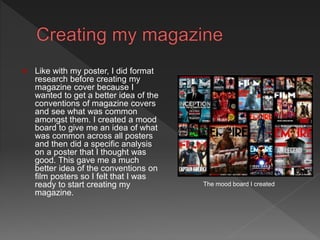
 Like with my poster, I did format
research before creating my
magazine cover because I
wanted to get a better idea of the
conventions of magazine covers
and see what was common
amongst them. I created a mood
board to give me an idea of what
was common across all posters
and then did a specific analysis
on a poster that I thought was
good. This gave me a much
better idea of the conventions on
film posters so I felt that I was
ready to start creating my
magazine.
The mood board I created
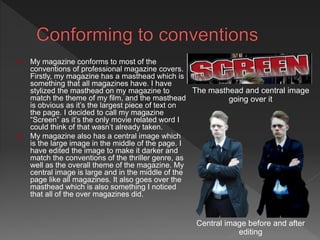
 My magazine conforms to most of the
conventions of professional magazine covers.
Firstly, my magazine has a masthead which is
something that all magazines have. I have
stylized the masthead on my magazine to
match the theme of my film, and the masthead
is obvious as it’s the largest piece of text on
the page. I decided to call my magazine
“Screen” as it’s the only movie related word I
could think of that wasn’t already taken.
 My magazine also has a central image which
is the large image in the middle of the page. I
have edited the image to make it darker and
match the conventions of the thriller genre, as
well as the overall theme of the magazine. My
central image is large and in the middle of the
page like all magazines. It also goes over the
masthead which is also something I noticed
that all of the over magazines did.
The masthead and central image
going over it
Central image before and after
editing
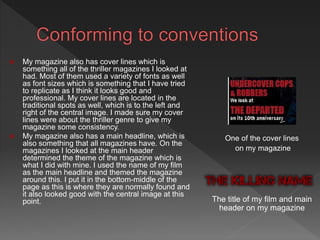
 My magazine also has cover lines which is
something all of the thriller magazines I looked at
had. Most of them used a variety of fonts as well
as font sizes which is something that I have tried
to replicate as I think it looks good and
professional. My cover lines are located in the
traditional spots as well, which is to the left and
right of the central image. I made sure my cover
lines were about the thriller genre to give my
magazine some consistency.
 My magazine also has a main headline, which is
also something that all magazines have. On the
magazines I looked at the main header
determined the theme of the magazine which is
what I did with mine. I used the name of my film
as the main headline and themed the magazine
around this. I put it in the bottom-middle of the
page as this is where they are normally found and
it also looked good with the central image at this
point.
One of the cover lines
on my magazine
The title of my film and main
header on my magazine
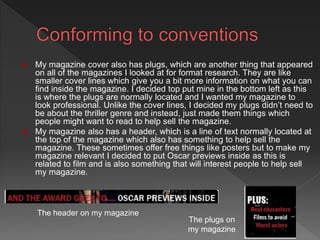
 My magazine cover also has plugs, which are another thing that appeared
on all of the magazines I looked at for format research. They are like
smaller cover lines which give you a bit more information on what you can
find inside the magazine. I decided top put mine in the bottom left as this
is where the plugs are normally located and I wanted my magazine to
look professional. Unlike the cover lines, I decided my plugs didn’t need to
be about the thriller genre and instead, just made them things which
people might want to read to help sell the magazine.
 My magazine also has a header, which is a line of text normally located at
the top of the magazine which also has something to help sell the
magazine. These sometimes offer free things like posters but to make my
magazine relevant I decided to put Oscar previews inside as this is
related to film and is also something that will interest people to help sell
my magazine.
The header on my magazine
The plugs on
my magazine
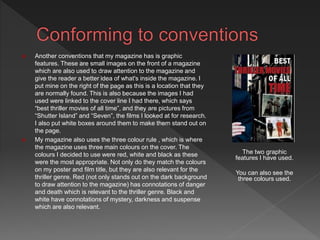
 Another conventions that my magazine has is graphic
features. These are small images on the front of a magazine
which are also used to draw attention to the magazine and
give the reader a better idea of what's inside the magazine. I
put mine on the right of the page as this is a location that they
are normally found. This is also because the images I had
used were linked to the cover line I had there, which says
“best thriller movies of all time”, and they are pictures from
“Shutter Island” and “Seven”, the films I looked at for research.
I also put white boxes around them to make them stand out on
the page.
 My magazine also uses the three colour rule , which is where
the magazine uses three main colours on the cover. The
colours I decided to use were red, white and black as these
were the most appropriate. Not only do they match the colours
on my poster and film title, but they are also relevant for the
thriller genre. Red (not only stands out on the dark background
to draw attention to the magazine) has connotations of danger
and death which is relevant to the thriller genre. Black and
white have connotations of mystery, darkness and suspense
which are also relevant.
The two graphic
features I have used.
You can also see the
three colours used.
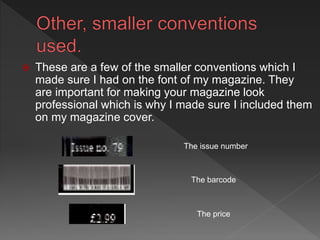
The issue number
The price
The barcode
 These are a few of the smaller conventions which I
made sure I had on the font of my magazine. They
are important for making your magazine look
professional which is why I made sure I included them
on my magazine cover.
 I don’t think my magazine develops any
magazine conventions, rather just conforms
to them. I don’t thin this is a bad thing as my
magazine does have all of the conventions
and does look like a professional magazine
as a result. However, if I was to make it
again I would try to develop some of the
conventions.
 I don’t think my magazine challenges any of
the conventions as I haven't included
anything that you wouldn’t expect to see,
and I haven't left out anything that you would
expect to see. This means that I have just
me the conventions as oppose to
challenging them.
 Audience feedback was important for my magazine because people
would be less likely to buy a magazine if they didn’t like the way that
the cover looked which is why I asked people for feedback on my
magazine cover.
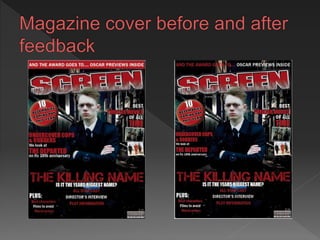
 Originally the cover lines on my magazine cover went over the central
image. People said that they didn’t like the way this looked as on most
magazines they don’t go over and they thought that they would look
better to the side. I changed it so the cover lines were next to the
central image instead of going over it.
 Another change I made was to the header at the top of the page.
Originally it had a red box behind it and the text was white. People said
that they didn’t like this and they thought it was too bright at the top of
the page and made the magazine look top heavy. I changed it so there
was no box and the text was white and red which drew some attention
without getting too much. I actually liked the original more but I wanted
to stick to my audience feedback so I left it changed.
 Finally, at first I didn’t have an issue number on my magazine. People
said that I should include one to make my magazine cover look more
professional.
 Like with my poster, one of the main technologies that I used for
research was Google Chrome. This is what I used to do research into
the different conventions of magazines, as well as get the images used
for my mood board and analysis. I created them using Powerpoint but
chose not to use Slideshare to upload them as there was only one
slide. Instead I cut them out and put them in Paint where I saved them
as PNGs ready to be uploaded onto my blog.
 For production I used two software's, which were Photoshop and
InDesign. I used Photoshop to cut out and edit the image that I wanted
to use on the poster. Photoshop allowed me to do this easily so it didn’t
take very long. To create the actual magazine I used InDesign which is
a publishing software. This was the right software to use because it
allowed me to place in all of the external images I had gotten, like the
central image and the main headline that I created on CoolText, and
arrange them the way I want. It then allowed me to put in all of the text
where I wanted it and then change the colour of the text to match the
theme of my poster and my film. I decided to use InDesign over
Microsoft Publisher as I think it gives a much more professional look
then publisher does.

Magazine evaluation

  • 2.
     Like withmy poster, I did format research before creating my magazine cover because I wanted to get a better idea of the conventions of magazine covers and see what was common amongst them. I created a mood board to give me an idea of what was common across all posters and then did a specific analysis on a poster that I thought was good. This gave me a much better idea of the conventions on film posters so I felt that I was ready to start creating my magazine. The mood board I created
  • 3.
     My magazineconforms to most of the conventions of professional magazine covers. Firstly, my magazine has a masthead which is something that all magazines have. I have stylized the masthead on my magazine to match the theme of my film, and the masthead is obvious as it’s the largest piece of text on the page. I decided to call my magazine “Screen” as it’s the only movie related word I could think of that wasn’t already taken.  My magazine also has a central image which is the large image in the middle of the page. I have edited the image to make it darker and match the conventions of the thriller genre, as well as the overall theme of the magazine. My central image is large and in the middle of the page like all magazines. It also goes over the masthead which is also something I noticed that all of the over magazines did. The masthead and central image going over it Central image before and after editing
  • 4.
     My magazinealso has cover lines which is something all of the thriller magazines I looked at had. Most of them used a variety of fonts as well as font sizes which is something that I have tried to replicate as I think it looks good and professional. My cover lines are located in the traditional spots as well, which is to the left and right of the central image. I made sure my cover lines were about the thriller genre to give my magazine some consistency.  My magazine also has a main headline, which is also something that all magazines have. On the magazines I looked at the main header determined the theme of the magazine which is what I did with mine. I used the name of my film as the main headline and themed the magazine around this. I put it in the bottom-middle of the page as this is where they are normally found and it also looked good with the central image at this point. One of the cover lines on my magazine The title of my film and main header on my magazine
  • 5.
     My magazinecover also has plugs, which are another thing that appeared on all of the magazines I looked at for format research. They are like smaller cover lines which give you a bit more information on what you can find inside the magazine. I decided top put mine in the bottom left as this is where the plugs are normally located and I wanted my magazine to look professional. Unlike the cover lines, I decided my plugs didn’t need to be about the thriller genre and instead, just made them things which people might want to read to help sell the magazine.  My magazine also has a header, which is a line of text normally located at the top of the magazine which also has something to help sell the magazine. These sometimes offer free things like posters but to make my magazine relevant I decided to put Oscar previews inside as this is related to film and is also something that will interest people to help sell my magazine. The header on my magazine The plugs on my magazine
  • 6.
     Another conventionsthat my magazine has is graphic features. These are small images on the front of a magazine which are also used to draw attention to the magazine and give the reader a better idea of what's inside the magazine. I put mine on the right of the page as this is a location that they are normally found. This is also because the images I had used were linked to the cover line I had there, which says “best thriller movies of all time”, and they are pictures from “Shutter Island” and “Seven”, the films I looked at for research. I also put white boxes around them to make them stand out on the page.  My magazine also uses the three colour rule , which is where the magazine uses three main colours on the cover. The colours I decided to use were red, white and black as these were the most appropriate. Not only do they match the colours on my poster and film title, but they are also relevant for the thriller genre. Red (not only stands out on the dark background to draw attention to the magazine) has connotations of danger and death which is relevant to the thriller genre. Black and white have connotations of mystery, darkness and suspense which are also relevant. The two graphic features I have used. You can also see the three colours used.
  • 7.
    The issue number Theprice The barcode  These are a few of the smaller conventions which I made sure I had on the font of my magazine. They are important for making your magazine look professional which is why I made sure I included them on my magazine cover.
  • 8.
     I don’tthink my magazine develops any magazine conventions, rather just conforms to them. I don’t thin this is a bad thing as my magazine does have all of the conventions and does look like a professional magazine as a result. However, if I was to make it again I would try to develop some of the conventions.
  • 9.
     I don’tthink my magazine challenges any of the conventions as I haven't included anything that you wouldn’t expect to see, and I haven't left out anything that you would expect to see. This means that I have just me the conventions as oppose to challenging them.
  • 10.
     Audience feedbackwas important for my magazine because people would be less likely to buy a magazine if they didn’t like the way that the cover looked which is why I asked people for feedback on my magazine cover.  Originally the cover lines on my magazine cover went over the central image. People said that they didn’t like the way this looked as on most magazines they don’t go over and they thought that they would look better to the side. I changed it so the cover lines were next to the central image instead of going over it.  Another change I made was to the header at the top of the page. Originally it had a red box behind it and the text was white. People said that they didn’t like this and they thought it was too bright at the top of the page and made the magazine look top heavy. I changed it so there was no box and the text was white and red which drew some attention without getting too much. I actually liked the original more but I wanted to stick to my audience feedback so I left it changed.  Finally, at first I didn’t have an issue number on my magazine. People said that I should include one to make my magazine cover look more professional.
  • 12.
     Like withmy poster, one of the main technologies that I used for research was Google Chrome. This is what I used to do research into the different conventions of magazines, as well as get the images used for my mood board and analysis. I created them using Powerpoint but chose not to use Slideshare to upload them as there was only one slide. Instead I cut them out and put them in Paint where I saved them as PNGs ready to be uploaded onto my blog.  For production I used two software's, which were Photoshop and InDesign. I used Photoshop to cut out and edit the image that I wanted to use on the poster. Photoshop allowed me to do this easily so it didn’t take very long. To create the actual magazine I used InDesign which is a publishing software. This was the right software to use because it allowed me to place in all of the external images I had gotten, like the central image and the main headline that I created on CoolText, and arrange them the way I want. It then allowed me to put in all of the text where I wanted it and then change the colour of the text to match the theme of my poster and my film. I decided to use InDesign over Microsoft Publisher as I think it gives a much more professional look then publisher does.