Machine Learning in Action
Andres Kull
Product Analyst @ Pipedrive
Machine Learning Estonia meetup, October 11, 2016
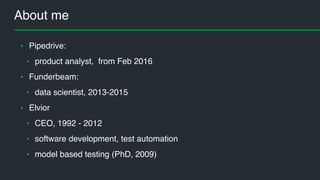
About me
• Pipedrive:
• product analyst, from Feb 2016
• Funderbeam:
• data scientist, 2013-2015
• Elvior
• CEO, 1992 - 2012
• software development, test automation
• model based testing (PhD, 2009)
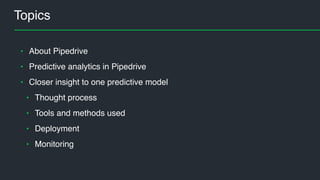
Topics
• About Pipedrive
• Predictive analytics in Pipedrive
• Closer insight to one predictive model
• Thought process
• Tools and methods used
• Deployment
• Monitoring
About Pipedrive (2 min video)
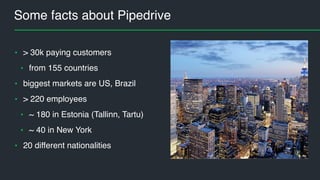
Some facts about Pipedrive
• > 30k paying customers
• from 155 countries
• biggest markets are US, Brazil
• > 220 employees
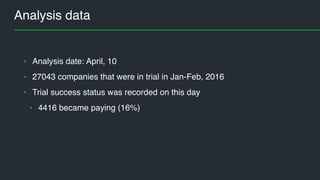
• ~ 180 in Estonia (Tallinn, Tartu)
• ~ 40 in New York
• 20 different nationalities
image area
My tasks @Pipedrive
• Serve product teams with data insight
• Predictive analytics / towards sales AI
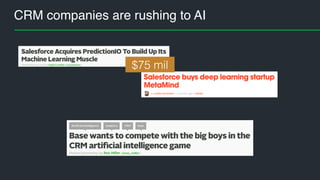
CRM companies are rushing to AI
$75 mil
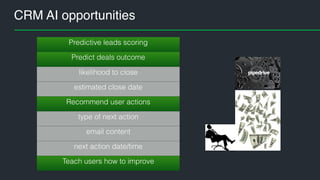
CRM AI opportunities
Predictive leads scoring
Predict deals outcome
likelihood to close
estimated close date
Recommend user actions
type of next action
email content
next action date/time
Teach users how to improve
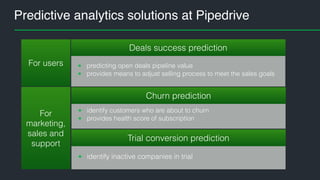
Predictive analytics solutions at Pipedrive
For
marketing,
sales and
support
For users • predicting open deals pipeline value
• provides means to adjust selling process to meet the sales goals
Deals success prediction
• identify customers who are about to churn
• provides health score of subscription
Churn prediction
• identify inactive companies in trial
Trial conversion prediction
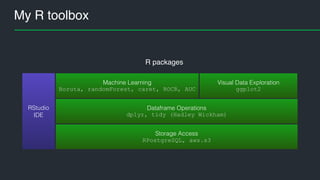
My R toolbox
Storage Access
RPostgreSQL, aws.s3
Dataframe Operations
dplyr, tidy (Hadley Wickham)
Machine Learning
Boruta, randomForest, caret, ROCR, AUC
Visual Data Exploration
ggplot2
RStudio
IDE
R packages
R references
Everything you need is to follow
Hadley Wickham
http://hadley.nz/
@hadleywickham
#rstats
… and you are in good hands
Trials conversion model
Business goal
• increase trial users conversion rate
• identify such trial companies who need
some engagement triggers
image area
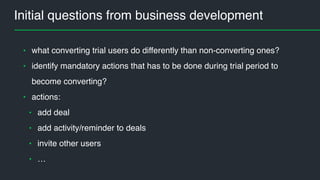
Initial questions from business development
• what converting trial users do differently than non-converting ones?
• identify mandatory actions that has to be done during trial period to
become converting?
• actions:
• add deal
• add activity/reminder to deals
• invite other users
• …
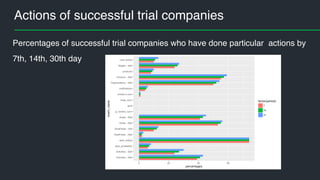
Actions of successful trial companies
Percentages of successful trial companies who have done particular actions by
7th, 14th, 30th day
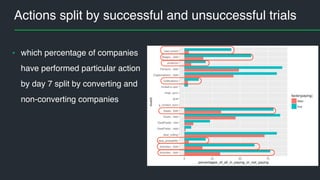
Actions split by successful and unsuccessful trials
• which percentage of companies
have performed particular action
by day 7 split by converting and
non-converting companies
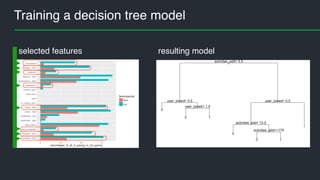
Training a decision tree model
resulting modelselected features
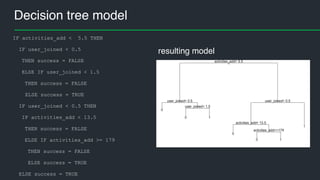
Decision tree model
resulting model
IF activities_add < 5.5 THEN
IF user_joined < 0.5
THEN success = FALSE
ELSE IF user_joined < 1.5
THEN success = FALSE
ELSE success = TRUE
IF user_joined < 0.5 THEN
IF activities_add < 13.5
THEN success = FALSE
ELSE IF activities_add >= 179
THEN success = FALSE
ELSE success = TRUE
ELSE success = TRUE
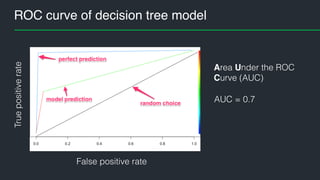
ROC curve of decision tree modelTruepositiverate
AUC = 0.7
False positive rate
Area Under the ROC
Curve (AUC)
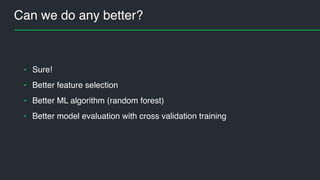
Can we do any better?
• Sure!
• Better feature selection
• Better ML algorithm (random forest)
• Better model evaluation with cross validation training
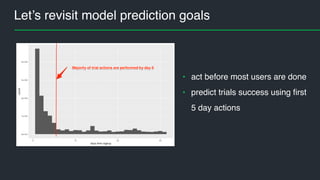
Let’s revisit model prediction goals
• act before most users are done
• predict trials success using first
5 day actions
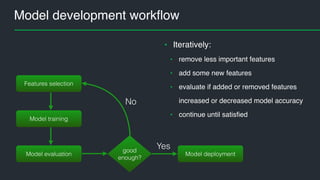
Model development workflow
Features selection
Model training
Model evaluation Model deployment
good
enough?
Yes
No
• Iteratively:
• remove less important features
• add some new features
• evaluate if added or removed features
increased or decreased model accuracy
• continue until satisfied
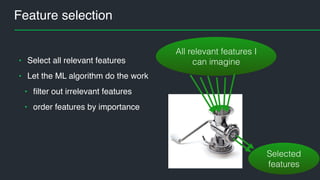
Feature selection
• Select all relevant features
• Let the ML algorithm do the work
• filter out irrelevant features
• order features by importance
All relevant features I
can imagine
Selected
features
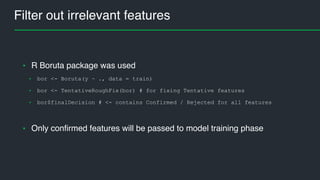
Filter out irrelevant features
• R Boruta package was used
• bor <- Boruta(y ~ ., data = train)
• bor <- TentativeRoughFix(bor) # for fixing Tentative features
• bor$finalDecision # <- contains Confirmed / Rejected for all features
• Only confirmed features will be passed to model training phase
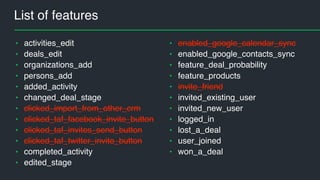
List of features
• activities_edit
• deals_edit
• organizations_add
• persons_add
• added_activity
• changed_deal_stage
• clicked_import_from_other_crm
• clicked_taf_facebook_invite_button
• clicked_taf_invites_send_button
• clicked_taf_twitter_invite_button
• completed_activity
• edited_stage
• enabled_google_calendar_sync
• enabled_google_contacts_sync
• feature_deal_probability
• feature_products
• invite_friend
• invited_existing_user
• invited_new_user
• logged_in
• lost_a_deal
• user_joined
• won_a_deal
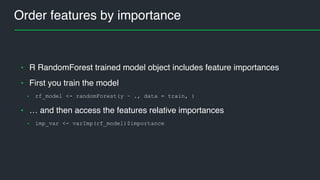
Order features by importance
• R RandomForest trained model object includes feature importances
• First you train the model
• rf_model <- randomForest(y ~ ., data = train, )
• … and then access the features relative importances
• imp_var <- varImp(rf_model)$importance
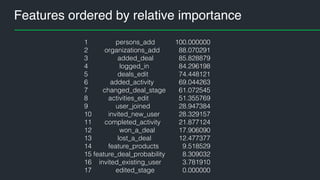
Features ordered by relative importance
1 persons_add
2 organizations_add
3 added_deal
4 logged_in
5 deals_edit
6 added_activity
7 changed_deal_stage
8 activities_edit
9 user_joined
10 invited_new_user
11 completed_activity
12 won_a_deal
13 lost_a_deal
14 feature_products
15 feature_deal_probability
16 invited_existing_user
17 edited_stage
100.000000
88.070291
85.828879
84.296198
74.448121
69.044263
61.072545
51.355769
28.947384
28.329157
21.877124
17.906090
12.477377
9.518529
8.309032
3.781910
0.000000
Split data to training and test data
• inTrain <- createDataPartition(y = all_ev[y][,1], p = 0.7, list = FALSE)
• train <- all_ev[inTrain, ]
• test <- all_ev[-inTrain, ]
• training set: 70% of companies
• hold-out test set: 30% of companies
• R caret package createDataPartition() function was used to split data
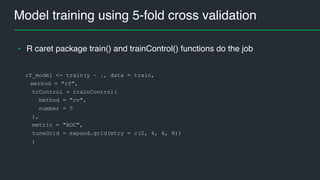
Model training using 5-fold cross validation
rf_model <- train(y ~ ., data = train,
method = "rf",
trControl = trainControl(
method = "cv",
number = 5
),
metric = "ROC",
tuneGrid = expand.grid(mtry = c(2, 4, 6, 8))
)
• R caret package train() and trainControl() functions do the job
Model evaluation
mtry <- rf_model$bestTune$mtry
train_auc <- rf_model$results$ROC[as.numeric(rownames(rf_model$bestTune))]
• model AUC on training data
• model AUC on test data
score <- predict(rf_model, newdata = test, type = "prob")
pred <- prediction(score[, 2], test[y])
test_auc <- performance(pred, "auc")
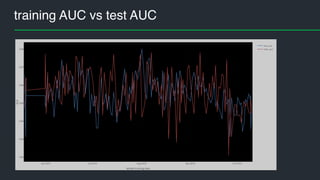
• AUC on training data 0.82..0.88
• AUC on test data 0.83..0.88
• Benchmark (decision tree) AUC = 0.7
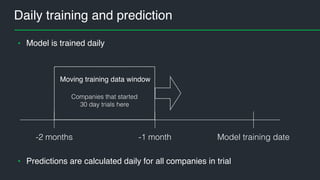
Daily training and prediction
• Model is trained daily
Model training date-1 month-2 months
Companies that started
30 day trials here
Moving training data window
• Predictions are calculated daily for all companies in trial
Model and predictions traceability
• Use cases
• Monitoring processes
• Explaining prediction results
• Relevant data has to be saved for traceability
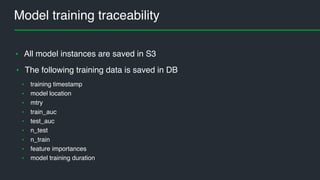
Model training traceability
• All model instances are saved in S3
• The following training data is saved in DB
• training timestamp
• model location
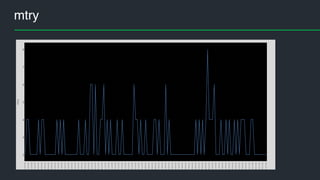
• mtry
• train_auc
• test_auc
• n_test
• n_train
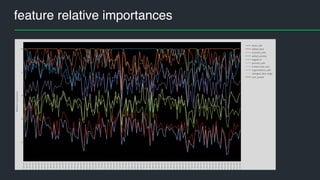
• feature importances
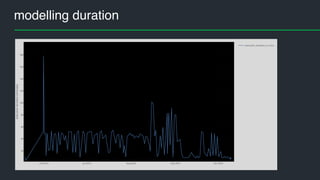
• model training duration
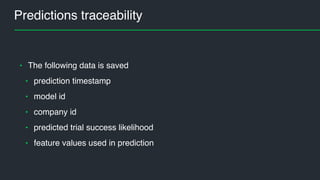
Predictions traceability
• The following data is saved
• prediction timestamp
• model id
• company id
• predicted trial success likelihood
• feature values used in prediction
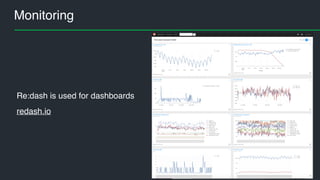
Monitoring
Re:dash is used for dashboards
redash.io
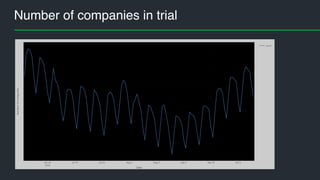
Number of companies in trial
training AUC vs test AUC
feature relative importances
modelling duration
mtry
• andres.kull@pipedrive.com
• @andres_kull
Q & A

Machine learning in action at Pipedrive

  • 1.
    Machine Learning inAction Andres Kull Product Analyst @ Pipedrive Machine Learning Estonia meetup, October 11, 2016
  • 2.
    About me • Pipedrive: •product analyst, from Feb 2016 • Funderbeam: • data scientist, 2013-2015 • Elvior • CEO, 1992 - 2012 • software development, test automation • model based testing (PhD, 2009)
  • 3.
    Topics • About Pipedrive •Predictive analytics in Pipedrive • Closer insight to one predictive model • Thought process • Tools and methods used • Deployment • Monitoring
  • 4.
  • 5.
    Some facts aboutPipedrive • > 30k paying customers • from 155 countries • biggest markets are US, Brazil • > 220 employees • ~ 180 in Estonia (Tallinn, Tartu) • ~ 40 in New York • 20 different nationalities image area
  • 6.
    My tasks @Pipedrive •Serve product teams with data insight • Predictive analytics / towards sales AI
  • 7.
    CRM companies arerushing to AI $75 mil
  • 8.
    CRM AI opportunities Predictiveleads scoring Predict deals outcome likelihood to close estimated close date Recommend user actions type of next action email content next action date/time Teach users how to improve
  • 9.
    Predictive analytics solutionsat Pipedrive For marketing, sales and support For users • predicting open deals pipeline value • provides means to adjust selling process to meet the sales goals Deals success prediction • identify customers who are about to churn • provides health score of subscription Churn prediction • identify inactive companies in trial Trial conversion prediction
  • 10.
    My R toolbox StorageAccess RPostgreSQL, aws.s3 Dataframe Operations dplyr, tidy (Hadley Wickham) Machine Learning Boruta, randomForest, caret, ROCR, AUC Visual Data Exploration ggplot2 RStudio IDE R packages
  • 11.
    R references Everything youneed is to follow Hadley Wickham http://hadley.nz/ @hadleywickham #rstats … and you are in good hands
  • 12.
  • 13.
    Business goal • increasetrial users conversion rate • identify such trial companies who need some engagement triggers image area
  • 14.
    Initial questions frombusiness development • what converting trial users do differently than non-converting ones? • identify mandatory actions that has to be done during trial period to become converting? • actions: • add deal • add activity/reminder to deals • invite other users • …
  • 15.
    Actions of successfultrial companies Percentages of successful trial companies who have done particular actions by 7th, 14th, 30th day
  • 16.
    Actions split bysuccessful and unsuccessful trials • which percentage of companies have performed particular action by day 7 split by converting and non-converting companies
  • 17.
    Training a decisiontree model resulting modelselected features
  • 18.
    Decision tree model resultingmodel IF activities_add < 5.5 THEN IF user_joined < 0.5 THEN success = FALSE ELSE IF user_joined < 1.5 THEN success = FALSE ELSE success = TRUE IF user_joined < 0.5 THEN IF activities_add < 13.5 THEN success = FALSE ELSE IF activities_add >= 179 THEN success = FALSE ELSE success = TRUE ELSE success = TRUE
  • 19.
    ROC curve ofdecision tree modelTruepositiverate AUC = 0.7 False positive rate Area Under the ROC Curve (AUC)
  • 20.
    Can we doany better? • Sure! • Better feature selection • Better ML algorithm (random forest) • Better model evaluation with cross validation training
  • 21.
    Let’s revisit modelprediction goals • act before most users are done • predict trials success using first 5 day actions
  • 22.
    Model development workflow Featuresselection Model training Model evaluation Model deployment good enough? Yes No • Iteratively: • remove less important features • add some new features • evaluate if added or removed features increased or decreased model accuracy • continue until satisfied
  • 23.
    Feature selection • Selectall relevant features • Let the ML algorithm do the work • filter out irrelevant features • order features by importance All relevant features I can imagine Selected features
  • 24.
    Filter out irrelevantfeatures • R Boruta package was used • bor <- Boruta(y ~ ., data = train) • bor <- TentativeRoughFix(bor) # for fixing Tentative features • bor$finalDecision # <- contains Confirmed / Rejected for all features • Only confirmed features will be passed to model training phase
  • 25.
    List of features •activities_edit • deals_edit • organizations_add • persons_add • added_activity • changed_deal_stage • clicked_import_from_other_crm • clicked_taf_facebook_invite_button • clicked_taf_invites_send_button • clicked_taf_twitter_invite_button • completed_activity • edited_stage • enabled_google_calendar_sync • enabled_google_contacts_sync • feature_deal_probability • feature_products • invite_friend • invited_existing_user • invited_new_user • logged_in • lost_a_deal • user_joined • won_a_deal
  • 26.
    Order features byimportance • R RandomForest trained model object includes feature importances • First you train the model • rf_model <- randomForest(y ~ ., data = train, ) • … and then access the features relative importances • imp_var <- varImp(rf_model)$importance
  • 27.
    Features ordered byrelative importance 1 persons_add 2 organizations_add 3 added_deal 4 logged_in 5 deals_edit 6 added_activity 7 changed_deal_stage 8 activities_edit 9 user_joined 10 invited_new_user 11 completed_activity 12 won_a_deal 13 lost_a_deal 14 feature_products 15 feature_deal_probability 16 invited_existing_user 17 edited_stage 100.000000 88.070291 85.828879 84.296198 74.448121 69.044263 61.072545 51.355769 28.947384 28.329157 21.877124 17.906090 12.477377 9.518529 8.309032 3.781910 0.000000
  • 28.
    Split data totraining and test data • inTrain <- createDataPartition(y = all_ev[y][,1], p = 0.7, list = FALSE) • train <- all_ev[inTrain, ] • test <- all_ev[-inTrain, ] • training set: 70% of companies • hold-out test set: 30% of companies • R caret package createDataPartition() function was used to split data
  • 29.
    Model training using5-fold cross validation rf_model <- train(y ~ ., data = train, method = "rf", trControl = trainControl( method = "cv", number = 5 ), metric = "ROC", tuneGrid = expand.grid(mtry = c(2, 4, 6, 8)) ) • R caret package train() and trainControl() functions do the job
  • 30.
    Model evaluation mtry <-rf_model$bestTune$mtry train_auc <- rf_model$results$ROC[as.numeric(rownames(rf_model$bestTune))] • model AUC on training data • model AUC on test data score <- predict(rf_model, newdata = test, type = "prob") pred <- prediction(score[, 2], test[y]) test_auc <- performance(pred, "auc") • AUC on training data 0.82..0.88 • AUC on test data 0.83..0.88 • Benchmark (decision tree) AUC = 0.7
  • 31.
    Daily training andprediction • Model is trained daily Model training date-1 month-2 months Companies that started 30 day trials here Moving training data window • Predictions are calculated daily for all companies in trial
  • 32.
    Model and predictionstraceability • Use cases • Monitoring processes • Explaining prediction results • Relevant data has to be saved for traceability
  • 33.
    Model training traceability •All model instances are saved in S3 • The following training data is saved in DB • training timestamp • model location • mtry • train_auc • test_auc • n_test • n_train • feature importances • model training duration
  • 34.
    Predictions traceability • Thefollowing data is saved • prediction timestamp • model id • company id • predicted trial success likelihood • feature values used in prediction
  • 35.
    Monitoring Re:dash is usedfor dashboards redash.io
  • 36.
  • 37.
  • 38.
  • 39.
  • 40.
  • 41.