Learning Module title:
Developing a digital photography workshop in the telecentre
Position within the curriculum:
Stage 2 (consolidation step) / Category 4
(Competence in the use of technical tools
as a basis and support of methodological
actions)
Description of training units ((((of each moduleof each moduleof each moduleof each module):
Title of the
Learning Units
Duration Learnings aims/outcome Learning Contents
(What is taught)
Pedagogies and Educational
Methods (How)
Techniques, Instruments and Materials Learning Unit Actors
(Who)
Evaluation
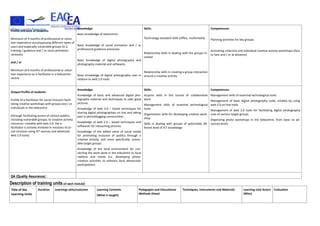
Profile entrance of students:
Minimum of 4 months of professional or volun-
teer experience accompanying different types of
users and especially vulnerable groups (in a
training / guidance and / or socio-animation
contexts)
and / or
Minimum of 4 months of professional or volun-
teer experience as e-facilitator in a telecentre-
centre
Knowledge:
Basic knowledge of telecentres
Basic knowledge of social animation and / or
professional guidance processes
Basic knowledge of digital photography and
photography material and softwares
Basic knowledge of digital photography uses in
relation to web 2.0 tools
Skills:
Technology standard skills (office, multimedia)
Relationship skills in dealing with the groups in-
volved
Relationship skills in creating a group interaction
around a creative activity
Competences:
Planning activities for key groups.
Animating collective and individual creative activity workshops (face
to face and / or at distance)
Output Profile of students
Profile of e-facilitator for social inclusion facili-
tating creative workshops with groups and / or
individuals in the telecentre
(through facilitating access of various publics,
including vulnerable groups, to creative activity
resources –notably with web 2.0, the e-
facilitator is actively involved in missions of so-
cial inclusion using ICT sources and advanced
web 2.0 tools)
Knowledge:
Knowledge of basic and advanced digital pho-
tography material and techniques to take good
pictures
Knowledge of web 2.0 – based techniques for
sharing digital photographies on line and taking
part in photoblogging communities
Knowledge of web 2.0 – based techniques and
softwares for retouching pictures
Knowledge of the added value of social media
for promoting inclusion of publics through a
creative activity, and more specifically, vulner-
able target groups
Knowledge of the local environment for con-
necting the work done in the telecentre to local
realities and needs (i.e. developing photo-
creation activities to enhance local democratic
participation)
Skills:
Acquire skills in the course of collaborative
work.
Management skills of essential technological
tools.
Organization skills for developing creative work-
shop
Skills in dealing with groups of potentially dif-
ferent level of ICT knowledge
Competences:
Management skills of essential technological tools.
Management of basic digital photography tools, notably by using
web 2.0 on-line tools
Management of web 2.0 tools for facilitating digital photography
uses of various target groups
Organizing photo workshops in the telecentre, from basic to ad-
vanced levels
QA (Quality Assurance) :
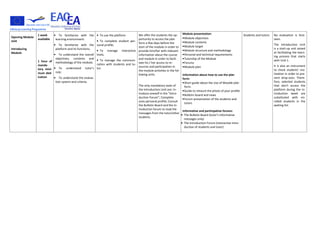
Opening Module
Unit
Introducing
Module
1 week
available
1 hour of
manda-
tory mini-
mum ded-
ication
• To familiarize with the
learning environment:
• To familiarize with the
platform and its functions;
• To understand the overall
objectives, contents and
methodology of the module;
• To understand tutor's
role;
• To understand the evalua-
tion system and criteria.
• To use the platform
• To complete student per-
sonal profile;
• To manage interactive
tools;
• To manage the communi-
cation with students and tu-
tor.
We offer the students the op-
portunity to access the plat-
form a few days before the
start of the module in order to
provide him/her with relevant
information about the course
and module in order to facili-
tate his / her access to re-
sources and participation in
the module activities in the fol-
lowing units.
The only mandatory tasks of
the Introduction Unit are: In-
troduce oneself in the “Intro-
duction Forum”; Complete
ones personal profile; Consult
the Bulletin Board and the In-
troduction forum to read the
messages from the tutor/other
students.
Module presentation:
•Module objectives
•Module contents
•Module target
•Module structure and methodology
•Personal and technical requirements
•Tutorship of the Module
•Forums
•Module plan
Information about how to use the plat-
form:
•Short guide about the Use of Moodle plat-
form.
•Guide to retouch the photo of your profile.
•Bulletin board and news
•Forum presentation of the students and
tutors
Informative and participative forums:
• The Bulletin Board (tutor’s informative
messages only)
• The Introduction Forum (interactive intro-
duction of students and tutor)
Students and tutors No evaluation is fore-
seen.
The Introduction Unit
is a start-up unit aimed
at facilitating the learn-
ing process that starts
with Unit 1.
It is also an instrument
to check students' mo-
tivation in order to pre-
vent drop-outs. There-
fore, selected students
that don't access the
platform during the In-
troduction week are
substituted with en-
rolled students in the
waiting list.
Unit 1:
Taking pictures
5 hours of
manda-
tory mini-
mum ded-
ication.
1 week
• To know about the main
functions of digital photo
cameras
• To acquire knowledge on
the essential concepts of
digital photography so as to
take quality pictures
• To learn about the
characteristics of digital
cameras and to understand
the mechanisms useful to
improve the quality of the
pictures
• To familiarize with the
lexical field of photography
and to understand how to
play with the cameras’
parameters to improve the
quality of the pictures
• To learn about the
commonly used techniques
so as to make quality pictures
The students are here offered
the possibility to familiarize
with the essential aspects of a
digital camera. This first
technical part provides the
students with some useful
concepts and techniques to
understand how the camera
works.
In a second time, the students
get familiar with technical
terms and functions of the
camera that may improve their
capacity to take good pictures
(speed, light, etc.).
Also, the students deal with a
more practical part of the
digital photography by
studying basic techniques
commonly used by
professionals to take good
pictures (tips and rules to
apply when they use the
camera).
The exercise of the unit 1 gives
the students the chance to put
into practice their new
knowledge on photo
techniques since they have to
take their own pictures and
comment on it through the
forum to discuss this first
exercise.
Finally, the students have the
possibility to go deeper in the
subject by consulting links to
photo blogs and on-line
tutorials helping them
composing a picture and have
a critical eye in front of an
image.
Reading 1 : “Prenons quelques photos”
[The reading is made of 2 parts, from which
one is about the technical components of a
digital photo camera and the types of
digital cameras available. In this part the
students get familiar with some technical
terms and functions that may improve their
capacity of taking good pictures. The second
part is about the parameters and
techniques to play with so as to get the
ideal picture. Some tips are offered to the
trainees].
URL (integrated in the reading as an
optional reading): “Wikibook Photographie”
[The link drives the students to a wikibook
dedicated to photography].
------------
Extra URL:“Tutoriel sur la composition d’une
image”
[Tutorial on the picture composition]
Extra URL: “Tutoriel pour comprendre, ana-
lyser et savoir critiquer une photo”
[Tutorial to know how to understand, analy-
se and criticize a photo]
Extra-Resource: Glossary of technical terms
Students and tutors • Task 1: Let’s take
pictures.
The students take
pictures according to
the tips indicated in the
exercise’s instructions.
• Task 2: Participation
to the forum: feedback
on the exercise
• Task 3: Participation
in the discussion forum
“Les techniques de
photo: quelle initiation
pour les publics du
centre multimédia?”
[Discussion on
“photography
techniques: how to
initiate the publics of
the telecentre?”]
Self Evaluation Unit 1
Unit 2:
What to do with
the pictures?
5 hours of
manda-
tory mini-
mum ded-
ication.
1 week
• To know about the possibi-
lities offered to treat your
pictures
• Discover Internet web sites
that offer on-line sharing of
pictures
• To learn to storage the
digital pictures
• To learn how to enjoy the
pictures
• To learn how to share
pictures on-line by creating a
Flickr account and
familiarizing with this web
2.0 tool
The unit focuses on the ways
to take best advantage of
one’s digital pictures.
The students learn about the
different techniques used to
download images from the
camera to the computer, as
well as on various types of
devices / supports (CD Rom,
USB stick, external disc, etc.).
At this level, they can learn in a
practical way the possibilities
to save their pictures under an
appropriate format (see extra
resources).
The students familiarize with
ways to storage their own
pictures: different possibilities
are presented.
Finally, the students learn
about a new way to enjoy
one’s picture, by discovering a
web 2.0 on-line tool that
enables to share the pictures
on-line. The students learn
about this on-line tool called
Flickr and learn how to create
their own on-line Flickr
account.
Reading 1: “Que faire avec ses photos?”
[What to do with our pictures? The reading
presents all the existing ways to download,
storage, develop and share the pictures]
------------
Extra-URL 1: Picasa application
Extra-URL 2: Tutorial on the formats to save
pictures on the computer
Extra-URL 3: Tutorial to lighten the weight
of pictures
Extra-URL 4: Panodia application to make
photo creation
Students and tutors • Task 1 : Exercise :
Create a Flickr account
• Task 2 : Exercise :
Upload your pictures
on Flickr
• Task 3 : Exercise :
Create an Internet
address to access your
Flickr account and
pictures
• Task 4 : Forum :
« what to do with our
pictures ? »
Self Evaluation Unit 2
Unit 3
Retouching pic-
tures
5 hours of
manda-
tory mini-
mum ded-
ication.
1 week
• To acquire elementary
knowledge on retouching
picture
• To learn most usable
techniques for retouching
pictures
• To learn how to use a soft-
ware of on-line pictures edi-
tion
• To learn what the
commonly used filters to
modify and correct pictures
are
• To learn about an on-line
tool that retouches pictures:
Picnik.
• To learn how to create
interesting effects and / or
transform pictures in an
entertaining way
• In this unit, students are
making a step ahead and
discover how to modify the
pictures they took in the
previous units:
• The students learn about
technical terms related to the
field of retouching pictures.
They also get to know some
softwares and applications,
amongst which Picnik.
• The students learn how use
Picnik, an on-line free editing
tool that proposes many filters
to apply on the images.
• The students can discuss to-
gether on the possibility to use
the retouching tool in the tele-
centre for initiating their pub-
lics on how to retouch pictures
Reading 1: “Retoucher des photos” [Retou-
ching pictures]
----------
Extra-Video: Apply filters on your Picture
(with Photo Filtre)
Extra-Resource: Download Photo-filtre
Extra-Resource: Filters with Gimp
Students and tutors • Task 1: Exercise: Re-
touch pictures
• Task 2: Forum: ac-
tivities of retouching
pictures in the tele-
centre
• Task 3: Wiki : collect
resources / tutorials
useful to apply filtres
on your pictures
Self Evaluation Unit 3
Unit 4:
Sharing pictures
5 hours of
manda-
tory
minimum
dedica-
tion.
1 week
• To discover web 2.0 envi-
ronment of existing commu-
nities in matter of digital
photography
• To know more about the
advantages of taking part in
on-line communities
• To learn how to share pic-
tures on-line
• To learn what the possibili-
ties offered to the users so as
to publish their pictures on-
line are
• To learn how to plan and
animate a digital photogra-
phy workshop
• To familiarize with
photobloggers’ communities
as web 2.0 tools to increase
the attractivity of digital pho-
tography
• The students are applying
all the knowledge and skills he
or she acquired from the pre-
vious units:
• They reach a level where
they can learn to share their
work on-line and participate
in photobloggers communi-
ties.
• The possibilities offered
enable the students to
organize their pictures in
coherent albums and
collections, using web 2.0
tools such as tags and
geotags.
• They are planning activities
of photo workshops adapted
to the publics of the telecen-
tre and come up with a work-
shop programme.
• They discover the possibili-
ties offered to protect their
photos using an adequate li-
cence (see extra-resource).
Reading 1: “Le partage des photos” [Sharing
pictures]
-------------
Extra-resources 1: Link to an on-line article
“Les photographes n’ont pas encore ap-
privoisé Internet” [“Photographs haven’t
familiarized with Internet yet”].
Extra-resources 2: link to the Creative
Commons web site.
Students and tutors • Task 1: Exercice:
search on Flickr
• Task 2: Exercise: join
a group on Flickr
• Task 3: Forum: how
to programme a digital
photography workshop
in the telecentre
• Task 4: wiki: collect
some useful resources
to prepare a digital
photo workshop
Self Evaluation Unit 4
Closing module
Unit
Forum and
evaluation ques-
tionnaire
10 days
available
1 hour of
mandato-
ry mini-
mum
dedication
• To assess knowledge/skills
acquired
The final exam is a 12 ques-
tions quiz which is to be com-
plemented in a limited amount
of time (12 minutes).
The questions asked concern
the 4 units of the course.
• Final exam
• Feedback forum
• Evaluation Questionnaire
Students and tutors • Task 1: Final Exam
• Task 2: Final forum
• Task 3: Evaluation
questionnaire
CONTACT: nmoquet@infrep.org

M7 Developing a digital photography workshop in the telecentre

  • 1.
    Learning Module title: Developinga digital photography workshop in the telecentre Position within the curriculum: Stage 2 (consolidation step) / Category 4 (Competence in the use of technical tools as a basis and support of methodological actions)
  • 2.
    Description of trainingunits ((((of each moduleof each moduleof each moduleof each module): Title of the Learning Units Duration Learnings aims/outcome Learning Contents (What is taught) Pedagogies and Educational Methods (How) Techniques, Instruments and Materials Learning Unit Actors (Who) Evaluation Profile entrance of students: Minimum of 4 months of professional or volun- teer experience accompanying different types of users and especially vulnerable groups (in a training / guidance and / or socio-animation contexts) and / or Minimum of 4 months of professional or volun- teer experience as e-facilitator in a telecentre- centre Knowledge: Basic knowledge of telecentres Basic knowledge of social animation and / or professional guidance processes Basic knowledge of digital photography and photography material and softwares Basic knowledge of digital photography uses in relation to web 2.0 tools Skills: Technology standard skills (office, multimedia) Relationship skills in dealing with the groups in- volved Relationship skills in creating a group interaction around a creative activity Competences: Planning activities for key groups. Animating collective and individual creative activity workshops (face to face and / or at distance) Output Profile of students Profile of e-facilitator for social inclusion facili- tating creative workshops with groups and / or individuals in the telecentre (through facilitating access of various publics, including vulnerable groups, to creative activity resources –notably with web 2.0, the e- facilitator is actively involved in missions of so- cial inclusion using ICT sources and advanced web 2.0 tools) Knowledge: Knowledge of basic and advanced digital pho- tography material and techniques to take good pictures Knowledge of web 2.0 – based techniques for sharing digital photographies on line and taking part in photoblogging communities Knowledge of web 2.0 – based techniques and softwares for retouching pictures Knowledge of the added value of social media for promoting inclusion of publics through a creative activity, and more specifically, vulner- able target groups Knowledge of the local environment for con- necting the work done in the telecentre to local realities and needs (i.e. developing photo- creation activities to enhance local democratic participation) Skills: Acquire skills in the course of collaborative work. Management skills of essential technological tools. Organization skills for developing creative work- shop Skills in dealing with groups of potentially dif- ferent level of ICT knowledge Competences: Management skills of essential technological tools. Management of basic digital photography tools, notably by using web 2.0 on-line tools Management of web 2.0 tools for facilitating digital photography uses of various target groups Organizing photo workshops in the telecentre, from basic to ad- vanced levels QA (Quality Assurance) :
  • 3.
    Opening Module Unit Introducing Module 1 week available 1hour of manda- tory mini- mum ded- ication • To familiarize with the learning environment: • To familiarize with the platform and its functions; • To understand the overall objectives, contents and methodology of the module; • To understand tutor's role; • To understand the evalua- tion system and criteria. • To use the platform • To complete student per- sonal profile; • To manage interactive tools; • To manage the communi- cation with students and tu- tor. We offer the students the op- portunity to access the plat- form a few days before the start of the module in order to provide him/her with relevant information about the course and module in order to facili- tate his / her access to re- sources and participation in the module activities in the fol- lowing units. The only mandatory tasks of the Introduction Unit are: In- troduce oneself in the “Intro- duction Forum”; Complete ones personal profile; Consult the Bulletin Board and the In- troduction forum to read the messages from the tutor/other students. Module presentation: •Module objectives •Module contents •Module target •Module structure and methodology •Personal and technical requirements •Tutorship of the Module •Forums •Module plan Information about how to use the plat- form: •Short guide about the Use of Moodle plat- form. •Guide to retouch the photo of your profile. •Bulletin board and news •Forum presentation of the students and tutors Informative and participative forums: • The Bulletin Board (tutor’s informative messages only) • The Introduction Forum (interactive intro- duction of students and tutor) Students and tutors No evaluation is fore- seen. The Introduction Unit is a start-up unit aimed at facilitating the learn- ing process that starts with Unit 1. It is also an instrument to check students' mo- tivation in order to pre- vent drop-outs. There- fore, selected students that don't access the platform during the In- troduction week are substituted with en- rolled students in the waiting list.
  • 4.
    Unit 1: Taking pictures 5hours of manda- tory mini- mum ded- ication. 1 week • To know about the main functions of digital photo cameras • To acquire knowledge on the essential concepts of digital photography so as to take quality pictures • To learn about the characteristics of digital cameras and to understand the mechanisms useful to improve the quality of the pictures • To familiarize with the lexical field of photography and to understand how to play with the cameras’ parameters to improve the quality of the pictures • To learn about the commonly used techniques so as to make quality pictures The students are here offered the possibility to familiarize with the essential aspects of a digital camera. This first technical part provides the students with some useful concepts and techniques to understand how the camera works. In a second time, the students get familiar with technical terms and functions of the camera that may improve their capacity to take good pictures (speed, light, etc.). Also, the students deal with a more practical part of the digital photography by studying basic techniques commonly used by professionals to take good pictures (tips and rules to apply when they use the camera). The exercise of the unit 1 gives the students the chance to put into practice their new knowledge on photo techniques since they have to take their own pictures and comment on it through the forum to discuss this first exercise. Finally, the students have the possibility to go deeper in the subject by consulting links to photo blogs and on-line tutorials helping them composing a picture and have a critical eye in front of an image. Reading 1 : “Prenons quelques photos” [The reading is made of 2 parts, from which one is about the technical components of a digital photo camera and the types of digital cameras available. In this part the students get familiar with some technical terms and functions that may improve their capacity of taking good pictures. The second part is about the parameters and techniques to play with so as to get the ideal picture. Some tips are offered to the trainees]. URL (integrated in the reading as an optional reading): “Wikibook Photographie” [The link drives the students to a wikibook dedicated to photography]. ------------ Extra URL:“Tutoriel sur la composition d’une image” [Tutorial on the picture composition] Extra URL: “Tutoriel pour comprendre, ana- lyser et savoir critiquer une photo” [Tutorial to know how to understand, analy- se and criticize a photo] Extra-Resource: Glossary of technical terms Students and tutors • Task 1: Let’s take pictures. The students take pictures according to the tips indicated in the exercise’s instructions. • Task 2: Participation to the forum: feedback on the exercise • Task 3: Participation in the discussion forum “Les techniques de photo: quelle initiation pour les publics du centre multimédia?” [Discussion on “photography techniques: how to initiate the publics of the telecentre?”] Self Evaluation Unit 1
  • 5.
    Unit 2: What todo with the pictures? 5 hours of manda- tory mini- mum ded- ication. 1 week • To know about the possibi- lities offered to treat your pictures • Discover Internet web sites that offer on-line sharing of pictures • To learn to storage the digital pictures • To learn how to enjoy the pictures • To learn how to share pictures on-line by creating a Flickr account and familiarizing with this web 2.0 tool The unit focuses on the ways to take best advantage of one’s digital pictures. The students learn about the different techniques used to download images from the camera to the computer, as well as on various types of devices / supports (CD Rom, USB stick, external disc, etc.). At this level, they can learn in a practical way the possibilities to save their pictures under an appropriate format (see extra resources). The students familiarize with ways to storage their own pictures: different possibilities are presented. Finally, the students learn about a new way to enjoy one’s picture, by discovering a web 2.0 on-line tool that enables to share the pictures on-line. The students learn about this on-line tool called Flickr and learn how to create their own on-line Flickr account. Reading 1: “Que faire avec ses photos?” [What to do with our pictures? The reading presents all the existing ways to download, storage, develop and share the pictures] ------------ Extra-URL 1: Picasa application Extra-URL 2: Tutorial on the formats to save pictures on the computer Extra-URL 3: Tutorial to lighten the weight of pictures Extra-URL 4: Panodia application to make photo creation Students and tutors • Task 1 : Exercise : Create a Flickr account • Task 2 : Exercise : Upload your pictures on Flickr • Task 3 : Exercise : Create an Internet address to access your Flickr account and pictures • Task 4 : Forum : « what to do with our pictures ? » Self Evaluation Unit 2
  • 6.
    Unit 3 Retouching pic- tures 5hours of manda- tory mini- mum ded- ication. 1 week • To acquire elementary knowledge on retouching picture • To learn most usable techniques for retouching pictures • To learn how to use a soft- ware of on-line pictures edi- tion • To learn what the commonly used filters to modify and correct pictures are • To learn about an on-line tool that retouches pictures: Picnik. • To learn how to create interesting effects and / or transform pictures in an entertaining way • In this unit, students are making a step ahead and discover how to modify the pictures they took in the previous units: • The students learn about technical terms related to the field of retouching pictures. They also get to know some softwares and applications, amongst which Picnik. • The students learn how use Picnik, an on-line free editing tool that proposes many filters to apply on the images. • The students can discuss to- gether on the possibility to use the retouching tool in the tele- centre for initiating their pub- lics on how to retouch pictures Reading 1: “Retoucher des photos” [Retou- ching pictures] ---------- Extra-Video: Apply filters on your Picture (with Photo Filtre) Extra-Resource: Download Photo-filtre Extra-Resource: Filters with Gimp Students and tutors • Task 1: Exercise: Re- touch pictures • Task 2: Forum: ac- tivities of retouching pictures in the tele- centre • Task 3: Wiki : collect resources / tutorials useful to apply filtres on your pictures Self Evaluation Unit 3
  • 7.
    Unit 4: Sharing pictures 5hours of manda- tory minimum dedica- tion. 1 week • To discover web 2.0 envi- ronment of existing commu- nities in matter of digital photography • To know more about the advantages of taking part in on-line communities • To learn how to share pic- tures on-line • To learn what the possibili- ties offered to the users so as to publish their pictures on- line are • To learn how to plan and animate a digital photogra- phy workshop • To familiarize with photobloggers’ communities as web 2.0 tools to increase the attractivity of digital pho- tography • The students are applying all the knowledge and skills he or she acquired from the pre- vious units: • They reach a level where they can learn to share their work on-line and participate in photobloggers communi- ties. • The possibilities offered enable the students to organize their pictures in coherent albums and collections, using web 2.0 tools such as tags and geotags. • They are planning activities of photo workshops adapted to the publics of the telecen- tre and come up with a work- shop programme. • They discover the possibili- ties offered to protect their photos using an adequate li- cence (see extra-resource). Reading 1: “Le partage des photos” [Sharing pictures] ------------- Extra-resources 1: Link to an on-line article “Les photographes n’ont pas encore ap- privoisé Internet” [“Photographs haven’t familiarized with Internet yet”]. Extra-resources 2: link to the Creative Commons web site. Students and tutors • Task 1: Exercice: search on Flickr • Task 2: Exercise: join a group on Flickr • Task 3: Forum: how to programme a digital photography workshop in the telecentre • Task 4: wiki: collect some useful resources to prepare a digital photo workshop Self Evaluation Unit 4 Closing module Unit Forum and evaluation ques- tionnaire 10 days available 1 hour of mandato- ry mini- mum dedication • To assess knowledge/skills acquired The final exam is a 12 ques- tions quiz which is to be com- plemented in a limited amount of time (12 minutes). The questions asked concern the 4 units of the course. • Final exam • Feedback forum • Evaluation Questionnaire Students and tutors • Task 1: Final Exam • Task 2: Final forum • Task 3: Evaluation questionnaire
  • 8.