






Mobile Technology
Masterful Design
Marketing
Innovation


Mike Kaple & Erica
Kendall
Big Design, Small Screen
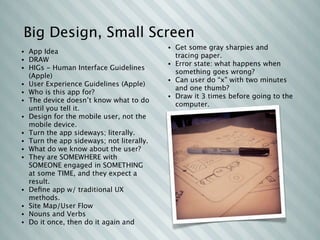
                                            • Get some gray sharpies and
•   App Idea
                                              tracing paper.
•   DRAW
                                            • Error state: what happens when
•   HIGs - Human Interface Guidelines
                                              something goes wrong?
    (Apple)
                                            • Can user do “x” with two minutes
•   User Experience Guidelines (Apple)
                                              and one thumb?
•   Who is this app for?
                                            • Draw it 3 times before going to the
•   The device doesn’t know what to do
                                              computer.
    until you tell it.
•   Design for the mobile user, not the
    mobile device.
•   Turn the app sideways; literally.
•   Turn the app sideways; not literally.
•   What do we know about the user?
•   They are SOMEWHERE with
    SOMEONE engaged in SOMETHING
    at some TIME, and they expect a
    result.
•   Define app w/ traditional UX
    methods.
•   Site Map/User Flow
•   Nouns and Verbs
•   Do it once, then do it again and
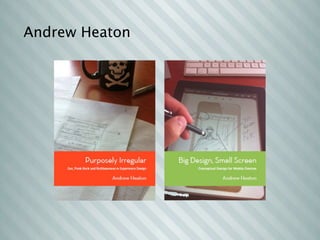
Andrew Heaton
PhoneGap 101
PhoneGap 101
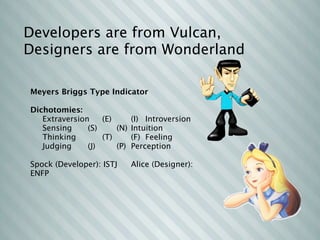
Developers are from Vulcan,
Designers are from Wonderland

Meyers Briggs Type Indicator

Dichotomies:
   Extraversion
      (E)
 
    (I)
 Introversion
   Sensing

   (S)
   
    (N)
 Intuition
   Thinking
 
        (T)
 
    (F)
 Feeling
   Judging

   (J)
   
    (P)
 Perception

Spock (Developer): ISTJ
      Alice (Designer):
ENFP
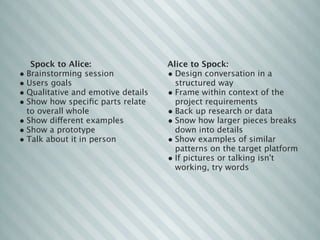
Spock to Alice:                  Alice to Spock:
• Brainstorming session             • Design conversation in a
• Users goals                         structured way
• Qualitative and emotive details   • Frame within context of the
• Show how specific parts relate       project requirements
  to overall whole                  • Back up research or data
• Show different examples           • Snow how larger pieces breaks
• Show a prototype                    down into details
• Talk about it in person           • Show examples of similar
                                      patterns on the target platform
                                    • If pictures or talking isn't
                                      working, try words
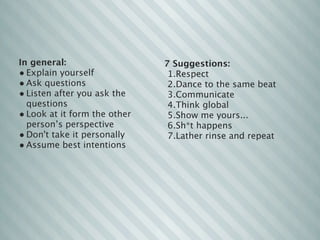
In general:                   7 Suggestions:
• Explain yourself             1.Respect
• Ask questions                2.Dance to the same beat
• Listen after you ask the     3.Communicate
  questions                    4.Think global
• Look at it form the other    5.Show me yours...
  person’s perspective         6.Sh*t happens 
• Don't take it personally     7.Lather rinse and repeat
• Assume best intentions
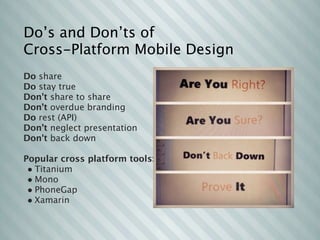
Do’s and Don’ts of
Cross-Platform Mobile Design
Do share
Do stay true
Don't share to share
Don't overdue branding
Do rest (API)
Don’t neglect presentation
Don't back down

Popular cross platform tools:
 • Titanium
 • Mono
 • PhoneGap
 • Xamarin
Using Xcode
Native iOS Mobile App Development
and Deployment Strategies
Augmented Reality
Morning Keynote by Trak Lord of Metaio
Augmented Reality
Morning Keynote by Trak Lord of Metaio
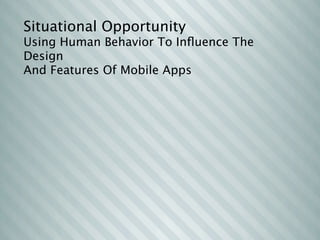
Situational Opportunity
Using Human Behavior To Influence The
Design
And Features Of Mobile Apps
Situational Opportunity
Using Human Behavior To Influence The
Design
And Features Of Mobile Apps


     Who’s that guy in the movie with
     the dog?
A Mobile You!
Keynote by Leon Gersing
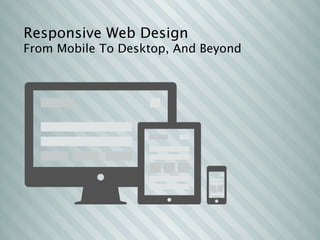
Responsive Web Design
From Mobile To Desktop, And Beyond
Quick & Code-Free
Mobile App Prototyping Techniques

M3 conf

  • 1.
  • 2.
    Big Design, SmallScreen • Get some gray sharpies and • App Idea tracing paper. • DRAW • Error state: what happens when • HIGs - Human Interface Guidelines something goes wrong? (Apple) • Can user do “x” with two minutes • User Experience Guidelines (Apple) and one thumb? • Who is this app for? • Draw it 3 times before going to the • The device doesn’t know what to do computer. until you tell it. • Design for the mobile user, not the mobile device. • Turn the app sideways; literally. • Turn the app sideways; not literally. • What do we know about the user? • They are SOMEWHERE with SOMEONE engaged in SOMETHING at some TIME, and they expect a result. • Define app w/ traditional UX methods. • Site Map/User Flow • Nouns and Verbs • Do it once, then do it again and
  • 3.
  • 4.
  • 5.
  • 6.
    Developers are fromVulcan, Designers are from Wonderland Meyers Briggs Type Indicator Dichotomies: Extraversion (E) (I) Introversion Sensing (S) (N) Intuition Thinking (T) (F) Feeling Judging (J) (P) Perception Spock (Developer): ISTJ Alice (Designer): ENFP
  • 7.
    Spock to Alice: Alice to Spock: • Brainstorming session  • Design conversation in a • Users goals structured way • Qualitative and emotive details • Frame within context of the • Show how specific parts relate project requirements to overall whole • Back up research or data • Show different examples • Snow how larger pieces breaks • Show a prototype down into details • Talk about it in person • Show examples of similar patterns on the target platform • If pictures or talking isn't working, try words
  • 8.
    In general: 7 Suggestions: • Explain yourself 1.Respect • Ask questions 2.Dance to the same beat • Listen after you ask the 3.Communicate questions 4.Think global • Look at it form the other 5.Show me yours... person’s perspective 6.Sh*t happens  • Don't take it personally 7.Lather rinse and repeat • Assume best intentions
  • 9.
    Do’s and Don’tsof Cross-Platform Mobile Design Do share Do stay true Don't share to share Don't overdue branding Do rest (API) Don’t neglect presentation Don't back down Popular cross platform tools: • Titanium • Mono • PhoneGap • Xamarin
  • 10.
    Using Xcode Native iOSMobile App Development and Deployment Strategies
  • 11.
    Augmented Reality Morning Keynoteby Trak Lord of Metaio
  • 12.
    Augmented Reality Morning Keynoteby Trak Lord of Metaio
  • 13.
    Situational Opportunity Using HumanBehavior To Influence The Design And Features Of Mobile Apps
  • 14.
    Situational Opportunity Using HumanBehavior To Influence The Design And Features Of Mobile Apps Who’s that guy in the movie with the dog?
  • 15.
    A Mobile You! Keynoteby Leon Gersing
  • 16.
    Responsive Web Design FromMobile To Desktop, And Beyond
  • 17.
    Quick & Code-Free MobileApp Prototyping Techniques

Editor's Notes

  • #2 \n
  • #3 \n
  • #4 \n
  • #5 \n
  • #6 \n
  • #7 \n
  • #8 \n
  • #9 \n
  • #10 All-day event of how to storyboard, code and deploy a mobile app. \n\n\n\n
  • #11 presenter: trak lord\nThis session will give an in-depth look into Metaio’s mobile developer ecosystem.\nFrom working business models to new forms of art, augmented reality has permeated nearly every aspect of mobile technology. Learn also how Metaio is working with key mobile players to refine and optimize its software for the next-generation of mobile devices and developers.\n
  • #12 presenter: andrew heaton\nauthor of: purposely irregular\n\n
  • #13 Drawing from personal experience and research from leading behavioral psychologists, this session aims to empower mobile developers to explore themselves and their craft. Helping them to establish confidence in their career, establish their voice in a highly competitive market, manage conflicts healthfully and communicate more effectively with others. No matter where you happen to be on your journey of continual improvement, reflecting on yourself and the effects of interpersonal relationships can provide valuable insight towards achieving your goals technically and emotionally. Invest in yourself to step outside the mould in mobile technology & do things that have never been done before. Learn to leverage the wisdom of those around you to cultivate powerful positive relationships without sacrificing the most important asset in your toolkit: yourself.\n
  • #14 \n
  • #15 \n