Evolution of The Internet and
Online Marketing
Professional eMarketer
www.professionalemarketer.com
Presented by Susantha Herath PGD in Marketing (KLN), PGD in IT (UK)
MODULE 01 : LESSON 02
 Learning Objectives
 Understand what is internet and how it developed as a
global network.
 Learn about ISPs and internet accessing methods
 Understand how internet works
 Learn about how internet and business world joined
together and developed into E-Marketing as a subject
 Understand different technical terms commonly used
and how they works
Introduction
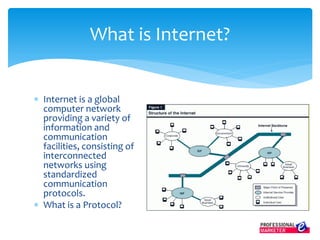
 Internet is a global
computer network
providing a variety of
information and
communication
facilities, consisting of
interconnected
networks using
standardized
communication
protocols.
 What is a Protocol?
What is Internet?
 Internet is a global network of computers and devices
 Internet is owned by “NO ONE”
 Small home and corporate networks connect each
other and formed country level networks and country
network connect to other countries.
 Countries are connected with under sea cables and
satellites.
 There are protocols for these connections!
What is Internet?
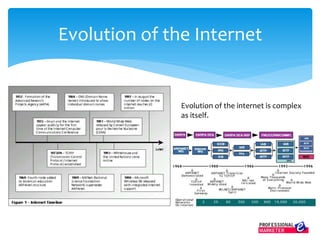
Evolution of the Internet
Evolution of the internet is complex
as itself.
 1969 ARPANET Created
 1971 E-Mail invented at ARPANET (15 Computers)
 1972 First public demonstrated of ARPANET
 1982 Invention of word “Internet” and TCP/IP
 1990 Invention of WWW by Tim Barnes Lee
 1991 Invention of first web browser
 1992 26 servers operational world wide. The term
“Surfing the Internet” declared by Jean Armour Polly
The Story in Brief
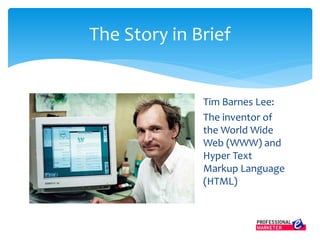
Tim Barnes Lee:
The inventor of
the World Wide
Web (WWW) and
Hyper Text
Markup Language
(HTML)
The Story in Brief
Jean Armour Polly:
Declared the name
“Surfing the
Internet”
The Story in Brief
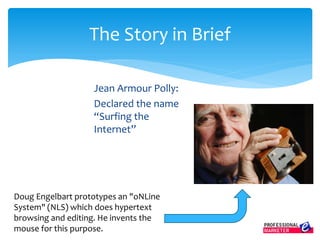
Doug Engelbart prototypes an "oNLine
System" (NLS) which does hypertext
browsing and editing. He invents the
mouse for this purpose.
1993 The Turning Point:
The year it all changed. January: about 50 HTTP servers and
about 600 WWW sites on line; WWW traffic measures 0.1% of
the National Science Foundation's (NSF) backbone
traffic. April 30: Declaration that WWW technology would
be freely usable by anyone, with no fees. September:
Working versions of Mosaic browser for X, PC/Windows and
Macintosh.
The Story in Brief
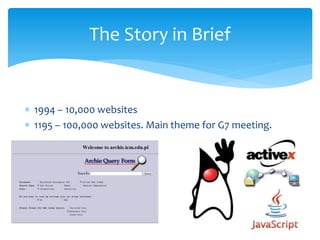
 1994 – 10,000 websites
 1195 – 100,000 websites. Main theme for G7 meeting.
The Story in Brief
 1996 Over 500,000 WWW Sites. Microsoft enters. Internet phones arrive.
 1997 Over 1,300,000 WWW Sites. Streaming media available.
 1998 Over 3,300,000 WWW Sites. Web size estimated at about
300,000,000 pages. E-Commerce, E-Auctions, Portals; E-trading begins.
 1999 Over 9,500,000 WWW Sites. E-Trade, Online Banking, MP3 popular.
 2000 Over 22,000,000 WWW Sites. Estimated 6 billion people on line.
Wireless technologies maturing.
 2001 Over 575,000,000 WWW sites by January, estimated 1.4 billion
pages. Broadband high speed access enters mainstream
The Story in Brief
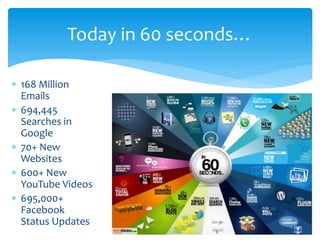
 168 Million
Emails
 694,445
Searches in
Google
 70+ New
Websites
 600+ New
YouTube Videos
 695,000+
Facebook
Status Updates
Today in 60 seconds…
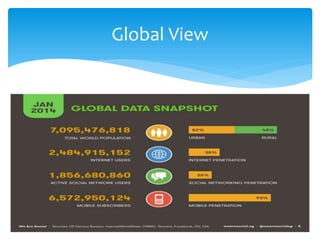
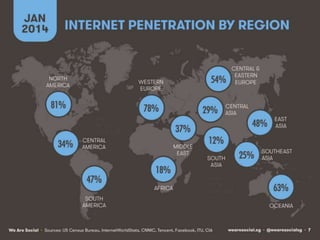
Global View
Evolution of Internet Access
 If internet is owned by “no one” and it is a global
network, why can’t we access it free just by
connecting a cable?
 The reason is ISPs?
 ISP stand for Internet Service Provider
 Why need an ISP to connect to the internet?
 ISPs invest and create necessary infrastructures and
facilities to connect with other countries. These
investments are HUGE.
Evolution of Internet Access
 ISPs need to lay cables underneath the ocean and hire
satellites
 So they charge from users to recover investments
and earn profit. It is telecommunication business!
 Furthermore ISPs protects the internet and
implement rules on users.
 ISPs plays major part in internet security
Evolution of Internet Access
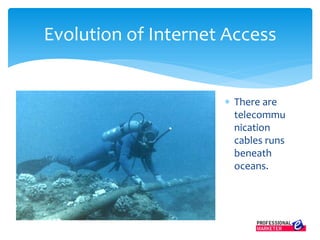
 There are
telecommu
nication
cables runs
beneath
oceans.
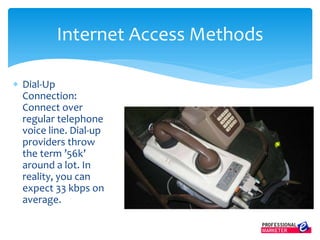
 Dial-Up
Connection:
Connect over
regular telephone
voice line. Dial-up
providers throw
the term ’56k’
around a lot. In
reality, you can
expect 33 kbps on
average.
Internet Access Methods
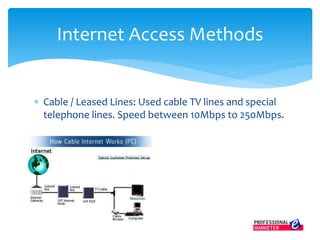
 Cable / Leased Lines: Used cable TV lines and special
telephone lines. Speed between 10Mbps to 250Mbps.
Internet Access Methods
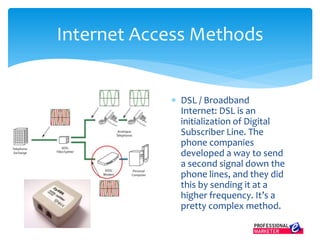
 DSL / Broadband
Internet: DSL is an
initialization of Digital
Subscriber Line. The
phone companies
developed a way to send
a second signal down the
phone lines, and they did
this by sending it at a
higher frequency. It’s a
pretty complex method.
Internet Access Methods
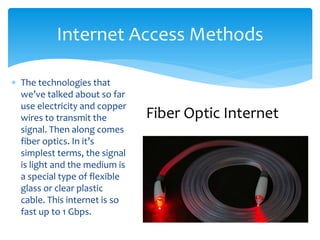
 The technologies that
we’ve talked about so far
use electricity and copper
wires to transmit the
signal. Then along comes
fiber optics. In it’s
simplest terms, the signal
is light and the medium is
a special type of flexible
glass or clear plastic
cable. This internet is so
fast up to 1 Gbps.
Internet Access Methods
Fiber Optic Internet
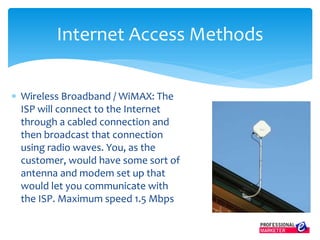
 Wireless Broadband / WiMAX: The
ISP will connect to the Internet
through a cabled connection and
then broadcast that connection
using radio waves. You, as the
customer, would have some sort of
antenna and modem set up that
would let you communicate with
the ISP. Maximum speed 1.5 Mbps
Internet Access Methods
 Mobile Internet (GPRS / 3G / 4G): This
is how you get the Internet on your
phone, USB stick, or PC cards that go
in your computer. Service providers
typically refer to it as Mobile Wireless
Broadband, even though the term
broadband isn’t technically being used
correctly. Speed with LTE service, up
to 150 Mbps, but more like 75 Mbps.
Internet Access Methods
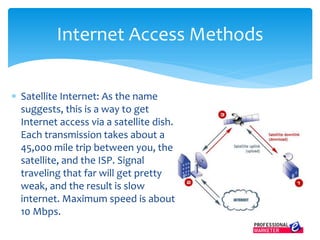
 Satellite Internet: As the name
suggests, this is a way to get
Internet access via a satellite dish.
Each transmission takes about a
45,000 mile trip between you, the
satellite, and the ISP. Signal
traveling that far will get pretty
weak, and the result is slow
internet. Maximum speed is about
10 Mbps.
Internet Access Methods
The Internet enters into Business
World. Game Changed…
 Computers were already a business tool as a page
processor and data processor.
 By the invention of email – business communication
got faster and cheaper
 Internet enable businesses to network with each
other.
 Internet grow faster and became a household facility.
 It is growing globally faster than anything.
 Net opportunities emerge.
Computer as a Business Tool
 The largest global market ever
 24/7 access – Better customer support and more
 Flexible market targeting options
 Inexpensive advertising
 Lots of things are available free
 Online lifestyle – in future living online
 Fastest communication
 Everyone is there in the internet
Internet: Many Opportunities for
Businesses
 In 1993, “Global Network Navigator” was the first
commercial website to sell a clickable ad (banner ad).
It was sold to the law firm “Heller Ehrman White &
McAuliffe”. GNN was basically an online information
portal that consisted of a news center and it also
acted as a product catalog.
Adverting on the Internet
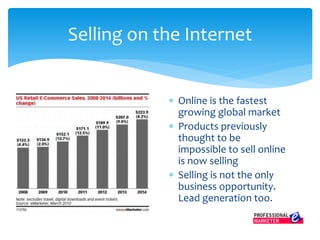
 Online is the fastest
growing global market
 Products previously
thought to be
impossible to sell online
is now selling
 Selling is not the only
business opportunity.
Lead generation too.
Selling on the Internet
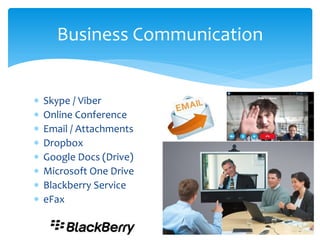
 Skype / Viber
 Online Conference
 Email / Attachments
 Dropbox
 Google Docs (Drive)
 Microsoft One Drive
 Blackberry Service
 eFax
Business Communication
 Website FAQ
 Online Knowledge Bases
(support.software.dell.com/kb-product-select)
 Community Discussion Forums
(supportforums.cisco.com)
 Online Chat (Zopim, Olark) – Eg: Namecheap.com
 BPO / Call Centers – VoIP Lines
 Remote Assistance (Remote Desktop / Team Viewer)
Customer Support
 Online ERP software
 Cloud Applications / Services
 Recruitment and Training
 Work from Home
 Content Delivery / Downloads
 Order Processing
 Online Payment Gateways
 Online Recognition / Branding, etc.
Internet for Operations
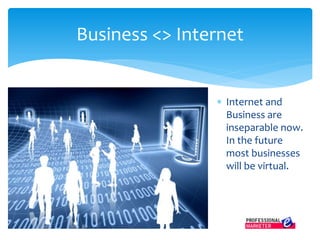
 Internet and
Business are
inseparable now.
In the future
most businesses
will be virtual.
Business <> Internet
In the next lesson we are going to compare and discuss
about traditional marketing and eMarketing.
Next…
More Lessons and Video Tutorials at
www.professionalemarketer.com

Evolution of Internet and Online Marketing (M1L2P1: Professional eMarketer)

  • 1.
    Evolution of TheInternet and Online Marketing Professional eMarketer www.professionalemarketer.com Presented by Susantha Herath PGD in Marketing (KLN), PGD in IT (UK) MODULE 01 : LESSON 02
  • 2.
     Learning Objectives Understand what is internet and how it developed as a global network.  Learn about ISPs and internet accessing methods  Understand how internet works  Learn about how internet and business world joined together and developed into E-Marketing as a subject  Understand different technical terms commonly used and how they works Introduction
  • 3.
     Internet isa global computer network providing a variety of information and communication facilities, consisting of interconnected networks using standardized communication protocols.  What is a Protocol? What is Internet?
  • 4.
     Internet isa global network of computers and devices  Internet is owned by “NO ONE”  Small home and corporate networks connect each other and formed country level networks and country network connect to other countries.  Countries are connected with under sea cables and satellites.  There are protocols for these connections! What is Internet?
  • 5.
    Evolution of theInternet Evolution of the internet is complex as itself.
  • 6.
     1969 ARPANETCreated  1971 E-Mail invented at ARPANET (15 Computers)  1972 First public demonstrated of ARPANET  1982 Invention of word “Internet” and TCP/IP  1990 Invention of WWW by Tim Barnes Lee  1991 Invention of first web browser  1992 26 servers operational world wide. The term “Surfing the Internet” declared by Jean Armour Polly The Story in Brief
  • 7.
    Tim Barnes Lee: Theinventor of the World Wide Web (WWW) and Hyper Text Markup Language (HTML) The Story in Brief
  • 8.
    Jean Armour Polly: Declaredthe name “Surfing the Internet” The Story in Brief Doug Engelbart prototypes an "oNLine System" (NLS) which does hypertext browsing and editing. He invents the mouse for this purpose.
  • 9.
    1993 The TurningPoint: The year it all changed. January: about 50 HTTP servers and about 600 WWW sites on line; WWW traffic measures 0.1% of the National Science Foundation's (NSF) backbone traffic. April 30: Declaration that WWW technology would be freely usable by anyone, with no fees. September: Working versions of Mosaic browser for X, PC/Windows and Macintosh. The Story in Brief
  • 10.
     1994 –10,000 websites  1195 – 100,000 websites. Main theme for G7 meeting. The Story in Brief
  • 11.
     1996 Over500,000 WWW Sites. Microsoft enters. Internet phones arrive.  1997 Over 1,300,000 WWW Sites. Streaming media available.  1998 Over 3,300,000 WWW Sites. Web size estimated at about 300,000,000 pages. E-Commerce, E-Auctions, Portals; E-trading begins.  1999 Over 9,500,000 WWW Sites. E-Trade, Online Banking, MP3 popular.  2000 Over 22,000,000 WWW Sites. Estimated 6 billion people on line. Wireless technologies maturing.  2001 Over 575,000,000 WWW sites by January, estimated 1.4 billion pages. Broadband high speed access enters mainstream The Story in Brief
  • 12.
     168 Million Emails 694,445 Searches in Google  70+ New Websites  600+ New YouTube Videos  695,000+ Facebook Status Updates Today in 60 seconds…
  • 13.
  • 15.
    Evolution of InternetAccess  If internet is owned by “no one” and it is a global network, why can’t we access it free just by connecting a cable?  The reason is ISPs?  ISP stand for Internet Service Provider  Why need an ISP to connect to the internet?  ISPs invest and create necessary infrastructures and facilities to connect with other countries. These investments are HUGE.
  • 16.
    Evolution of InternetAccess  ISPs need to lay cables underneath the ocean and hire satellites  So they charge from users to recover investments and earn profit. It is telecommunication business!  Furthermore ISPs protects the internet and implement rules on users.  ISPs plays major part in internet security
  • 17.
    Evolution of InternetAccess  There are telecommu nication cables runs beneath oceans.
  • 18.
     Dial-Up Connection: Connect over regulartelephone voice line. Dial-up providers throw the term ’56k’ around a lot. In reality, you can expect 33 kbps on average. Internet Access Methods
  • 19.
     Cable /Leased Lines: Used cable TV lines and special telephone lines. Speed between 10Mbps to 250Mbps. Internet Access Methods
  • 20.
     DSL /Broadband Internet: DSL is an initialization of Digital Subscriber Line. The phone companies developed a way to send a second signal down the phone lines, and they did this by sending it at a higher frequency. It’s a pretty complex method. Internet Access Methods
  • 21.
     The technologiesthat we’ve talked about so far use electricity and copper wires to transmit the signal. Then along comes fiber optics. In it’s simplest terms, the signal is light and the medium is a special type of flexible glass or clear plastic cable. This internet is so fast up to 1 Gbps. Internet Access Methods Fiber Optic Internet
  • 22.
     Wireless Broadband/ WiMAX: The ISP will connect to the Internet through a cabled connection and then broadcast that connection using radio waves. You, as the customer, would have some sort of antenna and modem set up that would let you communicate with the ISP. Maximum speed 1.5 Mbps Internet Access Methods
  • 23.
     Mobile Internet(GPRS / 3G / 4G): This is how you get the Internet on your phone, USB stick, or PC cards that go in your computer. Service providers typically refer to it as Mobile Wireless Broadband, even though the term broadband isn’t technically being used correctly. Speed with LTE service, up to 150 Mbps, but more like 75 Mbps. Internet Access Methods
  • 24.
     Satellite Internet:As the name suggests, this is a way to get Internet access via a satellite dish. Each transmission takes about a 45,000 mile trip between you, the satellite, and the ISP. Signal traveling that far will get pretty weak, and the result is slow internet. Maximum speed is about 10 Mbps. Internet Access Methods
  • 25.
    The Internet entersinto Business World. Game Changed…
  • 26.
     Computers werealready a business tool as a page processor and data processor.  By the invention of email – business communication got faster and cheaper  Internet enable businesses to network with each other.  Internet grow faster and became a household facility.  It is growing globally faster than anything.  Net opportunities emerge. Computer as a Business Tool
  • 27.
     The largestglobal market ever  24/7 access – Better customer support and more  Flexible market targeting options  Inexpensive advertising  Lots of things are available free  Online lifestyle – in future living online  Fastest communication  Everyone is there in the internet Internet: Many Opportunities for Businesses
  • 28.
     In 1993,“Global Network Navigator” was the first commercial website to sell a clickable ad (banner ad). It was sold to the law firm “Heller Ehrman White & McAuliffe”. GNN was basically an online information portal that consisted of a news center and it also acted as a product catalog. Adverting on the Internet
  • 29.
     Online isthe fastest growing global market  Products previously thought to be impossible to sell online is now selling  Selling is not the only business opportunity. Lead generation too. Selling on the Internet
  • 30.
     Skype /Viber  Online Conference  Email / Attachments  Dropbox  Google Docs (Drive)  Microsoft One Drive  Blackberry Service  eFax Business Communication
  • 31.
     Website FAQ Online Knowledge Bases (support.software.dell.com/kb-product-select)  Community Discussion Forums (supportforums.cisco.com)  Online Chat (Zopim, Olark) – Eg: Namecheap.com  BPO / Call Centers – VoIP Lines  Remote Assistance (Remote Desktop / Team Viewer) Customer Support
  • 32.
     Online ERPsoftware  Cloud Applications / Services  Recruitment and Training  Work from Home  Content Delivery / Downloads  Order Processing  Online Payment Gateways  Online Recognition / Branding, etc. Internet for Operations
  • 33.
     Internet and Businessare inseparable now. In the future most businesses will be virtual. Business <> Internet
  • 34.
    In the nextlesson we are going to compare and discuss about traditional marketing and eMarketing. Next… More Lessons and Video Tutorials at www.professionalemarketer.com