PRESENTED BY :Chetan,Punit,Gurpal
2012,2017,2018
INTRODUCTION TO INTERNET
What is the Internet?
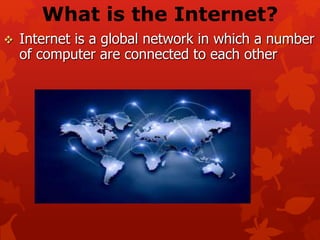
 Internet is a global network in which a number
of computer are connected to each other
Why we use the Internet?
Important Terminologies
 Extranet
 INTRANET
 INTERNET
 WWW
 INTERNETWORK
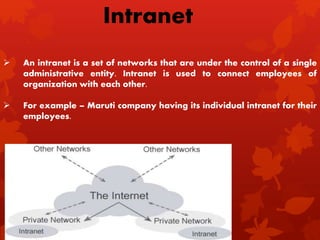
 An intranet is a set of networks that are under the control of a single
administrative entity. Intranet is used to connect employees of
organization with each other.
 For example – Maruti company having its individual intranet for their
employees.
Intranet
 An extranet is a private network that uses Internet technology and
the public telecommunication system to securely share part of a
business's information with suppliers, partners, customers, or other
businesses.
Extranet
• Difference Between Extranet And Intranet
 The main difference between an intranet and an extranet is
that the intranet is the network that is limited for use on the
organizations computers, whereas the extranet is an
extension of the company’s intranet.
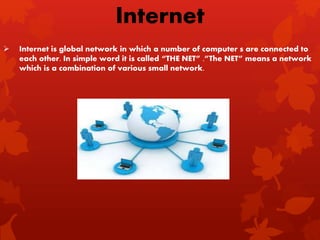
 Internet is global network in which a number of computer s are connected to
each other. In simple word it is called “THE NET” .”The NET” means a network
which is a combination of various small network.
Internet
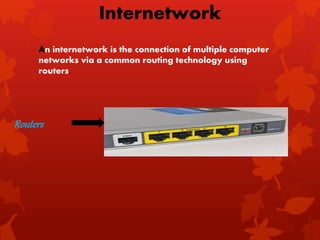
An internetwork is the connection of multiple computer
networks via a common routing technology using
routers.
Internetwork
Routers
 THE WORLD WIDE WEB or WWW or WEB is a method of accessing the
information over the medium of the internet. Its is used for getting
webpage availble over server.
WWW(world wide web)
Back to
Web Browser
A web-based program that displays the Internet
Common Web Browsers
Safari: for Apples
Internet Explorer: for Windows only
Other Web Browsers
 Google Chrome: created by Google
 Mozilla Firefox: works on Mac & PC
In the mid-1960’s most of the research organization used mainframe
computer which were standalone device. The computer manufactured by
different companies were unable to communicate with one another. The
U.S Department of Defense(DoD) started Advanced Research Projects Agency(ARPA) in
1957 whose main aim was to find a way to connect computer .
This resulted in the development of a small network of connected
computer ,called ARPAnet in 1969. It made use of a new packet switching
concept for inter-connecting computer that initially linked computer at
universities, military organization, government agencies and other
research institutions in united states.
History of Internet
How to connect to the Internet
 Three main ways to connect to the
Internet
1. Dial-Up
2. High Speed/DSL
3. Wireless Connection (Wi-Fi)
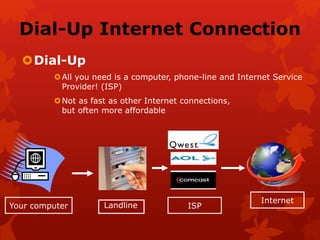
Dial-Up Internet Connection
Dial-Up
All you need is a computer, phone-line and Internet Service
Provider! (ISP)
Not as fast as other Internet connections,
but often more affordable
ISP
Internet
Your computer Landline
High Speed (Cable/DSL)Internet Connection
 Travels through fiber-optic cables underground
 Needs to be connected by a Modem to your computer
 Modem: A hub that connects the computer to
the Internet
 Faster than Dial-up
Wireless Internet Connection (Wi-Fi)
 Your computer must be a
“Wireless enabled” device
 Your computer can pick up signals
from different wireless networks
 Some networks require passwords
or a subscription, others are free
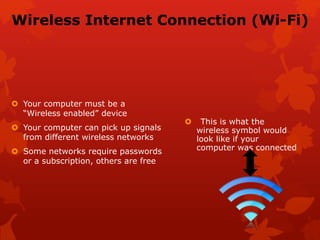
 This is what the
wireless symbol would
look like if your
computer was connected
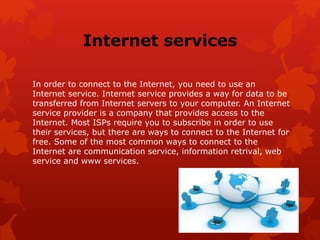
Internet services
In order to connect to the Internet, you need to use an
Internet service. Internet service provides a way for data to be
transferred from Internet servers to your computer. An Internet
service provider is a company that provides access to the
Internet. Most ISPs require you to subscribe in order to use
their services, but there are ways to connect to the Internet for
free. Some of the most common ways to connect to the
Internet are communication service, information retrival, web
service and www services.
Communication services
 A communications service provider or CSP a service
provider that transports information electronically, for
example a telecommunications service provider. The term
encompasses public and private companies in
the telecom (landline and wireless), Internet, cable, satell
ite, and managed services businesses
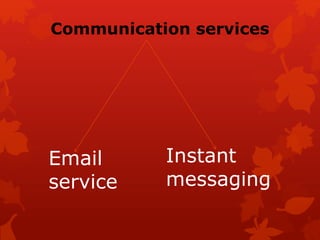
Communication services
Email
service
Instant
messaging
Email service
E-mail stand for electronic mail. It is very helpful method on the
internet to exchange the message to all over the world. We can
say it is exchange of electronic message between computer that
are connected to internet .
Instant messaging
Abbreviated IM, a type of communications service that enables
you to create a kind of private chat room with another
individual in order to communicate in real time over
the Internet, analogous to a telephone conversation but
using text-based, not voice-based, communication. Typically,
the instant messaging system alerts you whenever somebody
on your private list is online. You can then initiate a chat
session with that particular individual.
Information Retrieval
Information retrieval is the activity of
obtaining information resources relevant to an
information need from a collection of information
resources. Searches can be based on metadata or on
full-text (or other content-based) indexing.
Example – FTP, Telnet , Remote Logins
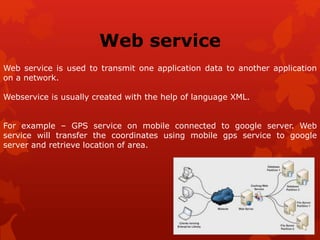
Web service
Web service is used to transmit one application data to another application
on a network.
Webservice is usually created with the help of language XML.
For example – GPS service on mobile connected to google server. Web
service will transfer the coordinates using mobile gps service to google
server and retrieve location of area.
World wide web(WWW)
<back>
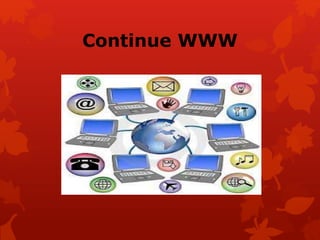
Continue WWW
ADVANTAGES OF INTERNET
Powerful search engines.
Ability to do research from your home versus research
libraries.
 Information at various levels of study. Everything from
scholarly articles to ones directed at children.
Message boards where people can discuss ideas on any
topic. Ability to get wide range of opinions. People can
find others that have a similar interest in whatever they
are interested in.
The internet provides the ability of emails. Free mail
service to anyone in the country.
Platform for products like SKYPE, which allow for
holding a video conference with anyone in the world who
also has access.
Things such as Yahoo Answers and other sites where
kids can have readily available help for homework
Disadvantages of internet
 There is a lot of wrong information on the internet. Anyone can
post anything, and much of it is garbage.
 There are predators that hang out on the internet waiting to get
unsuspecting people in dangerous situations.
 Some people are getting addicted to the internet and thus causing
problems with their interactions of friends and loved ones.
 It can be quite depressing to be on the internet and realize just
how uneducated so many people have become in today 's society
There are a lot of unscrupulous businesses that have
sprung up on the internet to take advantage of people.
Hackers can create viruses that can get into your
personal computer and ruin valuable data.
Hackers can use the internet for identity theft.
internet ,

internet ,

  • 1.
  • 2.
    What is theInternet?  Internet is a global network in which a number of computer are connected to each other
  • 3.
    Why we usethe Internet?
  • 4.
    Important Terminologies  Extranet INTRANET  INTERNET  WWW  INTERNETWORK
  • 5.
     An intranetis a set of networks that are under the control of a single administrative entity. Intranet is used to connect employees of organization with each other.  For example – Maruti company having its individual intranet for their employees. Intranet
  • 6.
     An extranetis a private network that uses Internet technology and the public telecommunication system to securely share part of a business's information with suppliers, partners, customers, or other businesses. Extranet • Difference Between Extranet And Intranet  The main difference between an intranet and an extranet is that the intranet is the network that is limited for use on the organizations computers, whereas the extranet is an extension of the company’s intranet.
  • 7.
     Internet isglobal network in which a number of computer s are connected to each other. In simple word it is called “THE NET” .”The NET” means a network which is a combination of various small network. Internet
  • 8.
    An internetwork isthe connection of multiple computer networks via a common routing technology using routers. Internetwork Routers
  • 9.
     THE WORLDWIDE WEB or WWW or WEB is a method of accessing the information over the medium of the internet. Its is used for getting webpage availble over server. WWW(world wide web) Back to
  • 10.
    Web Browser A web-basedprogram that displays the Internet Common Web Browsers Safari: for Apples Internet Explorer: for Windows only
  • 11.
    Other Web Browsers Google Chrome: created by Google  Mozilla Firefox: works on Mac & PC
  • 12.
    In the mid-1960’smost of the research organization used mainframe computer which were standalone device. The computer manufactured by different companies were unable to communicate with one another. The U.S Department of Defense(DoD) started Advanced Research Projects Agency(ARPA) in 1957 whose main aim was to find a way to connect computer . This resulted in the development of a small network of connected computer ,called ARPAnet in 1969. It made use of a new packet switching concept for inter-connecting computer that initially linked computer at universities, military organization, government agencies and other research institutions in united states. History of Internet
  • 13.
    How to connectto the Internet  Three main ways to connect to the Internet 1. Dial-Up 2. High Speed/DSL 3. Wireless Connection (Wi-Fi)
  • 14.
    Dial-Up Internet Connection Dial-Up Allyou need is a computer, phone-line and Internet Service Provider! (ISP) Not as fast as other Internet connections, but often more affordable ISP Internet Your computer Landline
  • 15.
    High Speed (Cable/DSL)InternetConnection  Travels through fiber-optic cables underground  Needs to be connected by a Modem to your computer  Modem: A hub that connects the computer to the Internet  Faster than Dial-up
  • 16.
    Wireless Internet Connection(Wi-Fi)  Your computer must be a “Wireless enabled” device  Your computer can pick up signals from different wireless networks  Some networks require passwords or a subscription, others are free  This is what the wireless symbol would look like if your computer was connected
  • 17.
    Internet services In orderto connect to the Internet, you need to use an Internet service. Internet service provides a way for data to be transferred from Internet servers to your computer. An Internet service provider is a company that provides access to the Internet. Most ISPs require you to subscribe in order to use their services, but there are ways to connect to the Internet for free. Some of the most common ways to connect to the Internet are communication service, information retrival, web service and www services.
  • 18.
    Communication services  Acommunications service provider or CSP a service provider that transports information electronically, for example a telecommunications service provider. The term encompasses public and private companies in the telecom (landline and wireless), Internet, cable, satell ite, and managed services businesses
  • 19.
  • 20.
    Email service E-mail standfor electronic mail. It is very helpful method on the internet to exchange the message to all over the world. We can say it is exchange of electronic message between computer that are connected to internet .
  • 21.
    Instant messaging Abbreviated IM,a type of communications service that enables you to create a kind of private chat room with another individual in order to communicate in real time over the Internet, analogous to a telephone conversation but using text-based, not voice-based, communication. Typically, the instant messaging system alerts you whenever somebody on your private list is online. You can then initiate a chat session with that particular individual.
  • 22.
    Information Retrieval Information retrievalis the activity of obtaining information resources relevant to an information need from a collection of information resources. Searches can be based on metadata or on full-text (or other content-based) indexing. Example – FTP, Telnet , Remote Logins
  • 23.
    Web service Web serviceis used to transmit one application data to another application on a network. Webservice is usually created with the help of language XML. For example – GPS service on mobile connected to google server. Web service will transfer the coordinates using mobile gps service to google server and retrieve location of area.
  • 24.
  • 25.
  • 26.
    ADVANTAGES OF INTERNET Powerfulsearch engines. Ability to do research from your home versus research libraries.  Information at various levels of study. Everything from scholarly articles to ones directed at children. Message boards where people can discuss ideas on any topic. Ability to get wide range of opinions. People can find others that have a similar interest in whatever they are interested in.
  • 27.
    The internet providesthe ability of emails. Free mail service to anyone in the country. Platform for products like SKYPE, which allow for holding a video conference with anyone in the world who also has access. Things such as Yahoo Answers and other sites where kids can have readily available help for homework
  • 28.
    Disadvantages of internet There is a lot of wrong information on the internet. Anyone can post anything, and much of it is garbage.  There are predators that hang out on the internet waiting to get unsuspecting people in dangerous situations.  Some people are getting addicted to the internet and thus causing problems with their interactions of friends and loved ones.  It can be quite depressing to be on the internet and realize just how uneducated so many people have become in today 's society
  • 29.
    There are alot of unscrupulous businesses that have sprung up on the internet to take advantage of people. Hackers can create viruses that can get into your personal computer and ruin valuable data. Hackers can use the internet for identity theft.