
www.learningfactory.ne   graeme.hodgson@learningfactory.net
What to expect

   •Common myths
   •Interesting facts
   •Types of hardware
   •Kinds of activity
   •Real life examples
   •Evaluating m-learning tools


www.learningfactory.ne            graeme.hodgson@learningfactory.net
Common myths
   •M-learning is all about mobile phones
   •Ss need state-of-the art technology
   •Only works with teens
   •Focus is on technology not learning
   •Every S must have their own device
   •Too expensive

   In other words…

   •M-learning uses anything portable!
   •Ss can use whatever is at hand
   •Any age group can benefit
   •No prior knowledge needed
   •Learning is S-centred and collaborative
   •Ss can use own or share institutional
   equipment in pairs/groups
   •Most technologies have no usage cost


www.learningfactory.ne                        graeme.hodgson@learningfactory.net
Some interesting facts
  •There are now 5 billion global mobile
  users and 20% of them use their phone
  to access the web (1 billion!);

  •Some African regions have 100% mobile
  phone penetration and many countries
  have jumped the PC generation;

  •Brazil has 205 million mobile phones
  (against population of 193 million);

  •more than 35 percent of the global
  workforce will be considered mobile
  workers by 2013 — some 1.3 billion;


www.learningfactory.ne                     graeme.hodgson@learningfactory.net
Types of Hardware
•Radio
•CD-ROM
•Flash drive
•Digital camera
•Mobile phone (sms only)
•Laptop
•Digital voice recorder
•Netbook
•iPod or MP3/MP4 player
•Smart phone (iPhone etc)
•Reader e.g. Kindle
•Tablet e.g. i-Pad


www.learningfactory.ne      graeme.hodgson@learningfactory.net
The 2011 Horizon Report
  •According to an Ericsson Study:
          • By 2015, 80% of people accessing the Internet will be doing so from
             mobile devices.
          • Internet-capable mobile devices will outnumber computers within
             the next year.
          • In Japan, over 75% of Internet users already use a mobile as their first
             choice for access.;
  •Mobiles embody the convergence of several technologies that lend
  themselves to educational use, including electronic book readers, annotation
  tools, applications for creation and composition, and social networking tools.
  •Poll Everywhere, turns mobiles into personal response systems, enabling
  teachers to quiz students, assess their understanding before, during, and after
  a lesson, and reveal patterns of thinking in the classroom. Any mobile will work
  for these purposes; all that is required is the ability to send text (SMS)
  messages.


www.culturainglesa.net                                 graeme.hodgson@learningfactory.net
www.learningfactory.ne   graeme.hodgson@learningfactory.net
Watch votes as they are
  received in real time


www.learningfactory.ne      graeme.hodgson@learningfactory.net
Kinds of activity
  •Brief interactions (5 mins or less) for
  quick review e.g. status check, request
  for just-in-time info or as student
  response tool in class.
  •M-Learning Projects (may use
  multiple applications include mobile
  cam) to complete assignments.
  •Collaborative elements or game play
  •Social networking, calendars,
  calculators, simulated reality.
  •Data collection or application of
  location-based info e.g. checking a
  map to see if project team members
  are nearby.


www.learningfactory.ne                       graeme.hodgson@learningfactory.net
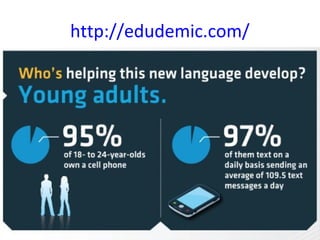
http://edudemic.com/
Shelly’s Tips - http://shellyterrell.com/
     Mobile learning is effective when...

     Learners choose the learning content.
     Learners are integrating artifacts, realia, objects, and
     experiences that surround their daily lives (real world learning).
     Learners are moving around with the device.
     Learners are motivated to expand the learning outside the
     classroom walls.
     Learners work collaboratively to explore the world around
     them.
     Learners are motivated to search for several possible options,
     solutions, and answers to problems.
     Learners are presented with problems in which they must
     find many possible solutions and are able to test out these
     solutions.


www.learningfactory.ne                                  graeme.hodgson@learningfactory.net
Shelly’s Tips - http://shellyterrell.com/
BYOD/BYOT: The Bring Your Own Devices/Technology
Movement
Create a code of conduct with the learners to ensure guidelines
are followed.
Get parents on board and have them sign Acceptable Use
Policies (AUPs).
Have a safe place where students can lock up the devices during
the school day.
Plan to collect the devices then distribute them when they will
be used. Each device must be labeled properly with the student's
first and last name.
Discover what various types of mobile devices learners have by
hosting a Mobile Device Show and Tell. Students will each share
what their device does by creating a presentation of their favorite
hobby, describing their family, or telling a story.
If some students lack devices, consider fundraising or asking the
other parents to contribute to a fund to get every student a
device.
www.learningfactory.ne                                graeme.hodgson@learningfactory.net
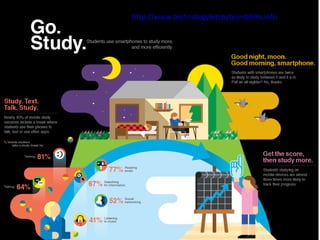
http://www.technologybitsbytesnibbles.info
Transactional Distance Model (Park, 2011)


     Transactional distance is the extent of psychological separation
     between the learner and the instructor (Shearer, 2007).

www.learningfactory.ne                                      graeme.hodgson@learningfactory.net
http://www.scoop.it/t/digital-integration-ci

www.learningfactory.ne                                         graeme.hodgson@learningfactory.net
Personalisation
  Linking m-Learning activity to coursebook content

  Inviting someone
  Use Cultura's mobile to send a text message to someone in the class, inviting him or her
  to a party at Cultura.

  Let's throw a bash!
  Bring some food/ drinks AND YOUR MOBILE to a cool party at Cultura! Use the camera to
  take photos of the party!

  Debriefing session
  Use your mobile to record your impressions on the party! Send your recording to your
  teacher via bluetooth.

                                  - Xavier & da Costa (2010), Cultura Inglesa Rio de Janeiro


www.learningfactory.ne                                      graeme.hodgson@learningfactory.net
Sending links and comparing registers
  SMS texting to 16-19 year-olds:

  Task 1 – T sent sms in English, inviting Ss to watch Shania Twain video “Ka-ching “ (
  http://www.youtube.com/watch?v=I42c6RP04xU)

  Task 2 – T sent sms in Txtng English, asking if Ss preferred spending money on frivolities
  or on travel.

  Classroom discussion about the video and comparison of sms English with more formal
  register in office environment.

                                          - Villas-Bôas (2010), Cultura Inglesa Rio de Janeiro


www.learningfactory.ne                                       graeme.hodgson@learningfactory.net
Homework
  SMS Scavenger Hunt with teens

  Ss divided into 3 groups; T sent sms with instructions to one member of group; this S
  sent sms to other group members. Letter sent to parents to explain the use of this tool.

  8 tasks: (i) Pls brn songs w so+adj; (ii) Pls brn songs w any food word; (iii) Pls brn songs w
  a celebrity name; (iv) find ex of pres perf in the txt and justify its use [Ss given copy of
  magazine page]; (v) Pls brn songs about films; (vi) Pls brn ex of SMS language; (vii) Pls
  write a film review 4 nxt class; (viii) Pls brn titles spooky films.

                           - Gisele Grangé Levy Teles Barbosa, Cultura Inglesa Rio de Janeiro


www.learningfactory.ne                                         graeme.hodgson@learningfactory.net
Digital Integration – Camila Santos, 2012
  “My Junior A class (aged 9-10) had just learned how to ask and answer questions about
  people’s possessions using “whose”. They had also learned some parts of the body the
  previous week. The initial idea was to make them use their own phones but some of
  them did not have them there so I used my mobile. I showed them a video on the board
  in order to catch their attention for some minutes while I was taking pictures of some
  parts of their bodies, one student at a time behind the group so that the others could
  not see. Then, I presented one of the pictures I had just taken and asked them, for
  example, “whose arm is that?” and they answered “it’s Camila’s, oh no...it’s Jessica’s”
  and so on. After I modeled, they were able to ask their friends by themselves. It was
  funny and very fruitful as they laughed every time they saw a picture of themselves. If I
  had had more time the following class, I would have repeated this activity but with their
  phones (or with somebody’s mobile if they did not have one). All in all, it was a great
  experience! =)”

                  http://www.scoop.it/t/digital-integration-ci


www.learningfactory.ne                                           graeme.hodgson@learningfactory.net
Mobile Glossaries

  “Another simple and effective way of using the mobiles in class is
  to create mobile glossaries. In one class, I asked the students to
  use the “notes” application in their mobiles/iPods to keep record
  of new words (and also example sentences). After we had done
  that the first time, many of them started doing this naturally, and
  used the application to take notes not only on vocabulary, but also
  on grammar and homework. ”

                         - Maria do Carmo Xavier, Cultura Inglesa Rio
                          http://digitalimmersion2011.weebly.com/mobiles.html


www.learningfactory.ne                            graeme.hodgson@learningfactory.net
Sue Lyon-Jones’ Criteria


www.learningfactory.ne       graeme.hodgson@learningfactory.net
References
  •Baldwin, C. (2011), British Council
       http://www.teachingenglish.org.uk/try/tips/mobile-learning
  •Caroll, D. (2011), Learning through digital media
       http://learningthroughdigitalmedia.net/
  •Chief Learning Officer Magazine
       http://clomedia.com/articles/view/mobile-learning-the-next-evolution
  •Digital Immersion Project, Cultura Inglesa Rio de Janeiro
       http://digitalimmersion.weebly.com/mobile.html
  •Hockly, N., e-Moderation Station
       http://www.emoderationskills.com/?tag=mobile
  •Horizon Report on Mobile Phones
       http://wp.nmc.org/horizon2011/sections/mobiles/
  •LearnEnglish (2011), British Council
       http://learnenglish.britishcouncil.org/en/mobile-learning
  •Lyon-Jones, S (2011), PLN Staff Lounge
       http://the-pln-staff-lounge.blogspot.com/search/label/%C2%A9%20Sue%20Lyon-
  Jones
  •Park, Y. A Pedagogical Framework for Mobile Learning
       http://www.irrodl.org/index.php/irrodl/rt/printerFriendly/791/1699
  •Stanley, G. (2011), EFL Blogspot
       http://blog-efl.blogspot.com/
www.learningfactory.ne                                       graeme.hodgson@learningfactory.net
www.learningfactory.ne   graeme.hodgson@learningfactory.net
Thank you!


              www.learningfactory.net

www.learningfactory.ne            graeme.hodgson@learningfactory.net

M learning bt belem

  • 1.
    www.learningfactory.ne graeme.hodgson@learningfactory.net
  • 2.
    What to expect •Common myths •Interesting facts •Types of hardware •Kinds of activity •Real life examples •Evaluating m-learning tools www.learningfactory.ne graeme.hodgson@learningfactory.net
  • 3.
    Common myths •M-learning is all about mobile phones •Ss need state-of-the art technology •Only works with teens •Focus is on technology not learning •Every S must have their own device •Too expensive In other words… •M-learning uses anything portable! •Ss can use whatever is at hand •Any age group can benefit •No prior knowledge needed •Learning is S-centred and collaborative •Ss can use own or share institutional equipment in pairs/groups •Most technologies have no usage cost www.learningfactory.ne graeme.hodgson@learningfactory.net
  • 4.
    Some interesting facts •There are now 5 billion global mobile users and 20% of them use their phone to access the web (1 billion!); •Some African regions have 100% mobile phone penetration and many countries have jumped the PC generation; •Brazil has 205 million mobile phones (against population of 193 million); •more than 35 percent of the global workforce will be considered mobile workers by 2013 — some 1.3 billion; www.learningfactory.ne graeme.hodgson@learningfactory.net
  • 5.
    Types of Hardware •Radio •CD-ROM •Flashdrive •Digital camera •Mobile phone (sms only) •Laptop •Digital voice recorder •Netbook •iPod or MP3/MP4 player •Smart phone (iPhone etc) •Reader e.g. Kindle •Tablet e.g. i-Pad www.learningfactory.ne graeme.hodgson@learningfactory.net
  • 6.
    The 2011 HorizonReport •According to an Ericsson Study: • By 2015, 80% of people accessing the Internet will be doing so from mobile devices. • Internet-capable mobile devices will outnumber computers within the next year. • In Japan, over 75% of Internet users already use a mobile as their first choice for access.; •Mobiles embody the convergence of several technologies that lend themselves to educational use, including electronic book readers, annotation tools, applications for creation and composition, and social networking tools. •Poll Everywhere, turns mobiles into personal response systems, enabling teachers to quiz students, assess their understanding before, during, and after a lesson, and reveal patterns of thinking in the classroom. Any mobile will work for these purposes; all that is required is the ability to send text (SMS) messages. www.culturainglesa.net graeme.hodgson@learningfactory.net
  • 7.
    www.learningfactory.ne graeme.hodgson@learningfactory.net
  • 8.
    Watch votes asthey are received in real time www.learningfactory.ne graeme.hodgson@learningfactory.net
  • 9.
    Kinds of activity •Brief interactions (5 mins or less) for quick review e.g. status check, request for just-in-time info or as student response tool in class. •M-Learning Projects (may use multiple applications include mobile cam) to complete assignments. •Collaborative elements or game play •Social networking, calendars, calculators, simulated reality. •Data collection or application of location-based info e.g. checking a map to see if project team members are nearby. www.learningfactory.ne graeme.hodgson@learningfactory.net
  • 11.
  • 12.
    Shelly’s Tips -http://shellyterrell.com/ Mobile learning is effective when... Learners choose the learning content. Learners are integrating artifacts, realia, objects, and experiences that surround their daily lives (real world learning). Learners are moving around with the device. Learners are motivated to expand the learning outside the classroom walls. Learners work collaboratively to explore the world around them. Learners are motivated to search for several possible options, solutions, and answers to problems. Learners are presented with problems in which they must find many possible solutions and are able to test out these solutions. www.learningfactory.ne graeme.hodgson@learningfactory.net
  • 13.
    Shelly’s Tips -http://shellyterrell.com/ BYOD/BYOT: The Bring Your Own Devices/Technology Movement Create a code of conduct with the learners to ensure guidelines are followed. Get parents on board and have them sign Acceptable Use Policies (AUPs). Have a safe place where students can lock up the devices during the school day. Plan to collect the devices then distribute them when they will be used. Each device must be labeled properly with the student's first and last name. Discover what various types of mobile devices learners have by hosting a Mobile Device Show and Tell. Students will each share what their device does by creating a presentation of their favorite hobby, describing their family, or telling a story. If some students lack devices, consider fundraising or asking the other parents to contribute to a fund to get every student a device. www.learningfactory.ne graeme.hodgson@learningfactory.net
  • 14.
  • 16.
    Transactional Distance Model(Park, 2011) Transactional distance is the extent of psychological separation between the learner and the instructor (Shearer, 2007). www.learningfactory.ne graeme.hodgson@learningfactory.net
  • 17.
  • 18.
    Personalisation Linkingm-Learning activity to coursebook content Inviting someone Use Cultura's mobile to send a text message to someone in the class, inviting him or her to a party at Cultura. Let's throw a bash! Bring some food/ drinks AND YOUR MOBILE to a cool party at Cultura! Use the camera to take photos of the party! Debriefing session Use your mobile to record your impressions on the party! Send your recording to your teacher via bluetooth. - Xavier & da Costa (2010), Cultura Inglesa Rio de Janeiro www.learningfactory.ne graeme.hodgson@learningfactory.net
  • 19.
    Sending links andcomparing registers SMS texting to 16-19 year-olds: Task 1 – T sent sms in English, inviting Ss to watch Shania Twain video “Ka-ching “ ( http://www.youtube.com/watch?v=I42c6RP04xU) Task 2 – T sent sms in Txtng English, asking if Ss preferred spending money on frivolities or on travel. Classroom discussion about the video and comparison of sms English with more formal register in office environment. - Villas-Bôas (2010), Cultura Inglesa Rio de Janeiro www.learningfactory.ne graeme.hodgson@learningfactory.net
  • 20.
    Homework SMSScavenger Hunt with teens Ss divided into 3 groups; T sent sms with instructions to one member of group; this S sent sms to other group members. Letter sent to parents to explain the use of this tool. 8 tasks: (i) Pls brn songs w so+adj; (ii) Pls brn songs w any food word; (iii) Pls brn songs w a celebrity name; (iv) find ex of pres perf in the txt and justify its use [Ss given copy of magazine page]; (v) Pls brn songs about films; (vi) Pls brn ex of SMS language; (vii) Pls write a film review 4 nxt class; (viii) Pls brn titles spooky films. - Gisele Grangé Levy Teles Barbosa, Cultura Inglesa Rio de Janeiro www.learningfactory.ne graeme.hodgson@learningfactory.net
  • 21.
    Digital Integration –Camila Santos, 2012 “My Junior A class (aged 9-10) had just learned how to ask and answer questions about people’s possessions using “whose”. They had also learned some parts of the body the previous week. The initial idea was to make them use their own phones but some of them did not have them there so I used my mobile. I showed them a video on the board in order to catch their attention for some minutes while I was taking pictures of some parts of their bodies, one student at a time behind the group so that the others could not see. Then, I presented one of the pictures I had just taken and asked them, for example, “whose arm is that?” and they answered “it’s Camila’s, oh no...it’s Jessica’s” and so on. After I modeled, they were able to ask their friends by themselves. It was funny and very fruitful as they laughed every time they saw a picture of themselves. If I had had more time the following class, I would have repeated this activity but with their phones (or with somebody’s mobile if they did not have one). All in all, it was a great experience! =)” http://www.scoop.it/t/digital-integration-ci www.learningfactory.ne graeme.hodgson@learningfactory.net
  • 22.
    Mobile Glossaries “Another simple and effective way of using the mobiles in class is to create mobile glossaries. In one class, I asked the students to use the “notes” application in their mobiles/iPods to keep record of new words (and also example sentences). After we had done that the first time, many of them started doing this naturally, and used the application to take notes not only on vocabulary, but also on grammar and homework. ” - Maria do Carmo Xavier, Cultura Inglesa Rio http://digitalimmersion2011.weebly.com/mobiles.html www.learningfactory.ne graeme.hodgson@learningfactory.net
  • 23.
    Sue Lyon-Jones’ Criteria www.learningfactory.ne graeme.hodgson@learningfactory.net
  • 24.
    References •Baldwin,C. (2011), British Council http://www.teachingenglish.org.uk/try/tips/mobile-learning •Caroll, D. (2011), Learning through digital media http://learningthroughdigitalmedia.net/ •Chief Learning Officer Magazine http://clomedia.com/articles/view/mobile-learning-the-next-evolution •Digital Immersion Project, Cultura Inglesa Rio de Janeiro http://digitalimmersion.weebly.com/mobile.html •Hockly, N., e-Moderation Station http://www.emoderationskills.com/?tag=mobile •Horizon Report on Mobile Phones http://wp.nmc.org/horizon2011/sections/mobiles/ •LearnEnglish (2011), British Council http://learnenglish.britishcouncil.org/en/mobile-learning •Lyon-Jones, S (2011), PLN Staff Lounge http://the-pln-staff-lounge.blogspot.com/search/label/%C2%A9%20Sue%20Lyon- Jones •Park, Y. A Pedagogical Framework for Mobile Learning http://www.irrodl.org/index.php/irrodl/rt/printerFriendly/791/1699 •Stanley, G. (2011), EFL Blogspot http://blog-efl.blogspot.com/ www.learningfactory.ne graeme.hodgson@learningfactory.net
  • 25.
    www.learningfactory.ne graeme.hodgson@learningfactory.net
  • 26.
    Thank you! www.learningfactory.net www.learningfactory.ne graeme.hodgson@learningfactory.net