Recycling Old Computers with LTSP $ whoami VU2SWX  aka Sunil TT College of Engineering  Attingal. Trivandrum  $ blogs   htttp://brainstorms.in http://unixlab.blogspot.com Catch me on Amateur  Radio  as  VU2SWX
Overview Brief introduction to LTSP Requirements for running LTSP Advantages and disadvantages links
What is LTSP? Linux Terminal Server Project Allows “thin” clients to connect to a Linux Terminal Server. All programs run on the server Clients run a thin Linux base with network and X session capabilities. LTSP allows for a single point of configuration and control Great for lab environments
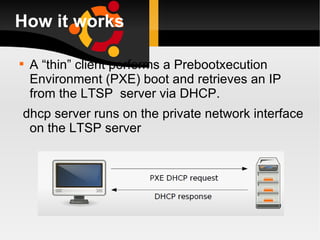
How it works A “thin” client performs a Prebootxecution Environment (PXE) boot and retrieves an IP from the LTSP  server via DHCP. dhcp server runs on the private network interface on the LTSP server
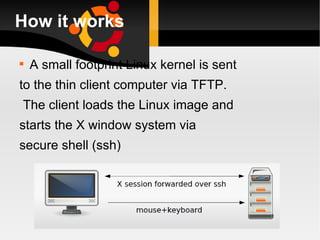
How it works A small footprint Linux kernel is sent to the thin client computer via TFTP. The client loads the Linux image and starts the X window system via secure shell (ssh)
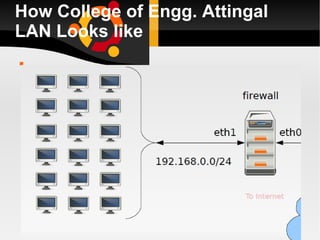
How College of Engg. Attingal LAN Looks like
What we have as server Server CPU should be powerful enough to run multiple X sessions. We have  Intel Xeon processor.  8 GB memory  160GB *3 sata hdd ( Raid) Running ubuntu 8.10
Our clients  Client Minimum Pentium II with 48 MB RAM and a 2M video card. Recommended  Pentium II and above with 64MB RAM and 4MB display card. Identical hardware preferred
Software A Linux distribution with or without LTSP included. Most distros except Ubuntu and Debian do not have LTSP 5 by default.
Software Four services running on the LTSP server: DHCP for IP address leases TFTP for initial netboot kernel NFS for forwarding filesystems SSH for all communication on the LAN
Networking Requirements Avoid Hubs 10-BaseT cards Preferred: 100 Mbps switch 100-BaseT cards Ideal: Gigabit switch. 100 Mbps switch with 1 Gbps uplink to the LTSP server.
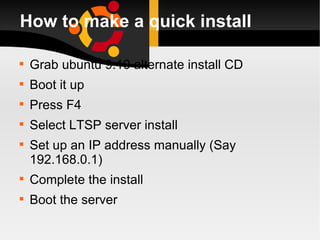
How to make a quick install Grab ubuntu 9.10 alternate install CD Boot it up  Press F4 Select LTSP server install Set up an IP address manually (Say 192.168.0.1) Complete the install Boot the server
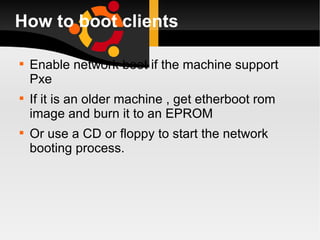
How to boot clients Enable network boot if the machine support Pxe If it is an older machine , get etherboot rom image and burn it to an EPROM  Or use a CD or floppy to start the network booting process.
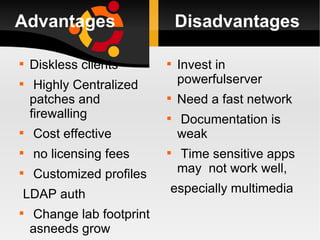
Advantages  Disadvantages Diskless clients Highly Centralized patches and firewalling Cost effective no licensing fees Customized profiles LDAP auth Change lab footprint asneeds grow Invest in powerfulserver Need a fast network Documentation is weak Time sensitive apps may  not work well, especially multimedia
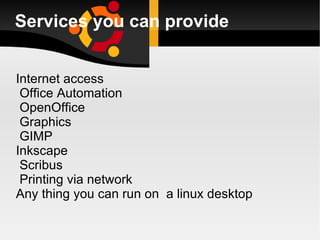
Services you can provide Internet access Office Automation OpenOffice Graphics GIMP Inkscape Scribus Printing via network  Any thing you can run on  a linux desktop
Links http:www.ltsp.org http://en.wikipedia.org/wiki/LTSP http:// www.edubuntu.org http://www.etherboot.org/
Questions ? VU2SWX  College of Engineering  Attingal. Trivandrum  Blogs  htttp://brainstorms.in http://unixlab.blogspot.com Twitter  @vu2swx Email  [email_address] Radio  vu2swx
Thank you

Ltsp

  • 1.
    Recycling Old Computerswith LTSP $ whoami VU2SWX aka Sunil TT College of Engineering Attingal. Trivandrum $ blogs htttp://brainstorms.in http://unixlab.blogspot.com Catch me on Amateur Radio as VU2SWX
  • 2.
    Overview Brief introductionto LTSP Requirements for running LTSP Advantages and disadvantages links
  • 3.
    What is LTSP?Linux Terminal Server Project Allows “thin” clients to connect to a Linux Terminal Server. All programs run on the server Clients run a thin Linux base with network and X session capabilities. LTSP allows for a single point of configuration and control Great for lab environments
  • 4.
    How it worksA “thin” client performs a Prebootxecution Environment (PXE) boot and retrieves an IP from the LTSP server via DHCP. dhcp server runs on the private network interface on the LTSP server
  • 5.
    How it worksA small footprint Linux kernel is sent to the thin client computer via TFTP. The client loads the Linux image and starts the X window system via secure shell (ssh)
  • 6.
    How College ofEngg. Attingal LAN Looks like
  • 7.
    What we haveas server Server CPU should be powerful enough to run multiple X sessions. We have Intel Xeon processor. 8 GB memory 160GB *3 sata hdd ( Raid) Running ubuntu 8.10
  • 8.
    Our clients Client Minimum Pentium II with 48 MB RAM and a 2M video card. Recommended Pentium II and above with 64MB RAM and 4MB display card. Identical hardware preferred
  • 9.
    Software A Linuxdistribution with or without LTSP included. Most distros except Ubuntu and Debian do not have LTSP 5 by default.
  • 10.
    Software Four servicesrunning on the LTSP server: DHCP for IP address leases TFTP for initial netboot kernel NFS for forwarding filesystems SSH for all communication on the LAN
  • 11.
    Networking Requirements AvoidHubs 10-BaseT cards Preferred: 100 Mbps switch 100-BaseT cards Ideal: Gigabit switch. 100 Mbps switch with 1 Gbps uplink to the LTSP server.
  • 12.
    How to makea quick install Grab ubuntu 9.10 alternate install CD Boot it up Press F4 Select LTSP server install Set up an IP address manually (Say 192.168.0.1) Complete the install Boot the server
  • 13.
    How to bootclients Enable network boot if the machine support Pxe If it is an older machine , get etherboot rom image and burn it to an EPROM Or use a CD or floppy to start the network booting process.
  • 14.
    Advantages DisadvantagesDiskless clients Highly Centralized patches and firewalling Cost effective no licensing fees Customized profiles LDAP auth Change lab footprint asneeds grow Invest in powerfulserver Need a fast network Documentation is weak Time sensitive apps may not work well, especially multimedia
  • 15.
    Services you canprovide Internet access Office Automation OpenOffice Graphics GIMP Inkscape Scribus Printing via network Any thing you can run on a linux desktop
  • 16.
    Links http:www.ltsp.org http://en.wikipedia.org/wiki/LTSPhttp:// www.edubuntu.org http://www.etherboot.org/
  • 17.
    Questions ? VU2SWX College of Engineering Attingal. Trivandrum Blogs htttp://brainstorms.in http://unixlab.blogspot.com Twitter @vu2swx Email [email_address] Radio vu2swx
  • 18.