Lisa Wharton
PORTFOLIO
Lisa Wharton
123 555 No Name St.
Gilroy, CA 95020
wharton.lisa22@gmail.com
408-555-5555
Contact
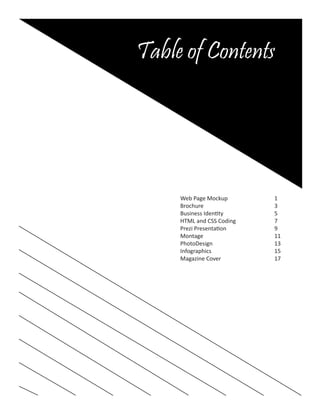
Table of Contents
Web Page Mockup			 1
Brochure				3
Business Identity			 5
HTML and CSS Coding			 7
Prezi Presentation			 9
Montage				11
PhotoDesign				13
Infographics				15
Magazine Cover			17
Web Page Mockup
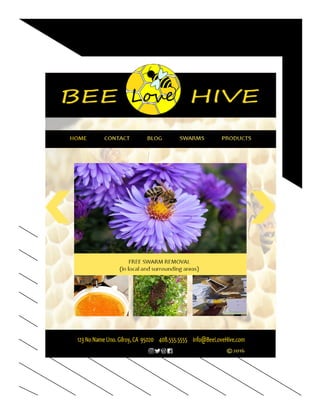
		 Description: Website mockup for Bee Love Hive
				
			 Date: Nov. 17, 2016	
	
		 Course:	 Visual Media 310 Sect. 17
		 Instructor:	 Doug Holladay
		 Programs Used:	 Photoshop
		 Objectives:	 Design a website mockup using a grid
		 Process:	 Using a grid system in Photoship I
					 was able to create an outline for my
					 site. I then took the logo I created
					 in the business identity project and
					created my color scheme around
					 it. After adding pictures, contact and
					 social information I submitted for
					 review. I took a lot of tips and was
					 able to re-create my layout and color
					 scheme and came up with a more
					appealing design.
Brochure
		 Description: Brochure featuring
					Brochure Building 101		
		
			 Date: Dec. 1, 2016	
	
		 Course:	 Visual CMedia 310 Sect. 17
		 Instructor:	 Doug Holladay
		 Programs Used:	 Indesign, Photoshop, Illustrator
		 Objectives:	 Create a brochure to communicate
					with my desired audience.
		 Process:	 Using illustrator I came up with the
					 logo for the desired business. I was
					 able to download photos that went
					 along with my desired theme. I then
					 used photoshop to select the desired
					 portion to use of each image. In
					indesign I created the tri-fold
					 brochure layout and then created an
					 outline and text holders. I placed
					 images and filled paragraphs with
					 desired text. I utilized text-wrap and
					 paragraph styles in completing the
					brochure project.
Business Identity
	 Business Identity
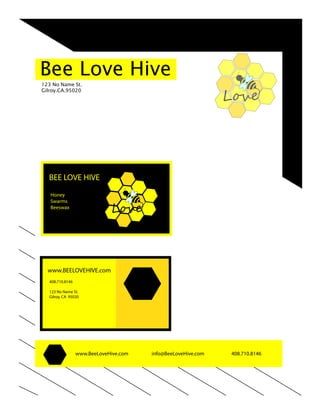
		 Description: Logo creation for Bee Love Hive
				
			 Date: Oct. 26, 2016	
	
		 Course:	 Visual Media 310 Sect. 17
		 Instructor:	 Doug Holladay
		 Programs Used:	 Adobe Illustrator
		 Objectives:	 Create a logo using illustrator and
					 a business card and letterhead
		 Process:	 I used illustrator to create some logo
					 ideas. After narrowing it down I
					 combined two ideas into one. Next
					 I designed the letterhead and
					 business card, making sure to pull
					 elements that would tie all of the
					designs together.
www.BeeLoveHive.com info@BeeLoveHive.com 408.710.8146
Bee Love Hive
123 No Name St.
Gilroy.CA.95020
www.BEELOVEHIVE.com
BEE LOVE HIVE
Honey
Swarms
Beeswax
408.710.8146
123 No Name St.
Gilroy, CA 95020
HTML & CSS Coding
	 HTML & CSS
		 Description: Create a webpage using HTML & CSS
				
			 Date: Nov. 10, 2016	
	
		 Course:	 Visual CMedia 310 Sect. 17
		 Instructor:	 Doug Holladay
		 Programs Used:	 Photoshop/Notepad++
		 Objectives:	 Code a webpage for Bee Love Hive
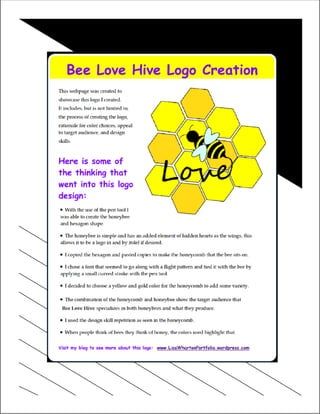
		 Process:	 I once again went with my logo that I
					 had created in photoshop for my
					 business identity project. After
					 re-sizing to be web quality, I saved
					 my logo and loaded it into my coding
					 program. I linked my CSS file to my
					 HTML file. Using CSS style codes
					 I designed the layout of my content
					 that I entered into HTML. After
					 correctly viewing I validated my page.
Prezi Presentation
		 Description: Prezi Presentation on how to be a
					California Brat
				
			 Date: Oct. 6, 2016	
	
		 Course:	 Visual CMedia 310 Sect. 17
		 Instructor:	 Doug Holladay
		 Programs Used:	 Prezi
		 Objectives:	 Create a presenation using Prezi
		 Process:	 I applied a background photo to
					 build from as a foundation. I then
					 decided on a flow direction for my
					 presentation and applied the photos
					 in their desired order. Text was then
					 added to the photos. After ensuring
					 that the directional flow properly
					 flowed, I submitted my presentation.
Photo Montage
		 Description: Spiritual Montage
			 Date: Oct. 19, 2016	
	
		 Course:	 Visual CMedia 310 Sect. 17
		 Instructor:	 Doug Holladay
		 Programs Used:	 Photoshop
		 Objectives:	 Create a montage that conveyed a
					spiritual message of my choosing.
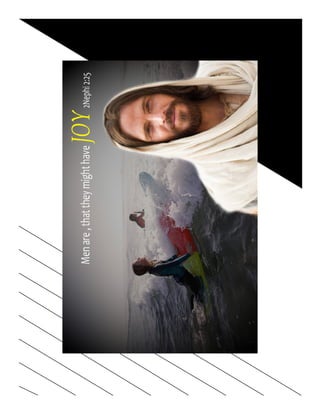
		 Process:	 I chose a message that I wanted to
					 convey. I decided on showing what
					 helps me feel His love and joy. I
					 searched for photos and chose an
					 ocean, earth, and of Christ smiling.
					 I used the ocean scene as my main
					 background. I lassoed around the
					 selected areas of the other photos
					 and moved them over to create a
					 masking layer. With the brush tool
					 set at a high opacity I faded out the
					 edges and then lowered the opacity
					 to get the desired effect.
Photo Design
		 Description: A photo design for Pianos in the Park.
				
			 Date: Oct. 13, 2016	
	
		 Course:	 Visual CMedia 310 Sect. 17
		 Instructor:	 Doug Holladay
		 Programs Used:	 Photoshop
		 Objectives:	 Create a flier using an original photo
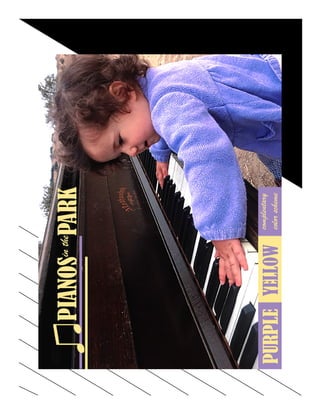
		 Process:	 I took some shots of my daughter
					 playing with the piano that is located
					 at our county park. I adjusted the
					 colors and resized to an 8.5x11 to be
					 used as my background. I utilized
					layers by adding elements.
Infographic
		 Description: Infographic about my anxiety
				
			 Date: Nov. 2, 2016	
	
		 Course:	 Visual CMedia 310 Sect. 17
		 Instructor:	 Doug Holladay
		 Programs Used:	 Illustrator
		 Objectives:	 Create an infographic.
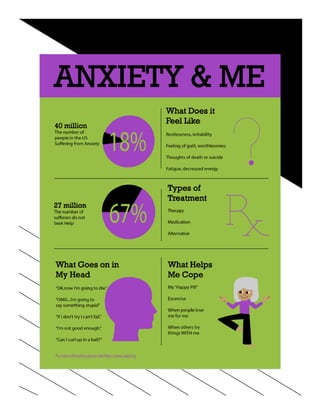
		 Process:	 Using the pen tool I was able to draw
					 my icons and character logo. I then
					 created my layout and applied the
					color scheme and elements that
					 related to the research I did on my
					 topic. I created pie-charts to show
					 the data that I collected.
Magazine Cover
		 Description: Magazine cover featuring me.
				
			 Date: Sept. 29, 2016
	
		 Course:	 Visual CMedia 310 Sect. 17
		 Instructor:	 Doug Holladay
		 Programs Used:	 Photoshop/Indesign
		 Objectives:	 Create a magazine cover that focuses
					on my interests and strengths.
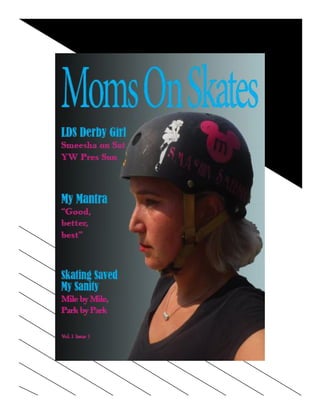
		 Process:	 I took a photo of myself showing
					 how skating is big part of who I am.
					 I edited the photo in photoshop to
					 select the desired portion of the
					 photo. I then went into indesign to
					 create my layout. Once that was
					 done I applied my photo and desired
					 text. I played with the color scheme
					 and text layout until I was happy
					 with the end result. Looking back at
					 it now I would make a lot of changes.
Lisa Wharton Portfolio

Lisa Wharton Portfolio

  • 1.
  • 2.
    Lisa Wharton 123 555No Name St. Gilroy, CA 95020 wharton.lisa22@gmail.com 408-555-5555 Contact
  • 3.
    Table of Contents WebPage Mockup 1 Brochure 3 Business Identity 5 HTML and CSS Coding 7 Prezi Presentation 9 Montage 11 PhotoDesign 13 Infographics 15 Magazine Cover 17
  • 4.
    Web Page Mockup Description: Website mockup for Bee Love Hive Date: Nov. 17, 2016 Course: Visual Media 310 Sect. 17 Instructor: Doug Holladay Programs Used: Photoshop Objectives: Design a website mockup using a grid Process: Using a grid system in Photoship I was able to create an outline for my site. I then took the logo I created in the business identity project and created my color scheme around it. After adding pictures, contact and social information I submitted for review. I took a lot of tips and was able to re-create my layout and color scheme and came up with a more appealing design.
  • 6.
    Brochure Description: Brochurefeaturing Brochure Building 101 Date: Dec. 1, 2016 Course: Visual CMedia 310 Sect. 17 Instructor: Doug Holladay Programs Used: Indesign, Photoshop, Illustrator Objectives: Create a brochure to communicate with my desired audience. Process: Using illustrator I came up with the logo for the desired business. I was able to download photos that went along with my desired theme. I then used photoshop to select the desired portion to use of each image. In indesign I created the tri-fold brochure layout and then created an outline and text holders. I placed images and filled paragraphs with desired text. I utilized text-wrap and paragraph styles in completing the brochure project.
  • 8.
    Business Identity BusinessIdentity Description: Logo creation for Bee Love Hive Date: Oct. 26, 2016 Course: Visual Media 310 Sect. 17 Instructor: Doug Holladay Programs Used: Adobe Illustrator Objectives: Create a logo using illustrator and a business card and letterhead Process: I used illustrator to create some logo ideas. After narrowing it down I combined two ideas into one. Next I designed the letterhead and business card, making sure to pull elements that would tie all of the designs together.
  • 9.
    www.BeeLoveHive.com info@BeeLoveHive.com 408.710.8146 BeeLove Hive 123 No Name St. Gilroy.CA.95020 www.BEELOVEHIVE.com BEE LOVE HIVE Honey Swarms Beeswax 408.710.8146 123 No Name St. Gilroy, CA 95020
  • 10.
    HTML & CSSCoding HTML & CSS Description: Create a webpage using HTML & CSS Date: Nov. 10, 2016 Course: Visual CMedia 310 Sect. 17 Instructor: Doug Holladay Programs Used: Photoshop/Notepad++ Objectives: Code a webpage for Bee Love Hive Process: I once again went with my logo that I had created in photoshop for my business identity project. After re-sizing to be web quality, I saved my logo and loaded it into my coding program. I linked my CSS file to my HTML file. Using CSS style codes I designed the layout of my content that I entered into HTML. After correctly viewing I validated my page.
  • 12.
    Prezi Presentation Description:Prezi Presentation on how to be a California Brat Date: Oct. 6, 2016 Course: Visual CMedia 310 Sect. 17 Instructor: Doug Holladay Programs Used: Prezi Objectives: Create a presenation using Prezi Process: I applied a background photo to build from as a foundation. I then decided on a flow direction for my presentation and applied the photos in their desired order. Text was then added to the photos. After ensuring that the directional flow properly flowed, I submitted my presentation.
  • 14.
    Photo Montage Description:Spiritual Montage Date: Oct. 19, 2016 Course: Visual CMedia 310 Sect. 17 Instructor: Doug Holladay Programs Used: Photoshop Objectives: Create a montage that conveyed a spiritual message of my choosing. Process: I chose a message that I wanted to convey. I decided on showing what helps me feel His love and joy. I searched for photos and chose an ocean, earth, and of Christ smiling. I used the ocean scene as my main background. I lassoed around the selected areas of the other photos and moved them over to create a masking layer. With the brush tool set at a high opacity I faded out the edges and then lowered the opacity to get the desired effect.
  • 16.
    Photo Design Description:A photo design for Pianos in the Park. Date: Oct. 13, 2016 Course: Visual CMedia 310 Sect. 17 Instructor: Doug Holladay Programs Used: Photoshop Objectives: Create a flier using an original photo Process: I took some shots of my daughter playing with the piano that is located at our county park. I adjusted the colors and resized to an 8.5x11 to be used as my background. I utilized layers by adding elements.
  • 18.
    Infographic Description: Infographicabout my anxiety Date: Nov. 2, 2016 Course: Visual CMedia 310 Sect. 17 Instructor: Doug Holladay Programs Used: Illustrator Objectives: Create an infographic. Process: Using the pen tool I was able to draw my icons and character logo. I then created my layout and applied the color scheme and elements that related to the research I did on my topic. I created pie-charts to show the data that I collected.
  • 20.
    Magazine Cover Description:Magazine cover featuring me. Date: Sept. 29, 2016 Course: Visual CMedia 310 Sect. 17 Instructor: Doug Holladay Programs Used: Photoshop/Indesign Objectives: Create a magazine cover that focuses on my interests and strengths. Process: I took a photo of myself showing how skating is big part of who I am. I edited the photo in photoshop to select the desired portion of the photo. I then went into indesign to create my layout. Once that was done I applied my photo and desired text. I played with the color scheme and text layout until I was happy with the end result. Looking back at it now I would make a lot of changes.