Building Your Professional
Network with LinkedIn
Erik Wieland, UCSF IT
http://www.linkedin.com/in/ewieland
What is LinkedIn?
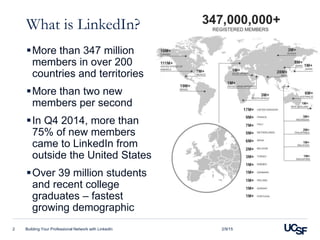
More than 347 million
members in over 200
countries and territories
More than two new
members per second
In Q4 2014, more than
75% of new members
came to LinkedIn from
outside the United States
Over 39 million students
and recent college
graduates – fastest
growing demographic
2/9/15Building Your Professional Network with LinkedIn2
No, really, What is LinkedIn?
Professional social networking
• Post your resume and expertise
• Keep in touch with people you know
• Follow companies
• Join groups
Job board
• Jobs displayed based on your interests and profile
• Use your network to get an “in”
Industry news aggregator
Building Your Professional Network with LinkedIn3 2/9/15
How do I use LinkedIn?
1. Create your profile
2. Connect to your colleagues
3. ???
4. PROFIT!!!
Erik’s LinkedIn Profile
LinkedIn Learning Center
Building Your Professional Network with LinkedIn4 2/9/15
How do You use LinkedIn?
Follow what’s going on
• Which industries, areas are growing? Shrinking?
• Which colleagues are feeling pressure? Thriving?
• Who’s new to UCSF? Who’s leaving?
• Who’s looking at, for me?
Strengthen my network
• Endorse
• Recommend
• Encourage
Building Your Professional Network with LinkedIn5 2/9/15
Frequently Asked Questions
What should I post as an
update?
How do I use “Who’s
Viewed Your Profile?”
What are my LinkedIn
Networks?
How do I use LinkedIn to
find business allies?
What are all these settings?
What should I include in my
profile?
How can I create a custom
URL?
How can I get some
recommendations?
Why should I follow
companies?
How can I use Search?
Building Your Professional Network with LinkedIn6 2/9/15
LinkedIn Networking tips
1. Keep your information up to date
2. Spend 30 minutes a week on LinkedIn
3. Only connect with people you really know
4. Use what you learn on LinkedIn in real life
5. Remember that LinkedIn is a professional social
networking tool
Building Your Professional Network with LinkedIn7 2/9/15
Questions?
Building Your Professional Network with LinkedIn8 2/9/15
Building Your Professional Network with LinkedIn

Building Your Professional Network with LinkedIn

  • 1.
    Building Your Professional Networkwith LinkedIn Erik Wieland, UCSF IT http://www.linkedin.com/in/ewieland
  • 2.
    What is LinkedIn? Morethan 347 million members in over 200 countries and territories More than two new members per second In Q4 2014, more than 75% of new members came to LinkedIn from outside the United States Over 39 million students and recent college graduates – fastest growing demographic 2/9/15Building Your Professional Network with LinkedIn2
  • 3.
    No, really, Whatis LinkedIn? Professional social networking • Post your resume and expertise • Keep in touch with people you know • Follow companies • Join groups Job board • Jobs displayed based on your interests and profile • Use your network to get an “in” Industry news aggregator Building Your Professional Network with LinkedIn3 2/9/15
  • 4.
    How do Iuse LinkedIn? 1. Create your profile 2. Connect to your colleagues 3. ??? 4. PROFIT!!! Erik’s LinkedIn Profile LinkedIn Learning Center Building Your Professional Network with LinkedIn4 2/9/15
  • 5.
    How do Youuse LinkedIn? Follow what’s going on • Which industries, areas are growing? Shrinking? • Which colleagues are feeling pressure? Thriving? • Who’s new to UCSF? Who’s leaving? • Who’s looking at, for me? Strengthen my network • Endorse • Recommend • Encourage Building Your Professional Network with LinkedIn5 2/9/15
  • 6.
    Frequently Asked Questions Whatshould I post as an update? How do I use “Who’s Viewed Your Profile?” What are my LinkedIn Networks? How do I use LinkedIn to find business allies? What are all these settings? What should I include in my profile? How can I create a custom URL? How can I get some recommendations? Why should I follow companies? How can I use Search? Building Your Professional Network with LinkedIn6 2/9/15
  • 7.
    LinkedIn Networking tips 1.Keep your information up to date 2. Spend 30 minutes a week on LinkedIn 3. Only connect with people you really know 4. Use what you learn on LinkedIn in real life 5. Remember that LinkedIn is a professional social networking tool Building Your Professional Network with LinkedIn7 2/9/15
  • 8.
    Questions? Building Your ProfessionalNetwork with LinkedIn8 2/9/15

Editor's Notes

  • #7 What should I include in my profile? – include visuals
  • #8 This is your web-searchable resume, so use it to update your resume and vice versa. Check spelling, punctuation, etc. Watch your connections’ connections to find people you may know. Connect with school friends. Your LinkedIn network represents your circles of influence (droplet analogy), not a collection of business cards. Avoid vendors unless they’re really business partners. Avoid recruiters unless you’re really looking (since that’s what other people will think). Research people to find new things to talk about, help understand their perspective, find commonalities, etc. Always research people you interview with (attraction analogy) Don’t overload your connections with personal or inane information. Use your feed to keep people informed about you and your interests.