Clinical and Translational
Science Institute / CTSI
at the University of California, San Francisco
“Mirror, Mirror, Who’s
Looking at My UCSF Profiles Page?”
Nooshin Latour, MA & Anirvan Chatterjee
UCCSC 2014, San Francisco
How to Harness the Power of
Google Analytics and Vanity
Nooshin Latour
Communications
and Marketing
Anirvan Chatterjee
Data Strategy
WHAT IS UCSF PROFILES?
PROFILES.UCSF.EDU
Hard to find the right expert
Photo by CTSI at UCSF, used under CC, https://flic.kr/p/k2Dkp3
for biomedical
researchers
What is UCSF Profiles?
• Every UCSF researcher has a profile
• Every profiles automatically includes
publications and research topics
• Researchers can log in to add a photo,
bio, awards, etc.
What is UCSF Profiles?
• Users can search UCSF Profiles to find an
expert on a topic, enabling collaboration
• Profiles data is publicly available via APIs,
and used in 30 UCSF apps & websites
What is UCSF Profiles?
• Lots of traffic from on and off campus
– 2,800 visits per day
– 1 million visits per year
– 75% of traffic from search engines
• We actively mine web analytics data to
provide insights into site usage
PHASE 1: LAUNCH
JAN 2010 – DEC 2011
How do you launch a brand new
campus-wide resource?
Photo by Diane Yee, used under CC, https://flic.kr/p/e48bHL
Tactics
1. News article on UCSF.edu
2. Executive Vice Chancellor emails ~8000 people
3. Send postcard to the 2500 people profiled
– Free iPad contest for users who update their profiles
4. Get major campus websites to link to the site
– e.g. UCSF.edu, Library, School of Medicine
5. In-person outreach at faculty event
Results
0
5,000
10,000
15,000
20,000
25,000
30,000
Visits per month (campus) Visits per month (external)
PHASE 2: GROWTH
JAN 2012 – JUN 2013
How to understand, increase
website traffic and usage?
Photo by Thomas Sauzedde, used under CC, https://flic.kr/p/admtKw
1. Search engine optimization
2. Advanced Google Analytics
3. Pretty URLs
profiles.ucsf.edu/
ProfileDetails.aspx?Person=276329999
profiles.ucsf.edu/deborah.grady
4. Get incoming links from all over
ucsf.edu
cancer.ucsf.edu
directory.ucsf.edu
ctsi.ucsf.edu
neurology.ucsf.edu
meded.ucsf.edu
immunology.ucsf.edu
postdocs.ucsf.edu
osr.ucsf.edu
ind.ucsf.edu
osher.ucsf.edu
accelerate.ucsf.edu
familymedicine.medschool.ucsf.edu
microbiology.ucsf.edu
humangenetics.ucsf.edu
id.medicine.ucsf.edu
endocrine.ucsf.edu
medicine.ucsf.edu
anesthesia.ucsf.edu
epilepsy.ucsf.edu
globalhealthsciences.ucsf.edu
surgery.ucsf.edu
radiology.ucsf.edu
ucsfhealth.org
open-proposals.ucsf.edu
anp.ucsf.edu
epibiostat.ucsf.edu
stemcell.ucsf.edu
diabetes.ucsf.edu
globalresearch.ucsf.edu
pharmacy.ucsf.edu
addiction.ucsf.edu
bms.ucsf.edu
pharmchem.ucsf.edu
ohns.ucsf.edu
mountzion.ucsfmedicalcenter.org
healthvalue.ucsf.edu
tobacco.ucsf.edu
ari.ucsf.edu
surgicalmovementdisorders.ucsf.edu
medschool.ucsf.edu
dgim.ucsf.edu
pharm.ucsf.edu
pediatrics.ucsf.edu
multiplesclerosis.ucsf.edu
transplant.surgery.ucsf.edu
cardiology.ucsf.edu
studentlife.ucsf.edu
globalprojects.ucsf.edu
mphd.ucsf.edu
psych.ucsf.edu
pibs.ucsf.edu
whcrc.ucsf.edu
cfar.ucsf.edu
nephrology.ucsf.edu
experimental.medicine.ucsf.edu
fellows.ucsf.edu
urology.ucsf.edu
cvri.ucsf.edu
general.surgery.ucsf.edu
officeofresearch.ucsf.edu
dahsm.ucsf.edu
gi.ucsf.edu
odonovanlab.ucsf.edu
coe.ucsf.edu
dermatology.ucsf.edu
ccb.ucsf.edu
sfghres.ucsf.edu
acrc.ucsf.edu
lomvardaslab.ucsf.edu
hcgne.ucsf.edu
geriatrics.ucsf.edu
top.ucsf.edu
ita.ucsf.edu
nursing.ucsf.edu
hospitalmedicine.ucsf.edu
nic.ucsf.edu
plastic.surgery.ucsf.edu
memory.ucsf.edu
prds.ucsf.edu
pulmonary.ucsf.edu
5. Syndicate Profiles data to
campus websites and apps
Results
0
10,000
20,000
30,000
40,000
50,000
60,000
70,000
Jan-12
Feb-12
Mar-12
Apr-12
May-12
Jun-12
Jul-12
Aug-12
Sep-12
Oct-12
Nov-12
Dec-12
Jan-13
Feb-13
Mar-13
Apr-13
May-13
Jun-13
Visits per month (campus) Visits per month (external)
PHASE 3: ENGAGEMENT
JUL 2013 – JUL 2014
The challenge
Only 28% of users had edited their own
Profiles pages (as of August 2013)
Regular Email Doesn’t Work
Source: YouKnowWhatSpamEmailis
Key Strategies
1. Measure: Establish benchmarks
2. Partnerships: Easier to work together
3. Automation: Tech trumps manual labor
4. Vanity: Tap into user motivations
CO-BRANDED PERSONALIZED
EMAILS
Case study 1
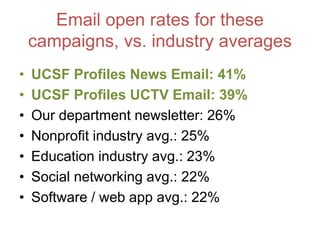
Email open rates for these
campaigns, vs. industry averages
• UCSF Profiles News Email: 41%
• UCSF Profiles UCTV Email: 39%
• Our department newsletter: 26%
• Nonprofit industry avg.: 25%
• Education industry avg.: 23%
• Social networking avg.: 22%
• Software / web app avg.: 22%
AUTOMATED
ONBOARDING
EMAILS
Case study 2
Automated onboarding email
1.User added to Profiles
2.Daily process checks new user logs
3.New users get a customized welcome email,
delivered via Mandrill email service provider
Automated onboarding email
After two weeks…
if they didn’t edit their Profile
A/B tested subject lines
“Reminder: Mary, take a few minutes
to update your UCSF Profiles page”
vs.
“Mary, here are three ways to
enhance your UCSF Profiles page”
After two weeks…
if they did edit their Profile
Email open rates
• Welcome email #1: 39%
Click-thru rate #1: 32 %
• Welcome email #2A (didn’t edit): 26%
• Welcome email #2B (did edit): 31%
CUSTOMIZED ENGAGEMENT
EMAILS
Case study 3
Default vs.
Customized Profile
Customization rates
As of November 2013, before this round of
emails:
• 18% had added a bio and photo
• 20% had added only a photo
• 3% had only added a bio
• 59% had added neither
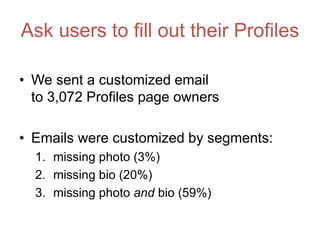
Ask users to fill out their Profiles
• We sent a customized email
to 3,072 Profiles page owners
• Emails were customized by segments:
1. missing photo (3%)
2. missing bio (20%)
3. missing photo and bio (59%)
Users gets a custom pitch
• Specific call to action (e.g. “add photo”)
• Share average pageviews to motivate
users
Results
• “Add bio” email 12% made edits
• “Add photo” email 11% made edits
• “Add both” email 10% made edits
UCSF PROFILES
ANNUAL REPORT 2013
Case study 4
What do researchers care about?
Academic reputation
Funding
Status
Google Analytics tells us which
networks looked at which user
So we can answer…
Am I being viewed by:
1. Colleagues at UCSF?
2. Colleagues at other universities?
3. Pharmaceutical companies?
4. Foundations?
5. The National Institute of Health?
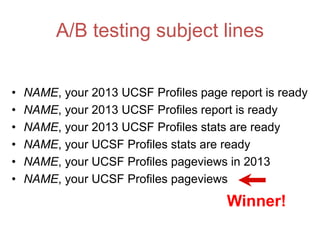
A/B testing subject lines
• NAME, your 2013 UCSF Profiles page report is ready
• NAME, your 2013 UCSF Profiles report is ready
• NAME, your 2013 UCSF Profiles stats are ready
• NAME, your UCSF Profiles stats are ready
• NAME, your UCSF Profiles pageviews in 2013
• NAME, your UCSF Profiles pageviews
Winner!
Email results
• Sent to 2,713 Profile owners
• Zero unsubscribes!
• Open rate: 46%
• Click rate: 14%
Survey user feedback
• 236 recipients (8.7%) completed survey
• 100% of them said knowing who looks at
their Profile page is useful/interesting
Survey user feedback
• “I want to learn exactly who (which pharma,
institution, company, govt agency) viewed my
profile”
• “How many people are clicking on my
publications?”
• “Are my pageviews high or low, compared
with others?”
• “Always happy to see my name up in lights!”
Survey user feedback
• “I like my Profiles page. I think it's a great
landing site for collaborators and students
who want to do research with me.”
• “I've been putting off updating my page - this
is very motivating”
• “This was a pleasant surprise. I didn't even
know this information was being collected. I
certainly didn't know others were interested.”
Did emails help
change users’ behavior?
YES!
385 net users (6% of total)
updated their Profiles
for the first time
Key lessons
1. Measure: Establish benchmarks
2. Partnerships: Easier to work together
3. Automation: Tech trumps manual labor
4. Vanity: Tap into user motivations
The team
Thank you!
Nooshin Latour
nooshin.latour@ucsf.edu
@nooshin
Anirvan Chatterjee
anirvan.chatterjee@ucsf.edu
@anirvan
UCSF Profiles
profiles.ucsf.edu

How to Harness the Power of Google Analytics, Email Marketing & Vanity to Increase User Engagement

  • 1.
    Clinical and Translational ScienceInstitute / CTSI at the University of California, San Francisco “Mirror, Mirror, Who’s Looking at My UCSF Profiles Page?” Nooshin Latour, MA & Anirvan Chatterjee UCCSC 2014, San Francisco
  • 2.
    How to Harnessthe Power of Google Analytics and Vanity
  • 3.
  • 4.
    WHAT IS UCSFPROFILES? PROFILES.UCSF.EDU
  • 5.
    Hard to findthe right expert Photo by CTSI at UCSF, used under CC, https://flic.kr/p/k2Dkp3
  • 6.
  • 7.
    What is UCSFProfiles? • Every UCSF researcher has a profile • Every profiles automatically includes publications and research topics • Researchers can log in to add a photo, bio, awards, etc.
  • 8.
    What is UCSFProfiles? • Users can search UCSF Profiles to find an expert on a topic, enabling collaboration • Profiles data is publicly available via APIs, and used in 30 UCSF apps & websites
  • 9.
    What is UCSFProfiles? • Lots of traffic from on and off campus – 2,800 visits per day – 1 million visits per year – 75% of traffic from search engines • We actively mine web analytics data to provide insights into site usage
  • 11.
    PHASE 1: LAUNCH JAN2010 – DEC 2011
  • 12.
    How do youlaunch a brand new campus-wide resource? Photo by Diane Yee, used under CC, https://flic.kr/p/e48bHL
  • 13.
    Tactics 1. News articleon UCSF.edu 2. Executive Vice Chancellor emails ~8000 people 3. Send postcard to the 2500 people profiled – Free iPad contest for users who update their profiles 4. Get major campus websites to link to the site – e.g. UCSF.edu, Library, School of Medicine 5. In-person outreach at faculty event
  • 14.
  • 15.
    PHASE 2: GROWTH JAN2012 – JUN 2013
  • 16.
    How to understand,increase website traffic and usage? Photo by Thomas Sauzedde, used under CC, https://flic.kr/p/admtKw
  • 17.
    1. Search engineoptimization
  • 18.
  • 19.
  • 20.
    4. Get incominglinks from all over ucsf.edu cancer.ucsf.edu directory.ucsf.edu ctsi.ucsf.edu neurology.ucsf.edu meded.ucsf.edu immunology.ucsf.edu postdocs.ucsf.edu osr.ucsf.edu ind.ucsf.edu osher.ucsf.edu accelerate.ucsf.edu familymedicine.medschool.ucsf.edu microbiology.ucsf.edu humangenetics.ucsf.edu id.medicine.ucsf.edu endocrine.ucsf.edu medicine.ucsf.edu anesthesia.ucsf.edu epilepsy.ucsf.edu globalhealthsciences.ucsf.edu surgery.ucsf.edu radiology.ucsf.edu ucsfhealth.org open-proposals.ucsf.edu anp.ucsf.edu epibiostat.ucsf.edu stemcell.ucsf.edu diabetes.ucsf.edu globalresearch.ucsf.edu pharmacy.ucsf.edu addiction.ucsf.edu bms.ucsf.edu pharmchem.ucsf.edu ohns.ucsf.edu mountzion.ucsfmedicalcenter.org healthvalue.ucsf.edu tobacco.ucsf.edu ari.ucsf.edu surgicalmovementdisorders.ucsf.edu medschool.ucsf.edu dgim.ucsf.edu pharm.ucsf.edu pediatrics.ucsf.edu multiplesclerosis.ucsf.edu transplant.surgery.ucsf.edu cardiology.ucsf.edu studentlife.ucsf.edu globalprojects.ucsf.edu mphd.ucsf.edu psych.ucsf.edu pibs.ucsf.edu whcrc.ucsf.edu cfar.ucsf.edu nephrology.ucsf.edu experimental.medicine.ucsf.edu fellows.ucsf.edu urology.ucsf.edu cvri.ucsf.edu general.surgery.ucsf.edu officeofresearch.ucsf.edu dahsm.ucsf.edu gi.ucsf.edu odonovanlab.ucsf.edu coe.ucsf.edu dermatology.ucsf.edu ccb.ucsf.edu sfghres.ucsf.edu acrc.ucsf.edu lomvardaslab.ucsf.edu hcgne.ucsf.edu geriatrics.ucsf.edu top.ucsf.edu ita.ucsf.edu nursing.ucsf.edu hospitalmedicine.ucsf.edu nic.ucsf.edu plastic.surgery.ucsf.edu memory.ucsf.edu prds.ucsf.edu pulmonary.ucsf.edu
  • 21.
    5. Syndicate Profilesdata to campus websites and apps
  • 22.
  • 23.
    PHASE 3: ENGAGEMENT JUL2013 – JUL 2014
  • 25.
    The challenge Only 28%of users had edited their own Profiles pages (as of August 2013)
  • 26.
    Regular Email Doesn’tWork Source: YouKnowWhatSpamEmailis
  • 27.
    Key Strategies 1. Measure:Establish benchmarks 2. Partnerships: Easier to work together 3. Automation: Tech trumps manual labor 4. Vanity: Tap into user motivations
  • 28.
  • 32.
    Email open ratesfor these campaigns, vs. industry averages • UCSF Profiles News Email: 41% • UCSF Profiles UCTV Email: 39% • Our department newsletter: 26% • Nonprofit industry avg.: 25% • Education industry avg.: 23% • Social networking avg.: 22% • Software / web app avg.: 22%
  • 33.
  • 34.
    Automated onboarding email 1.Useradded to Profiles 2.Daily process checks new user logs 3.New users get a customized welcome email, delivered via Mandrill email service provider
  • 35.
  • 36.
    After two weeks… ifthey didn’t edit their Profile
  • 37.
    A/B tested subjectlines “Reminder: Mary, take a few minutes to update your UCSF Profiles page” vs. “Mary, here are three ways to enhance your UCSF Profiles page”
  • 38.
    After two weeks… ifthey did edit their Profile
  • 39.
    Email open rates •Welcome email #1: 39% Click-thru rate #1: 32 % • Welcome email #2A (didn’t edit): 26% • Welcome email #2B (did edit): 31%
  • 40.
  • 41.
  • 42.
    Customization rates As ofNovember 2013, before this round of emails: • 18% had added a bio and photo • 20% had added only a photo • 3% had only added a bio • 59% had added neither
  • 43.
    Ask users tofill out their Profiles • We sent a customized email to 3,072 Profiles page owners • Emails were customized by segments: 1. missing photo (3%) 2. missing bio (20%) 3. missing photo and bio (59%)
  • 44.
    Users gets acustom pitch • Specific call to action (e.g. “add photo”) • Share average pageviews to motivate users
  • 46.
    Results • “Add bio”email 12% made edits • “Add photo” email 11% made edits • “Add both” email 10% made edits
  • 47.
    UCSF PROFILES ANNUAL REPORT2013 Case study 4
  • 49.
    What do researcherscare about? Academic reputation Funding Status
  • 50.
    Google Analytics tellsus which networks looked at which user
  • 51.
    So we cananswer… Am I being viewed by: 1. Colleagues at UCSF? 2. Colleagues at other universities? 3. Pharmaceutical companies? 4. Foundations? 5. The National Institute of Health?
  • 53.
    A/B testing subjectlines • NAME, your 2013 UCSF Profiles page report is ready • NAME, your 2013 UCSF Profiles report is ready • NAME, your 2013 UCSF Profiles stats are ready • NAME, your UCSF Profiles stats are ready • NAME, your UCSF Profiles pageviews in 2013 • NAME, your UCSF Profiles pageviews Winner!
  • 54.
    Email results • Sentto 2,713 Profile owners • Zero unsubscribes! • Open rate: 46% • Click rate: 14%
  • 55.
    Survey user feedback •236 recipients (8.7%) completed survey • 100% of them said knowing who looks at their Profile page is useful/interesting
  • 56.
    Survey user feedback •“I want to learn exactly who (which pharma, institution, company, govt agency) viewed my profile” • “How many people are clicking on my publications?” • “Are my pageviews high or low, compared with others?” • “Always happy to see my name up in lights!”
  • 57.
    Survey user feedback •“I like my Profiles page. I think it's a great landing site for collaborators and students who want to do research with me.” • “I've been putting off updating my page - this is very motivating” • “This was a pleasant surprise. I didn't even know this information was being collected. I certainly didn't know others were interested.”
  • 58.
    Did emails help changeusers’ behavior? YES! 385 net users (6% of total) updated their Profiles for the first time
  • 59.
    Key lessons 1. Measure:Establish benchmarks 2. Partnerships: Easier to work together 3. Automation: Tech trumps manual labor 4. Vanity: Tap into user motivations
  • 60.
  • 61.
    Thank you! Nooshin Latour nooshin.latour@ucsf.edu @nooshin AnirvanChatterjee anirvan.chatterjee@ucsf.edu @anirvan UCSF Profiles profiles.ucsf.edu

Editor's Notes

  • #3 From various targeted Profiles campaigns to increase engagement, we learned that using data to create a personal message is powerful and motivates people to take action, engage (CTA = call-to-action); UCSF Profiles networking system web product, We wanted to increase number of manually edited profiles and the method was to reach out in personalized manner, to specific groups of people.
  • #4 Communicator / techie duo
  • #6 On a campus so spread out like UCSF – researchers might get stuck on a problem and not know that someone else working on the same problem even exists. So a tool like UCSF profiles helps researchers find and potentially collaborate together.
  • #11 Every section, feature is filled out
  • #12 Today we’re breaking out the evolution of the product into 3 parts
  • #16 Problem: How do you understand and increase usage? Tactics Measurement via Google Analytics Search engine optimization, because our users mostly use Google Get links from wide variety of campus partners Syndicate results to campus websites Pretty URLs
  • #24 how do you increase profile owner awareness and engagement?
  • #25 Profiles is getting popular getting tons of traffic - it’s an online gateway
  • #26 We didn’t want to rest on our laurels! Compared to other institutions with similar research profile networks - we are leading in adoption & engagement, but we wanted to improve, do more,
  • #27 I’m not even receiving all the departmental and other institutional communications the average researcher or faculty member gets. So here’s this community we are deemed to served, provide resources and funding to, and are message is mixed with all this other communication. How can we better reach these researchers? Academics? - lessons on how to cut through it through many tests
  • #29 Mature stage, Profiles pretty developed by now. Expanded it from 3000 - 6000 profiles. Due to campus familiarity - at a point other entities could evangelize for us - co-branded partnership campaigns
  • #30 Building new partnerships with content partners adding data to Profiles, e.g. UCTV Opportunity to inform profile owners that we’re embedding videos on their profiles University of California Television (UCTV) is a broadcast outlet featuring programming from throughout the University of California
  • #31 Method: Mailchimp, mail merge, Concise - cross promoting content
  • #32 Repeated same partnership co-branded email with UCSF’s University relations – UR - News and Communications arm of UCSF, they know us and were excited to partner, evangelize with us
  • #33 Open - opened email (soft number since many clients can read emails on devices without opening it) Clicks - clicked on link in email
  • #34 1000 people leave and join UCSF Profiles – like a directory that just exists, new people don’t actually know they have a Profile page! There’s no way we’d have the bandwidth to send emails in batches to welcome people - looked into an automated solution. Based on success of first test with personalized emails, want to reach every Profiles user to increase awareness and engagement EARLY ON
  • #35 Trigger via new user logs, deliver through Mandrill (New user -> Mail visual)
  • #36 Give a stat from Google Analytics Custom email informing new users that they have a Profiles page with an average number of pageviews, Best email marketing practices: A/B test body copy, Clear, concise copy and call-to-action
  • #37 Helpful tips to fill out areas that are important, CTA
  • #38 Taking out reminder improved opens by 10%!
  • #39 Talk about tone, copy, best email marketing. Friendly to the point – not so formal and bureaucratic
  • #40 Highest click through rates – new excited user, drops off over time which is expected. Everyone knows that they have a Profile
  • #41 So we nailed onboarding for new users - what about everybody else that we didn’t capture? How do we get them to make the most important edits to their pages?
  • #42 Some fields are auto filled out, others need to be added by users, GOOD profiles are filled out, Uncustomized Look Empty Again, we’re funded to help researchers learn about each other and potentially collaborate so filled out profiles are better for everybody
  • #45 semi-personalized data Use Google Analytics data to be able to explain why they should add fields; provided semi-personalized pageviews stats (4 segments) Correlation with certain elements being filled out and higher pages views. **Health Science institution so we suspected that our users care about meaningful data and perhaps this info. would motivate them
  • #46 Customized call-to-action to get users to add the details they haven’t added HTML mail merge with Mailchimp (Filled out profiles - richer tool for all! ) Use Google Analytics data to be able to explain why they should add fields; provided pageviews stats (4 segments)
  • #47 Over 10% of users made an edit from each segment!
  • #49 ultimate vanity data to drive engagement
  • #50 We’ve been nagging users to update their profiles, but not showing the value. Data from Google Analytics can show users that the groups they care most about are using UCSF Profiles
  • #51 UCSF ISPs – Comcast (home); Verizon (phone)
  • #53 We got this data via Google Analytics, which tells us which entities are looking at which pages; so we only emailed people with 20 or more views, from at least 2 categories Solicit user feedback through Qualtrics survey Again, deliver as HTML mail merge through Mailchimp; Single sign in
  • #54 Over 6 rounds, Shortest subject line (last two you see) performed on average 10% better!!
  • #56 Vanity / Personal Data Works!! 100% (200) Profiles owners responded “Yes”!
  • #60 Just wanted reiterate our key tactics which became key lessons: Partners - Cross promote each other’s content Mail merge is easier than reaching out to users one by one & Fully automated emails just run by themselves! Vanity - Use personalization & data to better communicate to your users; **Our gut told us that researcher like to hear about themselves and what could help them professionally and it turned out to be true
  • #61 Product managers, developers, community navigator, leadership buy-in 

  • #62 Questions welcome!