GOLD
STANDARD
Introduction
LinkedIn is one of the most important tools a sales person should have in their arsenal.
With over 225 million members, over 2 million groups and millions of professional
oriented searches happening every day, LinkedIn is the most current database of
contact you can have.
Your profile is therefore of paramount importance. This is your window to the world
and will dictate how your clients and prospective clients will view you. Use this
platform to build on your personal brand and not just provide a resume.
You want your clients to see you as a knowledgeable, insightful leader who can bring
value to their business and help them through their buying experience. Creating a
profile that is client centric ensuring that you are their go-to person.
This guide is the start of your journey into creating the Social Wrap . The changes you
will make will bring benefits to your social selling activities.
Step 1 - Photo
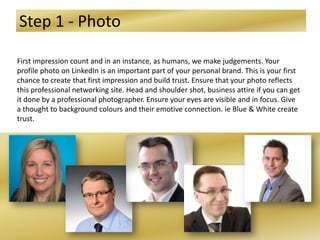
First impression count and in an instance, as humans, we make judgements. Your
profile photo on LinkedIn is an important part of your personal brand. This is your first
chance to create that first impression and build trust. Ensure that your photo reflects
this professional networking site. Head and shoulder shot, business attire if you can get
it done by a professional photographer. Ensure your eyes are visible and in focus. Give
a thought to background colours and their emotive connection. ie Blue & White create
trust.
Step 2 - Headline
Most people over look the Headline section, with the majority only using it to display
their current role (ie Sales Manager). This is a huge mistake. What you don’t realise is
that your LinkedIn page is similar to the Search Engine Optimisation (SEO) that Google
uses. All the words within your profile are searchable by people interested in further
information or business challenge.
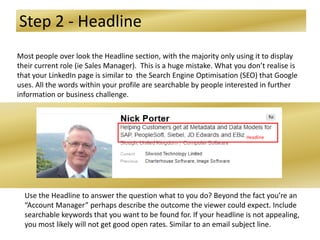
Use the Headline to answer the question what to you do? Beyond the fact you’re an
“Account Manager” perhaps describe the outcome the viewer could expect. Include
searchable keywords that you want to be found for. If your headline is not appealing,
you most likely will not get good open rates. Similar to an email subject line.
Headline
Step 3 – Personal URL
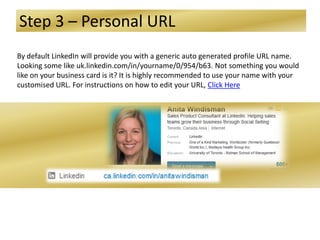
By default LinkedIn will provide you with a generic auto generated profile URL name.
Looking some like uk.linkedin.com/in/yourname/0/954/b63. Not something you would
like on your business card is it? It is highly recommended to use your name with your
customised URL. For instructions on how to edit your URL, Click Here
Step 4 – Contact Info
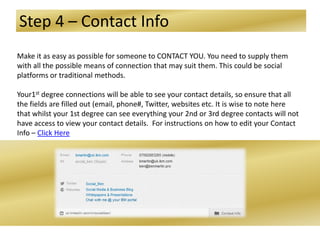
Make it as easy as possible for someone to CONTACT YOU. You need to supply them
with all the possible means of connection that may suit them. This could be social
platforms or traditional methods.
Your1st degree connections will be able to see your contact details, so ensure that all
the fields are filled out (email, phone#, Twitter, websites etc. It is wise to note here
that whilst your 1st degree can see everything your 2nd or 3rd degree contacts will not
have access to view your contact details. For instructions on how to edit your Contact
Info – Click Here
Step 5 - Summary
Who am I and Why am I here? The summary needs to be written to demonstrate the
value you will bring to the client. Clients are not interested that you hit all your KPI’s,
that you’re a great closer and sales person. They are interested if you can add value to
them, that you can demonstrate how you have helped similar clients. Highlight the
outcomes of your work to similar industries. Doing this will help build your credibility.
Remember the words you use in this section will enhance your SEO results. So ensure
you include industry key words when creating your summary. A great top tip is to
research key words your competition are using and incorporate them into your
wording. You have 2000 characters available *hint* use them all
New features on LinkedIn allow you to ability to add multimedia (video, infographics,
presentations) all helping you with credibility and your personal proposition. Media
samples can be added to Summary, Experience and Education
For more information on how to :
Add multimedia- Click Here
Edit your summary – Click Here
Step 6 - Experience
Whilst the summary should be about you and your value. The Experience sections are
a great place to highlight your accomplishments in each of your roles. It is also a great
place to add more about the company your are working for.
It may be easier to complete step 6 for the roles you have done before completing your
summary.
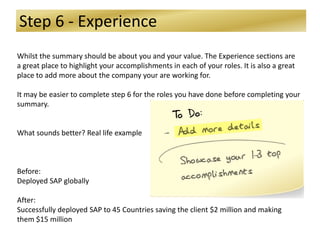
What sounds better? Real life example
Before:
Deployed SAP globally
After:
Successfully deployed SAP to 45 Countries saving the client $2 million and making
them $15 million
Step 7 - Activity
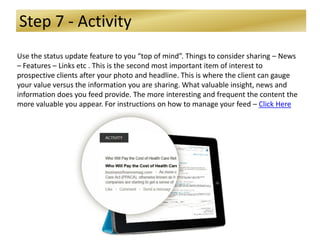
Use the status update feature to you “top of mind”. Things to consider sharing – News
– Features – Links etc . This is the second most important item of interest to
prospective clients after your photo and headline. This is where the client can gauge
your value versus the information you are sharing. What valuable insight, news and
information does you feed provide. The more interesting and frequent the content the
more valuable you appear. For instructions on how to manage your feed – Click Here
Step 8 - Recommendations
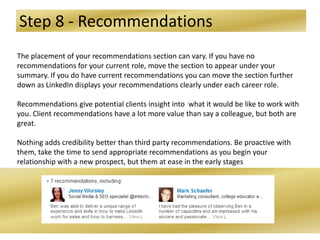
The placement of your recommendations section can vary. If you have no
recommendations for your current role, move the section to appear under your
summary. If you do have current recommendations you can move the section further
down as LinkedIn displays your recommendations clearly under each career role.
Recommendations give potential clients insight into what it would be like to work with
you. Client recommendations have a lot more value than say a colleague, but both are
great.
Nothing adds credibility better than third party recommendations. Be proactive with
them, take the time to send appropriate recommendations as you begin your
relationship with a new prospect, but them at ease in the early stages
Step 9 - Groups
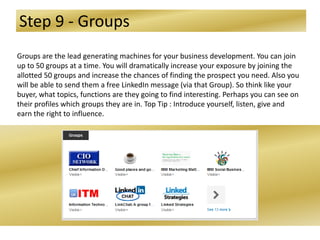
Groups are the lead generating machines for your business development. You can join
up to 50 groups at a time. You will dramatically increase your exposure by joining the
allotted 50 groups and increase the chances of finding the prospect you need. Also you
will be able to send them a free LinkedIn message (via that Group). So think like your
buyer, what topics, functions are they going to find interesting. Perhaps you can see on
their profiles which groups they are in. Top Tip : Introduce yourself, listen, give and
earn the right to influence.
Step 10 – Skills & Expertise
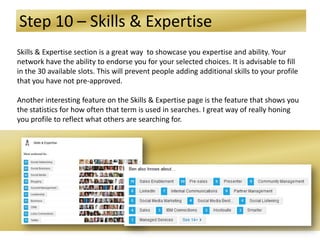
Skills & Expertise section is a great way to showcase you expertise and ability. Your
network have the ability to endorse you for your selected choices. It is advisable to fill
in the 30 available slots. This will prevent people adding additional skills to your profile
that you have not pre-approved.
Another interesting feature on the Skills & Expertise page is the feature that shows you
the statistics for how often that term is used in searches. I great way of really honing
you profile to reflect what others are searching for.

10 Steps to a Rocking LinkedIn Profile

  • 1.
  • 2.
    Introduction LinkedIn is oneof the most important tools a sales person should have in their arsenal. With over 225 million members, over 2 million groups and millions of professional oriented searches happening every day, LinkedIn is the most current database of contact you can have. Your profile is therefore of paramount importance. This is your window to the world and will dictate how your clients and prospective clients will view you. Use this platform to build on your personal brand and not just provide a resume. You want your clients to see you as a knowledgeable, insightful leader who can bring value to their business and help them through their buying experience. Creating a profile that is client centric ensuring that you are their go-to person. This guide is the start of your journey into creating the Social Wrap . The changes you will make will bring benefits to your social selling activities.
  • 3.
    Step 1 -Photo First impression count and in an instance, as humans, we make judgements. Your profile photo on LinkedIn is an important part of your personal brand. This is your first chance to create that first impression and build trust. Ensure that your photo reflects this professional networking site. Head and shoulder shot, business attire if you can get it done by a professional photographer. Ensure your eyes are visible and in focus. Give a thought to background colours and their emotive connection. ie Blue & White create trust.
  • 4.
    Step 2 -Headline Most people over look the Headline section, with the majority only using it to display their current role (ie Sales Manager). This is a huge mistake. What you don’t realise is that your LinkedIn page is similar to the Search Engine Optimisation (SEO) that Google uses. All the words within your profile are searchable by people interested in further information or business challenge. Use the Headline to answer the question what to you do? Beyond the fact you’re an “Account Manager” perhaps describe the outcome the viewer could expect. Include searchable keywords that you want to be found for. If your headline is not appealing, you most likely will not get good open rates. Similar to an email subject line. Headline
  • 5.
    Step 3 –Personal URL By default LinkedIn will provide you with a generic auto generated profile URL name. Looking some like uk.linkedin.com/in/yourname/0/954/b63. Not something you would like on your business card is it? It is highly recommended to use your name with your customised URL. For instructions on how to edit your URL, Click Here
  • 6.
    Step 4 –Contact Info Make it as easy as possible for someone to CONTACT YOU. You need to supply them with all the possible means of connection that may suit them. This could be social platforms or traditional methods. Your1st degree connections will be able to see your contact details, so ensure that all the fields are filled out (email, phone#, Twitter, websites etc. It is wise to note here that whilst your 1st degree can see everything your 2nd or 3rd degree contacts will not have access to view your contact details. For instructions on how to edit your Contact Info – Click Here
  • 7.
    Step 5 -Summary Who am I and Why am I here? The summary needs to be written to demonstrate the value you will bring to the client. Clients are not interested that you hit all your KPI’s, that you’re a great closer and sales person. They are interested if you can add value to them, that you can demonstrate how you have helped similar clients. Highlight the outcomes of your work to similar industries. Doing this will help build your credibility. Remember the words you use in this section will enhance your SEO results. So ensure you include industry key words when creating your summary. A great top tip is to research key words your competition are using and incorporate them into your wording. You have 2000 characters available *hint* use them all New features on LinkedIn allow you to ability to add multimedia (video, infographics, presentations) all helping you with credibility and your personal proposition. Media samples can be added to Summary, Experience and Education For more information on how to : Add multimedia- Click Here Edit your summary – Click Here
  • 8.
    Step 6 -Experience Whilst the summary should be about you and your value. The Experience sections are a great place to highlight your accomplishments in each of your roles. It is also a great place to add more about the company your are working for. It may be easier to complete step 6 for the roles you have done before completing your summary. What sounds better? Real life example Before: Deployed SAP globally After: Successfully deployed SAP to 45 Countries saving the client $2 million and making them $15 million
  • 9.
    Step 7 -Activity Use the status update feature to you “top of mind”. Things to consider sharing – News – Features – Links etc . This is the second most important item of interest to prospective clients after your photo and headline. This is where the client can gauge your value versus the information you are sharing. What valuable insight, news and information does you feed provide. The more interesting and frequent the content the more valuable you appear. For instructions on how to manage your feed – Click Here
  • 10.
    Step 8 -Recommendations The placement of your recommendations section can vary. If you have no recommendations for your current role, move the section to appear under your summary. If you do have current recommendations you can move the section further down as LinkedIn displays your recommendations clearly under each career role. Recommendations give potential clients insight into what it would be like to work with you. Client recommendations have a lot more value than say a colleague, but both are great. Nothing adds credibility better than third party recommendations. Be proactive with them, take the time to send appropriate recommendations as you begin your relationship with a new prospect, but them at ease in the early stages
  • 11.
    Step 9 -Groups Groups are the lead generating machines for your business development. You can join up to 50 groups at a time. You will dramatically increase your exposure by joining the allotted 50 groups and increase the chances of finding the prospect you need. Also you will be able to send them a free LinkedIn message (via that Group). So think like your buyer, what topics, functions are they going to find interesting. Perhaps you can see on their profiles which groups they are in. Top Tip : Introduce yourself, listen, give and earn the right to influence.
  • 12.
    Step 10 –Skills & Expertise Skills & Expertise section is a great way to showcase you expertise and ability. Your network have the ability to endorse you for your selected choices. It is advisable to fill in the 30 available slots. This will prevent people adding additional skills to your profile that you have not pre-approved. Another interesting feature on the Skills & Expertise page is the feature that shows you the statistics for how often that term is used in searches. I great way of really honing you profile to reflect what others are searching for.