The Social Professional – LinkedIn
Welcome
LinkedIn
The Social Professional – LinkedIn
834 Design & Marketing
Adrienne Wallace
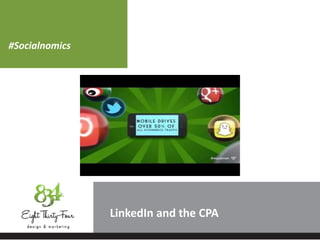
#Socialnomics
LinkedIn
What is Social Media?
A flexible definition
LinkedIn
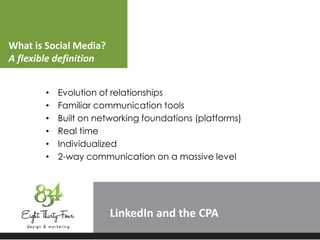
• Evolution of relationships
• Familiar communication tools
• Built on networking foundations (platforms)
• Real time
• Individualized
• 2-way communication on a massive level
What is Social Media?
Flattening the Earth
LinkedIn
Tipping point was identified by Neilson (2009):
Social media (67%) used more than email (65%)
What is Social Media?
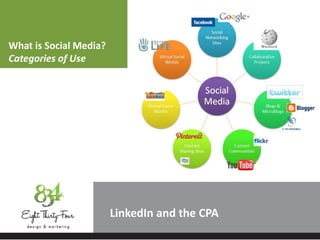
Categories of Use
LinkedIn
What is Social Media?
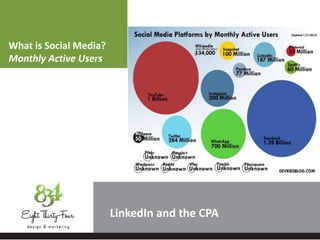
Monthly Active Users
LinkedIn
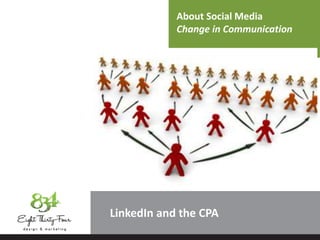
About Social Media
LinkedIn
3 Things
• Each platform has a distinct personality.
• Many different platforms for different purposes.
• Platforms may change, good communication does not.
About Social Media
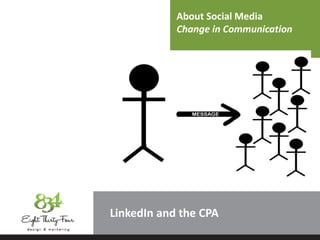
Change in Communication
LinkedIn
About Social Media
Change in Communication
LinkedIn
LinkedIn
Effects of Social Media
• Democracy
• Transparency in the everyday
• Meritocracy
• Open sourced comments posted affect
performance-based outcomes
• Authentocracy
• Success from true voices. Drive to be
“authentic self” is a large tenant of SM.
LinkedIn
Tools of Social Media
• Search/Audit/Strategize
• Create a policy for your firm.
• Assign ambassadors or educate all members
• Find out what you do, who does it?
• What do your competitors do? How?
• Track/Protect/Monitor
• Google analytics.
• Google alerts.
• Participate/Engage
• Answer the noise.
• Refer and redirect if need be.
About Social Media
Implications
LinkedIn
• Age of radical transparency.
• Lack of privacy-no one is exempt.
• Longevity of practice.
• Assured of change.
• Flexibility required.
• Evaluate and re-strategize (continually).
LinkedIn
How to engage?
• Determine your strategy and your audience.
• Get some headshots for goodness sake.
• Find yourself – what’s your brand?
• Create original content and add to the
conversation.
• Publish stuff worth reading.
• Engage your audience continually.
LinkedIn
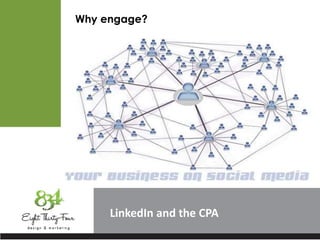
Why engage?
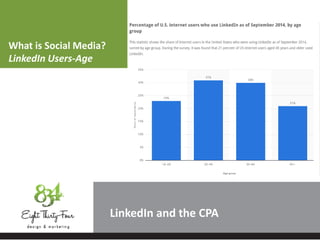
What is Social Media?
LinkedIn Users-Age
LinkedIn
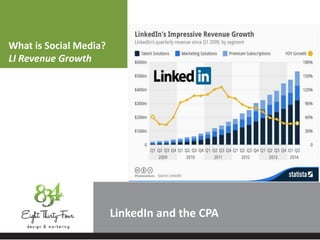
What is Social Media?
LI Revenue Growth
LinkedIn
What is Social Media?
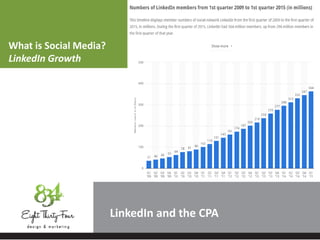
LinkedIn Growth
LinkedIn
LinkedIn Value
LinkedIn
Quick Stats
• 147 Million users in the past 12 months this number is up 47%
• Standard user is male (57%) aged between 29 and 54 years of age
• 20% of LinkedIn users are senior level executives
• 39% of LinkedIn users have titles of Manager, Director, CEO, COO,
CFO, or VP
• 60% are either decision makers, or have direct access to decision
makers
• 43% of all LinkedIn users are located in the United States
• Top four professions: IT, Marketing/Advertising, Financial Services,
Computer Software (all avg incomes over $60,000.00 annually)
• 49% of all LI members live in households earning more than
$100,000.00 a year.
Souce: LinkedIn Ads
LinkedIn
12 Common LinkedIn Mistakes
• Failing to take social seriously
• Not achieving a 100% complete LinkedIn profile
• No photo, or worse, the WRONG photo
• Not developing and building your network
• Not using LinkedIn to protect your clients
• Not asking or getting recommended
• Failing to join LinkedIn groups
• Waiting for people to come to you
• Letting your staff “loose” on LinkedIn without advice
• Not using keywords to “get found” (overview,
specialties, services)
• Not allowing testimonials on your profile from clients or
peers
• Not populating your links, videos, and resources
LinkedIn
8 Essential LinkedIn Connections
• Co-Workers, Current and past
• Clients or Customers
• Be careful of conflict of interest or privacy
• Classmates
• Yes, even if you haven’t seen them in a while
• Fellow Volunteers
• Extracurricular connections
• Members of Your Business Network/Natural Referral
Partners
• Family and Friends
• Ask these people to be your clients or to give a
recommendation on your behalf
• Fellow Members of LinkedIn Groups
• Yes, even if you don’t know them “in real life”
• Competitors
LinkedIn
7 Essential LinkedIn Activities
• Sign up
• Can’t participate if you don’t join
• Maintain a complete profile
• Don’t let it stagnate, post a few times a week even if
it’s “just” a share
• Update your status
• Show you are attentive
• Connect
• Build your network of primary, secondary and tertiary
relationships
• Join or better yet, make a group
• Connect with people of similar interests, share
strategies, complain about tax season and get
sympathy
• Share a link or answer a question
• Provide added value and items of interest
• Follow a company [maybe the competitor]
LinkedIn
7 Essential LinkedIn Settings to Modify
• Profile Photo
• Everyone, network, or connections only
• Public Profile
• Create your branded URL then choose which items
appear in a search to others
• Manage Recommendations
• Public or private
• Member Feed Visibility
• Choose who sees your updates [everyone, network
or connections only]
• Network Updates
• Control what updates you get on your homepage
• Connections Browse
• Control who sees your connections [can your
competition?]
• Authorized Applications
LinkedIn
7 Essential Groups to Join
• Your company’s group
• Engage members in discussion, refer people to other
services and develop reciprocal relationships
• AICPA [American Institute of CPAs]
• Lots of groups here from YoungCPAs to Tax Section
• State CPA Society
• The CPA support group for the state
• SocialCPAs
• CPAs and social networking of all platforms, not just
LinkedIn
• Your practice group
• What expertise do you have? Join that group.
• International CPA Association
• Help others and get help of a different perspective
• Your competitors
• Isn’t it obvious? Research. Intel.
LinkedIn
5 Super Active Finance-Related Groups
• Finance Club
• This is a kitchen-sink group-14 subgroups according
to field.
• Finance and Accounting Pros
• The subgroups of this group are divided into four
categories:
• Finance & Accounting Recruiters Only (I have
a job)
• Finance & Accounting Job Seekers Only (I
need a job)
• Finance Professionals (Jobs & Networking)
• Accounting Professionals (Jobs & Networking)
• Finance Services Careers
• Created just days before Lehman collapsed in
2008, this group connects job seekers and hiring
managers in a range of finance sectors.
LinkedIn
5 Super Active Finance-Related Groups
• Financial Services Regulation
• The group's purpose is to keep regulation officials
informed, so it's a good go-to service for staying
up-to-date on the labyrinth of finreg.
• Real Estate Finance & Networking
• This group connects individuals in commercial
and residential real estate, as well as those in
mortgage brokerage, asset management,
distressed debt and more.
LinkedIn
Use LinkedIn for What?
• Manage existing clients
• Distribution of quality info to clients
• Generate referrals through clients and referring
businesses
• Secure new clients through search
• Prevent attrition by offering additional services
• Share content
• Give clients valuable connections and referrals
• Increase your own web visibility/SEO rank/traffic in
general
• Low or no cost marketing
• Recruitment
• Research of trends
• Get/give advice
LinkedIn
Steps to gain a referral
• Social media flattens the referral process-you are already
connected
• Search for the client you want among your contacts
• View your contacts and their contacts
• Use the platform to build goodwill through a mutual
connection
• Message them or ask to be introduced through your
mutual contact
• Did someone search you? Connect with them, use
their curiosity to get to their contacts
• Prospect, search, connect, follow up
• Light stalking is the new normal
• Who will be at that event with you?
LinkedIn
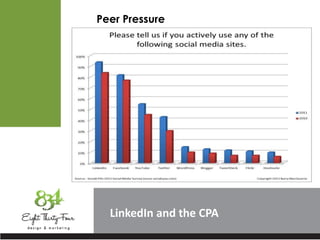
Peer Pressure
LinkedIn
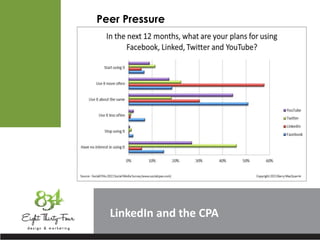
Peer Pressure
LinkedIn
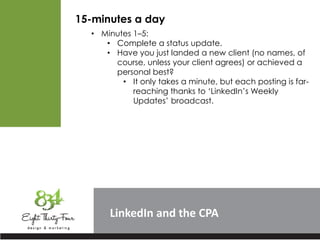
15-minutes a day
• Minutes 1–5:
• Complete a status update.
• Have you just landed a new client (no names, of
course, unless your client agrees) or achieved a
personal best?
• It only takes a minute, but each posting is far-
reaching thanks to ‘LinkedIn’s Weekly
Updates’ broadcast.
LinkedIn
15-minutes a day
• Minutes 6–10:
• Browse ‘All Updates’ on your ‘Home’ page.
• Congratulate a connection or comment on
a profile update, even if it’s just to say,
“Great new photo.”
• All of these comments go out to your entire
network.
LinkedIn
15-minutes a day
• Minutes 11–15:
• Glance through ‘People You May Know’ by
clicking on ‘Add Connections’ in the upper-right
corner of the ‘Profile’ screen and selecting it from
the screen that appears.
• These are people who are connected to
your connections. If you see someone you
know, invite him or her to join your network.
• When your invitation is accepted, ‘All
Updates’, shown on your ‘Home’ page, will
reflect that and your new connection will be
included in the ‘Weekly Updates’ broadcast.
LinkedIn Value
LinkedIn
James Potter, Insight Marketing
“When you know how to use LinkedIn well, you’ll save
yourself a ton of time. You will walk through open doors
instead of making cold calls; you’ll enhance your personal
reputation and the profile of your practice; you’ll access
outstanding information and opportunities that would
previously have missed and ultimately you will increase
your revenue.”
LinkedIn
LinkedIn Resources
• Quick tour and navigation of my own page
• Questions and concerns regarding the platform
• LinkedIn “Bible” for individuals
https://help.linkedin.com/app/home and
companies
https://help.linkedin.com/app/answers/detail/a_i
d/1561 (shortcut to company pages)
• Hate reading? Watch videos:
https://www.youtube.com/user/LinkedIn
• What about sponsored content? Watch here:
https://www.youtube.com/user/LIMarketingSoluti
ons
• LinkedIn HELP!!!!!
https://www.youtube.com/user/linkedinhelp
LinkedIn
Sources
• Socialcpas.com
• Youtube.com
• Linkedin.com
• InsightMarketing
• Journal of Accountancy
• Statistica
• Square Martini Media
• Top Dog Social
• LinkedUp Grand Rapids
• Accounting Today
• CPA Social Trends
• http://cpat-jacksonwhelan.netdna-ssl.com/wp-
content/uploads/2010/11/SocialCPAs-via-
CPATrendlines.pdf
• Not used but a GREAT ‘how to’ [oldie but a goodie]
• http://www.cpasuccess.com/2010/07/cpas-how-
to-jumpstart-your-social-media-strategy.html
LinkedIn
Connect with us!
834 Design & Marketing
http://834design.com/
Adrienne Wallace
adrienne@834design.com
@adriwall
http://www.linkedin.com/in/adriwall
834 Facebook
https://www.facebook.com/834design
834 LinkedIn
http://www.linkedin.com/company/2609249

The Social Professional

  • 1.
  • 2.
    Welcome LinkedIn The Social Professional– LinkedIn 834 Design & Marketing Adrienne Wallace
  • 3.
  • 4.
    What is SocialMedia? A flexible definition LinkedIn • Evolution of relationships • Familiar communication tools • Built on networking foundations (platforms) • Real time • Individualized • 2-way communication on a massive level
  • 5.
    What is SocialMedia? Flattening the Earth LinkedIn Tipping point was identified by Neilson (2009): Social media (67%) used more than email (65%)
  • 6.
    What is SocialMedia? Categories of Use LinkedIn
  • 7.
    What is SocialMedia? Monthly Active Users LinkedIn
  • 8.
    About Social Media LinkedIn 3Things • Each platform has a distinct personality. • Many different platforms for different purposes. • Platforms may change, good communication does not.
  • 9.
    About Social Media Changein Communication LinkedIn
  • 10.
    About Social Media Changein Communication LinkedIn
  • 11.
    LinkedIn Effects of SocialMedia • Democracy • Transparency in the everyday • Meritocracy • Open sourced comments posted affect performance-based outcomes • Authentocracy • Success from true voices. Drive to be “authentic self” is a large tenant of SM.
  • 12.
    LinkedIn Tools of SocialMedia • Search/Audit/Strategize • Create a policy for your firm. • Assign ambassadors or educate all members • Find out what you do, who does it? • What do your competitors do? How? • Track/Protect/Monitor • Google analytics. • Google alerts. • Participate/Engage • Answer the noise. • Refer and redirect if need be.
  • 13.
    About Social Media Implications LinkedIn •Age of radical transparency. • Lack of privacy-no one is exempt. • Longevity of practice. • Assured of change. • Flexibility required. • Evaluate and re-strategize (continually).
  • 14.
    LinkedIn How to engage? •Determine your strategy and your audience. • Get some headshots for goodness sake. • Find yourself – what’s your brand? • Create original content and add to the conversation. • Publish stuff worth reading. • Engage your audience continually.
  • 15.
  • 16.
    What is SocialMedia? LinkedIn Users-Age LinkedIn
  • 17.
    What is SocialMedia? LI Revenue Growth LinkedIn
  • 18.
    What is SocialMedia? LinkedIn Growth LinkedIn
  • 19.
    LinkedIn Value LinkedIn Quick Stats •147 Million users in the past 12 months this number is up 47% • Standard user is male (57%) aged between 29 and 54 years of age • 20% of LinkedIn users are senior level executives • 39% of LinkedIn users have titles of Manager, Director, CEO, COO, CFO, or VP • 60% are either decision makers, or have direct access to decision makers • 43% of all LinkedIn users are located in the United States • Top four professions: IT, Marketing/Advertising, Financial Services, Computer Software (all avg incomes over $60,000.00 annually) • 49% of all LI members live in households earning more than $100,000.00 a year. Souce: LinkedIn Ads
  • 20.
    LinkedIn 12 Common LinkedInMistakes • Failing to take social seriously • Not achieving a 100% complete LinkedIn profile • No photo, or worse, the WRONG photo • Not developing and building your network • Not using LinkedIn to protect your clients • Not asking or getting recommended • Failing to join LinkedIn groups • Waiting for people to come to you • Letting your staff “loose” on LinkedIn without advice • Not using keywords to “get found” (overview, specialties, services) • Not allowing testimonials on your profile from clients or peers • Not populating your links, videos, and resources
  • 21.
    LinkedIn 8 Essential LinkedInConnections • Co-Workers, Current and past • Clients or Customers • Be careful of conflict of interest or privacy • Classmates • Yes, even if you haven’t seen them in a while • Fellow Volunteers • Extracurricular connections • Members of Your Business Network/Natural Referral Partners • Family and Friends • Ask these people to be your clients or to give a recommendation on your behalf • Fellow Members of LinkedIn Groups • Yes, even if you don’t know them “in real life” • Competitors
  • 22.
    LinkedIn 7 Essential LinkedInActivities • Sign up • Can’t participate if you don’t join • Maintain a complete profile • Don’t let it stagnate, post a few times a week even if it’s “just” a share • Update your status • Show you are attentive • Connect • Build your network of primary, secondary and tertiary relationships • Join or better yet, make a group • Connect with people of similar interests, share strategies, complain about tax season and get sympathy • Share a link or answer a question • Provide added value and items of interest • Follow a company [maybe the competitor]
  • 23.
    LinkedIn 7 Essential LinkedInSettings to Modify • Profile Photo • Everyone, network, or connections only • Public Profile • Create your branded URL then choose which items appear in a search to others • Manage Recommendations • Public or private • Member Feed Visibility • Choose who sees your updates [everyone, network or connections only] • Network Updates • Control what updates you get on your homepage • Connections Browse • Control who sees your connections [can your competition?] • Authorized Applications
  • 24.
    LinkedIn 7 Essential Groupsto Join • Your company’s group • Engage members in discussion, refer people to other services and develop reciprocal relationships • AICPA [American Institute of CPAs] • Lots of groups here from YoungCPAs to Tax Section • State CPA Society • The CPA support group for the state • SocialCPAs • CPAs and social networking of all platforms, not just LinkedIn • Your practice group • What expertise do you have? Join that group. • International CPA Association • Help others and get help of a different perspective • Your competitors • Isn’t it obvious? Research. Intel.
  • 25.
    LinkedIn 5 Super ActiveFinance-Related Groups • Finance Club • This is a kitchen-sink group-14 subgroups according to field. • Finance and Accounting Pros • The subgroups of this group are divided into four categories: • Finance & Accounting Recruiters Only (I have a job) • Finance & Accounting Job Seekers Only (I need a job) • Finance Professionals (Jobs & Networking) • Accounting Professionals (Jobs & Networking) • Finance Services Careers • Created just days before Lehman collapsed in 2008, this group connects job seekers and hiring managers in a range of finance sectors.
  • 26.
    LinkedIn 5 Super ActiveFinance-Related Groups • Financial Services Regulation • The group's purpose is to keep regulation officials informed, so it's a good go-to service for staying up-to-date on the labyrinth of finreg. • Real Estate Finance & Networking • This group connects individuals in commercial and residential real estate, as well as those in mortgage brokerage, asset management, distressed debt and more.
  • 27.
    LinkedIn Use LinkedIn forWhat? • Manage existing clients • Distribution of quality info to clients • Generate referrals through clients and referring businesses • Secure new clients through search • Prevent attrition by offering additional services • Share content • Give clients valuable connections and referrals • Increase your own web visibility/SEO rank/traffic in general • Low or no cost marketing • Recruitment • Research of trends • Get/give advice
  • 28.
    LinkedIn Steps to gaina referral • Social media flattens the referral process-you are already connected • Search for the client you want among your contacts • View your contacts and their contacts • Use the platform to build goodwill through a mutual connection • Message them or ask to be introduced through your mutual contact • Did someone search you? Connect with them, use their curiosity to get to their contacts • Prospect, search, connect, follow up • Light stalking is the new normal • Who will be at that event with you?
  • 29.
  • 30.
  • 31.
    LinkedIn 15-minutes a day •Minutes 1–5: • Complete a status update. • Have you just landed a new client (no names, of course, unless your client agrees) or achieved a personal best? • It only takes a minute, but each posting is far- reaching thanks to ‘LinkedIn’s Weekly Updates’ broadcast.
  • 32.
    LinkedIn 15-minutes a day •Minutes 6–10: • Browse ‘All Updates’ on your ‘Home’ page. • Congratulate a connection or comment on a profile update, even if it’s just to say, “Great new photo.” • All of these comments go out to your entire network.
  • 33.
    LinkedIn 15-minutes a day •Minutes 11–15: • Glance through ‘People You May Know’ by clicking on ‘Add Connections’ in the upper-right corner of the ‘Profile’ screen and selecting it from the screen that appears. • These are people who are connected to your connections. If you see someone you know, invite him or her to join your network. • When your invitation is accepted, ‘All Updates’, shown on your ‘Home’ page, will reflect that and your new connection will be included in the ‘Weekly Updates’ broadcast.
  • 34.
    LinkedIn Value LinkedIn James Potter,Insight Marketing “When you know how to use LinkedIn well, you’ll save yourself a ton of time. You will walk through open doors instead of making cold calls; you’ll enhance your personal reputation and the profile of your practice; you’ll access outstanding information and opportunities that would previously have missed and ultimately you will increase your revenue.”
  • 35.
    LinkedIn LinkedIn Resources • Quicktour and navigation of my own page • Questions and concerns regarding the platform • LinkedIn “Bible” for individuals https://help.linkedin.com/app/home and companies https://help.linkedin.com/app/answers/detail/a_i d/1561 (shortcut to company pages) • Hate reading? Watch videos: https://www.youtube.com/user/LinkedIn • What about sponsored content? Watch here: https://www.youtube.com/user/LIMarketingSoluti ons • LinkedIn HELP!!!!! https://www.youtube.com/user/linkedinhelp
  • 36.
    LinkedIn Sources • Socialcpas.com • Youtube.com •Linkedin.com • InsightMarketing • Journal of Accountancy • Statistica • Square Martini Media • Top Dog Social • LinkedUp Grand Rapids • Accounting Today • CPA Social Trends • http://cpat-jacksonwhelan.netdna-ssl.com/wp- content/uploads/2010/11/SocialCPAs-via- CPATrendlines.pdf • Not used but a GREAT ‘how to’ [oldie but a goodie] • http://www.cpasuccess.com/2010/07/cpas-how- to-jumpstart-your-social-media-strategy.html
  • 37.
    LinkedIn Connect with us! 834Design & Marketing http://834design.com/ Adrienne Wallace adrienne@834design.com @adriwall http://www.linkedin.com/in/adriwall 834 Facebook https://www.facebook.com/834design 834 LinkedIn http://www.linkedin.com/company/2609249

Editor's Notes

  • #10 Old Model of Interpersonal Communication: One person, sending a message to other one person(s) at a time.
  • #11 New Model of Interpersonal Communication
  • #16 Your clients are talking-you better be listening.
  • #21 “Satisfied customers are the best source of new customers,” says Guy Kawasaki. Referrals are still the biggest source of new clients for accountants. A
  • #22 Discuss why these are important
  • #26 A quick search showed over 1,500 groups in accounting field alone.
  • #30 Your clients are talking-you better be listening.
  • #31 Your clients are talking-you better be listening.