Linkedin Survival Guide
ABOUT ME
 Social Media Strategist at Be Socially Awesome
 Owner of No Fuss Accounting Services (since 2007)
 Business Consultant and Trainer
 Planner Addict, Chihuahua Owner, Whovian
#MyKosmo
Make sure it is filled out 100%
Head Shot – Updated picture (Not from 7
years ago) Invest in a good photographer
Background Image – Great for branding and
matching other social profiles.
Use that profile title section to stand out
from the rest.
Custom URL
Avoid Flooding Your Updates with Profile
Changes
Profile Tips
Story Telling Area
Summary Section
Summary Section
Summary Section
Add Media to each
Experience
Position
Summary Section
Summary Section
Profile Tips
Review and edit the “Endorsements” of your
skills. Remove the ones are not applicable and
reorder and highlight the ones that count.
Ask for recommendations: if you are unable to
post recommendations on your business
transactions, consider ones for your volunteer
work, or networking / connecting abilities etc.
Get creative. How amazing are you?
Skills / Endorsements
LIMIT YOURSELF TO 10 SKILLS;
REORDER THEM BY POPULARITY
Skills / Endorsements
Recommendations
Recommendations
Only Send Requests To People You
Have Done Work For
Finding and Making Connections
Opportunities to socialize; get in front of a
connection (anniversaries; new jobs etc)
Finding and Making Connections
Add connections; using email connection,
Recheck periodically ( I do it monthly)
Finding and Making Connections
Find Alumni
Linkedin Recommended Connections
Finding and Making Connections
Join LinkedIn Groups
 Network with potential new connections
 In groups you can build your brand and
authority in your field. By answering questions
and adding value to conversations and topics.
 In groups you can look at questions people are
asking and use as inspiration for blog posts or
videos.
Finding and Making Connections
LinkedIn Groups
Finding and Making Connections
Use For Content Ideas; SEO suggested
Long Tail Keywords
LinkedIn Groups
General Tips
Become Invisible!
 Did you know when you look on a persons profile,
they can see that you were there?
 You can also view who checked your profile out.
 If you turn yourself invisible; you will no longer be
able to see who checked you out, until you turn
yourself visible again.
General Tips
General Tips
General Tips
General Tips
Keep Track of Your Contacts
 Did you know that you can export your entire Linkedin
directory of contacts to a spreadsheet?
 Easier to search and sort in a spreadsheet than inside of
Linkedin.
 You can also tap into the emails for use in Facebook ads.
 Do NOT add them to your newsletter / email list- that is
spamming
General Tips
General Tips
General Tips
General Tips
General Tips
General Tips
 Limit industry lingo in bio / job
descriptions
 Connect with people you know or vet
connection with others
 Blog on Linkedin Using “Publish a Post”
VS “Share an Update”
General Tips
 Do NOT spam with Linkedin emails
 When requesting to connect; don’t just use the
template email; add why you want to connect
 Make sure you use your status updates
 Like, comment and share other’s updates
(being Social!!)
 Add your Linkedin profile link to your email
signature
 Upload PDFs / Presentations to Slideshare.net
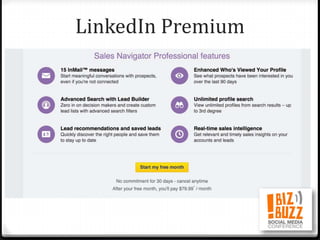
 Consider / Try Linkedin Premium (Free Trial)
to see if you feel it is worth the price.
General Tips
LinkedIn / Slideshare.Net
LinkedIn Premium
LinkedIn Premium
LinkedIn Premium
LinkedIn Premium
CONNECT WITH ME!
facebook.com/JoanneLDelBalso
@JoanneLDelBalso
Search “Be Socially Awesome” on Facebook
For My Private Facebook Group
@besociallyawesome
Search “Be Socially Awesome”
QUESTIONS?
http://bit.ly/BIZBUZZLINKEDINTIP
S
To grab this pdf!!!

Linkedin Survival Guide