My Top 10 LinkedIn Tips
I have used LinkedIn for
over 6 years, I hope you
find these tips helpful
www.facebook.com/johueybusinesssolutions
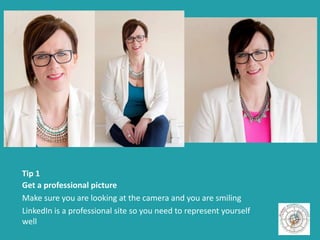
Tip 1
Get a professional picture
Make sure you are looking at the camera and you are smiling
LinkedIn is a professional site so you need to represent yourself
well
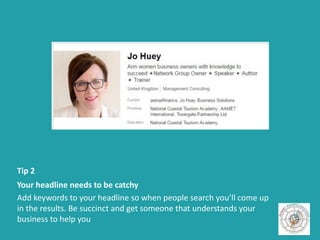
Tip 2
Your headline needs to be catchy
Add keywords to your headline so when people search you’ll come up
in the results. Be succinct and get someone that understands your
business to help you
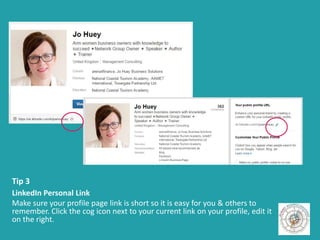
Tip 3
LinkedIn Personal Link
Make sure your profile page link is short so it is easy for you & others to
remember. Click the cog icon next to your current link on your profile, edit it
on the right.
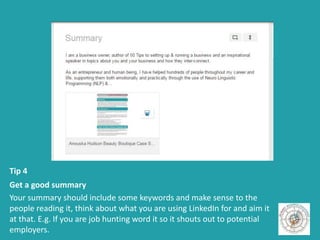
Tip 4
Get a good summary
Your summary should include some keywords and make sense to the
people reading it, think about what you are using LinkedIn for and aim it
at that. E.g. If you are job hunting word it so it shouts out to potential
employers.
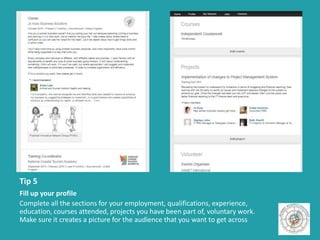
Tip 5
Fill up your profile
Complete all the sections for your employment, qualifications, experience,
education, courses attended, projects you have been part of, voluntary work.
Make sure it creates a picture for the audience that you want to get across
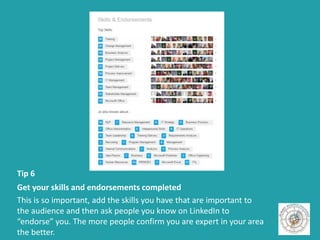
Tip 6
Get your skills and endorsements completed
This is so important, add the skills you have that are important to
the audience and then ask people you know on LinkedIn to
“endorse” you. The more people confirm you are expert in your area
the better.
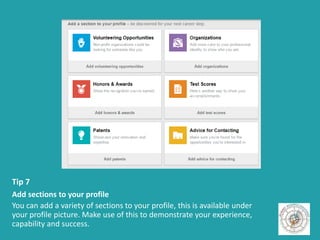
Tip 7
Add sections to your profile
You can add a variety of sections to your profile, this is available under
your profile picture. Make use of this to demonstrate your experience,
capability and success.
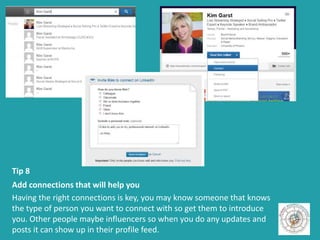
Tip 8
Add connections that will help you
Having the right connections is key, you may know someone that knows
the type of person you want to connect with so get them to introduce
you. Other people maybe influencers so when you do any updates and
posts it can show up in their profile feed.
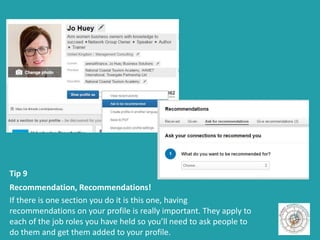
Tip 9
Recommendation, Recommendations!
If there is one section you do it is this one, having
recommendations on your profile is really important. They apply to
each of the job roles you have held so you’ll need to ask people to
do them and get them added to your profile.
Tip 10
Interact in the groups
This is my most important tip, join groups that will help you. If you are
looking for a job then find recruitment groups. If you are a business then
join networking groups or specialist groups to help in your industry.
Comment and create posts to raise your profile so people know who you
are and what you have to say. Your groups will show on your profile.
Don’t forget, keep your profile up-to-date

Linkedin: Confused to Clever in 10 steps

  • 1.
    My Top 10LinkedIn Tips I have used LinkedIn for over 6 years, I hope you find these tips helpful www.facebook.com/johueybusinesssolutions
  • 2.
    Tip 1 Get aprofessional picture Make sure you are looking at the camera and you are smiling LinkedIn is a professional site so you need to represent yourself well
  • 3.
    Tip 2 Your headlineneeds to be catchy Add keywords to your headline so when people search you’ll come up in the results. Be succinct and get someone that understands your business to help you
  • 4.
    Tip 3 LinkedIn PersonalLink Make sure your profile page link is short so it is easy for you & others to remember. Click the cog icon next to your current link on your profile, edit it on the right.
  • 5.
    Tip 4 Get agood summary Your summary should include some keywords and make sense to the people reading it, think about what you are using LinkedIn for and aim it at that. E.g. If you are job hunting word it so it shouts out to potential employers.
  • 6.
    Tip 5 Fill upyour profile Complete all the sections for your employment, qualifications, experience, education, courses attended, projects you have been part of, voluntary work. Make sure it creates a picture for the audience that you want to get across
  • 7.
    Tip 6 Get yourskills and endorsements completed This is so important, add the skills you have that are important to the audience and then ask people you know on LinkedIn to “endorse” you. The more people confirm you are expert in your area the better.
  • 8.
    Tip 7 Add sectionsto your profile You can add a variety of sections to your profile, this is available under your profile picture. Make use of this to demonstrate your experience, capability and success.
  • 9.
    Tip 8 Add connectionsthat will help you Having the right connections is key, you may know someone that knows the type of person you want to connect with so get them to introduce you. Other people maybe influencers so when you do any updates and posts it can show up in their profile feed.
  • 10.
    Tip 9 Recommendation, Recommendations! Ifthere is one section you do it is this one, having recommendations on your profile is really important. They apply to each of the job roles you have held so you’ll need to ask people to do them and get them added to your profile.
  • 11.
    Tip 10 Interact inthe groups This is my most important tip, join groups that will help you. If you are looking for a job then find recruitment groups. If you are a business then join networking groups or specialist groups to help in your industry. Comment and create posts to raise your profile so people know who you are and what you have to say. Your groups will show on your profile.
  • 12.
    Don’t forget, keepyour profile up-to-date