
DATABASE SYSTEM ARCHITECTURE
Sayed Ahmed
Computer Engineering, BUET, Bangladesh
MSc, Computer Science, U of Manitoba, Canada
Owner/President/Architect/Developer
Justetc (Just et cetera) Technologies
http://www.justetc.net
http://sayed.justetc.net
sayed@justetc.net
FREE TRAINING BY JUSTETC
 Training and Education in Bangla:
 http://Bangla.SaLearningSchool.com
 http://Blog. SaLearningSchool.com
 Training and Education in English:
 http://www.SaLearningSchool.com
 http://English.SaLearningSchool.com
 http://www.SitesTree.com
---------------------------------------------------------------------------------
 Ask questions and get answers
 http://Ask.JustEtc.net
---------------------------------------------------------------------------------
 Offline IT Training:
 http://University.JustEtc.net
LEARNING OBJECTIVES
 Understand different database system
architectures
 Comparison of different database system
architectures
 Note:
 Bangladesh Polytechnique Institute
 Subject Code: 6658, will be helpful
 Grade 9 to 12 (Bangladesh) students may be
benefited
DATABASE SYSTEM ARCHITECTURES
 DBMS architecture depends on the
Computer System Architecture
 DBMS architecture types
 Centralized Systems
 Client--Server Systems
 Parallel Systems
 Distributed Systems
CENTRALIZED SYSTEMS
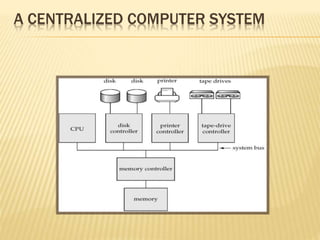
 The DBMS resides, Run, and sits on a
single computer system
 The DBMS does not interact with other
computer systems
 Can be called One Tier Architectures
 Microsoft Access
 Mainframe computer databases
 Reference:
 http://www.windowsecurity.com/whitepapers/softwar
e_engineering/An-Overview-of-Common-Database-
Architectures.html
A CENTRALIZED COMPUTER SYSTEM
CLIENT-SERVER SYSTEMS
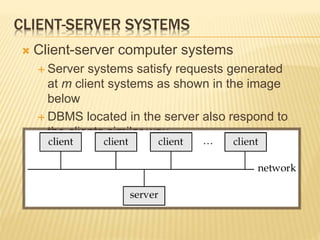
 Client-server computer systems
 Server systems satisfy requests generated
at m client systems as shown in the image
below
 DBMS located in the server also respond to
the clients similar way
CLIENT-SERVER SYSTEMS (CONT.)
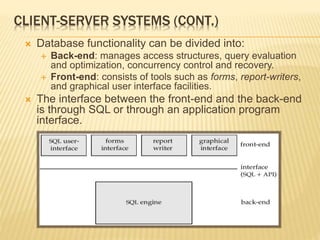
 Database functionality can be divided into:
 Back-end: manages access structures, query evaluation
and optimization, concurrency control and recovery.
 Front-end: consists of tools such as forms, report-writers,
and graphical user interface facilities.
 The interface between the front-end and the back-end
is through SQL or through an application program
interface.
CLIENT-SERVER SYSTEMS (CONT.)
 Examples
 MS SQL Server, Oracle, Sybase in general
 Can be of Thin Client and Fat-Client
type
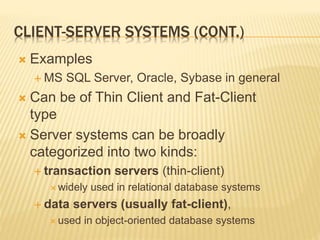
 Server systems can be broadly
categorized into two kinds:
 transaction servers (thin-client)
 widely used in relational database systems
 data servers (usually fat-client),
 used in object-oriented database systems
TRANSACTION SERVERS
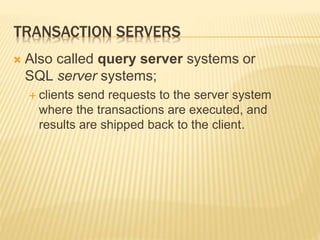
 Also called query server systems or
SQL server systems;
 clients send requests to the server system
where the transactions are executed, and
results are shipped back to the client.
TRANSACTION SERVER PROCESS STRUCTURE
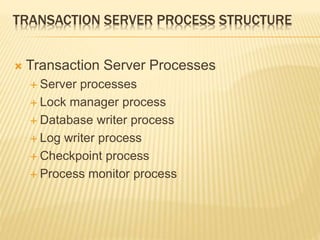
 Transaction Server Processes
 Server processes
 Lock manager process
 Database writer process
 Log writer process
 Checkpoint process
 Process monitor process
DATA SERVERS
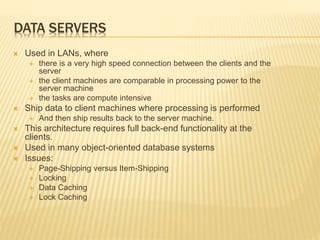
 Used in LANs, where
 there is a very high speed connection between the clients and the
server
 the client machines are comparable in processing power to the
server machine
 the tasks are compute intensive
 Ship data to client machines where processing is performed
 And then ship results back to the server machine.
 This architecture requires full back-end functionality at the
clients.
 Used in many object-oriented database systems
 Issues:
 Page-Shipping versus Item-Shipping
 Locking
 Data Caching
 Lock Caching
PARALLEL SYSTEMS
 One single DBMS in a parallel computer
 The same DBMS can be accessed by the processors and
can span over multiple hard drives if any in that computer
 Parallel database systems consist of multiple processors
and multiple disks connected by a fast interconnection
network.
 A coarse-grain parallel machine
 consists of a small number of powerful processors
 A massively parallel or fine grain parallel
 machine utilizes thousands of smaller processors.
 Two main performance measures:
 throughput --- the number of tasks that can be completed in
a given time interval
 response time --- the amount of time it takes to complete a
single task from the time it is submitted
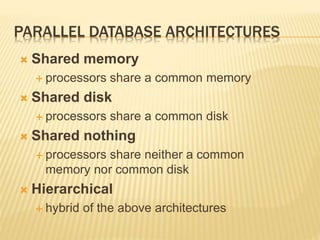
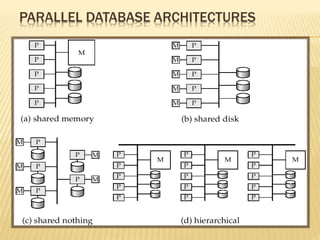
PARALLEL DATABASE ARCHITECTURES
 Shared memory
 processors share a common memory
 Shared disk
 processors share a common disk
 Shared nothing
 processors share neither a common
memory nor common disk
 Hierarchical
 hybrid of the above architectures
PARALLEL DATABASE ARCHITECTURES
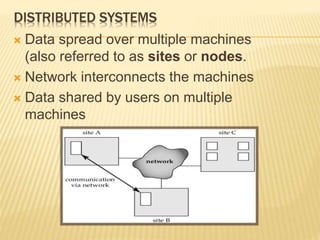
DISTRIBUTED SYSTEMS
 Data spread over multiple machines
(also referred to as sites or nodes.
 Network interconnects the machines
 Data shared by users on multiple
machines
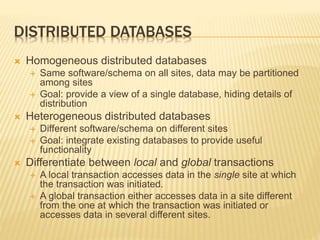
DISTRIBUTED DATABASES
 Homogeneous distributed databases
 Same software/schema on all sites, data may be partitioned
among sites
 Goal: provide a view of a single database, hiding details of
distribution
 Heterogeneous distributed databases
 Different software/schema on different sites
 Goal: integrate existing databases to provide useful
functionality
 Differentiate between local and global transactions
 A local transaction accesses data in the single site at which
the transaction was initiated.
 A global transaction either accesses data in a site different
from the one at which the transaction was initiated or
accesses data in several different sites.
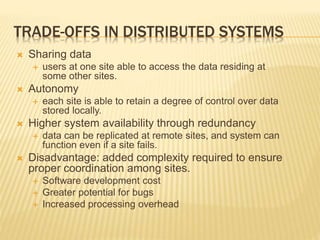
TRADE-OFFS IN DISTRIBUTED SYSTEMS
 Sharing data
 users at one site able to access the data residing at
some other sites.
 Autonomy
 each site is able to retain a degree of control over data
stored locally.
 Higher system availability through redundancy
 data can be replicated at remote sites, and system can
function even if a site fails.
 Disadvantage: added complexity required to ensure
proper coordination among sites.
 Software development cost
 Greater potential for bugs
 Increased processing overhead
HTTP://ASK.JUSTETC.NET
QUESTIONS?

Light sayed database_system_architecture

  • 1.
    DATABASE SYSTEM ARCHITECTURE SayedAhmed Computer Engineering, BUET, Bangladesh MSc, Computer Science, U of Manitoba, Canada Owner/President/Architect/Developer Justetc (Just et cetera) Technologies http://www.justetc.net http://sayed.justetc.net sayed@justetc.net
  • 2.
    FREE TRAINING BYJUSTETC  Training and Education in Bangla:  http://Bangla.SaLearningSchool.com  http://Blog. SaLearningSchool.com  Training and Education in English:  http://www.SaLearningSchool.com  http://English.SaLearningSchool.com  http://www.SitesTree.com ---------------------------------------------------------------------------------  Ask questions and get answers  http://Ask.JustEtc.net ---------------------------------------------------------------------------------  Offline IT Training:  http://University.JustEtc.net
  • 3.
    LEARNING OBJECTIVES  Understanddifferent database system architectures  Comparison of different database system architectures  Note:  Bangladesh Polytechnique Institute  Subject Code: 6658, will be helpful  Grade 9 to 12 (Bangladesh) students may be benefited
  • 4.
    DATABASE SYSTEM ARCHITECTURES DBMS architecture depends on the Computer System Architecture  DBMS architecture types  Centralized Systems  Client--Server Systems  Parallel Systems  Distributed Systems
  • 5.
    CENTRALIZED SYSTEMS  TheDBMS resides, Run, and sits on a single computer system  The DBMS does not interact with other computer systems  Can be called One Tier Architectures  Microsoft Access  Mainframe computer databases  Reference:  http://www.windowsecurity.com/whitepapers/softwar e_engineering/An-Overview-of-Common-Database- Architectures.html
  • 6.
  • 7.
    CLIENT-SERVER SYSTEMS  Client-servercomputer systems  Server systems satisfy requests generated at m client systems as shown in the image below  DBMS located in the server also respond to the clients similar way
  • 8.
    CLIENT-SERVER SYSTEMS (CONT.) Database functionality can be divided into:  Back-end: manages access structures, query evaluation and optimization, concurrency control and recovery.  Front-end: consists of tools such as forms, report-writers, and graphical user interface facilities.  The interface between the front-end and the back-end is through SQL or through an application program interface.
  • 9.
    CLIENT-SERVER SYSTEMS (CONT.) Examples  MS SQL Server, Oracle, Sybase in general  Can be of Thin Client and Fat-Client type  Server systems can be broadly categorized into two kinds:  transaction servers (thin-client)  widely used in relational database systems  data servers (usually fat-client),  used in object-oriented database systems
  • 10.
    TRANSACTION SERVERS  Alsocalled query server systems or SQL server systems;  clients send requests to the server system where the transactions are executed, and results are shipped back to the client.
  • 11.
    TRANSACTION SERVER PROCESSSTRUCTURE  Transaction Server Processes  Server processes  Lock manager process  Database writer process  Log writer process  Checkpoint process  Process monitor process
  • 12.
    DATA SERVERS  Usedin LANs, where  there is a very high speed connection between the clients and the server  the client machines are comparable in processing power to the server machine  the tasks are compute intensive  Ship data to client machines where processing is performed  And then ship results back to the server machine.  This architecture requires full back-end functionality at the clients.  Used in many object-oriented database systems  Issues:  Page-Shipping versus Item-Shipping  Locking  Data Caching  Lock Caching
  • 13.
    PARALLEL SYSTEMS  Onesingle DBMS in a parallel computer  The same DBMS can be accessed by the processors and can span over multiple hard drives if any in that computer  Parallel database systems consist of multiple processors and multiple disks connected by a fast interconnection network.  A coarse-grain parallel machine  consists of a small number of powerful processors  A massively parallel or fine grain parallel  machine utilizes thousands of smaller processors.  Two main performance measures:  throughput --- the number of tasks that can be completed in a given time interval  response time --- the amount of time it takes to complete a single task from the time it is submitted
  • 14.
    PARALLEL DATABASE ARCHITECTURES Shared memory  processors share a common memory  Shared disk  processors share a common disk  Shared nothing  processors share neither a common memory nor common disk  Hierarchical  hybrid of the above architectures
  • 15.
  • 16.
    DISTRIBUTED SYSTEMS  Dataspread over multiple machines (also referred to as sites or nodes.  Network interconnects the machines  Data shared by users on multiple machines
  • 17.
    DISTRIBUTED DATABASES  Homogeneousdistributed databases  Same software/schema on all sites, data may be partitioned among sites  Goal: provide a view of a single database, hiding details of distribution  Heterogeneous distributed databases  Different software/schema on different sites  Goal: integrate existing databases to provide useful functionality  Differentiate between local and global transactions  A local transaction accesses data in the single site at which the transaction was initiated.  A global transaction either accesses data in a site different from the one at which the transaction was initiated or accesses data in several different sites.
  • 18.
    TRADE-OFFS IN DISTRIBUTEDSYSTEMS  Sharing data  users at one site able to access the data residing at some other sites.  Autonomy  each site is able to retain a degree of control over data stored locally.  Higher system availability through redundancy  data can be replicated at remote sites, and system can function even if a site fails.  Disadvantage: added complexity required to ensure proper coordination among sites.  Software development cost  Greater potential for bugs  Increased processing overhead
  • 19.