© 2012 IBM Corporation
IBM WebSphere Application Server V8.5
Dynamic Cache in Liberty
© 2012 IBM Corporation
Overview
Section
© 2012 IBM Corporation
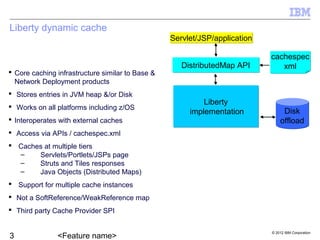
Liberty dynamic cache
 Core caching infrastructure similar to Base &
Network Deployment products
 Stores entries in JVM heap &/or Disk
 Works on all platforms including z/OS
 Interoperates with external caches
 Access via APIs / cachespec.xml
 Caches at multiple tiers
– Servlets/Portlets/JSPs page
– Struts and Tiles responses
– Java Objects (Distributed Maps)
 Support for multiple cache instances
 Not a SoftReference/WeakReference map
 Third party Cache Provider SPI
Servlet/JSP/applicationServlet/JSP/application
DistributedMap APIDistributedMap API
cachespec
xml
cachespec
xml
Liberty
implementation
Liberty
implementation Disk
offload
Disk
offload
© 2012 IBM Corporation
Usage scenarios
Section
© 2012 IBM Corporation
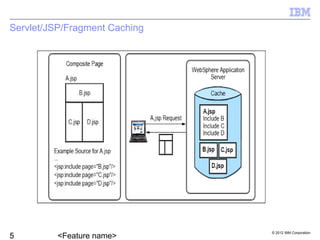
Servlet/JSP/Fragment Caching
© 2012 IBM Corporation
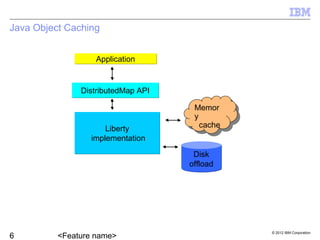
Java Object Caching
ApplicationApplication
DistributedMap APIDistributedMap API
Liberty
implementation
Liberty
implementation
Disk
offload
Disk
offload
Memor
y
cache
Memor
y
cache
© 2012 IBM Corporation
Demonstration
Section
© 2012 IBM Corporation
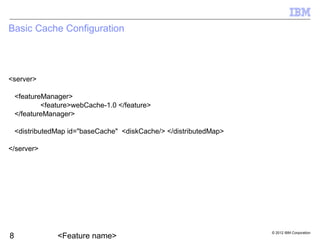
Basic Cache Configuration
<server>
<featureManager>
<feature>webCache-1.0 </feature>
</featureManager>
<distributedMap id="baseCache" <diskCache/> </distributedMap>
</server>
© 2012 IBM Corporation
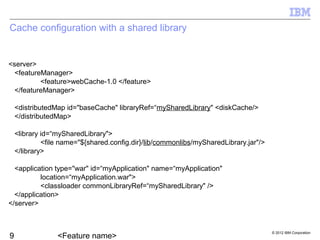
Cache configuration with a shared library
<server>
<featureManager>
<feature>webCache-1.0 </feature>
</featureManager>
<distributedMap id="baseCache" libraryRef=“mySharedLibrary" <diskCache/>
</distributedMap>
<library id=“mySharedLibrary">
<file name="${shared.config.dir}/lib/commonlibs/mySharedLibrary.jar"/>
</library>
<application type="war" id=“myApplication" name=“myApplication"
location=“myApplication.war">
<classloader commonLibraryRef=“mySharedLibrary" />
</application>
</server>
© 2012 IBM Corporation
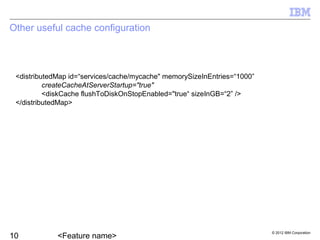
Other useful cache configuration
<distributedMap id=“services/cache/mycache" memorySizeInEntries=“1000”
createCacheAtServerStartup="true"
<diskCache flushToDiskOnStopEnabled="true“ sizeInGB=“2” />
</distributedMap>
© 2012 IBM Corporation
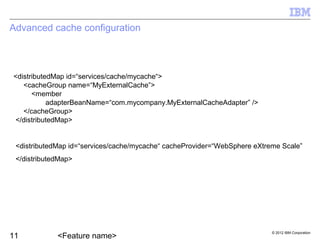
Advanced cache configuration
<distributedMap id=“services/cache/mycache“>
<cacheGroup name=“MyExternalCache”>
<member
adapterBeanName=“com.mycompany.MyExternalCacheAdapter” />
</cacheGroup>
</distributedMap>
<distributedMap id=“services/cache/mycache“ cacheProvider=“WebSphere eXtreme Scale”
</distributedMap>
© 2012 IBM Corporation
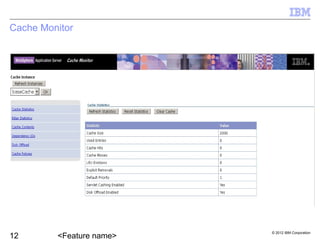
Cache Monitor
© 2012 IBM Corporation
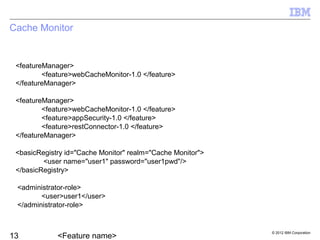
Cache Monitor
<featureManager>
<feature>webCacheMonitor-1.0 </feature>
</featureManager>
<featureManager>
<feature>webCacheMonitor-1.0 </feature>
<feature>appSecurity-1.0 </feature>
<feature>restConnector-1.0 </feature>
</featureManager>
<basicRegistry id="Cache Monitor" realm="Cache Monitor">
      <user name="user1" password="user1pwd"/>
</basicRegistry>
    <administrator-role>
      <user>user1</user>
    </administrator-role>
© 2012 IBM Corporation
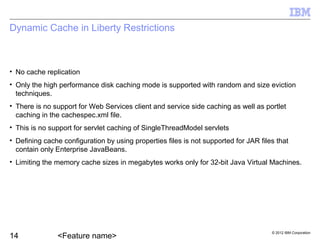
Dynamic Cache in Liberty Restrictions
• No cache replication
• Only the high performance disk caching mode is supported with random and size eviction
techniques.
• There is no support for Web Services client and service side caching as well as portlet
caching in the cachespec.xml file.
• This is no support for servlet caching of SingleThreadModel servlets
• Defining cache configuration by using properties files is not supported for JAR files that
contain only Enterprise JavaBeans.
• Limiting the memory cache sizes in megabytes works only for 32-bit Java Virtual Machines.
© 2012 IBM Corporation
Summary
Section
© 2012 IBM Corporation
Summary
 Dynamic caching is available in Liberty
 Configure caches using server.xml and properties files.
 The Cache Monitor displays all cache instances.

Liberty dynacache ffw_iea_ste

  • 1.
    © 2012 IBMCorporation IBM WebSphere Application Server V8.5 Dynamic Cache in Liberty
  • 2.
    © 2012 IBMCorporation Overview Section
  • 3.
    © 2012 IBMCorporation Liberty dynamic cache  Core caching infrastructure similar to Base & Network Deployment products  Stores entries in JVM heap &/or Disk  Works on all platforms including z/OS  Interoperates with external caches  Access via APIs / cachespec.xml  Caches at multiple tiers – Servlets/Portlets/JSPs page – Struts and Tiles responses – Java Objects (Distributed Maps)  Support for multiple cache instances  Not a SoftReference/WeakReference map  Third party Cache Provider SPI Servlet/JSP/applicationServlet/JSP/application DistributedMap APIDistributedMap API cachespec xml cachespec xml Liberty implementation Liberty implementation Disk offload Disk offload
  • 4.
    © 2012 IBMCorporation Usage scenarios Section
  • 5.
    © 2012 IBMCorporation Servlet/JSP/Fragment Caching
  • 6.
    © 2012 IBMCorporation Java Object Caching ApplicationApplication DistributedMap APIDistributedMap API Liberty implementation Liberty implementation Disk offload Disk offload Memor y cache Memor y cache
  • 7.
    © 2012 IBMCorporation Demonstration Section
  • 8.
    © 2012 IBMCorporation Basic Cache Configuration <server> <featureManager> <feature>webCache-1.0 </feature> </featureManager> <distributedMap id="baseCache" <diskCache/> </distributedMap> </server>
  • 9.
    © 2012 IBMCorporation Cache configuration with a shared library <server> <featureManager> <feature>webCache-1.0 </feature> </featureManager> <distributedMap id="baseCache" libraryRef=“mySharedLibrary" <diskCache/> </distributedMap> <library id=“mySharedLibrary"> <file name="${shared.config.dir}/lib/commonlibs/mySharedLibrary.jar"/> </library> <application type="war" id=“myApplication" name=“myApplication" location=“myApplication.war"> <classloader commonLibraryRef=“mySharedLibrary" /> </application> </server>
  • 10.
    © 2012 IBMCorporation Other useful cache configuration <distributedMap id=“services/cache/mycache" memorySizeInEntries=“1000” createCacheAtServerStartup="true" <diskCache flushToDiskOnStopEnabled="true“ sizeInGB=“2” /> </distributedMap>
  • 11.
    © 2012 IBMCorporation Advanced cache configuration <distributedMap id=“services/cache/mycache“> <cacheGroup name=“MyExternalCache”> <member adapterBeanName=“com.mycompany.MyExternalCacheAdapter” /> </cacheGroup> </distributedMap> <distributedMap id=“services/cache/mycache“ cacheProvider=“WebSphere eXtreme Scale” </distributedMap>
  • 12.
    © 2012 IBMCorporation Cache Monitor
  • 13.
    © 2012 IBMCorporation Cache Monitor <featureManager> <feature>webCacheMonitor-1.0 </feature> </featureManager> <featureManager> <feature>webCacheMonitor-1.0 </feature> <feature>appSecurity-1.0 </feature> <feature>restConnector-1.0 </feature> </featureManager> <basicRegistry id="Cache Monitor" realm="Cache Monitor">       <user name="user1" password="user1pwd"/> </basicRegistry>     <administrator-role>       <user>user1</user>     </administrator-role>
  • 14.
    © 2012 IBMCorporation Dynamic Cache in Liberty Restrictions • No cache replication • Only the high performance disk caching mode is supported with random and size eviction techniques. • There is no support for Web Services client and service side caching as well as portlet caching in the cachespec.xml file. • This is no support for servlet caching of SingleThreadModel servlets • Defining cache configuration by using properties files is not supported for JAR files that contain only Enterprise JavaBeans. • Limiting the memory cache sizes in megabytes works only for 32-bit Java Virtual Machines.
  • 15.
    © 2012 IBMCorporation Summary Section
  • 16.
    © 2012 IBMCorporation Summary  Dynamic caching is available in Liberty  Configure caches using server.xml and properties files.  The Cache Monitor displays all cache instances.

Editor's Notes

  • #2 This presentation describes support for dynamic caching included in IBM WebSphere Application Server V8.5.5 Liberty profile.
  • #3 This presentation will describe the web caching and distributed map features of the Liberty profile.
  • #4 Caching the output of servlets, Java Server Pages (JSPs) and Java objects improves application performance. WebSphere® Application Server consolidates several caching activities into one service called the dynamic cache . These caching activities work together to improve application performance, and share many configuration parameters that are set in the dynamic cache service of an application server. You can use the dynamic cache to improve the performance of servlets, JSPs and Java objects by serving requests from an in-memory cache. Cache entries contain servlet output, the results of a servlet after it runs, and metadata. The DistributedMap API provides applications with an extended java.util.Map interface to access the dynamic cache, allowing inspection and manipulation of the cache. Liberty dynamic caching is a subset of the dynamic caching provided in traditional WebSphere Application Server. The following features not implemented in Liberty: cache replication and web services caching.
  • #5 Liberty caching can be used to cache servlet and JSP response output, and Java objects. The intent of this presentation is to demonstrate how to configure caching in the Liberty profile. We will only briefly discuss how caching is used.
  • #6 Most dynamic web pages consist of multiple smaller and simpler page fragments. Some fragments are static (such as headers and footers), while others are dynamic (such as fragments containing stock quotes or sport scores). In this example, the content of A.jsp is composed of its own content plus the content of the 3 other included JSPs (fragments) B.jsp,C.jsp and D.jsp . Output from the JSPs is saved to the cache and can be served from the cache on a subsequent request.
  • #7 The Distributed Map interface is a simple interface for that extends java.util.HashMap. Using this interface, J2EE applications and system components can cache and share Java objects by storing a reference to the object in the cache.
  • #9 With the Liberty profile, caches are defined in the server.xml or with a properties file, like in traditional WebSphere Application Server. Caching is enabled with the webCache-1.0 feature. In Liberty, there is no distinction between servlet cache instances and object cache instances. All cache instances are a distrbuted map. Caches are defined using the distributedMap element. In this example, the cache “baseCache” is defined with enabling disk offload caching.
  • #10 A shared library must be defined and associated with a cache if custom Java objects are put into the cache and disk offload is enable or if an id or metadata generator is used with servlet caching. When a cache entry is off loaded to the disk cache it must first be serialized. When the entry is retrieved from the disk cache it must be deserialized. If the cache entry is a custom Java object the class must be available in a shared library to be deserialized. Similarly, if your cache policy defined in the cachespec.xml (pronounced CACHE SPEC X-M-L) defines an ID or metadata generator those classes must be available in a shared library for the caching engine to invoke.
  • #11 To limit the size of the cache in memory use the memorySizeInEntries property. The default size is 2000. By default, caches are only created when they are used. Using the createCacheAtServerStartup property a cache can be automatically created when the application server is started. Use the flushToDiskOnStopEnabled property to flush the cache content in memory to disk when the application server is stopped. The size of the disk cache can be limited by using the sizeInGB property.
  • #12 The dynamic cache can control caches outside of the application server, such as the Edge server, an IBM® HTTP Server, or an HTTP Server ESI Fragment Processor plug-in. Use the cacheGroup element to define an external cache. The adapterBeanName must be the fully qualified class which is located on the WebSphere Application Server class path, of the adapter between WebSphere Application Server and this external cache. An alternate cache provider, such as WebSphere eXtreme Scale, can be specified using the cacheProvider property.
  • #13 If you are developing J2EE applications that use dynamic caching then you are already familiar with the Cache Monitor. A version of the Cache Monitor for Liberty is available as a downloadable and installable feature. Consult the Release Notes for version 8.5.5 for specific download details. The Liberty Cache Monitor is capable of monitoring all cache instances since there is no distinction between servlet and object caches because all caches are distributed maps.
  • #14 The Cache Monitor, once it is downloaded and installed, can be enabled using the webCacheMonitor-1.0 feature. To run the Cache Monitor with application security, add the appSecurity-1.0 and restConnector-1.0 features. The administrator role will need to be associated with the user’s credentials.
  • #15 Some dynamic cache features in traditional WebSphere Application Server are not available in Liberty for various reasons. For example, cache replication is not supported because the underlying replication infrastructure used in traditional WebSphere Application Server does not exist in Liberty.
  • #16 To recap,..
  • #17 Many of the dynamic caching features in traditional WebSphere Application Server are now available in the Liberty profile. The cache instances are configured using elements in the server.xml file and like in traditional WebSphere Application Server, in cacheinstances.properties and distributedmap.properties files in the application war. The cache monitor will be available to download. Specific instructions will be available in the Release Notes for version 8.5.5.