WebSphere Application Server


                      Performance Tuning Toolkit


    WAS ENT Persona Test


                                                   © 2011 IBM Corporation
Feb, 2012
WAS ENT PersonaTest


Why we use this toolkit ?                                          Objective               Functions

                                                                   Find error as soon as    Monitor the servlet errors,
                                          Application Cluster #1   it occurs               transaction rollback, transaction
                                                                                           timeout, JDBC connection timeout,
                                                                                           JCA connection errors, thread hung
                                                                                           and failed proxy request.
                                          Application Cluster #2
                                                                   Find potential           Show detailed status of system
    HTTP Traffic                                                   problems                with easily understood charts and
                                                                                           forms
                   Proxy Server           Application Cluster #3
                                                                                            Detect the abnormal symptoms
                                                                                           according to some user defined
                                                                                           rules

                                                                   Accelerate               Tune all the servers in a
                                                                   performance tuning      centralized view.
                                                                   process
                                                                                            Run tuning scripts within the
                                                                                           workbench.

                                                                   Facilitate problems      Generate thread dump and heap
                                                                   determination           dump
                                                                                            Enable runtime trace
          1) Friendly and easily understood UI                                              Extract connection pool contents
          2) No additional effort to install or configure
                                                                   Data processing          Provide good report.
                                                                   and report               Support both online and
                                                                                           offline analysis


2                                                                                                             © 2012 IBM Corporation
WAS ENT Persona Test


Quick Start : Launch the Performance Tuning Toolkit
    Unzip the zip file and launch the PerfTuningToolkit.exe. You will see the workbench!


3                                                                                          © 2012 IBM Corporation
WAS ENT Persona Test


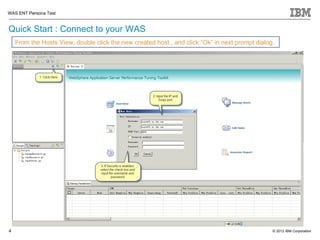
Quick Start : Connect to your WAS
    From the Hosts View, double click the new created host , and click “Ok” in next prompt dialog.


4                                                                                                © 2012 IBM Corporation
WAS ENT Persona Test


Quick Start : Start Monitoring
    Double click the added host and click “OK” in next message box to start all the servers


5                                                                                             © 2012 IBM Corporation
WAS ENT Persona Test


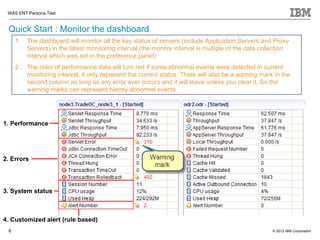
 Quick Start : Monitor the dashboard
     1.   The dashboard will monitor all the key status of servers (include Application Servers and Proxy
          Servers) in the latest monitoring interval (the monitor interval is multiple of the data collection
          interval which was set in the preference panel)
     2.   The color of performance data will turn red if some abnormal events were detected in current
          monitoring interval, it only represent the current status. There will also be a warning mark in the
          second column as long as any error ever occurs and it will leave unless you clear it. So the
          warning marks can represent history abnormal events.


1. Performance


2. Errors


3. System status


4. Customized alert (rule based)
 6                                                                                                    © 2012 IBM Corporation
WAS ENT Persona Test


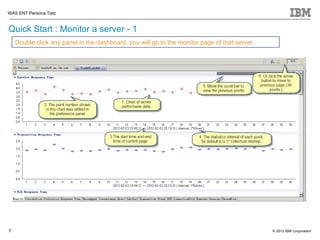
Quick Start : Monitor a server - 1
    Double click any panel in the dashboard, you will go to the monitor page of that server


7                                                                                             © 2012 IBM Corporation
WAS ENT Persona Test


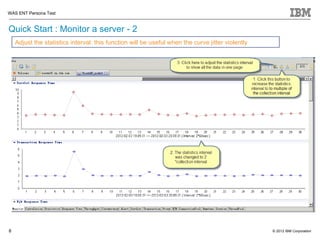
Quick Start : Monitor a server - 2
    Adjust the statistics interval: this function will be useful when the curve jitter violently


8                                                                                                  © 2012 IBM Corporation
WAS ENT Persona Test


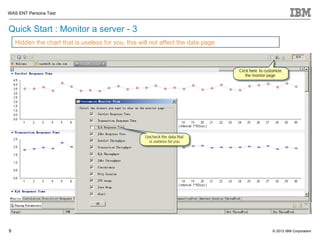
Quick Start : Monitor a server - 3
    Hidden the chart that is useless for you, this will not affect the data page


9                                                                                  © 2012 IBM Corporation
WAS ENT Persona Test


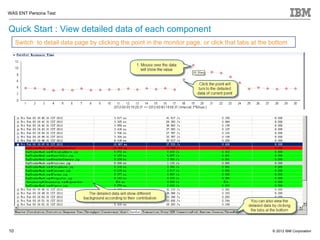
Quick Start : View detailed data of each component
     Switch to detail data page by clicking the point in the monitor page, or click that tabs at the bottom


10                                                                                                   © 2012 IBM Corporation
WAS ENT Persona Test


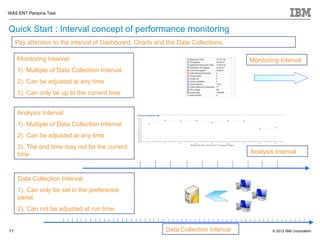
Quick Start : Interval concept of performance monitoring
     Pay attention to the interval of Dashboard, Charts and the Data Collections.

     Monitoring Interval:                                                             Monitoring Interval
     1). Multiple of Data Collection Interval.
     2). Can be adjusted at any time
     3). Can only be up to the current time


     Analysis Interval:
     1). Multiple of Data Collection Interval.
     2). Can be adjusted at any time
     3). The end time may not be the current
     time                                                                             Analysis Interval


     Data Collection Interval:
     1). Can only be set in the preference
     panel.
     2). Can not be adjusted at run time.


11                                                         Data Collection Interval           © 2012 IBM Corporation
WAS ENT Persona Test


Quick Start : Tuning servers - 1
     From the “Tuning parameters” view, you can retrieve parameters from the servers, modify
     them, and update the servers


12                                                                                             © 2012 IBM Corporation
WAS ENT Persona Test


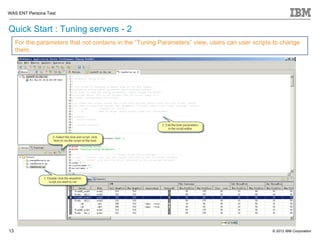
Quick Start : Tuning servers - 2
     For the parameters that not contains in the “Tuning Parameters” view, users can user scripts to change
     them.


13                                                                                               © 2012 IBM Corporation
WAS ENT Persona Test


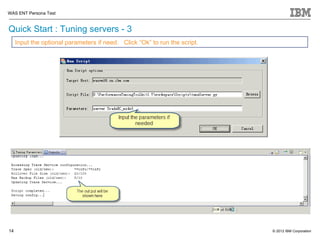
Quick Start : Tuning servers - 3
     Input the optional parameters if need. Click “Ok” to run the script.


14                                                                          © 2012 IBM Corporation
WAS ENT Persona Test


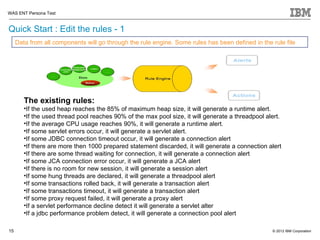
Quick Start : Edit the rules - 1
     Data from all components will go through the rule engine. Some rules has been defined in the rule file


        The existing rules:
        •If the used heap reaches the 85% of maximum heap size, it will generate a runtime alert.
        •If the used thread pool reaches 90% of the max pool size, it will generate a threadpool alert.
        •If the average CPU usage reaches 90%, it will generate a runtime alert.
        •If some servlet errors occur, it will generate a servlet alert.
        •If some JDBC connection timeout occur, it will generate a connection alert
        •If there are more then 1000 prepared statement discarded, it will generate a connection alert
        •If there are some thread waiting for connection, it will generate a connection alert
        •If some JCA connection error occur, it will generate a JCA alert
        •If there is no room for new session, it will generate a session alert
        •If some hung threads are declared, it will generate a threadpool alert
        •If some transactions rolled back, it will generate a transaction alert
        •If some transactions timeout, it will generate a transaction alert
        •If some proxy request failed, it will generate a proxy alert
        •If a servlet performance decline detect it will generate a servlet alter
        •If a jdbc performance problem detect, it will generate a connection pool alert

15                                                                                                 © 2012 IBM Corporation
WAS ENT Persona Test


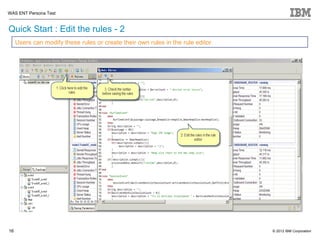
Quick Start : Edit the rules - 2
     Users can modify these rules or create their own rules in the rule editor.


16                                                                                © 2012 IBM Corporation
WAS ENT Persona Test


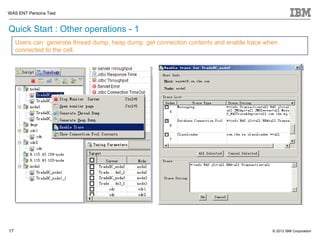
Quick Start : Other operations - 1
     Users can generate thread dump, heap dump, get connection contents and enable trace when
     connected to the cell.


17                                                                                         © 2012 IBM Corporation
WAS ENT Persona Test


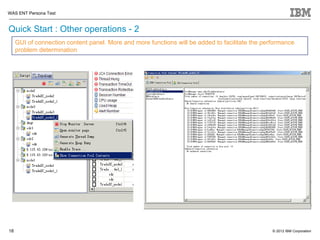
Quick Start : Other operations - 2
     GUI of connection content panel. More and more functions will be added to facilitate the performance
     problem determination


18                                                                                               © 2012 IBM Corporation
WAS ENT Persona Test


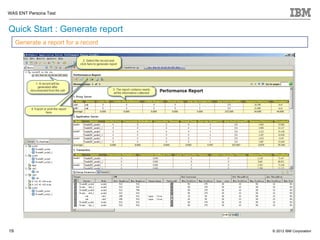
Quick Start : Generate report
     Generate a report for a record


19                                    © 2012 IBM Corporation
WAS ENT Persona Test


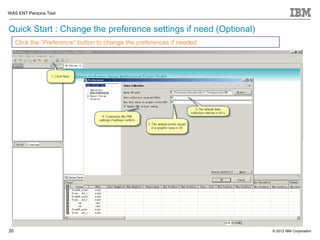
Quick Start : Change the preference settings if need (Optional)
     Click the “Preference” button to change the preferences if needed


20                                                                       © 2012 IBM Corporation
WAS ENT Persona Test


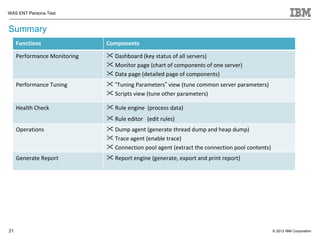
Summary
     Functions                Components

     Performance Monitoring    Dashboard (key status of all servers)
                               Monitor page (chart of components of one server)
                               Data page (detailed page of components)
     Performance Tuning        “Tuning Parameters” view (tune common server parameters)
                               Scripts view (tune other parameters)

     Health Check              Rule engine (process data)
                               Rule editor (edit rules)
     Operations                Dump agent (generate thread dump and heap dump)
                               Trace agent (enable trace)
                               Connection pool agent (extract the connection pool contents)
     Generate Report           Report engine (generate, export and print report)


21                                                                                             © 2012 IBM Corporation
WAS ENT Persona Test


                       Workshop: Connection Leak Detection
                                   (Optional)


22                                                           © 2012 IBM Corporation
WAS ENT Persona Test


Workshop : connection leak problem detection (Optional)
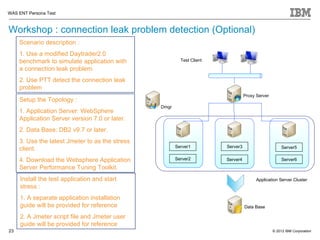
     Scenario description :
     1. Use a modified Daytrader2.0
     benchmark to simulate application with               Test Client

     a connection leak problem.
     2. Use PTT detect the connection leak
     problem
                                                                                  Proxy Server
     Setup the Topology :
                                                 Dmgr
     1. Application Server: WebSphere
     Application Server version 7.0 or later.
     2. Data Base: DB2 v9.7 or later.
     3. Use the latest Jmeter to as the stress
                                                        Server1         Server3                      Server5
     client.
     4. Download the Websphere Application              Server2         Server4                      Server6
     Server Performance Tuning Toolkit.
     Install the test application and start                                             Application Server Cluster
     stress :
     1. A separate application installation
     guide will be provided for reference                                         Data Base

     2. A Jmeter script file and Jmeter user
     guide will be provided for reference
23                                                                                               © 2012 IBM Corporation
WAS ENT Persona Test


Workshop : connection leak problem detection (Optional)
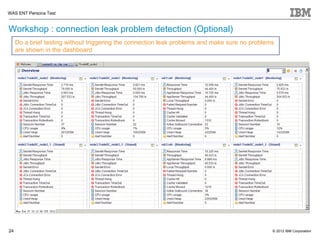
     Do a brief testing without triggering the connection leak problems and make sure no problems
     are shown in the dashboard


24                                                                                              © 2012 IBM Corporation
WAS ENT Persona Test


Workshop : connection leak problem detection (Optional)
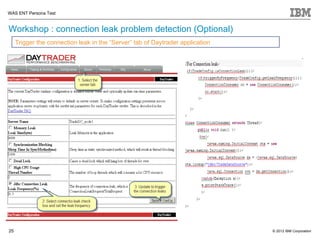
     Trigger the connection leak in the “Server” tab of Daytrader application


25                                                                              © 2012 IBM Corporation
WAS ENT Persona Test


Workshop : connection leak problem detection (Optional)
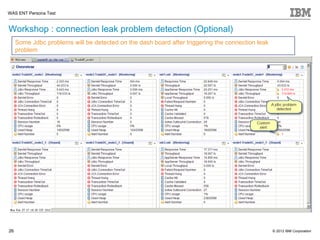
     Some Jdbc problems will be detected on the dash board after triggering the connection leak
     problem


26                                                                                                © 2012 IBM Corporation
WAS ENT Persona Test


Workshop : connection leak problem detection (Optional)
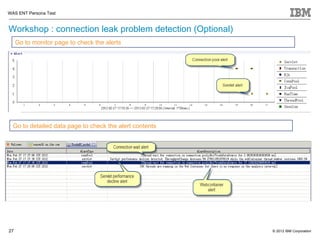
     Go to monitor page to check the alerts


  Go to detailed data page to check the alert contents


27                                                        © 2012 IBM Corporation
WAS ENT Persona Test


Workshop : connection leak problem detection (Optional)
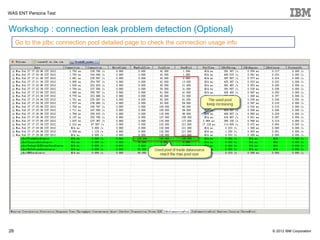
     Go to the jdbc connection pool detailed page to check the connection usage info


28                                                                                     © 2012 IBM Corporation
WAS ENT Persona Test


Workshop : connection leak problem detection (Optional)
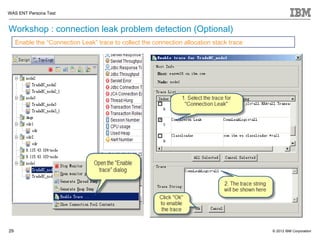
     Enable the “Connection Leak” trace to collect the connection allocation stack trace


29                                                                                         © 2012 IBM Corporation
WAS ENT Persona Test


Workshop : connection leak problem detection (Optional)
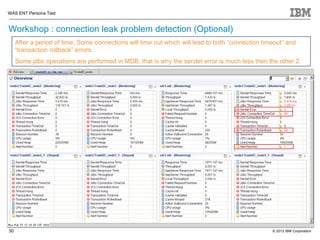
     After a period of time, Some connections will time out which will lead to both “connection timeout” and
     “transaction rollback” errors.
     Some jdbc operations are performed in MDB, that is why the servlet error is much less then the other 2.


30                                                                                                 © 2012 IBM Corporation
WAS ENT Persona Test


Workshop : connection leak problem detection (Optional)
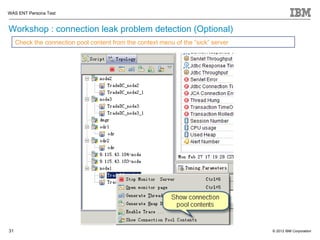
     Check the connection pool content from the context menu of the “sick” server


31                                                                                  © 2012 IBM Corporation
WAS ENT Persona Test


Workshop : connection leak problem detection (Optional)
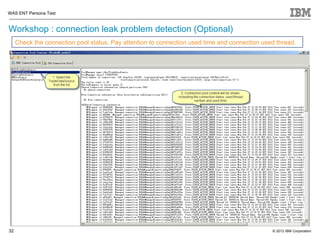
     Check the connection pool status, Pay attention to connection used time and connection used thread.


32                                                                                             © 2012 IBM Corporation
WAS ENT Persona Test


Workshop : connection leak problem detection (Optional)
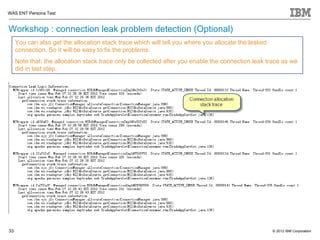
     You can also get the allocation stack trace which will tell you where you allocate the leaked
     connection. So it will be easy to fix the problems.
     Note that: the allocation stack trace only be collected after you enable the connection leak trace as we
     did in last step.


33                                                                                                   © 2012 IBM Corporation

Performance tuningtoolkitintroduction

  • 1.
    WebSphere Application Server Performance Tuning Toolkit WAS ENT Persona Test © 2011 IBM Corporation Feb, 2012
  • 2.
    WAS ENT PersonaTest Whywe use this toolkit ? Objective Functions Find error as soon as  Monitor the servlet errors, Application Cluster #1 it occurs transaction rollback, transaction timeout, JDBC connection timeout, JCA connection errors, thread hung and failed proxy request. Application Cluster #2 Find potential  Show detailed status of system HTTP Traffic problems with easily understood charts and forms Proxy Server Application Cluster #3  Detect the abnormal symptoms according to some user defined rules Accelerate  Tune all the servers in a performance tuning centralized view. process  Run tuning scripts within the workbench. Facilitate problems  Generate thread dump and heap determination dump  Enable runtime trace 1) Friendly and easily understood UI  Extract connection pool contents 2) No additional effort to install or configure Data processing  Provide good report. and report  Support both online and offline analysis 2 © 2012 IBM Corporation
  • 3.
    WAS ENT PersonaTest Quick Start : Launch the Performance Tuning Toolkit Unzip the zip file and launch the PerfTuningToolkit.exe. You will see the workbench! 3 © 2012 IBM Corporation
  • 4.
    WAS ENT PersonaTest Quick Start : Connect to your WAS From the Hosts View, double click the new created host , and click “Ok” in next prompt dialog. 4 © 2012 IBM Corporation
  • 5.
    WAS ENT PersonaTest Quick Start : Start Monitoring Double click the added host and click “OK” in next message box to start all the servers 5 © 2012 IBM Corporation
  • 6.
    WAS ENT PersonaTest Quick Start : Monitor the dashboard 1. The dashboard will monitor all the key status of servers (include Application Servers and Proxy Servers) in the latest monitoring interval (the monitor interval is multiple of the data collection interval which was set in the preference panel) 2. The color of performance data will turn red if some abnormal events were detected in current monitoring interval, it only represent the current status. There will also be a warning mark in the second column as long as any error ever occurs and it will leave unless you clear it. So the warning marks can represent history abnormal events. 1. Performance 2. Errors 3. System status 4. Customized alert (rule based) 6 © 2012 IBM Corporation
  • 7.
    WAS ENT PersonaTest Quick Start : Monitor a server - 1 Double click any panel in the dashboard, you will go to the monitor page of that server 7 © 2012 IBM Corporation
  • 8.
    WAS ENT PersonaTest Quick Start : Monitor a server - 2 Adjust the statistics interval: this function will be useful when the curve jitter violently 8 © 2012 IBM Corporation
  • 9.
    WAS ENT PersonaTest Quick Start : Monitor a server - 3 Hidden the chart that is useless for you, this will not affect the data page 9 © 2012 IBM Corporation
  • 10.
    WAS ENT PersonaTest Quick Start : View detailed data of each component Switch to detail data page by clicking the point in the monitor page, or click that tabs at the bottom 10 © 2012 IBM Corporation
  • 11.
    WAS ENT PersonaTest Quick Start : Interval concept of performance monitoring Pay attention to the interval of Dashboard, Charts and the Data Collections. Monitoring Interval: Monitoring Interval 1). Multiple of Data Collection Interval. 2). Can be adjusted at any time 3). Can only be up to the current time Analysis Interval: 1). Multiple of Data Collection Interval. 2). Can be adjusted at any time 3). The end time may not be the current time Analysis Interval Data Collection Interval: 1). Can only be set in the preference panel. 2). Can not be adjusted at run time. 11 Data Collection Interval © 2012 IBM Corporation
  • 12.
    WAS ENT PersonaTest Quick Start : Tuning servers - 1 From the “Tuning parameters” view, you can retrieve parameters from the servers, modify them, and update the servers 12 © 2012 IBM Corporation
  • 13.
    WAS ENT PersonaTest Quick Start : Tuning servers - 2 For the parameters that not contains in the “Tuning Parameters” view, users can user scripts to change them. 13 © 2012 IBM Corporation
  • 14.
    WAS ENT PersonaTest Quick Start : Tuning servers - 3 Input the optional parameters if need. Click “Ok” to run the script. 14 © 2012 IBM Corporation
  • 15.
    WAS ENT PersonaTest Quick Start : Edit the rules - 1 Data from all components will go through the rule engine. Some rules has been defined in the rule file The existing rules: •If the used heap reaches the 85% of maximum heap size, it will generate a runtime alert. •If the used thread pool reaches 90% of the max pool size, it will generate a threadpool alert. •If the average CPU usage reaches 90%, it will generate a runtime alert. •If some servlet errors occur, it will generate a servlet alert. •If some JDBC connection timeout occur, it will generate a connection alert •If there are more then 1000 prepared statement discarded, it will generate a connection alert •If there are some thread waiting for connection, it will generate a connection alert •If some JCA connection error occur, it will generate a JCA alert •If there is no room for new session, it will generate a session alert •If some hung threads are declared, it will generate a threadpool alert •If some transactions rolled back, it will generate a transaction alert •If some transactions timeout, it will generate a transaction alert •If some proxy request failed, it will generate a proxy alert •If a servlet performance decline detect it will generate a servlet alter •If a jdbc performance problem detect, it will generate a connection pool alert 15 © 2012 IBM Corporation
  • 16.
    WAS ENT PersonaTest Quick Start : Edit the rules - 2 Users can modify these rules or create their own rules in the rule editor. 16 © 2012 IBM Corporation
  • 17.
    WAS ENT PersonaTest Quick Start : Other operations - 1 Users can generate thread dump, heap dump, get connection contents and enable trace when connected to the cell. 17 © 2012 IBM Corporation
  • 18.
    WAS ENT PersonaTest Quick Start : Other operations - 2 GUI of connection content panel. More and more functions will be added to facilitate the performance problem determination 18 © 2012 IBM Corporation
  • 19.
    WAS ENT PersonaTest Quick Start : Generate report Generate a report for a record 19 © 2012 IBM Corporation
  • 20.
    WAS ENT PersonaTest Quick Start : Change the preference settings if need (Optional) Click the “Preference” button to change the preferences if needed 20 © 2012 IBM Corporation
  • 21.
    WAS ENT PersonaTest Summary Functions Components Performance Monitoring  Dashboard (key status of all servers)  Monitor page (chart of components of one server)  Data page (detailed page of components) Performance Tuning  “Tuning Parameters” view (tune common server parameters)  Scripts view (tune other parameters) Health Check  Rule engine (process data)  Rule editor (edit rules) Operations  Dump agent (generate thread dump and heap dump)  Trace agent (enable trace)  Connection pool agent (extract the connection pool contents) Generate Report  Report engine (generate, export and print report) 21 © 2012 IBM Corporation
  • 22.
    WAS ENT PersonaTest Workshop: Connection Leak Detection (Optional) 22 © 2012 IBM Corporation
  • 23.
    WAS ENT PersonaTest Workshop : connection leak problem detection (Optional) Scenario description : 1. Use a modified Daytrader2.0 benchmark to simulate application with Test Client a connection leak problem. 2. Use PTT detect the connection leak problem Proxy Server Setup the Topology : Dmgr 1. Application Server: WebSphere Application Server version 7.0 or later. 2. Data Base: DB2 v9.7 or later. 3. Use the latest Jmeter to as the stress Server1 Server3 Server5 client. 4. Download the Websphere Application Server2 Server4 Server6 Server Performance Tuning Toolkit. Install the test application and start Application Server Cluster stress : 1. A separate application installation guide will be provided for reference Data Base 2. A Jmeter script file and Jmeter user guide will be provided for reference 23 © 2012 IBM Corporation
  • 24.
    WAS ENT PersonaTest Workshop : connection leak problem detection (Optional) Do a brief testing without triggering the connection leak problems and make sure no problems are shown in the dashboard 24 © 2012 IBM Corporation
  • 25.
    WAS ENT PersonaTest Workshop : connection leak problem detection (Optional) Trigger the connection leak in the “Server” tab of Daytrader application 25 © 2012 IBM Corporation
  • 26.
    WAS ENT PersonaTest Workshop : connection leak problem detection (Optional) Some Jdbc problems will be detected on the dash board after triggering the connection leak problem 26 © 2012 IBM Corporation
  • 27.
    WAS ENT PersonaTest Workshop : connection leak problem detection (Optional) Go to monitor page to check the alerts Go to detailed data page to check the alert contents 27 © 2012 IBM Corporation
  • 28.
    WAS ENT PersonaTest Workshop : connection leak problem detection (Optional) Go to the jdbc connection pool detailed page to check the connection usage info 28 © 2012 IBM Corporation
  • 29.
    WAS ENT PersonaTest Workshop : connection leak problem detection (Optional) Enable the “Connection Leak” trace to collect the connection allocation stack trace 29 © 2012 IBM Corporation
  • 30.
    WAS ENT PersonaTest Workshop : connection leak problem detection (Optional) After a period of time, Some connections will time out which will lead to both “connection timeout” and “transaction rollback” errors. Some jdbc operations are performed in MDB, that is why the servlet error is much less then the other 2. 30 © 2012 IBM Corporation
  • 31.
    WAS ENT PersonaTest Workshop : connection leak problem detection (Optional) Check the connection pool content from the context menu of the “sick” server 31 © 2012 IBM Corporation
  • 32.
    WAS ENT PersonaTest Workshop : connection leak problem detection (Optional) Check the connection pool status, Pay attention to connection used time and connection used thread. 32 © 2012 IBM Corporation
  • 33.
    WAS ENT PersonaTest Workshop : connection leak problem detection (Optional) You can also get the allocation stack trace which will tell you where you allocate the leaked connection. So it will be easy to fix the problems. Note that: the allocation stack trace only be collected after you enable the connection leak trace as we did in last step. 33 © 2012 IBM Corporation