© 2015 IBM Corporation
AME-4182: Bringing IBM MQ Light Apps
into Your IBM MQ Infrastructure
Rob Nicholson
Alan Chat
Notices and Disclaimers
Copyright © 2015 by International Business Machines Corporation (IBM). No part of this document may be reproduced or
transmitted in any form without written permission from IBM.
U.S. Government Users Restricted Rights - Use, duplication or disclosure restricted by GSA ADP Schedule Contract with
IBM.
Information in these presentations (including information relating to products that have not yet been announced by IBM) has been
reviewed for accuracy as of the date of initial publication and could include unintentional technical or typographical errors. IBM
shall have no responsibility to update this information. THIS DOCUMENT IS DISTRIBUTED "AS IS" WITHOUT ANY WARRANTY,
EITHER EXPRESS OR IMPLIED. IN NO EVENT SHALL IBM BE LIABLE FOR ANY DAMAGE ARISING FROM THE USE OF
THIS INFORMATION, INCLUDING BUT NOT LIMITED TO, LOSS OF DATA, BUSINESS INTERRUPTION, LOSS OF PROFIT
OR LOSS OF OPPORTUNITY. IBM products and services are warranted according to the terms and conditions of the
agreements under which they are provided.
Any statements regarding IBM's future direction, intent or product plans are subject to change or withdrawal without
notice.
Performance data contained herein was generally obtained in a controlled, isolated environments. Customer examples are
presented as illustrations of how those customers have used IBM products and the results they may have achieved. Actual
performance, cost, savings or other results in other operating environments may vary.
References in this document to IBM products, programs, or services does not imply that IBM intends to make such products,
programs or services available in all countries in which IBM operates or does business.
Workshops, sessions and associated materials may have been prepared by independent session speakers, and do not
necessarily reflect the views of IBM. All materials and discussions are provided for informational purposes only, and are neither
intended to, nor shall constitute legal or other guidance or advice to any individual participant or their specific situation.
It is the customer’s responsibility to insure its own compliance with legal requirements and to obtain advice of competent legal
counsel as to the identification and interpretation of any relevant laws and regulatory requirements that may affect the customer’s
business and any actions the customer may need to take to comply with such laws. IBM does not provide legal advice or
represent or warrant that its services or products will ensure that the customer is in compliance with any law.
Notices and Disclaimers (con’t)
Information concerning non-IBM products was obtained from the suppliers of those products, their published
announcements or other publicly available sources. IBM has not tested those products in connection with this
publication and cannot confirm the accuracy of performance, compatibility or any other claims related to non-IBM
products. Questions on the capabilities of non-IBM products should be addressed to the suppliers of those products.
IBM does not warrant the quality of any third-party products, or the ability of any such third-party products to
interoperate with IBM’s products. IBM EXPRESSLY DISCLAIMS ALL WARRANTIES, EXPRESSED OR IMPLIED,
INCLUDING BUT NOT LIMITED TO, THE IMPLIED WARRANTIES OF MERCHANTABILITY AND FITNESS FOR A
PARTICULAR PURPOSE.
The provision of the information contained herein is not intended to, and does not, grant any right or license under any
IBM patents, copyrights, trademarks or other intellectual property right.
• IBM, the IBM logo, ibm.com, Bluemix, Blueworks Live, CICS, Clearcase, DOORS®, Enterprise Document
Management System™, Global Business Services ®, Global Technology Services ®, Information on Demand,
ILOG, Maximo®, MQIntegrator®, MQSeries®, Netcool®, OMEGAMON, OpenPower, PureAnalytics™,
PureApplication®, pureCluster™, PureCoverage®, PureData®, PureExperience®, PureFlex®, pureQuery®,
pureScale®, PureSystems®, QRadar®, Rational®, Rhapsody®, SoDA, SPSS, StoredIQ, Tivoli®, Trusteer®,
urban{code}®, Watson, WebSphere®, Worklight®, X-Force® and System z® Z/OS, are trademarks of
International Business Machines Corporation, registered in many jurisdictions worldwide. Other product and
service names might be trademarks of IBM or other companies. A current list of IBM trademarks is available on
the Web at "Copyright and trademark information" at: www.ibm.com/legal/copytrade.shtml.
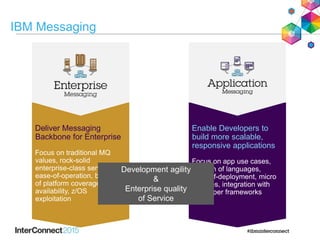
IBM Messaging
Deliver Messaging
Backbone for Enterprise
Focus on traditional MQ
values, rock-solid
enterprise-class service,
ease-of-operation, breadth
of platform coverage,
availability, z/OS
exploitation
Enable Developers to
build more scalable,
responsive applications
Focus on app use cases,
breadth of languages,
ease-of-deployment, micro
services, integration with
developer frameworks
Development agility
&
Enterprise quality
of Service
Agenda
• Introduction to MQ Light
• MQ Light in IBM MQ
• Demo
4
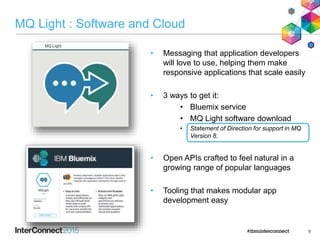
MQ Light : Software and Cloud
• Messaging that application developers
will love to use, helping them make
responsive applications that scale easily
• 3 ways to get it:
• Bluemix service
• MQ Light software download
• Statement of Direction for support in MQ
Version 8.
• Open APIs crafted to feel natural in a
growing range of popular languages
• Tooling that makes modular app
development easy
5
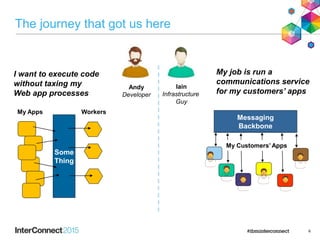
The journey that got us here
6
Andy
Developer
Iain
Infrastructure
Guy
I want to execute code
without taxing my
Web app processes
My job is run a
communications service
for my customers’ apps
Some
Thing
My Apps Workers
Messaging
Backbone
My Customers’ Apps
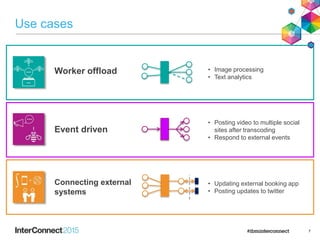
Use cases
7
Connecting external
systems
Event driven
Worker offload
• Posting video to multiple social
sites after transcoding
• Respond to external events
• Updating external booking app
• Posting updates to twitter
• Image processing
• Text analytics
Deployment Options
8
MQ Light Service
for Bluemix
WebSphere MQ
[open Beta]
“MQ Light”
MQ Light API - Language support
9
Simple, programming Language neutral messaging model
Idiomatic language & framework API Mappings
• Frictionless development
Open wire protocol (AMQP 1.0) & Open Source client libraries
• Facilitates community drivers for languages & frameworks
10
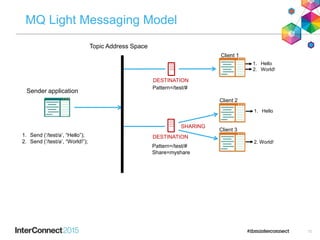
MQ Light Messaging Model
DESTINATION1. Send (‘/test/a’, “Hello”);
2. Send (‘/test/a’, “World!”);
1. Hello
2. World!
1. Hello
2. World!
SHARING
Topic Address Space
Sender application
DESTINATION
Pattern=/test/#
Pattern=/test/#
Share=myshare
Client 1
Client 2
Client 3
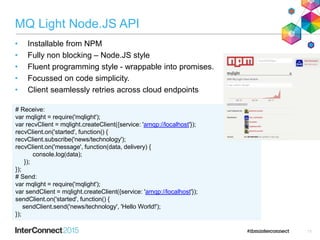
MQ Light Node.JS API
• Installable from NPM
• Fully non blocking – Node.JS style
• Fluent programming style - wrappable into promises.
• Focussed on code simplicity.
• Client seamlessly retries across cloud endpoints
11
# Receive:
var mqlight = require('mqlight');
var recvClient = mqlight.createClient({service: 'amqp://localhost'});
recvClient.on('started', function() {
recvClient.subscribe('news/technology');
recvClient.on('message', function(data, delivery) {
console.log(data);
});
});
# Send:
var mqlight = require('mqlight');
var sendClient = mqlight.createClient({service: 'amqp://localhost'});
sendClient.on('started', function() {
sendClient.send('news/technology', 'Hello World!');
});
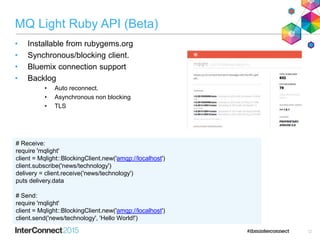
MQ Light Ruby API (Beta)
• Installable from rubygems.org
• Synchronous/blocking client.
• Bluemix connection support
• Backlog
• Auto reconnect.
• Asynchronous non blocking
• TLS
12
# Receive:
require 'mqlight'
client = Mqlight::BlockingClient.new('amqp://localhost')
client.subscribe('news/technology')
delivery = client.receive('news/technology')
puts delivery.data
# Send:
require 'mqlight'
client = Mqlight::BlockingClient.new('amqp://localhost')
client.send('news/technology', 'Hello World!')
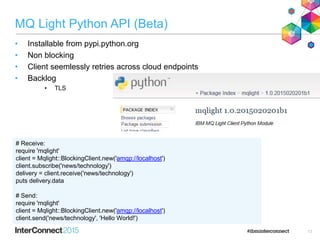
MQ Light Python API (Beta)
• Installable from pypi.python.org
• Non blocking
• Client seemlessly retries across cloud endpoints
• Backlog
• TLS
13
# Receive:
require 'mqlight'
client = Mqlight::BlockingClient.new('amqp://localhost')
client.subscribe('news/technology')
delivery = client.receive('news/technology')
puts delivery.data
# Send:
require 'mqlight'
client = Mqlight::BlockingClient.new('amqp://localhost')
client.send('news/technology', 'Hello World!')
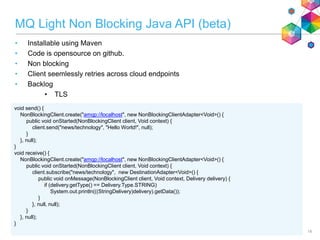
MQ Light Non Blocking Java API (beta)
• Installable using Maven
• Code is opensource on github.
• Non blocking
• Client seemlessly retries across cloud endpoints
• Backlog
• TLS
14
void send() {
NonBlockingClient.create("amqp://localhost", new NonBlockingClientAdapter<Void>() {
public void onStarted(NonBlockingClient client, Void context) {
client.send("news/technology", "Hello World!", null);
}
}, null);
}
void receive() {
NonBlockingClient.create("amqp://localhost", new NonBlockingClientAdapter<Void>() {
public void onStarted(NonBlockingClient client, Void context) {
client.subscribe("news/technology", new DestinationAdapter<Void>() {
public void onMessage(NonBlockingClient client, Void context, Delivery delivery) {
if (delivery.getType() == Delivery.Type.STRING)
System.out.println(((StringDelivery)delivery).getData());
}
}, null, null);
}
}, null);
}
Agenda
• Introduction to MQ Light
• MQ Light in IBM MQ
• Demo
15
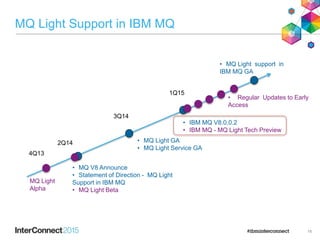
MQ Light Support in IBM MQ
16
• MQ V8 Announce
• Statement of Direction - MQ Light
Support in IBM MQ
• MQ Light Beta
2Q14
1Q15
3Q14
• MQ Light GA
• MQ Light Service GA
4Q13
MQ Light
Alpha
• IBM MQ V8.0.0.2
• IBM MQ - MQ Light Tech Preview
• Regular Updates to Early
Access
• MQ Light support in
IBM MQ GA
IBM MQ – MQ Light Tech Preview
• Platforms
• Windows 64 Bit
• Linux x86_64
• Beta Installation
• Get code/instructions from MQ Dev Blog: http://bit.ly/mqlightmq [1]
• Prereq is IBM MQ V 8.0.0.2
• Add Tech Preview install media
– Linux – RPM which is installed along side the other MQ RPMs
– Windows – Zip which is manually extracted to an MQ installation
[1] https://www.ibm.com/developerworks/community/blogs/messaging/entry/mq_support_for_mq_light_beta_now_available?lang=en
17
Open Beta - Available now
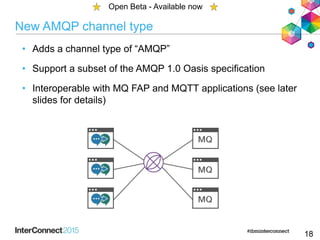
New AMQP channel type
• Adds a channel type of “AMQP”
• Support a subset of the AMQP 1.0 Oasis specification
• Interoperable with MQ FAP and MQTT applications (see later
slides for details)
18
Open Beta - Available now
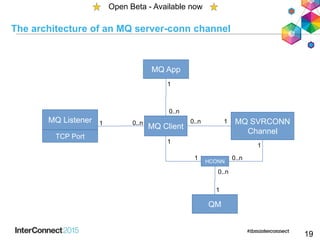
The architecture of an MQ server-conn channel
19
Open Beta - Available now
MQ Client
MQ SVRCONN
Channel
MQ Listener
TCP Port
QM
HCONN
0..n 1
1
1 0..n
1
1
MQ App
1
0..n
0..n
0..n1
JVM Process
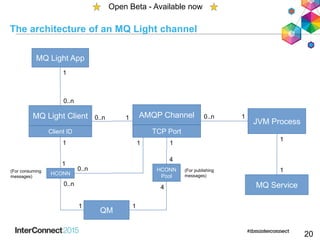
The architecture of an MQ Light channel
20
Open Beta - Available now
AMQP Channel
TCP Port
MQ Service
MQ Light Client
Client ID
QM
HCONN
0..n 1
1
1
0..n
1
1
MQ Light App
1
0..n
0..n
10..n
1
1(For consuming
messages)
HCONN
Pool
(For publishing
messages)
1
4
4
1
AMQP channels
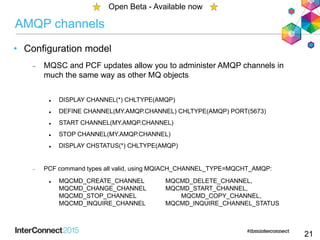
• Configuration model
 MQSC and PCF updates allow you to administer AMQP channels in
much the same way as other MQ objects
 DISPLAY CHANNEL(*) CHLTYPE(AMQP)
 DEFINE CHANNEL(MY.AMQP.CHANNEL) CHLTYPE(AMQP) PORT(5673)
 START CHANNEL(MY.AMQP.CHANNEL)
 STOP CHANNEL(MY.AMQP.CHANNEL)
 DISPLAY CHSTATUS(*) CHLTYPE(AMQP)
 PCF command types all valid, using MQIACH_CHANNEL_TYPE=MQCHT_AMQP:
 MQCMD_CREATE_CHANNEL MQCMD_DELETE_CHANNEL,
MQCMD_CHANGE_CHANNEL MQCMD_START_CHANNEL,
MQCMD_STOP_CHANNEL MQCMD_COPY_CHANNEL,
MQCMD_INQUIRE_CHANNEL MQCMD_INQUIRE_CHANNEL_STATUS
21
Open Beta - Available now
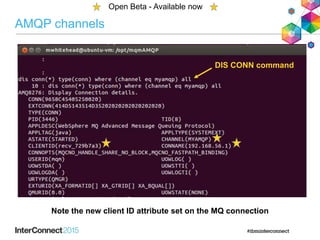
AMQP channels
Open Beta - Available now
Note the new client ID attribute set on the MQ connection
DIS CONN command
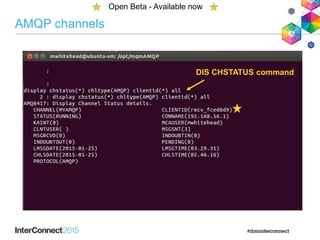
AMQP channels
Open Beta - Available now
DIS CHSTATUS command
Administration
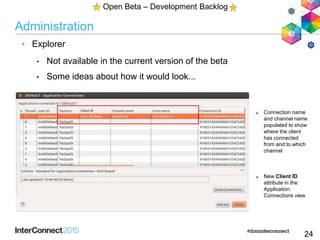
• Explorer
• Not available in the current version of the beta
• Some ideas about how it would look...
24
Open Beta – Development Backlog
 Connection name
and channel name
populated to show
where the client
has connected
from and to which
channel
 New Client ID
attribute in the
Application
Connections view
Administration
25
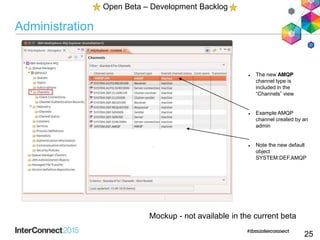
 The new AMQP
channel type is
included in the
“Channels” view
 Example AMQP
channel created by an
admin
 Note the new default
object
SYSTEM.DEF.AMQP
Mockup - not available in the current beta
Open Beta – Development Backlog
Administration
• Authorities
• MQ authorises configuration and commands for AMQP channels in
the same was as for other MQ channels
• Allows you to specify who has authority to:
 Start or stop a channel
 Change a channel's configuration
 Display a channel's status
 Delete a channel
26
Open Beta - Available now
Monitoring
• Events
• MQ provides events for monitoring different activities
• Some are available to try in the beta
 Command events (e.g. request to start a channel)
 Configuration events (e.g. request to change channel attrs)
• Some are ones we'd like to do
 Security events (e.g. an AMQP client failed an authority check)
27
Open Beta - Available now
Administration
 Backup/Restore
 MQ provides tools to saving and restoring queue manager configuration
 dmpmqcfg and runmqsc
 These have been updated to include AMQP channel definitions
 Service may request that custom tuning/service parameters be set in a .properties
file. If so, then this file must be manually backed up similar to qm.ini files today
 Logs
 Located in MQ data path
 /var/mqm/qmgrs/QM1/amqp.stdout and /var/mqm/qmgrs/QM1/amqp.stderr
 /var/mqm/qmgrs/errors/amqp_*.log
 /var/mqm/trace/amqp_*.trc (start/end trace using strmqtrc/endmqtrc)
28
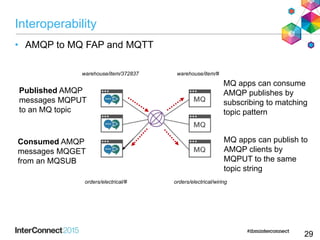
Interoperability
• AMQP to MQ FAP and MQTT
29
Published AMQP
messages MQPUT
to an MQ topic
Consumed AMQP
messages MQGET
from an MQSUB
MQ apps can publish to
AMQP clients by
MQPUT to the same
topic string
MQ apps can consume
AMQP publishes by
subscribing to matching
topic pattern
warehouse/item/372837 warehouse/item/#
orders/electrical/# orders/electrical/wiring
Interoperability
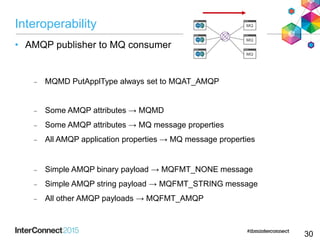
• AMQP publisher to MQ consumer
 MQMD PutApplType always set to MQAT_AMQP
 Some AMQP attributes → MQMD
 Some AMQP attributes → MQ message properties
 All AMQP application properties → MQ message properties
 Simple AMQP binary payload → MQFMT_NONE message
 Simple AMQP string payload → MQFMT_STRING message
 All other AMQP payloads → MQFMT_AMQP
30
Interoperability
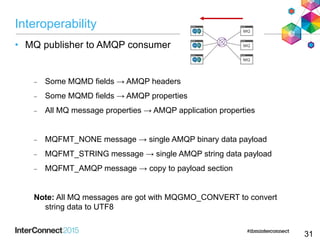
• MQ publisher to AMQP consumer
 Some MQMD fields → AMQP headers
 Some MQMD fields → AMQP properties
 All MQ message properties → AMQP application properties
 MQFMT_NONE message → single AMQP binary data payload
 MQFMT_STRING message → single AMQP string data payload
 MQFMT_AMQP message → copy to payload section
Note: All MQ messages are got with MQGMO_CONVERT to convert
string data to UTF8
31
Detail on Interoperability – AMQP to MQ
32
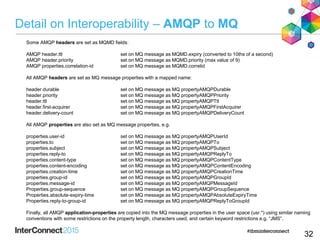
Some AMQP headers are set as MQMD fields:
AMQP header.ttl set on MQ message as MQMD.expiry (converted to 10ths of a second)
AMQP header.priority set on MQ message as MQMD.priority (max value of 9)
AMQP properties.correlation-id set on MQ message as MQMD.correlid
All AMQP headers are set as MQ message properties with a mapped name:
header.durable set on MQ message as MQ propertyAMQPDurable
header.priority set on MQ message as MQ propertyAMQPPriority
header.ttl set on MQ message as MQ propertyAMQPTtl
header.first-acquirer set on MQ message as MQ propertyAMQPFirstAcquirer
header.delivery-count set on MQ message as MQ propertyAMQPDeliveryCount
All AMQP properties are also set as MQ message properties, e.g.
properties.user-id set on MQ message as MQ propertyAMQPUserId
properties.to set on MQ message as MQ propertyAMQPTo
properties.subject set on MQ message as MQ propertyAMQPSubject
properties.reply-to set on MQ message as MQ propertyAMQPReplyTo
properties.content-type set on MQ message as MQ propertyAMQPContentType
properties.content-encoding set on MQ message as MQ propertyAMQPContentEncoding
properties.creation-time set on MQ message as MQ propertyAMQPCreationTime
properties.group-id set on MQ message as MQ propertyAMQPGroupId
properties.message-id set on MQ message as MQ propertyAMQPMessageId
Properties.group-sequence set on MQ message as MQ propertyAMQPGroupSequence
Properties.absolute-expiry-time set on MQ message as MQ propertyAMQPAbsoluteExpiryTime
Properties.reply-to-group-id set on MQ message as MQ propertyAMQPReplyToGroupId
Finally, all AMQP application-properties are copied into the MQ message properties in the user space (usr.*) using similar naming
conventions with some restrictions on the property length, characters used, and certain keyword restrictions e.g. “JMS”.
Detail on Interoperability – MQ to AMQP
33
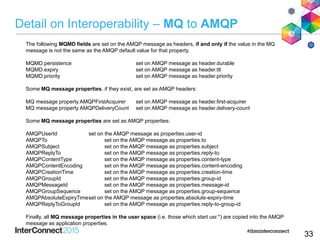
The following MQMD fields are set on the AMQP message as headers, if and only if the value in the MQ
message is not the same as the AMQP default value for that property.
MQMD.persistence set on AMQP message as header.durable
MQMD.expiry set on AMQP message as header.ttl
MQMD.priority set on AMQP message as header.priority
Some MQ message properties, if they exist, are set as AMQP headers:
MQ message property AMQPFirstAcquirer set on AMQP message as header.first-acquirer
MQ message property AMQPDeliveryCount set on AMQP message as header.delivery-count
Some MQ message properties are set as AMQP properties:
AMQPUserId set on the AMQP message as properties.user-id
AMQPTo set on the AMQP message as properties.to
AMQPSubject set on the AMQP message as properties.subject
AMQPReplyTo set on the AMQP message as properties.reply-to
AMQPContentType set on the AMQP message as properties.content-type
AMQPContentEncoding set on the AMQP message as properties.content-encoding
AMQPCreationTime set on the AMQP message as properties.creation-time
AMQPGroupId set on the AMQP message as properties.group-id
AMQPMessageId set on the AMQP message as properties.message-id
AMQPGroupSequence set on the AMQP message as properties.group-sequence
AMQPAbsoluteExpiryTimeset on the AMQP message as properties.absolute-expiry-time
AMQPReplyToGroupId set on the AMQP message as properties.reply-to-group-id
Finally, all MQ message properties in the user space (i.e. those which start usr.*) are copied into the AMQP
message as application properties.
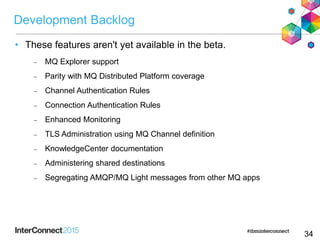
Development Backlog
• These features aren't yet available in the beta.
 MQ Explorer support
 Parity with MQ Distributed Platform coverage
 Channel Authentication Rules
 Connection Authentication Rules
 Enhanced Monitoring
 TLS Administration using MQ Channel definition
 KnowledgeCenter documentation
 Administering shared destinations
 Segregating AMQP/MQ Light messages from other MQ apps
34
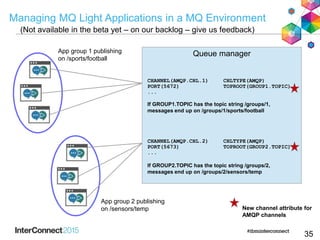
Managing MQ Light Applications in a MQ Environment
35
Queue managerApp group 1 publishing
on /sports/football
CHANNEL(AMQP.CHL.1) CHLTYPE(AMQP)
PORT(5672) TOPROOT(GROUP1.TOPIC)
...
If GROUP1.TOPIC has the topic string /groups/1,
messages end up on /groups/1/sports/football
App group 2 publishing
on /sensors/temp New channel attribute for
AMQP channels
CHANNEL(AMQP.CHL.2) CHLTYPE(AMQP)
PORT(5673) TOPROOT(GROUP2.TOPIC)
...
If GROUP2.TOPIC has the topic string /groups/2,
messages end up on /groups/2/sensors/temp
(Not available in the beta yet – on our backlog – give us feedback)
Demo
36
Thank You
Your Feedback is
Important!
Access the InterConnect 2015
Conference CONNECT Attendee
Portal to complete your session
surveys from your smartphone,
laptop or conference kiosk.

MQ Light in IBM MQ: IBM Interconnect 2015 session AME4182

  • 1.
    © 2015 IBMCorporation AME-4182: Bringing IBM MQ Light Apps into Your IBM MQ Infrastructure Rob Nicholson Alan Chat
  • 2.
    Notices and Disclaimers Copyright© 2015 by International Business Machines Corporation (IBM). No part of this document may be reproduced or transmitted in any form without written permission from IBM. U.S. Government Users Restricted Rights - Use, duplication or disclosure restricted by GSA ADP Schedule Contract with IBM. Information in these presentations (including information relating to products that have not yet been announced by IBM) has been reviewed for accuracy as of the date of initial publication and could include unintentional technical or typographical errors. IBM shall have no responsibility to update this information. THIS DOCUMENT IS DISTRIBUTED "AS IS" WITHOUT ANY WARRANTY, EITHER EXPRESS OR IMPLIED. IN NO EVENT SHALL IBM BE LIABLE FOR ANY DAMAGE ARISING FROM THE USE OF THIS INFORMATION, INCLUDING BUT NOT LIMITED TO, LOSS OF DATA, BUSINESS INTERRUPTION, LOSS OF PROFIT OR LOSS OF OPPORTUNITY. IBM products and services are warranted according to the terms and conditions of the agreements under which they are provided. Any statements regarding IBM's future direction, intent or product plans are subject to change or withdrawal without notice. Performance data contained herein was generally obtained in a controlled, isolated environments. Customer examples are presented as illustrations of how those customers have used IBM products and the results they may have achieved. Actual performance, cost, savings or other results in other operating environments may vary. References in this document to IBM products, programs, or services does not imply that IBM intends to make such products, programs or services available in all countries in which IBM operates or does business. Workshops, sessions and associated materials may have been prepared by independent session speakers, and do not necessarily reflect the views of IBM. All materials and discussions are provided for informational purposes only, and are neither intended to, nor shall constitute legal or other guidance or advice to any individual participant or their specific situation. It is the customer’s responsibility to insure its own compliance with legal requirements and to obtain advice of competent legal counsel as to the identification and interpretation of any relevant laws and regulatory requirements that may affect the customer’s business and any actions the customer may need to take to comply with such laws. IBM does not provide legal advice or represent or warrant that its services or products will ensure that the customer is in compliance with any law.
  • 3.
    Notices and Disclaimers(con’t) Information concerning non-IBM products was obtained from the suppliers of those products, their published announcements or other publicly available sources. IBM has not tested those products in connection with this publication and cannot confirm the accuracy of performance, compatibility or any other claims related to non-IBM products. Questions on the capabilities of non-IBM products should be addressed to the suppliers of those products. IBM does not warrant the quality of any third-party products, or the ability of any such third-party products to interoperate with IBM’s products. IBM EXPRESSLY DISCLAIMS ALL WARRANTIES, EXPRESSED OR IMPLIED, INCLUDING BUT NOT LIMITED TO, THE IMPLIED WARRANTIES OF MERCHANTABILITY AND FITNESS FOR A PARTICULAR PURPOSE. The provision of the information contained herein is not intended to, and does not, grant any right or license under any IBM patents, copyrights, trademarks or other intellectual property right. • IBM, the IBM logo, ibm.com, Bluemix, Blueworks Live, CICS, Clearcase, DOORS®, Enterprise Document Management System™, Global Business Services ®, Global Technology Services ®, Information on Demand, ILOG, Maximo®, MQIntegrator®, MQSeries®, Netcool®, OMEGAMON, OpenPower, PureAnalytics™, PureApplication®, pureCluster™, PureCoverage®, PureData®, PureExperience®, PureFlex®, pureQuery®, pureScale®, PureSystems®, QRadar®, Rational®, Rhapsody®, SoDA, SPSS, StoredIQ, Tivoli®, Trusteer®, urban{code}®, Watson, WebSphere®, Worklight®, X-Force® and System z® Z/OS, are trademarks of International Business Machines Corporation, registered in many jurisdictions worldwide. Other product and service names might be trademarks of IBM or other companies. A current list of IBM trademarks is available on the Web at "Copyright and trademark information" at: www.ibm.com/legal/copytrade.shtml.
  • 4.
    IBM Messaging Deliver Messaging Backbonefor Enterprise Focus on traditional MQ values, rock-solid enterprise-class service, ease-of-operation, breadth of platform coverage, availability, z/OS exploitation Enable Developers to build more scalable, responsive applications Focus on app use cases, breadth of languages, ease-of-deployment, micro services, integration with developer frameworks Development agility & Enterprise quality of Service
  • 5.
    Agenda • Introduction toMQ Light • MQ Light in IBM MQ • Demo 4
  • 6.
    MQ Light :Software and Cloud • Messaging that application developers will love to use, helping them make responsive applications that scale easily • 3 ways to get it: • Bluemix service • MQ Light software download • Statement of Direction for support in MQ Version 8. • Open APIs crafted to feel natural in a growing range of popular languages • Tooling that makes modular app development easy 5
  • 7.
    The journey thatgot us here 6 Andy Developer Iain Infrastructure Guy I want to execute code without taxing my Web app processes My job is run a communications service for my customers’ apps Some Thing My Apps Workers Messaging Backbone My Customers’ Apps
  • 8.
    Use cases 7 Connecting external systems Eventdriven Worker offload • Posting video to multiple social sites after transcoding • Respond to external events • Updating external booking app • Posting updates to twitter • Image processing • Text analytics
  • 9.
    Deployment Options 8 MQ LightService for Bluemix WebSphere MQ [open Beta] “MQ Light”
  • 10.
    MQ Light API- Language support 9 Simple, programming Language neutral messaging model Idiomatic language & framework API Mappings • Frictionless development Open wire protocol (AMQP 1.0) & Open Source client libraries • Facilitates community drivers for languages & frameworks
  • 11.
    10 MQ Light MessagingModel DESTINATION1. Send (‘/test/a’, “Hello”); 2. Send (‘/test/a’, “World!”); 1. Hello 2. World! 1. Hello 2. World! SHARING Topic Address Space Sender application DESTINATION Pattern=/test/# Pattern=/test/# Share=myshare Client 1 Client 2 Client 3
  • 12.
    MQ Light Node.JSAPI • Installable from NPM • Fully non blocking – Node.JS style • Fluent programming style - wrappable into promises. • Focussed on code simplicity. • Client seamlessly retries across cloud endpoints 11 # Receive: var mqlight = require('mqlight'); var recvClient = mqlight.createClient({service: 'amqp://localhost'}); recvClient.on('started', function() { recvClient.subscribe('news/technology'); recvClient.on('message', function(data, delivery) { console.log(data); }); }); # Send: var mqlight = require('mqlight'); var sendClient = mqlight.createClient({service: 'amqp://localhost'}); sendClient.on('started', function() { sendClient.send('news/technology', 'Hello World!'); });
  • 13.
    MQ Light RubyAPI (Beta) • Installable from rubygems.org • Synchronous/blocking client. • Bluemix connection support • Backlog • Auto reconnect. • Asynchronous non blocking • TLS 12 # Receive: require 'mqlight' client = Mqlight::BlockingClient.new('amqp://localhost') client.subscribe('news/technology') delivery = client.receive('news/technology') puts delivery.data # Send: require 'mqlight' client = Mqlight::BlockingClient.new('amqp://localhost') client.send('news/technology', 'Hello World!')
  • 14.
    MQ Light PythonAPI (Beta) • Installable from pypi.python.org • Non blocking • Client seemlessly retries across cloud endpoints • Backlog • TLS 13 # Receive: require 'mqlight' client = Mqlight::BlockingClient.new('amqp://localhost') client.subscribe('news/technology') delivery = client.receive('news/technology') puts delivery.data # Send: require 'mqlight' client = Mqlight::BlockingClient.new('amqp://localhost') client.send('news/technology', 'Hello World!')
  • 15.
    MQ Light NonBlocking Java API (beta) • Installable using Maven • Code is opensource on github. • Non blocking • Client seemlessly retries across cloud endpoints • Backlog • TLS 14 void send() { NonBlockingClient.create("amqp://localhost", new NonBlockingClientAdapter<Void>() { public void onStarted(NonBlockingClient client, Void context) { client.send("news/technology", "Hello World!", null); } }, null); } void receive() { NonBlockingClient.create("amqp://localhost", new NonBlockingClientAdapter<Void>() { public void onStarted(NonBlockingClient client, Void context) { client.subscribe("news/technology", new DestinationAdapter<Void>() { public void onMessage(NonBlockingClient client, Void context, Delivery delivery) { if (delivery.getType() == Delivery.Type.STRING) System.out.println(((StringDelivery)delivery).getData()); } }, null, null); } }, null); }
  • 16.
    Agenda • Introduction toMQ Light • MQ Light in IBM MQ • Demo 15
  • 17.
    MQ Light Supportin IBM MQ 16 • MQ V8 Announce • Statement of Direction - MQ Light Support in IBM MQ • MQ Light Beta 2Q14 1Q15 3Q14 • MQ Light GA • MQ Light Service GA 4Q13 MQ Light Alpha • IBM MQ V8.0.0.2 • IBM MQ - MQ Light Tech Preview • Regular Updates to Early Access • MQ Light support in IBM MQ GA
  • 18.
    IBM MQ –MQ Light Tech Preview • Platforms • Windows 64 Bit • Linux x86_64 • Beta Installation • Get code/instructions from MQ Dev Blog: http://bit.ly/mqlightmq [1] • Prereq is IBM MQ V 8.0.0.2 • Add Tech Preview install media – Linux – RPM which is installed along side the other MQ RPMs – Windows – Zip which is manually extracted to an MQ installation [1] https://www.ibm.com/developerworks/community/blogs/messaging/entry/mq_support_for_mq_light_beta_now_available?lang=en 17 Open Beta - Available now
  • 19.
    New AMQP channeltype • Adds a channel type of “AMQP” • Support a subset of the AMQP 1.0 Oasis specification • Interoperable with MQ FAP and MQTT applications (see later slides for details) 18 Open Beta - Available now
  • 20.
    The architecture ofan MQ server-conn channel 19 Open Beta - Available now MQ Client MQ SVRCONN Channel MQ Listener TCP Port QM HCONN 0..n 1 1 1 0..n 1 1 MQ App 1 0..n 0..n 0..n1
  • 21.
    JVM Process The architectureof an MQ Light channel 20 Open Beta - Available now AMQP Channel TCP Port MQ Service MQ Light Client Client ID QM HCONN 0..n 1 1 1 0..n 1 1 MQ Light App 1 0..n 0..n 10..n 1 1(For consuming messages) HCONN Pool (For publishing messages) 1 4 4 1
  • 22.
    AMQP channels • Configurationmodel  MQSC and PCF updates allow you to administer AMQP channels in much the same way as other MQ objects  DISPLAY CHANNEL(*) CHLTYPE(AMQP)  DEFINE CHANNEL(MY.AMQP.CHANNEL) CHLTYPE(AMQP) PORT(5673)  START CHANNEL(MY.AMQP.CHANNEL)  STOP CHANNEL(MY.AMQP.CHANNEL)  DISPLAY CHSTATUS(*) CHLTYPE(AMQP)  PCF command types all valid, using MQIACH_CHANNEL_TYPE=MQCHT_AMQP:  MQCMD_CREATE_CHANNEL MQCMD_DELETE_CHANNEL, MQCMD_CHANGE_CHANNEL MQCMD_START_CHANNEL, MQCMD_STOP_CHANNEL MQCMD_COPY_CHANNEL, MQCMD_INQUIRE_CHANNEL MQCMD_INQUIRE_CHANNEL_STATUS 21 Open Beta - Available now
  • 23.
    AMQP channels Open Beta- Available now Note the new client ID attribute set on the MQ connection DIS CONN command
  • 24.
    AMQP channels Open Beta- Available now DIS CHSTATUS command
  • 25.
    Administration • Explorer • Notavailable in the current version of the beta • Some ideas about how it would look... 24 Open Beta – Development Backlog  Connection name and channel name populated to show where the client has connected from and to which channel  New Client ID attribute in the Application Connections view
  • 26.
    Administration 25  The newAMQP channel type is included in the “Channels” view  Example AMQP channel created by an admin  Note the new default object SYSTEM.DEF.AMQP Mockup - not available in the current beta Open Beta – Development Backlog
  • 27.
    Administration • Authorities • MQauthorises configuration and commands for AMQP channels in the same was as for other MQ channels • Allows you to specify who has authority to:  Start or stop a channel  Change a channel's configuration  Display a channel's status  Delete a channel 26 Open Beta - Available now
  • 28.
    Monitoring • Events • MQprovides events for monitoring different activities • Some are available to try in the beta  Command events (e.g. request to start a channel)  Configuration events (e.g. request to change channel attrs) • Some are ones we'd like to do  Security events (e.g. an AMQP client failed an authority check) 27 Open Beta - Available now
  • 29.
    Administration  Backup/Restore  MQprovides tools to saving and restoring queue manager configuration  dmpmqcfg and runmqsc  These have been updated to include AMQP channel definitions  Service may request that custom tuning/service parameters be set in a .properties file. If so, then this file must be manually backed up similar to qm.ini files today  Logs  Located in MQ data path  /var/mqm/qmgrs/QM1/amqp.stdout and /var/mqm/qmgrs/QM1/amqp.stderr  /var/mqm/qmgrs/errors/amqp_*.log  /var/mqm/trace/amqp_*.trc (start/end trace using strmqtrc/endmqtrc) 28
  • 30.
    Interoperability • AMQP toMQ FAP and MQTT 29 Published AMQP messages MQPUT to an MQ topic Consumed AMQP messages MQGET from an MQSUB MQ apps can publish to AMQP clients by MQPUT to the same topic string MQ apps can consume AMQP publishes by subscribing to matching topic pattern warehouse/item/372837 warehouse/item/# orders/electrical/# orders/electrical/wiring
  • 31.
    Interoperability • AMQP publisherto MQ consumer  MQMD PutApplType always set to MQAT_AMQP  Some AMQP attributes → MQMD  Some AMQP attributes → MQ message properties  All AMQP application properties → MQ message properties  Simple AMQP binary payload → MQFMT_NONE message  Simple AMQP string payload → MQFMT_STRING message  All other AMQP payloads → MQFMT_AMQP 30
  • 32.
    Interoperability • MQ publisherto AMQP consumer  Some MQMD fields → AMQP headers  Some MQMD fields → AMQP properties  All MQ message properties → AMQP application properties  MQFMT_NONE message → single AMQP binary data payload  MQFMT_STRING message → single AMQP string data payload  MQFMT_AMQP message → copy to payload section Note: All MQ messages are got with MQGMO_CONVERT to convert string data to UTF8 31
  • 33.
    Detail on Interoperability– AMQP to MQ 32 Some AMQP headers are set as MQMD fields: AMQP header.ttl set on MQ message as MQMD.expiry (converted to 10ths of a second) AMQP header.priority set on MQ message as MQMD.priority (max value of 9) AMQP properties.correlation-id set on MQ message as MQMD.correlid All AMQP headers are set as MQ message properties with a mapped name: header.durable set on MQ message as MQ propertyAMQPDurable header.priority set on MQ message as MQ propertyAMQPPriority header.ttl set on MQ message as MQ propertyAMQPTtl header.first-acquirer set on MQ message as MQ propertyAMQPFirstAcquirer header.delivery-count set on MQ message as MQ propertyAMQPDeliveryCount All AMQP properties are also set as MQ message properties, e.g. properties.user-id set on MQ message as MQ propertyAMQPUserId properties.to set on MQ message as MQ propertyAMQPTo properties.subject set on MQ message as MQ propertyAMQPSubject properties.reply-to set on MQ message as MQ propertyAMQPReplyTo properties.content-type set on MQ message as MQ propertyAMQPContentType properties.content-encoding set on MQ message as MQ propertyAMQPContentEncoding properties.creation-time set on MQ message as MQ propertyAMQPCreationTime properties.group-id set on MQ message as MQ propertyAMQPGroupId properties.message-id set on MQ message as MQ propertyAMQPMessageId Properties.group-sequence set on MQ message as MQ propertyAMQPGroupSequence Properties.absolute-expiry-time set on MQ message as MQ propertyAMQPAbsoluteExpiryTime Properties.reply-to-group-id set on MQ message as MQ propertyAMQPReplyToGroupId Finally, all AMQP application-properties are copied into the MQ message properties in the user space (usr.*) using similar naming conventions with some restrictions on the property length, characters used, and certain keyword restrictions e.g. “JMS”.
  • 34.
    Detail on Interoperability– MQ to AMQP 33 The following MQMD fields are set on the AMQP message as headers, if and only if the value in the MQ message is not the same as the AMQP default value for that property. MQMD.persistence set on AMQP message as header.durable MQMD.expiry set on AMQP message as header.ttl MQMD.priority set on AMQP message as header.priority Some MQ message properties, if they exist, are set as AMQP headers: MQ message property AMQPFirstAcquirer set on AMQP message as header.first-acquirer MQ message property AMQPDeliveryCount set on AMQP message as header.delivery-count Some MQ message properties are set as AMQP properties: AMQPUserId set on the AMQP message as properties.user-id AMQPTo set on the AMQP message as properties.to AMQPSubject set on the AMQP message as properties.subject AMQPReplyTo set on the AMQP message as properties.reply-to AMQPContentType set on the AMQP message as properties.content-type AMQPContentEncoding set on the AMQP message as properties.content-encoding AMQPCreationTime set on the AMQP message as properties.creation-time AMQPGroupId set on the AMQP message as properties.group-id AMQPMessageId set on the AMQP message as properties.message-id AMQPGroupSequence set on the AMQP message as properties.group-sequence AMQPAbsoluteExpiryTimeset on the AMQP message as properties.absolute-expiry-time AMQPReplyToGroupId set on the AMQP message as properties.reply-to-group-id Finally, all MQ message properties in the user space (i.e. those which start usr.*) are copied into the AMQP message as application properties.
  • 35.
    Development Backlog • Thesefeatures aren't yet available in the beta.  MQ Explorer support  Parity with MQ Distributed Platform coverage  Channel Authentication Rules  Connection Authentication Rules  Enhanced Monitoring  TLS Administration using MQ Channel definition  KnowledgeCenter documentation  Administering shared destinations  Segregating AMQP/MQ Light messages from other MQ apps 34
  • 36.
    Managing MQ LightApplications in a MQ Environment 35 Queue managerApp group 1 publishing on /sports/football CHANNEL(AMQP.CHL.1) CHLTYPE(AMQP) PORT(5672) TOPROOT(GROUP1.TOPIC) ... If GROUP1.TOPIC has the topic string /groups/1, messages end up on /groups/1/sports/football App group 2 publishing on /sensors/temp New channel attribute for AMQP channels CHANNEL(AMQP.CHL.2) CHLTYPE(AMQP) PORT(5673) TOPROOT(GROUP2.TOPIC) ... If GROUP2.TOPIC has the topic string /groups/2, messages end up on /groups/2/sensors/temp (Not available in the beta yet – on our backlog – give us feedback)
  • 37.
  • 38.
    Thank You Your Feedbackis Important! Access the InterConnect 2015 Conference CONNECT Attendee Portal to complete your session surveys from your smartphone, laptop or conference kiosk.