L.O: STUDENTS WILL BE
ABLE TO EXPLAIN WHAT
THE INTERNET IS.
(15-30 minutes <1 class period)
DO NOW: READ
Unit 4 Lab 2: Reliable
Communication, Page 1
What Is “the Internet”?
I BOUGHT IT
OFF “THE
INTERNET”!
ISN’T IT
COOL!
The Internet is a network of
independent but connected devices all
over the world.
People talk as if "the Internet" and "the
World Wide Web" are the same thing, but
they are not.
The World Wide Web is the collection of interlinked website
documents (such as HTML files) that you can view with a
web browser by typing addresses like
http://bjc.berkeley.edu/website/privacy.html.
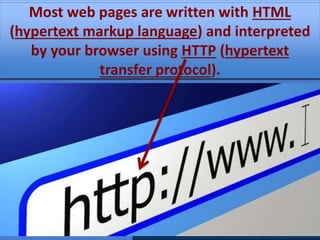
Most web pages are written with HTML
(hypertext markup language) and interpreted
by your browser using HTTP (hypertext
transfer protocol).
What is a “URL”?
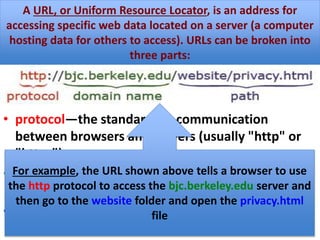
• protocol—the standard for communication
between browsers and servers (usually "http" or
"https")
• domain name—the name of the server that hosts
the data
• path—the location of the data in a hierarchy of
folders on the server
A URL, or Uniform Resource Locator, is an address for
accessing specific web data located on a server (a computer
hosting data for others to access). URLs can be broken into
three parts:
For example, the URL shown above tells a browser to use
the http protocol to access the bjc.berkeley.edu server and
then go to the website folder and open the privacy.html
file
For You To Do:
• Describe the parts of this URL for the
Snap! logo:
• http://snap.berkeley.edu/Logo5.png
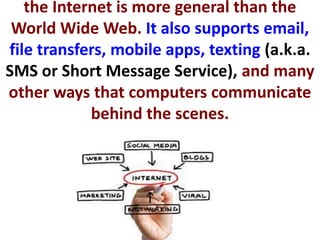
the Internet is more general than the
World Wide Web. It also supports email,
file transfers, mobile apps, texting (a.k.a.
SMS or Short Message Service), and many
other ways that computers communicate
behind the scenes.
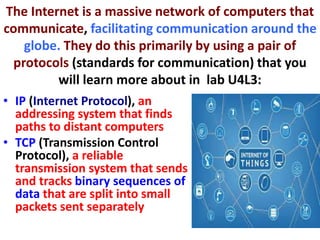
The Internet is a massive network of computers that
communicate, facilitating communication around the
globe. They do this primarily by using a pair of
protocols (standards for communication) that you
will learn more about in lab U4L3:
• IP (Internet Protocol), an
addressing system that finds
paths to distant computers
• TCP (Transmission Control
Protocol), a reliable
transmission system that sends
and tracks binary sequences of
data that are split into small
packets sent separately
The algorithms that ensure data reach their
destinations must continue to work even as
the Internet grows. So, the Internet was
designed to be: REDUNDANT AND
HIERARCHICAL
Redundant: There are multiple pathways among the physical
connections of the Internet to create redundancy. Even if
one pathway is unavailable, there is still another way to
transmit a message from sender to receiver (as shown
below)
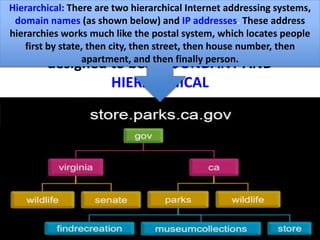
Hierarchical: There are two hierarchical Internet addressing systems,
domain names (as shown below) and IP addresses. These address
hierarchies works much like the postal system, which locates people
first by state, then city, then street, then house number, then
apartment, and then finally person.
Enduring Understandings:
• EU 6.1 The Internet is a network
of autonomous systems.
• EU 6.2 Characteristics of the
Internet influence the systems
built on it.
Learning Objectives:
• LO 6.1.1 Explain the abstractions in the
Internet and how the Internet functions.
[P3]
• LO 6.2.1 Explain characteristics of the
Internet and the systems built on it. [P5]
• LO 6.2.2 Explain how the characteristics
of the Internet influence the systems
built on it. [P4]
Essential Knowledge:
1. EK 6.1.1A The Internet connects devices and
networks all over the world.
2. EK 6.1.1C Devices and networks that make up the
Internet are connected and communicate using
addresses and protocols.
3. EK 6.1.1D The Internet and the systems built on it
facilitate collaboration.
4. EK 6.1.1G The domain name system (DNS)
translates names to IP addresses
Essential Knowledge:
• 5. EK 6.2.1A The Internet and the
systems built on it are hierarchical and
redundant.
• 6. EK 6.2.1B The domain name syntax is
hierarchical.
• 7. EK 6.2.1C IP addresses are
hierarchical.
• 8. EK 6.2.2A Hierarchy and redundancy
help systems scale.
Essential Knowledge:
• 9. EK 6.2.2B The redundancy of routing (i.e.,
more than one way to route data) between
two points on the Internet increases the
reliability of the Internet and helps it scale to
more devices and more people.
• 10. EK 6.2.2C Hierarchy in the DNS helps
system scale.
• 11. EK 6.2.2I The size and speed of systems
affect their use.

Lesson4.6 u4 l2 what is the internet?

  • 1.
    L.O: STUDENTS WILLBE ABLE TO EXPLAIN WHAT THE INTERNET IS. (15-30 minutes <1 class period) DO NOW: READ Unit 4 Lab 2: Reliable Communication, Page 1
  • 2.
    What Is “theInternet”? I BOUGHT IT OFF “THE INTERNET”! ISN’T IT COOL! The Internet is a network of independent but connected devices all over the world. People talk as if "the Internet" and "the World Wide Web" are the same thing, but they are not. The World Wide Web is the collection of interlinked website documents (such as HTML files) that you can view with a web browser by typing addresses like http://bjc.berkeley.edu/website/privacy.html. Most web pages are written with HTML (hypertext markup language) and interpreted by your browser using HTTP (hypertext transfer protocol).
  • 3.
    What is a“URL”? • protocol—the standard for communication between browsers and servers (usually "http" or "https") • domain name—the name of the server that hosts the data • path—the location of the data in a hierarchy of folders on the server A URL, or Uniform Resource Locator, is an address for accessing specific web data located on a server (a computer hosting data for others to access). URLs can be broken into three parts: For example, the URL shown above tells a browser to use the http protocol to access the bjc.berkeley.edu server and then go to the website folder and open the privacy.html file
  • 4.
    For You ToDo: • Describe the parts of this URL for the Snap! logo: • http://snap.berkeley.edu/Logo5.png
  • 5.
    the Internet ismore general than the World Wide Web. It also supports email, file transfers, mobile apps, texting (a.k.a. SMS or Short Message Service), and many other ways that computers communicate behind the scenes.
  • 6.
    The Internet isa massive network of computers that communicate, facilitating communication around the globe. They do this primarily by using a pair of protocols (standards for communication) that you will learn more about in lab U4L3: • IP (Internet Protocol), an addressing system that finds paths to distant computers • TCP (Transmission Control Protocol), a reliable transmission system that sends and tracks binary sequences of data that are split into small packets sent separately
  • 7.
    The algorithms thatensure data reach their destinations must continue to work even as the Internet grows. So, the Internet was designed to be: REDUNDANT AND HIERARCHICAL Redundant: There are multiple pathways among the physical connections of the Internet to create redundancy. Even if one pathway is unavailable, there is still another way to transmit a message from sender to receiver (as shown below) Hierarchical: There are two hierarchical Internet addressing systems, domain names (as shown below) and IP addresses. These address hierarchies works much like the postal system, which locates people first by state, then city, then street, then house number, then apartment, and then finally person.
  • 8.
    Enduring Understandings: • EU6.1 The Internet is a network of autonomous systems. • EU 6.2 Characteristics of the Internet influence the systems built on it.
  • 9.
    Learning Objectives: • LO6.1.1 Explain the abstractions in the Internet and how the Internet functions. [P3] • LO 6.2.1 Explain characteristics of the Internet and the systems built on it. [P5] • LO 6.2.2 Explain how the characteristics of the Internet influence the systems built on it. [P4]
  • 10.
    Essential Knowledge: 1. EK6.1.1A The Internet connects devices and networks all over the world. 2. EK 6.1.1C Devices and networks that make up the Internet are connected and communicate using addresses and protocols. 3. EK 6.1.1D The Internet and the systems built on it facilitate collaboration. 4. EK 6.1.1G The domain name system (DNS) translates names to IP addresses
  • 11.
    Essential Knowledge: • 5.EK 6.2.1A The Internet and the systems built on it are hierarchical and redundant. • 6. EK 6.2.1B The domain name syntax is hierarchical. • 7. EK 6.2.1C IP addresses are hierarchical. • 8. EK 6.2.2A Hierarchy and redundancy help systems scale.
  • 12.
    Essential Knowledge: • 9.EK 6.2.2B The redundancy of routing (i.e., more than one way to route data) between two points on the Internet increases the reliability of the Internet and helps it scale to more devices and more people. • 10. EK 6.2.2C Hierarchy in the DNS helps system scale. • 11. EK 6.2.2I The size and speed of systems affect their use.

Editor's Notes

  • #2 Lab 2: Reliable Communication This lab offers an introduction to the Internet that covers the difference between the World Wide Web and the Internet, URLs, network redundancy, and domain name hierarchy. Optional pages include information on the history of the Internet and a very brief introduction to HTML. Page 1: What Is the Internet? Understand HTTP as a protocol for enabling the World Wide Web. Understand how a URL is put together and how it enables routing of documents on the World Wide Web
  • #3 Page 1: What Is the Internet? Discussion Questions: What is HTML? How is it used? What is HTTP? How is it used? What is a URL? What are the different parts of a URL?