L.O: SWBAT INTRODUCTION
TO FLOW CHARTS.
Sequences:
The most basic algorithm uses sequences
to present a list of instructions to be
followed one after the other, step by step.
An algorithm is a plan, a set of step-by-step instructions that a
computer follows to solve a problem.
To solve the problem, the instructions have to be followed in the right
order.
If the instructions are not carried out in the right order, you won’t get
the result you expected!
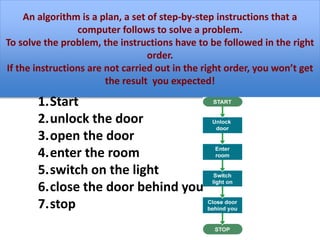
1.Start
2.unlock the door
3.open the door
4.enter the room
5.switch on the light
6.close the door behind you
7.stop
Selection:
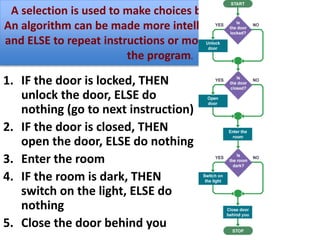
1. IF the door is locked, THEN
unlock the door, ELSE do
nothing (go to next instruction)
2. IF the door is closed, THEN
open the door, ELSE do nothing
3. Enter the room
4. IF the room is dark, THEN
switch on the light, ELSE do
nothing
5. Close the door behind you
A selection is used to make choices based on information.
An algorithm can be made more intelligent by using IF, THEN
and ELSE to repeat instructions or move to different parts of
the program.
Iteration
• Iteration is the process of looping or repeating
sections of a program.
• There are two types of iteration: count-controlled
and condition-controlled.
• Count-controlled loops repeat the same steps a
specific number of times,
• regardless of the outcome.
• But a condition-controlled loop will keep repeating
the steps over and over…and over…and over…and
over, until it gets a specific result.
For loop (Count-controlled loop)
• The count-controlled loop can be described as a
FOR loop. The program repeats the action FOR a
number of times.
Here is an example using pseudocode:
Make “count” = 0
For as long as “count” is in the range of 0 to 5
Print “I am in loop number: ” and the value
contained in “count” together on a line
Increment “count” by 1
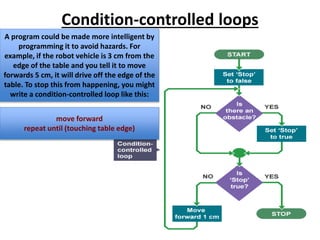
Condition-controlled loops
A program could be made more intelligent by
programming it to avoid hazards. For
example, if the robot vehicle is 3 cm from the
edge of the table and you tell it to move
forwards 5 cm, it will drive off the edge of the
table. To stop this from happening, you might
write a condition-controlled loop like this:
move forward
repeat until (touching table edge)
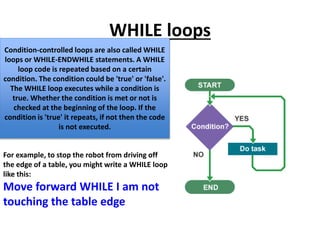
WHILE loops
Condition-controlled loops are also called WHILE
loops or WHILE-ENDWHILE statements. A WHILE
loop code is repeated based on a certain
condition. The condition could be 'true' or 'false'.
The WHILE loop executes while a condition is
true. Whether the condition is met or not is
checked at the beginning of the loop. If the
condition is 'true' it repeats, if not then the code
is not executed.
For example, to stop the robot from driving off
the edge of a table, you might write a WHILE loop
like this:
Move forward WHILE I am not
touching the table edge
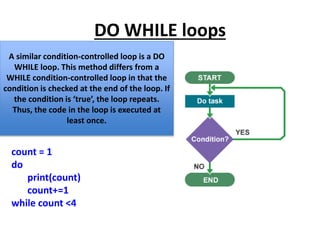
DO WHILE loops
A similar condition-controlled loop is a DO
WHILE loop. This method differs from a
WHILE condition-controlled loop in that the
condition is checked at the end of the loop. If
the condition is ‘true’, the loop repeats.
Thus, the code in the loop is executed at
least once.
count = 1
do
print(count)
count+=1
while count <4
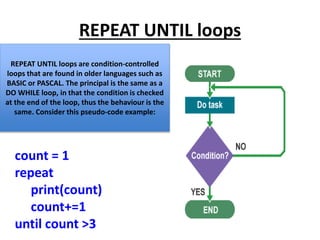
REPEAT UNTIL loops
REPEAT UNTIL loops are condition-controlled
loops that are found in older languages such as
BASIC or PASCAL. The principal is the same as a
DO WHILE loop, in that the condition is checked
at the end of the loop, thus the behaviour is the
same. Consider this pseudo-code example:
count = 1
repeat
print(count)
count+=1
until count >3
Infinite loops
Condition-controlled loops can result in
intentional or unintentional infinite loops. If we
wanted to loop indefinitely, we could set a
condition that would never be met, thus iterating
infinitely. The following examples would result in
an infinite loop:
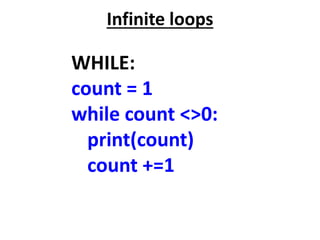
Infinite loops
WHILE:
count = 1
while count <>0:
print(count)
count +=1
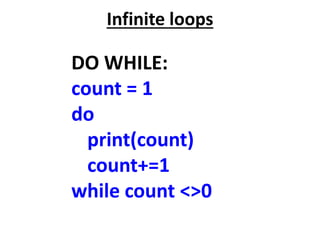
Infinite loops
DO WHILE:
count = 1
do
print(count)
count+=1
while count <>0
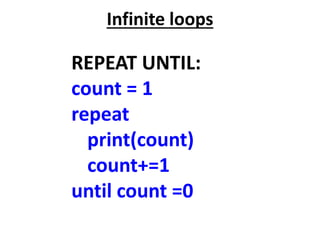
Infinite loops
REPEAT UNTIL:
count = 1
repeat
print(count)
count+=1
until count =0

Lesson flow charts 1

  • 1.
  • 2.
    Sequences: The most basicalgorithm uses sequences to present a list of instructions to be followed one after the other, step by step. An algorithm is a plan, a set of step-by-step instructions that a computer follows to solve a problem. To solve the problem, the instructions have to be followed in the right order. If the instructions are not carried out in the right order, you won’t get the result you expected! 1.Start 2.unlock the door 3.open the door 4.enter the room 5.switch on the light 6.close the door behind you 7.stop
  • 3.
    Selection: 1. IF thedoor is locked, THEN unlock the door, ELSE do nothing (go to next instruction) 2. IF the door is closed, THEN open the door, ELSE do nothing 3. Enter the room 4. IF the room is dark, THEN switch on the light, ELSE do nothing 5. Close the door behind you A selection is used to make choices based on information. An algorithm can be made more intelligent by using IF, THEN and ELSE to repeat instructions or move to different parts of the program.
  • 4.
    Iteration • Iteration isthe process of looping or repeating sections of a program. • There are two types of iteration: count-controlled and condition-controlled. • Count-controlled loops repeat the same steps a specific number of times, • regardless of the outcome. • But a condition-controlled loop will keep repeating the steps over and over…and over…and over…and over, until it gets a specific result.
  • 5.
    For loop (Count-controlledloop) • The count-controlled loop can be described as a FOR loop. The program repeats the action FOR a number of times. Here is an example using pseudocode: Make “count” = 0 For as long as “count” is in the range of 0 to 5 Print “I am in loop number: ” and the value contained in “count” together on a line Increment “count” by 1
  • 6.
    Condition-controlled loops A programcould be made more intelligent by programming it to avoid hazards. For example, if the robot vehicle is 3 cm from the edge of the table and you tell it to move forwards 5 cm, it will drive off the edge of the table. To stop this from happening, you might write a condition-controlled loop like this: move forward repeat until (touching table edge)
  • 7.
    WHILE loops Condition-controlled loopsare also called WHILE loops or WHILE-ENDWHILE statements. A WHILE loop code is repeated based on a certain condition. The condition could be 'true' or 'false'. The WHILE loop executes while a condition is true. Whether the condition is met or not is checked at the beginning of the loop. If the condition is 'true' it repeats, if not then the code is not executed. For example, to stop the robot from driving off the edge of a table, you might write a WHILE loop like this: Move forward WHILE I am not touching the table edge
  • 8.
    DO WHILE loops Asimilar condition-controlled loop is a DO WHILE loop. This method differs from a WHILE condition-controlled loop in that the condition is checked at the end of the loop. If the condition is ‘true’, the loop repeats. Thus, the code in the loop is executed at least once. count = 1 do print(count) count+=1 while count <4
  • 9.
    REPEAT UNTIL loops REPEATUNTIL loops are condition-controlled loops that are found in older languages such as BASIC or PASCAL. The principal is the same as a DO WHILE loop, in that the condition is checked at the end of the loop, thus the behaviour is the same. Consider this pseudo-code example: count = 1 repeat print(count) count+=1 until count >3
  • 10.
    Infinite loops Condition-controlled loopscan result in intentional or unintentional infinite loops. If we wanted to loop indefinitely, we could set a condition that would never be met, thus iterating infinitely. The following examples would result in an infinite loop:
  • 11.
    Infinite loops WHILE: count =1 while count <>0: print(count) count +=1
  • 12.
    Infinite loops DO WHILE: count= 1 do print(count) count+=1 while count <>0
  • 13.
    Infinite loops REPEAT UNTIL: count= 1 repeat print(count) count+=1 until count =0