Lesson Plan – Lesson Five

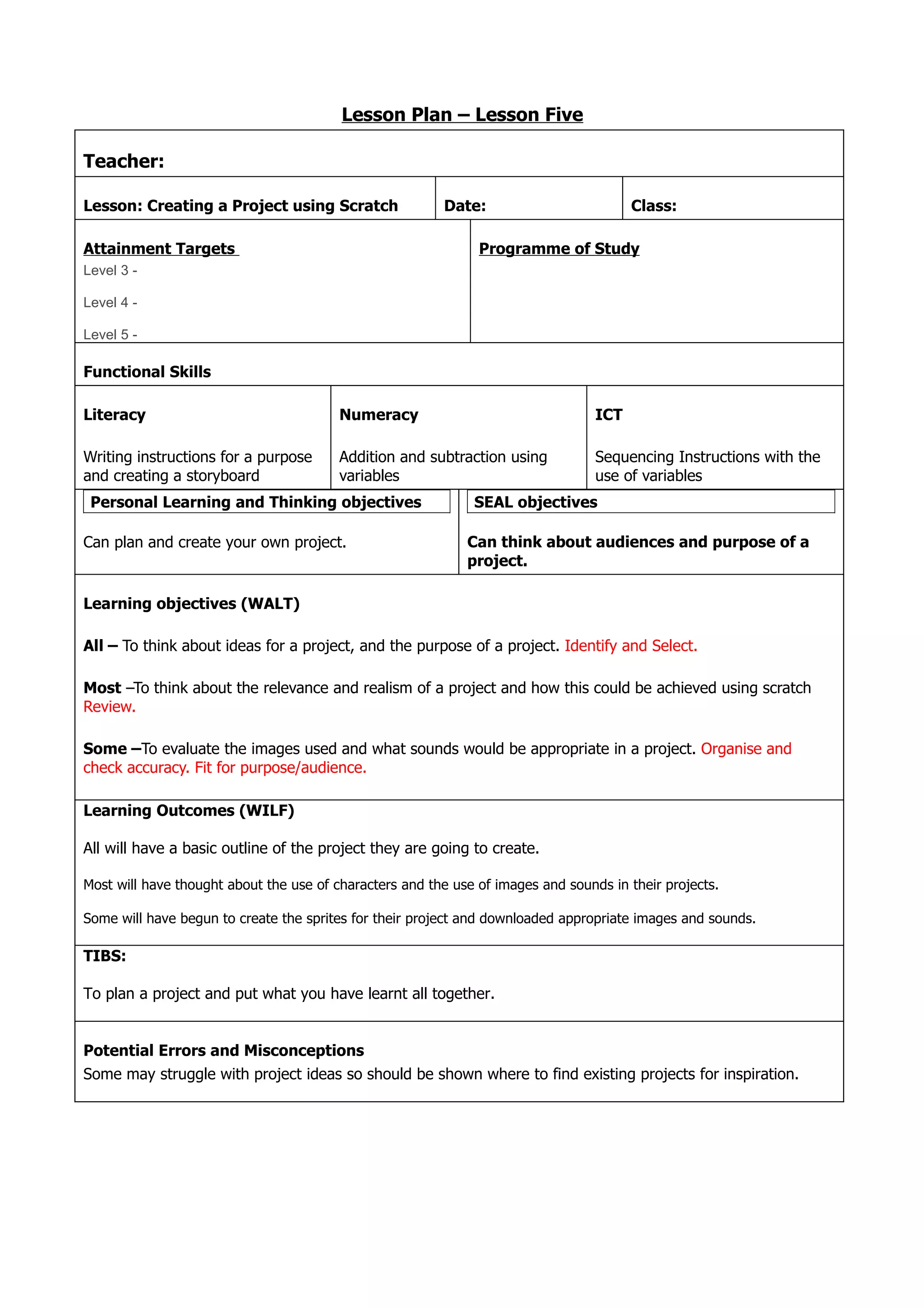
Teacher:

Lesson: Creating a Project using Scratch                 Date:                          Class:

Attainment Targets                                             Programme of Study
Level 3 -

Level 4 -

Level 5 -

Functional Skills

Literacy                                 Numeracy                                 ICT

Writing instructions for a purpose       Addition and subtraction using           Sequencing Instructions with the
and creating a storyboard                variables                                use of variables
 Personal Learning and Thinking objectives                    SEAL objectives

Can plan and create your own project.                        Can think about audiences and purpose of a
                                                             project.

Learning objectives (WALT)

All – To think about ideas for a project, and the purpose of a project. Identify and Select.

Most –To think about the relevance and realism of a project and how this could be achieved using scratch
Review.

Some –To evaluate the images used and what sounds would be appropriate in a project. Organise and
check accuracy. Fit for purpose/audience.

Learning Outcomes (WILF)

All will have a basic outline of the project they are going to create.

Most will have thought about the use of characters and the use of images and sounds in their projects.

Some will have begun to create the sprites for their project and downloaded appropriate images and sounds.

TIBS:

To plan a project and put what you have learnt all together.


Potential Errors and Misconceptions
Some may struggle with project ideas so should be shown where to find existing projects for inspiration.
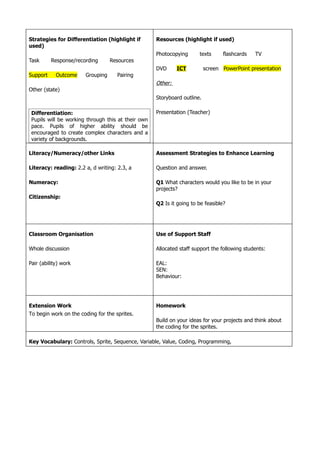
Strategies for Differentiation (highlight if        Resources (highlight if used)
used)
                                                    Photocopying      texts      flashcards   TV
Task      Response/recording      Resources
                                                    DVD      ICT          screen PowerPoint presentation
Support     Outcome    Grouping      Pairing
                                                    Other:
Other (state)
                                                    Storyboard outline.

 Differentiation:                                   Presentation (Teacher)
 Pupils will be working through this at their own
 pace. Pupils of higher ability should be
 encouraged to create complex characters and a
 variety of backgrounds.

Literacy/Numeracy/other Links                       Assessment Strategies to Enhance Learning

Literacy: reading: 2.2 a, d writing: 2.3, a         Question and answer.

Numeracy:                                           Q1 What characters would you like to be in your
                                                    projects?
Citizenship:
                                                    Q2 Is it going to be feasible?


Classroom Organisation                              Use of Support Staff

Whole discussion                                    Allocated staff support the following students:

Pair (ability) work                                 EAL:
                                                    SEN:
                                                    Behaviour:


Extension Work                                      Homework
To begin work on the coding for the sprites.
                                                    Build on your ideas for your projects and think about
                                                    the coding for the sprites.

Key Vocabulary: Controls, Sprite, Sequence, Variable, Value, Coding, Programming,
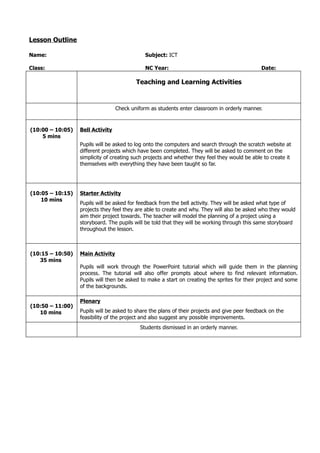
Lesson Outline

Name:                                         Subject: ICT

Class:                                        NC Year:                                         Date:

                                          Teaching and Learning Activities


                                  Check uniform as students enter classroom in orderly manner.


(10:00 – 10:05)   Bell Activity
    5 mins
                  Pupils will be asked to log onto the computers and search through the scratch website at
                  different projects which have been completed. They will be asked to comment on the
                  simplicity of creating such projects and whether they feel they would be able to create it
                  themselves with everything they have been taught so far.


(10:05 – 10:15)   Starter Activity
    10 mins
                  Pupils will be asked for feedback from the bell activity. They will be asked what type of
                  projects they feel they are able to create and why. They will also be asked who they would
                  aim their project towards. The teacher will model the planning of a project using a
                  storyboard. The pupils will be told that they will be working through this same storyboard
                  throughout the lesson.


(10:15 – 10:50)   Main Activity
   35 mins
                  Pupils will work through the PowerPoint tutorial which will guide them in the planning
                  process. The tutorial will also offer prompts about where to find relevant information.
                  Pupils will then be asked to make a start on creating the sprites for their project and some
                  of the backgrounds.

                  Plenary
(10:50 – 11:00)
   10 mins        Pupils will be asked to share the plans of their projects and give peer feedback on the
                  feasibility of the project and also suggest any possible improvements.
                                            Students dismissed in an orderly manner.

Lesson five plan

  • 1.
    Lesson Plan –Lesson Five Teacher: Lesson: Creating a Project using Scratch Date: Class: Attainment Targets Programme of Study Level 3 - Level 4 - Level 5 - Functional Skills Literacy Numeracy ICT Writing instructions for a purpose Addition and subtraction using Sequencing Instructions with the and creating a storyboard variables use of variables Personal Learning and Thinking objectives SEAL objectives Can plan and create your own project. Can think about audiences and purpose of a project. Learning objectives (WALT) All – To think about ideas for a project, and the purpose of a project. Identify and Select. Most –To think about the relevance and realism of a project and how this could be achieved using scratch Review. Some –To evaluate the images used and what sounds would be appropriate in a project. Organise and check accuracy. Fit for purpose/audience. Learning Outcomes (WILF) All will have a basic outline of the project they are going to create. Most will have thought about the use of characters and the use of images and sounds in their projects. Some will have begun to create the sprites for their project and downloaded appropriate images and sounds. TIBS: To plan a project and put what you have learnt all together. Potential Errors and Misconceptions Some may struggle with project ideas so should be shown where to find existing projects for inspiration.
  • 2.
    Strategies for Differentiation(highlight if Resources (highlight if used) used) Photocopying texts flashcards TV Task Response/recording Resources DVD ICT screen PowerPoint presentation Support Outcome Grouping Pairing Other: Other (state) Storyboard outline. Differentiation: Presentation (Teacher) Pupils will be working through this at their own pace. Pupils of higher ability should be encouraged to create complex characters and a variety of backgrounds. Literacy/Numeracy/other Links Assessment Strategies to Enhance Learning Literacy: reading: 2.2 a, d writing: 2.3, a Question and answer. Numeracy: Q1 What characters would you like to be in your projects? Citizenship: Q2 Is it going to be feasible? Classroom Organisation Use of Support Staff Whole discussion Allocated staff support the following students: Pair (ability) work EAL: SEN: Behaviour: Extension Work Homework To begin work on the coding for the sprites. Build on your ideas for your projects and think about the coding for the sprites. Key Vocabulary: Controls, Sprite, Sequence, Variable, Value, Coding, Programming,
  • 3.
    Lesson Outline Name: Subject: ICT Class: NC Year: Date: Teaching and Learning Activities Check uniform as students enter classroom in orderly manner. (10:00 – 10:05) Bell Activity 5 mins Pupils will be asked to log onto the computers and search through the scratch website at different projects which have been completed. They will be asked to comment on the simplicity of creating such projects and whether they feel they would be able to create it themselves with everything they have been taught so far. (10:05 – 10:15) Starter Activity 10 mins Pupils will be asked for feedback from the bell activity. They will be asked what type of projects they feel they are able to create and why. They will also be asked who they would aim their project towards. The teacher will model the planning of a project using a storyboard. The pupils will be told that they will be working through this same storyboard throughout the lesson. (10:15 – 10:50) Main Activity 35 mins Pupils will work through the PowerPoint tutorial which will guide them in the planning process. The tutorial will also offer prompts about where to find relevant information. Pupils will then be asked to make a start on creating the sprites for their project and some of the backgrounds. Plenary (10:50 – 11:00) 10 mins Pupils will be asked to share the plans of their projects and give peer feedback on the feasibility of the project and also suggest any possible improvements. Students dismissed in an orderly manner.