MySQL Data Manipulation
Review Questions
• What are the rules that pertain to the naming of
databases, tables and columns in MySQL?
• What rule of order applies to the naming of
attributes assigned to numeric column types?
• What general rules apply when inserting data into a
table using the INSERT statement?
• Why must extreme care be taken when using the
DROP TABLE statement?
• Why is the insertion of the DROP TABLE IF
EXISTS tbl_name at the beginning of a database
script useful?
Objectives
• Upon successful completion of this module, you
should be able to:
– Name MySQL’s main Data Manipulation commands, these
being SELECT, INSERT, UPDATE & DELETE.
– Use the SELECT statement to retrieve data from table
according to user-defined criteria.
– Use the INSERT statement to add new data to an existing
table.
– Use the UPDATE statement to change existing data resident
within a table.
– Use the DELETE statement to remove existing data from a
table.
– Use Advanced Data Retrieval & Manipulation Syntax
MySQL DML
• As discussed in Lecture 4, MySQL commands (also
referred to as statements) fall into two main categories:
• Data Definition Language (DDL)
• Data Manipulation Language (DML)
• As covered earlier, the main Data Definition (DDL)
commands are CREATE, DROP, ALTER & RENAME,
with CREATE & DROP being the most commonly used.
• In today’s lecture, the main Data Manipulation (DML)
commands will be examined, these being SELECT,
INSERT, UPDATE & DELETE.
Table Basics Reviewed
• An RDBMS contains one or more objects called tables.
• Database information is stored in these tables.
• Tables are uniquely identified by name and consist of
rows and columns.
• Columns are defined by a column name, data type, and
a variety of other optional attributes.
• Rows contain the records or data for the columns.
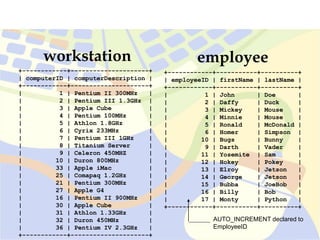
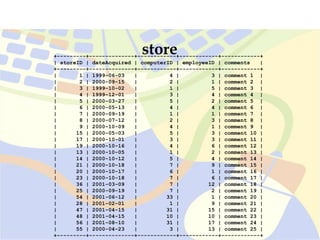
Tables for this Lecture
•workstation
•employee
•store
workstation
+------------+---------------------+
| computerID | computerDescription |
+------------+---------------------+
| 1 | Pentium II 300MHz |
| 2 | Pentium III 1.3GHz |
| 3 | Apple Cube |
| 4 | Pentium 100MHz |
| 5 | Athlon 1.8GHz |
| 6 | Cyrix 233MHz |
| 7 | Pentium III 1GHz |
| 8 | Titanium Server |
| 9 | Celeron 450MHZ |
| 10 | Duron 800MHz |
| 33 | Apple iMac |
| 25 | Comapaq 1.2GHz |
| 21 | Pentium 300MHz |
| 27 | Apple G4 |
| 16 | Pentium II 900MHz |
| 30 | Apple Cube |
| 31 | Athlon 1.33GHz |
| 32 | Duron 450MHz |
| 36 | Pentium IV 2.3GHz |
+------------+---------------------+
employee
+------------+-----------+----------+
| employeeID | firstName | lastName |
+------------+-----------+----------+
| 1 | John | Doe |
| 2 | Daffy | Duck |
| 3 | Mickey | Mouse |
| 4 | Minnie | Mouse |
| 5 | Ronald | McDonald |
| 6 | Homer | Simpson |
| 10 | Bugs | Bunny |
| 9 | Darth | Vader |
| 11 | Yosemite | Sam |
| 12 | Hokey | Pokey |
| 13 | Elroy | Jetson |
| 14 | George | Jetson |
| 15 | Bubba | JoeBob |
| 16 | Billy | Bob |
| 17 | Monty | Python |
+------------+-----------+----------+
AUTO_INCREMENT declared to
EmployeeID
+---------+--------------+------------+------------+------------+
| storeID | dateAcquired | computerID | employeeID | comments |
+---------+--------------+------------+------------+------------+
| 1 | 1999-06-03 | 4 | 3 | comment 1 |
| 2 | 2000-09-15 | 2 | 1 | comment 2 |
| 3 | 1999-10-02 | 1 | 5 | comment 3 |
| 4 | 1999-12-01 | 3 | 4 | comment 4 |
| 5 | 2000-03-27 | 5 | 2 | comment 5 |
| 6 | 2000-05-13 | 4 | 4 | comment 6 |
| 7 | 2000-09-19 | 1 | 1 | comment 7 |
| 8 | 2000-07-12 | 2 | 3 | comment 8 |
| 9 | 2000-10-09 | 4 | 1 | comment 9 |
| 15 | 2000-05-03 | 5 | 3 | comment 10 |
| 17 | 2000-10-01 | 3 | 3 | comment 11 |
| 19 | 2000-10-16 | 4 | 6 | comment 12 |
| 13 | 2000-10-05 | 1 | 2 | comment 13 |
| 14 | 2000-10-12 | 5 | 4 | comment 14 |
| 21 | 2000-10-18 | 7 | 9 | comment 15 |
| 20 | 2000-10-17 | 6 | 1 | comment 16 |
| 23 | 2000-10-18 | 7 | 6 | comment 17 |
| 36 | 2001-03-09 | 7 | 12 | comment 18 |
| 25 | 2000-09-19 | 7 | 2 | comment 19 |
| 54 | 2001-06-12 | 33 | 1 | comment 20 |
| 28 | 2001-02-01 | 1 | 9 | comment 21 |
| 47 | 2001-04-15 | 31 | 15 | comment 22 |
| 48 | 2001-04-15 | 10 | 10 | comment 23 |
| 56 | 2001-08-10 | 31 | 17 | comment 24 |
| 55 | 2000-04-23 | 3 | 13 | comment 25 |
+---------+--------------+------------+------------+------------+
store
MySQL SELECT Statement
SELECT column_1 [,column_2,…]
FROM tbl_name
[WHERE condition(s)];
Syntax
• Used to retrieve rows selected from one or more tables.
• FROM indicates the tables from which to retrieve rows.
• WHERE indicates conditions that rows must meet to be
returned.
MySQL SELECT Statement
SELECT *
SELECT * FROM workstation;
Example:
• Displays the contents of every column for every
tuple in the table indicated.
+------------+---------------------+
| computerID | computerDescription |
+------------+---------------------+
| 1 | Pentium II 300MHz |
| 2 | Pentium III 1.3GHz |
| 3 | Apple Cube |
| 4 | Pentium 100MHz |
| 5 | Athlon 1.8GHz |
| 6 | Cyrix 233MHz |
| 7 | Pentium III 1GHz |
| 8 | Titanium Server |
| 9 | Celeron 450MHZ |
| 10 | Duron 800MHz |
| 33 | Apple iMac |
| 25 | Comapaq 1.2GHz |
| 21 | Pentium 300MHz |
| 27 | Apple G4 |
| 16 | Pentium II 900MHz |
| 30 | Apple Cube |
| 31 | Athlon 1.33GHz |
| 32 | Duron 450MHz |
| 36 | Pentium IV 2.3GHz |
+------------+---------------------+
SELECT * FROM workstation;
MySQL SELECT Statement
SELECT column1 [,column2,…]
FROM tblname
WHERE condition = argument;
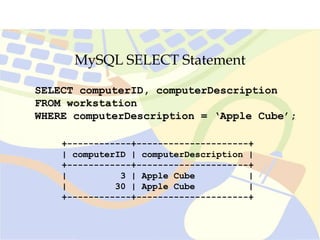
SELECT computerID, computerDescription
FROM workstation WHERE
computerDescription = ‘Apple Cube’;
Example:
• Display the contents of columns indicated that satisfy the
stipulated argument.
MySQL SELECT Statement
+------------+---------------------+
| computerID | computerDescription |
+------------+---------------------+
| 3 | Apple Cube |
| 30 | Apple Cube |
+------------+---------------------+
SELECT computerID, computerDescription
FROM workstation
WHERE computerDescription = ‘Apple Cube’;
MySQL SELECT Statement
SELECT column_1’ [,column_2,…]
FROM tblname
WHERE column <= argument;
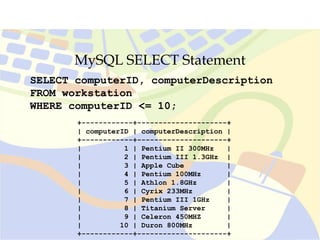
SELECT computerID, computerDescription
FROM workstation
WHERE computerID <= 10;
Example:
• Display the contents of columns indicated where the column
‘computerID’ contains a value less than, or equal to, 10.
MySQL SELECT Statement
SELECT computerID, computerDescription
FROM workstation
WHERE computerID <= 10;
+------------+---------------------+
| computerID | computerDescription |
+------------+---------------------+
| 1 | Pentium II 300MHz |
| 2 | Pentium III 1.3GHz |
| 3 | Apple Cube |
| 4 | Pentium 100MHz |
| 5 | Athlon 1.8GHz |
| 6 | Cyrix 233MHz |
| 7 | Pentium III 1GHz |
| 8 | Titanium Server |
| 9 | Celeron 450MHZ |
| 10 | Duron 800MHz |
+------------+---------------------+
MySQL SELECT Statement
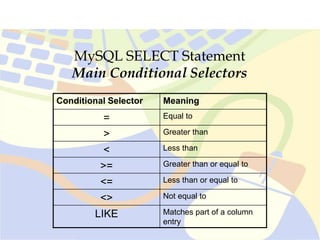
Main Conditional Selectors
Conditional Selector Meaning
= Equal to
> Greater than
< Less than
>= Greater than or equal to
<= Less than or equal to
<> Not equal to
LIKE Matches part of a column
entry
MySQL SELECT Statement
Pattern Matching with SELECT
• In cases where an exact comparison value cannot be used to limit
a SELECT statement, MySQL’s pattern matching operations can
be used.
• Pattern matching is carried out using the LIKE and NOT LIKE
operators.
• Both operators are followed by a string containing one or more of
the wildcard character (% and _).
• The placement of the % will determine where in the string the
required characters are to appear, as follows:
LIKE ‘pol%’ – Field entries must begin with pol.
LIKE ‘%pol’ - Field entries must end with pol
LIKE %pol%’ - Field entries can have pol anywhere within them.
• LIKE ‘_o%’ - Field entries can have o as second letter.
MySQL SELECT Statement
Pattern Matching examples
•Given the following list of occupations, which
items would be returned from the pattern
matches below?
(‘Policeman’, ‘Policy Maker’, ‘Interpol’,
‘Federal politician’, ‘Pole Dancer’, ‘Light pole
painter’)
… WHERE occupation LIKE ‘P_l%’;
… WHERE occupation LIKE ‘%pol’;
… WHERE occupation LIKE ‘pol’;
MySQL SELECT Statement
SELECT column_1 [,column_2,…]
FROM table_name
WHERE column LIKE ‘%argument%’;
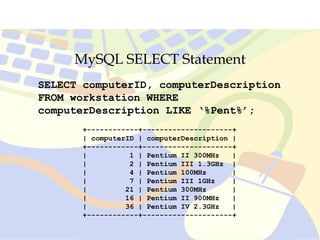
SELECT computerID, computerDescription
FROM workstation WHERE
computerDescription LIKE ‘%Pent%’;
Example:
• Display the contents of columns indicated where the column
‘computerDescription’ contains, in part, the string ‘pent’.
MySQL SELECT Statement
SELECT computerID, computerDescription
FROM workstation WHERE
computerDescription LIKE ‘%Pent%’;
+------------+---------------------+
| computerID | computerDescription |
+------------+---------------------+
| 1 | Pentium II 300MHz |
| 2 | Pentium III 1.3GHz |
| 4 | Pentium 100MHz |
| 7 | Pentium III 1GHz |
| 21 | Pentium 300MHz |
| 16 | Pentium II 900MHz |
| 36 | Pentium IV 2.3GHz |
+------------+---------------------+
MySQL SELECT Statement
SELECT column1 [,column2,…]
FROM table_name
WHERE column LIKE ‘%argument’;
SELECT computerID, computerDescription
FROM workstation WHERE
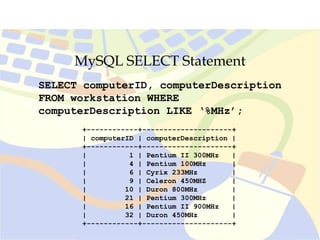
computerDescription LIKE ‘%MHz’;
Example:
• Display the contents of columns indicated where the column
‘computerDescription’ contains a value ending in MHz.
MySQL SELECT Statement
SELECT computerID, computerDescription
FROM workstation WHERE
computerDescription LIKE ‘%MHz’;
+------------+---------------------+
| computerID | computerDescription |
+------------+---------------------+
| 1 | Pentium II 300MHz |
| 4 | Pentium 100MHz |
| 6 | Cyrix 233MHz |
| 9 | Celeron 450MHZ |
| 10 | Duron 800MHz |
| 21 | Pentium 300MHz |
| 16 | Pentium II 900MHz |
| 32 | Duron 450MHz |
+------------+---------------------+
MySQL SELECT Statement
SELECT column_1 [,column_2,…]
FROM table_name
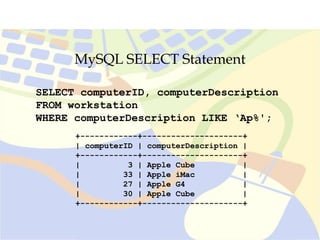
WHERE column LIKE ‘argument%’;
SELECT computerID, computerDescription
FROM workstation
WHERE computerDescription LIKE ‘Ap%';
Example:
• Display the contents of columns indicated where the column
‘computerDescription’ contains a component beginning in ‘ap’.
MySQL SELECT Statement
SELECT computerID, computerDescription
FROM workstation
WHERE computerDescription LIKE ‘Ap%';
+------------+---------------------+
| computerID | computerDescription |
+------------+---------------------+
| 3 | Apple Cube |
| 33 | Apple iMac |
| 27 | Apple G4 |
| 30 | Apple Cube |
+------------+---------------------+
MySQL INSERT Statement
INSERT INTO table_name [(first_column,
...last_column)]
VALUES (first_value,...last_value);
Syntax
• Inserts new rows into an existing table.
• The columns into which the values are to be inserted are named
first.
• VALUES indicates the data to be entered into the named columns.
• Rule of order applies.
MySQL INSERT Statement
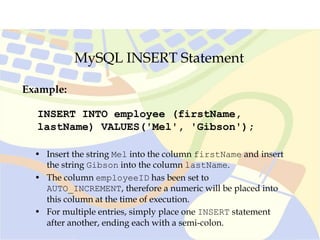
INSERT INTO employee (firstName,
lastName) VALUES('Mel', 'Gibson');
Example:
• Insert the string Mel into the column firstName and insert
the string Gibson into the column lastName.
• The column employeeID has been set to
AUTO_INCREMENT, therefore a numeric will be placed into
this column at the time of execution.
• For multiple entries, simply place one INSERT statement
after another, ending each with a semi-colon.
MySQL INSERT Statement
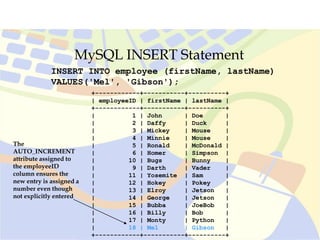
INSERT INTO employee (firstName, lastName)
VALUES('Mel', 'Gibson');
+------------+-----------+----------+
| employeeID | firstName | lastName |
+------------+-----------+----------+
| 1 | John | Doe |
| 2 | Daffy | Duck |
| 3 | Mickey | Mouse |
| 4 | Minnie | Mouse |
| 5 | Ronald | McDonald |
| 6 | Homer | Simpson |
| 10 | Bugs | Bunny |
| 9 | Darth | Vader |
| 11 | Yosemite | Sam |
| 12 | Hokey | Pokey |
| 13 | Elroy | Jetson |
| 14 | George | Jetson |
| 15 | Bubba | JoeBob |
| 16 | Billy | Bob |
| 17 | Monty | Python |
| 18 | Mel | Gibson |
+------------+-----------+----------+
The
AUTO_INCREMENT
attribute assigned to
the employeeID
column ensures the
new entry is assigned a
number even though
not explicitly entered
MySQL INSERT Statement
Multiple Inserts
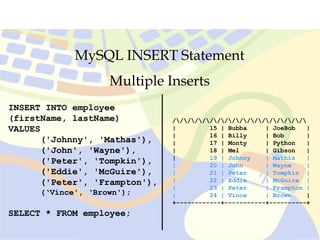
INSERT INTO employee
(firstName, lastName)
VALUES
('Johnny', 'Mathas'),
('John', 'Wayne'),
('Peter', 'Tompkin'),
('Eddie', 'McGuire'),
('Peter', 'Frampton'),
(‘Vince', ‘Brown');
SELECT * FROM employee;
• When using the CLI, multiple row
entries can be achieved using this syntax.
• In each case, the column that has not
been named (employeeID) is assigned a
value by the AUTO_INCREMENT
attribute.
• Each value set is enclosed in its own set
of parenthesis and are separated by a
comma.
• The closing semi-colon is applied only
after the final value set has been declared.
MySQL INSERT Statement
Multiple Inserts
INSERT INTO employee
(firstName, lastName)
VALUES
('Johnny', 'Mathas'),
('John', 'Wayne'),
('Peter', 'Tompkin'),
('Eddie', 'McGuire'),
('Peter', 'Frampton'),
(‘Vince', ‘Brown');
SELECT * FROM employee;
//////////////////
| 15 | Bubba | JoeBob |
| 16 | Billy | Bob |
| 17 | Monty | Python |
| 18 | Mel | Gibson |
| 19 | Johnny | Mathis |
| 20 | John | Wayne |
| 21 | Peter | Tompkin |
| 22 | Eddie | McGuire |
| 23 | Peter | Frampton |
| 24 | Vince | Brown |
+------------+-----------+----------+
MySQL UPDATE Statement
UPDATE table_name
SET column_1 = value_1 [, column_2 = value_2, ...]
WHERE column operator value [and|or column operator
value]
Syntax
• Updates columns in existing table rows with new values.
• SET indicates the columns that will be affected by the change.
• WHERE indicates which rows will actually be changed in the
fields indicated.
• Operators are usually mathematical in nature (=, >, < etc).
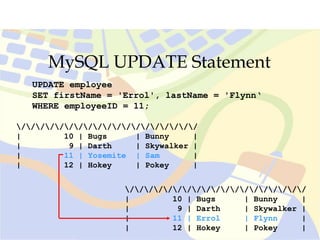
MySQL UPDATE Statement
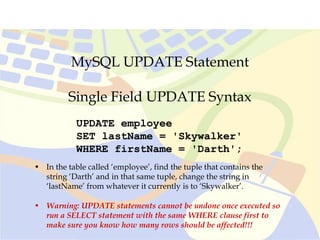
UPDATE employee
SET lastName = 'Skywalker'
WHERE firstName = 'Darth';
Single Field UPDATE Syntax
• In the table called ‘employee’, find the tuple that contains the
string ‘Darth’ and in that same tuple, change the string in
‘lastName’ from whatever it currently is to ‘Skywalker’.
• Warning: UPDATE statements cannot be undone once executed so
run a SELECT statement with the same WHERE clause first to
make sure you know how many rows should be affected!!!
MySQL UPDATE Statement
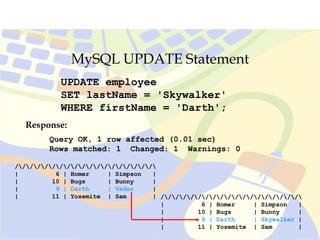
UPDATE employee
SET lastName = 'Skywalker'
WHERE firstName = 'Darth';
Response:
Query OK, 1 row affected (0.01 sec)
Rows matched: 1 Changed: 1 Warnings: 0
///////////////////
| 6 | Homer | Simpson |
| 10 | Bugs | Bunny |
| 9 | Darth | Skywalker |
| 11 | Yosemite | Sam |
///////////////////
| 6 | Homer | Simpson |
| 10 | Bugs | Bunny |
| 9 | Darth | Vader |
| 11 | Yosemite | Sam |
MySQL UPDATE Statement
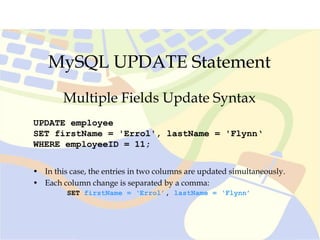
UPDATE employee
SET firstName = 'Errol', lastName = 'Flynn‘
WHERE employeeID = 11;
Multiple Fields Update Syntax
• In this case, the entries in two columns are updated simultaneously.
• Each column change is separated by a comma:
SET firstName = ‘Errol’, lastName = ‘Flynn’
MySQL UPDATE Statement
UPDATE employee
SET firstName = 'Errol', lastName = 'Flynn‘
WHERE employeeID = 11;
///////////////////
| 10 | Bugs | Bunny |
| 9 | Darth | Skywalker |
| 11 | Yosemite | Sam |
| 12 | Hokey | Pokey |
///////////////////
| 10 | Bugs | Bunny |
| 9 | Darth | Skywalker |
| 11 | Errol | Flynn |
| 12 | Hokey | Pokey |
MySQL DELETE Statement
DELETE FROM tbl_name
WHERE column_name operator value [and|or
column operator value]
Syntax
• Deletes rows from table that satisfy the condition given by WHERE.
• DELETE with no WHERE clause results in all rows being deleted.
! Where tables reference one another via primary-foreign key relationships and
InnoDB has not been applied to these tables, data anomalies are likely to result from
data deletions.

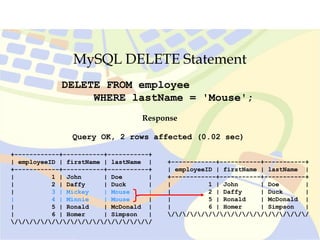
MySQL DELETE Statement
Single Instance DELETE Syntax
DELETE FROM employee
WHERE lastName = 'Mouse';
• In the table called ‘employee’, delete all tuples that contain the
string ‘Mouse’ in the ‘lastName’ column.
• Warning: DELETE statements cannot be undone once executed so
run a SELECT statement with the same WHERE clause first to
make sure you know how many rows should be affected!!!
MySQL DELETE Statement
DELETE FROM employee
WHERE lastName = 'Mouse';
Query OK, 2 rows affected (0.02 sec)
Response
+------------+-----------+-----------+
| employeeID | firstName | lastName |
+------------+-----------+-----------+
| 1 | John | Doe |
| 2 | Daffy | Duck |
| 3 | Mickey | Mouse |
| 4 | Minnie | Mouse |
| 5 | Ronald | McDonald |
| 6 | Homer | Simpson |
///////////////////
+------------+-----------+-----------+
| employeeID | firstName | lastName |
+------------+-----------+-----------+
| 1 | John | Doe |
| 2 | Daffy | Duck |
| 5 | Ronald | McDonald |
| 6 | Homer | Simpson |
///////////////////
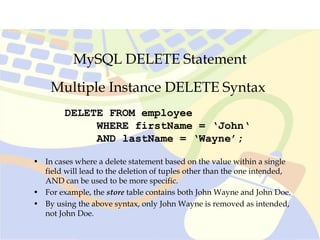
MySQL DELETE Statement
Multiple Instance DELETE Syntax
DELETE FROM employee
WHERE firstName = ‘John‘
AND lastName = ‘Wayne’;
• In cases where a delete statement based on the value within a single
field will lead to the deletion of tuples other than the one intended,
AND can be used to be more specific.
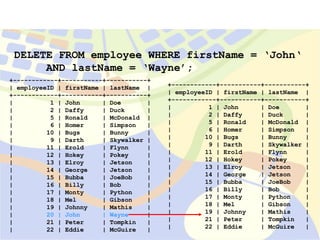
• For example, the store table contains both John Wayne and John Doe.
• By using the above syntax, only John Wayne is removed as intended,
not John Doe.
+------------+-----------+-----------+
| employeeID | firstName | lastName |
+------------+-----------+-----------+
| 1 | John | Doe |
| 2 | Daffy | Duck |
| 5 | Ronald | McDonald |
| 6 | Homer | Simpson |
| 10 | Bugs | Bunny |
| 9 | Darth | Skywalker |
| 11 | Erold | Flynn |
| 12 | Hokey | Pokey |
| 13 | Elroy | Jetson |
| 14 | George | Jetson |
| 15 | Bubba | JoeBob |
| 16 | Billy | Bob |
| 17 | Monty | Python |
| 18 | Mel | Gibson |
| 19 | Johnny | Mathis |
| 20 | John | Wayne |
| 21 | Peter | Tompkin |
| 22 | Eddie | McGuire |
+------------+-----------+-----------+
| employeeID | firstName | lastName |
+------------+-----------+-----------+
| 1 | John | Doe |
| 2 | Daffy | Duck |
| 5 | Ronald | McDonald |
| 6 | Homer | Simpson |
| 10 | Bugs | Bunny |
| 9 | Darth | Skywalker |
| 11 | Erold | Flynn |
| 12 | Hokey | Pokey |
| 13 | Elroy | Jetson |
| 14 | George | Jetson |
| 15 | Bubba | JoeBob |
| 16 | Billy | Bob |
| 17 | Monty | Python |
| 18 | Mel | Gibson |
| 19 | Johnny | Mathis |
| 21 | Peter | Tompkin |
| 22 | Eddie | McGuire |
DELETE FROM employee WHERE firstName = ‘John‘
AND lastName = ‘Wayne’;
MySQL DELETE Statement
Multiple Instance DELETE Syntax
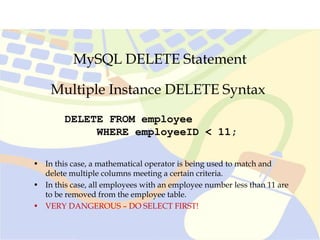
DELETE FROM employee
WHERE employeeID < 11;
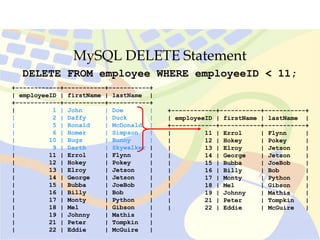
• In this case, a mathematical operator is being used to match and
delete multiple columns meeting a certain criteria.
• In this case, all employees with an employee number less than 11 are
to be removed from the employee table.
• VERY DANGEROUS – DO SELECT FIRST!
MySQL DELETE Statement
DELETE FROM employee WHERE employeeID < 11;
+------------+-----------+-----------+
| employeeID | firstName | lastName |
+------------+-----------+-----------+
| 1 | John | Doe |
| 2 | Daffy | Duck |
| 5 | Ronald | McDonald |
| 6 | Homer | Simpson |
| 10 | Bugs | Bunny |
| 9 | Darth | Skywalker |
| 11 | Errol | Flynn |
| 12 | Hokey | Pokey |
| 13 | Elroy | Jetson |
| 14 | George | Jetson |
| 15 | Bubba | JoeBob |
| 16 | Billy | Bob |
| 17 | Monty | Python |
| 18 | Mel | Gibson |
| 19 | Johnny | Mathis |
| 21 | Peter | Tompkin |
| 22 | Eddie | McGuire |
+------------+-----------+-----------+
| employeeID | firstName | lastName |
+------------+-----------+-----------+
| 11 | Errol | Flynn |
| 12 | Hokey | Pokey |
| 13 | Elroy | Jetson |
| 14 | George | Jetson |
| 15 | Bubba | JoeBob |
| 16 | Billy | Bob |
| 17 | Monty | Python |
| 18 | Mel | Gibson |
| 19 | Johnny | Mathis |
| 21 | Peter | Tompkin |
| 22 | Eddie | McGuire |
Advanced Data Retrieval
& Manipulation Syntax
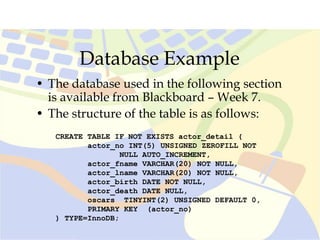
Database Example
• The database used in the following section
is available from Blackboard – Week 7.
• The structure of the table is as follows:
CREATE TABLE IF NOT EXISTS actor_detail (
actor_no INT(5) UNSIGNED ZEROFILL NOT
NULL AUTO_INCREMENT,
actor_fname VARCHAR(20) NOT NULL,
actor_lname VARCHAR(20) NOT NULL,
actor_birth DATE NOT NULL,
actor_death DATE NULL,
oscars TINYINT(2) UNSIGNED DEFAULT 0,
PRIMARY KEY (actor_no)
) TYPE=InnoDB;
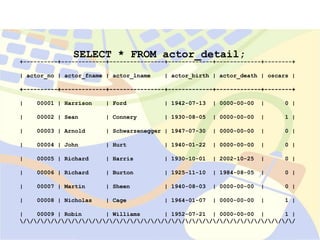
+----------+-------------+----------------+-------------+-------------+--------+
| 00001 | Harrison | Ford | 1942-07-13 | 0000-00-00 | 0 |
| 00002 | Sean | Connery | 1930-08-05 | 0000-00-00 | 1 |
| 00003 | Arnold | Schwarzenegger | 1947-07-30 | 0000-00-00 | 0 |
| 00004 | John | Hurt | 1940-01-22 | 0000-00-00 | 0 |
| 00005 | Richard | Harris | 1930-10-01 | 2002-10-25 | 0 |
| 00006 | Richard | Burton | 1925-11-10 | 1984-08-05 | 0 |
| 00007 | Martin | Sheen | 1940-08-03 | 0000-00-00 | 0 |
| 00008 | Nicholas | Cage | 1964-01-07 | 0000-00-00 | 1 |
| 00009 | Robin | Williams | 1952-07-21 | 0000-00-00 | 1 |
////////////////////////////////////////
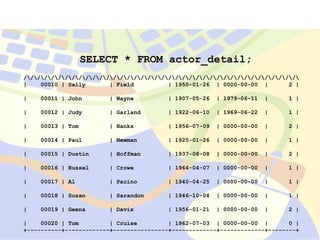
SELECT * FROM actor_detail;
+----------+-------------+----------------+-------------+-------------+--------+
| actor_no | actor_fname | actor_lname | actor_birth | actor_death | oscars |
+----------+-------------+----------------+-------------+-------------+--------+
SELECT * FROM actor_detail;
////////////////////////////////////////
| 00010 | Sally | Field | 1950-01-26 | 0000-00-00 | 2 |
| 00011 | John | Wayne | 1907-05-26 | 1979-06-11 | 1 |
| 00012 | Judy | Garland | 1922-06-10 | 1969-06-22 | 1 |
| 00013 | Tom | Hanks | 1956-07-09 | 0000-00-00 | 2 |
| 00014 | Paul | Newman | 1925-01-26 | 0000-00-00 | 1 |
| 00015 | Dustin | Hoffman | 1937-08-08 | 0000-00-00 | 2 |
| 00016 | Russel | Crowe | 1964-04-07 | 0000-00-00 | 1 |
| 00017 | Al | Pacino | 1940-04-25 | 0000-00-00 | 1 |
| 00018 | Susan | Sarandon | 1946-10-04 | 0000-00-00 | 1 |
| 00019 | Geena | Davis | 1956-01-21 | 0000-00-00 | 2 |
| 00020 | Tom | Cruise | 1962-07-03 | 0000-00-00 | 0 |
+----------+-------------+----------------+-------------+-------------+--------+
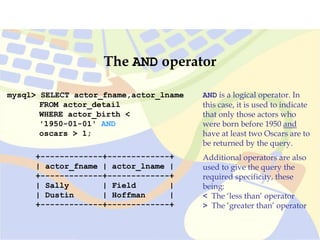
mysql> SELECT actor_fname,actor_lname
FROM actor_detail
WHERE actor_birth <
'1950-01-01' AND
oscars > 1;
+-------------+-------------+
| actor_fname | actor_lname |
+-------------+-------------+
| Sally | Field |
| Dustin | Hoffman |
+-------------+-------------+
The AND operator
AND is a logical operator. In
this case, it is used to indicate
that only those actors who
were born before 1950 and
have at least two Oscars are to
be returned by the query.
Additional operators are also
used to give the query the
required specificity, these
being:
< The ‘less than’ operator
> The ‘greater than’ operator
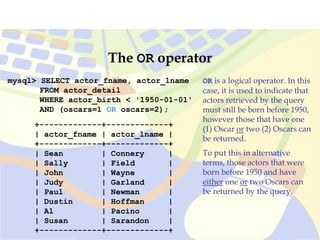
mysql> SELECT actor_fname, actor_lname
FROM actor_detail
WHERE actor_birth < '1950-01-01'
AND (oscars=1 OR oscars=2);
+-------------+-------------+
| actor_fname | actor_lname |
+-------------+-------------+
| Sean | Connery |
| Sally | Field |
| John | Wayne |
| Judy | Garland |
| Paul | Newman |
| Dustin | Hoffman |
| Al | Pacino |
| Susan | Sarandon |
+-------------+-------------+
The OR operator
OR is a logical operator. In this
case, it is used to indicate that
actors retrieved by the query
must still be born before 1950,
however those that have one
(1) Oscar or two (2) Oscars can
be returned.
To put this in alternative
terms, those actors that were
born before 1950 and have
either one or two Oscars can
be returned by the query.
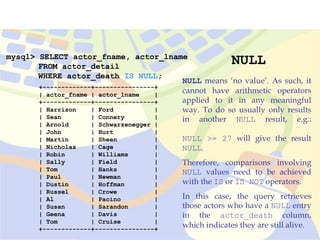
mysql> SELECT actor_fname, actor_lname
FROM actor_detail
WHERE actor_death IS NULL;
+-------------+----------------+
| actor_fname | actor_lname |
+-------------+----------------+
| Harrison | Ford |
| Sean | Connery |
| Arnold | Schwarzenegger |
| John | Hurt |
| Martin | Sheen |
| Nicholas | Cage |
| Robin | Williams |
| Sally | Field |
| Tom | Hanks |
| Paul | Newman |
| Dustin | Hoffman |
| Russel | Crowe |
| Al | Pacino |
| Susan | Sarandon |
| Geena | Davis |
| Tom | Cruise |
+-------------+----------------+
NULL
NULL means ‘no value’. As such, it
cannot have arithmetic operators
applied to it in any meaningful
way. To do so usually only results
in another NULL result, e.g.:
NULL >= 27 will give the result
NULL.
Therefore, comparisons involving
NULL values need to be achieved
with the IS or IS NOT operators.
In this case, the query retrieves
those actors who have a NULL entry
in the actor_death column,
which indicates they are still alive.
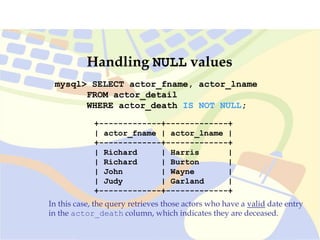
mysql> SELECT actor_fname, actor_lname
FROM actor_detail
WHERE actor_death IS NOT NULL;
In this case, the query retrieves those actors who have a valid date entry
in the actor_death column, which indicates they are deceased.
+-------------+-------------+
| actor_fname | actor_lname |
+-------------+-------------+
| Richard | Harris |
| Richard | Burton |
| John | Wayne |
| Judy | Garland |
+-------------+-------------+
Handling NULL values
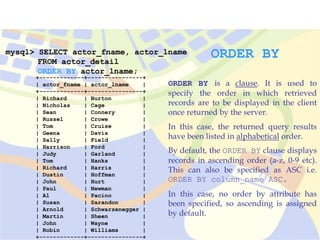
mysql> SELECT actor_fname, actor_lname
FROM actor_detail
ORDER BY actor_lname;
+-------------+----------------+
| actor_fname | actor_lname |
+-------------+----------------+
| Richard | Burton |
| Nicholas | Cage |
| Sean | Connery |
| Russel | Crowe |
| Tom | Cruise |
| Geena | Davis |
| Sally | Field |
| Harrison | Ford |
| Judy | Garland |
| Tom | Hanks |
| Richard | Harris |
| Dustin | Hoffman |
| John | Hurt |
| Paul | Newman |
| Al | Pacino |
| Susan | Sarandon |
| Arnold | Schwarzenegger |
| Martin | Sheen |
| John | Wayne |
| Robin | Williams |
+-------------+----------------+
ORDER BY
ORDER BY is a clause. It is used to
specify the order in which retrieved
records are to be displayed in the client
once returned by the server.
In this case, the returned query results
have been listed in alphabetical order.
By default, the ORDER BY clause displays
records in ascending order (a-z, 0-9 etc).
This can also be specified as ASC i.e.
ORDER BY column_name ASC.
In this case, no order by attribute has
been specified, so ascending is assigned
by default.
mysql> SELECT actor_fname, actor_lname
FROM actor_detail
ORDER BY actor_lname DESC;
In this case, the DESC attribute is
applied to ORDER BY column_name,
hence the query returns results in
reverse alphabetical order.
+-------------+----------------+
| actor_fname | actor_lname |
+-------------+----------------+
| Robin | Williams |
| John | Wayne |
| Martin | Sheen |
| Arnold | Schwarzenegger |
| Susan | Sarandon |
| Al | Pacino |
| Paul | Newman |
| John | Hurt |
| Dustin | Hoffman |
| Richard | Harris |
| Tom | Hanks |
| Judy | Garland |
| Harrison | Ford |
| Sally | Field |
| Geena | Davis |
| Tom | Cruise |
| Russel | Crowe |
| Sean | Connery |
| Nicholas | Cage |
| Richard | Burton |
+-------------+----------------+
ORDER BY DESC
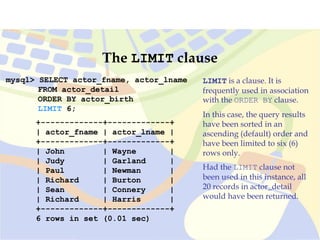
mysql> SELECT actor_fname, actor_lname
FROM actor_detail
ORDER BY actor_birth
LIMIT 6;
+-------------+-------------+
| actor_fname | actor_lname |
+-------------+-------------+
| John | Wayne |
| Judy | Garland |
| Paul | Newman |
| Richard | Burton |
| Sean | Connery |
| Richard | Harris |
+-------------+-------------+
6 rows in set (0.01 sec)
The LIMIT clause
LIMIT is a clause. It is
frequently used in association
with the ORDER BY clause.
In this case, the query results
have been sorted in an
ascending (default) order and
have been limited to six (6)
rows only.
Had the LIMIT clause not
been used in this instance, all
20 records in actor_detail
would have been returned.
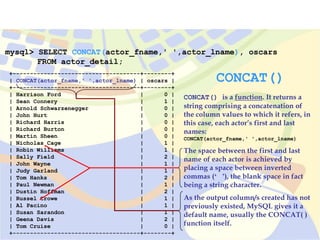
mysql> SELECT CONCAT(actor_fname,' ',actor_lname), oscars
FROM actor_detail;
+-------------------------------------+--------+
| CONCAT(actor_fname,' ',actor_lname) | oscars |
+-------------------------------------+--------+
| Harrison Ford | 0 |
| Sean Connery | 1 |
| Arnold Schwarzenegger | 0 |
| John Hurt | 0 |
| Richard Harris | 0 |
| Richard Burton | 0 |
| Martin Sheen | 0 |
| Nicholas Cage | 1 |
| Robin Williams | 1 |
| Sally Field | 2 |
| John Wayne | 1 |
| Judy Garland | 1 |
| Tom Hanks | 2 |
| Paul Newman | 1 |
| Dustin Hoffman | 2 |
| Russel Crowe | 1 |
| Al Pacino | 1 |
| Susan Sarandon | 1 |
| Geena Davis | 2 |
| Tom Cruise | 0 |
+-------------------------------------+--------+
CONCAT()
CONCAT() is a function. It returns a
string comprising a concatenation of
the column values to which it refers, in
this case, each actor’s first and last
names:
CONCAT(actor_fname,' ',actor_lname)
The space between the first and last
name of each actor is achieved by
placing a space between inverted
commas (‘ ’), the blank space in fact
being a string character.
As the output column/s created has not
previously existed, MySQL gives it a
default name, usually the CONCAT( )
function itself.
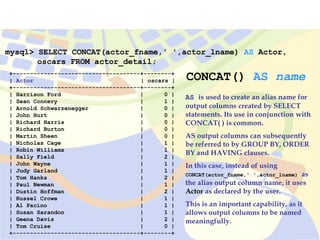
mysql> SELECT CONCAT(actor_fname,' ',actor_lname) AS Actor,
oscars FROM actor_detail;
+-------------------------------------+--------+
| Actor | oscars |
+-------------------------------------+--------+
| Harrison Ford | 0 |
| Sean Connery | 1 |
| Arnold Schwarzenegger | 0 |
| John Hurt | 0 |
| Richard Harris | 0 |
| Richard Burton | 0 |
| Martin Sheen | 0 |
| Nicholas Cage | 1 |
| Robin Williams | 1 |
| Sally Field | 2 |
| John Wayne | 1 |
| Judy Garland | 1 |
| Tom Hanks | 2 |
| Paul Newman | 1 |
| Dustin Hoffman | 2 |
| Russel Crowe | 1 |
| Al Pacino | 1 |
| Susan Sarandon | 1 |
| Geena Davis | 2 |
| Tom Cruise | 0 |
+-------------------------------------+--------+
CONCAT() AS name
AS is used to create an alias name for
output columns created by SELECT
statements. Its use in conjunction with
CONCAT( ) is common.
AS output columns can subsequently
be referred to by GROUP BY, ORDER
BY and HAVING clauses.
In this case, instead of using
CONCAT(actor_fname,' ',actor_lname) as
the alias output column name, it uses
Actor as declared by the user.
This is an important capability, as it
allows output columns to be named
meaningfully.
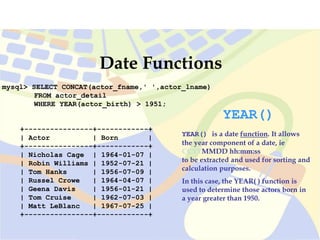
mysql> SELECT CONCAT(actor_fname,' ',actor_lname)
FROM actor_detail
WHERE YEAR(actor_birth) > 1951;
Date Functions
YEAR()
YEAR() is a date function. It allows
the year component of a date, ie
CCYYMMDD hh:mm:ss
to be extracted and used for sorting and
calculation purposes.
In this case, the YEAR( ) function is
used to determine those actors born in
a year greater than 1950.
+----------------+------------+
| Actor | Born |
+----------------+------------+
| Nicholas Cage | 1964-01-07 |
| Robin Williams | 1952-07-21 |
| Tom Hanks | 1956-07-09 |
| Russel Crowe | 1964-04-07 |
| Geena Davis | 1956-01-21 |
| Tom Cruise | 1962-07-03 |
| Matt LeBlanc | 1967-07-25 |
+----------------+------------+
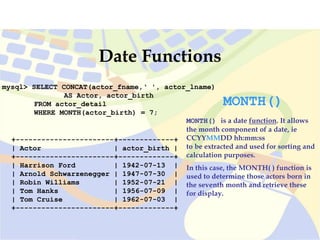
mysql> SELECT CONCAT(actor_fname,‘ ', actor_lname)
AS Actor, actor_birth
FROM actor_detail
WHERE MONTH(actor_birth) = 7;
+-----------------------+-------------+
| Actor | actor_birth |
+-----------------------+-------------+
| Harrison Ford | 1942-07-13 |
| Arnold Schwarzenegger | 1947-07-30 |
| Robin Williams | 1952-07-21 |
| Tom Hanks | 1956-07-09 |
| Tom Cruise | 1962-07-03 |
+-----------------------+-------------+
Date Functions
MONTH()
MONTH() is a date function. It allows
the month component of a date, ie
CCYYMMDD hh:mm:ss
to be extracted and used for sorting and
calculation purposes.
In this case, the MONTH( ) function is
used to determine those actors born in
the seventh month and retrieve these
for display.
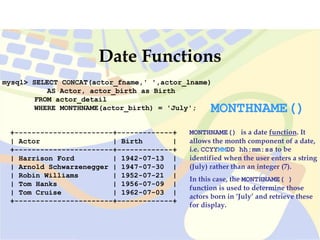
mysql> SELECT CONCAT(actor_fname,' ',actor_lname)
AS Actor, actor_birth as Birth
FROM actor_detail
WHERE MONTHNAME(actor_birth) = 'July';
+-----------------------+-------------+
| Actor | Birth |
+-----------------------+-------------+
| Harrison Ford | 1942-07-13 |
| Arnold Schwarzenegger | 1947-07-30 |
| Robin Williams | 1952-07-21 |
| Tom Hanks | 1956-07-09 |
| Tom Cruise | 1962-07-03 |
+-----------------------+-------------+
Date Functions
MONTHNAME()
MONTHNAME() is a date function. It
allows the month component of a date,
i.e. CCYYMMDD hh:mm:ss to be
identified when the user enters a string
(July) rather than an integer (7).
In this case, the MONTHNAME( )
function is used to determine those
actors born in ‘July’ and retrieve these
for display.
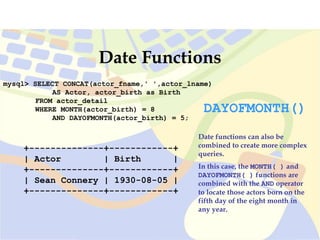
mysql> SELECT CONCAT(actor_fname,' ',actor_lname)
AS Actor, actor_birth as Birth
FROM actor_detail
WHERE MONTH(actor_birth) = 8
AND DAYOFMONTH(actor_birth) = 5;
+--------------+------------+
| Actor | Birth |
+--------------+------------+
| Sean Connery | 1930-08-05 |
+--------------+------------+
Date Functions
Date functions can also be
combined to create more complex
queries.
In this case, the MONTH( ) and
DAYOFMONTH( ) functions are
combined with the AND operator
to locate those actors born on the
fifth day of the eight month in
any year.
DAYOFMONTH()
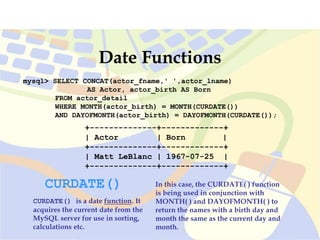
mysql> SELECT CONCAT(actor_fname,' ',actor_lname)
AS Actor, actor_birth AS Born
FROM actor_detail
WHERE MONTH(actor_birth) = MONTH(CURDATE())
AND DAYOFMONTH(actor_birth) = DAYOFMONTH(CURDATE());
+--------------+-------------+
| Actor | Born |
+--------------+-------------+
| Matt LeBlanc | 1967-07-25 |
+--------------+-------------+
Date Functions
CURDATE()
CURDATE() is a date function. It
acquires the current date from the
MySQL server for use in sorting,
calculations etc.
In this case, the CURDATE( ) function
is being used in conjunction with
MONTH( ) and DAYOFMONTH( ) to
return the names with a birth day and
month the same as the current day and
month.
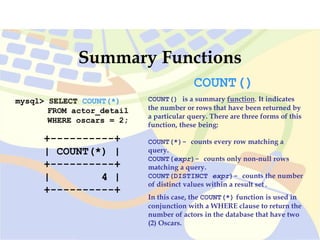
mysql> SELECT COUNT(*)
FROM actor_detail
WHERE oscars = 2;
+----------+
| COUNT(*) |
+----------+
| 4 |
+----------+
Summary Functions
COUNT()
COUNT() is a summary function. It indicates
the number or rows that have been returned by
a particular query. There are three forms of this
function, these being:
COUNT(*)- counts every row matching a
query.
COUNT(expr)- counts only non-null rows
matching a query.
COUNT(DISTINCT expr)- counts the number
of distinct values within a result set.
In this case, the COUNT(*) function is used in
conjunction with a WHERE clause to return the
number of actors in the database that have two
(2) Oscars.
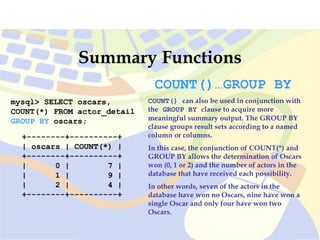
mysql> SELECT oscars,
COUNT(*) FROM actor_detail
GROUP BY oscars;
+--------+----------+
| oscars | COUNT(*) |
+--------+----------+
| 0 | 7 |
| 1 | 9 |
| 2 | 4 |
+--------+----------+
Summary Functions
COUNT()…GROUP BY
COUNT() can also be used in conjunction with
the GROUP BY clause to acquire more
meaningful summary output. The GROUP BY
clause groups result sets according to a named
column or columns.
In this case, the conjunction of COUNT(*) and
GROUP BY allows the determination of Oscars
won (0, 1 or 2) and the number of actors in the
database that have received each possibility.
In other words, seven of the actors in the
database have won no Oscars, nine have won a
single Oscar and only four have won two
Oscars.
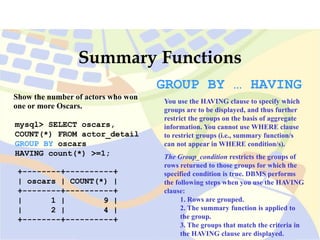
mysql> SELECT oscars,
COUNT(*) FROM actor_detail
GROUP BY oscars
HAVING count(*) >=1;
+--------+----------+
| oscars | COUNT(*) |
+--------+----------+
| 1 | 9 |
| 2 | 4 |
+--------+----------+
Summary Functions
GROUP BY … HAVING
You use the HAVING clause to specify which
groups are to be displayed, and thus further
restrict the groups on the basis of aggregate
information. You cannot use WHERE clause
to restrict groups (i.e., summary function/s
can not appear in WHERE condition/s).
The Group_condition restricts the groups of
rows returned to those groups for which the
specified condition is true. DBMS performs
the following steps when you use the HAVING
clause:
1. Rows are grouped.
2. The summary function is applied to
the group.
3. The groups that match the criteria in
the HAVING clause are displayed.
Show the number of actors who won
one or more Oscars.
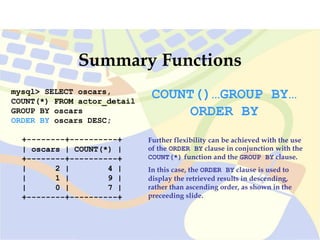
mysql> SELECT oscars,
COUNT(*) FROM actor_detail
GROUP BY oscars
ORDER BY oscars DESC;
+--------+----------+
| oscars | COUNT(*) |
+--------+----------+
| 2 | 4 |
| 1 | 9 |
| 0 | 7 |
+--------+----------+
Summary Functions
COUNT()…GROUP BY…
ORDER BY
Further flexibility can be achieved with the use
of the ORDER BY clause in conjunction with the
COUNT(*) function and the GROUP BY clause.
In this case, the ORDER BY clause is used to
display the retrieved results in descending,
rather than ascending order, as shown in the
preceeding slide.
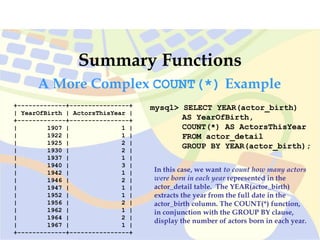
mysql> SELECT YEAR(actor_birth)
AS YearOfBirth,
COUNT(*) AS ActorsThisYear
FROM actor_detail
GROUP BY YEAR(actor_birth);
Summary Functions
+-------------+----------------+
| YearOfBirth | ActorsThisYear |
+-------------+----------------+
| 1907 | 1 |
| 1922 | 1 |
| 1925 | 2 |
| 1930 | 2 |
| 1937 | 1 |
| 1940 | 3 |
| 1942 | 1 |
| 1946 | 2 |
| 1947 | 1 |
| 1952 | 1 |
| 1956 | 2 |
| 1962 | 1 |
| 1964 | 2 |
| 1967 | 1 |
+-------------+----------------+
In this case, we want to count how many actors
were born in each year represented in the
actor_detail table. The YEAR(actor_birth)
extracts the year from the full date in the
actor_birth column. The COUNT(*) function,
in conjunction with the GROUP BY clause,
display the number of actors born in each year.
A More Complex COUNT(*) Example
Summary Functions
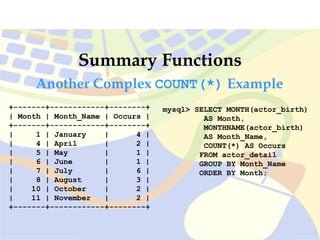
Another Complex COUNT(*) Example
mysql> SELECT MONTH(actor_birth)
AS Month,
MONTHNAME(actor_birth)
AS Month_Name,
COUNT(*) AS Occurs
FROM actor_detail
GROUP BY Month_Name
ORDER BY Month;
+-------+------------+--------+
| Month | Month_Name | Occurs |
+-------+------------+--------+
| 1 | January | 4 |
| 4 | April | 2 |
| 5 | May | 1 |
| 6 | June | 1 |
| 7 | July | 6 |
| 8 | August | 3 |
| 10 | October | 2 |
| 11 | November | 2 |
+-------+------------+--------+
Summary Functions
Create DATABASE IF NOT EXISTS exam;
Use exam;
DROP TABLE IF EXISTS result;
CREATE TABLE IF NOT EXISTS result (
student_no INTEGER(5) UNSIGNED NOT NULL,
exam_id INTEGER(3) UNSIGNED NOT NULL,
exam_score INTEGER(3) UNSIGNED NULL,
PRIMARY KEY (student_no, exam_id)
);
+------------+---------+------------+
| student_no | exam_id | exam_score |
+------------+---------+------------+
| 1 | 27 | 45 |
| 1 | 28 | 10 |
| 1 | 29 | 14 |
| 2 | 27 | 65 |
| 2 | 28 | 80 |
| 2 | 29 | 24 |
| 3 | 27 | 95 |
| 3 | 28 | 65 |
| 3 | 29 | 42 |
| 4 | 27 | 18 |
| 4 | 28 | 50 |
| 4 | 29 | 53 |
| 5 | 27 | 25 |
| 5 | 28 | 55 |
| 5 | 29 | 35 |
| 6 | 27 | 40 |
| 6 | 28 | 75 |
| 6 | 29 | 68 |
| 7 | 27 | 70 |
| 7 | 28 | 35 |
| 7 | 29 | 86 |
+------------+---------+------------+
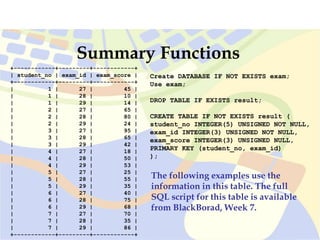
The following examples use the
information in this table. The full
SQL script for this table is available
from BlackBorad, Week 7.
Summary Functions
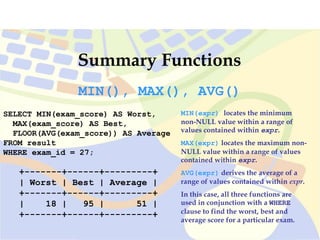
SELECT MIN(exam_score) AS Worst,
MAX(exam_score) AS Best,
FLOOR(AVG(exam_score)) AS Average
FROM result
WHERE exam_id = 27;
+-------+------+---------+
| Worst | Best | Average |
+-------+------+---------+
| 18 | 95 | 51 |
+-------+------+---------+
MIN(), MAX(), AVG()
MIN(expr) locates the minimum
non-NULL value within a range of
values contained within expr.
MAX(expr) locates the maximum non-
NULL value within a range of values
contained within expr.
AVG(expr) derives the average of a
range of values contained within expr.
In this case, all three functions are
used in conjunction with a WHERE
clause to find the worst, best and
average score for a particular exam.
Summary Functions
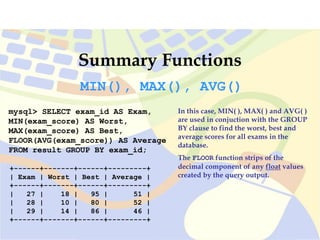
mysql> SELECT exam_id AS Exam,
MIN(exam_score) AS Worst,
MAX(exam_score) AS Best,
FLOOR(AVG(exam_score)) AS Average
FROM result GROUP BY exam_id;
+------+-------+------+---------+
| Exam | Worst | Best | Average |
+------+-------+------+---------+
| 27 | 18 | 95 | 51 |
| 28 | 10 | 80 | 52 |
| 29 | 14 | 86 | 46 |
+------+-------+------+---------+
MIN(), MAX(), AVG()
In this case, MIN( ), MAX( ) and AVG( )
are used in conjuction with the GROUP
BY clause to find the worst, best and
average scores for all exams in the
database.
The FLOOR function strips of the
decimal component of any float values
created by the query output.
Summary
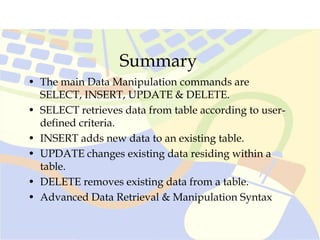
• The main Data Manipulation commands are
SELECT, INSERT, UPDATE & DELETE.
• SELECT retrieves data from table according to user-
defined criteria.
• INSERT adds new data to an existing table.
• UPDATE changes existing data residing within a
table.
• DELETE removes existing data from a table.
• Advanced Data Retrieval & Manipulation Syntax
References
DuBois, P. (2003). MySQL. The definitive guide to using,
programming, and administering MySQL4. (2nd Ed.).
Indianapolis, Indiana: Sams Publishing.
MySQL AB. (2003). MySQL Reference Manual. [on-line].
Available WWW:http://www.mysql.com/doc/en/
index.html.
Pratt, J.P. (2001). A Guide to SQL. (5th Ed.). Cambridge,
MA: Thomson Learning.

4. Data Manipulation.ppt

  • 1.
  • 2.
    Review Questions • Whatare the rules that pertain to the naming of databases, tables and columns in MySQL? • What rule of order applies to the naming of attributes assigned to numeric column types? • What general rules apply when inserting data into a table using the INSERT statement? • Why must extreme care be taken when using the DROP TABLE statement? • Why is the insertion of the DROP TABLE IF EXISTS tbl_name at the beginning of a database script useful?
  • 3.
    Objectives • Upon successfulcompletion of this module, you should be able to: – Name MySQL’s main Data Manipulation commands, these being SELECT, INSERT, UPDATE & DELETE. – Use the SELECT statement to retrieve data from table according to user-defined criteria. – Use the INSERT statement to add new data to an existing table. – Use the UPDATE statement to change existing data resident within a table. – Use the DELETE statement to remove existing data from a table. – Use Advanced Data Retrieval & Manipulation Syntax
  • 4.
    MySQL DML • Asdiscussed in Lecture 4, MySQL commands (also referred to as statements) fall into two main categories: • Data Definition Language (DDL) • Data Manipulation Language (DML) • As covered earlier, the main Data Definition (DDL) commands are CREATE, DROP, ALTER & RENAME, with CREATE & DROP being the most commonly used. • In today’s lecture, the main Data Manipulation (DML) commands will be examined, these being SELECT, INSERT, UPDATE & DELETE.
  • 5.
    Table Basics Reviewed •An RDBMS contains one or more objects called tables. • Database information is stored in these tables. • Tables are uniquely identified by name and consist of rows and columns. • Columns are defined by a column name, data type, and a variety of other optional attributes. • Rows contain the records or data for the columns.
  • 6.
    Tables for thisLecture •workstation •employee •store
  • 7.
    workstation +------------+---------------------+ | computerID |computerDescription | +------------+---------------------+ | 1 | Pentium II 300MHz | | 2 | Pentium III 1.3GHz | | 3 | Apple Cube | | 4 | Pentium 100MHz | | 5 | Athlon 1.8GHz | | 6 | Cyrix 233MHz | | 7 | Pentium III 1GHz | | 8 | Titanium Server | | 9 | Celeron 450MHZ | | 10 | Duron 800MHz | | 33 | Apple iMac | | 25 | Comapaq 1.2GHz | | 21 | Pentium 300MHz | | 27 | Apple G4 | | 16 | Pentium II 900MHz | | 30 | Apple Cube | | 31 | Athlon 1.33GHz | | 32 | Duron 450MHz | | 36 | Pentium IV 2.3GHz | +------------+---------------------+ employee +------------+-----------+----------+ | employeeID | firstName | lastName | +------------+-----------+----------+ | 1 | John | Doe | | 2 | Daffy | Duck | | 3 | Mickey | Mouse | | 4 | Minnie | Mouse | | 5 | Ronald | McDonald | | 6 | Homer | Simpson | | 10 | Bugs | Bunny | | 9 | Darth | Vader | | 11 | Yosemite | Sam | | 12 | Hokey | Pokey | | 13 | Elroy | Jetson | | 14 | George | Jetson | | 15 | Bubba | JoeBob | | 16 | Billy | Bob | | 17 | Monty | Python | +------------+-----------+----------+ AUTO_INCREMENT declared to EmployeeID
  • 8.
    +---------+--------------+------------+------------+------------+ | storeID |dateAcquired | computerID | employeeID | comments | +---------+--------------+------------+------------+------------+ | 1 | 1999-06-03 | 4 | 3 | comment 1 | | 2 | 2000-09-15 | 2 | 1 | comment 2 | | 3 | 1999-10-02 | 1 | 5 | comment 3 | | 4 | 1999-12-01 | 3 | 4 | comment 4 | | 5 | 2000-03-27 | 5 | 2 | comment 5 | | 6 | 2000-05-13 | 4 | 4 | comment 6 | | 7 | 2000-09-19 | 1 | 1 | comment 7 | | 8 | 2000-07-12 | 2 | 3 | comment 8 | | 9 | 2000-10-09 | 4 | 1 | comment 9 | | 15 | 2000-05-03 | 5 | 3 | comment 10 | | 17 | 2000-10-01 | 3 | 3 | comment 11 | | 19 | 2000-10-16 | 4 | 6 | comment 12 | | 13 | 2000-10-05 | 1 | 2 | comment 13 | | 14 | 2000-10-12 | 5 | 4 | comment 14 | | 21 | 2000-10-18 | 7 | 9 | comment 15 | | 20 | 2000-10-17 | 6 | 1 | comment 16 | | 23 | 2000-10-18 | 7 | 6 | comment 17 | | 36 | 2001-03-09 | 7 | 12 | comment 18 | | 25 | 2000-09-19 | 7 | 2 | comment 19 | | 54 | 2001-06-12 | 33 | 1 | comment 20 | | 28 | 2001-02-01 | 1 | 9 | comment 21 | | 47 | 2001-04-15 | 31 | 15 | comment 22 | | 48 | 2001-04-15 | 10 | 10 | comment 23 | | 56 | 2001-08-10 | 31 | 17 | comment 24 | | 55 | 2000-04-23 | 3 | 13 | comment 25 | +---------+--------------+------------+------------+------------+ store
  • 9.
    MySQL SELECT Statement SELECTcolumn_1 [,column_2,…] FROM tbl_name [WHERE condition(s)]; Syntax • Used to retrieve rows selected from one or more tables. • FROM indicates the tables from which to retrieve rows. • WHERE indicates conditions that rows must meet to be returned.
  • 10.
    MySQL SELECT Statement SELECT* SELECT * FROM workstation; Example: • Displays the contents of every column for every tuple in the table indicated.
  • 11.
    +------------+---------------------+ | computerID |computerDescription | +------------+---------------------+ | 1 | Pentium II 300MHz | | 2 | Pentium III 1.3GHz | | 3 | Apple Cube | | 4 | Pentium 100MHz | | 5 | Athlon 1.8GHz | | 6 | Cyrix 233MHz | | 7 | Pentium III 1GHz | | 8 | Titanium Server | | 9 | Celeron 450MHZ | | 10 | Duron 800MHz | | 33 | Apple iMac | | 25 | Comapaq 1.2GHz | | 21 | Pentium 300MHz | | 27 | Apple G4 | | 16 | Pentium II 900MHz | | 30 | Apple Cube | | 31 | Athlon 1.33GHz | | 32 | Duron 450MHz | | 36 | Pentium IV 2.3GHz | +------------+---------------------+ SELECT * FROM workstation;
  • 12.
    MySQL SELECT Statement SELECTcolumn1 [,column2,…] FROM tblname WHERE condition = argument; SELECT computerID, computerDescription FROM workstation WHERE computerDescription = ‘Apple Cube’; Example: • Display the contents of columns indicated that satisfy the stipulated argument.
  • 13.
    MySQL SELECT Statement +------------+---------------------+ |computerID | computerDescription | +------------+---------------------+ | 3 | Apple Cube | | 30 | Apple Cube | +------------+---------------------+ SELECT computerID, computerDescription FROM workstation WHERE computerDescription = ‘Apple Cube’;
  • 14.
    MySQL SELECT Statement SELECTcolumn_1’ [,column_2,…] FROM tblname WHERE column <= argument; SELECT computerID, computerDescription FROM workstation WHERE computerID <= 10; Example: • Display the contents of columns indicated where the column ‘computerID’ contains a value less than, or equal to, 10.
  • 15.
    MySQL SELECT Statement SELECTcomputerID, computerDescription FROM workstation WHERE computerID <= 10; +------------+---------------------+ | computerID | computerDescription | +------------+---------------------+ | 1 | Pentium II 300MHz | | 2 | Pentium III 1.3GHz | | 3 | Apple Cube | | 4 | Pentium 100MHz | | 5 | Athlon 1.8GHz | | 6 | Cyrix 233MHz | | 7 | Pentium III 1GHz | | 8 | Titanium Server | | 9 | Celeron 450MHZ | | 10 | Duron 800MHz | +------------+---------------------+
  • 16.
    MySQL SELECT Statement MainConditional Selectors Conditional Selector Meaning = Equal to > Greater than < Less than >= Greater than or equal to <= Less than or equal to <> Not equal to LIKE Matches part of a column entry
  • 17.
    MySQL SELECT Statement PatternMatching with SELECT • In cases where an exact comparison value cannot be used to limit a SELECT statement, MySQL’s pattern matching operations can be used. • Pattern matching is carried out using the LIKE and NOT LIKE operators. • Both operators are followed by a string containing one or more of the wildcard character (% and _). • The placement of the % will determine where in the string the required characters are to appear, as follows: LIKE ‘pol%’ – Field entries must begin with pol. LIKE ‘%pol’ - Field entries must end with pol LIKE %pol%’ - Field entries can have pol anywhere within them. • LIKE ‘_o%’ - Field entries can have o as second letter.
  • 18.
    MySQL SELECT Statement PatternMatching examples •Given the following list of occupations, which items would be returned from the pattern matches below? (‘Policeman’, ‘Policy Maker’, ‘Interpol’, ‘Federal politician’, ‘Pole Dancer’, ‘Light pole painter’) … WHERE occupation LIKE ‘P_l%’; … WHERE occupation LIKE ‘%pol’; … WHERE occupation LIKE ‘pol’;
  • 19.
    MySQL SELECT Statement SELECTcolumn_1 [,column_2,…] FROM table_name WHERE column LIKE ‘%argument%’; SELECT computerID, computerDescription FROM workstation WHERE computerDescription LIKE ‘%Pent%’; Example: • Display the contents of columns indicated where the column ‘computerDescription’ contains, in part, the string ‘pent’.
  • 20.
    MySQL SELECT Statement SELECTcomputerID, computerDescription FROM workstation WHERE computerDescription LIKE ‘%Pent%’; +------------+---------------------+ | computerID | computerDescription | +------------+---------------------+ | 1 | Pentium II 300MHz | | 2 | Pentium III 1.3GHz | | 4 | Pentium 100MHz | | 7 | Pentium III 1GHz | | 21 | Pentium 300MHz | | 16 | Pentium II 900MHz | | 36 | Pentium IV 2.3GHz | +------------+---------------------+
  • 21.
    MySQL SELECT Statement SELECTcolumn1 [,column2,…] FROM table_name WHERE column LIKE ‘%argument’; SELECT computerID, computerDescription FROM workstation WHERE computerDescription LIKE ‘%MHz’; Example: • Display the contents of columns indicated where the column ‘computerDescription’ contains a value ending in MHz.
  • 22.
    MySQL SELECT Statement SELECTcomputerID, computerDescription FROM workstation WHERE computerDescription LIKE ‘%MHz’; +------------+---------------------+ | computerID | computerDescription | +------------+---------------------+ | 1 | Pentium II 300MHz | | 4 | Pentium 100MHz | | 6 | Cyrix 233MHz | | 9 | Celeron 450MHZ | | 10 | Duron 800MHz | | 21 | Pentium 300MHz | | 16 | Pentium II 900MHz | | 32 | Duron 450MHz | +------------+---------------------+
  • 23.
    MySQL SELECT Statement SELECTcolumn_1 [,column_2,…] FROM table_name WHERE column LIKE ‘argument%’; SELECT computerID, computerDescription FROM workstation WHERE computerDescription LIKE ‘Ap%'; Example: • Display the contents of columns indicated where the column ‘computerDescription’ contains a component beginning in ‘ap’.
  • 24.
    MySQL SELECT Statement SELECTcomputerID, computerDescription FROM workstation WHERE computerDescription LIKE ‘Ap%'; +------------+---------------------+ | computerID | computerDescription | +------------+---------------------+ | 3 | Apple Cube | | 33 | Apple iMac | | 27 | Apple G4 | | 30 | Apple Cube | +------------+---------------------+
  • 25.
    MySQL INSERT Statement INSERTINTO table_name [(first_column, ...last_column)] VALUES (first_value,...last_value); Syntax • Inserts new rows into an existing table. • The columns into which the values are to be inserted are named first. • VALUES indicates the data to be entered into the named columns. • Rule of order applies.
  • 26.
    MySQL INSERT Statement INSERTINTO employee (firstName, lastName) VALUES('Mel', 'Gibson'); Example: • Insert the string Mel into the column firstName and insert the string Gibson into the column lastName. • The column employeeID has been set to AUTO_INCREMENT, therefore a numeric will be placed into this column at the time of execution. • For multiple entries, simply place one INSERT statement after another, ending each with a semi-colon.
  • 27.
    MySQL INSERT Statement INSERTINTO employee (firstName, lastName) VALUES('Mel', 'Gibson'); +------------+-----------+----------+ | employeeID | firstName | lastName | +------------+-----------+----------+ | 1 | John | Doe | | 2 | Daffy | Duck | | 3 | Mickey | Mouse | | 4 | Minnie | Mouse | | 5 | Ronald | McDonald | | 6 | Homer | Simpson | | 10 | Bugs | Bunny | | 9 | Darth | Vader | | 11 | Yosemite | Sam | | 12 | Hokey | Pokey | | 13 | Elroy | Jetson | | 14 | George | Jetson | | 15 | Bubba | JoeBob | | 16 | Billy | Bob | | 17 | Monty | Python | | 18 | Mel | Gibson | +------------+-----------+----------+ The AUTO_INCREMENT attribute assigned to the employeeID column ensures the new entry is assigned a number even though not explicitly entered
  • 28.
    MySQL INSERT Statement MultipleInserts INSERT INTO employee (firstName, lastName) VALUES ('Johnny', 'Mathas'), ('John', 'Wayne'), ('Peter', 'Tompkin'), ('Eddie', 'McGuire'), ('Peter', 'Frampton'), (‘Vince', ‘Brown'); SELECT * FROM employee; • When using the CLI, multiple row entries can be achieved using this syntax. • In each case, the column that has not been named (employeeID) is assigned a value by the AUTO_INCREMENT attribute. • Each value set is enclosed in its own set of parenthesis and are separated by a comma. • The closing semi-colon is applied only after the final value set has been declared.
  • 29.
    MySQL INSERT Statement MultipleInserts INSERT INTO employee (firstName, lastName) VALUES ('Johnny', 'Mathas'), ('John', 'Wayne'), ('Peter', 'Tompkin'), ('Eddie', 'McGuire'), ('Peter', 'Frampton'), (‘Vince', ‘Brown'); SELECT * FROM employee; ////////////////// | 15 | Bubba | JoeBob | | 16 | Billy | Bob | | 17 | Monty | Python | | 18 | Mel | Gibson | | 19 | Johnny | Mathis | | 20 | John | Wayne | | 21 | Peter | Tompkin | | 22 | Eddie | McGuire | | 23 | Peter | Frampton | | 24 | Vince | Brown | +------------+-----------+----------+
  • 30.
    MySQL UPDATE Statement UPDATEtable_name SET column_1 = value_1 [, column_2 = value_2, ...] WHERE column operator value [and|or column operator value] Syntax • Updates columns in existing table rows with new values. • SET indicates the columns that will be affected by the change. • WHERE indicates which rows will actually be changed in the fields indicated. • Operators are usually mathematical in nature (=, >, < etc).
  • 31.
    MySQL UPDATE Statement UPDATEemployee SET lastName = 'Skywalker' WHERE firstName = 'Darth'; Single Field UPDATE Syntax • In the table called ‘employee’, find the tuple that contains the string ‘Darth’ and in that same tuple, change the string in ‘lastName’ from whatever it currently is to ‘Skywalker’. • Warning: UPDATE statements cannot be undone once executed so run a SELECT statement with the same WHERE clause first to make sure you know how many rows should be affected!!!
  • 32.
    MySQL UPDATE Statement UPDATEemployee SET lastName = 'Skywalker' WHERE firstName = 'Darth'; Response: Query OK, 1 row affected (0.01 sec) Rows matched: 1 Changed: 1 Warnings: 0 /////////////////// | 6 | Homer | Simpson | | 10 | Bugs | Bunny | | 9 | Darth | Skywalker | | 11 | Yosemite | Sam | /////////////////// | 6 | Homer | Simpson | | 10 | Bugs | Bunny | | 9 | Darth | Vader | | 11 | Yosemite | Sam |
  • 33.
    MySQL UPDATE Statement UPDATEemployee SET firstName = 'Errol', lastName = 'Flynn‘ WHERE employeeID = 11; Multiple Fields Update Syntax • In this case, the entries in two columns are updated simultaneously. • Each column change is separated by a comma: SET firstName = ‘Errol’, lastName = ‘Flynn’
  • 34.
    MySQL UPDATE Statement UPDATEemployee SET firstName = 'Errol', lastName = 'Flynn‘ WHERE employeeID = 11; /////////////////// | 10 | Bugs | Bunny | | 9 | Darth | Skywalker | | 11 | Yosemite | Sam | | 12 | Hokey | Pokey | /////////////////// | 10 | Bugs | Bunny | | 9 | Darth | Skywalker | | 11 | Errol | Flynn | | 12 | Hokey | Pokey |
  • 35.
    MySQL DELETE Statement DELETEFROM tbl_name WHERE column_name operator value [and|or column operator value] Syntax • Deletes rows from table that satisfy the condition given by WHERE. • DELETE with no WHERE clause results in all rows being deleted. ! Where tables reference one another via primary-foreign key relationships and InnoDB has not been applied to these tables, data anomalies are likely to result from data deletions. 
  • 36.
    MySQL DELETE Statement SingleInstance DELETE Syntax DELETE FROM employee WHERE lastName = 'Mouse'; • In the table called ‘employee’, delete all tuples that contain the string ‘Mouse’ in the ‘lastName’ column. • Warning: DELETE statements cannot be undone once executed so run a SELECT statement with the same WHERE clause first to make sure you know how many rows should be affected!!!
  • 37.
    MySQL DELETE Statement DELETEFROM employee WHERE lastName = 'Mouse'; Query OK, 2 rows affected (0.02 sec) Response +------------+-----------+-----------+ | employeeID | firstName | lastName | +------------+-----------+-----------+ | 1 | John | Doe | | 2 | Daffy | Duck | | 3 | Mickey | Mouse | | 4 | Minnie | Mouse | | 5 | Ronald | McDonald | | 6 | Homer | Simpson | /////////////////// +------------+-----------+-----------+ | employeeID | firstName | lastName | +------------+-----------+-----------+ | 1 | John | Doe | | 2 | Daffy | Duck | | 5 | Ronald | McDonald | | 6 | Homer | Simpson | ///////////////////
  • 38.
    MySQL DELETE Statement MultipleInstance DELETE Syntax DELETE FROM employee WHERE firstName = ‘John‘ AND lastName = ‘Wayne’; • In cases where a delete statement based on the value within a single field will lead to the deletion of tuples other than the one intended, AND can be used to be more specific. • For example, the store table contains both John Wayne and John Doe. • By using the above syntax, only John Wayne is removed as intended, not John Doe.
  • 39.
    +------------+-----------+-----------+ | employeeID |firstName | lastName | +------------+-----------+-----------+ | 1 | John | Doe | | 2 | Daffy | Duck | | 5 | Ronald | McDonald | | 6 | Homer | Simpson | | 10 | Bugs | Bunny | | 9 | Darth | Skywalker | | 11 | Erold | Flynn | | 12 | Hokey | Pokey | | 13 | Elroy | Jetson | | 14 | George | Jetson | | 15 | Bubba | JoeBob | | 16 | Billy | Bob | | 17 | Monty | Python | | 18 | Mel | Gibson | | 19 | Johnny | Mathis | | 20 | John | Wayne | | 21 | Peter | Tompkin | | 22 | Eddie | McGuire | +------------+-----------+-----------+ | employeeID | firstName | lastName | +------------+-----------+-----------+ | 1 | John | Doe | | 2 | Daffy | Duck | | 5 | Ronald | McDonald | | 6 | Homer | Simpson | | 10 | Bugs | Bunny | | 9 | Darth | Skywalker | | 11 | Erold | Flynn | | 12 | Hokey | Pokey | | 13 | Elroy | Jetson | | 14 | George | Jetson | | 15 | Bubba | JoeBob | | 16 | Billy | Bob | | 17 | Monty | Python | | 18 | Mel | Gibson | | 19 | Johnny | Mathis | | 21 | Peter | Tompkin | | 22 | Eddie | McGuire | DELETE FROM employee WHERE firstName = ‘John‘ AND lastName = ‘Wayne’;
  • 40.
    MySQL DELETE Statement MultipleInstance DELETE Syntax DELETE FROM employee WHERE employeeID < 11; • In this case, a mathematical operator is being used to match and delete multiple columns meeting a certain criteria. • In this case, all employees with an employee number less than 11 are to be removed from the employee table. • VERY DANGEROUS – DO SELECT FIRST!
  • 41.
    MySQL DELETE Statement DELETEFROM employee WHERE employeeID < 11; +------------+-----------+-----------+ | employeeID | firstName | lastName | +------------+-----------+-----------+ | 1 | John | Doe | | 2 | Daffy | Duck | | 5 | Ronald | McDonald | | 6 | Homer | Simpson | | 10 | Bugs | Bunny | | 9 | Darth | Skywalker | | 11 | Errol | Flynn | | 12 | Hokey | Pokey | | 13 | Elroy | Jetson | | 14 | George | Jetson | | 15 | Bubba | JoeBob | | 16 | Billy | Bob | | 17 | Monty | Python | | 18 | Mel | Gibson | | 19 | Johnny | Mathis | | 21 | Peter | Tompkin | | 22 | Eddie | McGuire | +------------+-----------+-----------+ | employeeID | firstName | lastName | +------------+-----------+-----------+ | 11 | Errol | Flynn | | 12 | Hokey | Pokey | | 13 | Elroy | Jetson | | 14 | George | Jetson | | 15 | Bubba | JoeBob | | 16 | Billy | Bob | | 17 | Monty | Python | | 18 | Mel | Gibson | | 19 | Johnny | Mathis | | 21 | Peter | Tompkin | | 22 | Eddie | McGuire |
  • 42.
    Advanced Data Retrieval &Manipulation Syntax
  • 43.
    Database Example • Thedatabase used in the following section is available from Blackboard – Week 7. • The structure of the table is as follows: CREATE TABLE IF NOT EXISTS actor_detail ( actor_no INT(5) UNSIGNED ZEROFILL NOT NULL AUTO_INCREMENT, actor_fname VARCHAR(20) NOT NULL, actor_lname VARCHAR(20) NOT NULL, actor_birth DATE NOT NULL, actor_death DATE NULL, oscars TINYINT(2) UNSIGNED DEFAULT 0, PRIMARY KEY (actor_no) ) TYPE=InnoDB;
  • 44.
    +----------+-------------+----------------+-------------+-------------+--------+ | 00001 |Harrison | Ford | 1942-07-13 | 0000-00-00 | 0 | | 00002 | Sean | Connery | 1930-08-05 | 0000-00-00 | 1 | | 00003 | Arnold | Schwarzenegger | 1947-07-30 | 0000-00-00 | 0 | | 00004 | John | Hurt | 1940-01-22 | 0000-00-00 | 0 | | 00005 | Richard | Harris | 1930-10-01 | 2002-10-25 | 0 | | 00006 | Richard | Burton | 1925-11-10 | 1984-08-05 | 0 | | 00007 | Martin | Sheen | 1940-08-03 | 0000-00-00 | 0 | | 00008 | Nicholas | Cage | 1964-01-07 | 0000-00-00 | 1 | | 00009 | Robin | Williams | 1952-07-21 | 0000-00-00 | 1 | //////////////////////////////////////// SELECT * FROM actor_detail; +----------+-------------+----------------+-------------+-------------+--------+ | actor_no | actor_fname | actor_lname | actor_birth | actor_death | oscars | +----------+-------------+----------------+-------------+-------------+--------+
  • 45.
    SELECT * FROMactor_detail; //////////////////////////////////////// | 00010 | Sally | Field | 1950-01-26 | 0000-00-00 | 2 | | 00011 | John | Wayne | 1907-05-26 | 1979-06-11 | 1 | | 00012 | Judy | Garland | 1922-06-10 | 1969-06-22 | 1 | | 00013 | Tom | Hanks | 1956-07-09 | 0000-00-00 | 2 | | 00014 | Paul | Newman | 1925-01-26 | 0000-00-00 | 1 | | 00015 | Dustin | Hoffman | 1937-08-08 | 0000-00-00 | 2 | | 00016 | Russel | Crowe | 1964-04-07 | 0000-00-00 | 1 | | 00017 | Al | Pacino | 1940-04-25 | 0000-00-00 | 1 | | 00018 | Susan | Sarandon | 1946-10-04 | 0000-00-00 | 1 | | 00019 | Geena | Davis | 1956-01-21 | 0000-00-00 | 2 | | 00020 | Tom | Cruise | 1962-07-03 | 0000-00-00 | 0 | +----------+-------------+----------------+-------------+-------------+--------+
  • 46.
    mysql> SELECT actor_fname,actor_lname FROMactor_detail WHERE actor_birth < '1950-01-01' AND oscars > 1; +-------------+-------------+ | actor_fname | actor_lname | +-------------+-------------+ | Sally | Field | | Dustin | Hoffman | +-------------+-------------+ The AND operator AND is a logical operator. In this case, it is used to indicate that only those actors who were born before 1950 and have at least two Oscars are to be returned by the query. Additional operators are also used to give the query the required specificity, these being: < The ‘less than’ operator > The ‘greater than’ operator
  • 47.
    mysql> SELECT actor_fname,actor_lname FROM actor_detail WHERE actor_birth < '1950-01-01' AND (oscars=1 OR oscars=2); +-------------+-------------+ | actor_fname | actor_lname | +-------------+-------------+ | Sean | Connery | | Sally | Field | | John | Wayne | | Judy | Garland | | Paul | Newman | | Dustin | Hoffman | | Al | Pacino | | Susan | Sarandon | +-------------+-------------+ The OR operator OR is a logical operator. In this case, it is used to indicate that actors retrieved by the query must still be born before 1950, however those that have one (1) Oscar or two (2) Oscars can be returned. To put this in alternative terms, those actors that were born before 1950 and have either one or two Oscars can be returned by the query.
  • 48.
    mysql> SELECT actor_fname,actor_lname FROM actor_detail WHERE actor_death IS NULL; +-------------+----------------+ | actor_fname | actor_lname | +-------------+----------------+ | Harrison | Ford | | Sean | Connery | | Arnold | Schwarzenegger | | John | Hurt | | Martin | Sheen | | Nicholas | Cage | | Robin | Williams | | Sally | Field | | Tom | Hanks | | Paul | Newman | | Dustin | Hoffman | | Russel | Crowe | | Al | Pacino | | Susan | Sarandon | | Geena | Davis | | Tom | Cruise | +-------------+----------------+ NULL NULL means ‘no value’. As such, it cannot have arithmetic operators applied to it in any meaningful way. To do so usually only results in another NULL result, e.g.: NULL >= 27 will give the result NULL. Therefore, comparisons involving NULL values need to be achieved with the IS or IS NOT operators. In this case, the query retrieves those actors who have a NULL entry in the actor_death column, which indicates they are still alive.
  • 49.
    mysql> SELECT actor_fname,actor_lname FROM actor_detail WHERE actor_death IS NOT NULL; In this case, the query retrieves those actors who have a valid date entry in the actor_death column, which indicates they are deceased. +-------------+-------------+ | actor_fname | actor_lname | +-------------+-------------+ | Richard | Harris | | Richard | Burton | | John | Wayne | | Judy | Garland | +-------------+-------------+ Handling NULL values
  • 50.
    mysql> SELECT actor_fname,actor_lname FROM actor_detail ORDER BY actor_lname; +-------------+----------------+ | actor_fname | actor_lname | +-------------+----------------+ | Richard | Burton | | Nicholas | Cage | | Sean | Connery | | Russel | Crowe | | Tom | Cruise | | Geena | Davis | | Sally | Field | | Harrison | Ford | | Judy | Garland | | Tom | Hanks | | Richard | Harris | | Dustin | Hoffman | | John | Hurt | | Paul | Newman | | Al | Pacino | | Susan | Sarandon | | Arnold | Schwarzenegger | | Martin | Sheen | | John | Wayne | | Robin | Williams | +-------------+----------------+ ORDER BY ORDER BY is a clause. It is used to specify the order in which retrieved records are to be displayed in the client once returned by the server. In this case, the returned query results have been listed in alphabetical order. By default, the ORDER BY clause displays records in ascending order (a-z, 0-9 etc). This can also be specified as ASC i.e. ORDER BY column_name ASC. In this case, no order by attribute has been specified, so ascending is assigned by default.
  • 51.
    mysql> SELECT actor_fname,actor_lname FROM actor_detail ORDER BY actor_lname DESC; In this case, the DESC attribute is applied to ORDER BY column_name, hence the query returns results in reverse alphabetical order. +-------------+----------------+ | actor_fname | actor_lname | +-------------+----------------+ | Robin | Williams | | John | Wayne | | Martin | Sheen | | Arnold | Schwarzenegger | | Susan | Sarandon | | Al | Pacino | | Paul | Newman | | John | Hurt | | Dustin | Hoffman | | Richard | Harris | | Tom | Hanks | | Judy | Garland | | Harrison | Ford | | Sally | Field | | Geena | Davis | | Tom | Cruise | | Russel | Crowe | | Sean | Connery | | Nicholas | Cage | | Richard | Burton | +-------------+----------------+ ORDER BY DESC
  • 52.
    mysql> SELECT actor_fname,actor_lname FROM actor_detail ORDER BY actor_birth LIMIT 6; +-------------+-------------+ | actor_fname | actor_lname | +-------------+-------------+ | John | Wayne | | Judy | Garland | | Paul | Newman | | Richard | Burton | | Sean | Connery | | Richard | Harris | +-------------+-------------+ 6 rows in set (0.01 sec) The LIMIT clause LIMIT is a clause. It is frequently used in association with the ORDER BY clause. In this case, the query results have been sorted in an ascending (default) order and have been limited to six (6) rows only. Had the LIMIT clause not been used in this instance, all 20 records in actor_detail would have been returned.
  • 53.
    mysql> SELECT CONCAT(actor_fname,'',actor_lname), oscars FROM actor_detail; +-------------------------------------+--------+ | CONCAT(actor_fname,' ',actor_lname) | oscars | +-------------------------------------+--------+ | Harrison Ford | 0 | | Sean Connery | 1 | | Arnold Schwarzenegger | 0 | | John Hurt | 0 | | Richard Harris | 0 | | Richard Burton | 0 | | Martin Sheen | 0 | | Nicholas Cage | 1 | | Robin Williams | 1 | | Sally Field | 2 | | John Wayne | 1 | | Judy Garland | 1 | | Tom Hanks | 2 | | Paul Newman | 1 | | Dustin Hoffman | 2 | | Russel Crowe | 1 | | Al Pacino | 1 | | Susan Sarandon | 1 | | Geena Davis | 2 | | Tom Cruise | 0 | +-------------------------------------+--------+ CONCAT() CONCAT() is a function. It returns a string comprising a concatenation of the column values to which it refers, in this case, each actor’s first and last names: CONCAT(actor_fname,' ',actor_lname) The space between the first and last name of each actor is achieved by placing a space between inverted commas (‘ ’), the blank space in fact being a string character. As the output column/s created has not previously existed, MySQL gives it a default name, usually the CONCAT( ) function itself.
  • 54.
    mysql> SELECT CONCAT(actor_fname,'',actor_lname) AS Actor, oscars FROM actor_detail; +-------------------------------------+--------+ | Actor | oscars | +-------------------------------------+--------+ | Harrison Ford | 0 | | Sean Connery | 1 | | Arnold Schwarzenegger | 0 | | John Hurt | 0 | | Richard Harris | 0 | | Richard Burton | 0 | | Martin Sheen | 0 | | Nicholas Cage | 1 | | Robin Williams | 1 | | Sally Field | 2 | | John Wayne | 1 | | Judy Garland | 1 | | Tom Hanks | 2 | | Paul Newman | 1 | | Dustin Hoffman | 2 | | Russel Crowe | 1 | | Al Pacino | 1 | | Susan Sarandon | 1 | | Geena Davis | 2 | | Tom Cruise | 0 | +-------------------------------------+--------+ CONCAT() AS name AS is used to create an alias name for output columns created by SELECT statements. Its use in conjunction with CONCAT( ) is common. AS output columns can subsequently be referred to by GROUP BY, ORDER BY and HAVING clauses. In this case, instead of using CONCAT(actor_fname,' ',actor_lname) as the alias output column name, it uses Actor as declared by the user. This is an important capability, as it allows output columns to be named meaningfully.
  • 55.
    mysql> SELECT CONCAT(actor_fname,'',actor_lname) FROM actor_detail WHERE YEAR(actor_birth) > 1951; Date Functions YEAR() YEAR() is a date function. It allows the year component of a date, ie CCYYMMDD hh:mm:ss to be extracted and used for sorting and calculation purposes. In this case, the YEAR( ) function is used to determine those actors born in a year greater than 1950. +----------------+------------+ | Actor | Born | +----------------+------------+ | Nicholas Cage | 1964-01-07 | | Robin Williams | 1952-07-21 | | Tom Hanks | 1956-07-09 | | Russel Crowe | 1964-04-07 | | Geena Davis | 1956-01-21 | | Tom Cruise | 1962-07-03 | | Matt LeBlanc | 1967-07-25 | +----------------+------------+
  • 56.
    mysql> SELECT CONCAT(actor_fname,‘', actor_lname) AS Actor, actor_birth FROM actor_detail WHERE MONTH(actor_birth) = 7; +-----------------------+-------------+ | Actor | actor_birth | +-----------------------+-------------+ | Harrison Ford | 1942-07-13 | | Arnold Schwarzenegger | 1947-07-30 | | Robin Williams | 1952-07-21 | | Tom Hanks | 1956-07-09 | | Tom Cruise | 1962-07-03 | +-----------------------+-------------+ Date Functions MONTH() MONTH() is a date function. It allows the month component of a date, ie CCYYMMDD hh:mm:ss to be extracted and used for sorting and calculation purposes. In this case, the MONTH( ) function is used to determine those actors born in the seventh month and retrieve these for display.
  • 57.
    mysql> SELECT CONCAT(actor_fname,'',actor_lname) AS Actor, actor_birth as Birth FROM actor_detail WHERE MONTHNAME(actor_birth) = 'July'; +-----------------------+-------------+ | Actor | Birth | +-----------------------+-------------+ | Harrison Ford | 1942-07-13 | | Arnold Schwarzenegger | 1947-07-30 | | Robin Williams | 1952-07-21 | | Tom Hanks | 1956-07-09 | | Tom Cruise | 1962-07-03 | +-----------------------+-------------+ Date Functions MONTHNAME() MONTHNAME() is a date function. It allows the month component of a date, i.e. CCYYMMDD hh:mm:ss to be identified when the user enters a string (July) rather than an integer (7). In this case, the MONTHNAME( ) function is used to determine those actors born in ‘July’ and retrieve these for display.
  • 58.
    mysql> SELECT CONCAT(actor_fname,'',actor_lname) AS Actor, actor_birth as Birth FROM actor_detail WHERE MONTH(actor_birth) = 8 AND DAYOFMONTH(actor_birth) = 5; +--------------+------------+ | Actor | Birth | +--------------+------------+ | Sean Connery | 1930-08-05 | +--------------+------------+ Date Functions Date functions can also be combined to create more complex queries. In this case, the MONTH( ) and DAYOFMONTH( ) functions are combined with the AND operator to locate those actors born on the fifth day of the eight month in any year. DAYOFMONTH()
  • 59.
    mysql> SELECT CONCAT(actor_fname,'',actor_lname) AS Actor, actor_birth AS Born FROM actor_detail WHERE MONTH(actor_birth) = MONTH(CURDATE()) AND DAYOFMONTH(actor_birth) = DAYOFMONTH(CURDATE()); +--------------+-------------+ | Actor | Born | +--------------+-------------+ | Matt LeBlanc | 1967-07-25 | +--------------+-------------+ Date Functions CURDATE() CURDATE() is a date function. It acquires the current date from the MySQL server for use in sorting, calculations etc. In this case, the CURDATE( ) function is being used in conjunction with MONTH( ) and DAYOFMONTH( ) to return the names with a birth day and month the same as the current day and month.
  • 60.
    mysql> SELECT COUNT(*) FROMactor_detail WHERE oscars = 2; +----------+ | COUNT(*) | +----------+ | 4 | +----------+ Summary Functions COUNT() COUNT() is a summary function. It indicates the number or rows that have been returned by a particular query. There are three forms of this function, these being: COUNT(*)- counts every row matching a query. COUNT(expr)- counts only non-null rows matching a query. COUNT(DISTINCT expr)- counts the number of distinct values within a result set. In this case, the COUNT(*) function is used in conjunction with a WHERE clause to return the number of actors in the database that have two (2) Oscars.
  • 61.
    mysql> SELECT oscars, COUNT(*)FROM actor_detail GROUP BY oscars; +--------+----------+ | oscars | COUNT(*) | +--------+----------+ | 0 | 7 | | 1 | 9 | | 2 | 4 | +--------+----------+ Summary Functions COUNT()…GROUP BY COUNT() can also be used in conjunction with the GROUP BY clause to acquire more meaningful summary output. The GROUP BY clause groups result sets according to a named column or columns. In this case, the conjunction of COUNT(*) and GROUP BY allows the determination of Oscars won (0, 1 or 2) and the number of actors in the database that have received each possibility. In other words, seven of the actors in the database have won no Oscars, nine have won a single Oscar and only four have won two Oscars.
  • 62.
    mysql> SELECT oscars, COUNT(*)FROM actor_detail GROUP BY oscars HAVING count(*) >=1; +--------+----------+ | oscars | COUNT(*) | +--------+----------+ | 1 | 9 | | 2 | 4 | +--------+----------+ Summary Functions GROUP BY … HAVING You use the HAVING clause to specify which groups are to be displayed, and thus further restrict the groups on the basis of aggregate information. You cannot use WHERE clause to restrict groups (i.e., summary function/s can not appear in WHERE condition/s). The Group_condition restricts the groups of rows returned to those groups for which the specified condition is true. DBMS performs the following steps when you use the HAVING clause: 1. Rows are grouped. 2. The summary function is applied to the group. 3. The groups that match the criteria in the HAVING clause are displayed. Show the number of actors who won one or more Oscars.
  • 63.
    mysql> SELECT oscars, COUNT(*)FROM actor_detail GROUP BY oscars ORDER BY oscars DESC; +--------+----------+ | oscars | COUNT(*) | +--------+----------+ | 2 | 4 | | 1 | 9 | | 0 | 7 | +--------+----------+ Summary Functions COUNT()…GROUP BY… ORDER BY Further flexibility can be achieved with the use of the ORDER BY clause in conjunction with the COUNT(*) function and the GROUP BY clause. In this case, the ORDER BY clause is used to display the retrieved results in descending, rather than ascending order, as shown in the preceeding slide.
  • 64.
    mysql> SELECT YEAR(actor_birth) ASYearOfBirth, COUNT(*) AS ActorsThisYear FROM actor_detail GROUP BY YEAR(actor_birth); Summary Functions +-------------+----------------+ | YearOfBirth | ActorsThisYear | +-------------+----------------+ | 1907 | 1 | | 1922 | 1 | | 1925 | 2 | | 1930 | 2 | | 1937 | 1 | | 1940 | 3 | | 1942 | 1 | | 1946 | 2 | | 1947 | 1 | | 1952 | 1 | | 1956 | 2 | | 1962 | 1 | | 1964 | 2 | | 1967 | 1 | +-------------+----------------+ In this case, we want to count how many actors were born in each year represented in the actor_detail table. The YEAR(actor_birth) extracts the year from the full date in the actor_birth column. The COUNT(*) function, in conjunction with the GROUP BY clause, display the number of actors born in each year. A More Complex COUNT(*) Example
  • 65.
    Summary Functions Another ComplexCOUNT(*) Example mysql> SELECT MONTH(actor_birth) AS Month, MONTHNAME(actor_birth) AS Month_Name, COUNT(*) AS Occurs FROM actor_detail GROUP BY Month_Name ORDER BY Month; +-------+------------+--------+ | Month | Month_Name | Occurs | +-------+------------+--------+ | 1 | January | 4 | | 4 | April | 2 | | 5 | May | 1 | | 6 | June | 1 | | 7 | July | 6 | | 8 | August | 3 | | 10 | October | 2 | | 11 | November | 2 | +-------+------------+--------+
  • 66.
    Summary Functions Create DATABASEIF NOT EXISTS exam; Use exam; DROP TABLE IF EXISTS result; CREATE TABLE IF NOT EXISTS result ( student_no INTEGER(5) UNSIGNED NOT NULL, exam_id INTEGER(3) UNSIGNED NOT NULL, exam_score INTEGER(3) UNSIGNED NULL, PRIMARY KEY (student_no, exam_id) ); +------------+---------+------------+ | student_no | exam_id | exam_score | +------------+---------+------------+ | 1 | 27 | 45 | | 1 | 28 | 10 | | 1 | 29 | 14 | | 2 | 27 | 65 | | 2 | 28 | 80 | | 2 | 29 | 24 | | 3 | 27 | 95 | | 3 | 28 | 65 | | 3 | 29 | 42 | | 4 | 27 | 18 | | 4 | 28 | 50 | | 4 | 29 | 53 | | 5 | 27 | 25 | | 5 | 28 | 55 | | 5 | 29 | 35 | | 6 | 27 | 40 | | 6 | 28 | 75 | | 6 | 29 | 68 | | 7 | 27 | 70 | | 7 | 28 | 35 | | 7 | 29 | 86 | +------------+---------+------------+ The following examples use the information in this table. The full SQL script for this table is available from BlackBorad, Week 7.
  • 67.
    Summary Functions SELECT MIN(exam_score)AS Worst, MAX(exam_score) AS Best, FLOOR(AVG(exam_score)) AS Average FROM result WHERE exam_id = 27; +-------+------+---------+ | Worst | Best | Average | +-------+------+---------+ | 18 | 95 | 51 | +-------+------+---------+ MIN(), MAX(), AVG() MIN(expr) locates the minimum non-NULL value within a range of values contained within expr. MAX(expr) locates the maximum non- NULL value within a range of values contained within expr. AVG(expr) derives the average of a range of values contained within expr. In this case, all three functions are used in conjunction with a WHERE clause to find the worst, best and average score for a particular exam.
  • 68.
    Summary Functions mysql> SELECTexam_id AS Exam, MIN(exam_score) AS Worst, MAX(exam_score) AS Best, FLOOR(AVG(exam_score)) AS Average FROM result GROUP BY exam_id; +------+-------+------+---------+ | Exam | Worst | Best | Average | +------+-------+------+---------+ | 27 | 18 | 95 | 51 | | 28 | 10 | 80 | 52 | | 29 | 14 | 86 | 46 | +------+-------+------+---------+ MIN(), MAX(), AVG() In this case, MIN( ), MAX( ) and AVG( ) are used in conjuction with the GROUP BY clause to find the worst, best and average scores for all exams in the database. The FLOOR function strips of the decimal component of any float values created by the query output.
  • 69.
    Summary • The mainData Manipulation commands are SELECT, INSERT, UPDATE & DELETE. • SELECT retrieves data from table according to user- defined criteria. • INSERT adds new data to an existing table. • UPDATE changes existing data residing within a table. • DELETE removes existing data from a table. • Advanced Data Retrieval & Manipulation Syntax
  • 70.
    References DuBois, P. (2003).MySQL. The definitive guide to using, programming, and administering MySQL4. (2nd Ed.). Indianapolis, Indiana: Sams Publishing. MySQL AB. (2003). MySQL Reference Manual. [on-line]. Available WWW:http://www.mysql.com/doc/en/ index.html. Pratt, J.P. (2001). A Guide to SQL. (5th Ed.). Cambridge, MA: Thomson Learning.