Lecture 1
Data Types Part 2
23/10/2018 Data Types Lecture 1 Part 2 1
Content Lecture 1 Part2
 Numeral Systems
 Converting
 Converting Decimal to Binary
 Converting Decimal to Octal
 Converting Decimal to Hexadecimal
 Converting Binary, Octal and Hexadecimal to Decimal
 Converting between Octal and Hexadecimal
23/10/2018 Data Types Lecture 1 Part 2 2
Content Lecture 1 Part2
 Representation of Data in Computer
 Bit
 Nibble
 Byte
 Bit Operators
 Bit-AND
 Bit-OR
 Bit-XOR
 Bit-Not
 Bit left shift
 Bit right shift
23/10/2018 Data Types Lecture 1 Part 2 3
Numeral Systems
 Numeral systems are a form of a writing representation of
mathematical numbers
 A numeral system represents uniquely a given set of
numbers
 The most common used numeral system are
 Binary (base 2)
 Decimal (base 10)
 Octal (base 8)
 Hexadecimal (base 16)
 To indicate the used system you place the base after the
number as subscript
 Example: Decimal number (654321)10
23/10/2018 Data Types Lecture 1 Part 2 4
Numeral Systems
 Binary
 The binary numeral system is the number system to base 2
 It uses only the digit 0 and 1
 Internally used by all modern computers
 Example: (01001101)2
 Octal
 The octal numeral system is the number system to base 8
 It uses the digits 0 to 7
 Used for example for file permissions under Unix systems
(chmod)
23/10/2018 Data Types Lecture 1 Part 2 5
Numeral Systems
 It does not need an extra symbol
 Many programming languages use a single 0 to indicate a octal
number (020)
 Example: (123456)10 = (361100)8
 Hexadecimal
 A positional numeral system with base 16
 It uses 16 symbols commonly 0–9 and A, B, C, D, E, F (or a–f)
 Primary use: a human friendly representation of binary numbers
 Example:
(123)10 = (7B)16
(471508)10 = (731D4)16
 Many programming languages use a 0x to indicate a hexadecimal
number (0x12)
23/10/2018 Data Types Lecture 1 Part 2 6
Converting
 Converting means to transform a number from one
numeral system to the other
 Converting will be done between these numeral systems:
 Decimal
 Binary
 Hexadecimal
 Octal
23/10/2018 Data Types Lecture 1 Part 2 7
Converting Decimal to Binary
Proceeding
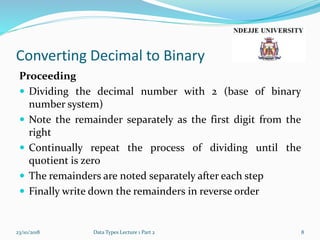
 Dividing the decimal number with 2 (base of binary
number system)
 Note the remainder separately as the first digit from the
right
 Continually repeat the process of dividing until the
quotient is zero
 The remainders are noted separately after each step
 Finally write down the remainders in reverse order
23/10/2018 Data Types Lecture 1 Part 2 8
Converting Decimal to Binary
Example 1
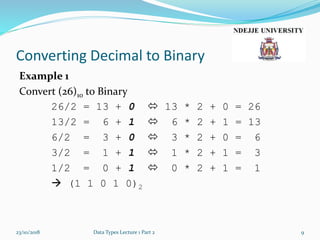
Convert (26)10 to Binary
26/2 = 13 + 0  13 * 2 + 0 = 26
13/2 = 6 + 1  6 * 2 + 1 = 13
6/2 = 3 + 0  3 * 2 + 0 = 6
3/2 = 1 + 1  1 * 2 + 1 = 3
1/2 = 0 + 1  0 * 2 + 1 = 1
 (1 1 0 1 0)2
23/10/2018 Data Types Lecture 1 Part 2 9
Converting Decimal to Binary
Example 2
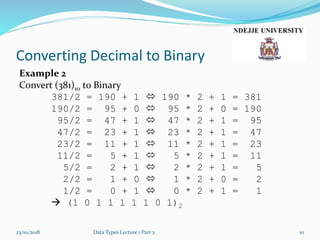
Convert (381)10 to Binary
381/2 = 190 + 1  190 * 2 + 1 = 381
190/2 = 95 + 0  95 * 2 + 0 = 190
95/2 = 47 + 1  47 * 2 + 1 = 95
47/2 = 23 + 1  23 * 2 + 1 = 47
23/2 = 11 + 1  11 * 2 + 1 = 23
11/2 = 5 + 1  5 * 2 + 1 = 11
5/2 = 2 + 1  2 * 2 + 1 = 5
2/2 = 1 + 0  1 * 2 + 0 = 2
1/2 = 0 + 1  0 * 2 + 1 = 1
 (1 0 1 1 1 1 1 0 1)2
23/10/2018 Data Types Lecture 1 Part 2 10
Converting Decimal to Octal
Proceeding
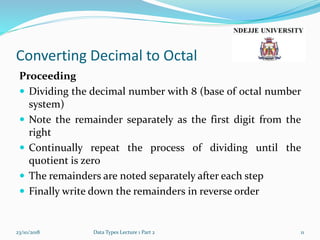
 Dividing the decimal number with 8 (base of octal number
system)
 Note the remainder separately as the first digit from the
right
 Continually repeat the process of dividing until the
quotient is zero
 The remainders are noted separately after each step
 Finally write down the remainders in reverse order
23/10/2018 Data Types Lecture 1 Part 2 11
Converting Decimal to Octal
Example 1
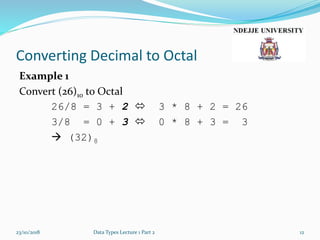
Convert (26)10 to Octal
26/8 = 3 + 2  3 * 8 + 2 = 26
3/8 = 0 + 3  0 * 8 + 3 = 3
 (32)8
23/10/2018 Data Types Lecture 1 Part 2 12
Converting Decimal to Octal
Example 2
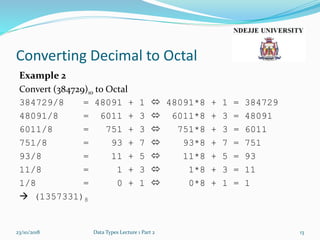
Convert (384729)10 to Octal
384729/8 = 48091 + 1  48091*8 + 1 = 384729
48091/8 = 6011 + 3  6011*8 + 3 = 48091
6011/8 = 751 + 3  751*8 + 3 = 6011
751/8 = 93 + 7  93*8 + 7 = 751
93/8 = 11 + 5  11*8 + 5 = 93
11/8 = 1 + 3  1*8 + 3 = 11
1/8 = 0 + 1  0*8 + 1 = 1
 (1357331)8
23/10/2018 Data Types Lecture 1 Part 2 13
Converting Decimal to
Hexadecimal
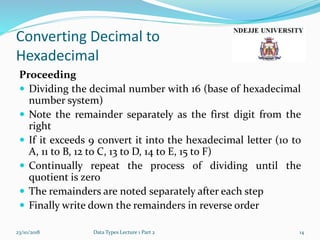
Proceeding
 Dividing the decimal number with 16 (base of hexadecimal
number system)
 Note the remainder separately as the first digit from the
right
 If it exceeds 9 convert it into the hexadecimal letter (10 to
A, 11 to B, 12 to C, 13 to D, 14 to E, 15 to F)
 Continually repeat the process of dividing until the
quotient is zero
 The remainders are noted separately after each step
 Finally write down the remainders in reverse order
23/10/2018 Data Types Lecture 1 Part 2 14
Converting Decimal to
Hexadecimal
Example 1
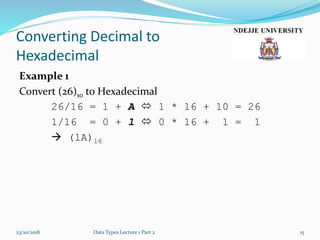
Convert (26)10 to Hexadecimal
26/16 = 1 + A  1 * 16 + 10 = 26
1/16 = 0 + 1  0 * 16 + 1 = 1
 (1A)16
23/10/2018 Data Types Lecture 1 Part 2 15
Converting Decimal to
Hexadecimal
Example 2
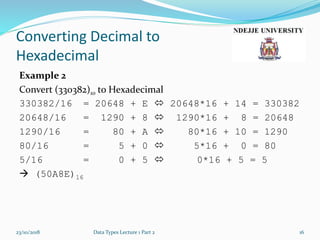
Convert (330382)10 to Hexadecimal
330382/16 = 20648 + E  20648*16 + 14 = 330382
20648/16 = 1290 + 8  1290*16 + 8 = 20648
1290/16 = 80 + A  80*16 + 10 = 1290
80/16 = 5 + 0  5*16 + 0 = 80
5/16 = 0 + 5  0*16 + 5 = 5
 (50A8E)16
23/10/2018 Data Types Lecture 1 Part 2 16
Converting Binary, Octal and
Hexadecimal to Decimal
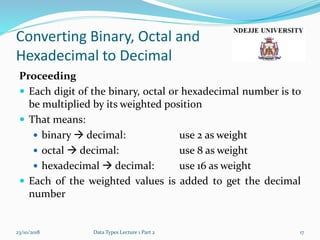
Proceeding
 Each digit of the binary, octal or hexadecimal number is to
be multiplied by its weighted position
 That means:
 binary  decimal: use 2 as weight
 octal  decimal: use 8 as weight
 hexadecimal  decimal: use 16 as weight
 Each of the weighted values is added to get the decimal
number
23/10/2018 Data Types Lecture 1 Part 2 17
Converting Binary, Octal and
Hexadecimal to Decimal
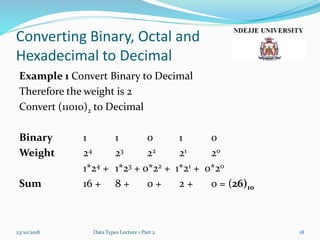
Example 1 Convert Binary to Decimal
Therefore the weight is 2
Convert (11010)2 to Decimal
Binary 1 1 0 1 0
Weight 24 23 22 21 20
1*24 + 1*23 + 0*22 + 1*21 + 0*20
Sum 16 + 8 + 0 + 2 + 0 = (26)10
23/10/2018 Data Types Lecture 1 Part 2 18
Converting Binary, Octal and
Hexadecimal to Decimal
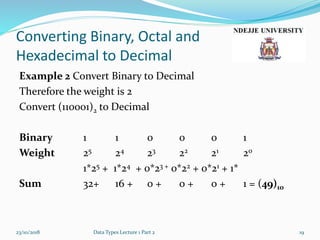
Example 2 Convert Binary to Decimal
Therefore the weight is 2
Convert (110001)2 to Decimal
Binary 1 1 0 0 0 1
Weight 25 24 23 22 21 20
1*25 + 1*24 + 0*23 + 0*22 + 0*21 + 1*
Sum 32+ 16 + 0 + 0 + 0 + 1 = (49)10
23/10/2018 Data Types Lecture 1 Part 2 19
Converting Binary, Octal and
Hexadecimal to Decimal
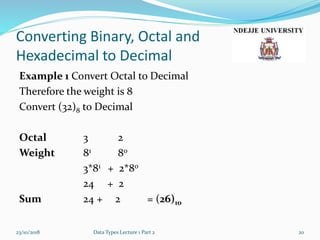
Example 1 Convert Octal to Decimal
Therefore the weight is 8
Convert (32)8 to Decimal
Octal 3 2
Weight 81 80
3*81 + 2*80
24 + 2
Sum 24 + 2 = (26)10
23/10/2018 Data Types Lecture 1 Part 2 20
Converting Binary, Octal and
Hexadecimal to Decimal
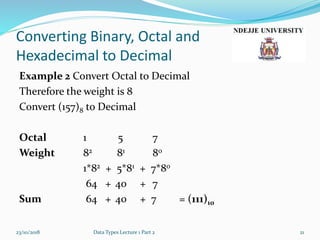
Example 2 Convert Octal to Decimal
Therefore the weight is 8
Convert (157)8 to Decimal
Octal 1 5 7
Weight 82 81 80
1*82 + 5*81 + 7*80
64 + 40 + 7
Sum 64 + 40 + 7 = (111)10
23/10/2018 Data Types Lecture 1 Part 2 21
Converting Binary, Octal and
Hexadecimal to Decimal
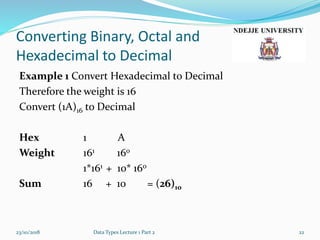
Example 1 Convert Hexadecimal to Decimal
Therefore the weight is 16
Convert (1A)16 to Decimal
Hex 1 A
Weight 161 160
1*161 + 10* 160
Sum 16 + 10 = (26)10
23/10/2018 Data Types Lecture 1 Part 2 22
Converting Binary, Octal and
Hexadecimal to Decimal
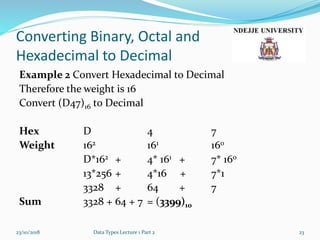
Example 2 Convert Hexadecimal to Decimal
Therefore the weight is 16
Convert (D47)16 to Decimal
Hex D 4 7
Weight 162 161 160
D*162 + 4* 161 + 7* 160
13*256 + 4*16 + 7*1
3328 + 64 + 7
Sum 3328 + 64 + 7 = (3399)10
23/10/2018 Data Types Lecture 1 Part 2 23
Converting Octal and
Hexadecimal to binary
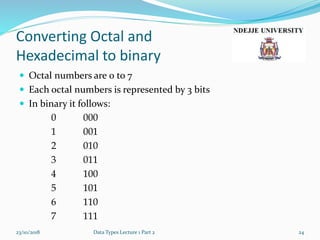
 Octal numbers are 0 to 7
 Each octal numbers is represented by 3 bits
 In binary it follows:
0 000
1 001
2 010
3 011
4 100
5 101
6 110
7 111
23/10/2018 Data Types Lecture 1 Part 2 24
Converting Octal and
Hexadecimal to binary
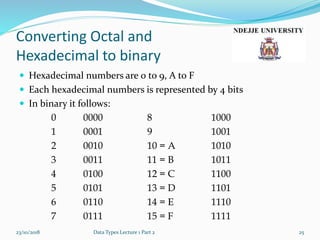
 Hexadecimal numbers are 0 to 9, A to F
 Each hexadecimal numbers is represented by 4 bits
 In binary it follows:
0 0000 8 1000
1 0001 9 1001
2 0010 10 = A 1010
3 0011 11 = B 1011
4 0100 12 = C 1100
5 0101 13 = D 1101
6 0110 14 = E 1110
7 0111 15 = F 1111
23/10/2018 Data Types Lecture 1 Part 2 25
Converting Between Octal and
Hexadecimal
Proceeding
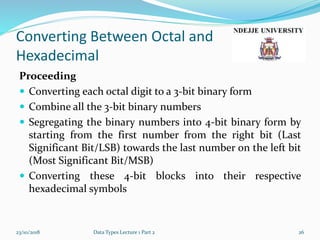
 Converting each octal digit to a 3-bit binary form
 Combine all the 3-bit binary numbers
 Segregating the binary numbers into 4-bit binary form by
starting from the first number from the right bit (Last
Significant Bit/LSB) towards the last number on the left bit
(Most Significant Bit/MSB)
 Converting these 4-bit blocks into their respective
hexadecimal symbols
23/10/2018 Data Types Lecture 1 Part 2 26
Converting Between Octal and
Hexadecimal
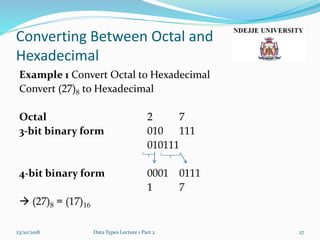
Example 1 Convert Octal to Hexadecimal
Convert (27)8 to Hexadecimal
Octal 2 7
3-bit binary form 010 111
010111
4-bit binary form 0001 0111
1 7
 (27)8 = (17)16
23/10/2018 Data Types Lecture 1 Part 2 27
Converting Between Octal and
Hexadecimal
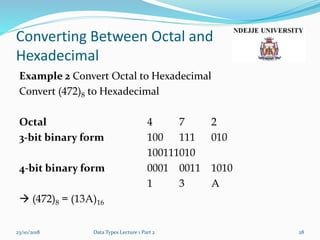
Example 2 Convert Octal to Hexadecimal
Convert (472)8 to Hexadecimal
Octal 4 7 2
3-bit binary form 100 111 010
100111010
4-bit binary form 0001 0011 1010
1 3 A
 (472)8 = (13A)16
23/10/2018 Data Types Lecture 1 Part 2 28
Converting Between Octal and
Hexadecimal
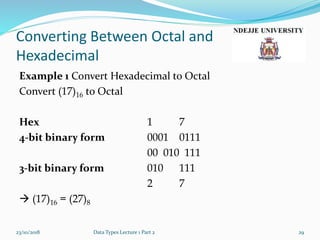
Example 1 Convert Hexadecimal to Octal
Convert (17)16 to Octal
Hex 1 7
4-bit binary form 0001 0111
00 010 111
3-bit binary form 010 111
2 7
 (17)16 = (27)8
23/10/2018 Data Types Lecture 1 Part 2 29
Converting Between Octal and
Hexadecimal
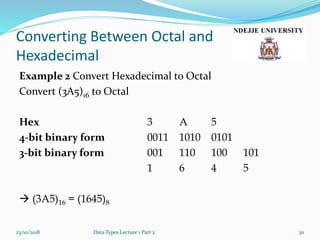
Example 2 Convert Hexadecimal to Octal
Convert (3A5)16 to Octal
Hex 3 A 5
4-bit binary form 0011 1010 0101
3-bit binary form 001 110 100 101
1 6 4 5
 (3A5)16 = (1645)8
23/10/2018 Data Types Lecture 1 Part 2 30
General Remarks
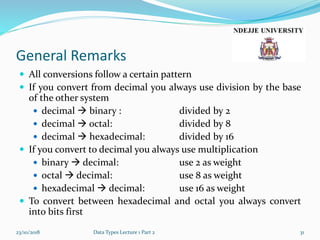
 All conversions follow a certain pattern
 If you convert from decimal you always use division by the base
of the other system
 decimal  binary : divided by 2
 decimal  octal: divided by 8
 decimal  hexadecimal: divided by 16
 If you convert to decimal you always use multiplication
 binary  decimal: use 2 as weight
 octal  decimal: use 8 as weight
 hexadecimal  decimal: use 16 as weight
 To convert between hexadecimal and octal you always convert
into bits first
23/10/2018 Data Types Lecture 1 Part 2 31
General Remarks
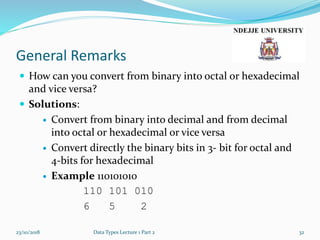
 How can you convert from binary into octal or hexadecimal
and vice versa?
 Solutions:
 Convert from binary into decimal and from decimal
into octal or hexadecimal or vice versa
 Convert directly the binary bits in 3- bit for octal and
4-bits for hexadecimal
 Example 110101010
110 101 010
6 5 2
23/10/2018 Data Types Lecture 1 Part 2 32
Representation of Data in the
Computer
 The data in Computer Systems are presented through a
binary or two's complement numbering system
 The used units are:
 Bit
 Nibble
 Byte
23/10/2018 Data Structures and Algorithm Introduction 33
Representation of Data in the
Computer
Bit
 A bit or binary digit is the smallest unit of data in computing
 A bit representing only two different value interpreted by 0 and 1
 You can represent an infinite number of items with only one bit
 true/false
 red/blue
 male/female
 +/-,
 on/off
23/10/2018 Data Structures and Algorithm Introduction 34
Representation of Data in the
Computer
Nibble
 A collection of 4 bits is called nibble
 Also called "semioctet" or "quartet" in a networking or
telecommunication context
 Nibbles represent binary coded decimal (BCD) and
hexadecimal number
 You can display up to 24 = 16 distinct values
 Nibbles are used for binary coding of real numbers
23/10/2018 Data Structures and Algorithm Introduction 35
Representation of Data in the
Computer
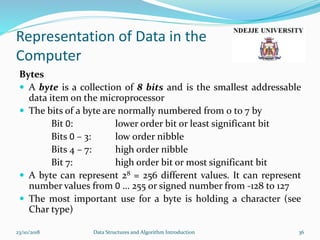
Bytes
 A byte is a collection of 8 bits and is the smallest addressable
data item on the microprocessor
 The bits of a byte are normally numbered from 0 to 7 by
Bit 0: lower order bit or least significant bit
Bits 0 – 3: low order nibble
Bits 4 – 7: high order nibble
Bit 7: high order bit or most significant bit
 A byte can represent 28 = 256 different values. It can represent
number values from 0 … 255 or signed number from -128 to 127
 The most important use for a byte is holding a character (see
Char type)
23/10/2018 Data Structures and Algorithm Introduction 36
Representation of Data in the
Computer
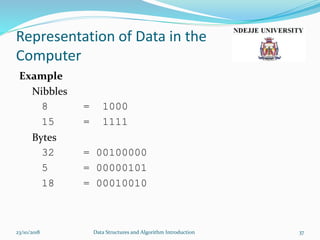
Example
Nibbles
8 = 1000
15 = 1111
Bytes
32 = 00100000
5 = 00000101
18 = 00010010
23/10/2018 Data Structures and Algorithm Introduction 37
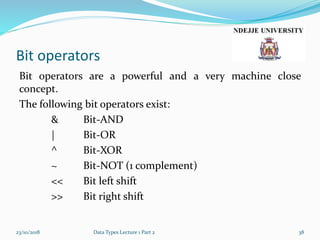
Bit operators
Bit operators are a powerful and a very machine close
concept.
The following bit operators exist:
& Bit-AND
| Bit-OR
^ Bit-XOR
~ Bit-NOT (1 complement)
<< Bit left shift
>> Bit right shift
23/10/2018 Data Types Lecture 1 Part 2 38
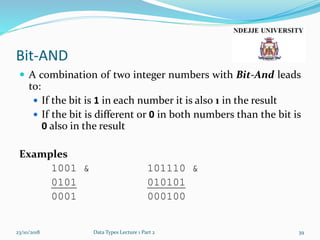
Bit-AND
 A combination of two integer numbers with Bit-And leads
to:
 If the bit is 1 in each number it is also 1 in the result
 If the bit is different or 0 in both numbers than the bit is
0 also in the result
Examples
1001 & 101110 &
0101 010101
0001 000100
23/10/2018 Data Types Lecture 1 Part 2 39
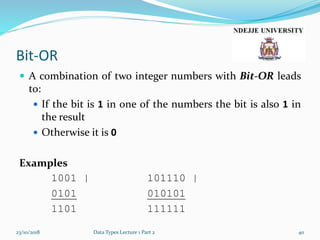
Bit-OR
 A combination of two integer numbers with Bit-OR leads
to:
 If the bit is 1 in one of the numbers the bit is also 1 in
the result
 Otherwise it is 0
Examples
1001 | 101110 |
0101 010101
1101 111111
23/10/2018 Data Types Lecture 1 Part 2 40
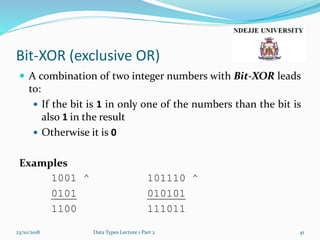
Bit-XOR (exclusive OR)
 A combination of two integer numbers with Bit-XOR leads
to:
 If the bit is 1 in only one of the numbers than the bit is
also 1 in the result
 Otherwise it is 0
Examples
1001 ^ 101110 ^
0101 010101
1100 111011
23/10/2018 Data Types Lecture 1 Part 2 41
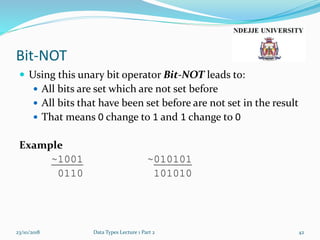
Bit-NOT
 Using this unary bit operator Bit-NOT leads to:
 All bits are set which are not set before
 All bits that have been set before are not set in the result
 That means 0 change to 1 and 1 change to 0
Example
~1001 ~010101
0110 101010
23/10/2018 Data Types Lecture 1 Part 2 42
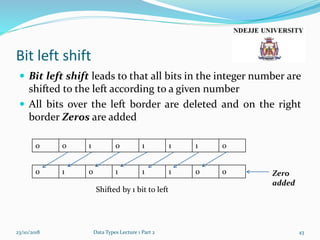
Bit left shift
 Bit left shift leads to that all bits in the integer number are
shifted to the left according to a given number
 All bits over the left border are deleted and on the right
border Zeros are added
23/10/2018 Data Types Lecture 1 Part 2 43
0 0 1 0 1 1 1 0
0 1 0 1 1 1 0 0 Zero
added
Shifted by 1 bit to left
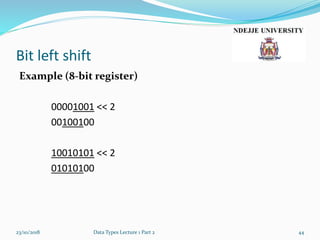
Bit left shift
Example (8-bit register)
00001001 << 2
00100100
10010101 << 2
01010100
23/10/2018 Data Types Lecture 1 Part 2 44
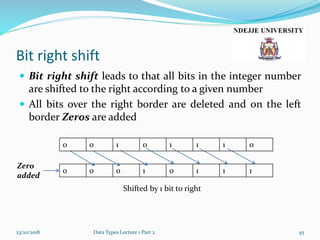
Bit right shift
 Bit right shift leads to that all bits in the integer number
are shifted to the right according to a given number
 All bits over the right border are deleted and on the left
border Zeros are added
23/10/2018 Data Types Lecture 1 Part 2 45
0 0 1 0 1 1 1 0
0 0 0 1 0 1 1 1
Shifted by 1 bit to right
Zero
added
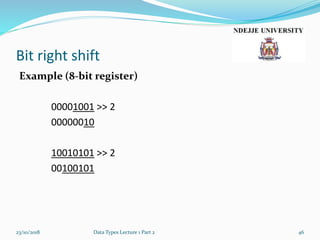
Bit right shift
Example (8-bit register)
00001001 >> 2
00000010
10010101 >> 2
00100101
23/10/2018 Data Types Lecture 1 Part 2 46
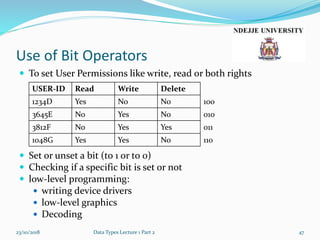
Use of Bit Operators
 To set User Permissions like write, read or both rights
 Set or unset a bit (to 1 or to 0)
 Checking if a specific bit is set or not
 low-level programming:
 writing device drivers
 low-level graphics
 Decoding
23/10/2018 Data Types Lecture 1 Part 2 47
USER-ID Read Write Delete
1234D Yes No No 100
3645E No Yes No 010
3812F No Yes Yes 011
1048G Yes Yes No 110
Any
questions?
23/10/2018 Data Types Lecture 1 Part 2 48

Lecture1b data types

  • 1.
    Lecture 1 Data TypesPart 2 23/10/2018 Data Types Lecture 1 Part 2 1
  • 2.
    Content Lecture 1Part2  Numeral Systems  Converting  Converting Decimal to Binary  Converting Decimal to Octal  Converting Decimal to Hexadecimal  Converting Binary, Octal and Hexadecimal to Decimal  Converting between Octal and Hexadecimal 23/10/2018 Data Types Lecture 1 Part 2 2
  • 3.
    Content Lecture 1Part2  Representation of Data in Computer  Bit  Nibble  Byte  Bit Operators  Bit-AND  Bit-OR  Bit-XOR  Bit-Not  Bit left shift  Bit right shift 23/10/2018 Data Types Lecture 1 Part 2 3
  • 4.
    Numeral Systems  Numeralsystems are a form of a writing representation of mathematical numbers  A numeral system represents uniquely a given set of numbers  The most common used numeral system are  Binary (base 2)  Decimal (base 10)  Octal (base 8)  Hexadecimal (base 16)  To indicate the used system you place the base after the number as subscript  Example: Decimal number (654321)10 23/10/2018 Data Types Lecture 1 Part 2 4
  • 5.
    Numeral Systems  Binary The binary numeral system is the number system to base 2  It uses only the digit 0 and 1  Internally used by all modern computers  Example: (01001101)2  Octal  The octal numeral system is the number system to base 8  It uses the digits 0 to 7  Used for example for file permissions under Unix systems (chmod) 23/10/2018 Data Types Lecture 1 Part 2 5
  • 6.
    Numeral Systems  Itdoes not need an extra symbol  Many programming languages use a single 0 to indicate a octal number (020)  Example: (123456)10 = (361100)8  Hexadecimal  A positional numeral system with base 16  It uses 16 symbols commonly 0–9 and A, B, C, D, E, F (or a–f)  Primary use: a human friendly representation of binary numbers  Example: (123)10 = (7B)16 (471508)10 = (731D4)16  Many programming languages use a 0x to indicate a hexadecimal number (0x12) 23/10/2018 Data Types Lecture 1 Part 2 6
  • 7.
    Converting  Converting meansto transform a number from one numeral system to the other  Converting will be done between these numeral systems:  Decimal  Binary  Hexadecimal  Octal 23/10/2018 Data Types Lecture 1 Part 2 7
  • 8.
    Converting Decimal toBinary Proceeding  Dividing the decimal number with 2 (base of binary number system)  Note the remainder separately as the first digit from the right  Continually repeat the process of dividing until the quotient is zero  The remainders are noted separately after each step  Finally write down the remainders in reverse order 23/10/2018 Data Types Lecture 1 Part 2 8
  • 9.
    Converting Decimal toBinary Example 1 Convert (26)10 to Binary 26/2 = 13 + 0  13 * 2 + 0 = 26 13/2 = 6 + 1  6 * 2 + 1 = 13 6/2 = 3 + 0  3 * 2 + 0 = 6 3/2 = 1 + 1  1 * 2 + 1 = 3 1/2 = 0 + 1  0 * 2 + 1 = 1  (1 1 0 1 0)2 23/10/2018 Data Types Lecture 1 Part 2 9
  • 10.
    Converting Decimal toBinary Example 2 Convert (381)10 to Binary 381/2 = 190 + 1  190 * 2 + 1 = 381 190/2 = 95 + 0  95 * 2 + 0 = 190 95/2 = 47 + 1  47 * 2 + 1 = 95 47/2 = 23 + 1  23 * 2 + 1 = 47 23/2 = 11 + 1  11 * 2 + 1 = 23 11/2 = 5 + 1  5 * 2 + 1 = 11 5/2 = 2 + 1  2 * 2 + 1 = 5 2/2 = 1 + 0  1 * 2 + 0 = 2 1/2 = 0 + 1  0 * 2 + 1 = 1  (1 0 1 1 1 1 1 0 1)2 23/10/2018 Data Types Lecture 1 Part 2 10
  • 11.
    Converting Decimal toOctal Proceeding  Dividing the decimal number with 8 (base of octal number system)  Note the remainder separately as the first digit from the right  Continually repeat the process of dividing until the quotient is zero  The remainders are noted separately after each step  Finally write down the remainders in reverse order 23/10/2018 Data Types Lecture 1 Part 2 11
  • 12.
    Converting Decimal toOctal Example 1 Convert (26)10 to Octal 26/8 = 3 + 2  3 * 8 + 2 = 26 3/8 = 0 + 3  0 * 8 + 3 = 3  (32)8 23/10/2018 Data Types Lecture 1 Part 2 12
  • 13.
    Converting Decimal toOctal Example 2 Convert (384729)10 to Octal 384729/8 = 48091 + 1  48091*8 + 1 = 384729 48091/8 = 6011 + 3  6011*8 + 3 = 48091 6011/8 = 751 + 3  751*8 + 3 = 6011 751/8 = 93 + 7  93*8 + 7 = 751 93/8 = 11 + 5  11*8 + 5 = 93 11/8 = 1 + 3  1*8 + 3 = 11 1/8 = 0 + 1  0*8 + 1 = 1  (1357331)8 23/10/2018 Data Types Lecture 1 Part 2 13
  • 14.
    Converting Decimal to Hexadecimal Proceeding Dividing the decimal number with 16 (base of hexadecimal number system)  Note the remainder separately as the first digit from the right  If it exceeds 9 convert it into the hexadecimal letter (10 to A, 11 to B, 12 to C, 13 to D, 14 to E, 15 to F)  Continually repeat the process of dividing until the quotient is zero  The remainders are noted separately after each step  Finally write down the remainders in reverse order 23/10/2018 Data Types Lecture 1 Part 2 14
  • 15.
    Converting Decimal to Hexadecimal Example1 Convert (26)10 to Hexadecimal 26/16 = 1 + A  1 * 16 + 10 = 26 1/16 = 0 + 1  0 * 16 + 1 = 1  (1A)16 23/10/2018 Data Types Lecture 1 Part 2 15
  • 16.
    Converting Decimal to Hexadecimal Example2 Convert (330382)10 to Hexadecimal 330382/16 = 20648 + E  20648*16 + 14 = 330382 20648/16 = 1290 + 8  1290*16 + 8 = 20648 1290/16 = 80 + A  80*16 + 10 = 1290 80/16 = 5 + 0  5*16 + 0 = 80 5/16 = 0 + 5  0*16 + 5 = 5  (50A8E)16 23/10/2018 Data Types Lecture 1 Part 2 16
  • 17.
    Converting Binary, Octaland Hexadecimal to Decimal Proceeding  Each digit of the binary, octal or hexadecimal number is to be multiplied by its weighted position  That means:  binary  decimal: use 2 as weight  octal  decimal: use 8 as weight  hexadecimal  decimal: use 16 as weight  Each of the weighted values is added to get the decimal number 23/10/2018 Data Types Lecture 1 Part 2 17
  • 18.
    Converting Binary, Octaland Hexadecimal to Decimal Example 1 Convert Binary to Decimal Therefore the weight is 2 Convert (11010)2 to Decimal Binary 1 1 0 1 0 Weight 24 23 22 21 20 1*24 + 1*23 + 0*22 + 1*21 + 0*20 Sum 16 + 8 + 0 + 2 + 0 = (26)10 23/10/2018 Data Types Lecture 1 Part 2 18
  • 19.
    Converting Binary, Octaland Hexadecimal to Decimal Example 2 Convert Binary to Decimal Therefore the weight is 2 Convert (110001)2 to Decimal Binary 1 1 0 0 0 1 Weight 25 24 23 22 21 20 1*25 + 1*24 + 0*23 + 0*22 + 0*21 + 1* Sum 32+ 16 + 0 + 0 + 0 + 1 = (49)10 23/10/2018 Data Types Lecture 1 Part 2 19
  • 20.
    Converting Binary, Octaland Hexadecimal to Decimal Example 1 Convert Octal to Decimal Therefore the weight is 8 Convert (32)8 to Decimal Octal 3 2 Weight 81 80 3*81 + 2*80 24 + 2 Sum 24 + 2 = (26)10 23/10/2018 Data Types Lecture 1 Part 2 20
  • 21.
    Converting Binary, Octaland Hexadecimal to Decimal Example 2 Convert Octal to Decimal Therefore the weight is 8 Convert (157)8 to Decimal Octal 1 5 7 Weight 82 81 80 1*82 + 5*81 + 7*80 64 + 40 + 7 Sum 64 + 40 + 7 = (111)10 23/10/2018 Data Types Lecture 1 Part 2 21
  • 22.
    Converting Binary, Octaland Hexadecimal to Decimal Example 1 Convert Hexadecimal to Decimal Therefore the weight is 16 Convert (1A)16 to Decimal Hex 1 A Weight 161 160 1*161 + 10* 160 Sum 16 + 10 = (26)10 23/10/2018 Data Types Lecture 1 Part 2 22
  • 23.
    Converting Binary, Octaland Hexadecimal to Decimal Example 2 Convert Hexadecimal to Decimal Therefore the weight is 16 Convert (D47)16 to Decimal Hex D 4 7 Weight 162 161 160 D*162 + 4* 161 + 7* 160 13*256 + 4*16 + 7*1 3328 + 64 + 7 Sum 3328 + 64 + 7 = (3399)10 23/10/2018 Data Types Lecture 1 Part 2 23
  • 24.
    Converting Octal and Hexadecimalto binary  Octal numbers are 0 to 7  Each octal numbers is represented by 3 bits  In binary it follows: 0 000 1 001 2 010 3 011 4 100 5 101 6 110 7 111 23/10/2018 Data Types Lecture 1 Part 2 24
  • 25.
    Converting Octal and Hexadecimalto binary  Hexadecimal numbers are 0 to 9, A to F  Each hexadecimal numbers is represented by 4 bits  In binary it follows: 0 0000 8 1000 1 0001 9 1001 2 0010 10 = A 1010 3 0011 11 = B 1011 4 0100 12 = C 1100 5 0101 13 = D 1101 6 0110 14 = E 1110 7 0111 15 = F 1111 23/10/2018 Data Types Lecture 1 Part 2 25
  • 26.
    Converting Between Octaland Hexadecimal Proceeding  Converting each octal digit to a 3-bit binary form  Combine all the 3-bit binary numbers  Segregating the binary numbers into 4-bit binary form by starting from the first number from the right bit (Last Significant Bit/LSB) towards the last number on the left bit (Most Significant Bit/MSB)  Converting these 4-bit blocks into their respective hexadecimal symbols 23/10/2018 Data Types Lecture 1 Part 2 26
  • 27.
    Converting Between Octaland Hexadecimal Example 1 Convert Octal to Hexadecimal Convert (27)8 to Hexadecimal Octal 2 7 3-bit binary form 010 111 010111 4-bit binary form 0001 0111 1 7  (27)8 = (17)16 23/10/2018 Data Types Lecture 1 Part 2 27
  • 28.
    Converting Between Octaland Hexadecimal Example 2 Convert Octal to Hexadecimal Convert (472)8 to Hexadecimal Octal 4 7 2 3-bit binary form 100 111 010 100111010 4-bit binary form 0001 0011 1010 1 3 A  (472)8 = (13A)16 23/10/2018 Data Types Lecture 1 Part 2 28
  • 29.
    Converting Between Octaland Hexadecimal Example 1 Convert Hexadecimal to Octal Convert (17)16 to Octal Hex 1 7 4-bit binary form 0001 0111 00 010 111 3-bit binary form 010 111 2 7  (17)16 = (27)8 23/10/2018 Data Types Lecture 1 Part 2 29
  • 30.
    Converting Between Octaland Hexadecimal Example 2 Convert Hexadecimal to Octal Convert (3A5)16 to Octal Hex 3 A 5 4-bit binary form 0011 1010 0101 3-bit binary form 001 110 100 101 1 6 4 5  (3A5)16 = (1645)8 23/10/2018 Data Types Lecture 1 Part 2 30
  • 31.
    General Remarks  Allconversions follow a certain pattern  If you convert from decimal you always use division by the base of the other system  decimal  binary : divided by 2  decimal  octal: divided by 8  decimal  hexadecimal: divided by 16  If you convert to decimal you always use multiplication  binary  decimal: use 2 as weight  octal  decimal: use 8 as weight  hexadecimal  decimal: use 16 as weight  To convert between hexadecimal and octal you always convert into bits first 23/10/2018 Data Types Lecture 1 Part 2 31
  • 32.
    General Remarks  Howcan you convert from binary into octal or hexadecimal and vice versa?  Solutions:  Convert from binary into decimal and from decimal into octal or hexadecimal or vice versa  Convert directly the binary bits in 3- bit for octal and 4-bits for hexadecimal  Example 110101010 110 101 010 6 5 2 23/10/2018 Data Types Lecture 1 Part 2 32
  • 33.
    Representation of Datain the Computer  The data in Computer Systems are presented through a binary or two's complement numbering system  The used units are:  Bit  Nibble  Byte 23/10/2018 Data Structures and Algorithm Introduction 33
  • 34.
    Representation of Datain the Computer Bit  A bit or binary digit is the smallest unit of data in computing  A bit representing only two different value interpreted by 0 and 1  You can represent an infinite number of items with only one bit  true/false  red/blue  male/female  +/-,  on/off 23/10/2018 Data Structures and Algorithm Introduction 34
  • 35.
    Representation of Datain the Computer Nibble  A collection of 4 bits is called nibble  Also called "semioctet" or "quartet" in a networking or telecommunication context  Nibbles represent binary coded decimal (BCD) and hexadecimal number  You can display up to 24 = 16 distinct values  Nibbles are used for binary coding of real numbers 23/10/2018 Data Structures and Algorithm Introduction 35
  • 36.
    Representation of Datain the Computer Bytes  A byte is a collection of 8 bits and is the smallest addressable data item on the microprocessor  The bits of a byte are normally numbered from 0 to 7 by Bit 0: lower order bit or least significant bit Bits 0 – 3: low order nibble Bits 4 – 7: high order nibble Bit 7: high order bit or most significant bit  A byte can represent 28 = 256 different values. It can represent number values from 0 … 255 or signed number from -128 to 127  The most important use for a byte is holding a character (see Char type) 23/10/2018 Data Structures and Algorithm Introduction 36
  • 37.
    Representation of Datain the Computer Example Nibbles 8 = 1000 15 = 1111 Bytes 32 = 00100000 5 = 00000101 18 = 00010010 23/10/2018 Data Structures and Algorithm Introduction 37
  • 38.
    Bit operators Bit operatorsare a powerful and a very machine close concept. The following bit operators exist: & Bit-AND | Bit-OR ^ Bit-XOR ~ Bit-NOT (1 complement) << Bit left shift >> Bit right shift 23/10/2018 Data Types Lecture 1 Part 2 38
  • 39.
    Bit-AND  A combinationof two integer numbers with Bit-And leads to:  If the bit is 1 in each number it is also 1 in the result  If the bit is different or 0 in both numbers than the bit is 0 also in the result Examples 1001 & 101110 & 0101 010101 0001 000100 23/10/2018 Data Types Lecture 1 Part 2 39
  • 40.
    Bit-OR  A combinationof two integer numbers with Bit-OR leads to:  If the bit is 1 in one of the numbers the bit is also 1 in the result  Otherwise it is 0 Examples 1001 | 101110 | 0101 010101 1101 111111 23/10/2018 Data Types Lecture 1 Part 2 40
  • 41.
    Bit-XOR (exclusive OR) A combination of two integer numbers with Bit-XOR leads to:  If the bit is 1 in only one of the numbers than the bit is also 1 in the result  Otherwise it is 0 Examples 1001 ^ 101110 ^ 0101 010101 1100 111011 23/10/2018 Data Types Lecture 1 Part 2 41
  • 42.
    Bit-NOT  Using thisunary bit operator Bit-NOT leads to:  All bits are set which are not set before  All bits that have been set before are not set in the result  That means 0 change to 1 and 1 change to 0 Example ~1001 ~010101 0110 101010 23/10/2018 Data Types Lecture 1 Part 2 42
  • 43.
    Bit left shift Bit left shift leads to that all bits in the integer number are shifted to the left according to a given number  All bits over the left border are deleted and on the right border Zeros are added 23/10/2018 Data Types Lecture 1 Part 2 43 0 0 1 0 1 1 1 0 0 1 0 1 1 1 0 0 Zero added Shifted by 1 bit to left
  • 44.
    Bit left shift Example(8-bit register) 00001001 << 2 00100100 10010101 << 2 01010100 23/10/2018 Data Types Lecture 1 Part 2 44
  • 45.
    Bit right shift Bit right shift leads to that all bits in the integer number are shifted to the right according to a given number  All bits over the right border are deleted and on the left border Zeros are added 23/10/2018 Data Types Lecture 1 Part 2 45 0 0 1 0 1 1 1 0 0 0 0 1 0 1 1 1 Shifted by 1 bit to right Zero added
  • 46.
    Bit right shift Example(8-bit register) 00001001 >> 2 00000010 10010101 >> 2 00100101 23/10/2018 Data Types Lecture 1 Part 2 46
  • 47.
    Use of BitOperators  To set User Permissions like write, read or both rights  Set or unset a bit (to 1 or to 0)  Checking if a specific bit is set or not  low-level programming:  writing device drivers  low-level graphics  Decoding 23/10/2018 Data Types Lecture 1 Part 2 47 USER-ID Read Write Delete 1234D Yes No No 100 3645E No Yes No 010 3812F No Yes Yes 011 1048G Yes Yes No 110
  • 48.

Editor's Notes

  • #42 Returns 1 for the different ones and 0 for the same ones
  • #48 Machine / hardware close programming