1
CSE 403
UML SequenceDiagrams
Reading:
UML Distilled Ch. 4, by M. Fowler
These lecture slides are copyright (C) Marty Stepp, 2007. They may not be rehosted, sold, or
modified without expressed permission from the author. All rights reserved.
2.
2
UML sequence diagrams
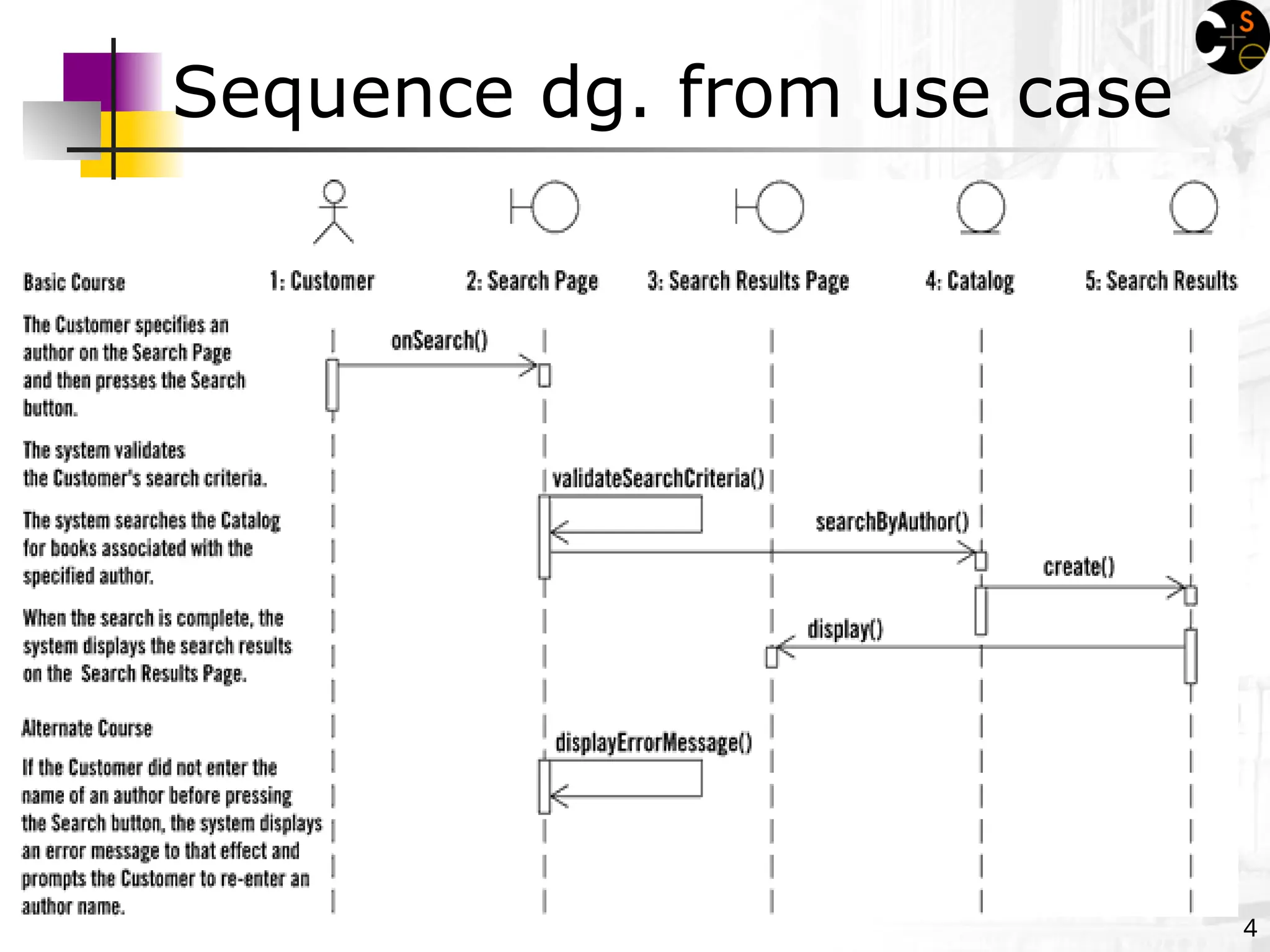
sequence diagram: an "interaction diagram" that
models a single scenario executing in the system
perhaps 2nd most used UML diagram (behind class diagram)
relation of UML diagrams to other exercises:
CRC cards -> class diagram
use cases -> sequence diagrams
3.
3
Key parts ofa sequence diag.
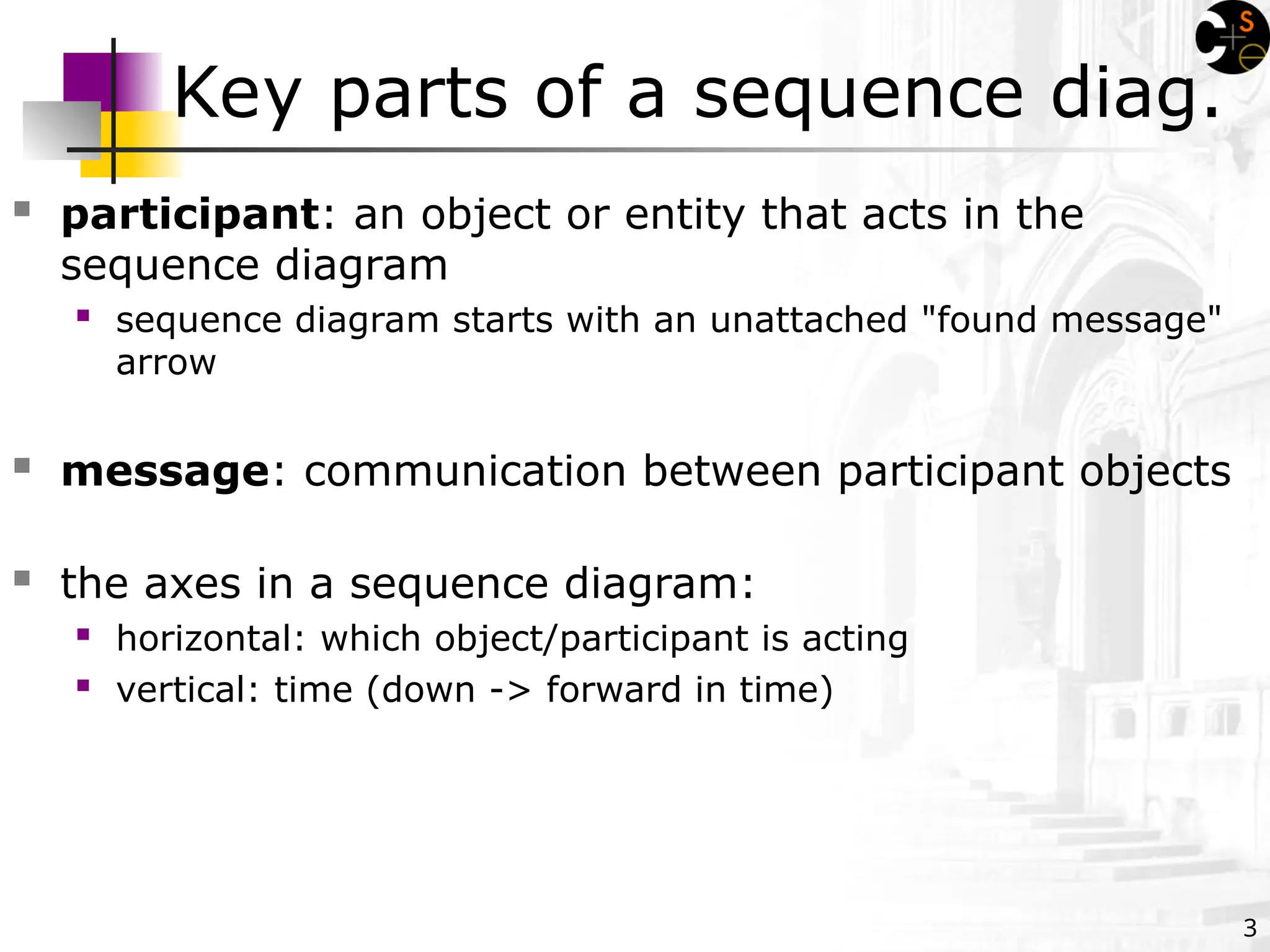
participant: an object or entity that acts in the
sequence diagram
sequence diagram starts with an unattached "found message"
arrow
message: communication between participant objects
the axes in a sequence diagram:
horizontal: which object/participant is acting
vertical: time (down -> forward in time)
5
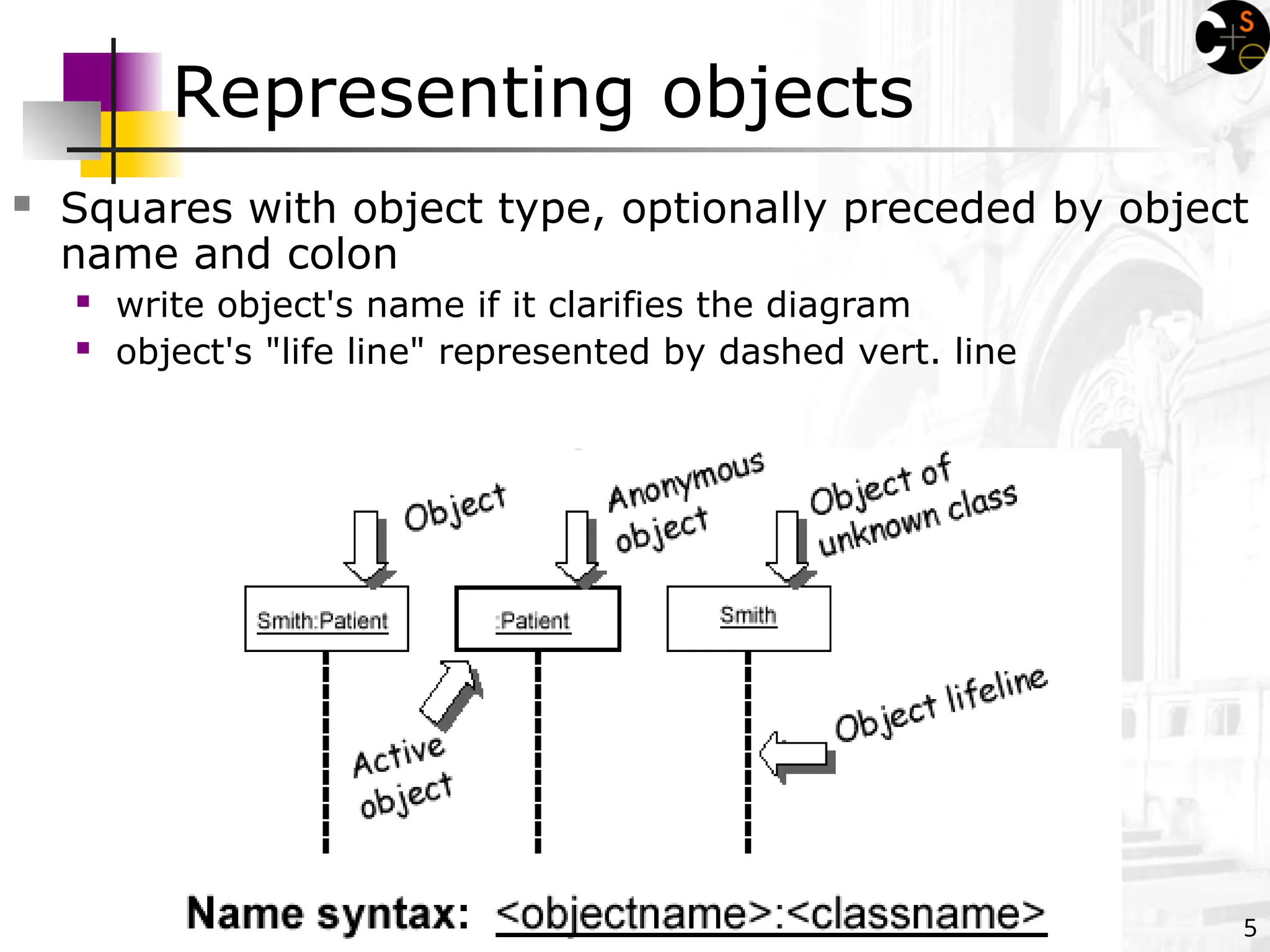
Representing objects
Squareswith object type, optionally preceded by object
name and colon
write object's name if it clarifies the diagram
object's "life line" represented by dashed vert. line
6.
6
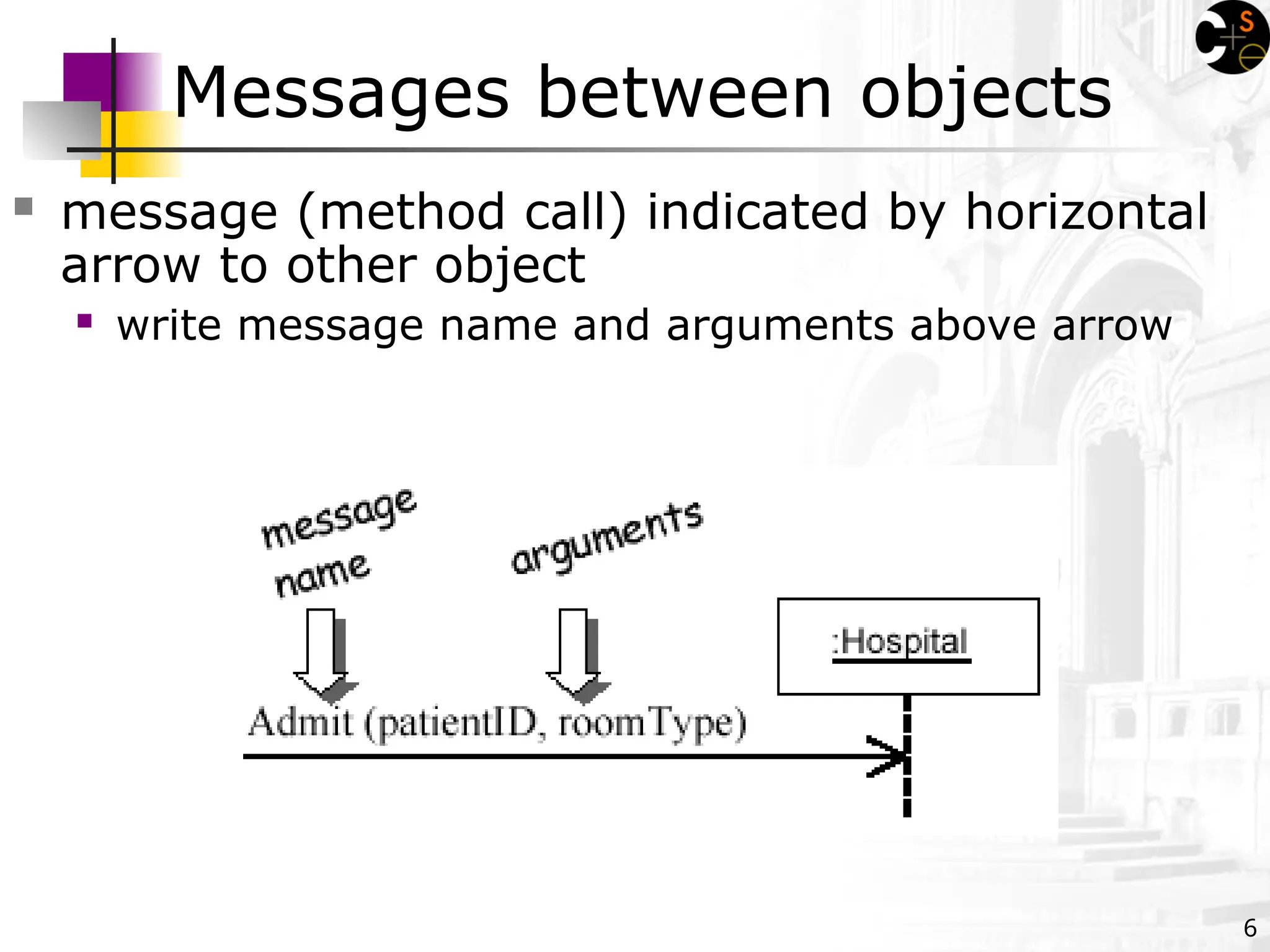
message (methodcall) indicated by horizontal
arrow to other object
write message name and arguments above arrow
Messages between objects
7.
7
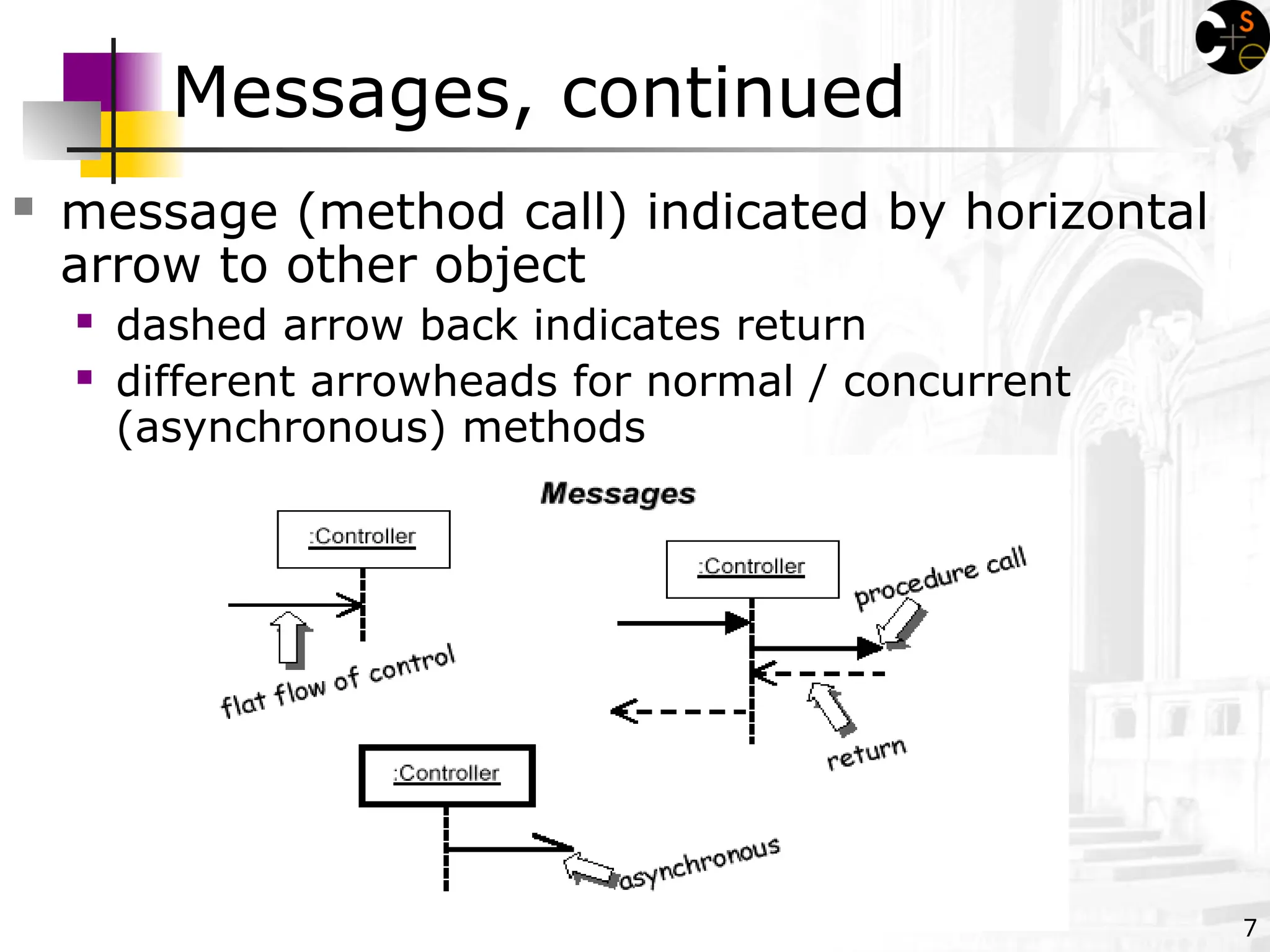
Messages, continued
message(method call) indicated by horizontal
arrow to other object
dashed arrow back indicates return
different arrowheads for normal / concurrent
(asynchronous) methods
8.
8
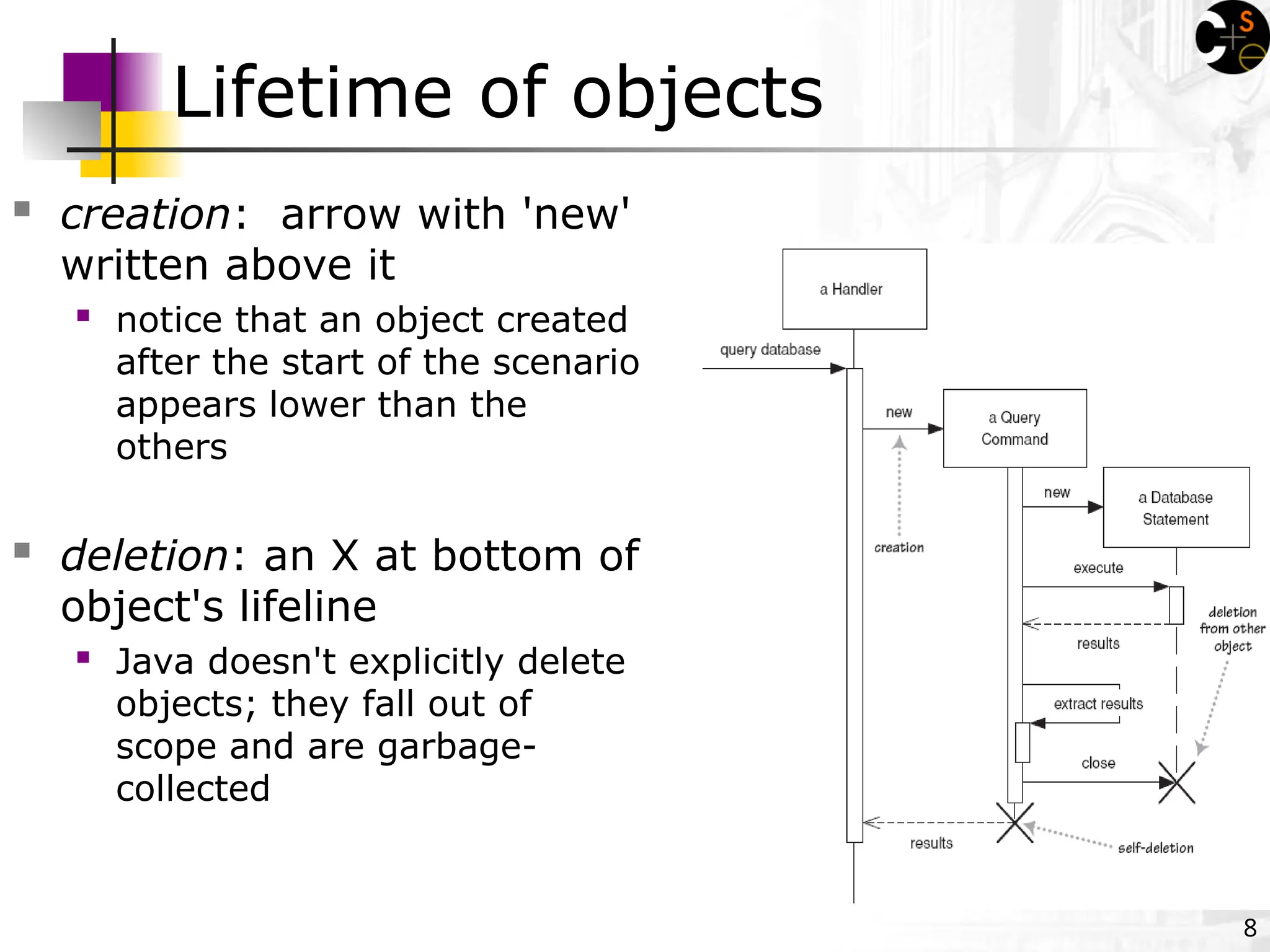
Lifetime of objects
creation: arrow with 'new'
written above it
notice that an object created
after the start of the scenario
appears lower than the
others
deletion: an X at bottom of
object's lifeline
Java doesn't explicitly delete
objects; they fall out of
scope and are garbage-
collected
9.
9
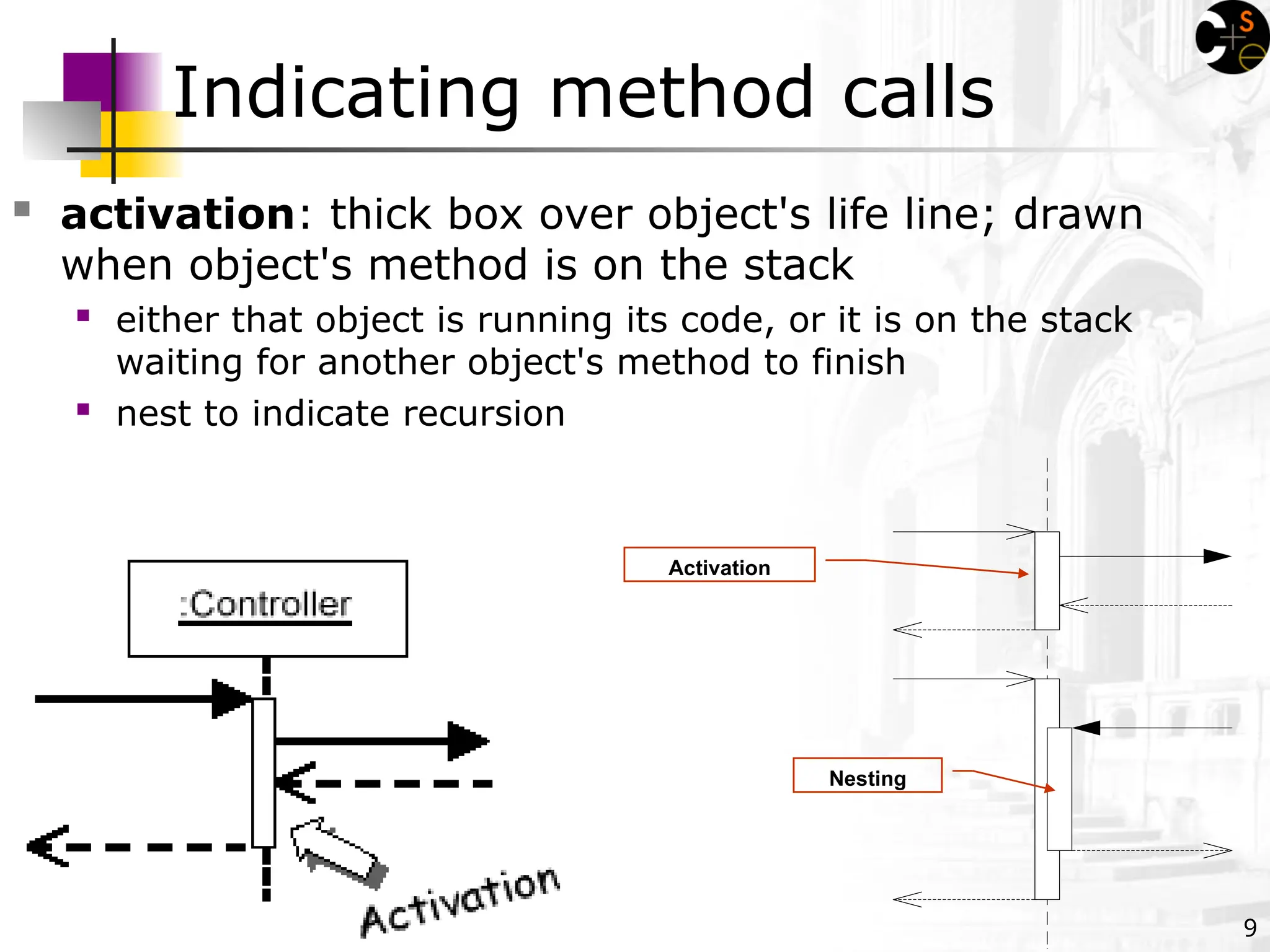
Indicating method calls
activation: thick box over object's life line; drawn
when object's method is on the stack
either that object is running its code, or it is on the stack
waiting for another object's method to finish
nest to indicate recursion
Activation
Nesting
10.
10
Indicating selection andloops
frame: box around part of a sequence diagram to indicate
selection or loop
if -> (opt) [condition]
if/else -> (alt) [condition], separated by horizontal dashed
line
loop -> (loop) [condition or items to loop over]
11.
11
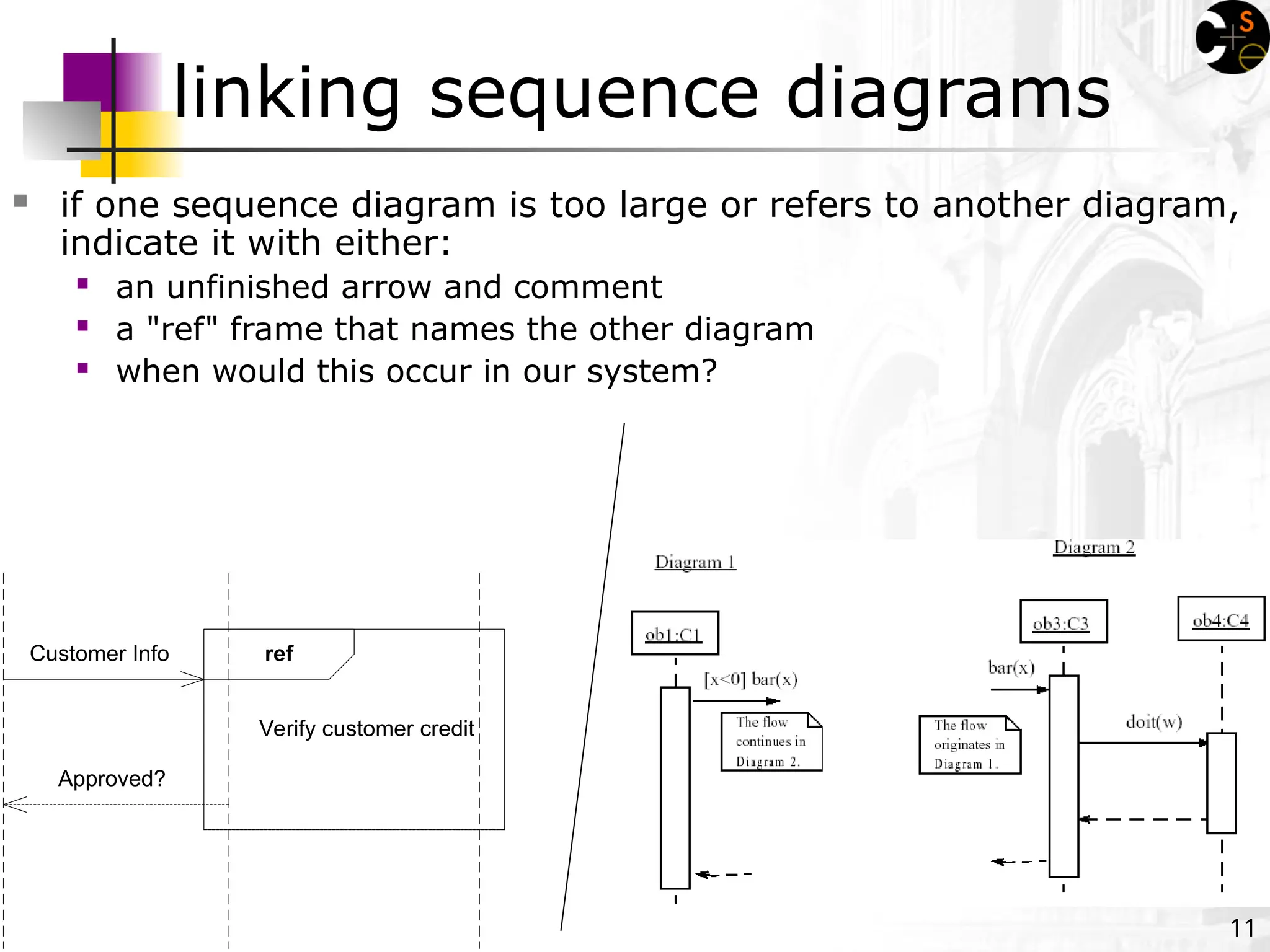
linking sequence diagrams
if one sequence diagram is too large or refers to another diagram,
indicate it with either:
an unfinished arrow and comment
a "ref" frame that names the other diagram
when would this occur in our system?
Verify customer credit
ref
Customer Info
Approved?
16
Why not justcode it?
Sequence diagrams can be somewhat close to the code
level. So why not just code up that algorithm rather
than drawing it as a sequence diagram?
a good sequence diagram is still a bit above the level
of the real code (not all code is drawn on diagram)
sequence diagrams are language-agnostic (can be
implemented in many different languages
non-coders can do sequence diagrams
easier to do sequence diagrams as a team
can see many objects/classes at a time on same
page (visual bandwidth)
17.
17
Sequence diagram exercise1
Let's do a sequence diagram for the following casual use
case, Start New Poker Round :
The scenario begins when the player chooses to start a new
round in the UI. The UI asks whether any new players want to
join the round; if so, the new players are added using the UI.
All players' hands are emptied into the deck, which is then
shuffled. The player left of the dealer supplies an ante bet of
the proper amount. Next each player is dealt a hand of two
cards from the deck in a round-robin fashion; one card to each
player, then the second card.
If the player left of the dealer doesn't have enough money to
ante, he/she is removed from the game, and the next player
supplies the ante. If that player also cannot afford the ante,
this cycle continues until such a player is found or all players are
removed.
18.
18
Sequence diagram exercise2
Let's do a sequence diagram for the following casual
use case, Add Calendar Appointment :
The scenario begins when the user chooses to add a new
appointment in the UI. The UI notices which part of the calendar is
active and pops up an Add Appointment window for that date and
time.
The user enters the necessary information about the appointment's
name, location, start and end times. The UI will prevent the user from
entering an appointment that has invalid information, such as an
empty name or negative duration. The calendar records the new
appointment in the user's list of appointments. Any reminder selected
by the user is added to the list of reminders.
If the user already has an appointment at that time, the user
is shown a warning message and asked to choose an available time or
replace the previous appointment. If the user enters an appointment
with the same name and duration as an existing group meeting, the
calendar asks the user whether he/she intended to join that group
meeting instead. If so, the user is added to that group meeting's list
of participants.
![10
Indicating selection and loops
frame: box around part of a sequence diagram to indicate
selection or loop
if -> (opt) [condition]
if/else -> (alt) [condition], separated by horizontal dashed
line
loop -> (loop) [condition or items to loop over]](https://image.slidesharecdn.com/lecture09-sequencediagrams-250217023945-c0c3ce86/75/lecture09-sequencediagrams-notes-and-leac-10-2048.jpg)




![[DSC Europe 25] Vid Stimac - Policy Parsimony: Between Oversimplifying and Ov...](https://cdn.slidesharecdn.com/ss_thumbnails/eqlepagzqp2rhg3gbluh-dsc-stimac-251120-251205090438-059e7f54-thumbnail.jpg?width=640&height=640&fit=bounds)

![[DSC Europe 25] Dragan Vucic - Building the Learning Organization - How AI Tr...](https://cdn.slidesharecdn.com/ss_thumbnails/8brigo2sbu6qur6gxrra-7-251205085715-6ae07d24-thumbnail.jpg?width=640&height=640&fit=bounds)

![[DSC Europe 25] Dusan Jovicic - AI Story: From on-prem to cloud and back agai...](https://cdn.slidesharecdn.com/ss_thumbnails/8kp49m6uq22ifnbwhfnk-2-251205085715-964d11a6-thumbnail.jpg?width=640&height=640&fit=bounds)


![[DSC Europe 25] Andy Cotgreave - Nothing is new in analytics.pptx](https://cdn.slidesharecdn.com/ss_thumbnails/mba4vzcurvoh5lfrd5zw-6-251205194645-341bbbbe-thumbnail.jpg?width=640&height=640&fit=bounds)

![[DSC Europe 25] Goran Obradovic - The Rise of Sovereign AI: Building the Regi...](https://cdn.slidesharecdn.com/ss_thumbnails/7nw2xxixrxqdxvrb5wca-6-251205085714-ab09a2ac-thumbnail.jpg?width=640&height=640&fit=bounds)