


©SIProp Project, 2006-2017 1
The Self-Contained SDR Satellite Grand
Station with Raspberry Pi 3
Noritsuna Imamura(JI1SZP)
noritsuna@siprop.org
©SIProp Project, 2006-2018 2
Contents
The Self-Contained SDR Grand Station with
Raspberry Pi 3
Setup
Raspberry Pi
GNU Radio
Gqrx
TeamViewer
OS Image
Download
©SIProp Project, 2006-2018 3
What’s The Self-Contained SDR Grand
Station with Raspberry Pi 3
This Satellite Grand Station has Full Functions
for Satellite Radio, Power Supply and WAN
Connection with Raspberry Pi in small box.
Feature
Space-Saving
8inchi ^ 3 size
All Cable-Less
No Power Cable, No RF Cable, No Network Cable
WAN Connection
Reachable from Anywhere
SDR+GNU Radio
Programmable Satellite Grand Station
Automatic Satellite Communication
Qt based Tracking Satellite Software (Our software)
• https://github.com/siprop/satella.git
• Coming Soon!!!
©SIProp Project, 2006-2018 4
Based Devices
SDR
RTL-SDR
http://www.rtl-
sdr.com/buy-rtl-sdr-dvb-
t-dongles/
Antenna
Mobile Antenna
144/430MHz
LNA
0.1-2000MHz Wideband
RF Low Noise Amplifier
Main PC
Raspberry Pi 3
https://www.raspberry
pi.org/products/raspbe
rry-pi-3-model-b/
Rainproof Box
Aluminum Box
©SIProp Project, 2006-2018 5
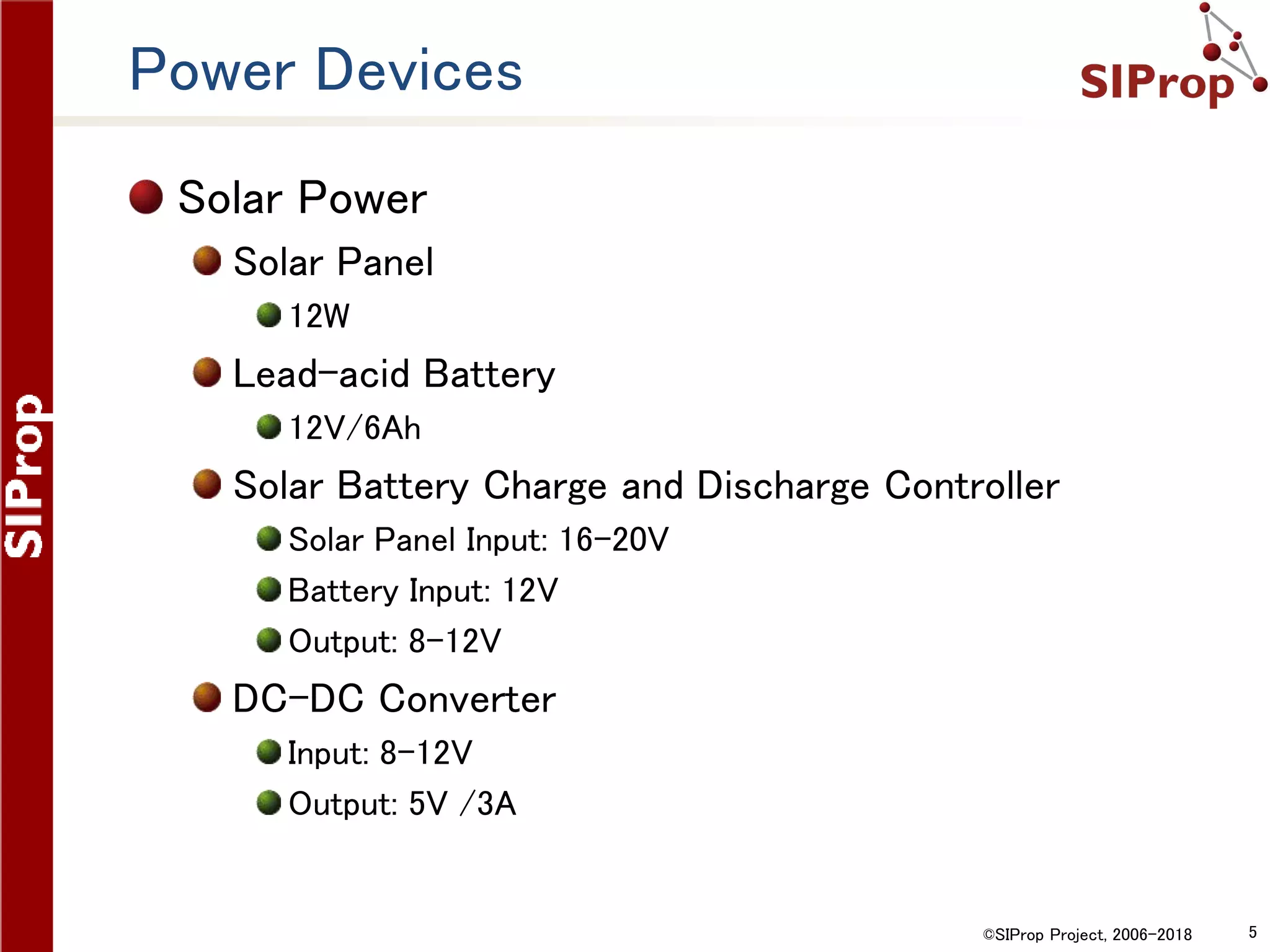
Power Devices
Solar Power
Solar Panel
12W
Lead-acid Battery
12V/6Ah
Solar Battery Charge and Discharge Controller
Solar Panel Input: 16-20V
Battery Input: 12V
Output: 8-12V
DC-DC Converter
Input: 8-12V
Output: 5V /3A
©SIProp Project, 2006-2018 6
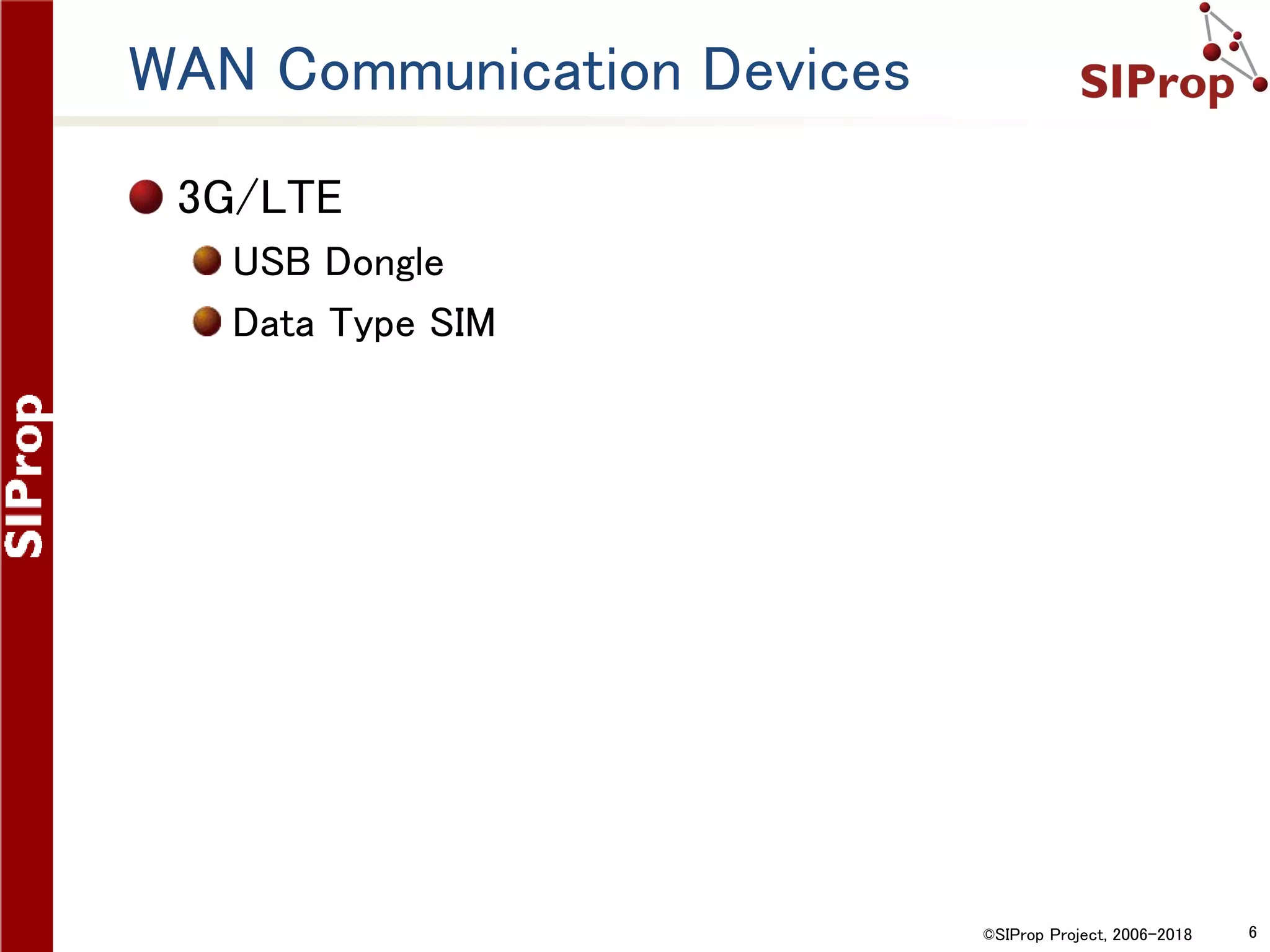
WAN Communication Devices
3G/LTE
USB Dongle
Data Type SIM
©SIProp Project, 2006-2018 7
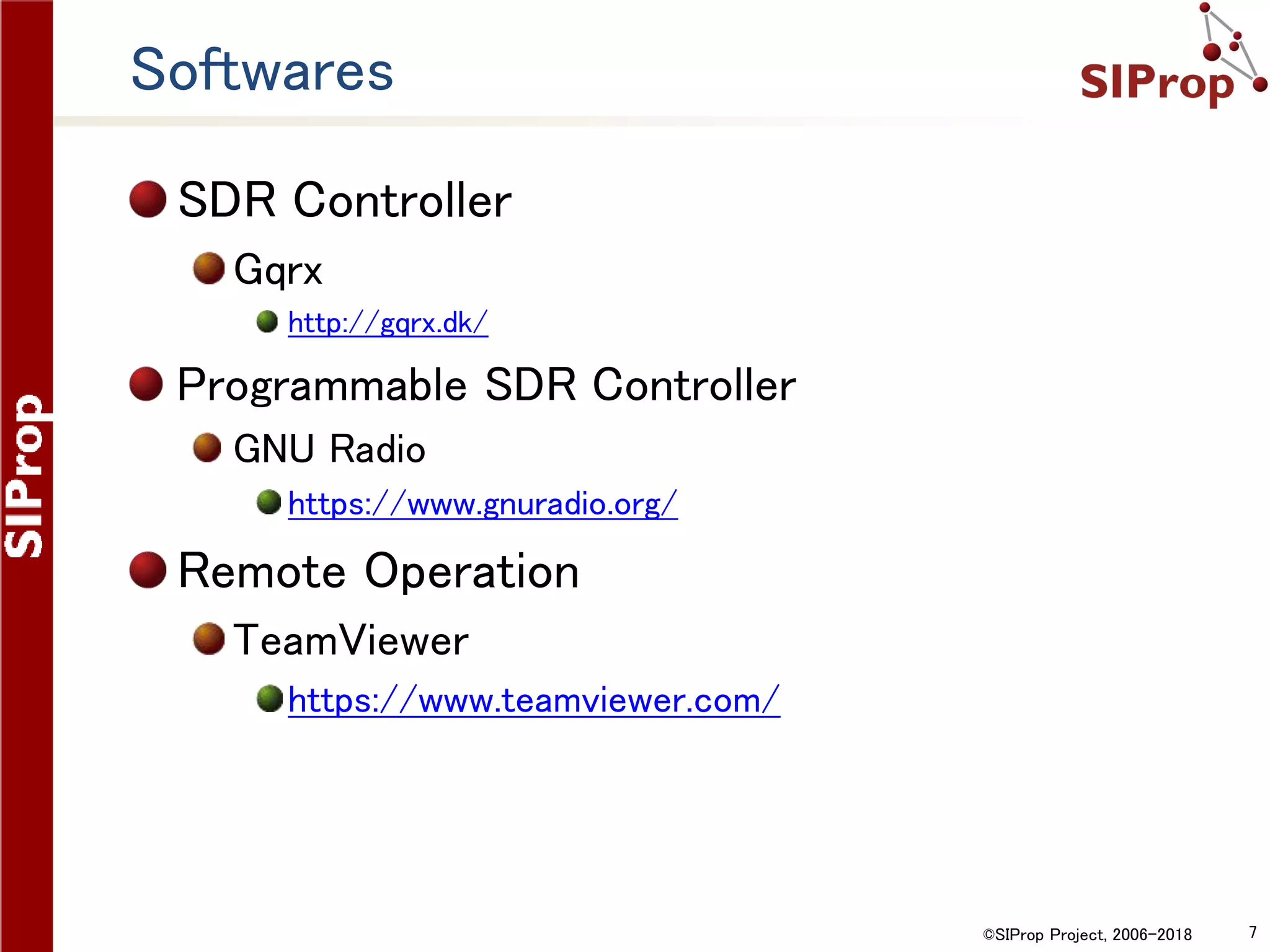
Softwares
SDR Controller
Gqrx
http://gqrx.dk/
Programmable SDR Controller
GNU Radio
https://www.gnuradio.org/
Remote Operation
TeamViewer
https://www.teamviewer.com/
©SIProp Project, 2006-2018 8
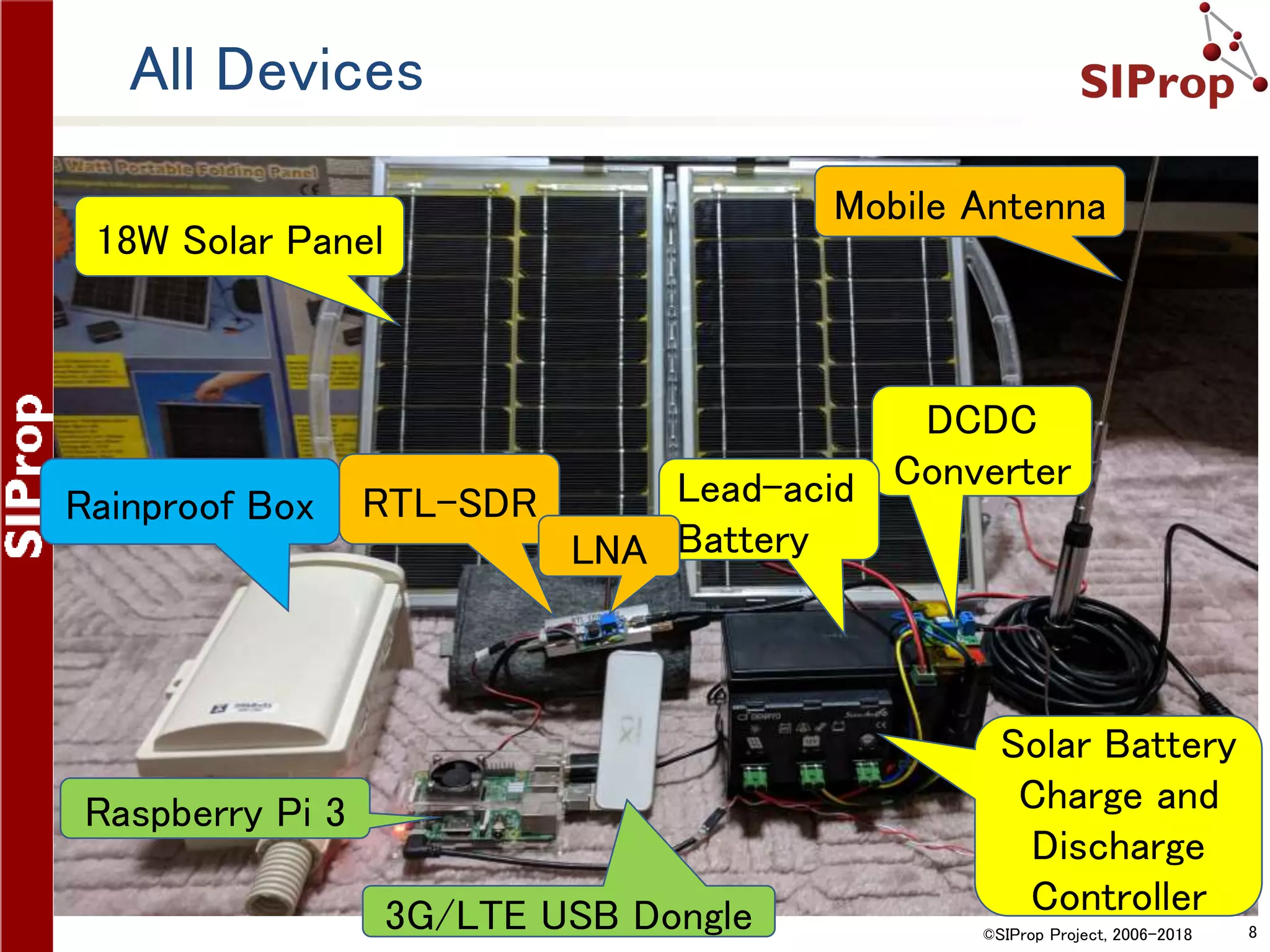
All Devices
18W Solar Panel
Mobile Antenna
DCDC
Converter
Solar Battery
Charge and
Discharge
Controller
Lead-acid
Battery
RTL-SDR
LNA
Rainproof Box
Raspberry Pi 3
3G/LTE USB Dongle
©SIProp Project, 2006-2018 9
Required Power Specifications
©SIProp Project, 2006-2018 10
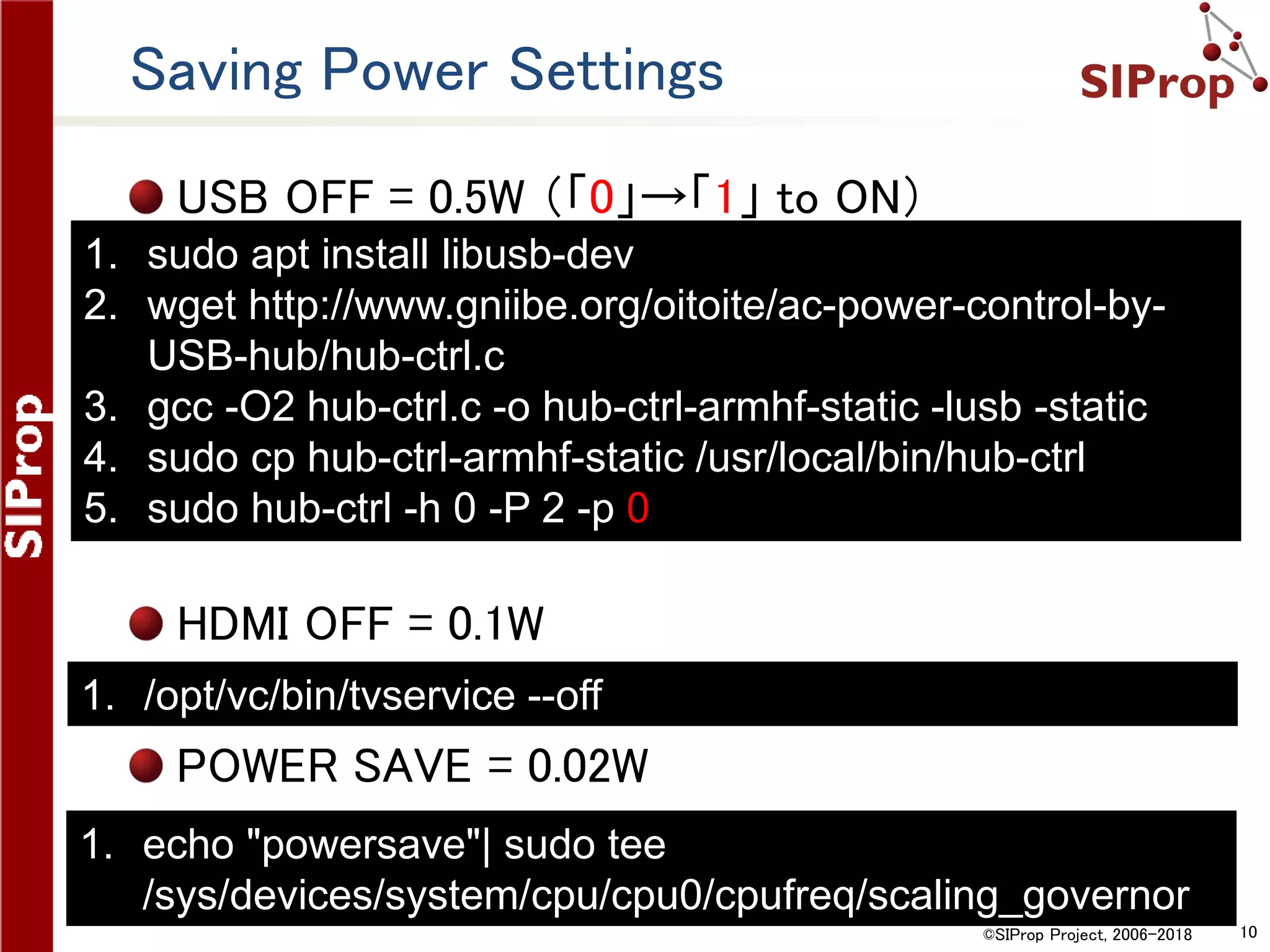
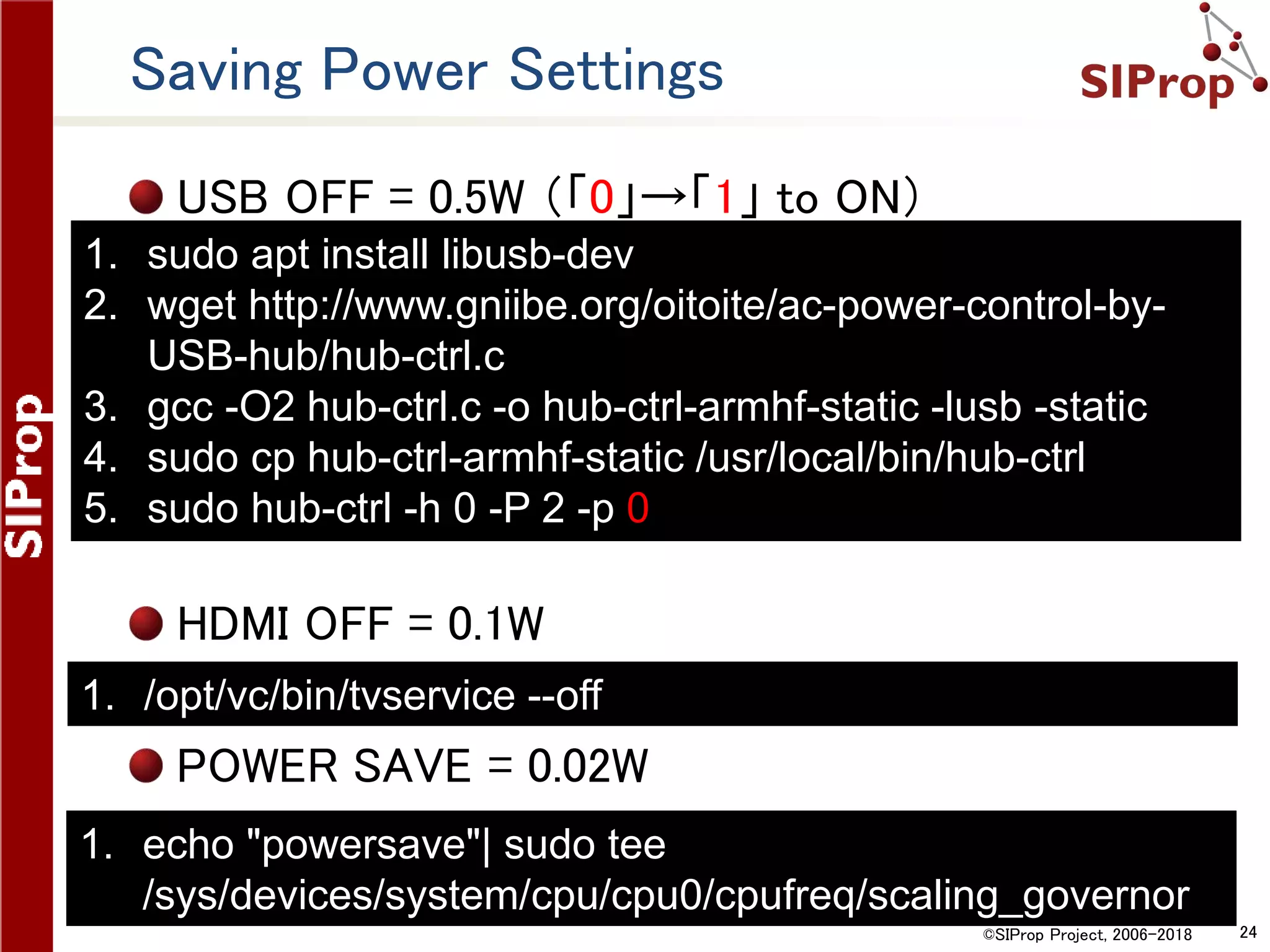
Saving Power Settings
USB OFF = 0.5W (「0」→「1」 to ON)
HDMI OFF = 0.1W
POWER SAVE = 0.02W
1. sudo apt install libusb-dev
2. wget http://www.gniibe.org/oitoite/ac-power-control-by-
USB-hub/hub-ctrl.c
3. gcc -O2 hub-ctrl.c -o hub-ctrl-armhf-static -lusb -static
4. sudo cp hub-ctrl-armhf-static /usr/local/bin/hub-ctrl
5. sudo hub-ctrl -h 0 -P 2 -p 0
1. /opt/vc/bin/tvservice --off
1. echo "powersave"| sudo tee
/sys/devices/system/cpu/cpu0/cpufreq/scaling_governor
©SIProp Project, 2006-2018 11
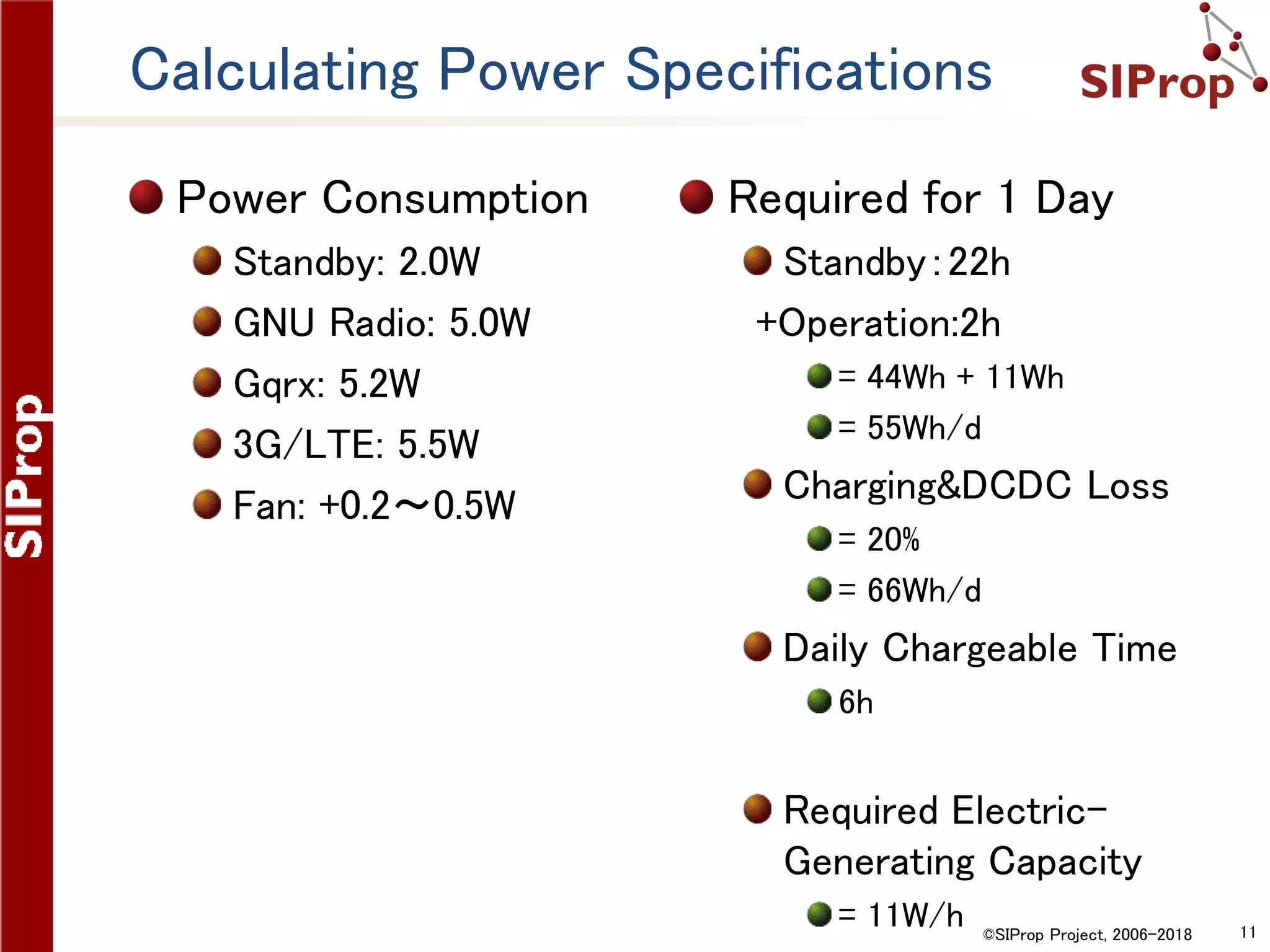
Calculating Power Specifications
Power Consumption
Standby: 2.0W
GNU Radio: 5.0W
Gqrx: 5.2W
3G/LTE: 5.5W
Fan: +0.2~0.5W
Required for 1 Day
Standby:22h
+Operation:2h
= 44Wh + 11Wh
= 55Wh/d
Charging&DCDC Loss
= 20%
= 66Wh/d
Daily Chargeable Time
6h
Required Electric-
Generating Capacity
= 11W/h
©SIProp Project, 2006-2018 12
Setup Raspberry Pi
©SIProp Project, 2006-2018 13
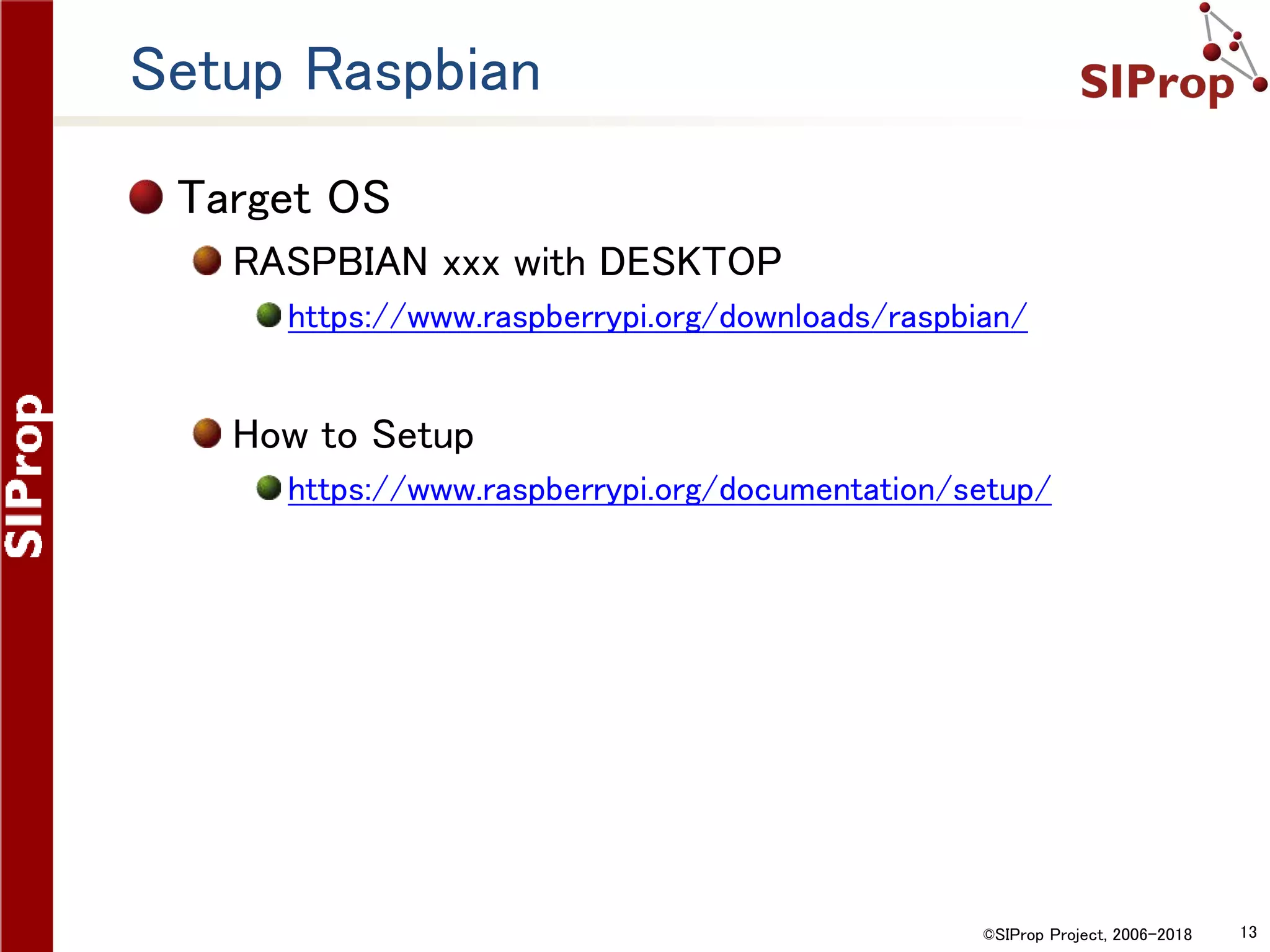
Setup Raspbian
Target OS
RASPBIAN xxx with DESKTOP
https://www.raspberrypi.org/downloads/raspbian/
How to Setup
https://www.raspberrypi.org/documentation/setup/
©SIProp Project, 2006-2018 14
NTP
©SIProp Project, 2006-2018 15
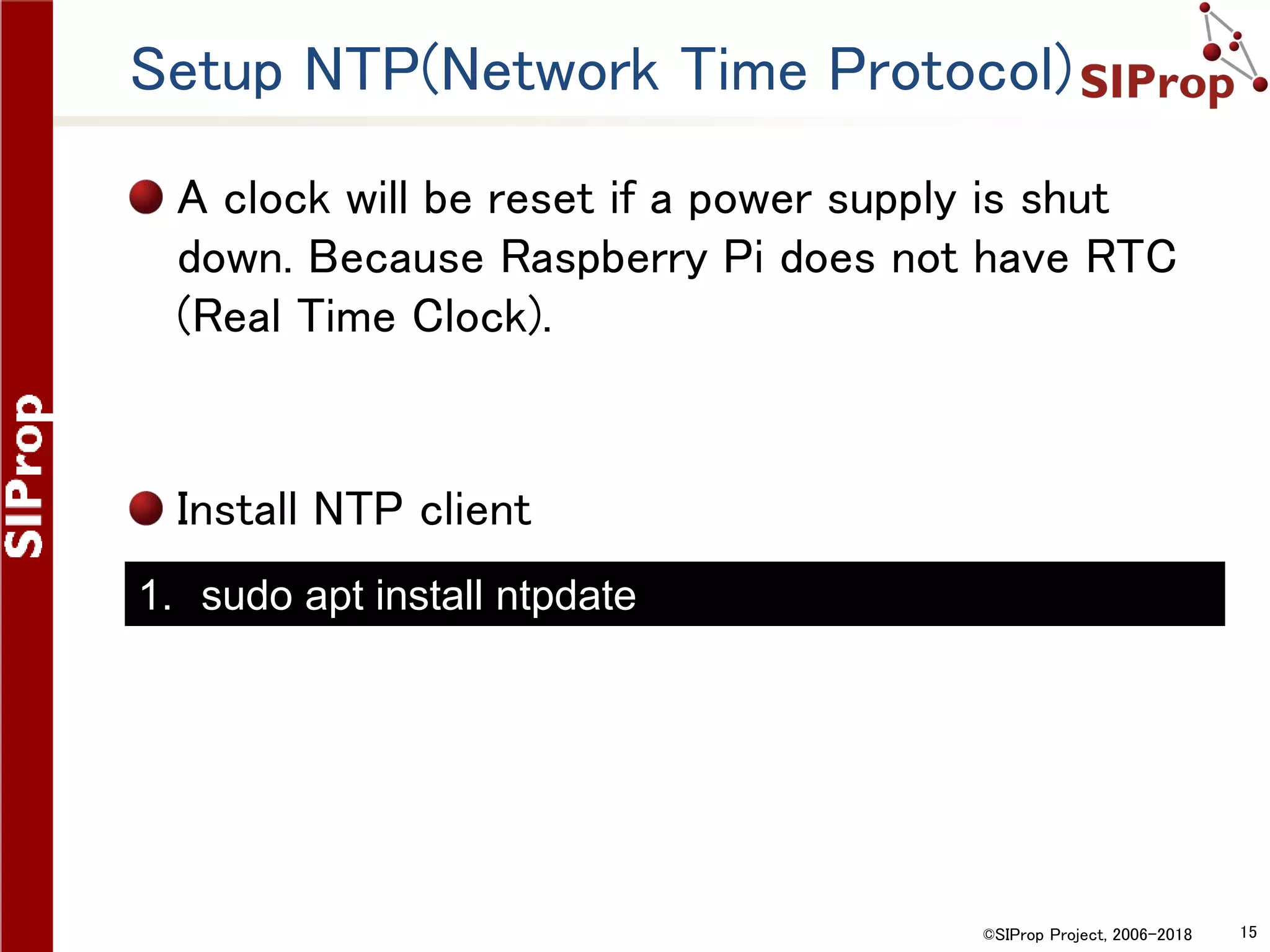
Setup NTP(Network Time Protocol)
A clock will be reset if a power supply is shut
down. Because Raspberry Pi does not have RTC
(Real Time Clock).
Install NTP client
1. sudo apt install ntpdate
©SIProp Project, 2006-2018 16
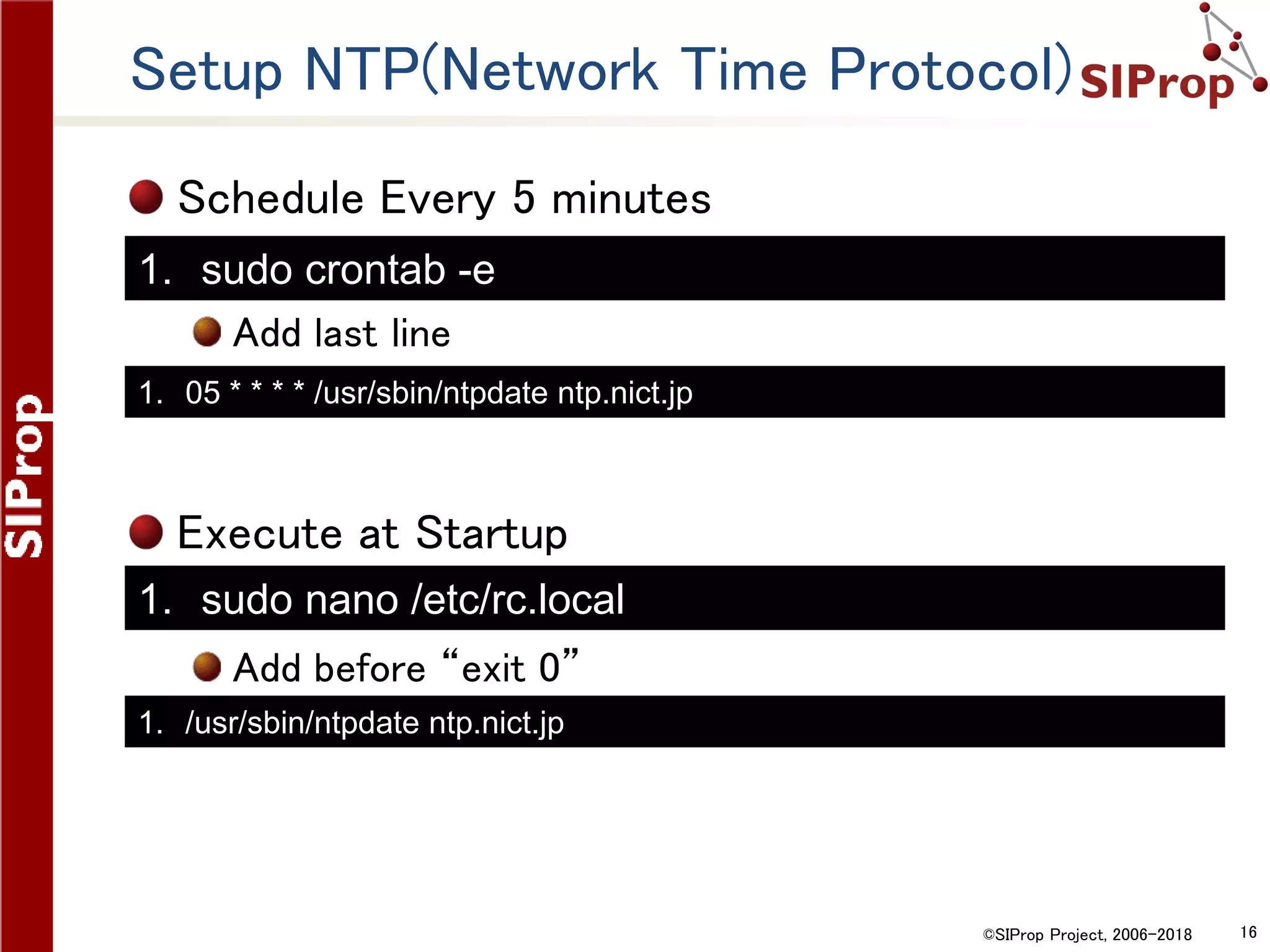
Setup NTP(Network Time Protocol)
Schedule Every 5 minutes
Add last line
Execute at Startup
Add before “exit 0”
1. 05 * * * * /usr/sbin/ntpdate ntp.nict.jp
1. /usr/sbin/ntpdate ntp.nict.jp
1. sudo crontab -e
1. sudo nano /etc/rc.local
©SIProp Project, 2006-2018 17
Automatic Update
©SIProp Project, 2006-2018 18
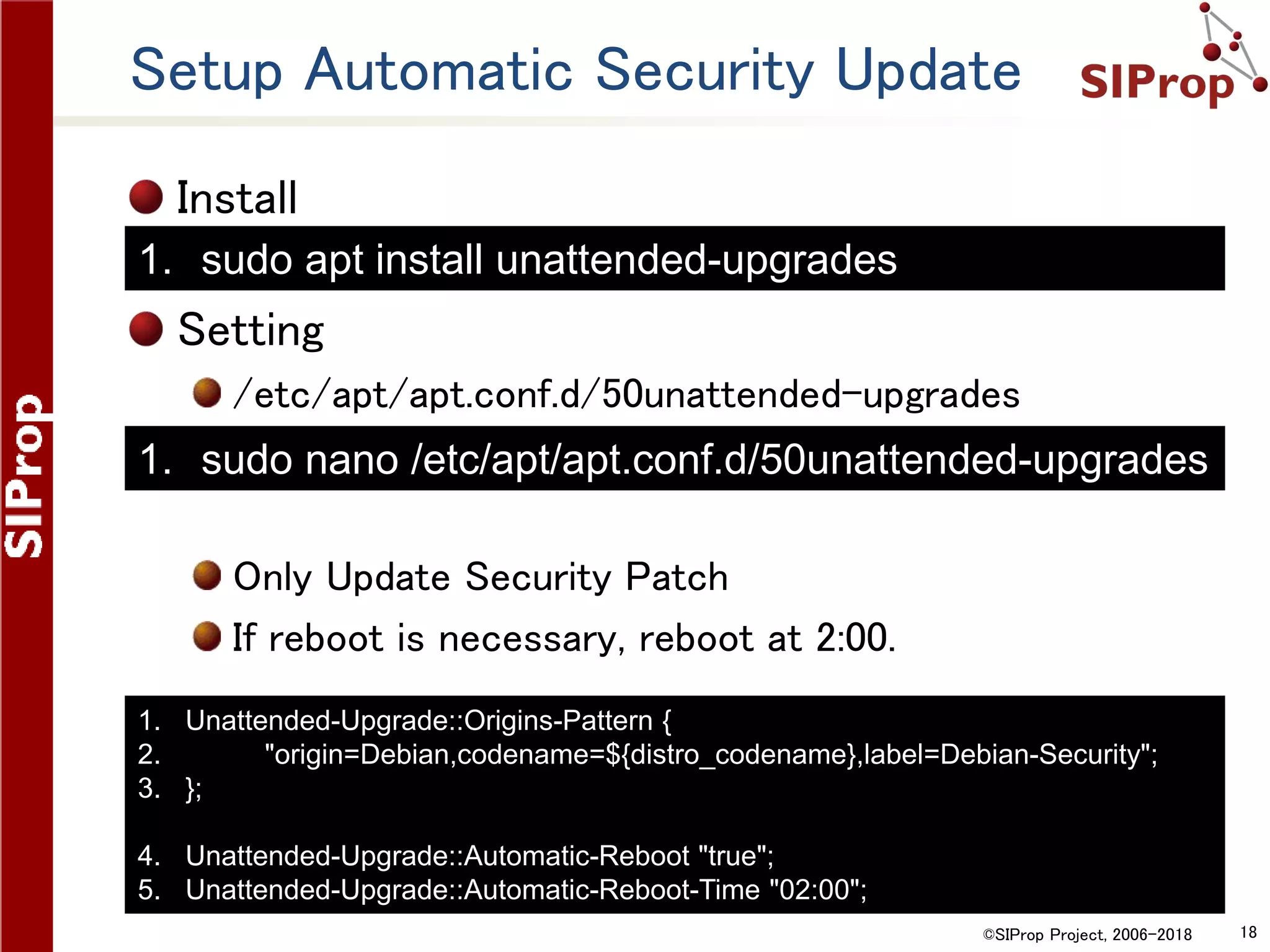
Setup Automatic Security Update
Install
Setting
/etc/apt/apt.conf.d/50unattended-upgrades
Only Update Security Patch
If reboot is necessary, reboot at 2:00.
1. Unattended-Upgrade::Origins-Pattern {
2. "origin=Debian,codename=${distro_codename},label=Debian-Security";
3. };
4. Unattended-Upgrade::Automatic-Reboot "true";
5. Unattended-Upgrade::Automatic-Reboot-Time "02:00";
1. sudo nano /etc/apt/apt.conf.d/50unattended-upgrades
1. sudo apt install unattended-upgrades
©SIProp Project, 2006-2018 19
Reduce Writing to Disk(SD Card)
©SIProp Project, 2006-2018 20
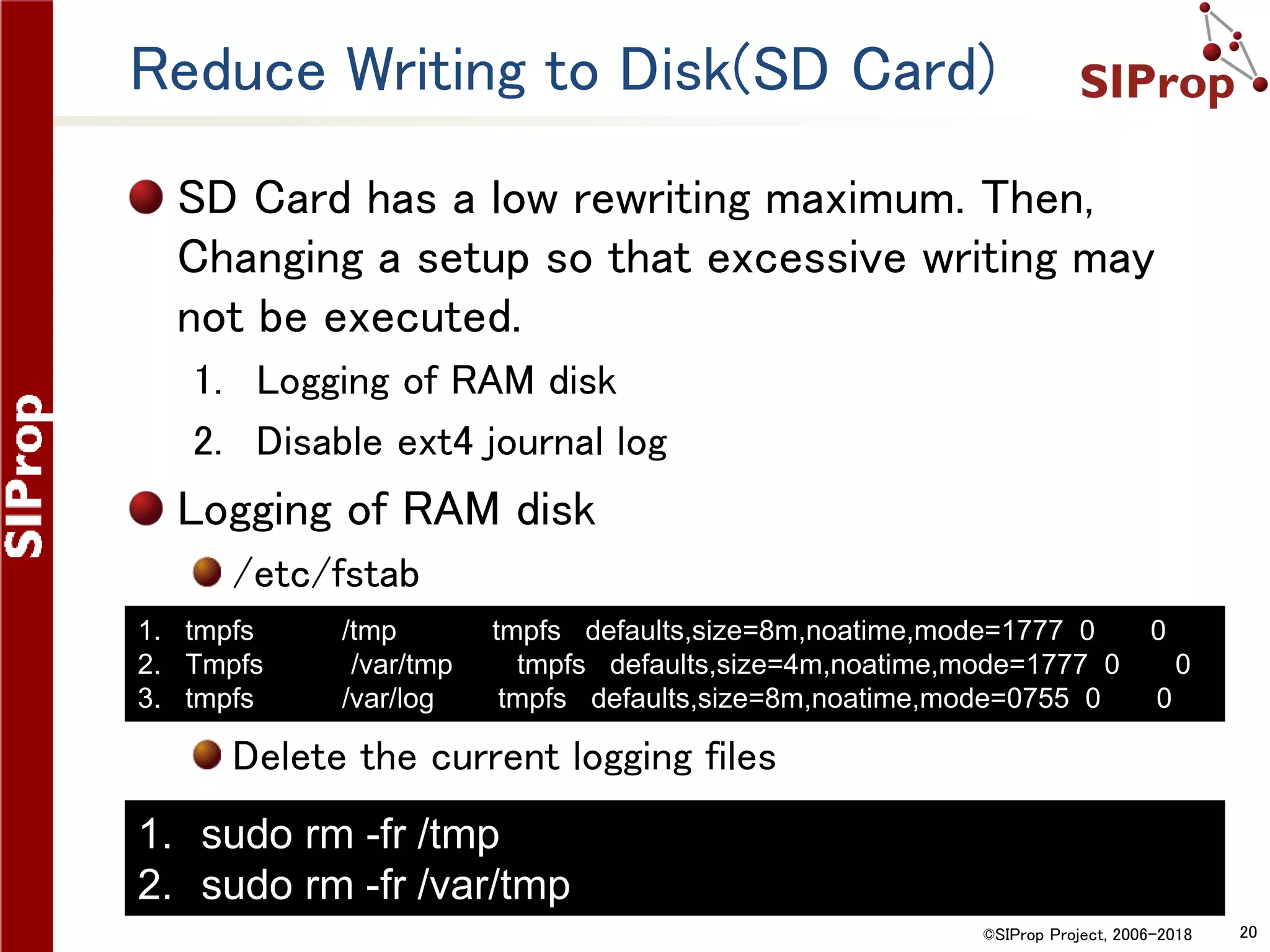
Reduce Writing to Disk(SD Card)
SD Card has a low rewriting maximum. Then,
Changing a setup so that excessive writing may
not be executed.
1. Logging of RAM disk
2. Disable ext4 journal log
Logging of RAM disk
/etc/fstab
Delete the current logging files
1. tmpfs /tmp tmpfs defaults,size=8m,noatime,mode=1777 0 0
2. Tmpfs /var/tmp tmpfs defaults,size=4m,noatime,mode=1777 0 0
3. tmpfs /var/log tmpfs defaults,size=8m,noatime,mode=0755 0 0
1. sudo rm -fr /tmp
2. sudo rm -fr /var/tmp
©SIProp Project, 2006-2018 21
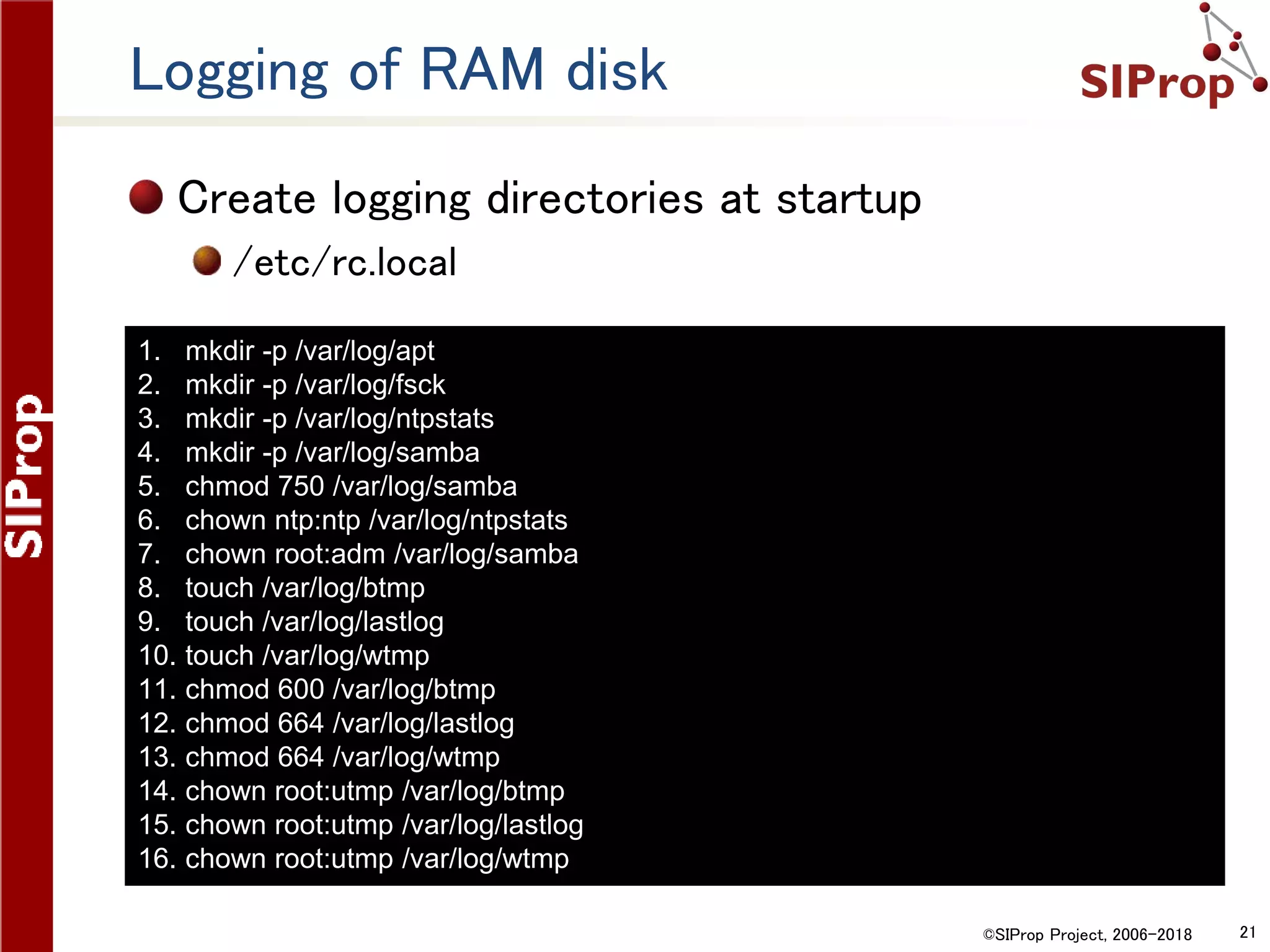
Logging of RAM disk
Create logging directories at startup
/etc/rc.local
1. mkdir -p /var/log/apt
2. mkdir -p /var/log/fsck
3. mkdir -p /var/log/ntpstats
4. mkdir -p /var/log/samba
5. chmod 750 /var/log/samba
6. chown ntp:ntp /var/log/ntpstats
7. chown root:adm /var/log/samba
8. touch /var/log/btmp
9. touch /var/log/lastlog
10. touch /var/log/wtmp
11. chmod 600 /var/log/btmp
12. chmod 664 /var/log/lastlog
13. chmod 664 /var/log/wtmp
14. chown root:utmp /var/log/btmp
15. chown root:utmp /var/log/lastlog
16. chown root:utmp /var/log/wtmp
©SIProp Project, 2006-2018 22
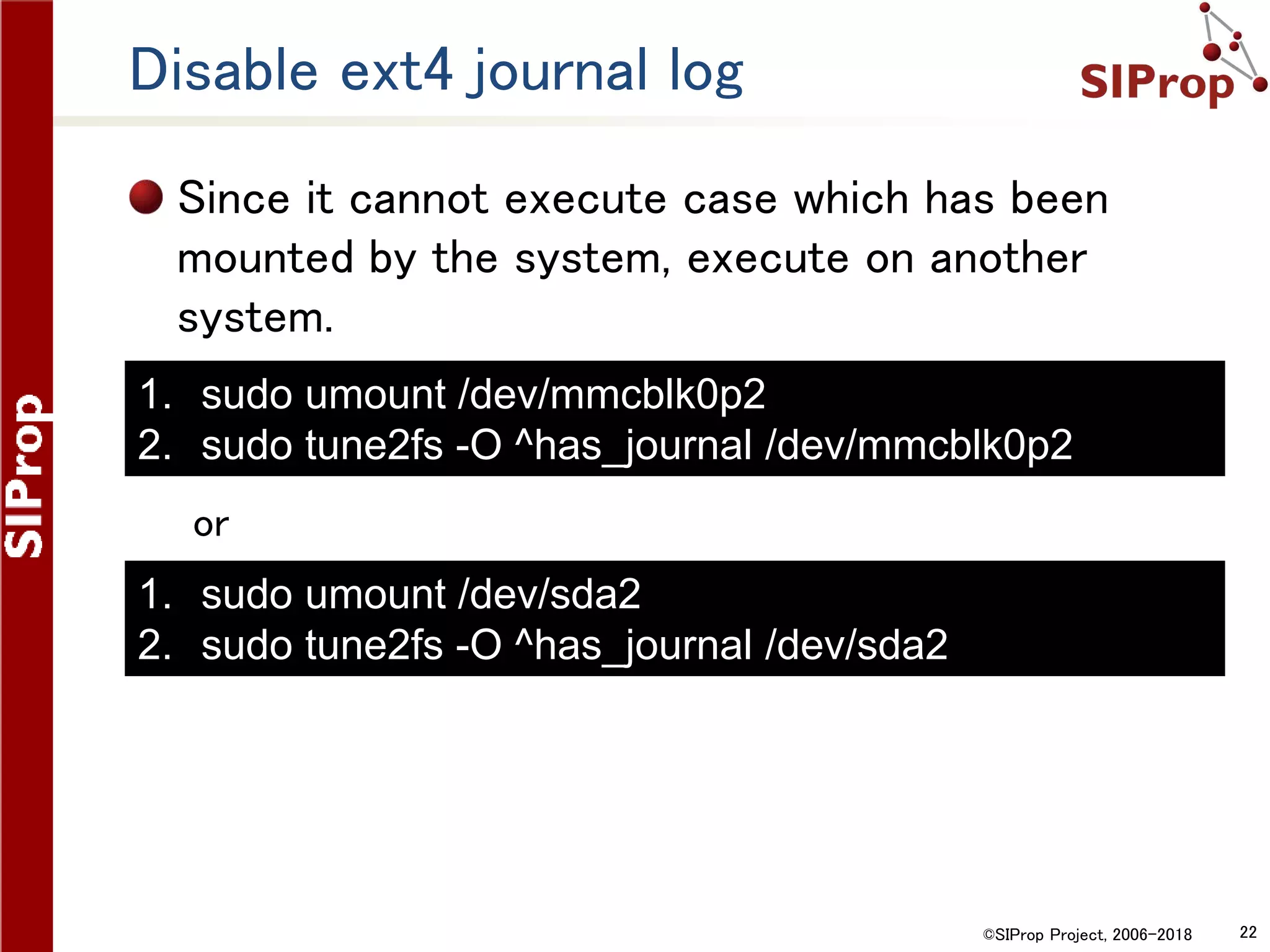
Disable ext4 journal log
Since it cannot execute case which has been
mounted by the system, execute on another
system.
or
1. sudo umount /dev/mmcblk0p2
2. sudo tune2fs -O ^has_journal /dev/mmcblk0p2
1. sudo umount /dev/sda2
2. sudo tune2fs -O ^has_journal /dev/sda2
©SIProp Project, 2006-2018 23
Saving Power Settings
©SIProp Project, 2006-2018 24
Saving Power Settings
USB OFF = 0.5W (「0」→「1」 to ON)
HDMI OFF = 0.1W
POWER SAVE = 0.02W
1. sudo apt install libusb-dev
2. wget http://www.gniibe.org/oitoite/ac-power-control-by-
USB-hub/hub-ctrl.c
3. gcc -O2 hub-ctrl.c -o hub-ctrl-armhf-static -lusb -static
4. sudo cp hub-ctrl-armhf-static /usr/local/bin/hub-ctrl
5. sudo hub-ctrl -h 0 -P 2 -p 0
1. /opt/vc/bin/tvservice --off
1. echo "powersave"| sudo tee
/sys/devices/system/cpu/cpu0/cpufreq/scaling_governor
©SIProp Project, 2006-2018 25
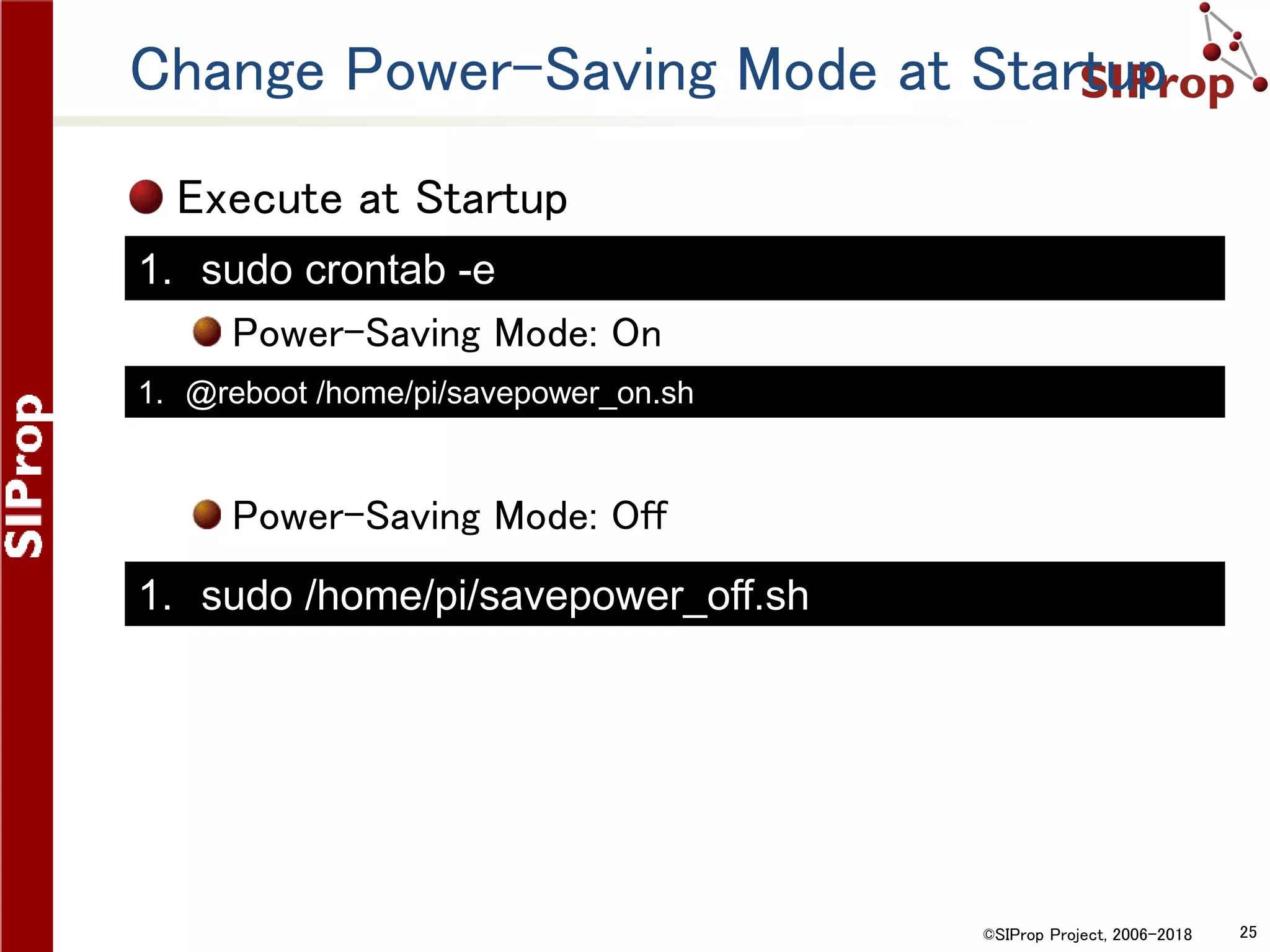
Change Power-Saving Mode at Startup
Execute at Startup
Power-Saving Mode: On
Power-Saving Mode: Off
1. @reboot /home/pi/savepower_on.sh
1. sudo crontab -e
1. sudo /home/pi/savepower_off.sh
©SIProp Project, 2006-2018 26
GNU Radio
©SIProp Project, 2006-2018 27
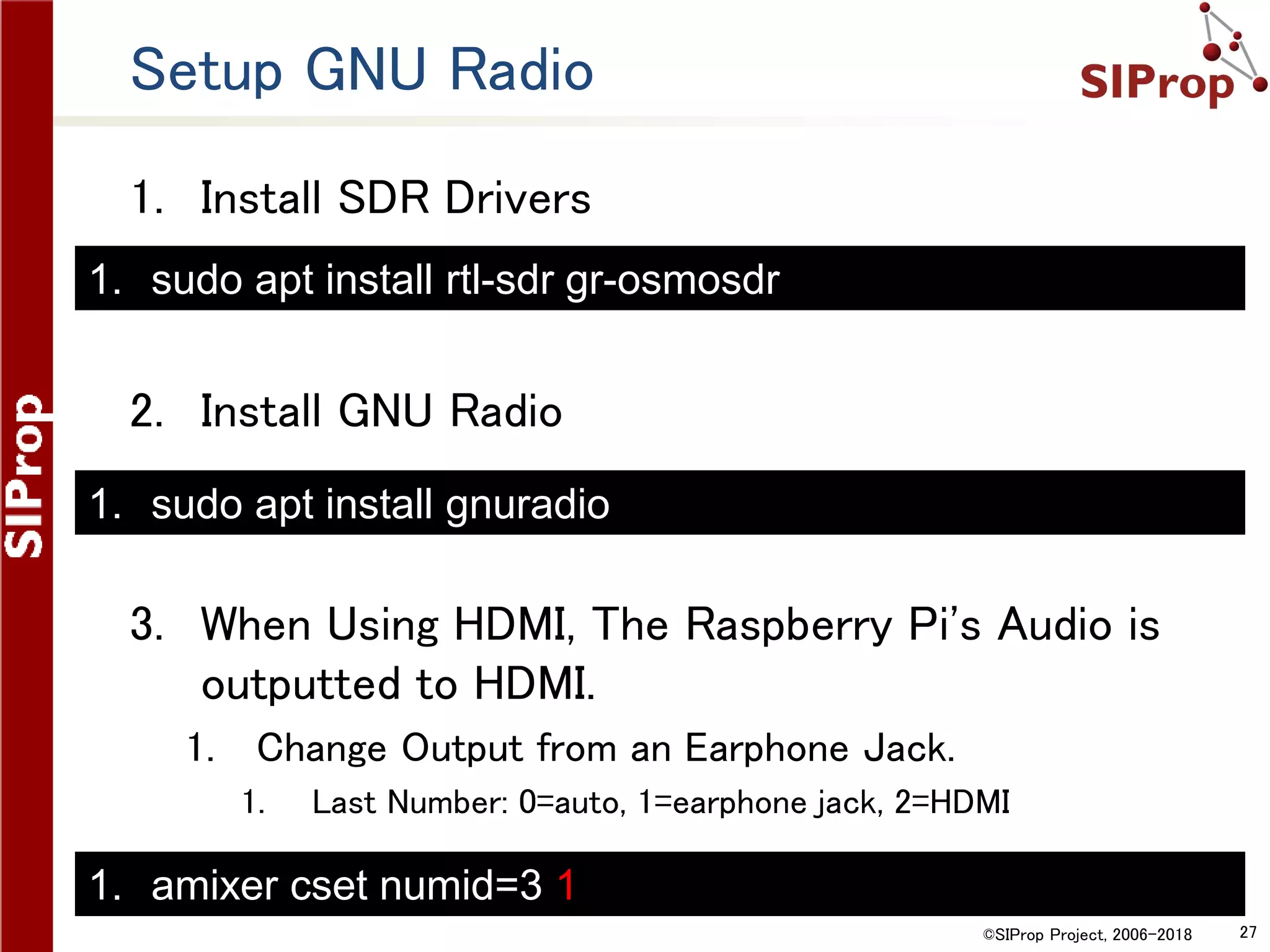
Setup GNU Radio
1. Install SDR Drivers
2. Install GNU Radio
3. When Using HDMI, The Raspberry Pi's Audio is
outputted to HDMI.
1. Change Output from an Earphone Jack.
1. Last Number: 0=auto, 1=earphone jack, 2=HDMI
1. sudo apt install rtl-sdr gr-osmosdr
1. sudo apt install gnuradio
1. amixer cset numid=3 1
©SIProp Project, 2006-2018 28
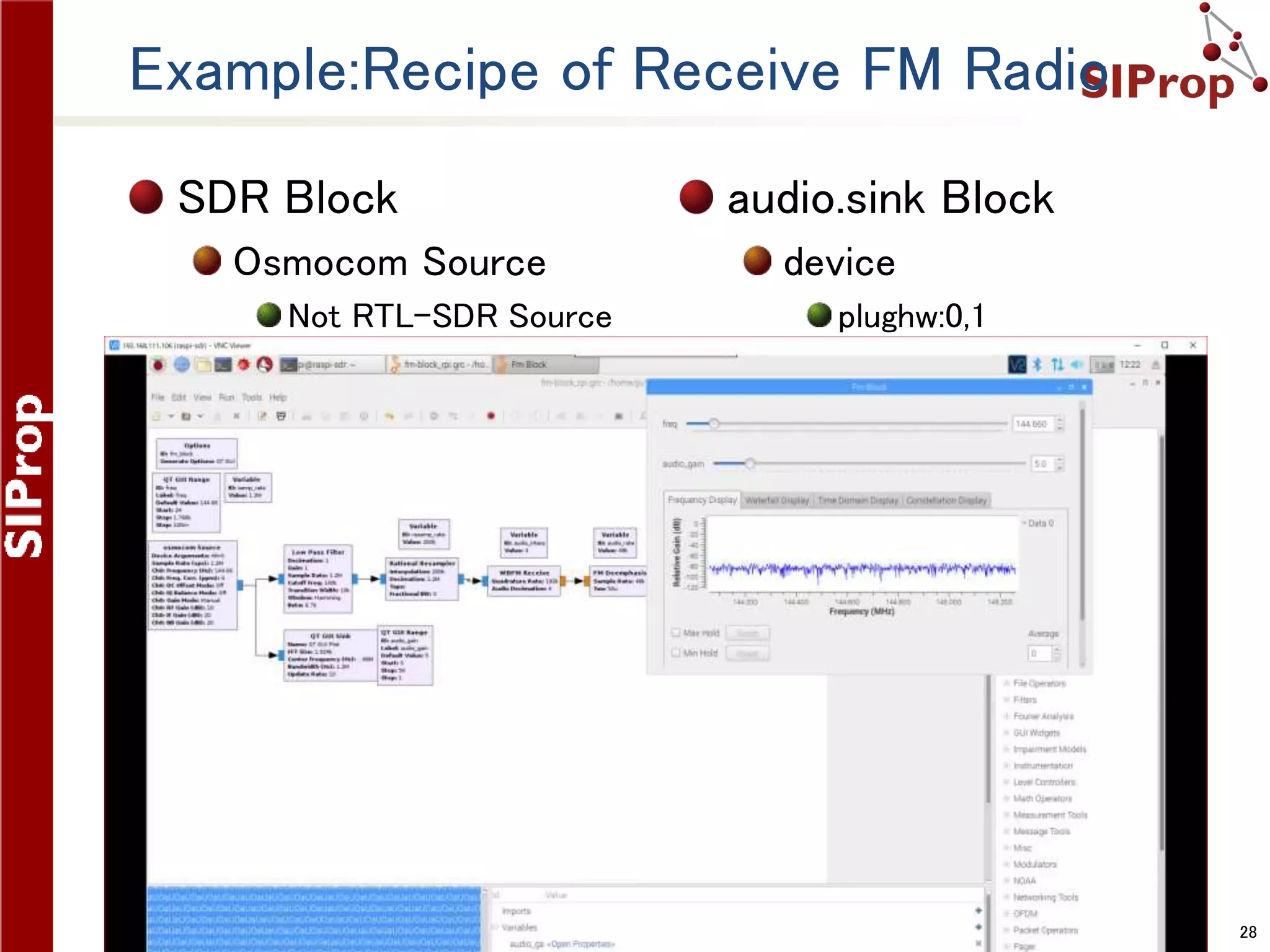
Example:Recipe of Receive FM Radio
SDR Block
Osmocom Source
Not RTL-SDR Source
audio.sink Block
device
plughw:0,1
©SIProp Project, 2006-2018 29
Gqrx
©SIProp Project, 2006-2018 30
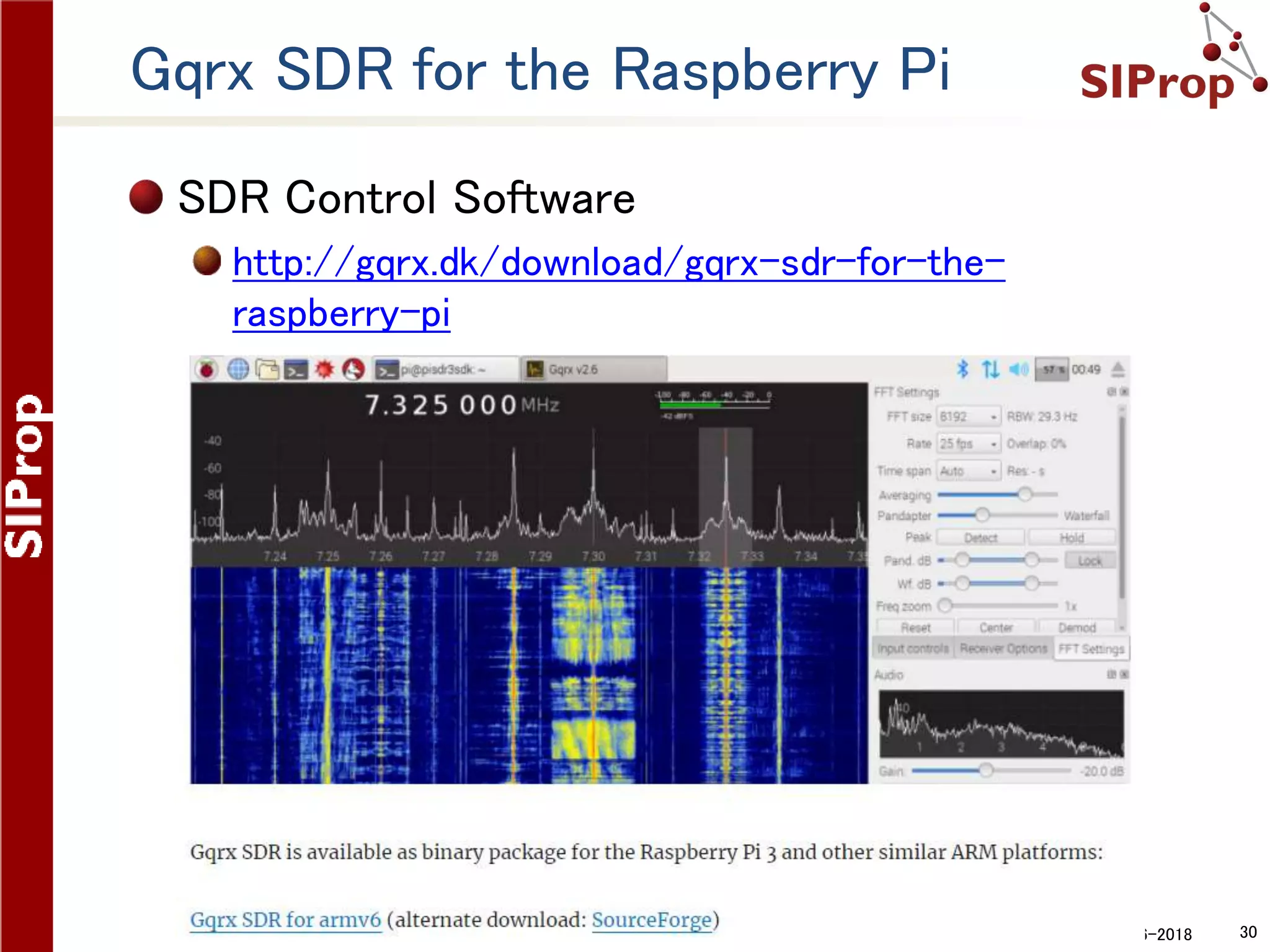
Gqrx SDR for the Raspberry Pi
SDR Control Software
http://gqrx.dk/download/gqrx-sdr-for-the-
raspberry-pi
©SIProp Project, 2006-2018 31
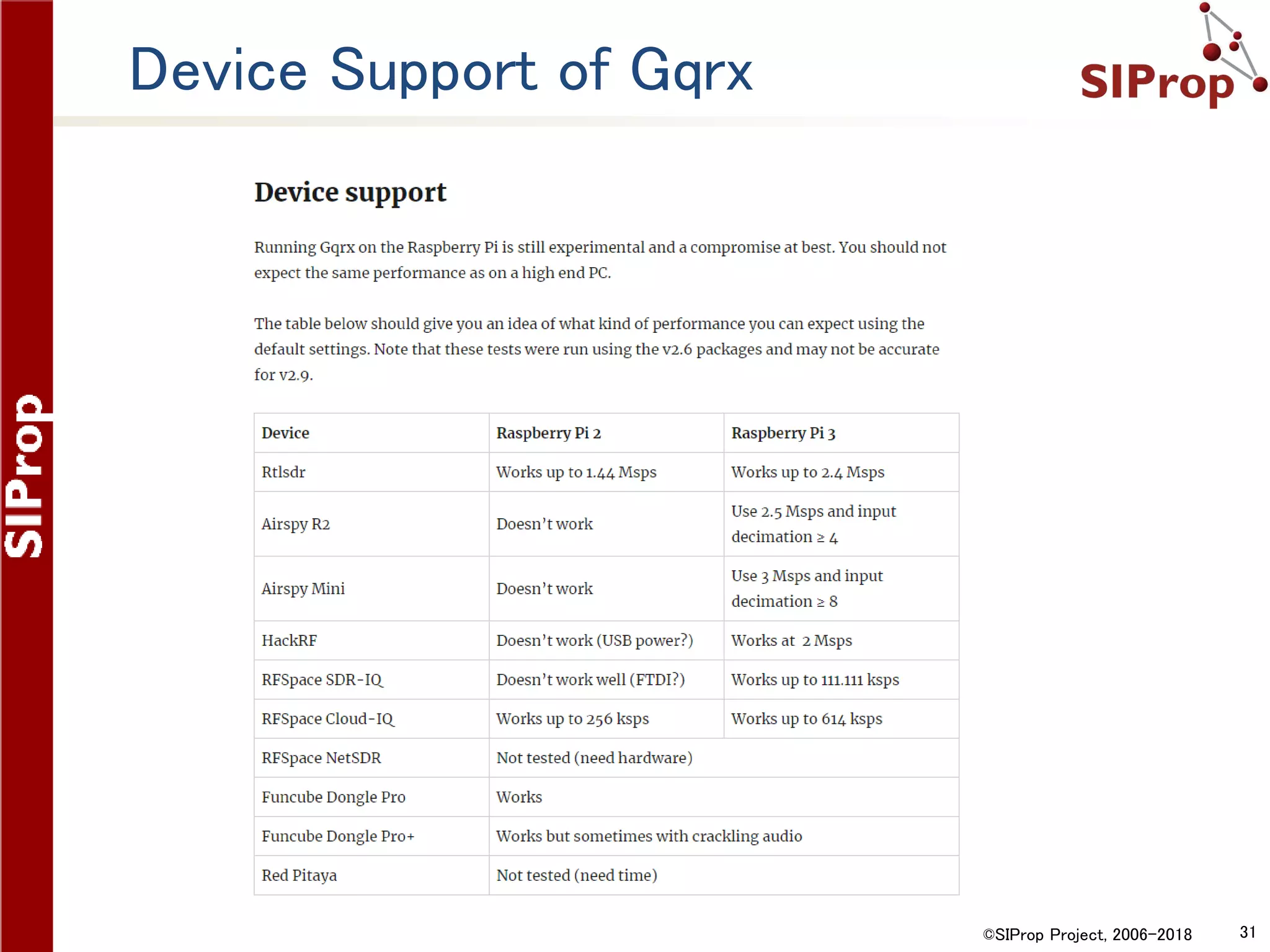
Device Support of Gqrx
©SIProp Project, 2006-2018 32
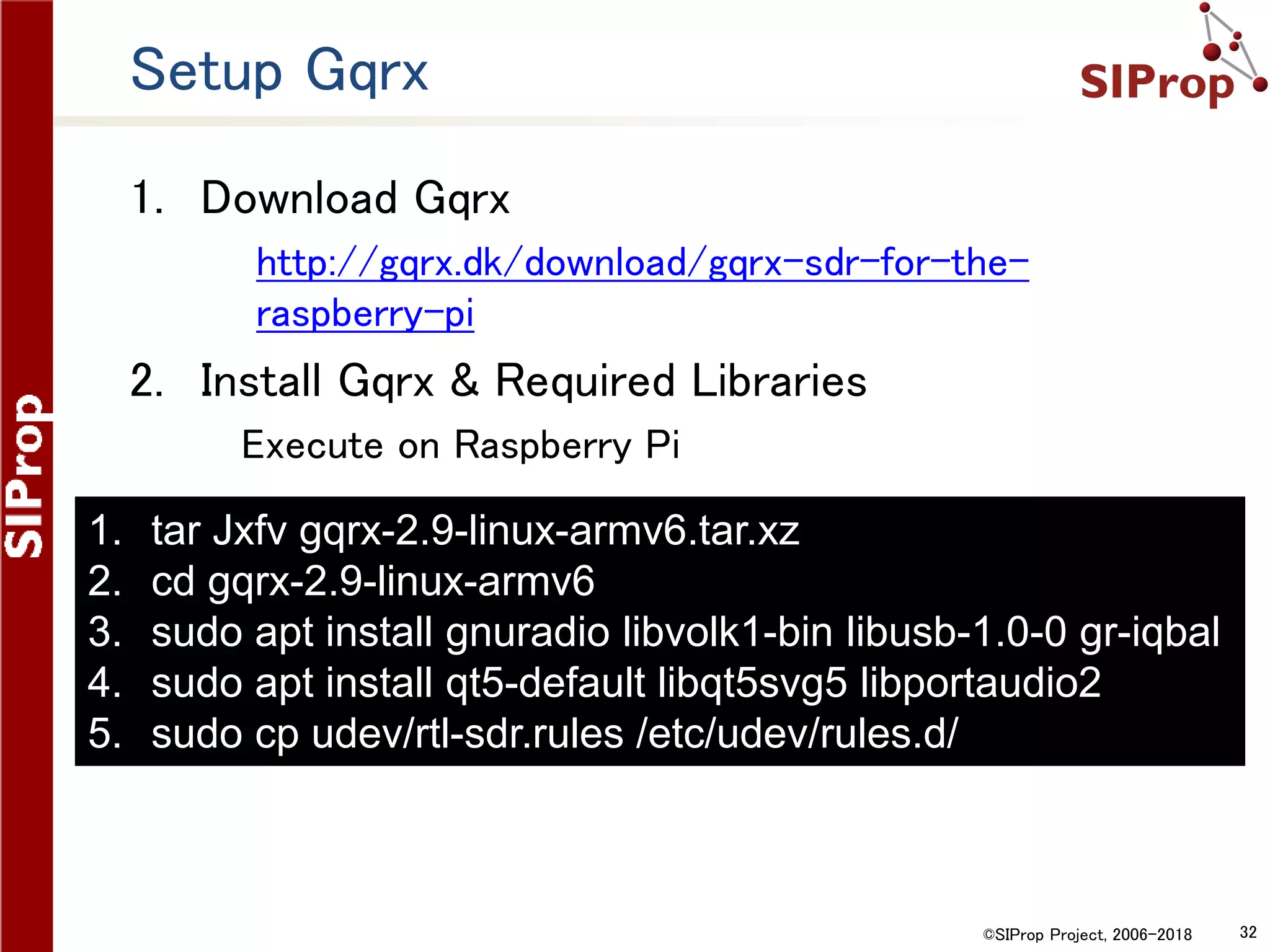
Setup Gqrx
1. Download Gqrx
1. http://gqrx.dk/download/gqrx-sdr-for-the-
raspberry-pi
2. Install Gqrx & Required Libraries
Execute on Raspberry Pi
1. tar Jxfv gqrx-2.9-linux-armv6.tar.xz
2. cd gqrx-2.9-linux-armv6
3. sudo apt install gnuradio libvolk1-bin libusb-1.0-0 gr-iqbal
4. sudo apt install qt5-default libqt5svg5 libportaudio2
5. sudo cp udev/rtl-sdr.rules /etc/udev/rules.d/
©SIProp Project, 2006-2018 33
3G/LTE Connection
©SIProp Project, 2006-2018 34
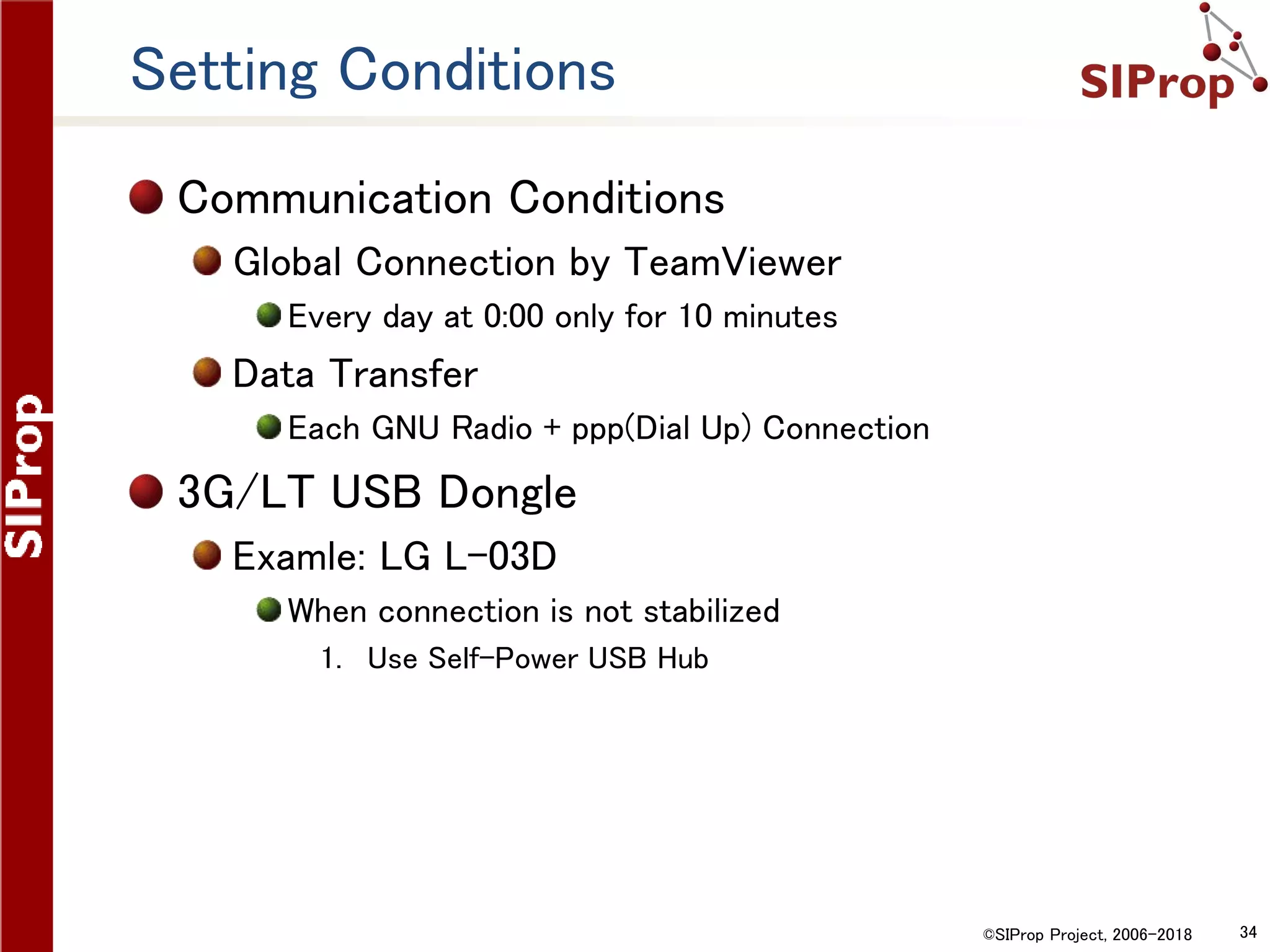
Setting Conditions
Communication Conditions
Global Connection by TeamViewer
Every day at 0:00 only for 10 minutes
Data Transfer
Each GNU Radio + ppp(Dial Up) Connection
3G/LT USB Dongle
Examle: LG L-03D
When connection is not stabilized
1. Use Self-Power USB Hub
©SIProp Project, 2006-2018 35
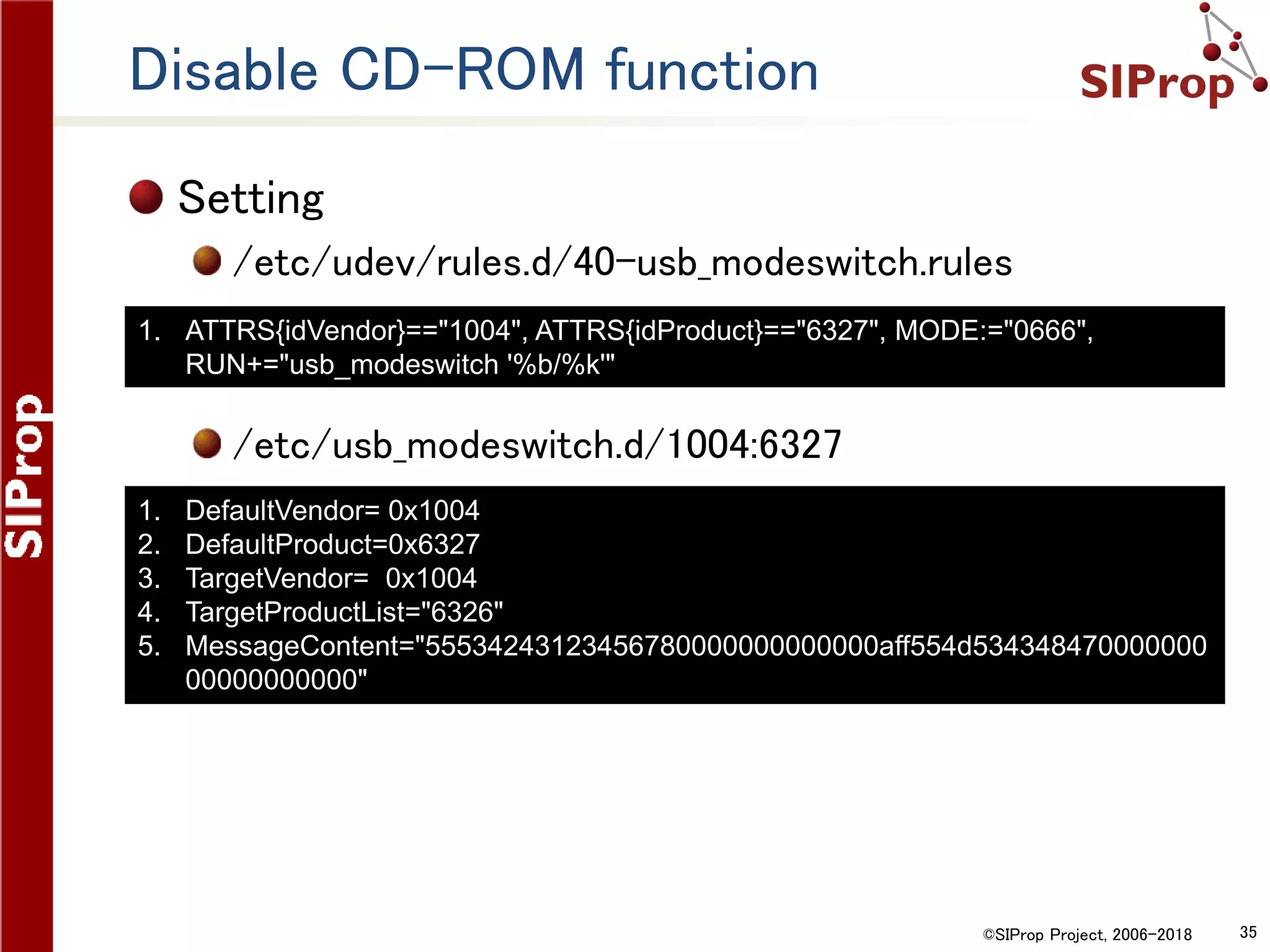
Disable CD-ROM function
Setting
/etc/udev/rules.d/40-usb_modeswitch.rules
/etc/usb_modeswitch.d/1004:6327
1. ATTRS{idVendor}=="1004", ATTRS{idProduct}=="6327", MODE:="0666",
RUN+="usb_modeswitch '%b/%k'"
1. DefaultVendor= 0x1004
2. DefaultProduct=0x6327
3. TargetVendor= 0x1004
4. TargetProductList="6326"
5. MessageContent="55534243123456780000000000000aff554d534348470000000
00000000000"
©SIProp Project, 2006-2018 36
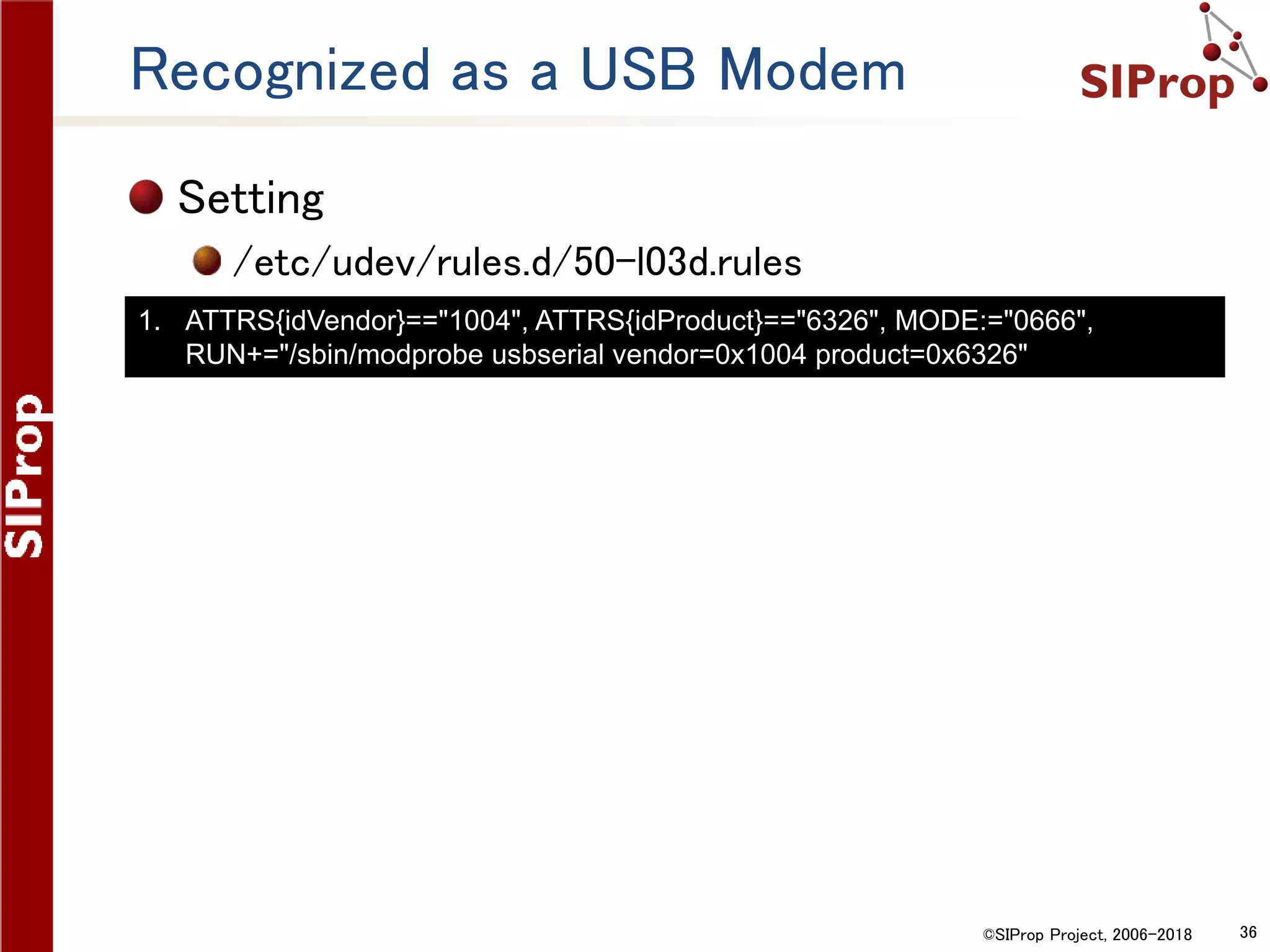
Recognized as a USB Modem
Setting
/etc/udev/rules.d/50-l03d.rules
1. ATTRS{idVendor}=="1004", ATTRS{idProduct}=="6326", MODE:="0666",
RUN+="/sbin/modprobe usbserial vendor=0x1004 product=0x6326"
©SIProp Project, 2006-2018 37
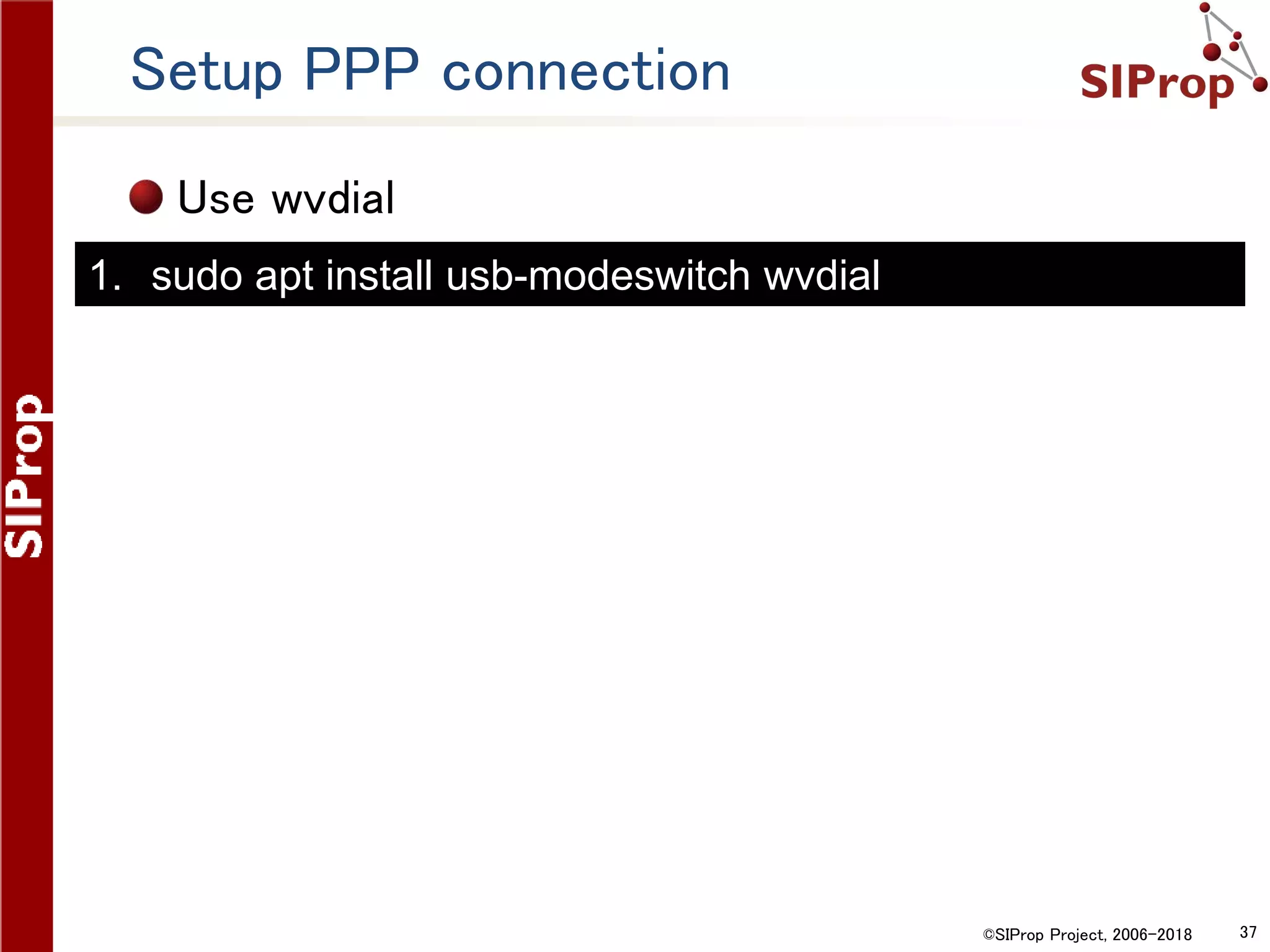
Setup PPP connection
Use wvdial
1. sudo apt install usb-modeswitch wvdial
©SIProp Project, 2006-2018 38
Example:So-net’s 0SIM(Japan)
Settng
/etc/wvdial.conf
1. [Dialer Defaults]
2. Init1 = ATZ
3. Init2 = ATH
4. Init3 = AT+CGDCONT=2,"IP","so-net.jp"
5. Dial Attempts = 3
6. Stupid Mode = yes
7. Modem Type = Analog Modem
8. Dial Command = ATD
9. New PPPD = yes
10. APN = so-net.jp
11. Modem = /dev/ttyUSB2
12. Baud = 460800
13. ISDN = 0
14. Phone = *99***2#
15. Auto Reconnect = yes
16. Username = nuro
17. Password = nuro
18. Carrier Check = no
©SIProp Project, 2006-2018 39
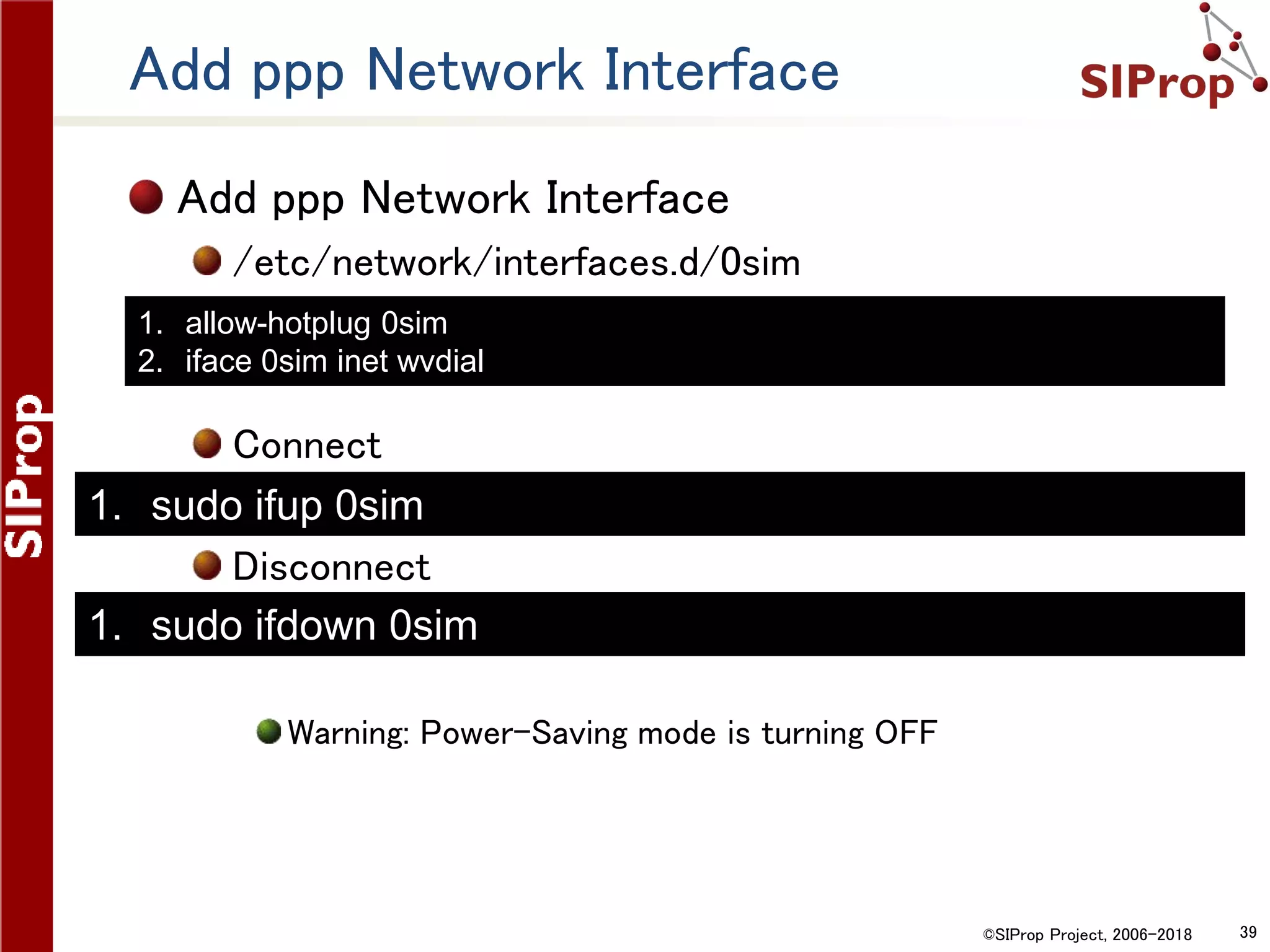
Add ppp Network Interface
/etc/network/interfaces.d/0sim
Connect
Disconnect
Warning: Power-Saving mode is turning OFF
1. sudo ifdown 0sim
1. sudo ifup 0sim
1. allow-hotplug 0sim
2. iface 0sim inet wvdial
©SIProp Project, 2006-2018 40
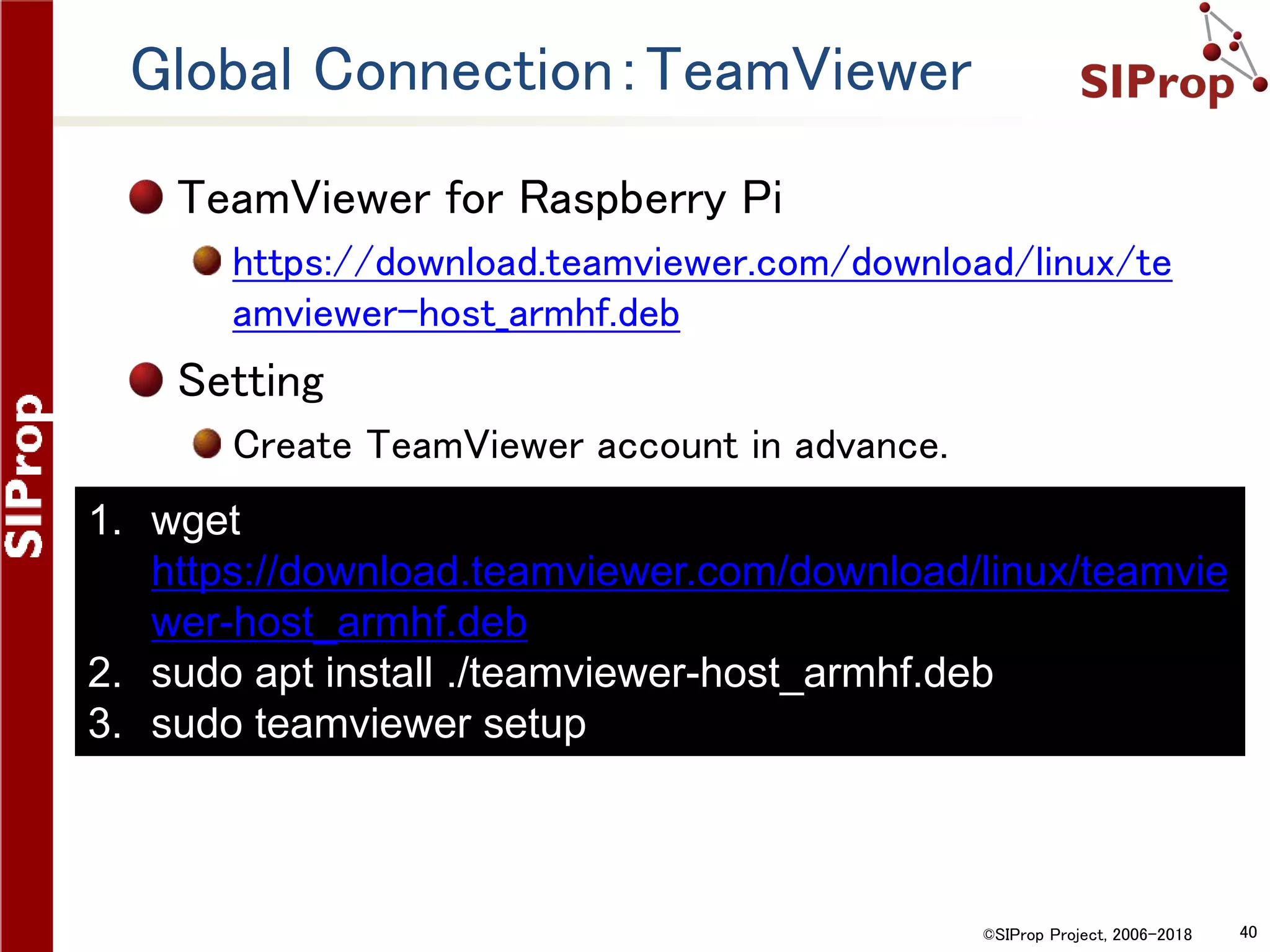
Global Connection:TeamViewer
TeamViewer for Raspberry Pi
https://download.teamviewer.com/download/linux/te
amviewer-host_armhf.deb
Setting
Create TeamViewer account in advance.
1. wget
https://download.teamviewer.com/download/linux/teamvie
wer-host_armhf.deb
2. sudo apt install ./teamviewer-host_armhf.deb
3. sudo teamviewer setup
©SIProp Project, 2006-2018 41
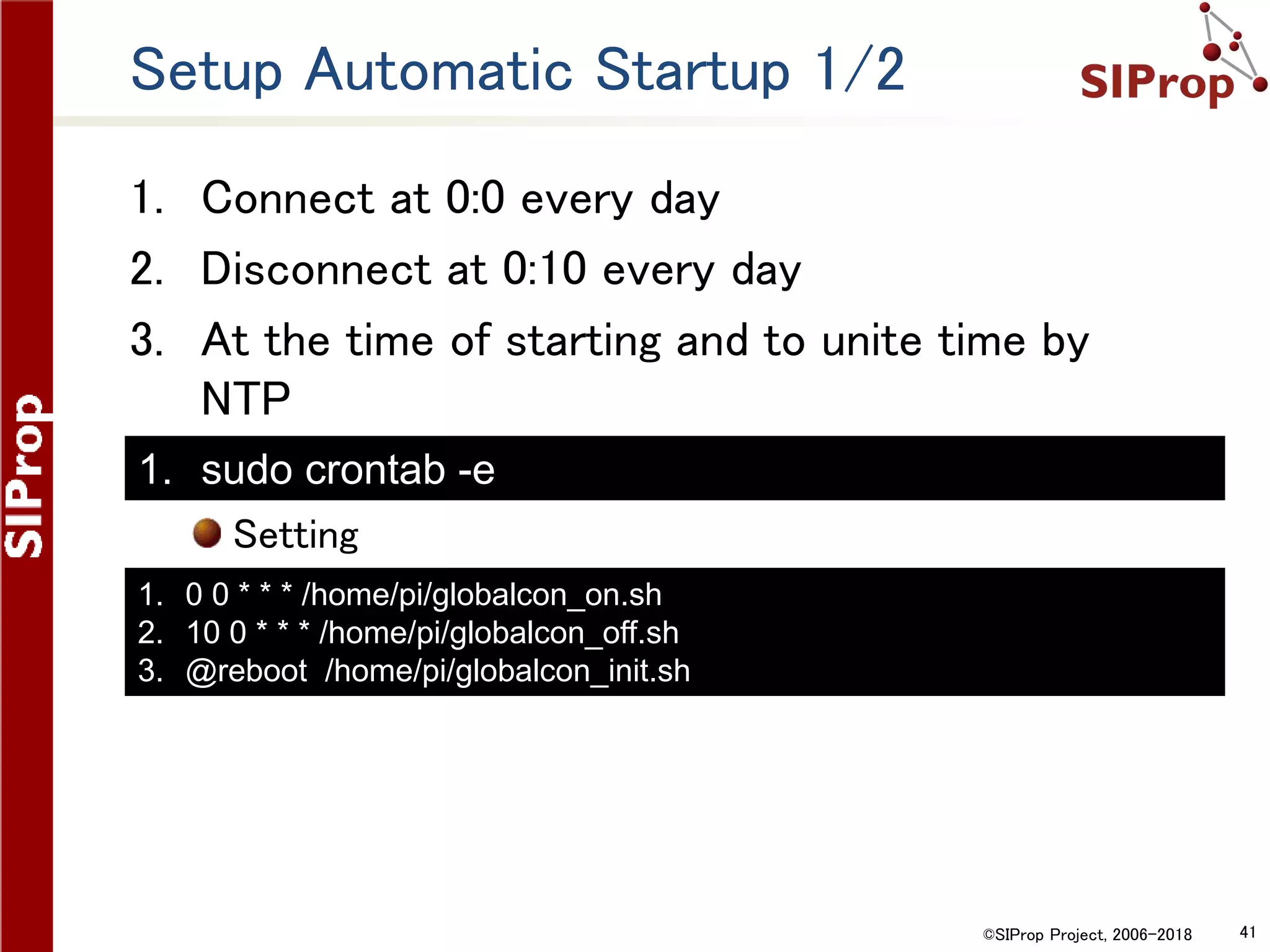
Setup Automatic Startup 1/2
1. Connect at 0:0 every day
2. Disconnect at 0:10 every day
3. At the time of starting and to unite time by
NTP
Setting
1. 0 0 * * * /home/pi/globalcon_on.sh
2. 10 0 * * * /home/pi/globalcon_off.sh
3. @reboot /home/pi/globalcon_init.sh
1. sudo crontab -e
©SIProp Project, 2006-2018 42
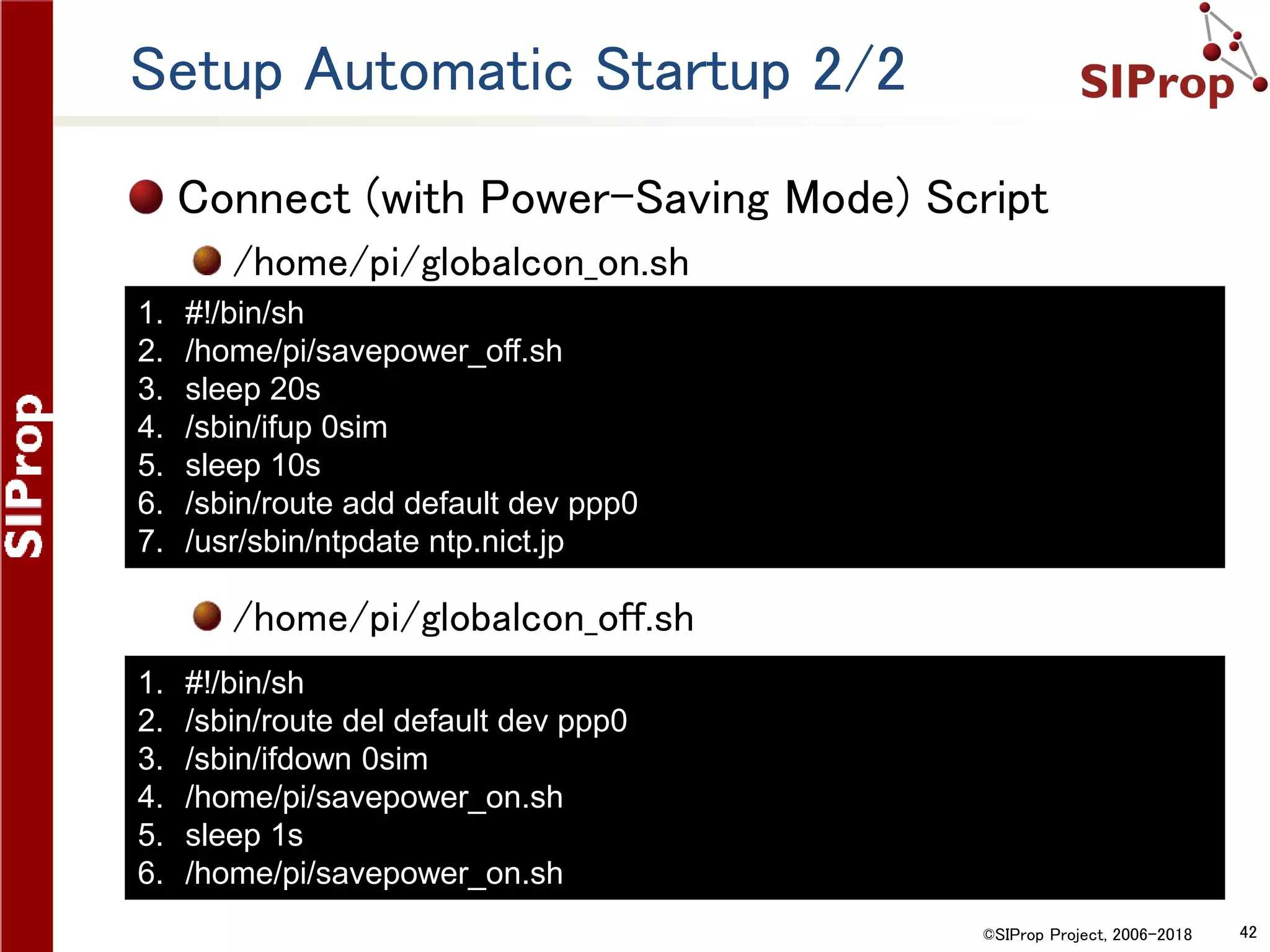
Setup Automatic Startup 2/2
Connect (with Power-Saving Mode) Script
/home/pi/globalcon_on.sh
/home/pi/globalcon_off.sh
1. #!/bin/sh
2. /home/pi/savepower_off.sh
3. sleep 20s
4. /sbin/ifup 0sim
5. sleep 10s
6. /sbin/route add default dev ppp0
7. /usr/sbin/ntpdate ntp.nict.jp
1. #!/bin/sh
2. /sbin/route del default dev ppp0
3. /sbin/ifdown 0sim
4. /home/pi/savepower_on.sh
5. sleep 1s
6. /home/pi/savepower_on.sh
©SIProp Project, 2006-2018 43
Setup Automatic Re-Connect
Re-Connect Script
/home/pi/globalcon_recon.sh
Check connection for every minute during connection
Setting
1. #!/bin/sh
2. isAlive=`ps -ef | grep " wvdial " | 
3. grep -v grep | wc -l`
4. if [ $isAlive = 1 ]; then
5. echo alive
6. else
7. echo die
8. /home/pi/globalcon_off.sh
9. /home/pi/globalcon_on.sh
10.fi
1. sudo crontab -e
1. 1,2,3,4,5,6,7,8,9 0 * * * /home/pi/globalcon_recon.sh
©SIProp Project, 2006-2018 44
About The OS Image which the
all the soft setups have finished
©SIProp Project, 2006-2018 45
The OS Image which the all the soft
setups have finished
About The OS Image which the all the soft setups
have finished
1. http://www.noritsuna.jp/download/raspi-sdr_GS_en.zip
1. Image Size
1. 8GB or more microSD
2. LAN IP
1. DHCP
3. Remote Operations
1. Local Network: VNC
2. Global Network: TeamViewer
1. No Account. Please execute “teamviewer setup”
4. Login
1. User: pi , Password: raspberry
5. Power-Saving Mode
1. Control /home/pi/savepower_[on|off].sh
2. Startup Setting “sudo crontab –e” & Enable comment out lines
1. Warning: If on, Disable USB Devices & HDMI.
©SIProp Project, 2006-2018 46
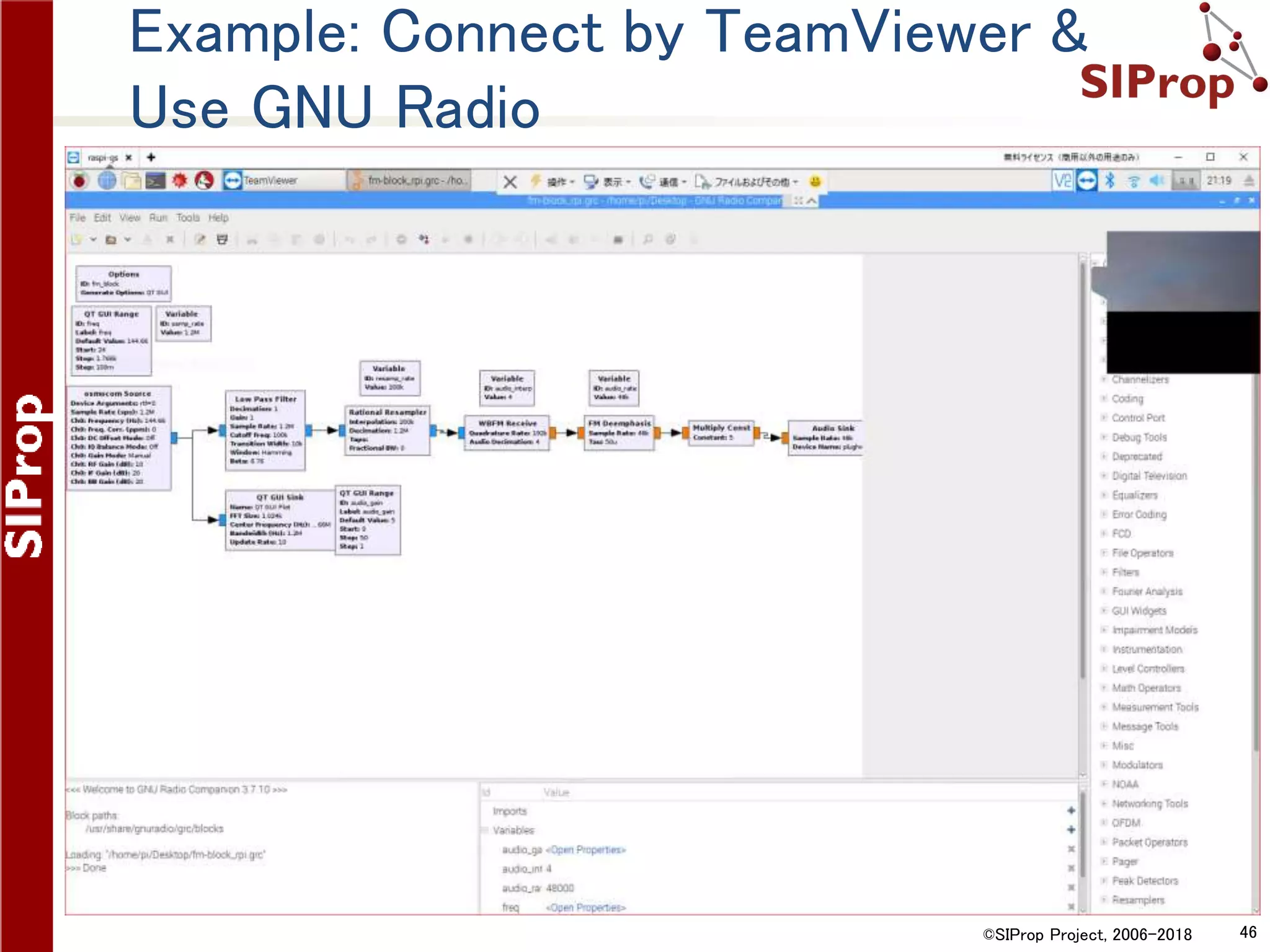
Example: Connect by TeamViewer &
Use GNU Radio

The Self-Contained SDR Satellite Grand Station with Raspberry Pi 3

  • 1.
    ©SIProp Project, 2006-20171 The Self-Contained SDR Satellite Grand Station with Raspberry Pi 3 Noritsuna Imamura(JI1SZP) noritsuna@siprop.org
  • 2.
    ©SIProp Project, 2006-20182 Contents The Self-Contained SDR Grand Station with Raspberry Pi 3 Setup Raspberry Pi GNU Radio Gqrx TeamViewer OS Image Download
  • 3.
    ©SIProp Project, 2006-20183 What’s The Self-Contained SDR Grand Station with Raspberry Pi 3 This Satellite Grand Station has Full Functions for Satellite Radio, Power Supply and WAN Connection with Raspberry Pi in small box. Feature Space-Saving 8inchi ^ 3 size All Cable-Less No Power Cable, No RF Cable, No Network Cable WAN Connection Reachable from Anywhere SDR+GNU Radio Programmable Satellite Grand Station Automatic Satellite Communication Qt based Tracking Satellite Software (Our software) • https://github.com/siprop/satella.git • Coming Soon!!!
  • 4.
    ©SIProp Project, 2006-20184 Based Devices SDR RTL-SDR http://www.rtl- sdr.com/buy-rtl-sdr-dvb- t-dongles/ Antenna Mobile Antenna 144/430MHz LNA 0.1-2000MHz Wideband RF Low Noise Amplifier Main PC Raspberry Pi 3 https://www.raspberry pi.org/products/raspbe rry-pi-3-model-b/ Rainproof Box Aluminum Box
  • 5.
    ©SIProp Project, 2006-20185 Power Devices Solar Power Solar Panel 12W Lead-acid Battery 12V/6Ah Solar Battery Charge and Discharge Controller Solar Panel Input: 16-20V Battery Input: 12V Output: 8-12V DC-DC Converter Input: 8-12V Output: 5V /3A
  • 6.
    ©SIProp Project, 2006-20186 WAN Communication Devices 3G/LTE USB Dongle Data Type SIM
  • 7.
    ©SIProp Project, 2006-20187 Softwares SDR Controller Gqrx http://gqrx.dk/ Programmable SDR Controller GNU Radio https://www.gnuradio.org/ Remote Operation TeamViewer https://www.teamviewer.com/
  • 8.
    ©SIProp Project, 2006-20188 All Devices 18W Solar Panel Mobile Antenna DCDC Converter Solar Battery Charge and Discharge Controller Lead-acid Battery RTL-SDR LNA Rainproof Box Raspberry Pi 3 3G/LTE USB Dongle
  • 9.
    ©SIProp Project, 2006-20189 Required Power Specifications
  • 10.
    ©SIProp Project, 2006-201810 Saving Power Settings USB OFF = 0.5W (「0」→「1」 to ON) HDMI OFF = 0.1W POWER SAVE = 0.02W 1. sudo apt install libusb-dev 2. wget http://www.gniibe.org/oitoite/ac-power-control-by- USB-hub/hub-ctrl.c 3. gcc -O2 hub-ctrl.c -o hub-ctrl-armhf-static -lusb -static 4. sudo cp hub-ctrl-armhf-static /usr/local/bin/hub-ctrl 5. sudo hub-ctrl -h 0 -P 2 -p 0 1. /opt/vc/bin/tvservice --off 1. echo "powersave"| sudo tee /sys/devices/system/cpu/cpu0/cpufreq/scaling_governor
  • 11.
    ©SIProp Project, 2006-201811 Calculating Power Specifications Power Consumption Standby: 2.0W GNU Radio: 5.0W Gqrx: 5.2W 3G/LTE: 5.5W Fan: +0.2~0.5W Required for 1 Day Standby:22h +Operation:2h = 44Wh + 11Wh = 55Wh/d Charging&DCDC Loss = 20% = 66Wh/d Daily Chargeable Time 6h Required Electric- Generating Capacity = 11W/h
  • 12.
    ©SIProp Project, 2006-201812 Setup Raspberry Pi
  • 13.
    ©SIProp Project, 2006-201813 Setup Raspbian Target OS RASPBIAN xxx with DESKTOP https://www.raspberrypi.org/downloads/raspbian/ How to Setup https://www.raspberrypi.org/documentation/setup/
  • 14.
  • 15.
    ©SIProp Project, 2006-201815 Setup NTP(Network Time Protocol) A clock will be reset if a power supply is shut down. Because Raspberry Pi does not have RTC (Real Time Clock). Install NTP client 1. sudo apt install ntpdate
  • 16.
    ©SIProp Project, 2006-201816 Setup NTP(Network Time Protocol) Schedule Every 5 minutes Add last line Execute at Startup Add before “exit 0” 1. 05 * * * * /usr/sbin/ntpdate ntp.nict.jp 1. /usr/sbin/ntpdate ntp.nict.jp 1. sudo crontab -e 1. sudo nano /etc/rc.local
  • 17.
    ©SIProp Project, 2006-201817 Automatic Update
  • 18.
    ©SIProp Project, 2006-201818 Setup Automatic Security Update Install Setting /etc/apt/apt.conf.d/50unattended-upgrades Only Update Security Patch If reboot is necessary, reboot at 2:00. 1. Unattended-Upgrade::Origins-Pattern { 2. "origin=Debian,codename=${distro_codename},label=Debian-Security"; 3. }; 4. Unattended-Upgrade::Automatic-Reboot "true"; 5. Unattended-Upgrade::Automatic-Reboot-Time "02:00"; 1. sudo nano /etc/apt/apt.conf.d/50unattended-upgrades 1. sudo apt install unattended-upgrades
  • 19.
    ©SIProp Project, 2006-201819 Reduce Writing to Disk(SD Card)
  • 20.
    ©SIProp Project, 2006-201820 Reduce Writing to Disk(SD Card) SD Card has a low rewriting maximum. Then, Changing a setup so that excessive writing may not be executed. 1. Logging of RAM disk 2. Disable ext4 journal log Logging of RAM disk /etc/fstab Delete the current logging files 1. tmpfs /tmp tmpfs defaults,size=8m,noatime,mode=1777 0 0 2. Tmpfs /var/tmp tmpfs defaults,size=4m,noatime,mode=1777 0 0 3. tmpfs /var/log tmpfs defaults,size=8m,noatime,mode=0755 0 0 1. sudo rm -fr /tmp 2. sudo rm -fr /var/tmp
  • 21.
    ©SIProp Project, 2006-201821 Logging of RAM disk Create logging directories at startup /etc/rc.local 1. mkdir -p /var/log/apt 2. mkdir -p /var/log/fsck 3. mkdir -p /var/log/ntpstats 4. mkdir -p /var/log/samba 5. chmod 750 /var/log/samba 6. chown ntp:ntp /var/log/ntpstats 7. chown root:adm /var/log/samba 8. touch /var/log/btmp 9. touch /var/log/lastlog 10. touch /var/log/wtmp 11. chmod 600 /var/log/btmp 12. chmod 664 /var/log/lastlog 13. chmod 664 /var/log/wtmp 14. chown root:utmp /var/log/btmp 15. chown root:utmp /var/log/lastlog 16. chown root:utmp /var/log/wtmp
  • 22.
    ©SIProp Project, 2006-201822 Disable ext4 journal log Since it cannot execute case which has been mounted by the system, execute on another system. or 1. sudo umount /dev/mmcblk0p2 2. sudo tune2fs -O ^has_journal /dev/mmcblk0p2 1. sudo umount /dev/sda2 2. sudo tune2fs -O ^has_journal /dev/sda2
  • 23.
    ©SIProp Project, 2006-201823 Saving Power Settings
  • 24.
    ©SIProp Project, 2006-201824 Saving Power Settings USB OFF = 0.5W (「0」→「1」 to ON) HDMI OFF = 0.1W POWER SAVE = 0.02W 1. sudo apt install libusb-dev 2. wget http://www.gniibe.org/oitoite/ac-power-control-by- USB-hub/hub-ctrl.c 3. gcc -O2 hub-ctrl.c -o hub-ctrl-armhf-static -lusb -static 4. sudo cp hub-ctrl-armhf-static /usr/local/bin/hub-ctrl 5. sudo hub-ctrl -h 0 -P 2 -p 0 1. /opt/vc/bin/tvservice --off 1. echo "powersave"| sudo tee /sys/devices/system/cpu/cpu0/cpufreq/scaling_governor
  • 25.
    ©SIProp Project, 2006-201825 Change Power-Saving Mode at Startup Execute at Startup Power-Saving Mode: On Power-Saving Mode: Off 1. @reboot /home/pi/savepower_on.sh 1. sudo crontab -e 1. sudo /home/pi/savepower_off.sh
  • 26.
  • 27.
    ©SIProp Project, 2006-201827 Setup GNU Radio 1. Install SDR Drivers 2. Install GNU Radio 3. When Using HDMI, The Raspberry Pi's Audio is outputted to HDMI. 1. Change Output from an Earphone Jack. 1. Last Number: 0=auto, 1=earphone jack, 2=HDMI 1. sudo apt install rtl-sdr gr-osmosdr 1. sudo apt install gnuradio 1. amixer cset numid=3 1
  • 28.
    ©SIProp Project, 2006-201828 Example:Recipe of Receive FM Radio SDR Block Osmocom Source Not RTL-SDR Source audio.sink Block device plughw:0,1
  • 29.
  • 30.
    ©SIProp Project, 2006-201830 Gqrx SDR for the Raspberry Pi SDR Control Software http://gqrx.dk/download/gqrx-sdr-for-the- raspberry-pi
  • 31.
    ©SIProp Project, 2006-201831 Device Support of Gqrx
  • 32.
    ©SIProp Project, 2006-201832 Setup Gqrx 1. Download Gqrx 1. http://gqrx.dk/download/gqrx-sdr-for-the- raspberry-pi 2. Install Gqrx & Required Libraries Execute on Raspberry Pi 1. tar Jxfv gqrx-2.9-linux-armv6.tar.xz 2. cd gqrx-2.9-linux-armv6 3. sudo apt install gnuradio libvolk1-bin libusb-1.0-0 gr-iqbal 4. sudo apt install qt5-default libqt5svg5 libportaudio2 5. sudo cp udev/rtl-sdr.rules /etc/udev/rules.d/
  • 33.
    ©SIProp Project, 2006-201833 3G/LTE Connection
  • 34.
    ©SIProp Project, 2006-201834 Setting Conditions Communication Conditions Global Connection by TeamViewer Every day at 0:00 only for 10 minutes Data Transfer Each GNU Radio + ppp(Dial Up) Connection 3G/LT USB Dongle Examle: LG L-03D When connection is not stabilized 1. Use Self-Power USB Hub
  • 35.
    ©SIProp Project, 2006-201835 Disable CD-ROM function Setting /etc/udev/rules.d/40-usb_modeswitch.rules /etc/usb_modeswitch.d/1004:6327 1. ATTRS{idVendor}=="1004", ATTRS{idProduct}=="6327", MODE:="0666", RUN+="usb_modeswitch '%b/%k'" 1. DefaultVendor= 0x1004 2. DefaultProduct=0x6327 3. TargetVendor= 0x1004 4. TargetProductList="6326" 5. MessageContent="55534243123456780000000000000aff554d534348470000000 00000000000"
  • 36.
    ©SIProp Project, 2006-201836 Recognized as a USB Modem Setting /etc/udev/rules.d/50-l03d.rules 1. ATTRS{idVendor}=="1004", ATTRS{idProduct}=="6326", MODE:="0666", RUN+="/sbin/modprobe usbserial vendor=0x1004 product=0x6326"
  • 37.
    ©SIProp Project, 2006-201837 Setup PPP connection Use wvdial 1. sudo apt install usb-modeswitch wvdial
  • 38.
    ©SIProp Project, 2006-201838 Example:So-net’s 0SIM(Japan) Settng /etc/wvdial.conf 1. [Dialer Defaults] 2. Init1 = ATZ 3. Init2 = ATH 4. Init3 = AT+CGDCONT=2,"IP","so-net.jp" 5. Dial Attempts = 3 6. Stupid Mode = yes 7. Modem Type = Analog Modem 8. Dial Command = ATD 9. New PPPD = yes 10. APN = so-net.jp 11. Modem = /dev/ttyUSB2 12. Baud = 460800 13. ISDN = 0 14. Phone = *99***2# 15. Auto Reconnect = yes 16. Username = nuro 17. Password = nuro 18. Carrier Check = no
  • 39.
    ©SIProp Project, 2006-201839 Add ppp Network Interface Add ppp Network Interface /etc/network/interfaces.d/0sim Connect Disconnect Warning: Power-Saving mode is turning OFF 1. sudo ifdown 0sim 1. sudo ifup 0sim 1. allow-hotplug 0sim 2. iface 0sim inet wvdial
  • 40.
    ©SIProp Project, 2006-201840 Global Connection:TeamViewer TeamViewer for Raspberry Pi https://download.teamviewer.com/download/linux/te amviewer-host_armhf.deb Setting Create TeamViewer account in advance. 1. wget https://download.teamviewer.com/download/linux/teamvie wer-host_armhf.deb 2. sudo apt install ./teamviewer-host_armhf.deb 3. sudo teamviewer setup
  • 41.
    ©SIProp Project, 2006-201841 Setup Automatic Startup 1/2 1. Connect at 0:0 every day 2. Disconnect at 0:10 every day 3. At the time of starting and to unite time by NTP Setting 1. 0 0 * * * /home/pi/globalcon_on.sh 2. 10 0 * * * /home/pi/globalcon_off.sh 3. @reboot /home/pi/globalcon_init.sh 1. sudo crontab -e
  • 42.
    ©SIProp Project, 2006-201842 Setup Automatic Startup 2/2 Connect (with Power-Saving Mode) Script /home/pi/globalcon_on.sh /home/pi/globalcon_off.sh 1. #!/bin/sh 2. /home/pi/savepower_off.sh 3. sleep 20s 4. /sbin/ifup 0sim 5. sleep 10s 6. /sbin/route add default dev ppp0 7. /usr/sbin/ntpdate ntp.nict.jp 1. #!/bin/sh 2. /sbin/route del default dev ppp0 3. /sbin/ifdown 0sim 4. /home/pi/savepower_on.sh 5. sleep 1s 6. /home/pi/savepower_on.sh
  • 43.
    ©SIProp Project, 2006-201843 Setup Automatic Re-Connect Re-Connect Script /home/pi/globalcon_recon.sh Check connection for every minute during connection Setting 1. #!/bin/sh 2. isAlive=`ps -ef | grep " wvdial " | 3. grep -v grep | wc -l` 4. if [ $isAlive = 1 ]; then 5. echo alive 6. else 7. echo die 8. /home/pi/globalcon_off.sh 9. /home/pi/globalcon_on.sh 10.fi 1. sudo crontab -e 1. 1,2,3,4,5,6,7,8,9 0 * * * /home/pi/globalcon_recon.sh
  • 44.
    ©SIProp Project, 2006-201844 About The OS Image which the all the soft setups have finished
  • 45.
    ©SIProp Project, 2006-201845 The OS Image which the all the soft setups have finished About The OS Image which the all the soft setups have finished 1. http://www.noritsuna.jp/download/raspi-sdr_GS_en.zip 1. Image Size 1. 8GB or more microSD 2. LAN IP 1. DHCP 3. Remote Operations 1. Local Network: VNC 2. Global Network: TeamViewer 1. No Account. Please execute “teamviewer setup” 4. Login 1. User: pi , Password: raspberry 5. Power-Saving Mode 1. Control /home/pi/savepower_[on|off].sh 2. Startup Setting “sudo crontab –e” & Enable comment out lines 1. Warning: If on, Disable USB Devices & HDMI.
  • 46.
    ©SIProp Project, 2006-201846 Example: Connect by TeamViewer & Use GNU Radio