E-commerce
                                           business. technology. society.
                                           Second Edition


                                           Kenneth C. Laudon
                                           Carol Guercio Traver


Copyright © 2004 Pearson Education, Inc.                           Slide 6-1
Chapter 6
          E-commerce Payment Systems


Copyright © 2004 Pearson Education, Inc.   Slide 6-2
Learning Objectives
              Describe the features of traditional payment systems
              Discuss the current limitations of online credit card
               payment systems
              Understand the features and functionality of digital
               wallets
              Describe the features and functionality of the major
               types of digital payment systems in the B2C arena
              Describe the features and functionality of the major
               types of digital payment systems in the B2B arena
              Describe the features and functionality of electronic
               billing presentment and payment systems

Copyright © 2004 Pearson Education, Inc.                          Slide 6-3
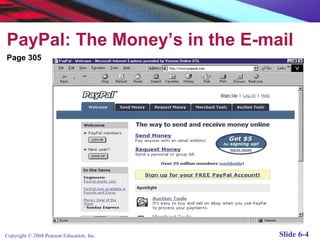
PayPal: The Money’s in the E-mail
Page 305


Copyright © 2004 Pearson Education, Inc.   Slide 6-4
PayPal: The Money’s in the E-mail
              One of e-commerce’s major success stories:
                 Went public in 2002; acquired by eBay October
                   2002 for $1.5 billion
              An example of a “peer-to-peer” payment system
              Fills a niche that credit card companies avoided –
               individuals and small merchants
              Piggybacks on existing credit card and checking
               payment systems
              Weakness: suffers from relatively high levels of fraud
              Competitors include Western Union (MoneyZap),
               AOL (AOLQuickcash) and Citibank (C2it)

Copyright © 2004 Pearson Education, Inc.                          Slide 6-5
Types of Payment Systems

          Cash
          Checking  Transfer
          Credit Card
          Stored Value
          Accumulating Balance


Copyright © 2004 Pearson Education, Inc.   Slide 6-6
Cash
              Legal tender defined by a national authority to
               represent value
              Most common form of payment in terms of number of
               transactions
              Instantly convertible into other forms of value without
               intermediation of any kind
              Portable, requires no authentication, and provides
               instant purchasing power
              “Free” (no transaction fee), anonymous, low cognitive
               demands
              Limitations: easily stolen, limited to smaller
               transaction, does not provide any float

Copyright © 2004 Pearson Education, Inc.                           Slide 6-7
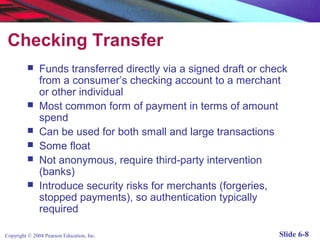
Checking Transfer
              Funds transferred directly via a signed draft or check
               from a consumer’s checking account to a merchant
               or other individual
              Most common form of payment in terms of amount
               spend
              Can be used for both small and large transactions
              Some float
              Not anonymous, require third-party intervention
               (banks)
              Introduce security risks for merchants (forgeries,
               stopped payments), so authentication typically
               required

Copyright © 2004 Pearson Education, Inc.                           Slide 6-8
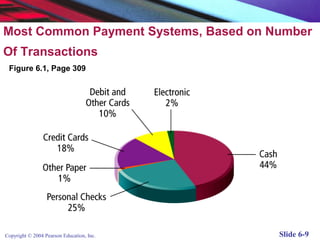
Most Common Payment Systems, Based on Number
Of Transactions
 Figure 6.1, Page 309


Copyright © 2004 Pearson Education, Inc.   Slide 6-9
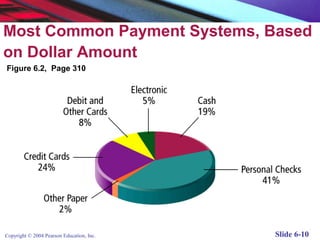
Most Common Payment Systems, Based
on Dollar Amount
Figure 6.2, Page 310


Copyright © 2004 Pearson Education, Inc.   Slide 6-10
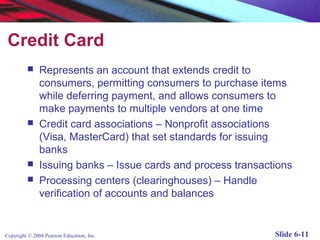
Credit Card
              Represents an account that extends credit to
               consumers, permitting consumers to purchase items
               while deferring payment, and allows consumers to
               make payments to multiple vendors at one time
              Credit card associations – Nonprofit associations
               (Visa, MasterCard) that set standards for issuing
               banks
              Issuing banks – Issue cards and process transactions
              Processing centers (clearinghouses) – Handle
               verification of accounts and balances


Copyright © 2004 Pearson Education, Inc.                       Slide 6-11
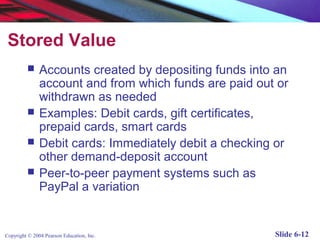
Stored Value
              Accounts created by depositing funds into an
               account and from which funds are paid out or
               withdrawn as needed
              Examples: Debit cards, gift certificates,
               prepaid cards, smart cards
              Debit cards: Immediately debit a checking or
               other demand-deposit account
              Peer-to-peer payment systems such as
               PayPal a variation


Copyright © 2004 Pearson Education, Inc.                Slide 6-12
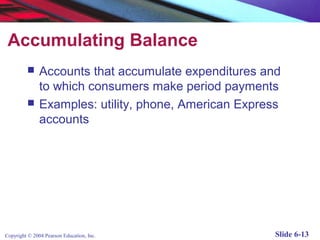
Accumulating Balance
              Accounts that accumulate expenditures and
               to which consumers make period payments
              Examples: utility, phone, American Express
               accounts


Copyright © 2004 Pearson Education, Inc.                Slide 6-13
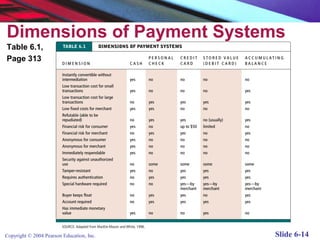
Dimensions of Payment Systems
Table 6.1,
Page 313


Copyright © 2004 Pearson Education, Inc.   Slide 6-14
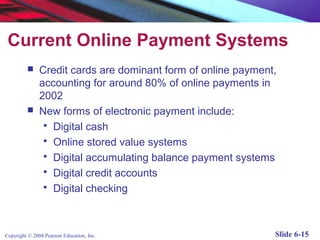
Current Online Payment Systems
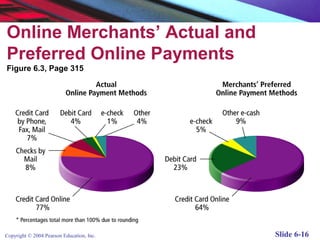
              Credit cards are dominant form of online payment,
               accounting for around 80% of online payments in
               2002
              New forms of electronic payment include:
                 Digital cash
                 Online stored value systems
                 Digital accumulating balance payment systems
                 Digital credit accounts
                 Digital checking


Copyright © 2004 Pearson Education, Inc.                       Slide 6-15
Online Merchants’ Actual and
Preferred Online Payments
Figure 6.3, Page 315


Copyright © 2004 Pearson Education, Inc.   Slide 6-16
How an Online Credit Card
 Transaction Works
              Processed in much the same way that in-
               store purchases are
              Major difference is that online merchants do
               not see or take impression of card, and no
               signature is available (CNP transactions)
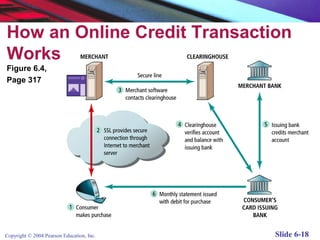
              Participants include consumer, merchant,
               clearinghouse, merchant bank (acquiring
               bank) and consumer’s card issuing bank


Copyright © 2004 Pearson Education, Inc.                 Slide 6-17
How an Online Credit Transaction
Works
Figure 6.4,
Page 317


Copyright © 2004 Pearson Education, Inc.   Slide 6-18
Limitations of Online Credit
 Card Payment Systems
              Security – neither merchant nor consumer
               can be fully authenticated
              Cost – for merchants, around 3.5% of
               purchase price plus transaction fee of 20-30
               cents per transaction
              Social equity – many people do not have
               access to credit cards (young adults, plus
               almost 100 million other adult Americans who
               cannot afford cards or are considered poor
               risk)

Copyright © 2004 Pearson Education, Inc.                Slide 6-19
Insight on Society: The Right to Shop
             Digital Divide: Some groups don’t have same access
              to computers and Internet that others do
           Digital “have nots” include:
                 Households with incomes below $35,000
                 Those without college educations
                 People living in rural areas
                 African-Americans and Hispanics
                 Seniors over 65
                 Disabled
           Most recent Department of Commerce study --most
              of above groups gaining access to computers and
              Internet due to falling computer prices and free or low
              cost ISPs
Copyright © 2004 Pearson Education, Inc.credit cards, still hard for people to shop
           But without                                                           Slide 6-20
The SET (Secure Electronic
 Transaction) Protocol
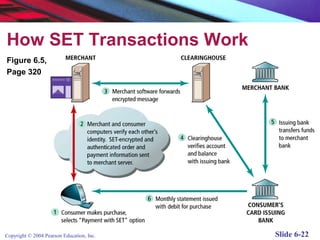
              Authenticates cardholder and merchant identity
               through use of digital certificates
              An open standard developed by MasterCard and
               Visa
              Transaction process similar to standard online credit
               card transaction, with more identity verification
              Thus far, has not caught on much, due to costs
               involved in integrating SET into existing systems, and
               lack of interest among consumers


Copyright © 2004 Pearson Education, Inc.                         Slide 6-21
How SET Transactions Work
Figure 6.5,
Page 320


Copyright © 2004 Pearson Education, Inc.   Slide 6-22
Digital Wallets
              Concept of digital wallet relevant to many of the new
               digital payment systems
              Seeks to emulate the functionality of traditional wallet
              Most important functions:
                 Authenticate consumer through use of digital
                  certificates or other encryption methods
                 Store and transfer value
                 Secure payment process from consumer to
                  merchant
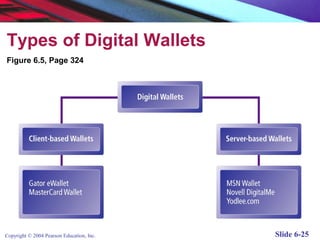
              Two major categories:
                 Client-based digital wallets – Gator.com,
                  MasterCard Wallet
                 Server-based digital wallets – MSN Wallet

Copyright © 2004 Pearson Education, Inc.                           Slide 6-23
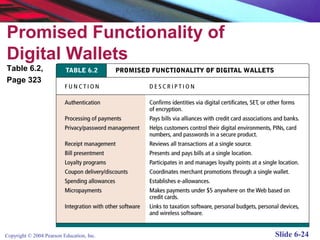
Promised Functionality of
Digital Wallets
Table 6.2,
Page 323


Copyright © 2004 Pearson Education, Inc.   Slide 6-24
Types of Digital Wallets
Figure 6.5, Page 324


Copyright © 2004 Pearson Education, Inc.   Slide 6-25
Digital Cash
              One of the first forms of alternative payment
               systems
              Not really “cash” – rather, are forms of value
               storage and value exchange that have limited
               convertibility into other forms of value, and
               require intermediaries to convert
              Many of early examples have disappear;
               concepts survive as part of P2P payment
               systems

Copyright © 2004 Pearson Education, Inc.                  Slide 6-26
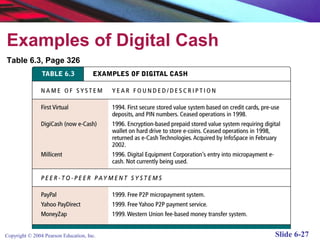
Examples of Digital Cash
Table 6.3, Page 326


Copyright © 2004 Pearson Education, Inc.   Slide 6-27
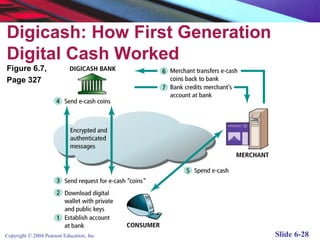
Digicash: How First Generation
Digital Cash Worked
Figure 6.7,
Page 327


Copyright © 2004 Pearson Education, Inc.   Slide 6-28
Online Stored Value Systems
              Permit consumers to make instant, online
               payments to merchants and other individuals
               based on value stored in an online account
              Rely on value stored in a consumer’s bank,
               checking or credit card account


Copyright © 2004 Pearson Education, Inc.                Slide 6-29
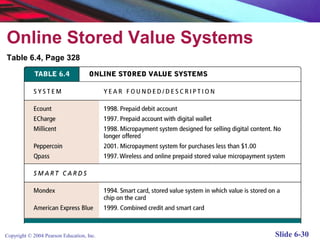
Online Stored Value Systems
Table 6.4, Page 328


Copyright © 2004 Pearson Education, Inc.   Slide 6-30
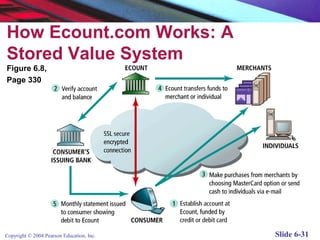
How Ecount.com Works: A
Stored Value System
Figure 6.8,
Page 330


Copyright © 2004 Pearson Education, Inc.   Slide 6-31
Insight on Business: Rocketcash.com

              An example of an online stored value system
              Aimed at teenagers
              Funds can be deposited in a RocketCash
               account, which functions like a credit card
               and allows teens to buy products online


Copyright © 2004 Pearson Education, Inc.               Slide 6-32
Smart Cards as Stored Value Systems

              Another kind of stored value system based on
               credit-card sized plastic cards that have
               embedded chips that store personal
               information
              Two types:
                 Contact
                 Contactless
              Examples: Mondex, American Express Blue

Copyright © 2004 Pearson Education, Inc.                Slide 6-33
Digital Accumulating Balance
 Payment Systems
              Allows users to make micropayments and
               purchases on the Web, accumulating a debit
               balance for which they are billed at the end of
               the month
              Examples: Qpass and iPin


Copyright © 2004 Pearson Education, Inc.                   Slide 6-34
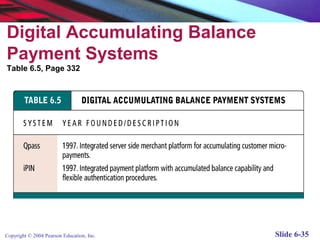
Digital Accumulating Balance
Payment Systems
Table 6.5, Page 332


Copyright © 2004 Pearson Education, Inc.   Slide 6-35
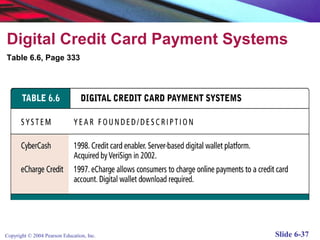
Digital Credit Card Payment Systems

              Extend the functionality of existing credit
               cards for use as online shopping payment
               tools
              Focus specifically on making use of credit
               cards safer and more convenient for online
               merchants and consumers
              Example: eCharge


Copyright © 2004 Pearson Education, Inc.                 Slide 6-36
Digital Credit Card Payment Systems
Table 6.6, Page 333


Copyright © 2004 Pearson Education, Inc.   Slide 6-37
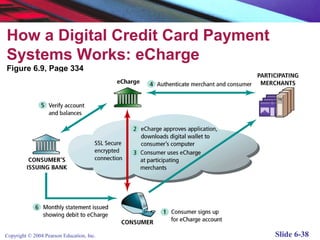
How a Digital Credit Card Payment
Systems Works: eCharge
Figure 6.9, Page 334


Copyright © 2004 Pearson Education, Inc.   Slide 6-38
Digital Checking Payment Systems

              Extend the functionality of existing checking
               accounts for use as online shopping payment
               tools
              Examples: eCheck, Achex (MoneyZap)


Copyright © 2004 Pearson Education, Inc.                 Slide 6-39
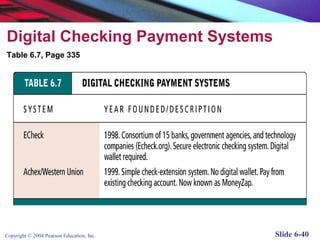
Digital Checking Payment Systems
Table 6.7, Page 335


Copyright © 2004 Pearson Education, Inc.   Slide 6-40
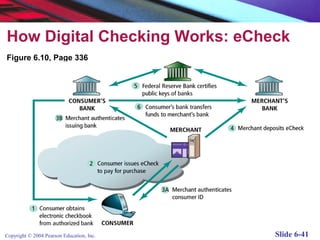
How Digital Checking Works: eCheck
Figure 6.10, Page 336


Copyright © 2004 Pearson Education, Inc.   Slide 6-41
Digital Payment Systems and
the Wireless Web
              Mobile payment (m-payments) systems not
               very well established yet in U.S, but with
               growth in Wi-Fi and 3G cellular phone
               systems, this is beginning to change
              Example: Qpass, AT&T and Wayport venture
               to provide mobile payment and billing called
               GoPort
              Gartner predicts m-payments worldwide will
               total at least $30 billion by 2002; majority of
               transactions will be micro-m-payments

Copyright © 2004 Pearson Education, Inc.                   Slide 6-42
Insight on Technology: Wireless Payments
 Follow Wi-Fi and Cellular Growth
              In Europe, already a number of phone-based
               transaction systems
              In U.S., development of Wi-Fi and Bluetooth
               expected to drive growth
              Prerequisites:
                 Development of the technology
                 Technology must become widely available
                 Technology needs backing of most of major
                  stakeholders
              Challenge: Getting all the players to agree on a
               common secure platform for wireless e-commerce
               payment systems
Copyright © 2004 Pearson Education, Inc.                      Slide 6-43
B2B Payment Systems
              More complex than B2C
              Two main types:
                 Systems that replace traditional banks
                  (example: Actrade)
                 Existing banking systems extending to B2B
                  marketplace (example: Orbian)


Copyright © 2004 Pearson Education, Inc.                Slide 6-44
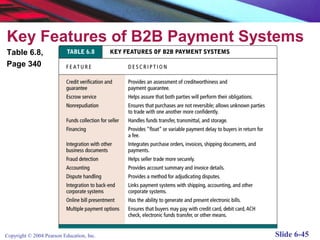
Key Features of B2B Payment Systems
Table 6.8,
Page 340


Copyright © 2004 Pearson Education, Inc.   Slide 6-45
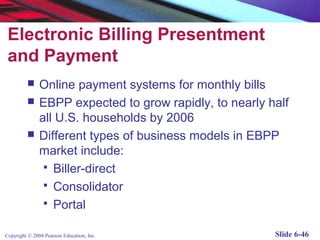
Electronic Billing Presentment
 and Payment
              Online payment systems for monthly bills
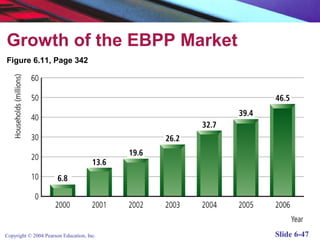
              EBPP expected to grow rapidly, to nearly half
               all U.S. households by 2006
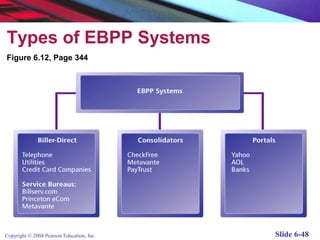
              Different types of business models in EBPP
               market include:
                 Biller-direct
                 Consolidator
                 Portal


Copyright © 2004 Pearson Education, Inc.                 Slide 6-46
Growth of the EBPP Market
Figure 6.11, Page 342


Copyright © 2004 Pearson Education, Inc.   Slide 6-47
Types of EBPP Systems
Figure 6.12, Page 344


Copyright © 2004 Pearson Education, Inc.   Slide 6-48
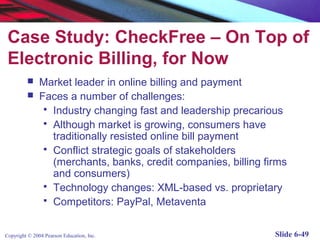
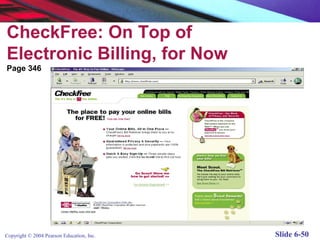
Case Study: CheckFree – On Top of
 Electronic Billing, for Now
              Market leader in online billing and payment
              Faces a number of challenges:
                 Industry changing fast and leadership precarious
                 Although market is growing, consumers have
                  traditionally resisted online bill payment
                 Conflict strategic goals of stakeholders
                  (merchants, banks, credit companies, billing firms
                  and consumers)
                 Technology changes: XML-based vs. proprietary
                 Competitors: PayPal, Metaventa


Copyright © 2004 Pearson Education, Inc.                         Slide 6-49
CheckFree: On Top of
Electronic Billing, for Now
Page 346


Copyright © 2004 Pearson Education, Inc.   Slide 6-50

Lecture 4 e commerce 2 payment systems

  • 1.
    E-commerce business. technology. society. Second Edition Kenneth C. Laudon Carol Guercio Traver Copyright © 2004 Pearson Education, Inc. Slide 6-1
  • 2.
    Chapter 6 E-commerce Payment Systems Copyright © 2004 Pearson Education, Inc. Slide 6-2
  • 3.
    Learning Objectives  Describe the features of traditional payment systems  Discuss the current limitations of online credit card payment systems  Understand the features and functionality of digital wallets  Describe the features and functionality of the major types of digital payment systems in the B2C arena  Describe the features and functionality of the major types of digital payment systems in the B2B arena  Describe the features and functionality of electronic billing presentment and payment systems Copyright © 2004 Pearson Education, Inc. Slide 6-3
  • 4.
    PayPal: The Money’sin the E-mail Page 305 Copyright © 2004 Pearson Education, Inc. Slide 6-4
  • 5.
    PayPal: The Money’sin the E-mail  One of e-commerce’s major success stories:  Went public in 2002; acquired by eBay October 2002 for $1.5 billion  An example of a “peer-to-peer” payment system  Fills a niche that credit card companies avoided – individuals and small merchants  Piggybacks on existing credit card and checking payment systems  Weakness: suffers from relatively high levels of fraud  Competitors include Western Union (MoneyZap), AOL (AOLQuickcash) and Citibank (C2it) Copyright © 2004 Pearson Education, Inc. Slide 6-5
  • 6.
    Types of PaymentSystems  Cash  Checking Transfer  Credit Card  Stored Value  Accumulating Balance Copyright © 2004 Pearson Education, Inc. Slide 6-6
  • 7.
    Cash  Legal tender defined by a national authority to represent value  Most common form of payment in terms of number of transactions  Instantly convertible into other forms of value without intermediation of any kind  Portable, requires no authentication, and provides instant purchasing power  “Free” (no transaction fee), anonymous, low cognitive demands  Limitations: easily stolen, limited to smaller transaction, does not provide any float Copyright © 2004 Pearson Education, Inc. Slide 6-7
  • 8.
    Checking Transfer  Funds transferred directly via a signed draft or check from a consumer’s checking account to a merchant or other individual  Most common form of payment in terms of amount spend  Can be used for both small and large transactions  Some float  Not anonymous, require third-party intervention (banks)  Introduce security risks for merchants (forgeries, stopped payments), so authentication typically required Copyright © 2004 Pearson Education, Inc. Slide 6-8
  • 9.
    Most Common PaymentSystems, Based on Number Of Transactions Figure 6.1, Page 309 Copyright © 2004 Pearson Education, Inc. Slide 6-9
  • 10.
    Most Common PaymentSystems, Based on Dollar Amount Figure 6.2, Page 310 Copyright © 2004 Pearson Education, Inc. Slide 6-10
  • 11.
    Credit Card  Represents an account that extends credit to consumers, permitting consumers to purchase items while deferring payment, and allows consumers to make payments to multiple vendors at one time  Credit card associations – Nonprofit associations (Visa, MasterCard) that set standards for issuing banks  Issuing banks – Issue cards and process transactions  Processing centers (clearinghouses) – Handle verification of accounts and balances Copyright © 2004 Pearson Education, Inc. Slide 6-11
  • 12.
    Stored Value  Accounts created by depositing funds into an account and from which funds are paid out or withdrawn as needed  Examples: Debit cards, gift certificates, prepaid cards, smart cards  Debit cards: Immediately debit a checking or other demand-deposit account  Peer-to-peer payment systems such as PayPal a variation Copyright © 2004 Pearson Education, Inc. Slide 6-12
  • 13.
    Accumulating Balance  Accounts that accumulate expenditures and to which consumers make period payments  Examples: utility, phone, American Express accounts Copyright © 2004 Pearson Education, Inc. Slide 6-13
  • 14.
    Dimensions of PaymentSystems Table 6.1, Page 313 Copyright © 2004 Pearson Education, Inc. Slide 6-14
  • 15.
    Current Online PaymentSystems  Credit cards are dominant form of online payment, accounting for around 80% of online payments in 2002  New forms of electronic payment include:  Digital cash  Online stored value systems  Digital accumulating balance payment systems  Digital credit accounts  Digital checking Copyright © 2004 Pearson Education, Inc. Slide 6-15
  • 16.
    Online Merchants’ Actualand Preferred Online Payments Figure 6.3, Page 315 Copyright © 2004 Pearson Education, Inc. Slide 6-16
  • 17.
    How an OnlineCredit Card Transaction Works  Processed in much the same way that in- store purchases are  Major difference is that online merchants do not see or take impression of card, and no signature is available (CNP transactions)  Participants include consumer, merchant, clearinghouse, merchant bank (acquiring bank) and consumer’s card issuing bank Copyright © 2004 Pearson Education, Inc. Slide 6-17
  • 18.
    How an OnlineCredit Transaction Works Figure 6.4, Page 317 Copyright © 2004 Pearson Education, Inc. Slide 6-18
  • 19.
    Limitations of OnlineCredit Card Payment Systems  Security – neither merchant nor consumer can be fully authenticated  Cost – for merchants, around 3.5% of purchase price plus transaction fee of 20-30 cents per transaction  Social equity – many people do not have access to credit cards (young adults, plus almost 100 million other adult Americans who cannot afford cards or are considered poor risk) Copyright © 2004 Pearson Education, Inc. Slide 6-19
  • 20.
    Insight on Society:The Right to Shop  Digital Divide: Some groups don’t have same access to computers and Internet that others do  Digital “have nots” include:  Households with incomes below $35,000  Those without college educations  People living in rural areas  African-Americans and Hispanics  Seniors over 65  Disabled  Most recent Department of Commerce study --most of above groups gaining access to computers and Internet due to falling computer prices and free or low cost ISPs Copyright © 2004 Pearson Education, Inc.credit cards, still hard for people to shop  But without Slide 6-20
  • 21.
    The SET (SecureElectronic Transaction) Protocol  Authenticates cardholder and merchant identity through use of digital certificates  An open standard developed by MasterCard and Visa  Transaction process similar to standard online credit card transaction, with more identity verification  Thus far, has not caught on much, due to costs involved in integrating SET into existing systems, and lack of interest among consumers Copyright © 2004 Pearson Education, Inc. Slide 6-21
  • 22.
    How SET TransactionsWork Figure 6.5, Page 320 Copyright © 2004 Pearson Education, Inc. Slide 6-22
  • 23.
    Digital Wallets  Concept of digital wallet relevant to many of the new digital payment systems  Seeks to emulate the functionality of traditional wallet  Most important functions:  Authenticate consumer through use of digital certificates or other encryption methods  Store and transfer value  Secure payment process from consumer to merchant  Two major categories:  Client-based digital wallets – Gator.com, MasterCard Wallet  Server-based digital wallets – MSN Wallet Copyright © 2004 Pearson Education, Inc. Slide 6-23
  • 24.
    Promised Functionality of DigitalWallets Table 6.2, Page 323 Copyright © 2004 Pearson Education, Inc. Slide 6-24
  • 25.
    Types of DigitalWallets Figure 6.5, Page 324 Copyright © 2004 Pearson Education, Inc. Slide 6-25
  • 26.
    Digital Cash  One of the first forms of alternative payment systems  Not really “cash” – rather, are forms of value storage and value exchange that have limited convertibility into other forms of value, and require intermediaries to convert  Many of early examples have disappear; concepts survive as part of P2P payment systems Copyright © 2004 Pearson Education, Inc. Slide 6-26
  • 27.
    Examples of DigitalCash Table 6.3, Page 326 Copyright © 2004 Pearson Education, Inc. Slide 6-27
  • 28.
    Digicash: How FirstGeneration Digital Cash Worked Figure 6.7, Page 327 Copyright © 2004 Pearson Education, Inc. Slide 6-28
  • 29.
    Online Stored ValueSystems  Permit consumers to make instant, online payments to merchants and other individuals based on value stored in an online account  Rely on value stored in a consumer’s bank, checking or credit card account Copyright © 2004 Pearson Education, Inc. Slide 6-29
  • 30.
    Online Stored ValueSystems Table 6.4, Page 328 Copyright © 2004 Pearson Education, Inc. Slide 6-30
  • 31.
    How Ecount.com Works:A Stored Value System Figure 6.8, Page 330 Copyright © 2004 Pearson Education, Inc. Slide 6-31
  • 32.
    Insight on Business:Rocketcash.com  An example of an online stored value system  Aimed at teenagers  Funds can be deposited in a RocketCash account, which functions like a credit card and allows teens to buy products online Copyright © 2004 Pearson Education, Inc. Slide 6-32
  • 33.
    Smart Cards asStored Value Systems  Another kind of stored value system based on credit-card sized plastic cards that have embedded chips that store personal information  Two types:  Contact  Contactless  Examples: Mondex, American Express Blue Copyright © 2004 Pearson Education, Inc. Slide 6-33
  • 34.
    Digital Accumulating Balance Payment Systems  Allows users to make micropayments and purchases on the Web, accumulating a debit balance for which they are billed at the end of the month  Examples: Qpass and iPin Copyright © 2004 Pearson Education, Inc. Slide 6-34
  • 35.
    Digital Accumulating Balance PaymentSystems Table 6.5, Page 332 Copyright © 2004 Pearson Education, Inc. Slide 6-35
  • 36.
    Digital Credit CardPayment Systems  Extend the functionality of existing credit cards for use as online shopping payment tools  Focus specifically on making use of credit cards safer and more convenient for online merchants and consumers  Example: eCharge Copyright © 2004 Pearson Education, Inc. Slide 6-36
  • 37.
    Digital Credit CardPayment Systems Table 6.6, Page 333 Copyright © 2004 Pearson Education, Inc. Slide 6-37
  • 38.
    How a DigitalCredit Card Payment Systems Works: eCharge Figure 6.9, Page 334 Copyright © 2004 Pearson Education, Inc. Slide 6-38
  • 39.
    Digital Checking PaymentSystems  Extend the functionality of existing checking accounts for use as online shopping payment tools  Examples: eCheck, Achex (MoneyZap) Copyright © 2004 Pearson Education, Inc. Slide 6-39
  • 40.
    Digital Checking PaymentSystems Table 6.7, Page 335 Copyright © 2004 Pearson Education, Inc. Slide 6-40
  • 41.
    How Digital CheckingWorks: eCheck Figure 6.10, Page 336 Copyright © 2004 Pearson Education, Inc. Slide 6-41
  • 42.
    Digital Payment Systemsand the Wireless Web  Mobile payment (m-payments) systems not very well established yet in U.S, but with growth in Wi-Fi and 3G cellular phone systems, this is beginning to change  Example: Qpass, AT&T and Wayport venture to provide mobile payment and billing called GoPort  Gartner predicts m-payments worldwide will total at least $30 billion by 2002; majority of transactions will be micro-m-payments Copyright © 2004 Pearson Education, Inc. Slide 6-42
  • 43.
    Insight on Technology:Wireless Payments Follow Wi-Fi and Cellular Growth  In Europe, already a number of phone-based transaction systems  In U.S., development of Wi-Fi and Bluetooth expected to drive growth  Prerequisites:  Development of the technology  Technology must become widely available  Technology needs backing of most of major stakeholders  Challenge: Getting all the players to agree on a common secure platform for wireless e-commerce payment systems Copyright © 2004 Pearson Education, Inc. Slide 6-43
  • 44.
    B2B Payment Systems  More complex than B2C  Two main types:  Systems that replace traditional banks (example: Actrade)  Existing banking systems extending to B2B marketplace (example: Orbian) Copyright © 2004 Pearson Education, Inc. Slide 6-44
  • 45.
    Key Features ofB2B Payment Systems Table 6.8, Page 340 Copyright © 2004 Pearson Education, Inc. Slide 6-45
  • 46.
    Electronic Billing Presentment and Payment  Online payment systems for monthly bills  EBPP expected to grow rapidly, to nearly half all U.S. households by 2006  Different types of business models in EBPP market include:  Biller-direct  Consolidator  Portal Copyright © 2004 Pearson Education, Inc. Slide 6-46
  • 47.
    Growth of theEBPP Market Figure 6.11, Page 342 Copyright © 2004 Pearson Education, Inc. Slide 6-47
  • 48.
    Types of EBPPSystems Figure 6.12, Page 344 Copyright © 2004 Pearson Education, Inc. Slide 6-48
  • 49.
    Case Study: CheckFree– On Top of Electronic Billing, for Now  Market leader in online billing and payment  Faces a number of challenges:  Industry changing fast and leadership precarious  Although market is growing, consumers have traditionally resisted online bill payment  Conflict strategic goals of stakeholders (merchants, banks, credit companies, billing firms and consumers)  Technology changes: XML-based vs. proprietary  Competitors: PayPal, Metaventa Copyright © 2004 Pearson Education, Inc. Slide 6-49
  • 50.
    CheckFree: On Topof Electronic Billing, for Now Page 346 Copyright © 2004 Pearson Education, Inc. Slide 6-50