Name : Vadadoriya Subhash S.
En No. : 120590116011
Sem. : 5th
Branch : Information & Technology
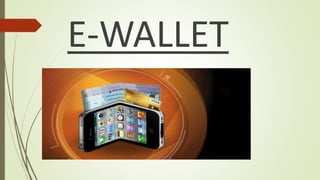
E-WALLET
Key Points
 Vision
 What is a Digital Wallet?
 Types Of Electronic Wallet
 Components
 Technology
 NFC
 Payment Model
 Architecture
 Features
 Advantages and disadvantages
 How it is being used right now?
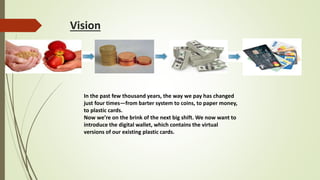
Vision
In the past few thousand years, the way we pay has changed
just four times—from barter system to coins, to paper money,
to plastic cards.
Now we’re on the brink of the next big shift. We now want to
introduce the digital wallet, which contains the virtual
versions of our existing plastic cards.
WHAT IS A DIGITAL WALLET?
 A digital wallet is a software component that allows a user to make an electronic
payment with a financial instrument and hides the low-level details of executing
the payment protocol that is
used to make the payment.
 A digital wallet allows a user to make an electronic payment with a financial
instrument (such as a credit card or digital cash), and hides the low-level details
of executing the payment protocol that is used to make the payment.
 It authenticates the consumer through the use of digital certificates or other
encryption methods, stores and transfers value, and secure the payment process
from the consumer to the merchant.
 It can hold other than payments like Bank account details, Credit cards, Gift
coupons and reward certificates, Loyalty cards Offers.
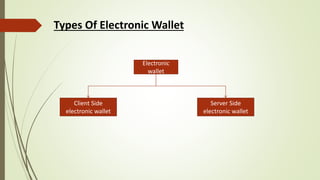
Types Of Electronic Wallet
Client Side
electronic wallet
Electronic
wallet
Server Side
electronic wallet
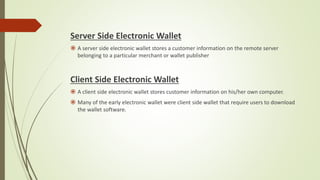
Server Side Electronic Wallet
 A server side electronic wallet stores a customer information on the remote server
belonging to a particular merchant or wallet publisher
Client Side Electronic Wallet
 A client side electronic wallet stores customer information on his/her own computer.
 Many of the early electronic wallet were client side wallet that require users to download
the wallet software.
COMPONENTS
 A digital wallet has a software and information component.
 The software provides security and encryption for the personal information
and for the actual transaction.
 Normally, digital wallets are stored on the client side and are easily self-
maintained and fully compatible with most e-commerce Web sites.
 A server-side digital wallet, also known as a thin wallet, is one that an
organization creates for and about you and maintains on its servers. Server-
side digital wallets are gaining popularity among major retailers due to the
security, efficiency, and added utility it provides to the end-user, which
increases their enjoyment of their overall purchase.
 The information component is basically a database of user-inputted
information. This information consists of your shipping address, billing
address, payment methods (including credit card numbers, expiry dates, and
security numbers), and other information.
TECHNOLOGY
 Secure Communication Medium
• New NFC (Near Field Communication) chips are already appearing in
smart phones which provide very close range, low power, easy to
setup up point-to-point communication.
• NFC acts as the communication medium for exchanging monetary
and identification information, such as credit card numbers and
receipts, with other devices.
 Fast Secure Authentication and Secure Tamper Proof Storage
• Secure programmable chips in cell phoneswill allow the cell phone
to securely store both “digital cash” and the phone owner’s
monetary and identification implements.
• This assumes that the cell phone owner secures his digital wallet
with a good password. This chip will ensure that thieves are unable
to access the digital wallet embedded in the stolen phone. Biometric
scannerscould also be integrated into cell phones andused for quick
and easy authentication.
OPERATION OF NFC
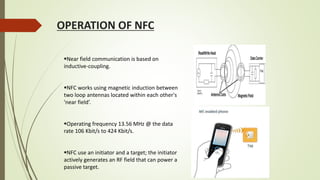
Near field communication is based on
inductive-coupling.
NFC works using magnetic induction between
two loop antennas located within each other's
'near field’.
Operating frequency 13.56 MHz @ the data
rate 106 Kbit/s to 424 Kbit/s.
NFC use an initiator and a target; the initiator
actively generates an RF field that can power a
passive target.
How it Works?
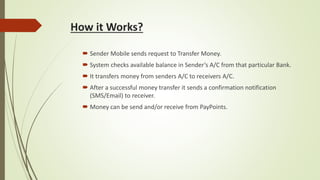
 Sender Mobile sends request to Transfer Money.
 System checks available balance in Sender’s A/C from that particular Bank.
 It transfers money from senders A/C to receivers A/C.
 After a successful money transfer it sends a confirmation notification
(SMS/Email) to receiver.
 Money can be send and/or receive from PayPoints.
PAYMENT MODELS
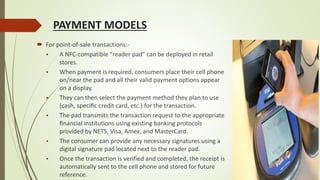
 For point-of-sale transactions:-
 A NFC-compatible “reader pad” can be deployed in retail
stores.
 When payment is required, consumers place their cell phone
on/near the pad and all their valid payment options appear
on a display.
 They can then select the payment method they plan to use
(cash, specific credit card, etc.) for the transaction.
 The pad transmits the transaction request to the appropriate
financial institutions using existing banking protocols
provided by NETS, Visa, Amex, and MasterCard.
 The consumer can provide any necessary signatures using a
digital signature pad located next to the reader pad.
 Once the transaction is verified and completed, the receipt is
automatically sent to the cell phone and stored for future
reference.
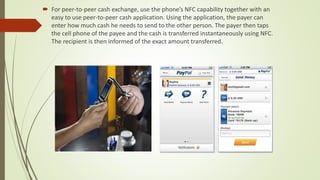
 For peer-to-peer cash exchange, use the phone’s NFC capability together with an
easy to use peer-to-peer cash application. Using the application, the payer can
enter how much cash he needs to send to the other person. The payer then taps
the cell phone of the payee and the cash is transferred instantaneously using NFC.
The recipient is then informed of the exact amount transferred.
HOW TO SUPPORT CASH TRANSFER
 Place cash in the digital wallet either by :
a) Topping-up the cash on device at specific top-up machines which are
integrated with existing automated teller machines
b) Online by logging intobank’s online portal and transferring cash into phone.
 Transferring that cash to a retailer or another digital wallet by using NFC.
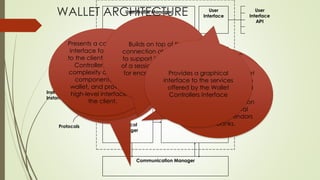
User Profile Manager
Instrument
Manager
Protocol
Manager
Communication Manager
Wallet
Controller
User
Interface
Client
API
User
Interface
API
Instrument
Instances
Protocols
Manages all of the
financial instrument
options contained in the
wallet, for example, it
may be queried to
determine which
instrument classes and
instances are available
to execute a given
payment or other
operation
Provides the wallet with
an interface to send
and receive messages
between wallets and
peer commerce
components by setting
up a connection with a
remote Communication
Manager.
Manages all of the
protocols that the wallet
may use to accomplish
various operations, and
invokes protocols to
carry out the interaction
between the digital
wallet and the vendors
and banks.
Manages information
about clients and
groups of clients of the
wallet including their
user names, passwords,
ship-to and bill-to
addresses, and
potentially other user
profile information as
well
Presents a consolidated
interface for the wallet
to the client. The Wallet
Controller hides the
complexity of the other
components of the
wallet, and provides a
high-level interface to
the client.
Builds on top of the
connection abstraction
to support the concept
of a session. Responsible
for encryption of data.Provides a graphical
interface to the services
offered by the Wallet
Controllers interface
WALLET ARCHITECTURE
FEATURE OF E-WALLET
 Refillable
 Infinite lifetime
 Current balance can be stored and read
 User authentication is provided
 Universal access
 Maximum possible cash
 Cannot be duplicated
Salient features of e-Wallet:
 More than 40 years of data
retention
 Firewall encrypted security logic
 Compatible with many supporting
hardware.
 No separate card reader is
required to access our card
 Polarity reversal indicator is pre-
built in our card.
 Reusability of our card is
unlimited.
 Multiple card features are
incorporated in the same card.
 External complexities are less
ADVANTAGES
 Ease of use:
 Withdraw or deposit value by telephone
 Pay the exact amount, no fiddling for change
 No signature required
 Immediate payment
• Flexibility:
 Transfer value by telephone
 Pay person to person
 For low or high values
 Multi-currency capability
 No age limit, so suitable for all the family
 Safety and control:
 Spend only what you have
 Read your balance
 Load value at home
 Lock your card or wallet
 Keep track of what you have spent and where
 Customer is traceable if a lost card is found
• Accessibility and convenience:
 Cash machines and telephones give more access points to funds in bank
account
 Available 24 hours / 365 days
 Cash machines and telephones cannot run out of electronic cash
DISADVANTAGES
 System Outages: Information for digital wallets are stored on the cloud
of business servers; therefore, the risk of a system malfunction or shut
down is always present. As a result, businesses will not be able to
process payments or they will become increasingly slow due to high
traffic in the servers.
 Security: Companies must ensure that their customers' information is
encrypted and well protected. One of the biggest concerns of adopting a
digital wallet application is "will my information be safe"? This is the
hurdle that companies must face and as a result, must develop security
systems that are as safe and full proof as possible to avoid potential
security issues.
 Stake Holder Dynamics: Satisfying the business and strategic goals of
multiple stake holders such as banks, retailers, regulatory bodies, is
difficult.
 Compelling user experience: A user-friendly wallet interface, easy to
use and intuitive is difficult to produce.
How it is being used right now?
There are many different companies offering E-Wallets. Although each
one is a little different, they all perform the same basic tasks. Some of
them are:
 SQUARE Wallet
 GOOGLE e-wallet
 PayPal
 ISIS
 Venmo
 Dwolla
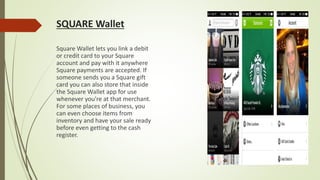
SQUARE Wallet
Square Wallet lets you link a debit
or credit card to your Square
account and pay with it anywhere
Square payments are accepted. If
someone sends you a Square gift
card you can also store that inside
the Square Wallet app for use
whenever you're at that merchant.
For some places of business, you
can even choose items from
inventory and have your sale ready
before even getting to the cash
register.
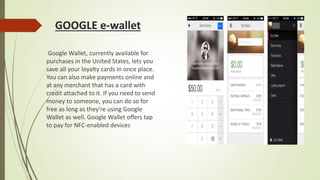
GOOGLE e-wallet
Google Wallet, currently available for
purchases in the United States, lets you
save all your loyalty cards in once place.
You can also make payments online and
at any merchant that has a card with
credit attached to it. If you need to send
money to someone, you can do so for
free as long as they're using Google
Wallet as well. Google Wallet offers tap
to pay for NFC-enabled devices
PAYPAL
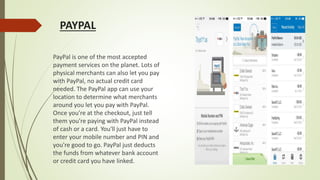
PayPal is one of the most accepted
payment services on the planet. Lots of
physical merchants can also let you pay
with PayPal, no actual credit card
needed. The PayPal app can use your
location to determine what merchants
around you let you pay with PayPal.
Once you're at the checkout, just tell
them you're paying with PayPal instead
of cash or a card. You'll just have to
enter your mobile number and PIN and
you're good to go. PayPal just deducts
the funds from whatever bank account
or credit card you have linked.
ISIS
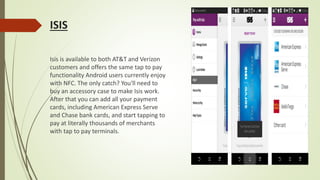
Isis is available to both AT&T and Verizon
customers and offers the same tap to pay
functionality Android users currently enjoy
with NFC. The only catch? You'll need to
buy an accessory case to make Isis work.
After that you can add all your payment
cards, including American Express Serve
and Chase bank cards, and start tapping to
pay at literally thousands of merchants
with tap to pay terminals.
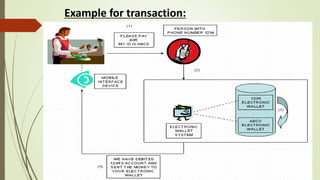
Example for transaction:
THANK YOU!!

E walllet / Digital Wallet

  • 1.
    Name : VadadoriyaSubhash S. En No. : 120590116011 Sem. : 5th Branch : Information & Technology
  • 2.
  • 3.
    Key Points  Vision What is a Digital Wallet?  Types Of Electronic Wallet  Components  Technology  NFC  Payment Model  Architecture  Features  Advantages and disadvantages  How it is being used right now?
  • 4.
    Vision In the pastfew thousand years, the way we pay has changed just four times—from barter system to coins, to paper money, to plastic cards. Now we’re on the brink of the next big shift. We now want to introduce the digital wallet, which contains the virtual versions of our existing plastic cards.
  • 5.
    WHAT IS ADIGITAL WALLET?  A digital wallet is a software component that allows a user to make an electronic payment with a financial instrument and hides the low-level details of executing the payment protocol that is used to make the payment.  A digital wallet allows a user to make an electronic payment with a financial instrument (such as a credit card or digital cash), and hides the low-level details of executing the payment protocol that is used to make the payment.  It authenticates the consumer through the use of digital certificates or other encryption methods, stores and transfers value, and secure the payment process from the consumer to the merchant.  It can hold other than payments like Bank account details, Credit cards, Gift coupons and reward certificates, Loyalty cards Offers.
  • 6.
    Types Of ElectronicWallet Client Side electronic wallet Electronic wallet Server Side electronic wallet
  • 7.
    Server Side ElectronicWallet  A server side electronic wallet stores a customer information on the remote server belonging to a particular merchant or wallet publisher Client Side Electronic Wallet  A client side electronic wallet stores customer information on his/her own computer.  Many of the early electronic wallet were client side wallet that require users to download the wallet software.
  • 8.
    COMPONENTS  A digitalwallet has a software and information component.  The software provides security and encryption for the personal information and for the actual transaction.  Normally, digital wallets are stored on the client side and are easily self- maintained and fully compatible with most e-commerce Web sites.  A server-side digital wallet, also known as a thin wallet, is one that an organization creates for and about you and maintains on its servers. Server- side digital wallets are gaining popularity among major retailers due to the security, efficiency, and added utility it provides to the end-user, which increases their enjoyment of their overall purchase.  The information component is basically a database of user-inputted information. This information consists of your shipping address, billing address, payment methods (including credit card numbers, expiry dates, and security numbers), and other information.
  • 9.
    TECHNOLOGY  Secure CommunicationMedium • New NFC (Near Field Communication) chips are already appearing in smart phones which provide very close range, low power, easy to setup up point-to-point communication. • NFC acts as the communication medium for exchanging monetary and identification information, such as credit card numbers and receipts, with other devices.  Fast Secure Authentication and Secure Tamper Proof Storage • Secure programmable chips in cell phoneswill allow the cell phone to securely store both “digital cash” and the phone owner’s monetary and identification implements. • This assumes that the cell phone owner secures his digital wallet with a good password. This chip will ensure that thieves are unable to access the digital wallet embedded in the stolen phone. Biometric scannerscould also be integrated into cell phones andused for quick and easy authentication.
  • 10.
    OPERATION OF NFC Nearfield communication is based on inductive-coupling. NFC works using magnetic induction between two loop antennas located within each other's 'near field’. Operating frequency 13.56 MHz @ the data rate 106 Kbit/s to 424 Kbit/s. NFC use an initiator and a target; the initiator actively generates an RF field that can power a passive target.
  • 11.
    How it Works? Sender Mobile sends request to Transfer Money.  System checks available balance in Sender’s A/C from that particular Bank.  It transfers money from senders A/C to receivers A/C.  After a successful money transfer it sends a confirmation notification (SMS/Email) to receiver.  Money can be send and/or receive from PayPoints.
  • 12.
    PAYMENT MODELS  Forpoint-of-sale transactions:-  A NFC-compatible “reader pad” can be deployed in retail stores.  When payment is required, consumers place their cell phone on/near the pad and all their valid payment options appear on a display.  They can then select the payment method they plan to use (cash, specific credit card, etc.) for the transaction.  The pad transmits the transaction request to the appropriate financial institutions using existing banking protocols provided by NETS, Visa, Amex, and MasterCard.  The consumer can provide any necessary signatures using a digital signature pad located next to the reader pad.  Once the transaction is verified and completed, the receipt is automatically sent to the cell phone and stored for future reference.
  • 13.
     For peer-to-peercash exchange, use the phone’s NFC capability together with an easy to use peer-to-peer cash application. Using the application, the payer can enter how much cash he needs to send to the other person. The payer then taps the cell phone of the payee and the cash is transferred instantaneously using NFC. The recipient is then informed of the exact amount transferred.
  • 14.
    HOW TO SUPPORTCASH TRANSFER  Place cash in the digital wallet either by : a) Topping-up the cash on device at specific top-up machines which are integrated with existing automated teller machines b) Online by logging intobank’s online portal and transferring cash into phone.  Transferring that cash to a retailer or another digital wallet by using NFC.
  • 15.
    User Profile Manager Instrument Manager Protocol Manager CommunicationManager Wallet Controller User Interface Client API User Interface API Instrument Instances Protocols Manages all of the financial instrument options contained in the wallet, for example, it may be queried to determine which instrument classes and instances are available to execute a given payment or other operation Provides the wallet with an interface to send and receive messages between wallets and peer commerce components by setting up a connection with a remote Communication Manager. Manages all of the protocols that the wallet may use to accomplish various operations, and invokes protocols to carry out the interaction between the digital wallet and the vendors and banks. Manages information about clients and groups of clients of the wallet including their user names, passwords, ship-to and bill-to addresses, and potentially other user profile information as well Presents a consolidated interface for the wallet to the client. The Wallet Controller hides the complexity of the other components of the wallet, and provides a high-level interface to the client. Builds on top of the connection abstraction to support the concept of a session. Responsible for encryption of data.Provides a graphical interface to the services offered by the Wallet Controllers interface WALLET ARCHITECTURE
  • 16.
    FEATURE OF E-WALLET Refillable  Infinite lifetime  Current balance can be stored and read  User authentication is provided  Universal access  Maximum possible cash  Cannot be duplicated
  • 17.
    Salient features ofe-Wallet:  More than 40 years of data retention  Firewall encrypted security logic  Compatible with many supporting hardware.  No separate card reader is required to access our card  Polarity reversal indicator is pre- built in our card.  Reusability of our card is unlimited.  Multiple card features are incorporated in the same card.  External complexities are less
  • 18.
    ADVANTAGES  Ease ofuse:  Withdraw or deposit value by telephone  Pay the exact amount, no fiddling for change  No signature required  Immediate payment • Flexibility:  Transfer value by telephone  Pay person to person  For low or high values  Multi-currency capability  No age limit, so suitable for all the family
  • 19.
     Safety andcontrol:  Spend only what you have  Read your balance  Load value at home  Lock your card or wallet  Keep track of what you have spent and where  Customer is traceable if a lost card is found • Accessibility and convenience:  Cash machines and telephones give more access points to funds in bank account  Available 24 hours / 365 days  Cash machines and telephones cannot run out of electronic cash
  • 20.
    DISADVANTAGES  System Outages:Information for digital wallets are stored on the cloud of business servers; therefore, the risk of a system malfunction or shut down is always present. As a result, businesses will not be able to process payments or they will become increasingly slow due to high traffic in the servers.  Security: Companies must ensure that their customers' information is encrypted and well protected. One of the biggest concerns of adopting a digital wallet application is "will my information be safe"? This is the hurdle that companies must face and as a result, must develop security systems that are as safe and full proof as possible to avoid potential security issues.  Stake Holder Dynamics: Satisfying the business and strategic goals of multiple stake holders such as banks, retailers, regulatory bodies, is difficult.  Compelling user experience: A user-friendly wallet interface, easy to use and intuitive is difficult to produce.
  • 21.
    How it isbeing used right now? There are many different companies offering E-Wallets. Although each one is a little different, they all perform the same basic tasks. Some of them are:  SQUARE Wallet  GOOGLE e-wallet  PayPal  ISIS  Venmo  Dwolla
  • 22.
    SQUARE Wallet Square Walletlets you link a debit or credit card to your Square account and pay with it anywhere Square payments are accepted. If someone sends you a Square gift card you can also store that inside the Square Wallet app for use whenever you're at that merchant. For some places of business, you can even choose items from inventory and have your sale ready before even getting to the cash register.
  • 23.
    GOOGLE e-wallet Google Wallet,currently available for purchases in the United States, lets you save all your loyalty cards in once place. You can also make payments online and at any merchant that has a card with credit attached to it. If you need to send money to someone, you can do so for free as long as they're using Google Wallet as well. Google Wallet offers tap to pay for NFC-enabled devices
  • 24.
    PAYPAL PayPal is oneof the most accepted payment services on the planet. Lots of physical merchants can also let you pay with PayPal, no actual credit card needed. The PayPal app can use your location to determine what merchants around you let you pay with PayPal. Once you're at the checkout, just tell them you're paying with PayPal instead of cash or a card. You'll just have to enter your mobile number and PIN and you're good to go. PayPal just deducts the funds from whatever bank account or credit card you have linked.
  • 25.
    ISIS Isis is availableto both AT&T and Verizon customers and offers the same tap to pay functionality Android users currently enjoy with NFC. The only catch? You'll need to buy an accessory case to make Isis work. After that you can add all your payment cards, including American Express Serve and Chase bank cards, and start tapping to pay at literally thousands of merchants with tap to pay terminals.
  • 26.
  • 28.