Strategies for
Curriculum
Partnerships: Lessons
Learned
Stephen Abram, MLS
Lighthouse Consulting Inc.
Leatherstocking Conference, Vernon NY
Nov. 19, 2015
What does a curriculum partnership look
like?
 Builds over time
 Starts easy
 Sustainable
 Integrated
 Relationship-oriented
 Focuses on adult, practical learning
 Aligns with value systems
 Saves time for a minor investment of time
When you’re doing it right you . . .
 Have a year long staff partnership curriculum
 You start with the ready – those early adopters, innovators, network leaners…
 You view resistance as requests for more information in a critical thinking
group of well educated and experienced teachers and administrators
 You focus on simple but key issues that make a difference and align with their
values
 You get good at partnerships with other libraries including public, you run PL
card programs to extend the resources (like VA), you partner with tech
providers like Gale, EBSCO, ProQuest, Apple, Google Education, LEGO
Education, LittleBits, etc.
What are the key issues?
 Information fluency (21st Century literacies) for teachers and learners
(they’re different)
 Dealing with reading issues using technology
 STEM and STEAM issues (The school library as laboratory for discovery and
exploration)
 Blended learning
 Flipped classroom
What does a curriculum partnership look
like?
 Teaching partnership training first . . . Positioning the school library as a
resource, positioning the school librarians as a partners for learning
 A year long (October – May basically) curriculum that builds so that your
audience and partners can plan their time investment.
Information Fluency
There’s so much on this!
Information Fluency
 There’s so much on this!
 Separate the teacher needs from the learners
 When you work through the classroom teacher and partners effectively with
project based activities you magnify your impact
 Work with administration to have endorsement of pilots, experiments, and
funding
 Work with teacher communications in the context of their challenges
(projects, needier learners, assignments, etc.)
 Start small and build – you can’t build a mountain quickly!
Leatherstocking Searches
STEM and STEAM
 Amongst us chickens here . . . Addressing non-PC issues
 Girls
 Boys
 Workforce preparation in the context of thinking and learning readiness
 Higher-Ed preparedness
It’s not just Makerspaces
 Makerspaces are a great tool and environment to have the real conversations
 It all relates to the realities of the world that will exists and the skills that
need to build incrementally.
 Have a good stump speech on the vision and the building block of why makers
are needed – in the arts, the engineering and design spectrum.
 Work with administration and other partenrs to build gradually and keep them
onside.
Ooohs and Ahhhs
 Printing an entire house
 Printing skin grafts
 Printing bone and skull
plates
 Printing guns
 Printing car parts (Jay
Leno)
 Printing original art
 Printing historic objects
 Printing food
 Printing jewelry
Prototyping and distributed
manufacturing with
applications in architecture,
construction (AEC), industrial
design, automotive,
aerospace, military,
engineering, civil engineering,
dental and medical industries,
biotech (human tissue
replacement), fashion,
footwear, jewelry, eyewear,
education, geographic
information systems, food,
and many other fields.
Professional applications (3D)
 Rapid prototyping
 Rapid manufacturing
 Mass customization (solo copies)
 Mass production
 Domestic and hobbyist uses
 Mass distribution
Simple and Easy Scaffolding
 LEGO® and duplo® and Mega Bloks®
Scaffolding
 Pre-school, Elementary, Middle School, High School
 Competitions, Communities, Hackers
 Mega Bloks large-size, primary colour – macro-motor skills
 Duplo – medium-size – motor skill and manipulation development
 LEGO – fine motor skill development, colour awareness, creativity
 LEGO Kits – instruction sets, reading, levels of complexity
 LEGO Mindstorms (LEGO Robotics) +software
 LEGO Software- e.g. LEGO Digital Designer (CAD/CAM),
 Mindstorms software (bluetooth), plus non-Lego free software like
BlockCAD, LDdraw, LeoCAD …
 LEGO Hackers – LegoBOT 3D printing (pictured)
Teaching with LEGO
LEGO Mindstorms®
LEGO® a place to start
3D Photo Booth
http://hiconsumption.com/2012/11/3d-figure-printing-photo-booth-in-japan/
James Bond’s Skyfall Car
http://www.slashgear.com/james-bond-skyfall-crew-turned-to-3d-printers-
for-aston-martin-db5-stunt-double-12256594/
Filigree Skull
http://makezine.com/craft/3d-printed-filigree-skull/
Portrait Sculpture
http://blog.ponoko.com/2012/04/19/3d-printing-as-an-art-form/
Prosthetics
http://gizmodo.com/5993147/how-3d-printing-gave-this-man-his-life-and-face-
back
Clothing
3D Home Printing in one day
http://www.dezeen.com/2013/02/13/protohouse-2-3d-printed-house-by-softkill-
Prototyping
Manufacturing
http://www.wired.com/dangerroom/2012/08/3d-
weapons/
Play & Learning
http://southweb.org/lifewise/fabrication-power-to-the-people-
why-no-government-can-stop-the-3d-printing-revolution/
Preservation and Study
http://www.geekosystem.com/staples-3d-printing/
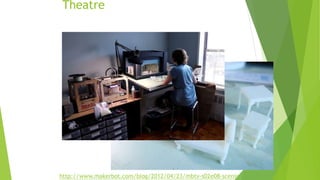
Theatre
http://www.makerbot.com/blog/2012/04/23/mbtv-s02e08-scenic-
Bio-printing
http://on3dprinting.com/2012/07/06/infographic-go-on-print-a-liver-the-evolution-
of-bio-3d-printing/
Medical
Making for Libraries
 Arduino, Raspberry Pi, Little Bits
 LibraryBox
 Publishing, Art, Music
 Infographics
 Video & Podcasts
 Crowdfunding (Kickstarter, IndieGoGo, RocketHub, etc.)
 Your imagination
What are Books For?
2010 Eduventures Research on Investments
 58% of instructors believe that technology in courses positively impacts student engagement.
 71% of instructors that rated student engagement levels as “high” as a result of using technology in courses.
 71% of students who are employed full-time and 77% of students who are employed part-time prefer more technology-
based tools in the classroom.
 79% of instructors and 86 percent of students have seen the average level of engagement improve over the last year as
they have increased their use of digital educational tools.
 87% of students believe online libraries and databases have had the most significant impact on their overall
learning.
 62% identify blogs, wikis, and other online authoring tools while 59% identify YouTube and recorded lectures.
 E-books and e-textbooks impact overall learning among 50% of students surveyed, while 42% of students identify online
portals.
 44% of instructors believe that online libraries and databases will have the greatest impact on student
engagement.
 32% of instructors identify e-textbooks and 30% identify interactive homework solutions as having the potential to
improve engagement and learning outcomes. (e-readers was 11%)
 49% of students believe that online libraries and databases will have the greatest impact on student engagement.
 Students are more optimistic about the potential for technology.
OMG – the Textbook!
36
Until the lion learns to write her own story,
the story will always be from the perspective
of the hunter not the hunted.
Stephen Abram, MLS, FSLA
Lighthouse Consulting Inc.
Cel: 416-669-4855
stephen.abram@gmail.com
Stephen’s Lighthouse Blog
http://stephenslighthouse.com
Facebook: Stephen Abram
LinkedIn: Stephen Abram
Twitter: @sabram
SlideShare: StephenAbram1

Leatherstocking abrambreakout

  • 1.
    Strategies for Curriculum Partnerships: Lessons Learned StephenAbram, MLS Lighthouse Consulting Inc. Leatherstocking Conference, Vernon NY Nov. 19, 2015
  • 2.
    What does acurriculum partnership look like?  Builds over time  Starts easy  Sustainable  Integrated  Relationship-oriented  Focuses on adult, practical learning  Aligns with value systems  Saves time for a minor investment of time
  • 3.
    When you’re doingit right you . . .  Have a year long staff partnership curriculum  You start with the ready – those early adopters, innovators, network leaners…  You view resistance as requests for more information in a critical thinking group of well educated and experienced teachers and administrators  You focus on simple but key issues that make a difference and align with their values  You get good at partnerships with other libraries including public, you run PL card programs to extend the resources (like VA), you partner with tech providers like Gale, EBSCO, ProQuest, Apple, Google Education, LEGO Education, LittleBits, etc.
  • 4.
    What are thekey issues?  Information fluency (21st Century literacies) for teachers and learners (they’re different)  Dealing with reading issues using technology  STEM and STEAM issues (The school library as laboratory for discovery and exploration)  Blended learning  Flipped classroom
  • 5.
    What does acurriculum partnership look like?  Teaching partnership training first . . . Positioning the school library as a resource, positioning the school librarians as a partners for learning  A year long (October – May basically) curriculum that builds so that your audience and partners can plan their time investment.
  • 6.
  • 7.
    Information Fluency  There’sso much on this!  Separate the teacher needs from the learners  When you work through the classroom teacher and partners effectively with project based activities you magnify your impact  Work with administration to have endorsement of pilots, experiments, and funding  Work with teacher communications in the context of their challenges (projects, needier learners, assignments, etc.)  Start small and build – you can’t build a mountain quickly!
  • 8.
  • 9.
    STEM and STEAM Amongst us chickens here . . . Addressing non-PC issues  Girls  Boys  Workforce preparation in the context of thinking and learning readiness  Higher-Ed preparedness
  • 10.
    It’s not justMakerspaces  Makerspaces are a great tool and environment to have the real conversations  It all relates to the realities of the world that will exists and the skills that need to build incrementally.  Have a good stump speech on the vision and the building block of why makers are needed – in the arts, the engineering and design spectrum.  Work with administration and other partenrs to build gradually and keep them onside.
  • 11.
    Ooohs and Ahhhs Printing an entire house  Printing skin grafts  Printing bone and skull plates  Printing guns  Printing car parts (Jay Leno)  Printing original art  Printing historic objects  Printing food  Printing jewelry Prototyping and distributed manufacturing with applications in architecture, construction (AEC), industrial design, automotive, aerospace, military, engineering, civil engineering, dental and medical industries, biotech (human tissue replacement), fashion, footwear, jewelry, eyewear, education, geographic information systems, food, and many other fields.
  • 12.
    Professional applications (3D) Rapid prototyping  Rapid manufacturing  Mass customization (solo copies)  Mass production  Domestic and hobbyist uses  Mass distribution
  • 13.
    Simple and EasyScaffolding  LEGO® and duplo® and Mega Bloks®
  • 15.
    Scaffolding  Pre-school, Elementary,Middle School, High School  Competitions, Communities, Hackers  Mega Bloks large-size, primary colour – macro-motor skills  Duplo – medium-size – motor skill and manipulation development  LEGO – fine motor skill development, colour awareness, creativity  LEGO Kits – instruction sets, reading, levels of complexity  LEGO Mindstorms (LEGO Robotics) +software  LEGO Software- e.g. LEGO Digital Designer (CAD/CAM),  Mindstorms software (bluetooth), plus non-Lego free software like BlockCAD, LDdraw, LeoCAD …  LEGO Hackers – LegoBOT 3D printing (pictured)
  • 16.
  • 17.
  • 18.
  • 19.
  • 20.
    James Bond’s SkyfallCar http://www.slashgear.com/james-bond-skyfall-crew-turned-to-3d-printers- for-aston-martin-db5-stunt-double-12256594/
  • 21.
  • 22.
  • 23.
  • 24.
  • 25.
    3D Home Printingin one day http://www.dezeen.com/2013/02/13/protohouse-2-3d-printed-house-by-softkill-
  • 26.
  • 27.
  • 28.
  • 29.
  • 30.
  • 31.
  • 32.
  • 33.
    Making for Libraries Arduino, Raspberry Pi, Little Bits  LibraryBox  Publishing, Art, Music  Infographics  Video & Podcasts  Crowdfunding (Kickstarter, IndieGoGo, RocketHub, etc.)  Your imagination
  • 34.
  • 35.
    2010 Eduventures Researchon Investments  58% of instructors believe that technology in courses positively impacts student engagement.  71% of instructors that rated student engagement levels as “high” as a result of using technology in courses.  71% of students who are employed full-time and 77% of students who are employed part-time prefer more technology- based tools in the classroom.  79% of instructors and 86 percent of students have seen the average level of engagement improve over the last year as they have increased their use of digital educational tools.  87% of students believe online libraries and databases have had the most significant impact on their overall learning.  62% identify blogs, wikis, and other online authoring tools while 59% identify YouTube and recorded lectures.  E-books and e-textbooks impact overall learning among 50% of students surveyed, while 42% of students identify online portals.  44% of instructors believe that online libraries and databases will have the greatest impact on student engagement.  32% of instructors identify e-textbooks and 30% identify interactive homework solutions as having the potential to improve engagement and learning outcomes. (e-readers was 11%)  49% of students believe that online libraries and databases will have the greatest impact on student engagement.  Students are more optimistic about the potential for technology.
  • 36.
    OMG – theTextbook! 36
  • 38.
    Until the lionlearns to write her own story, the story will always be from the perspective of the hunter not the hunted.
  • 40.
    Stephen Abram, MLS,FSLA Lighthouse Consulting Inc. Cel: 416-669-4855 stephen.abram@gmail.com Stephen’s Lighthouse Blog http://stephenslighthouse.com Facebook: Stephen Abram LinkedIn: Stephen Abram Twitter: @sabram SlideShare: StephenAbram1