Learning Trends: 2010 and Beyond
ACS Learning Services


By Caroline Avey
Learning Trends: 2010 and Beyond
The Learning industry is currently dominated by a variety of trends.
In this paper we detail some of the developing areas of focus for ACS
Learning Services and within the industry.
Anytime, Anywhere Learning
There is a continued interest in conversion of ILTs into online learning for 24/7 access. This is driven by
required just-in-time availability, the desire to minimize disruption to the business due to days away from
work and interest in reduction of travel costs. ASTD provides a benchmark: “best” corporations currently have
35 percent of their curriculum available online.

Another developing trend is the increased use of webcasts in learning. The drivers for online learning
mentioned above are also driving increased use of webcasting. There are two differentiators for using
webcasting over online. The first is unstable or rapidly changing content. The advisory services practice of our
accounting client has made extensive use of webcasting since the content changes within months and the
firm isn’t willing to invest in a long development cycle for a session that will shortly become obsolete. The
second is to provide a live connection between learners and facilitators/subject matter experts. This same
advisory services practice uses webcasting to enable learning and discussions with thought leaders located         Learning trends within the industry
around the world. What used to be conveyed in a conference call, short workshops or email is now content for       include anytime, anywhere learning,
webcasts. Webcasts are perceived as a more immersive experience over conference calls or email messaging.          learner-generated content, crowd
The notion of staggering learning sessions allows for a day workshop to be broken into four webcast sessions.      sourcing, micro-learning, virtual
These sessions can be archived and posted online as a webcast series.                                              classrooms, rapid authoring, and portal
                                                                                                                   learning enhancing the LMS.

Another development is the repurposing of content for handheld devices such as smartphones (m-learning),
iPods, Kindle reading devices, iPads and other mobile electronic devices. Drivers for mobile learning are
primarily ease of access, personal accessibility and engagement. For access, this is truly anytime/anywhere
learning. A learner can download a course in the airport concourse, take the learning on the handheld device
on the airplane, and then upload the course results to an LMS when the learner arrives at his or her
destination. The notion of continual access is really a personal electronic job aid. Content topics can be
archived on personal devices and then accessed as a refresher. The last business driver is engagement. The
professional business audience is enamored with devices. The younger professionals are intrigued by mobile
applications and the ability to access information. We currently have relationships with four m-learning
providers that create what is called a widget or application. This application acts as a personal LMS system to
pull down and store learning modules. Accenture recently won the Brandon Hall gold medal for m-learning,
and Merrill Lynch has a well-known successful use case for using m-learning to increase uptake of compliance
training that is accessible both online as well as via m-learning to ensure access to and uptake on compliance
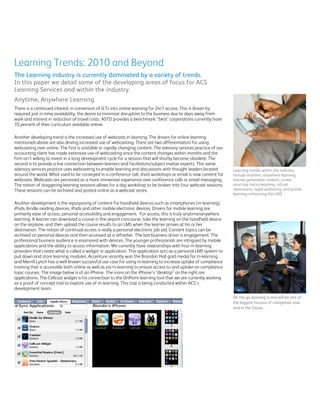
topic courses. The image below is of an iPhone. The icons on the iPhone’s “desktop” on the right are
applications. The Cellcast widget is his connection to the OnPoint learning tool that we are currently working
as a proof of concept trial to explore use of m-learning. This trial is being conducted within ACS’s
development team.
                                                                                                                   On the go learning is and will be one of
                                                                                                                   the biggest focuses of companies now
                                                                                                                   and in the future.
Learner-Generated Content
The very basis for “how people learn” is changing. Here’s how it impacts different generation of learners. The
1950s model was “tell me” in traditional classroom-tutored format. The 1970s ushered in the free-thinking
generation of “let me try it,” and so the push for hands-on training and case-based training evolved. The late
’80s and ’90s changed the learning model to “let me discover it.” Our learning designs included online
treasure hunts or simulated experiences to create the “a-ha” experience for learning. One recent example of
this is ACS’ Th!nkTank website on Unisfair that our team worked to create.

Now, we face a whole new learner profile of “I want to create the learning.” A learner is given content such as
a framework, process or a model and then the learner is challenged to explore, synthesize, and apply the
content in their real world and then report back. This can be done in teams or as individuals. Last year, we
used this style of design in teaching consulting skills. This is a “business school” approach to learning that is
now being explored in corporate learning.


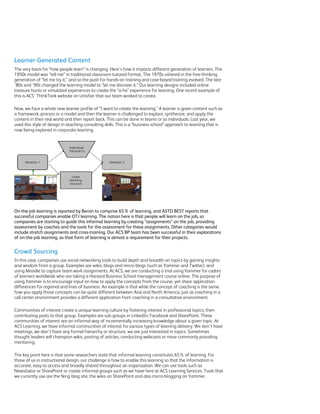
On-the-job learning is reported by Bersin to comprise 65% of learning, and ASTD BEST reports that
successful companies enable OTJ learning. The notion here is that people will learn on the job, so
companies are starting to guide this informal learning by creating “assignments” on the job, providing
assessment by coaches and the tools for the assessment for these assignments. Other categories would
include stretch assignments and cross-training. Our ACS BP team has been successful in their explorations
of on-the-job learning, as that form of learning is almost a requirement for their projects.


Crowd Sourcing
In this case, companies use social networking tools to build depth and breadth on topics by gaining insights
and wisdom from a group. Examples are wikis, blogs and micro-blogs (such as Yammer and Twitter), and
using Moodle to capture team work assignments. At ACS, we are conducting a trial using Yammer for cadres
of learners worldwide who are taking a Harvard Business School management course online. The purpose of
using Yammer is to encourage input on how to apply the concepts from the course, yet share application
differences for regional and lines of business. An example is that while the concept of coaching is the same,
how you apply those concepts can be quite different between Asia and North America, just as coaching in a
call center environment provides a different application from coaching in a consultative environment.

Communities of interest create a unique learning culture by fostering interest in professional topics, then
contributing posts to that group. Examples are sub-groups in LinkedIn, Facebook and SharePoint. These
communities of interest are an informal way of incrementally increasing knowledge about a given topic. At
ACS Learning, we have informal communities of interest for various types of learning delivery. We don’t have
meetings, we don’t have any formal hierarchy or structure; we are just interested in topics. Sometimes
thought leaders will champion wikis, posting of articles, conducting webcasts or more commonly providing
mentoring.

The key point here is that some researchers state that informal learning constitutes 65% of learning. For
those of us in instructional design, our challenge is how to enable this learning so that the information is
accurate, easy to access and broadly shared throughout an organization. We can use tools such as
NewsGator or SharePoint or create informal groups such as we have here at ACS Learning Services. Tools that
we currently use are the Ning blog site, the wikis on SharePoint and also micro-blogging on Yammer.
Micro-learning
There is a movement toward 5–10 minute modules that are standalone. These modules can be deployed for
m-learning, podcasts, videocasts and other handhelds as mentioned above; but increasingly, we see micro-
learning shorten the length of online modules, cutting webcast sessions to one-half or one hour. Micro-
learning is good for industries with rapidly evolving markets/content. It is also effectively used to make
refresher courses readily accessible on handheld devices, such as a refresher course on sales tips or refreshers
on using a technology. Watch for significant growth in micro and device learning as technology enables more
memory on devices, HTML evolves to include mobile, and Flash will soon be enabled on devices.


Virtual Classrooms
Virtual classrooms use traditional webcast technology with add-on tools for social media and/or use of
streaming video for speakers. Think of how WebEx and Centra are promoting their concept of a 2D virtual
classroom. There are high-tech solutions such as using Skype, or a tool such as ePop to provide live video of
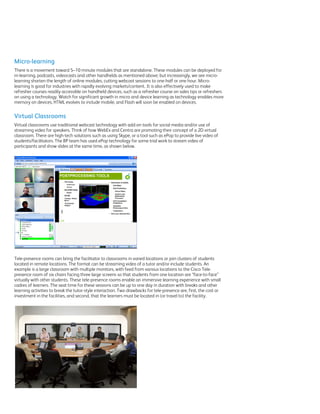
students/facilitators. The BP team has used ePop technology for some trial work to stream video of
participants and show slides at the same time, as shown below.


Tele-presence rooms can bring the facilitator to classrooms in varied locations or join clusters of students
located in remote locations. The format can be streaming video of a tutor and/or include students. An
example is a large classroom with multiple monitors, with feed from various locations to the Cisco Tele-
presence room of six chairs facing three large screens so that students from one location are “face-to-face”
virtually with other students. These tele-presence rooms enable an immersive learning experience with small
cadres of learners. The seat time for these sessions can be up to one day in duration with breaks and other
learning activities to break the tutor-style interaction. Two drawbacks for tele-presence are, first, the cost or
investment in the facilities, and second, that the learners must be located in (or travel to) the facility.
You have all read or experienced our work in 3D virtual worlds and have learned about some of the obstacles
for these platforms: complex download of software, VPN access requirement to open ports, bandwidth issues
and computer RAM that impact performance, etc. The 3D virtual worlds industry has been well aware of this
issue and a year ago I mentioned the concept of a “thin client” solution that runs off the browser. What were
concepts or alpha-tested tools a year ago are here in beta mode today. These tools are less graphically
intense, don’t require admin rights to download and don’t require either a high-end graphics card or high
bandwidth. They run with “plug-and-play” locations that are “prebuilt” and available, not unlike a real work
conference center. Features include streaming video, application sharing, whiteboarding, collaborative work
(multiple users working on same document at same time), links to databases like SharePoint, some social
network profiling, and VoIP. Per a recent Bersin study, about 25% of organizations are doing some work in
3D, not unlike the Second Life project EY recently completed. In a recent conversation with a researcher from
Xerox R&D, their primary interest is using these new environments to change the service delivery model for
Xerox — in other words, using 3D environments to interact with clients. I believe that ACS’ Office of
Innovation is also championing the use of 2D (Unisfair-like) and 3D for use within our company. What it
means is that these worlds are very cost effective, can be adapted within weeks and are highly reliable and
effective. Microsoft just completed a use case in the tool Reaction Grid and reports significant cost savings
and effectiveness:
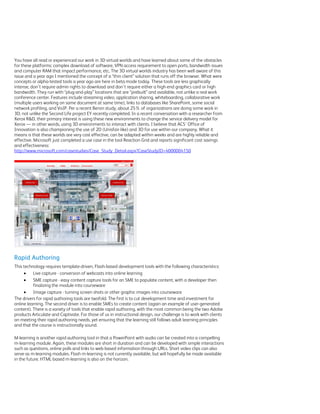
http://www.microsoft.com/casestudies/Case_Study_Detail.aspx?CaseStudyID=4000004150


Rapid Authoring
This technology requires template-driven, Flash-based development tools with the following characteristics:
         Live capture - conversion of webcasts into online learning
         SME capture - easy content capture tools for an SME to populate content, with a developer then
          finalizing the module into courseware
         Image capture - turning screen shots or other graphic images into courseware
The drivers for rapid authoring tools are twofold. The first is to cut development time and investment for
online learning. The second driver is to enable SMEs to create content (again an example of user-generated
content). There is a variety of tools that enable rapid authoring, with the most common being the two Adobe
products Articulate and Captivate. For those of us in instructional design, our challenge is to work with clients
on meeting their rapid authoring needs, yet ensuring that the learning still follows adult learning principles
and that the course is instructionally sound.

M-learning is another rapid authoring tool in that a PowerPoint with audio can be created into a compelling
m-learning module. Again, these modules are short in duration and can be developed with simple interactions
such as questions, online polls and links to web-based information through URLs. Short video clips can also
serve as m-learning modules. Flash m-learning is not currently available, but will hopefully be made available
in the future. HTML-based m-learning is also on the horizon.
Portal Learning Enhances the LMS
An LMS is now frequently viewed as an engine or database. There is strong interest in overlaying the more
traditional LMS interfaces with a “front door” portal which provides links to traditional courseware on the LMS,
but also provides access to informal learning such as wikis and blogs. Additionally, this type of portal is more
user-demand ready so that the user can easily browse for topics, or take an assessment to identify a gap in
knowledge, with the gap report providing links to courseware addressing the identified learning need.

What’s really out there in the future? More technology! And therefore, the need for more creative and
sophisticated design capabilities and approaches!

             Augmented reality – using bar code technology to enhance an environment with learning. An
              example would be glasses worn on an orientation tour that display “text” in the glasses when you
              focus on a symbol in the real world
             Holographic learning environments
             LMS on your phone – This is already a reality. With several solutions such as BlackBerry’s Chalk
              Pushcast and OnPoint’s Cellcast, you have an application on your device that receives notice of
              your learning, accesses your learning, deploys the learning to you and then uploads your results


For more information about Learning Trends or ACS Learning Services, please visit
www.acslearningservices.com or call 866-290-0006.
©2010 Xerox Corporation. All rights reserved. ACS® and the ACS design are trademarks of ACS Marketing LP in the US and/or other countries.
XEROX® and XEROX and Design® are trademarks of Xerox Corporation in the United States and/or other countries.

Learning trends white paper final

  • 1.
    Learning Trends: 2010and Beyond ACS Learning Services By Caroline Avey
  • 2.
    Learning Trends: 2010and Beyond The Learning industry is currently dominated by a variety of trends. In this paper we detail some of the developing areas of focus for ACS Learning Services and within the industry. Anytime, Anywhere Learning There is a continued interest in conversion of ILTs into online learning for 24/7 access. This is driven by required just-in-time availability, the desire to minimize disruption to the business due to days away from work and interest in reduction of travel costs. ASTD provides a benchmark: “best” corporations currently have 35 percent of their curriculum available online. Another developing trend is the increased use of webcasts in learning. The drivers for online learning mentioned above are also driving increased use of webcasting. There are two differentiators for using webcasting over online. The first is unstable or rapidly changing content. The advisory services practice of our accounting client has made extensive use of webcasting since the content changes within months and the firm isn’t willing to invest in a long development cycle for a session that will shortly become obsolete. The second is to provide a live connection between learners and facilitators/subject matter experts. This same advisory services practice uses webcasting to enable learning and discussions with thought leaders located Learning trends within the industry around the world. What used to be conveyed in a conference call, short workshops or email is now content for include anytime, anywhere learning, webcasts. Webcasts are perceived as a more immersive experience over conference calls or email messaging. learner-generated content, crowd The notion of staggering learning sessions allows for a day workshop to be broken into four webcast sessions. sourcing, micro-learning, virtual These sessions can be archived and posted online as a webcast series. classrooms, rapid authoring, and portal learning enhancing the LMS. Another development is the repurposing of content for handheld devices such as smartphones (m-learning), iPods, Kindle reading devices, iPads and other mobile electronic devices. Drivers for mobile learning are primarily ease of access, personal accessibility and engagement. For access, this is truly anytime/anywhere learning. A learner can download a course in the airport concourse, take the learning on the handheld device on the airplane, and then upload the course results to an LMS when the learner arrives at his or her destination. The notion of continual access is really a personal electronic job aid. Content topics can be archived on personal devices and then accessed as a refresher. The last business driver is engagement. The professional business audience is enamored with devices. The younger professionals are intrigued by mobile applications and the ability to access information. We currently have relationships with four m-learning providers that create what is called a widget or application. This application acts as a personal LMS system to pull down and store learning modules. Accenture recently won the Brandon Hall gold medal for m-learning, and Merrill Lynch has a well-known successful use case for using m-learning to increase uptake of compliance training that is accessible both online as well as via m-learning to ensure access to and uptake on compliance topic courses. The image below is of an iPhone. The icons on the iPhone’s “desktop” on the right are applications. The Cellcast widget is his connection to the OnPoint learning tool that we are currently working as a proof of concept trial to explore use of m-learning. This trial is being conducted within ACS’s development team. On the go learning is and will be one of the biggest focuses of companies now and in the future.
  • 3.
    Learner-Generated Content The verybasis for “how people learn” is changing. Here’s how it impacts different generation of learners. The 1950s model was “tell me” in traditional classroom-tutored format. The 1970s ushered in the free-thinking generation of “let me try it,” and so the push for hands-on training and case-based training evolved. The late ’80s and ’90s changed the learning model to “let me discover it.” Our learning designs included online treasure hunts or simulated experiences to create the “a-ha” experience for learning. One recent example of this is ACS’ Th!nkTank website on Unisfair that our team worked to create. Now, we face a whole new learner profile of “I want to create the learning.” A learner is given content such as a framework, process or a model and then the learner is challenged to explore, synthesize, and apply the content in their real world and then report back. This can be done in teams or as individuals. Last year, we used this style of design in teaching consulting skills. This is a “business school” approach to learning that is now being explored in corporate learning. On-the-job learning is reported by Bersin to comprise 65% of learning, and ASTD BEST reports that successful companies enable OTJ learning. The notion here is that people will learn on the job, so companies are starting to guide this informal learning by creating “assignments” on the job, providing assessment by coaches and the tools for the assessment for these assignments. Other categories would include stretch assignments and cross-training. Our ACS BP team has been successful in their explorations of on-the-job learning, as that form of learning is almost a requirement for their projects. Crowd Sourcing In this case, companies use social networking tools to build depth and breadth on topics by gaining insights and wisdom from a group. Examples are wikis, blogs and micro-blogs (such as Yammer and Twitter), and using Moodle to capture team work assignments. At ACS, we are conducting a trial using Yammer for cadres of learners worldwide who are taking a Harvard Business School management course online. The purpose of using Yammer is to encourage input on how to apply the concepts from the course, yet share application differences for regional and lines of business. An example is that while the concept of coaching is the same, how you apply those concepts can be quite different between Asia and North America, just as coaching in a call center environment provides a different application from coaching in a consultative environment. Communities of interest create a unique learning culture by fostering interest in professional topics, then contributing posts to that group. Examples are sub-groups in LinkedIn, Facebook and SharePoint. These communities of interest are an informal way of incrementally increasing knowledge about a given topic. At ACS Learning, we have informal communities of interest for various types of learning delivery. We don’t have meetings, we don’t have any formal hierarchy or structure; we are just interested in topics. Sometimes thought leaders will champion wikis, posting of articles, conducting webcasts or more commonly providing mentoring. The key point here is that some researchers state that informal learning constitutes 65% of learning. For those of us in instructional design, our challenge is how to enable this learning so that the information is accurate, easy to access and broadly shared throughout an organization. We can use tools such as NewsGator or SharePoint or create informal groups such as we have here at ACS Learning Services. Tools that we currently use are the Ning blog site, the wikis on SharePoint and also micro-blogging on Yammer.
  • 4.
    Micro-learning There is amovement toward 5–10 minute modules that are standalone. These modules can be deployed for m-learning, podcasts, videocasts and other handhelds as mentioned above; but increasingly, we see micro- learning shorten the length of online modules, cutting webcast sessions to one-half or one hour. Micro- learning is good for industries with rapidly evolving markets/content. It is also effectively used to make refresher courses readily accessible on handheld devices, such as a refresher course on sales tips or refreshers on using a technology. Watch for significant growth in micro and device learning as technology enables more memory on devices, HTML evolves to include mobile, and Flash will soon be enabled on devices. Virtual Classrooms Virtual classrooms use traditional webcast technology with add-on tools for social media and/or use of streaming video for speakers. Think of how WebEx and Centra are promoting their concept of a 2D virtual classroom. There are high-tech solutions such as using Skype, or a tool such as ePop to provide live video of students/facilitators. The BP team has used ePop technology for some trial work to stream video of participants and show slides at the same time, as shown below. Tele-presence rooms can bring the facilitator to classrooms in varied locations or join clusters of students located in remote locations. The format can be streaming video of a tutor and/or include students. An example is a large classroom with multiple monitors, with feed from various locations to the Cisco Tele- presence room of six chairs facing three large screens so that students from one location are “face-to-face” virtually with other students. These tele-presence rooms enable an immersive learning experience with small cadres of learners. The seat time for these sessions can be up to one day in duration with breaks and other learning activities to break the tutor-style interaction. Two drawbacks for tele-presence are, first, the cost or investment in the facilities, and second, that the learners must be located in (or travel to) the facility.
  • 5.
    You have allread or experienced our work in 3D virtual worlds and have learned about some of the obstacles for these platforms: complex download of software, VPN access requirement to open ports, bandwidth issues and computer RAM that impact performance, etc. The 3D virtual worlds industry has been well aware of this issue and a year ago I mentioned the concept of a “thin client” solution that runs off the browser. What were concepts or alpha-tested tools a year ago are here in beta mode today. These tools are less graphically intense, don’t require admin rights to download and don’t require either a high-end graphics card or high bandwidth. They run with “plug-and-play” locations that are “prebuilt” and available, not unlike a real work conference center. Features include streaming video, application sharing, whiteboarding, collaborative work (multiple users working on same document at same time), links to databases like SharePoint, some social network profiling, and VoIP. Per a recent Bersin study, about 25% of organizations are doing some work in 3D, not unlike the Second Life project EY recently completed. In a recent conversation with a researcher from Xerox R&D, their primary interest is using these new environments to change the service delivery model for Xerox — in other words, using 3D environments to interact with clients. I believe that ACS’ Office of Innovation is also championing the use of 2D (Unisfair-like) and 3D for use within our company. What it means is that these worlds are very cost effective, can be adapted within weeks and are highly reliable and effective. Microsoft just completed a use case in the tool Reaction Grid and reports significant cost savings and effectiveness: http://www.microsoft.com/casestudies/Case_Study_Detail.aspx?CaseStudyID=4000004150 Rapid Authoring This technology requires template-driven, Flash-based development tools with the following characteristics:  Live capture - conversion of webcasts into online learning  SME capture - easy content capture tools for an SME to populate content, with a developer then finalizing the module into courseware  Image capture - turning screen shots or other graphic images into courseware The drivers for rapid authoring tools are twofold. The first is to cut development time and investment for online learning. The second driver is to enable SMEs to create content (again an example of user-generated content). There is a variety of tools that enable rapid authoring, with the most common being the two Adobe products Articulate and Captivate. For those of us in instructional design, our challenge is to work with clients on meeting their rapid authoring needs, yet ensuring that the learning still follows adult learning principles and that the course is instructionally sound. M-learning is another rapid authoring tool in that a PowerPoint with audio can be created into a compelling m-learning module. Again, these modules are short in duration and can be developed with simple interactions such as questions, online polls and links to web-based information through URLs. Short video clips can also serve as m-learning modules. Flash m-learning is not currently available, but will hopefully be made available in the future. HTML-based m-learning is also on the horizon.
  • 6.
    Portal Learning Enhancesthe LMS An LMS is now frequently viewed as an engine or database. There is strong interest in overlaying the more traditional LMS interfaces with a “front door” portal which provides links to traditional courseware on the LMS, but also provides access to informal learning such as wikis and blogs. Additionally, this type of portal is more user-demand ready so that the user can easily browse for topics, or take an assessment to identify a gap in knowledge, with the gap report providing links to courseware addressing the identified learning need. What’s really out there in the future? More technology! And therefore, the need for more creative and sophisticated design capabilities and approaches!  Augmented reality – using bar code technology to enhance an environment with learning. An example would be glasses worn on an orientation tour that display “text” in the glasses when you focus on a symbol in the real world  Holographic learning environments  LMS on your phone – This is already a reality. With several solutions such as BlackBerry’s Chalk Pushcast and OnPoint’s Cellcast, you have an application on your device that receives notice of your learning, accesses your learning, deploys the learning to you and then uploads your results For more information about Learning Trends or ACS Learning Services, please visit www.acslearningservices.com or call 866-290-0006. ©2010 Xerox Corporation. All rights reserved. ACS® and the ACS design are trademarks of ACS Marketing LP in the US and/or other countries. XEROX® and XEROX and Design® are trademarks of Xerox Corporation in the United States and/or other countries.