The TCP Client’sSocket
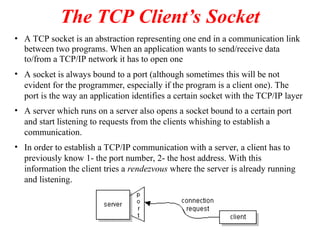
• A TCP socket is an abstraction representing one end in a communication link
between two programs. When an application wants to send/receive data
to/from a TCP/IP network it has to open one
• A socket is always bound to a port (although sometimes this will be not
evident for the programmer, especially if the program is a client one). The
port is the way an application identifies a certain socket with the TCP/IP layer
• A server which runs on a server also opens a socket bound to a certain port
and start listening to requests from the clients whishing to establish a
communication.
• In order to establish a TCP/IP communication with a server, a client has to
previously know 1- the port number, 2- the host address. With this
information the client tries a rendezvous where the server is already running
and listening.
3.
TCP Client inJava (1)
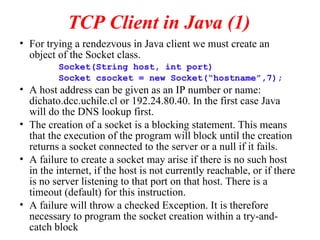
• For trying a rendezvous in Java client we must create an
object of the Socket class.
Socket(String host, int port)
Socket csocket = new Socket(“hostname”,7);
• A host address can be given as an IP number or name:
dichato.dcc.uchile.cl or 192.24.80.40. In the first case Java
will do the DNS lookup first.
• The creation of a socket is a blocking statement. This means
that the execution of the program will block until the creation
returns a socket connected to the server or a null if it fails.
• A failure to create a socket may arise if there is no such host
in the internet, if the host is not currently reachable, or if there
is no server listening to that port on that host. There is a
timeout (default) for this instruction.
• A failure will throw a checked Exception. It is therefore
necessary to program the socket creation within a try-and-
catch block
4.
TCP Client inJava (2)
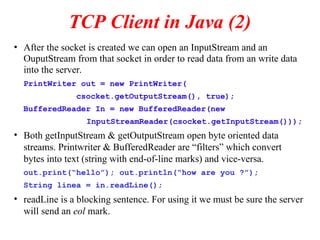
• After the socket is created we can open an InputStream and an
OuputStream from that socket in order to read data from an write data
into the server.
PrintWriter out = new PrintWriter(
csocket.getOutputStream(), true);
BufferedReader In = new BufferedReader(new
InputStreamReader(csocket.getInputStream()));
• Both getInputStream & getOutputStream open byte oriented data
streams. Printwriter & BufferedReader are “filters” which convert
bytes into text (string with end-of-line marks) and vice-versa.
out.print(“hello”); out.println(“how are you ?”);
String linea = in.readLine();
• readLine is a blocking sentence. For using it we must be sure the server
will send an eol mark.
5.
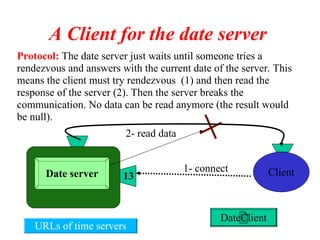
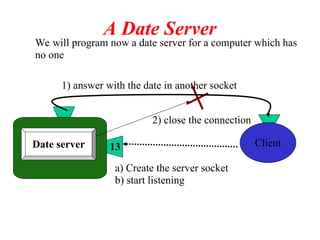
Protocol: The dateserver just waits until someone tries a
rendezvous and answers with the current date of the server. This
means the client must try rendezvous (1) and then read the
response of the server (2). Then the server breaks the
communication. No data can be read anymore (the result would
be null).
Date server 13 Client
A Client for the date server
1- connect
2- read data
DateClient
URLs of time servers
6.
import java.io.*;
import java.net.*;
publicclass DateClient {
public static void main(String[] args) throws Exception {
dateSocket = new Socket(args[0],PORT);
//opening a text-oriented input channel
in = new BufferedReader(new
InputStreamReader(dateSocket.getInputStream()));
//read data from server
String line = in.readLine();
//print on the screen
System.out.println("date received: " + line);
//close socket and everything attached to it
dateSocket.close();
}
}
7.
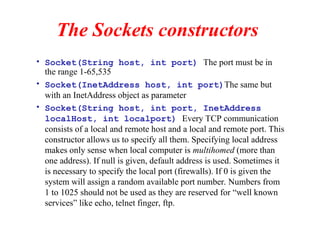
The Sockets constructors
•Socket(String host, int port) The port must be in
the range 1-65,535
• Socket(InetAddress host, int port)The same but
with an InetAddress object as parameter
• Socket(String host, int port, InetAddress
localHost, int localport) Every TCP communication
consists of a local and remote host and a local and remote port. This
constructor allows us to specify all them. Specifying local address
makes only sense when local computer is multihomed (more than
one address). If null is given, default address is used. Sometimes it
is necessary to specify the local port (firewalls). If 0 is given the
system will assign a random available port number. Numbers from
1 to 1025 should not be used as they are reserved for “well known
services” like echo, telnet finger, ftp.
8.
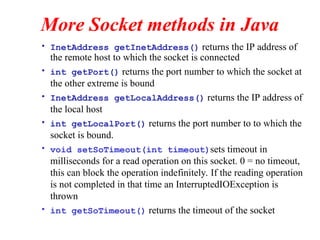
More Socket methodsin Java
• InetAddress getInetAddress() returns the IP address of
the remote host to which the socket is connected
• int getPort() returns the port number to which the socket at
the other extreme is bound
• InetAddress getLocalAddress() returns the IP address of
the local host
• int getLocalPort() returns the port number to to which the
socket is bound.
• void setSoTimeout(int timeout)sets timeout in
milliseconds for a read operation on this socket. 0 = no timeout,
this can block the operation indefinitely. If the reading operation
is not completed in that time an InterruptedIOException is
thrown
• int getSoTimeout() returns the timeout of the socket
9.
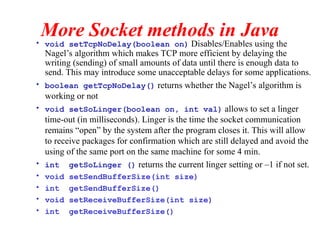
More Socket methodsin Java
• void setTcpNoDelay(boolean on) Disables/Enables using the
Nagel’s algorithm which makes TCP more efficient by delaying the
writing (sending) of small amounts of data until there is enough data to
send. This may introduce some unacceptable delays for some applications.
• boolean getTcpNoDelay() returns whether the Nagel’s algorithm is
working or not
• void setSoLinger(boolean on, int val) allows to set a linger
time-out (in milliseconds). Linger is the time the socket communication
remains “open” by the system after the program closes it. This will allow
to receive packages for confirmation which are still delayed and avoid the
using of the same port on the same machine for some 4 min.
• int getSoLinger () returns the current linger setting or –1 if not set.
• void setSendBufferSize(int size)
• int getSendBufferSize()
• void setReceiveBufferSize(int size)
• int getReceiveBufferSize()
10.
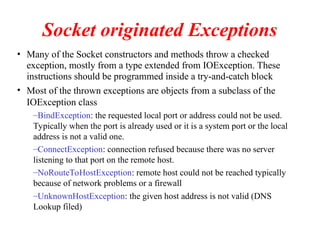
Socket originated Exceptions
•Many of the Socket constructors and methods throw a checked
exception, mostly from a type extended from IOException. These
instructions should be programmed inside a try-and-catch block
• Most of the thrown exceptions are objects from a subclass of the
IOException class
–BindException: the requested local port or address could not be used.
Typically when the port is already used or it is a system port or the local
address is not a valid one.
–ConnectException: connection refused because there was no server
listening to that port on the remote host.
–NoRouteToHostException: remote host could not be reached typically
because of network problems or a firewall
–UnknownHostException: the given host address is not valid (DNS
Lookup filed)
11.
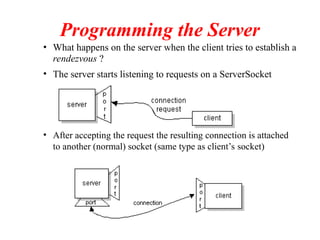
Programming the Server
•What happens on the server when the client tries to establish a
rendezvous ?
• The server starts listening to requests on a ServerSocket
• After accepting the request the resulting connection is attached
to another (normal) socket (same type as client’s socket)
12.
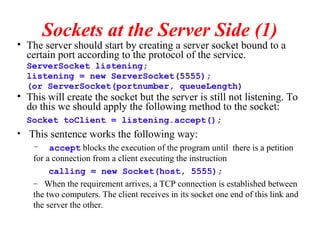
Sockets at theServer Side (1)
• The server should start by creating a server socket bound to a
certain port according to the protocol of the service.
ServerSocket listening;
listening = new ServerSocket(5555);
(or ServerSocket(portnumber, queueLength)
• This will create the socket but the server is still not listening. To
do this we should apply the following method to the socket:
Socket toClient = listening.accept();
• This sentence works the following way:
– accept blocks the execution of the program until there is a petition
for a connection from a client executing the instruction
calling = new Socket(host, 5555);
– When the requirement arrives, a TCP connection is established between
the two computers. The client receives in its socket one end of this link and
the server the other.
13.
Sockets at theServer Side(2)
• At the server side we can apply the same methods as
we did at the client side. Particularly we may need to
open an input and an output data stream.
• After this, the server should implement the protocol.
• It is important that both side follow this protocol in
order not to block the communication and/or miss
some data. This mean following the “turn taking” rules
of sending to and receiving data and the format of the
data to be exchanged.
• Note that the server socket (and port) at which the
server was originally listening to requests is not used
anymore. This is a design issue
14.
We will programnow a date server for a computer which has
no one
A Date Server
Date server 13 Client
a) Create the server socket
b) start listening
2) close the connection
1) answer with the date in another socket
15.
import java.net.*;
import java.io.*;
importjava.util.*;
public class DateServer {
public static void main(String args[]) throws Exception {
//If I don't want to care about exception I put throws Exception
//create a server socket bound to the port passed as parameter
ServerSocket server = new ServerSocket(Integer.parseInt(args[0]));
while(true) {
System.out.println("Waiting for client...");
Socket client = server.accept();
System.out.println("Accepted from "+client.getInetAddress());
PrintWriter bo = new PrintWriter(client.getOutputStream(),true);
//creating a date objrct with the System's date
Date d = new Date();
// sending
bo.println(d.toString());
}
}
}
16.
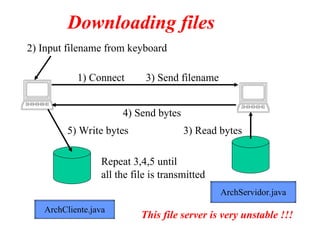
2) Input filenamefrom keyboard
1) Connect 3) Send filename
4) Send bytes
3) Read bytes
5) Write bytes
Repeat 3,4,5 until
all the file is transmitted
Downloading files
ArchServidor.java
ArchCliente.java
This file server is very unstable !!!
17.
import java.io.*;
import java.net.*;
publicclass ArchServidor {
public static void main(String[] args) throws Exception {
ServerSocket ss = new ServerSocket(666);
while(true) {
cs = ss.accept();
BufferedReader inSocket = new BufferedReader(
new InputStreamReader(cs.getInputStream()));
String fileName = inSocket.readLine();
FileInputStream inFile = new FileInputStream(fileName);
OutputStream outSocket = cs.getOutputStream();
int b;
byte ab[] = new byte[1024];
while ((b= inFile.read(ab,0,1024) ) != -1) {
outSocket.write(ab,0,b);
}
}
}
}
18.
import java.io.*;
import java.net.*;
publicclass ArchCliente {
public static void main(String[] args) throws Exception {
Socket elSocket = null;
elSocket = new Socket(args[0], 4449);
PrintWriter outSocket = new PrintWriter(elSocket.getOutputStream(),true);
outSocket.println(args[1]);
FileOutputStream outFile = new FileOutputStream(fileName);
InputStream inSocket = elSocket.getInputStream();
int b;
byte ab[] = new byte[1024];
while ((b= inSocket.read(ab,0,1024) ) != -1)
outFile.write(ab,0,b);
}
}
![import java.io.*;
import java.net.*;
public class DateClient {
public static void main(String[] args) throws Exception {
dateSocket = new Socket(args[0],PORT);
//opening a text-oriented input channel
in = new BufferedReader(new
InputStreamReader(dateSocket.getInputStream()));
//read data from server
String line = in.readLine();
//print on the screen
System.out.println("date received: " + line);
//close socket and everything attached to it
dateSocket.close();
}
}](https://image.slidesharecdn.com/sockets-250504151928-cb0a053c/85/Sockets-ppt-socket-sofcv-ohghjagshsdjjhjfb-6-320.jpg)
![import java.net.*;
import java.io.*;
import java.util.*;
public class DateServer {
public static void main(String args[]) throws Exception {
//If I don't want to care about exception I put throws Exception
//create a server socket bound to the port passed as parameter
ServerSocket server = new ServerSocket(Integer.parseInt(args[0]));
while(true) {
System.out.println("Waiting for client...");
Socket client = server.accept();
System.out.println("Accepted from "+client.getInetAddress());
PrintWriter bo = new PrintWriter(client.getOutputStream(),true);
//creating a date objrct with the System's date
Date d = new Date();
// sending
bo.println(d.toString());
}
}
}](https://image.slidesharecdn.com/sockets-250504151928-cb0a053c/85/Sockets-ppt-socket-sofcv-ohghjagshsdjjhjfb-15-320.jpg)
![import java.io.*;
import java.net.*;
public class ArchServidor {
public static void main(String[] args) throws Exception {
ServerSocket ss = new ServerSocket(666);
while(true) {
cs = ss.accept();
BufferedReader inSocket = new BufferedReader(
new InputStreamReader(cs.getInputStream()));
String fileName = inSocket.readLine();
FileInputStream inFile = new FileInputStream(fileName);
OutputStream outSocket = cs.getOutputStream();
int b;
byte ab[] = new byte[1024];
while ((b= inFile.read(ab,0,1024) ) != -1) {
outSocket.write(ab,0,b);
}
}
}
}](https://image.slidesharecdn.com/sockets-250504151928-cb0a053c/85/Sockets-ppt-socket-sofcv-ohghjagshsdjjhjfb-17-320.jpg)
![import java.io.*;
import java.net.*;
public class ArchCliente {
public static void main(String[] args) throws Exception {
Socket elSocket = null;
elSocket = new Socket(args[0], 4449);
PrintWriter outSocket = new PrintWriter(elSocket.getOutputStream(),true);
outSocket.println(args[1]);
FileOutputStream outFile = new FileOutputStream(fileName);
InputStream inSocket = elSocket.getInputStream();
int b;
byte ab[] = new byte[1024];
while ((b= inSocket.read(ab,0,1024) ) != -1)
outFile.write(ab,0,b);
}
}](https://image.slidesharecdn.com/sockets-250504151928-cb0a053c/85/Sockets-ppt-socket-sofcv-ohghjagshsdjjhjfb-18-320.jpg)


![paper8.pdfiy87t6r5e5wsretdryfugihojp[][poipuoiyutyrtersweaserdtfyguhuijk](https://cdn.slidesharecdn.com/ss_thumbnails/paper8-250429220717-e1d88b07-thumbnail.jpg?width=640&height=640&fit=bounds)


