CHAT SERVER BASED ON JAVA 
Under the guidance of: 
Mrs. Jaya Sharma, 
Dept. of CS&E, 
ASET. 
Submitted by- 
Nitish Nagar (A2305208383) 
Rajkumar Mahalawat(A2305208440) 
Raman Sethi (A2305208416) 
B.Tech(CS&E) : 2008-12 
Semester : 5th
CHAT SERVER 
 The “Chat Server” is a windows-based internet 
chatting software system. 
 It is composed of two major subsystems: a Server 
and a Client, which are independent processes that 
can be executed on separate computers on a 
network. 
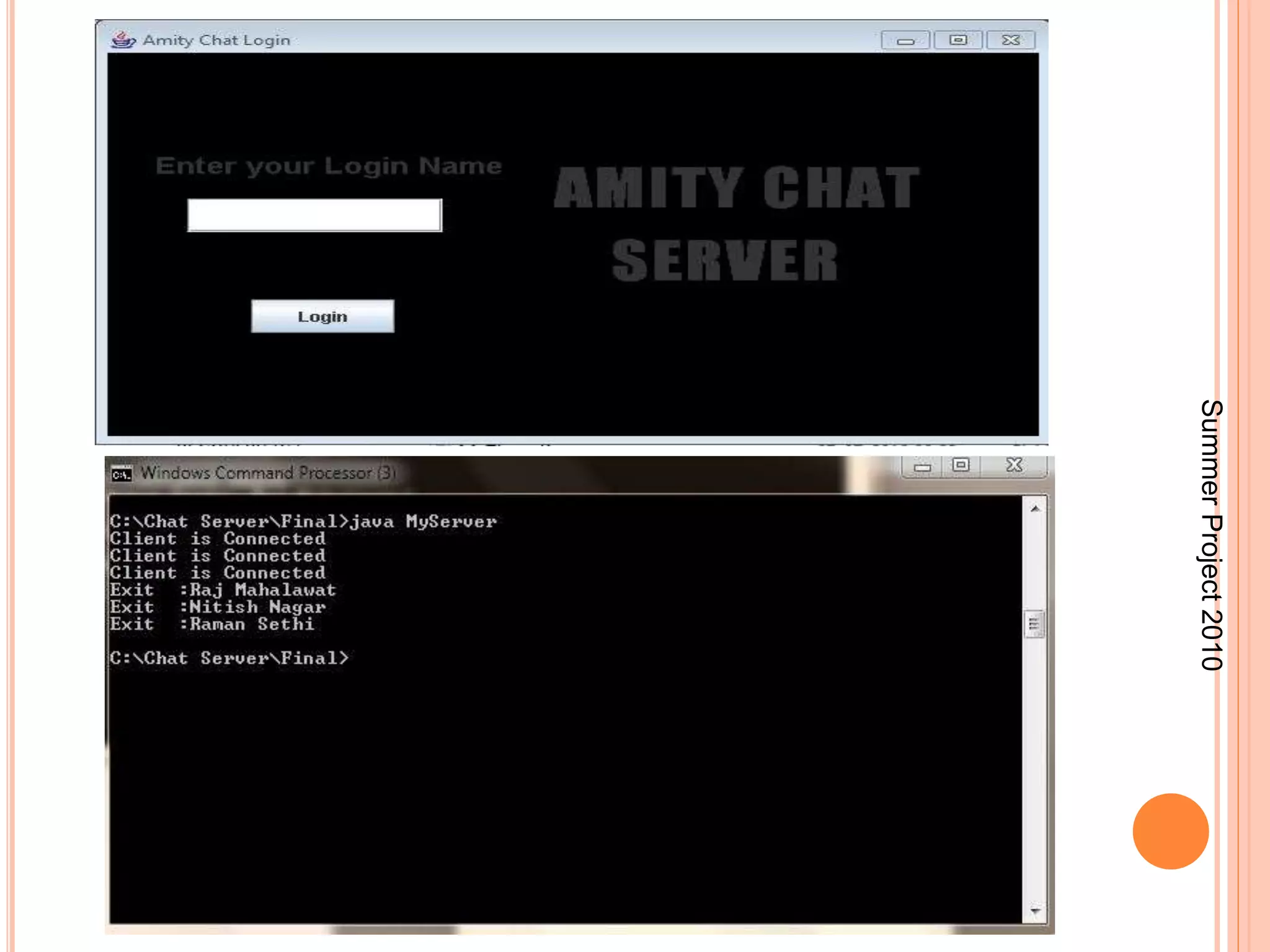
 This includes allowing clients to login so they can be 
identified by username and forwarding messages 
from one client destined to another. 
 Examples of Chatting Applications : Gtalk, Yahoo 
Messenger,Hotmail. 
Summer Project 2010
SOCKETS AND JAVA SOCKET CLASSES 
 A socket is an endpoint of a two-way communication link 
between two programs running on the network. 
 A socket is bound to a port number so that the TCP 
layer can identify the application that data destined to be 
sent. 
 Java’s .net package provides two classes: 
Socket – for implementing a client 
ServerSocket – for implementing a server 
 There are four fundamental operations a socket 
performs. These are: 
Connect to a remote machine 
Send data 
Receive data 
Close the connection 
3 
Summer Project 2010
… 
 Sockets provide an interface for programming 
networks at the transport layer. 
 A socket is a reliable connection for the transmission 
of data between two hosts. 
 A server (program) runs on a specific computer and 
has a socket that is bound to a specific port. The 
server waits and listens to the socket for a client to 
make a connection request. 
 Socket-based communication is programming 
language independent. 
That means, a socket program written in Java language can 
also communicate to a program written in Java or non-Java 
socket program. 
4 
Summer Project 2010
CLIENT SERVER PROGRAMMING 
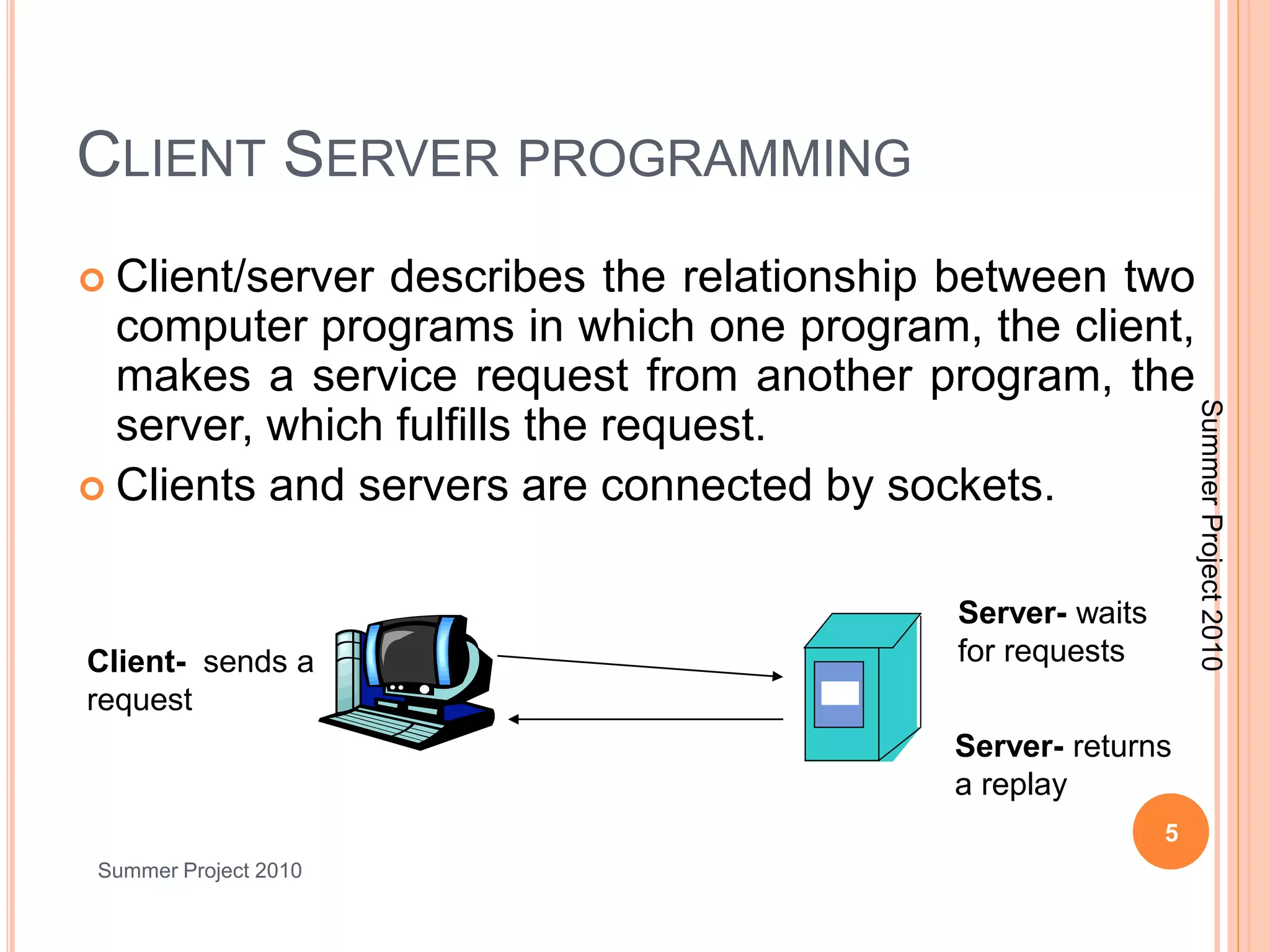
 Client/server describes the relationship between two 
computer programs in which one program, the client, 
makes a service request from another program, the 
server, which fulfills the request. 
 Clients and servers are connected by sockets. 
5 
Summer Project 2010 
Server- waits 
Client- sends a for requests 
request 
Server- returns 
a replay 
Summer Project 2010
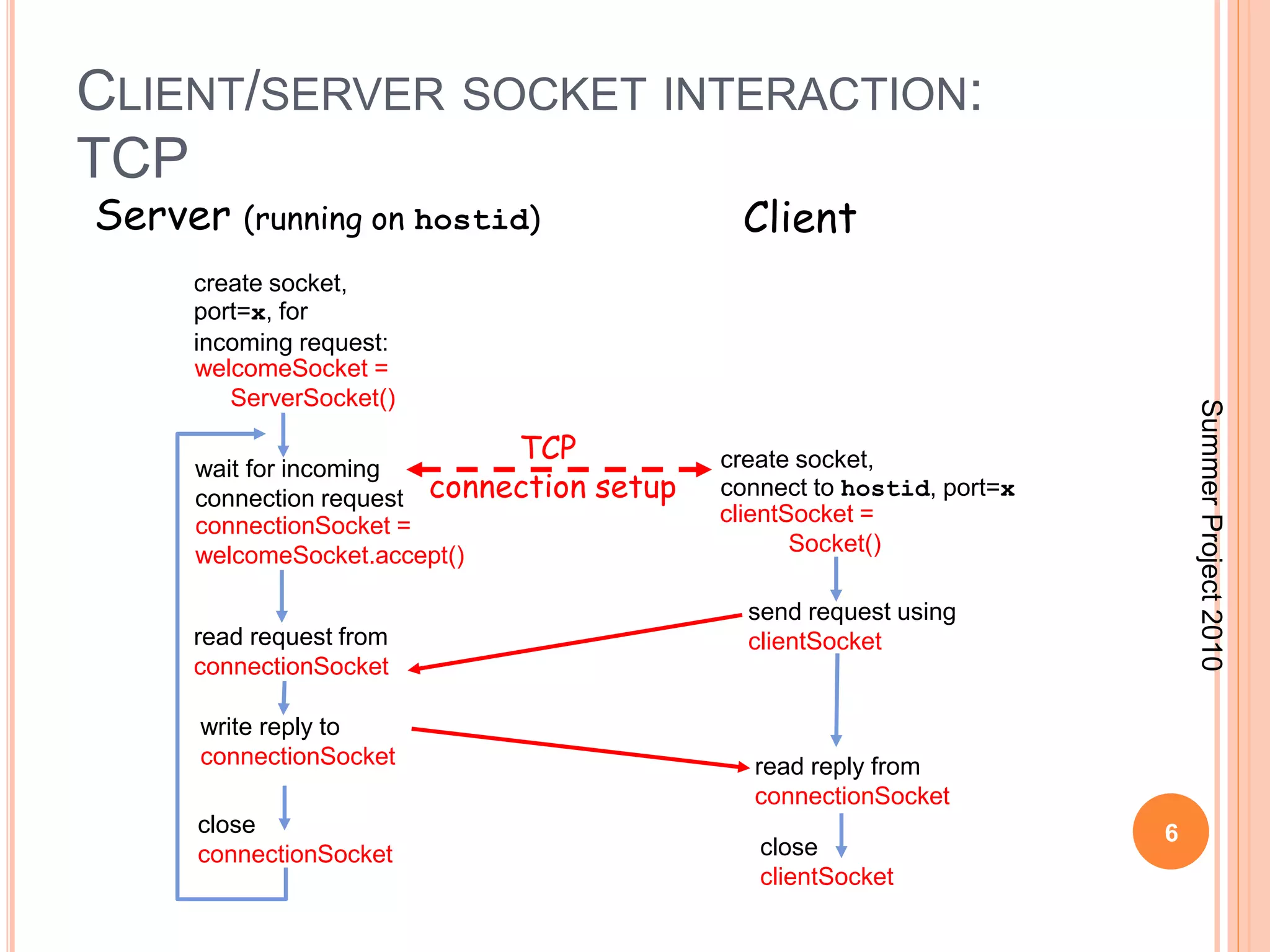
CLIENT/SERVER SOCKET INTERACTION: 
TCP 
6 
Server (running on hostid) Client 
create socket, 
port=x, for 
incoming request: 
welcomeSocket = 
ServerSocket() 
wait for incoming 
connection request 
connectionSocket = 
welcomeSocket.accept() 
create socket, 
connect to hostid, port=x 
clientSocket = 
Socket() 
read request from clientSocket 
connectionSocket 
close 
connectionSocket 
send request using 
read reply from 
connectionSocket 
close 
clientSocket 
write reply to 
connectionSocket 
TCP 
connection setup 
Summer Project 2010
SOCKET PROGRAMMING WITH TCP 
7 
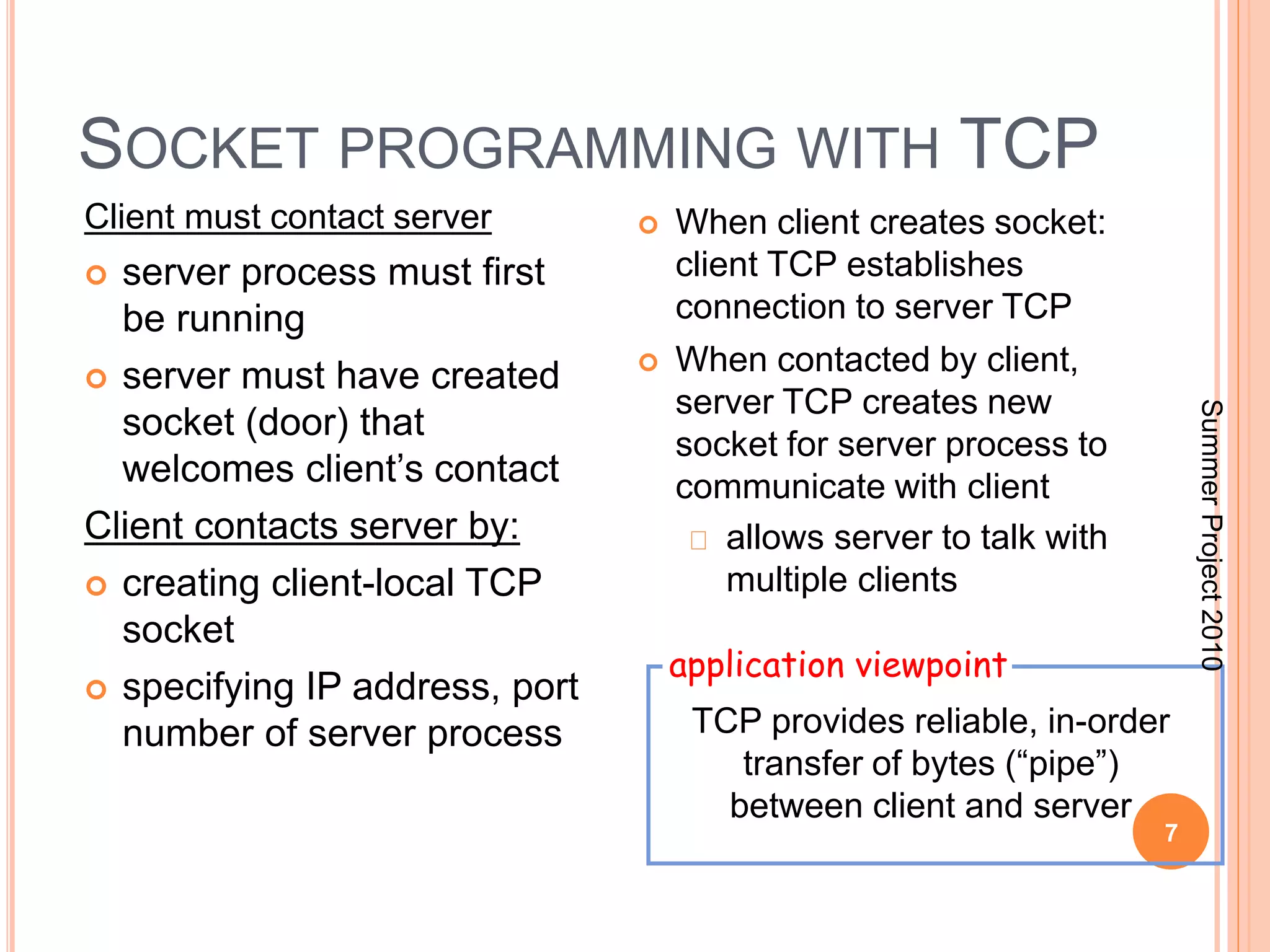
Client must contact server 
 server process must first 
be running 
 server must have created 
socket (door) that 
welcomes client’s contact 
Client contacts server by: 
 creating client-local TCP 
socket 
 specifying IP address, port 
number of server process 
 When client creates socket: 
client TCP establishes 
connection to server TCP 
 When contacted by client, 
server TCP creates new 
socket for server process to 
communicate with client 
allows server to talk with 
multiple clients 
application viewpoint 
TCP provides reliable, in-order 
transfer of bytes (“pipe”) 
between client and server 
Summer Project 2010
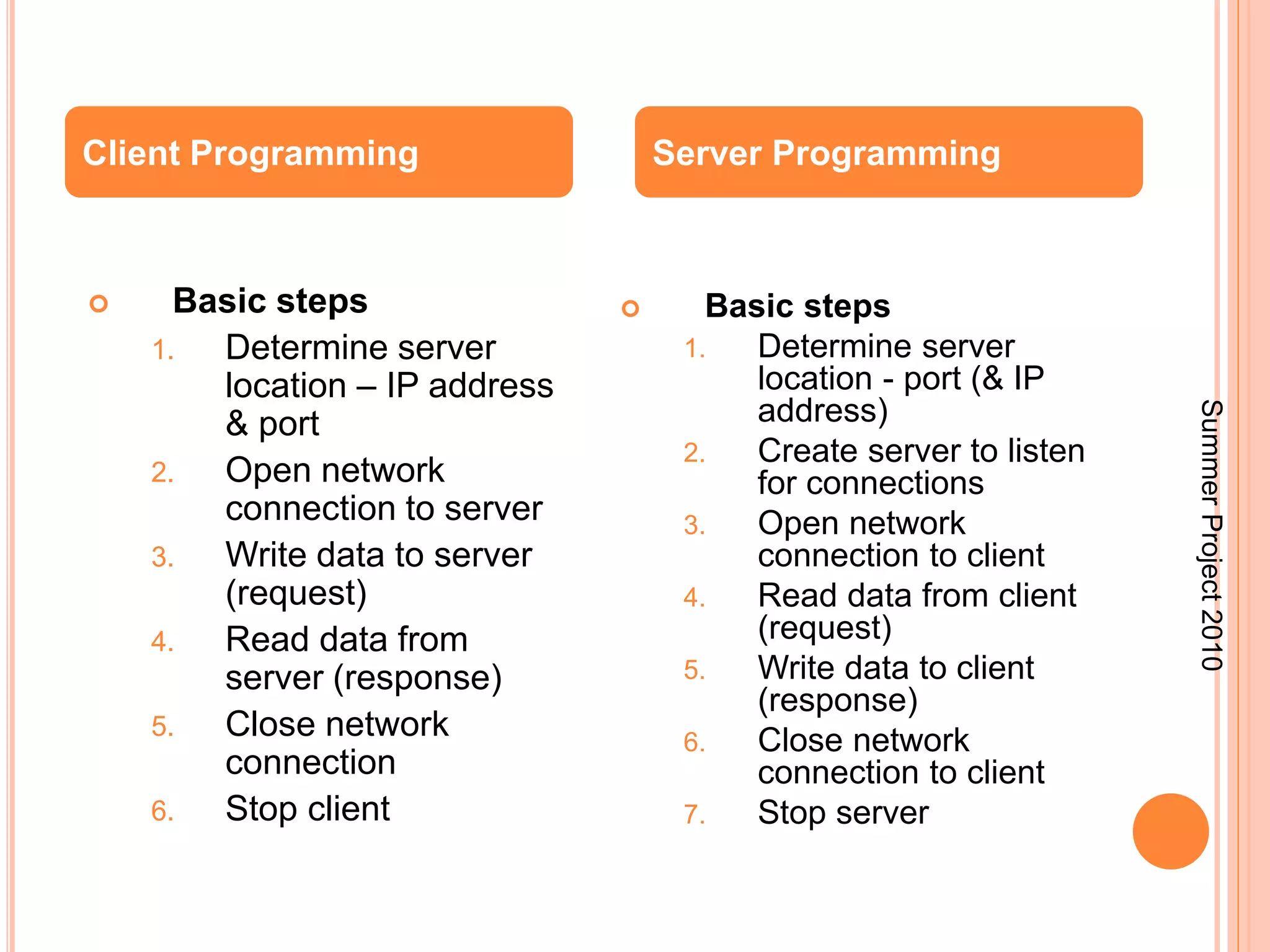
Client Programming Server Programming 
 Basic steps 
1. Determine server 
location – IP address 
& port 
2. Open network 
connection to server 
3. Write data to server 
(request) 
4. Read data from 
server (response) 
5. Close network 
connection 
6. Stop client 
 Basic steps 
1. Determine server 
location - port (& IP 
address) 
2. Create server to listen 
for connections 
3. Open network 
connection to client 
4. Read data from client 
(request) 
5. Write data to client 
(response) 
6. Close network 
connection to client 
7. Stop server 
Summer Project 2010
THREADING 
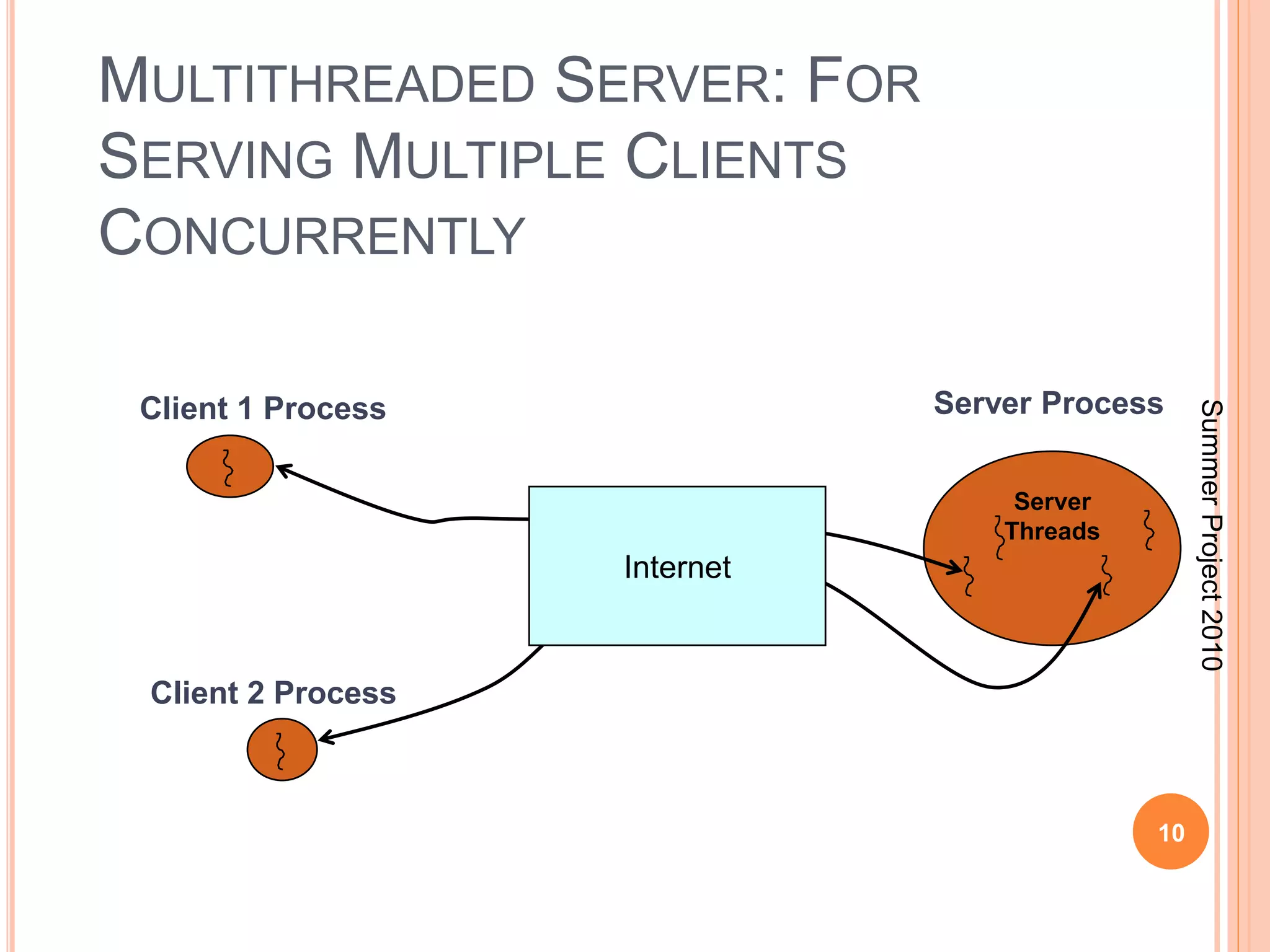
 No more than one server socket can listen to a 
particular port at one time. 
 Since a server may need to handle many 
connections at once, server programs tend to be 
heavily multi-threaded. 
 Generally the server socket passes off the actual 
processing of connections to a separate thread. 
 There should be a loop which continually accepts 
new connections. 
 Rather than handling the connection directly the 
socket should be passed to a Thread object that 
handles the connection. 
Summer Project 2010
MULTITHREADED SERVER: FOR 
SERVING MULTIPLE CLIENTS 
CONCURRENTLY 
Client 1 Process Server Process 
10 
Server 
Threads 
Client 2 Process 
Internet 
Summer Project 2010
Summer Project 2010
Summer Project 2010
APPLICATION 
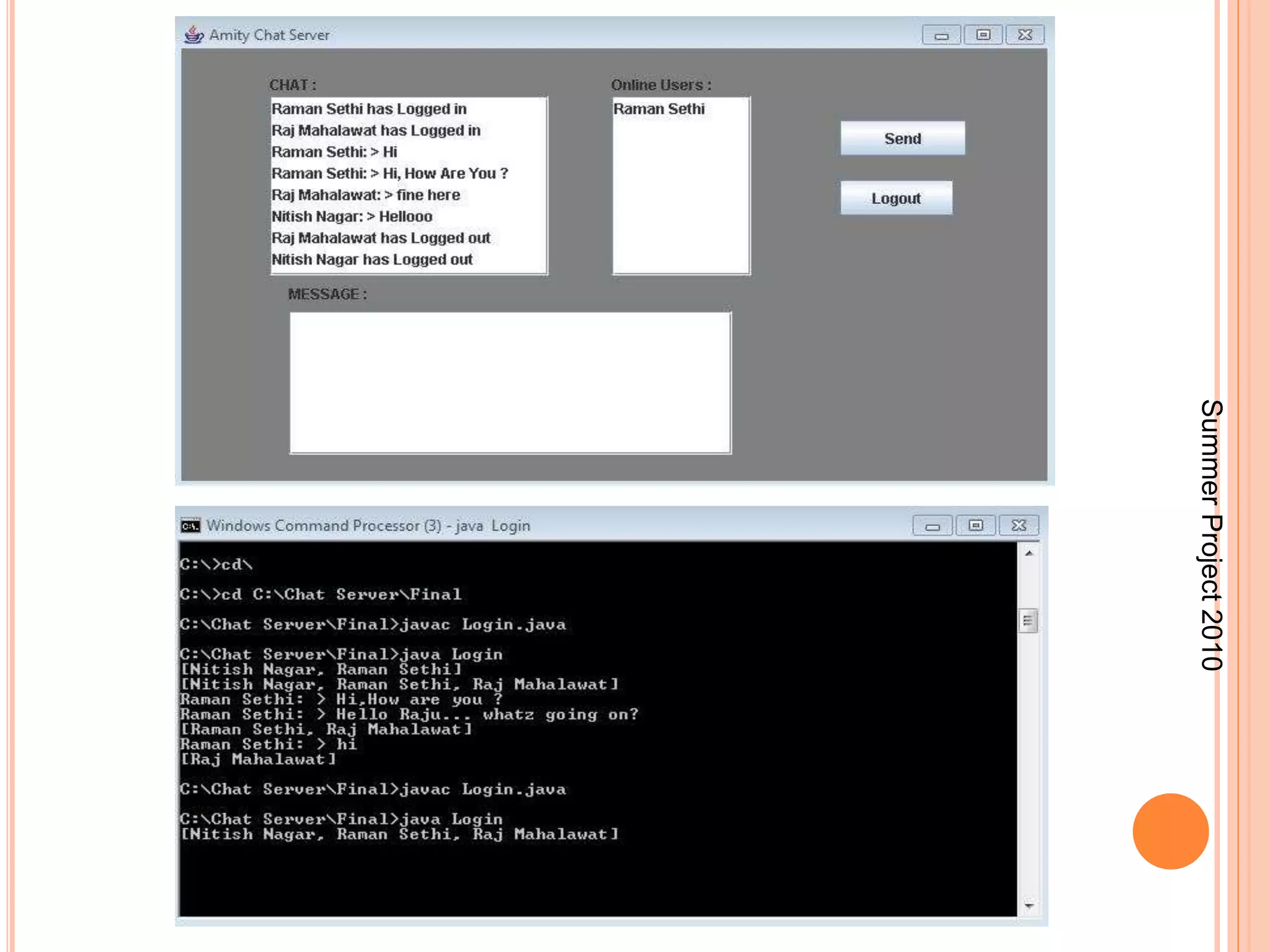
 This also includes listing the usernames of the 
clients that are currently logged in to facilitate 
communication. 
 A “Chat Server” is a form of real-time Internet text 
messaging (chat) or synchronous conferencing. 
 It is mainly designed for group communication in 
discussion forums, called channels, but also 
allows one-to-one communication via private 
message as well as chat and data transfers 
via Direct Client-to-Client. 
Summer Project 2010
FUTUTRE SCOPE 
 Login session information: We can include a feature 
in this application that will keep a record of the user’s 
login session. 
 Offline messages: User can send messages to friends 
even when they are offline. 
 File transferring and sharing: User can transfer one or 
more files to other users. A file can also be shared 
between two or more users. 
 Profile Database: The profile information of every user 
can be stored at the server. 
 Login Timeout: This feature allows the user to be 
logged in only for a specific time. After this time span 
ends, the user is automatically logged out 
Summer Project 2010
THANK YOU

Chat server nitish nagar

  • 1.
    CHAT SERVER BASEDON JAVA Under the guidance of: Mrs. Jaya Sharma, Dept. of CS&E, ASET. Submitted by- Nitish Nagar (A2305208383) Rajkumar Mahalawat(A2305208440) Raman Sethi (A2305208416) B.Tech(CS&E) : 2008-12 Semester : 5th
  • 2.
    CHAT SERVER The “Chat Server” is a windows-based internet chatting software system.  It is composed of two major subsystems: a Server and a Client, which are independent processes that can be executed on separate computers on a network.  This includes allowing clients to login so they can be identified by username and forwarding messages from one client destined to another.  Examples of Chatting Applications : Gtalk, Yahoo Messenger,Hotmail. Summer Project 2010
  • 3.
    SOCKETS AND JAVASOCKET CLASSES  A socket is an endpoint of a two-way communication link between two programs running on the network.  A socket is bound to a port number so that the TCP layer can identify the application that data destined to be sent.  Java’s .net package provides two classes: Socket – for implementing a client ServerSocket – for implementing a server  There are four fundamental operations a socket performs. These are: Connect to a remote machine Send data Receive data Close the connection 3 Summer Project 2010
  • 4.
    …  Socketsprovide an interface for programming networks at the transport layer.  A socket is a reliable connection for the transmission of data between two hosts.  A server (program) runs on a specific computer and has a socket that is bound to a specific port. The server waits and listens to the socket for a client to make a connection request.  Socket-based communication is programming language independent. That means, a socket program written in Java language can also communicate to a program written in Java or non-Java socket program. 4 Summer Project 2010
  • 5.
    CLIENT SERVER PROGRAMMING  Client/server describes the relationship between two computer programs in which one program, the client, makes a service request from another program, the server, which fulfills the request.  Clients and servers are connected by sockets. 5 Summer Project 2010 Server- waits Client- sends a for requests request Server- returns a replay Summer Project 2010
  • 6.
    CLIENT/SERVER SOCKET INTERACTION: TCP 6 Server (running on hostid) Client create socket, port=x, for incoming request: welcomeSocket = ServerSocket() wait for incoming connection request connectionSocket = welcomeSocket.accept() create socket, connect to hostid, port=x clientSocket = Socket() read request from clientSocket connectionSocket close connectionSocket send request using read reply from connectionSocket close clientSocket write reply to connectionSocket TCP connection setup Summer Project 2010
  • 7.
    SOCKET PROGRAMMING WITHTCP 7 Client must contact server  server process must first be running  server must have created socket (door) that welcomes client’s contact Client contacts server by:  creating client-local TCP socket  specifying IP address, port number of server process  When client creates socket: client TCP establishes connection to server TCP  When contacted by client, server TCP creates new socket for server process to communicate with client allows server to talk with multiple clients application viewpoint TCP provides reliable, in-order transfer of bytes (“pipe”) between client and server Summer Project 2010
  • 8.
    Client Programming ServerProgramming  Basic steps 1. Determine server location – IP address & port 2. Open network connection to server 3. Write data to server (request) 4. Read data from server (response) 5. Close network connection 6. Stop client  Basic steps 1. Determine server location - port (& IP address) 2. Create server to listen for connections 3. Open network connection to client 4. Read data from client (request) 5. Write data to client (response) 6. Close network connection to client 7. Stop server Summer Project 2010
  • 9.
    THREADING  Nomore than one server socket can listen to a particular port at one time.  Since a server may need to handle many connections at once, server programs tend to be heavily multi-threaded.  Generally the server socket passes off the actual processing of connections to a separate thread.  There should be a loop which continually accepts new connections.  Rather than handling the connection directly the socket should be passed to a Thread object that handles the connection. Summer Project 2010
  • 10.
    MULTITHREADED SERVER: FOR SERVING MULTIPLE CLIENTS CONCURRENTLY Client 1 Process Server Process 10 Server Threads Client 2 Process Internet Summer Project 2010
  • 11.
  • 12.
  • 13.
    APPLICATION  Thisalso includes listing the usernames of the clients that are currently logged in to facilitate communication.  A “Chat Server” is a form of real-time Internet text messaging (chat) or synchronous conferencing.  It is mainly designed for group communication in discussion forums, called channels, but also allows one-to-one communication via private message as well as chat and data transfers via Direct Client-to-Client. Summer Project 2010
  • 14.
    FUTUTRE SCOPE Login session information: We can include a feature in this application that will keep a record of the user’s login session.  Offline messages: User can send messages to friends even when they are offline.  File transferring and sharing: User can transfer one or more files to other users. A file can also be shared between two or more users.  Profile Database: The profile information of every user can be stored at the server.  Login Timeout: This feature allows the user to be logged in only for a specific time. After this time span ends, the user is automatically logged out Summer Project 2010
  • 15.