Microcomputer applicationsFall semester 2011Day 2: types of software, computing environmentsProfessor: Giuseppe Sindoni (gsindoni@johncabot.edu)This material is distributed under the “Creative Commons “Attribution – NonCommercial – Share Alike 3.0” , available at http://creativecommons.org/licenses/by-nc-sa/3.0/
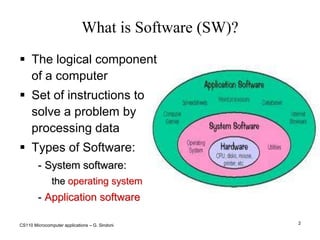
CS110 Microcomputer applications – G. Sindoni2What is Software (SW)?The logical component of a computer Set of instructions to solve a problem by processing dataTypes of Software:System software: the operating systemApplication softwareFoglio ElettronicoBrowserElaboratore di TestiDatabaseE molti altri SW applicativi
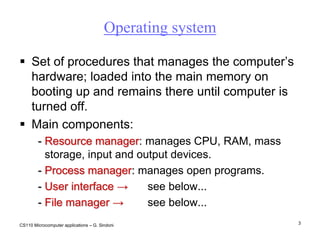
CS110 Microcomputer applications – G. Sindoni3Operating systemSet of procedures that manages the computer’s hardware; loaded into the main memory on booting up and remains there until computer is turned off.Main components:Resource manager: manages CPU, RAM, mass storage, input and output devices.Process manager: manages open programs. User interface ->	see below... File manager-> 	see below...
CS110 Microcomputer applications – G. Sindoni4User interfaceAllows users to input instructions to use the system.Command line interface (CLI): the original interface mode, still in use for complex tasks. Based on text commands.Graphical User Interface (GUI): graphics-based interaction to enable less expert users to use the computer. Usually based on an analogy of a working environment (Desktop, Folders, Trash, Notes, etc.)‏.Operating systems and their user interface: DOS, Windows, Linux, Mac OS, Android, iOS.
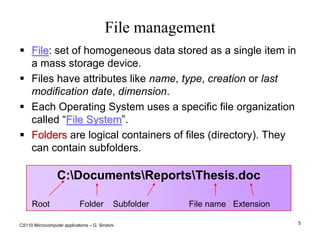
CS110 Microcomputer applications – G. Sindoni5File managementC:\Documents\Reports\Thesis.doc Root	        Folder    Subfolder                 File name   ExtensionFile: set of homogeneous data stored as a single item in a mass storage device. Files have attributes like name, type, creation or last modification date, dimension. Each Operating System uses a specific file organization called “File System”.Folders are logical containers of files (directory). They can contain subfolders.
CS110 Microcomputer applications – G. Sindoni6Application software - 1Personal productivity programs are the main reason for the success and spread of PCs:Word processors, for editing of complex texts (Word, Writer, Pages, Google Documents).Spreadsheets, for complex calculations and simple data analysis (Excel, Calc, Numbers, Google spreadsheets).Presentation tools (PowerPoint, Impress, KeyNote, Google presentations).Databases for personal data management (Access, Base).Currently available office suites: Microsoft Office, OpenOffice.org, StarOffice, iWork
CS110 Microcomputer applications – G. Sindoni7Application software - 2Browsers: Internet Explorer, Mozilla Firefox, Chrome, SafariEmail clients: Outlook (Express), Mozilla Thunderbird.Desktop PublishingComputer Aided Design (CAD)Enterprise Resource Planning (ERP)Media PlayersGraphics programs for drawing and retouching photos, programs for composing music, editing film, etcComputer games And many others...
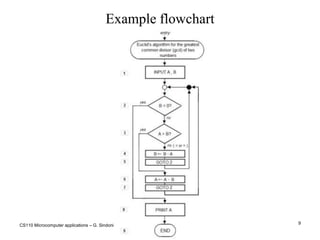
CS110 Microcomputer applications – G. Sindoni8AlgorithmsAlgorithms solve problems by tackling them in a systematic way. Examples include recipes and search engines.In IT, algorithms are methods to solve problems that can  be implemented as programs. A procedure is a series of steps (sequence) implementing an algorithm.A flowchart provides a graphic representation of the algorithm (procedure). Broadly speaking, flowcharts are  a graphic modeling language to represent algorithms.
CS110 Microcomputer applications – G. Sindoni9Example flowchart
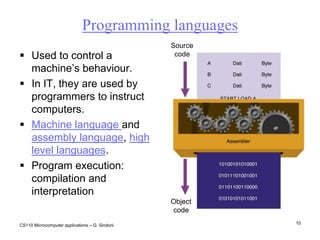
CS110 Microcomputer applications – G. Sindoni10Programming languagesSourcecodeUsed to control a machine’s behaviour. In IT, they are used by programmers to instruct computers. Machine language and assembly language, high level languages.Program execution: compilation and interpretationObjectcode
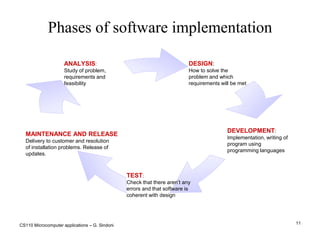
CS110 Microcomputer applications – G. Sindoni11Phases of software implementation
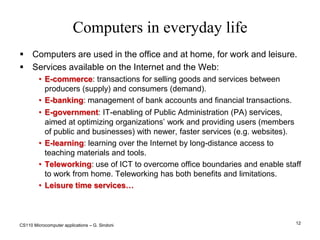
CS110 Microcomputer applications – G. Sindoni12Computers in everyday lifeComputers are used in the office and at home, for work and leisure.Services available on the Internet and the Web:E-commerce: transactions for selling goods and services between producers (supply) and consumers (demand).
E-banking: management of bank accounts and financial transactions.
E-government: IT-enabling of Public Administration (PA) services, aimed at optimizing organizations’ work and providing users (members of public and businesses) with newer, faster services (e.g. websites).
E-learning: learning over the Internet by long-distance access to teaching materials and tools.
Teleworking: use of ICT to overcome office boundaries and enable staff to work from home. Teleworking has both benefits and limitations.
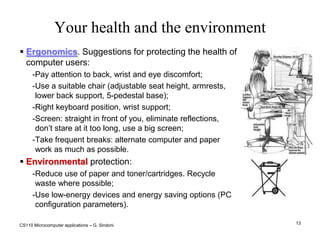
Leisure time services…CS110 Microcomputer applications – G. Sindoni13Your health and the environmentErgonomics. Suggestions for protecting the health of computer users:Pay attention to back, wrist and eye discomfort;Use a suitable chair (adjustable seat height, armrests, lower back support, 5-pedestal base);‏Right keyboard position, wrist support;Screen: straight in front of you, eliminate reflections, don’t stare at it too long, use a big screen;Take frequent breaks: alternate computer and paper work as much as possible.Environmental protection:Reduce use of paper and toner/cartridges. Recycle waste where possible;Use low-energy devices and energy saving options (PC configuration parameters).
CS110 Microcomputer applications – G. Sindoni14Computer security: user identificationSecurity encompasses 3 aspects:Confidentiality: data, services and devices can be accessed by enabled users only.Integrity: security of data, services and devices; tracking every change.Availability: those who have the right to use data, services and devices must be able to do so. User identification is crucial. Authentication: general rules for creating passwords.Identification and personal data: each country has specific laws on protection of privacy.
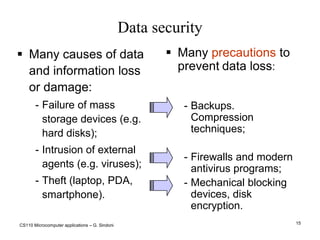
CS110 Microcomputer applications – G. Sindoni15Data securityMany causes of data and information loss or damage:Failure of mass storage devices (e.g. hard disks);Intrusion of external agents (e.g. viruses);Theft (laptop, PDA, smartphone).Many precautions to preventdata loss:
Backups. Compression techniques;
Firewalls and modern antivirus programs;
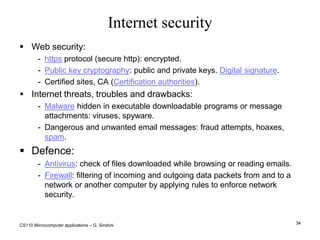
Mechanical blocking devices, disk encryption. CS110 Microcomputer applications – G. Sindoni16Computer virusesViruses are programs containing potentially harmful instructions. Main types:True viruses: portions of a program which are activated when the program is executed. They can reproduce and cause trouble.Worms: programs which exploit the net to infect other computers. They propagate via email and the Web. Trojans: programs behaving in unexpected ways or opening doors to the “enemy”.Where they hide:Infected programs; they also spread as email attachments or are downloaded from “fake” websites.Infected documents (MacroVirus).Defence:Antivirus programs. Keep them and operating systems updated. Defence systems limiting access to local resources (e.g. Firewall)‏.Common sense: do not open email attachments if you are not sure of their content; do not download software from unsafe websites.
CS110 Microcomputer applications – G. Sindoni17Legal aspects: copyrightCopyright: software is usually protected by copyright laws. The user license is called EULA (End User License Agreement).Proprietary software can generally only be used on an individual basis: duplication and improper use are prohibited.Other types of licence:Freeware: usually downloaded from the Internet. Free, unrestricted use, can be freely copied and distributed.Shareware: trial version usually downloaded from the Internet. The licence to continue using it or to access and use all its functions is usually cheap.Open Source software -> day 5... Most internet content - images, music, video, etc – is protected by copyright.
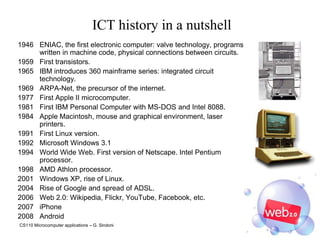
CS110 Microcomputer applications – G. Sindoni18ICT history in a nutshell1946	ENIAC, the first electronic computer: valve technology, programs written in machine code, physical connections between circuits.1959	First transistors.1965	IBM introduces 360 mainframe series: integrated circuit technology.1969	ARPA-Net, the precursor of the internet.1977	First Apple II microcomputer.1981	First IBM Personal Computer with MS-DOS and Intel 8088.1984	Apple Macintosh, mouse and graphical environment, laser printers.1991	First Linux version.1992	Microsoft Windows 3.11994	World Wide Web. First version of Netscape. Intel Pentium processor.1998	AMD Athlon processor.2001	Windows XP, rise of Linux.2004	Rise of Google and spread of ADSL.Web 2.0: Wikipedia, Flickr, YouTube, Facebook, etc.‏iPhoneAndroid
CS110 Microcomputer applications – G. Sindoni19Local computingSo far…PC as a self-contained worldSoftware seen as something aimed at making a single PC workPrinciple…One person, one PC, a bunch of dedicated software programs running on it
CS110 Microcomputer applications – G. Sindoni20Computer networksConnect computers (millions of them).Communication network: a system of computers, telephones or other connected devices, able to communicate with each other  and share applications and data. Main types:Local or LAN: Local Area Network. WLAN (Wireless LAN);Geographic or WAN: Wide Area Network. MAN (Metropolitan Area Network);Networks of networks or Networking. Internet.
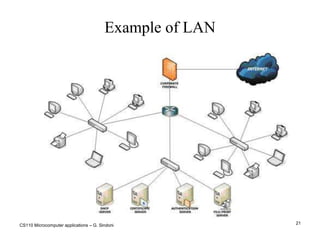
CS110 Microcomputer applications – G. Sindoni21Example of LAN
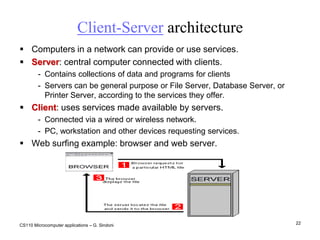
CS110 Microcomputer applications – G. Sindoni22Client-Server architectureComputers in a network can provide or use services.Server: central computer connected with clients.Contains collections of data and programs for clients Servers can be general purpose or File Server, Database Server, or Printer Server, according to the services they offer.Client: uses services made available by servers.Connected via a wired or wireless network.PC, workstation and other devices requesting services.Web surfing example: browser and web server.
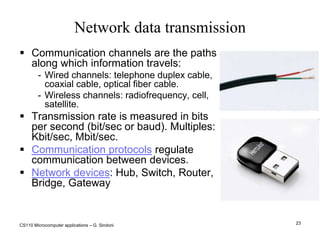
CS110 Microcomputer applications – G. Sindoni23Network data transmissionCommunication channels are the paths along which information travels:Wired channels: telephone duplex cable, coaxial cable, optical fiber cable.Wireless channels: radiofrequency, cell, satellite. Transmission rate is measured in bits per second (bit/sec or baud). Multiples: Kbit/sec, Mbit/sec. Communication protocols regulate communication between devices.Network devices: Hub, Switch, Router, Bridge, Gateway
CS110 Microcomputer applications – G. Sindoni24Home connectionsTo access the Internet from home we need:An access device (modem, terminal, router, etc)‏.A physical connection to a telephone, digital or mobile network.An Internet Service Provider (ISP)‏.Types of connection:“Dial-up” with modem on a telephone network up to 56 Kbit/sec. Less and less used, available everywhere there’s a home telephone.Digital network ISDN up to 128 kbit/sec: simultaneous data and voice transmission.ADSL (Asymmetric Digital Subscriber Line) network: up to 24Mbit/sec, very widespread, AKA broadband. “Always on” connection. ‏Optical fiber: no telephone line needed.Cell: Radio-Modem USB.
CS110 Microcomputer applications – G. Sindoni25What is the Internet?The largest computer network.Created in the 60s from an USA ARPA-DoD project.A network of networks, based on the TCP/IP (TCP, IP, UDP, FTP, NNTP, HTTP). They are public and open.
The original objective was to share and exchange data between research laboratories.
1969: first connection between two computers (UCLA-Stanford).
The oldest services are email, file and document transmission (ftp), newsgroup (nntp), remote control (telnet).
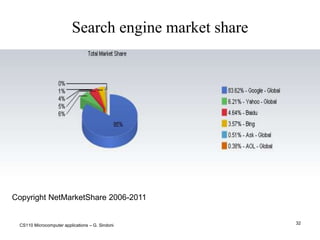
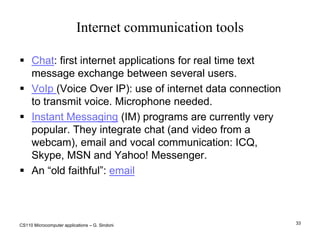
Modern services include web, chat, voip, etc.
Main internet organizations: ICANN, ISOC, IETF, IESG and W3C, managed by companies, selected users and nations.

L2 cs110 jcu-sindonirev04092011

  • 1.
    Microcomputer applicationsFall semester2011Day 2: types of software, computing environmentsProfessor: Giuseppe Sindoni (gsindoni@johncabot.edu)This material is distributed under the “Creative Commons “Attribution – NonCommercial – Share Alike 3.0” , available at http://creativecommons.org/licenses/by-nc-sa/3.0/
  • 2.
    CS110 Microcomputer applications– G. Sindoni2What is Software (SW)?The logical component of a computer Set of instructions to solve a problem by processing dataTypes of Software:System software: the operating systemApplication softwareFoglio ElettronicoBrowserElaboratore di TestiDatabaseE molti altri SW applicativi
  • 3.
    CS110 Microcomputer applications– G. Sindoni3Operating systemSet of procedures that manages the computer’s hardware; loaded into the main memory on booting up and remains there until computer is turned off.Main components:Resource manager: manages CPU, RAM, mass storage, input and output devices.Process manager: manages open programs. User interface -> see below... File manager-> see below...
  • 4.
    CS110 Microcomputer applications– G. Sindoni4User interfaceAllows users to input instructions to use the system.Command line interface (CLI): the original interface mode, still in use for complex tasks. Based on text commands.Graphical User Interface (GUI): graphics-based interaction to enable less expert users to use the computer. Usually based on an analogy of a working environment (Desktop, Folders, Trash, Notes, etc.)‏.Operating systems and their user interface: DOS, Windows, Linux, Mac OS, Android, iOS.
  • 5.
    CS110 Microcomputer applications– G. Sindoni5File managementC:\Documents\Reports\Thesis.doc Root Folder Subfolder File name ExtensionFile: set of homogeneous data stored as a single item in a mass storage device. Files have attributes like name, type, creation or last modification date, dimension. Each Operating System uses a specific file organization called “File System”.Folders are logical containers of files (directory). They can contain subfolders.
  • 6.
    CS110 Microcomputer applications– G. Sindoni6Application software - 1Personal productivity programs are the main reason for the success and spread of PCs:Word processors, for editing of complex texts (Word, Writer, Pages, Google Documents).Spreadsheets, for complex calculations and simple data analysis (Excel, Calc, Numbers, Google spreadsheets).Presentation tools (PowerPoint, Impress, KeyNote, Google presentations).Databases for personal data management (Access, Base).Currently available office suites: Microsoft Office, OpenOffice.org, StarOffice, iWork
  • 7.
    CS110 Microcomputer applications– G. Sindoni7Application software - 2Browsers: Internet Explorer, Mozilla Firefox, Chrome, SafariEmail clients: Outlook (Express), Mozilla Thunderbird.Desktop PublishingComputer Aided Design (CAD)Enterprise Resource Planning (ERP)Media PlayersGraphics programs for drawing and retouching photos, programs for composing music, editing film, etcComputer games And many others...
  • 8.
    CS110 Microcomputer applications– G. Sindoni8AlgorithmsAlgorithms solve problems by tackling them in a systematic way. Examples include recipes and search engines.In IT, algorithms are methods to solve problems that can be implemented as programs. A procedure is a series of steps (sequence) implementing an algorithm.A flowchart provides a graphic representation of the algorithm (procedure). Broadly speaking, flowcharts are a graphic modeling language to represent algorithms.
  • 9.
    CS110 Microcomputer applications– G. Sindoni9Example flowchart
  • 10.
    CS110 Microcomputer applications– G. Sindoni10Programming languagesSourcecodeUsed to control a machine’s behaviour. In IT, they are used by programmers to instruct computers. Machine language and assembly language, high level languages.Program execution: compilation and interpretationObjectcode
  • 11.
    CS110 Microcomputer applications– G. Sindoni11Phases of software implementation
  • 12.
    CS110 Microcomputer applications– G. Sindoni12Computers in everyday lifeComputers are used in the office and at home, for work and leisure.Services available on the Internet and the Web:E-commerce: transactions for selling goods and services between producers (supply) and consumers (demand).
  • 13.
    E-banking: management ofbank accounts and financial transactions.
  • 14.
    E-government: IT-enabling ofPublic Administration (PA) services, aimed at optimizing organizations’ work and providing users (members of public and businesses) with newer, faster services (e.g. websites).
  • 15.
    E-learning: learning overthe Internet by long-distance access to teaching materials and tools.
  • 16.
    Teleworking: use ofICT to overcome office boundaries and enable staff to work from home. Teleworking has both benefits and limitations.
  • 17.
    Leisure time services…CS110Microcomputer applications – G. Sindoni13Your health and the environmentErgonomics. Suggestions for protecting the health of computer users:Pay attention to back, wrist and eye discomfort;Use a suitable chair (adjustable seat height, armrests, lower back support, 5-pedestal base);‏Right keyboard position, wrist support;Screen: straight in front of you, eliminate reflections, don’t stare at it too long, use a big screen;Take frequent breaks: alternate computer and paper work as much as possible.Environmental protection:Reduce use of paper and toner/cartridges. Recycle waste where possible;Use low-energy devices and energy saving options (PC configuration parameters).
  • 18.
    CS110 Microcomputer applications– G. Sindoni14Computer security: user identificationSecurity encompasses 3 aspects:Confidentiality: data, services and devices can be accessed by enabled users only.Integrity: security of data, services and devices; tracking every change.Availability: those who have the right to use data, services and devices must be able to do so. User identification is crucial. Authentication: general rules for creating passwords.Identification and personal data: each country has specific laws on protection of privacy.
  • 19.
    CS110 Microcomputer applications– G. Sindoni15Data securityMany causes of data and information loss or damage:Failure of mass storage devices (e.g. hard disks);Intrusion of external agents (e.g. viruses);Theft (laptop, PDA, smartphone).Many precautions to preventdata loss:
  • 20.
  • 21.
    Firewalls and modernantivirus programs;
  • 22.
    Mechanical blocking devices,disk encryption. CS110 Microcomputer applications – G. Sindoni16Computer virusesViruses are programs containing potentially harmful instructions. Main types:True viruses: portions of a program which are activated when the program is executed. They can reproduce and cause trouble.Worms: programs which exploit the net to infect other computers. They propagate via email and the Web. Trojans: programs behaving in unexpected ways or opening doors to the “enemy”.Where they hide:Infected programs; they also spread as email attachments or are downloaded from “fake” websites.Infected documents (MacroVirus).Defence:Antivirus programs. Keep them and operating systems updated. Defence systems limiting access to local resources (e.g. Firewall)‏.Common sense: do not open email attachments if you are not sure of their content; do not download software from unsafe websites.
  • 23.
    CS110 Microcomputer applications– G. Sindoni17Legal aspects: copyrightCopyright: software is usually protected by copyright laws. The user license is called EULA (End User License Agreement).Proprietary software can generally only be used on an individual basis: duplication and improper use are prohibited.Other types of licence:Freeware: usually downloaded from the Internet. Free, unrestricted use, can be freely copied and distributed.Shareware: trial version usually downloaded from the Internet. The licence to continue using it or to access and use all its functions is usually cheap.Open Source software -> day 5... Most internet content - images, music, video, etc – is protected by copyright.
  • 24.
    CS110 Microcomputer applications– G. Sindoni18ICT history in a nutshell1946 ENIAC, the first electronic computer: valve technology, programs written in machine code, physical connections between circuits.1959 First transistors.1965 IBM introduces 360 mainframe series: integrated circuit technology.1969 ARPA-Net, the precursor of the internet.1977 First Apple II microcomputer.1981 First IBM Personal Computer with MS-DOS and Intel 8088.1984 Apple Macintosh, mouse and graphical environment, laser printers.1991 First Linux version.1992 Microsoft Windows 3.11994 World Wide Web. First version of Netscape. Intel Pentium processor.1998 AMD Athlon processor.2001 Windows XP, rise of Linux.2004 Rise of Google and spread of ADSL.Web 2.0: Wikipedia, Flickr, YouTube, Facebook, etc.‏iPhoneAndroid
  • 25.
    CS110 Microcomputer applications– G. Sindoni19Local computingSo far…PC as a self-contained worldSoftware seen as something aimed at making a single PC workPrinciple…One person, one PC, a bunch of dedicated software programs running on it
  • 26.
    CS110 Microcomputer applications– G. Sindoni20Computer networksConnect computers (millions of them).Communication network: a system of computers, telephones or other connected devices, able to communicate with each other and share applications and data. Main types:Local or LAN: Local Area Network. WLAN (Wireless LAN);Geographic or WAN: Wide Area Network. MAN (Metropolitan Area Network);Networks of networks or Networking. Internet.
  • 27.
    CS110 Microcomputer applications– G. Sindoni21Example of LAN
  • 28.
    CS110 Microcomputer applications– G. Sindoni22Client-Server architectureComputers in a network can provide or use services.Server: central computer connected with clients.Contains collections of data and programs for clients Servers can be general purpose or File Server, Database Server, or Printer Server, according to the services they offer.Client: uses services made available by servers.Connected via a wired or wireless network.PC, workstation and other devices requesting services.Web surfing example: browser and web server.
  • 29.
    CS110 Microcomputer applications– G. Sindoni23Network data transmissionCommunication channels are the paths along which information travels:Wired channels: telephone duplex cable, coaxial cable, optical fiber cable.Wireless channels: radiofrequency, cell, satellite. Transmission rate is measured in bits per second (bit/sec or baud). Multiples: Kbit/sec, Mbit/sec. Communication protocols regulate communication between devices.Network devices: Hub, Switch, Router, Bridge, Gateway
  • 30.
    CS110 Microcomputer applications– G. Sindoni24Home connectionsTo access the Internet from home we need:An access device (modem, terminal, router, etc)‏.A physical connection to a telephone, digital or mobile network.An Internet Service Provider (ISP)‏.Types of connection:“Dial-up” with modem on a telephone network up to 56 Kbit/sec. Less and less used, available everywhere there’s a home telephone.Digital network ISDN up to 128 kbit/sec: simultaneous data and voice transmission.ADSL (Asymmetric Digital Subscriber Line) network: up to 24Mbit/sec, very widespread, AKA broadband. “Always on” connection. ‏Optical fiber: no telephone line needed.Cell: Radio-Modem USB.
  • 31.
    CS110 Microcomputer applications– G. Sindoni25What is the Internet?The largest computer network.Created in the 60s from an USA ARPA-DoD project.A network of networks, based on the TCP/IP (TCP, IP, UDP, FTP, NNTP, HTTP). They are public and open.
  • 32.
    The original objectivewas to share and exchange data between research laboratories.
  • 33.
    1969: first connectionbetween two computers (UCLA-Stanford).
  • 34.
    The oldest servicesare email, file and document transmission (ftp), newsgroup (nntp), remote control (telnet).
  • 35.
    Modern services includeweb, chat, voip, etc.
  • 36.
    Main internet organizations:ICANN, ISOC, IETF, IESG and W3C, managed by companies, selected users and nations.