Virtualization as
      Information System Consolidation
                     Tool

RMLL 2009
FDL, CC-by-sa
2009-07-07


                        Franck VILLAUME
                        mailto:franck.villaume@capgemini.com
                        xmpp:fvill@im.apinc.org
Agenda

   Common virtualization glitches
   Steps before start
   Available Hypervisors
   Why KVM
   Libvirt : abstraction layer
   Orchestrators
   Why Enomalism
   Useful related admin tools
   Useful related Virtualization tools
   A last word about OOM
   Demo


                                          2
Introduction

     Use case of this presentation :
    • Multi-tier App (HTTPD, Tomcat, PostgreSQL)
    • Need a way to start easily a new instance of this App
    • Public Access to this app
    • Data life cycle very short
    • Virtualization seen as an opportunity to rethink the organisation
      (human include)
    • Prior experience with VMWare Esx


                                                                          3
Common glitches about virtualization

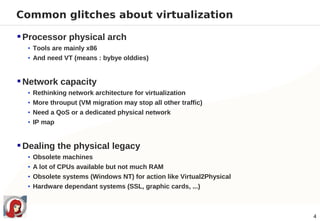
 Processor physical arch
  • Tools are mainly x86
  • And need VT (means : bybye olddies)


 Network capacity
  • Rethinking network architecture for virtualization
  • More throuput (VM migration may stop all other traffic)
  • Need a QoS or a dedicated physical network
  • IP map


 Dealing the physical legacy
  • Obsolete machines
  • A lot of CPUs available but not much RAM
  • Obsolete systems (Windows NT) for action like Virtual2Physical
  • Hardware dependant systems (SSL, graphic cards, ...)


                                                                     4
Common glitches about virtualization

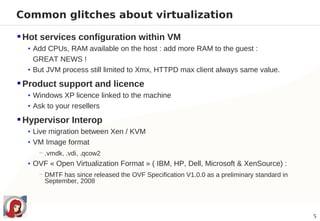
 Hot services configuration within VM
  • Add CPUs, RAM available on the host : add more RAM to the guest :
    GREAT NEWS !
  • But JVM process still limited to Xmx, HTTPD max client always same value.

 Product support and licence
  • Windows XP licence linked to the machine
  • Ask to your resellers

 Hypervisor Interop
  • Live migration between Xen / KVM
  • VM Image format
     − .vmdk, .vdi, .qcow2
  • OVF « Open Virtualization Format » ( IBM, HP, Dell, Microsoft & XenSource) :
     − DMTF has since released the OVF Specification V1.0.0 as a preliminary standard in
       September, 2008


                                                                                           5
Steps before virtualization start

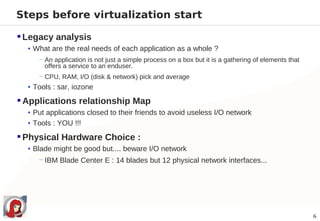
 Legacy analysis
  • What are the real needs of each application as a whole ?
     − An application is not just a simple process on a box but it is a gathering of elements that
       offers a service to an enduser.
     − CPU, RAM, I/O (disk & network) pick and average
  • Tools : sar, iozone

 Applications relationship Map
  • Put applications closed to their friends to avoid useless I/O network
  • Tools : YOU !!!

 Physical Hardware Choice :
  • Blade might be good but.... beware I/O network
     − IBM Blade Center E : 14 blades but 12 physical network interfaces...


                                                                                                     6
Available hypervisors

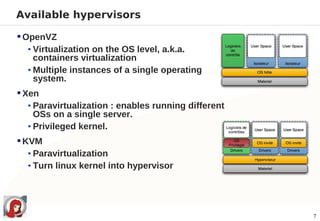
 OpenVZ
   • Virtualization on the OS level, a.k.a.
     containers virtualization
   • Multiple instances of a single operating
     system.
 Xen
   • Paravirtualization : enables running different
     OSs on a single server.
   • Privileged kernel.
 KVM
   • Paravirtualization
   • Turn linux kernel into hypervisor


                                                      7
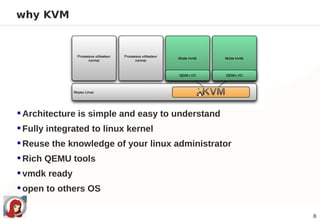
why KVM


 Architecture is simple and easy to understand
 Fully integrated to linux kernel
 Reuse the knowledge of your linux administrator
 Rich QEMU tools
 vmdk ready
 open to others OS

                                                    8
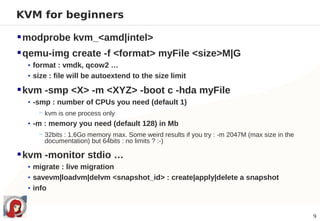
KVM for beginners

 modprobe kvm_<amd|intel>
 qemu-img create -f <format> myFile <size>M|G
  • format : vmdk, qcow2 …
  • size : file will be autoextend to the size limit

 kvm -smp <X> -m <XYZ> -boot c -hda myFile
  • -smp : number of CPUs you need (default 1)
     − kvm is one process only
  • -m : memory you need (default 128) in Mb
     − 32bits : 1.6Go memory max. Some weird results if you try : -m 2047M (max size in the
       documentation) but 64bits : no limits ? :-)

 kvm -monitor stdio …
  • migrate : live migration
  • savevm|loadvm|delvm <snapshot_id> : create|apply|delete a snapshot
  • info


                                                                                              9
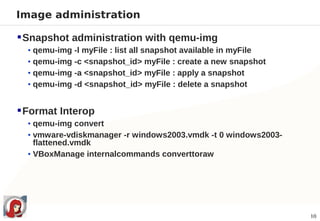
Image administration

 Snapshot administration with qemu-img
  • qemu-img -l myFile : list all snapshot available in myFile
  • qemu-img -c <snapshot_id> myFile : create a new snapshot
  • qemu-img -a <snapshot_id> myFile : apply a snapshot
  • qemu-img -d <snapshot_id> myFile : delete a snapshot


 Format Interop
  • qemu-img convert
  • vmware-vdiskmanager -r windows2003.vmdk -t 0 windows2003-
    flattened.vmdk
  • VBoxManage internalcommands converttoraw


                                                                 10
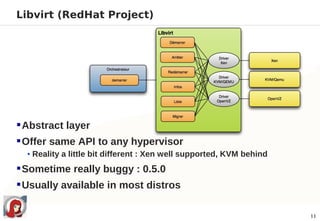
Libvirt (RedHat Project)


 Abstract layer
 Offer same API to any hypervisor
  • Reality a little bit different : Xen well supported, KVM behind

 Sometime really buggy : 0.5.0
 Usually available in most distros

                                                                      11
Libvirt for beginners

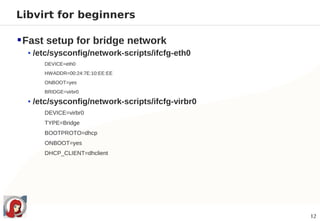
 Fast setup for bridge network
  • /etc/sysconfig/network-scripts/ifcfg-eth0
      DEVICE=eth0
      HWADDR=00:24:7E:10:EE:EE
      ONBOOT=yes
      BRIDGE=virbr0

  • /etc/sysconfig/network-scripts/ifcfg-virbr0
      DEVICE=virbr0
      TYPE=Bridge
      BOOTPROTO=dhcp
      ONBOOT=yes
      DHCP_CLIENT=dhclient


                                                  12
Libvirt for beginners

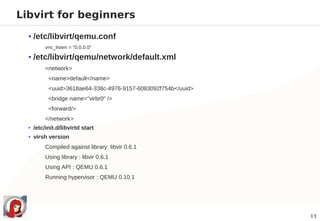
  • /etc/libvirt/qemu.conf
         vnc_listen = "0.0.0.0"

  • /etc/libvirt/qemu/network/default.xml
         <network>
          <name>default</name>
          <uuid>3618ae64-338c-4976-9157-6083092f754b</uuid>
          <bridge name="virbr0" />
          <forward/>
         </network>
  • /etc/init.d/libvirtd start
  • virsh version
         Compiled against library: libvir 0.6.1
         Using library : libvir 0.6.1
         Using API : QEMU 0.6.1
         Running hypervisor : QEMU 0.10.1


                                                              13
Libvirt XML format
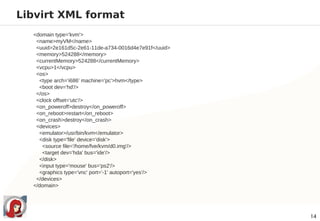
  <domain type='kvm'>
   <name>myVM</name>
   <uuid>2e161d5c-2e61-11de-a734-0016d4e7e91f</uuid>
   <memory>524288</memory>
   <currentMemory>524288</currentMemory>
   <vcpu>1</vcpu>
   <os>
    <type arch='i686' machine='pc'>hvm</type>
    <boot dev='hd'/>
   </os>
   <clock offset='utc'/>
   <on_poweroff>destroy</on_poweroff>
   <on_reboot>restart</on_reboot>
   <on_crash>destroy</on_crash>
   <devices>
    <emulator>/usr/bin/kvm</emulator>
    <disk type='file' device='disk'>
     <source file='/home/fve/kvm/d0.img'/>
     <target dev='hda' bus='ide'/>
    </disk>
    <input type='mouse' bus='ps2'/>
    <graphics type='vnc' port='-1' autoport='yes'/>
   </devices>
  </domain>


                                                       14
Libvirt command line : virsh

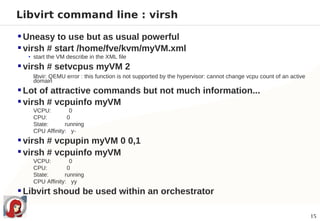
 Uneasy to use but as usual powerful
 virsh # start /home/fve/kvm/myVM.xml
  • start the VM describe in the XML file

 virsh # setvcpus myVM 2
   libvir: QEMU error : this function is not supported by the hypervisor: cannot change vcpu count of an active
   domain
 Lot of attractive commands but not much information...
 virsh # vcpuinfo myVM
   VCPU:         0
   CPU:         0
   State:      running
   CPU Affinity: y-
 virsh # vcpupin myVM 0 0,1
 virsh # vcpuinfo myVM
   VCPU:         0
   CPU:         0
   State:      running
   CPU Affinity: yy
 Libvirt shoud be used within an orchestrator

                                                                                                                  15
Orchestrators

 Desktop client :
  • Qemulator
     − Easy to use, nice to play with but not a datacenter tool
  • Virt-manager (RedHat Project)
     − Datacenter tool but need to be install on a dedicated machine.

 Browser App :
  • oVirt (RedHat projet)
     − Last version 0.96
     − Only KVM
  • Enomalism
     − Last version 2.2.3
     − Xen, KVM
     − Cloud ready


                                                                        16
Why Enomalism ?

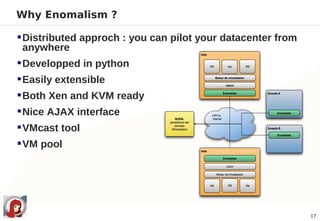
 Distributed approch : you can pilot your datacenter from
  anywhere
 Developped in python
 Easily extensible
 Both Xen and KVM ready
 Nice AJAX interface
 VMcast tool
 VM pool


                                                             17
Enomalism for beginners

 Installation : deb / RPM package available
  • Watch out the libvirt version !
     − Ok with 0.4.1 or the 0.5.1
     − Broken with 0.5.0
     − Not tested with higher version

 MySQL server must be up and ready
 Need some python packages
  • python-mysql, python-setuptools
  • Package will install complementary python eggs

 Create the database :
  • [Enomalism_dir]/script/initdb.sh
  • Adapt the config/$hostname.cfg file


                                                     18
Enomalism

 Great tool but


 No snapshoting command directly available
  • KVM package available but need to work with kvm userland =< 0.9.1
     − Use the /dev/pts listed by lsof
    − http://src.enomaly.com/browser/extension_modules/e2_kvmsnapshoting

 Network provisionning not ready
 AJAX not really portable
 Python 2.4 or 2.5 only
 MySQL SPOF
 PostgreSQL not supported

                                                                           19
Useful related admin tools

 CPU affinity : taskset
   [fve@localhost ~]$ taskset -p 8359
   pid 8359's current affinity mask: 3
   [fve@localhost ~]$ taskset -p 0x00000001 8359
   pid 8359's current affinity mask: 3
   pid 8359's new affinity mask: 1


  • Beware in case of live migration....


 I/O QoS : ionice
  • ionice -c <scheduling_class> -n <priority_class> -p <pid>


 I/O network
  • tc command


                                                                20
Useful related Virtualization tools

 Physical 2 virtual :
  • dd
  • Any ghost-like : clonezilla, g4u
  • virt-p2v (RedHat project)


 Configuration tools :
  • puppet
  • cobbler (Redhat project)


 Virtual 2 physical :
  • NO TOOLS AVAILABLE !!!


                                       21
A last word : OOM


 And what if there is no memory available ???
 oom_killer do his job ! VM die
   • /proc/<pid>/oom_adj (value range : -17 to 15)
     − if -17 then no oom_killer on this process
  • echo 2 > /proc/sys/vm/overcommit_memory
     − Process cannot get more memory than available (RAM + SWAP).
     − May be a VM managing problem


                                                                     22
Enomalism : some screenshots !!!


                NO SCREENSHOTS !


                 IT'S DEMO TIME !


                                    23
References

 Wikipedia
 http://www.linux-kvm.org & http://www.linux-kvm.com
 http://openvz.org
 http://libvirt.org
 http://www.enomaly.com
 RTFM


                                                        24
Any questions ?

Thank you for your attention
    & thank to Antoine

RMLL / LSM 2009

  • 1.
    Virtualization as Information System Consolidation Tool RMLL 2009 FDL, CC-by-sa 2009-07-07 Franck VILLAUME mailto:franck.villaume@capgemini.com xmpp:fvill@im.apinc.org
  • 2.
    Agenda  Common virtualization glitches  Steps before start  Available Hypervisors  Why KVM  Libvirt : abstraction layer  Orchestrators  Why Enomalism  Useful related admin tools  Useful related Virtualization tools  A last word about OOM  Demo 2
  • 3.
    Introduction  Use case of this presentation : • Multi-tier App (HTTPD, Tomcat, PostgreSQL) • Need a way to start easily a new instance of this App • Public Access to this app • Data life cycle very short • Virtualization seen as an opportunity to rethink the organisation (human include) • Prior experience with VMWare Esx 3
  • 4.
    Common glitches aboutvirtualization  Processor physical arch • Tools are mainly x86 • And need VT (means : bybye olddies)  Network capacity • Rethinking network architecture for virtualization • More throuput (VM migration may stop all other traffic) • Need a QoS or a dedicated physical network • IP map  Dealing the physical legacy • Obsolete machines • A lot of CPUs available but not much RAM • Obsolete systems (Windows NT) for action like Virtual2Physical • Hardware dependant systems (SSL, graphic cards, ...) 4
  • 5.
    Common glitches aboutvirtualization  Hot services configuration within VM • Add CPUs, RAM available on the host : add more RAM to the guest : GREAT NEWS ! • But JVM process still limited to Xmx, HTTPD max client always same value.  Product support and licence • Windows XP licence linked to the machine • Ask to your resellers  Hypervisor Interop • Live migration between Xen / KVM • VM Image format − .vmdk, .vdi, .qcow2 • OVF « Open Virtualization Format » ( IBM, HP, Dell, Microsoft & XenSource) : − DMTF has since released the OVF Specification V1.0.0 as a preliminary standard in September, 2008 5
  • 6.
    Steps before virtualizationstart  Legacy analysis • What are the real needs of each application as a whole ? − An application is not just a simple process on a box but it is a gathering of elements that offers a service to an enduser. − CPU, RAM, I/O (disk & network) pick and average • Tools : sar, iozone  Applications relationship Map • Put applications closed to their friends to avoid useless I/O network • Tools : YOU !!!  Physical Hardware Choice : • Blade might be good but.... beware I/O network − IBM Blade Center E : 14 blades but 12 physical network interfaces... 6
  • 7.
    Available hypervisors  OpenVZ • Virtualization on the OS level, a.k.a. containers virtualization • Multiple instances of a single operating system.  Xen • Paravirtualization : enables running different OSs on a single server. • Privileged kernel.  KVM • Paravirtualization • Turn linux kernel into hypervisor 7
  • 8.
    why KVM  Architectureis simple and easy to understand  Fully integrated to linux kernel  Reuse the knowledge of your linux administrator  Rich QEMU tools  vmdk ready  open to others OS 8
  • 9.
    KVM for beginners modprobe kvm_<amd|intel>  qemu-img create -f <format> myFile <size>M|G • format : vmdk, qcow2 … • size : file will be autoextend to the size limit  kvm -smp <X> -m <XYZ> -boot c -hda myFile • -smp : number of CPUs you need (default 1) − kvm is one process only • -m : memory you need (default 128) in Mb − 32bits : 1.6Go memory max. Some weird results if you try : -m 2047M (max size in the documentation) but 64bits : no limits ? :-)  kvm -monitor stdio … • migrate : live migration • savevm|loadvm|delvm <snapshot_id> : create|apply|delete a snapshot • info 9
  • 10.
    Image administration  Snapshotadministration with qemu-img • qemu-img -l myFile : list all snapshot available in myFile • qemu-img -c <snapshot_id> myFile : create a new snapshot • qemu-img -a <snapshot_id> myFile : apply a snapshot • qemu-img -d <snapshot_id> myFile : delete a snapshot  Format Interop • qemu-img convert • vmware-vdiskmanager -r windows2003.vmdk -t 0 windows2003- flattened.vmdk • VBoxManage internalcommands converttoraw 10
  • 11.
    Libvirt (RedHat Project) Abstract layer  Offer same API to any hypervisor • Reality a little bit different : Xen well supported, KVM behind  Sometime really buggy : 0.5.0  Usually available in most distros 11
  • 12.
    Libvirt for beginners Fast setup for bridge network • /etc/sysconfig/network-scripts/ifcfg-eth0 DEVICE=eth0 HWADDR=00:24:7E:10:EE:EE ONBOOT=yes BRIDGE=virbr0 • /etc/sysconfig/network-scripts/ifcfg-virbr0 DEVICE=virbr0 TYPE=Bridge BOOTPROTO=dhcp ONBOOT=yes DHCP_CLIENT=dhclient 12
  • 13.
    Libvirt for beginners • /etc/libvirt/qemu.conf vnc_listen = "0.0.0.0" • /etc/libvirt/qemu/network/default.xml <network> <name>default</name> <uuid>3618ae64-338c-4976-9157-6083092f754b</uuid> <bridge name="virbr0" /> <forward/> </network> • /etc/init.d/libvirtd start • virsh version Compiled against library: libvir 0.6.1 Using library : libvir 0.6.1 Using API : QEMU 0.6.1 Running hypervisor : QEMU 0.10.1 13
  • 14.
    Libvirt XML format <domain type='kvm'> <name>myVM</name> <uuid>2e161d5c-2e61-11de-a734-0016d4e7e91f</uuid> <memory>524288</memory> <currentMemory>524288</currentMemory> <vcpu>1</vcpu> <os> <type arch='i686' machine='pc'>hvm</type> <boot dev='hd'/> </os> <clock offset='utc'/> <on_poweroff>destroy</on_poweroff> <on_reboot>restart</on_reboot> <on_crash>destroy</on_crash> <devices> <emulator>/usr/bin/kvm</emulator> <disk type='file' device='disk'> <source file='/home/fve/kvm/d0.img'/> <target dev='hda' bus='ide'/> </disk> <input type='mouse' bus='ps2'/> <graphics type='vnc' port='-1' autoport='yes'/> </devices> </domain> 14
  • 15.
    Libvirt command line: virsh  Uneasy to use but as usual powerful  virsh # start /home/fve/kvm/myVM.xml • start the VM describe in the XML file  virsh # setvcpus myVM 2 libvir: QEMU error : this function is not supported by the hypervisor: cannot change vcpu count of an active domain  Lot of attractive commands but not much information...  virsh # vcpuinfo myVM VCPU: 0 CPU: 0 State: running CPU Affinity: y-  virsh # vcpupin myVM 0 0,1  virsh # vcpuinfo myVM VCPU: 0 CPU: 0 State: running CPU Affinity: yy  Libvirt shoud be used within an orchestrator 15
  • 16.
    Orchestrators  Desktop client: • Qemulator − Easy to use, nice to play with but not a datacenter tool • Virt-manager (RedHat Project) − Datacenter tool but need to be install on a dedicated machine.  Browser App : • oVirt (RedHat projet) − Last version 0.96 − Only KVM • Enomalism − Last version 2.2.3 − Xen, KVM − Cloud ready 16
  • 17.
    Why Enomalism ? Distributed approch : you can pilot your datacenter from anywhere  Developped in python  Easily extensible  Both Xen and KVM ready  Nice AJAX interface  VMcast tool  VM pool 17
  • 18.
    Enomalism for beginners Installation : deb / RPM package available • Watch out the libvirt version ! − Ok with 0.4.1 or the 0.5.1 − Broken with 0.5.0 − Not tested with higher version  MySQL server must be up and ready  Need some python packages • python-mysql, python-setuptools • Package will install complementary python eggs  Create the database : • [Enomalism_dir]/script/initdb.sh • Adapt the config/$hostname.cfg file 18
  • 19.
    Enomalism Great toolbut  No snapshoting command directly available • KVM package available but need to work with kvm userland =< 0.9.1 − Use the /dev/pts listed by lsof − http://src.enomaly.com/browser/extension_modules/e2_kvmsnapshoting  Network provisionning not ready  AJAX not really portable  Python 2.4 or 2.5 only  MySQL SPOF  PostgreSQL not supported 19
  • 20.
    Useful related admintools  CPU affinity : taskset [fve@localhost ~]$ taskset -p 8359 pid 8359's current affinity mask: 3 [fve@localhost ~]$ taskset -p 0x00000001 8359 pid 8359's current affinity mask: 3 pid 8359's new affinity mask: 1 • Beware in case of live migration....  I/O QoS : ionice • ionice -c <scheduling_class> -n <priority_class> -p <pid>  I/O network • tc command 20
  • 21.
    Useful related Virtualizationtools  Physical 2 virtual : • dd • Any ghost-like : clonezilla, g4u • virt-p2v (RedHat project)  Configuration tools : • puppet • cobbler (Redhat project)  Virtual 2 physical : • NO TOOLS AVAILABLE !!! 21
  • 22.
    A last word: OOM  And what if there is no memory available ???  oom_killer do his job ! VM die • /proc/<pid>/oom_adj (value range : -17 to 15) − if -17 then no oom_killer on this process • echo 2 > /proc/sys/vm/overcommit_memory − Process cannot get more memory than available (RAM + SWAP). − May be a VM managing problem 22
  • 23.
    Enomalism : somescreenshots !!! NO SCREENSHOTS ! IT'S DEMO TIME ! 23
  • 24.
    References  Wikipedia  http://www.linux-kvm.org& http://www.linux-kvm.com  http://openvz.org  http://libvirt.org  http://www.enomaly.com  RTFM 24
  • 25.
    Any questions ? Thankyou for your attention & thank to Antoine