

Drive
into
By
Udayendu Kar
Technical Architect
Avaya India Pvt Ltd
Agenda:
 Virtualization with KVM & oVirt
 KVM vs Xen architecture
 Combination of Qemu & KVM
 Libvirt architecture
 KVM userspace tools
 virt-manager
 oVirt
 Questions ?
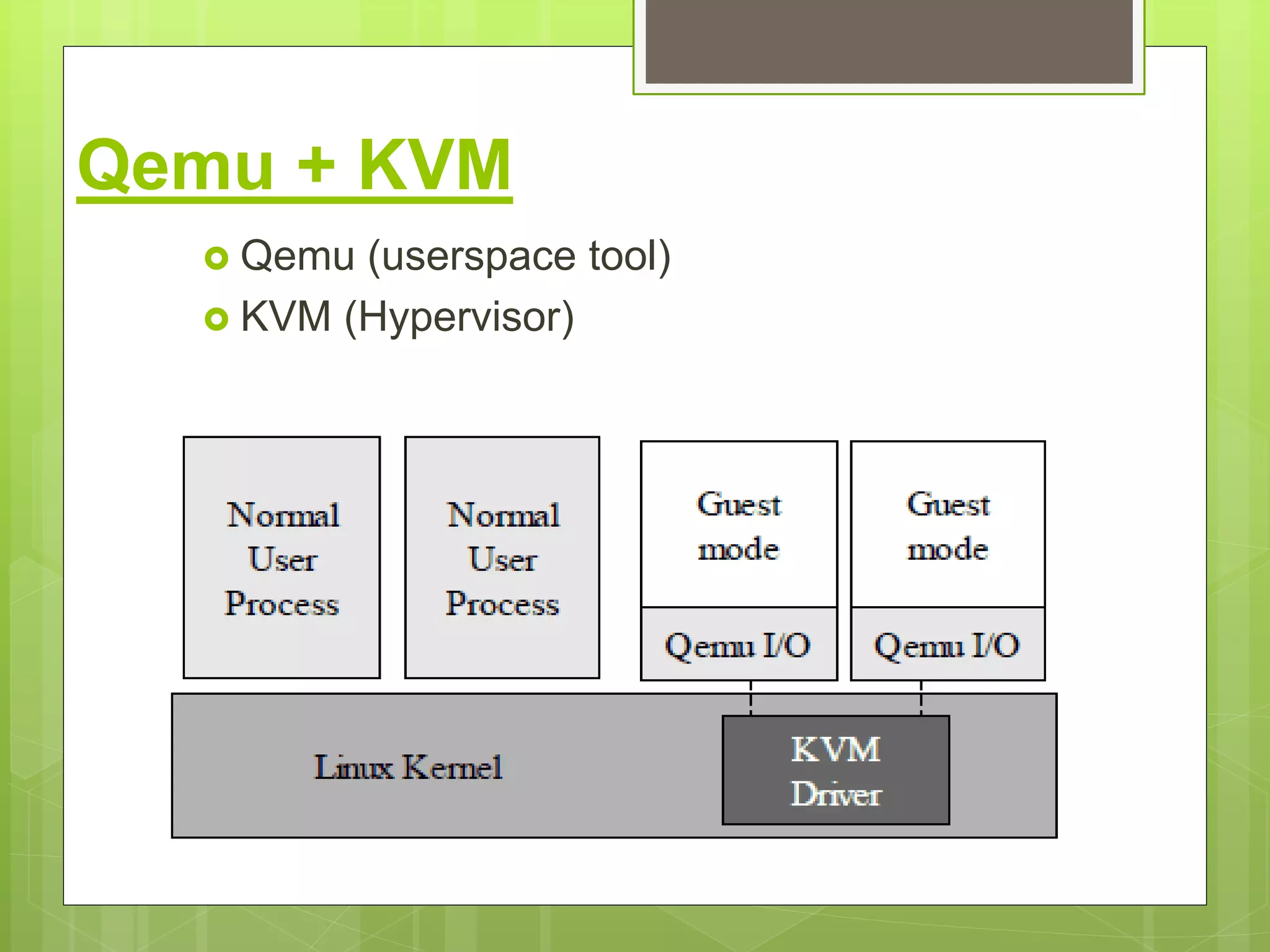
Qemu + KVM
 Qemu (userspace tool)
 KVM (Hypervisor)
Libvirt as an interface between user space and kernel space. The
below image indicates all the supported tools in user and kernel
spaces.
Refer: http://wiki.libvirt.org/page/Main_Page
CentOS 6 64-Bit EPEL repo:
# wget http://download.fedoraproject.org/pub/epel/6/x86_64/epel-release-6-8.noarch.rpm
# rpm -ivh epel-release-6-8.noarch.rpm
Check Hardware Virtualization Supoort:
KVM requires hardware virtualization support such as Intel VT or AMD's AMD-V, which are instruction set
extensions for hardware-assisted virtualization. Check if hardware virtualization support is available on
CentOS host machine:
$ egrep -i 'vmx|svm' --color=always /proc/cpuinfo
If CPU flags contain "vmx" or "svm", it means hardware virtualization support is available.
Install KVM, QEMU and user-space tools:
a) Install KVM, virt-manager and virtinst (a tool to create VMs) as follows:
# yum install kvm libvirt python-virtinst qemu-kvm virt-manager qemu-system-x86
openssh-askpass libcanberra-devel virt-install virsh
b) Start libvirtd daemon, and set it to auto-start:
# service libvirtd start
# chkconfig libvirtd on
Then use virt-manager tool to start the virtual machine creation.
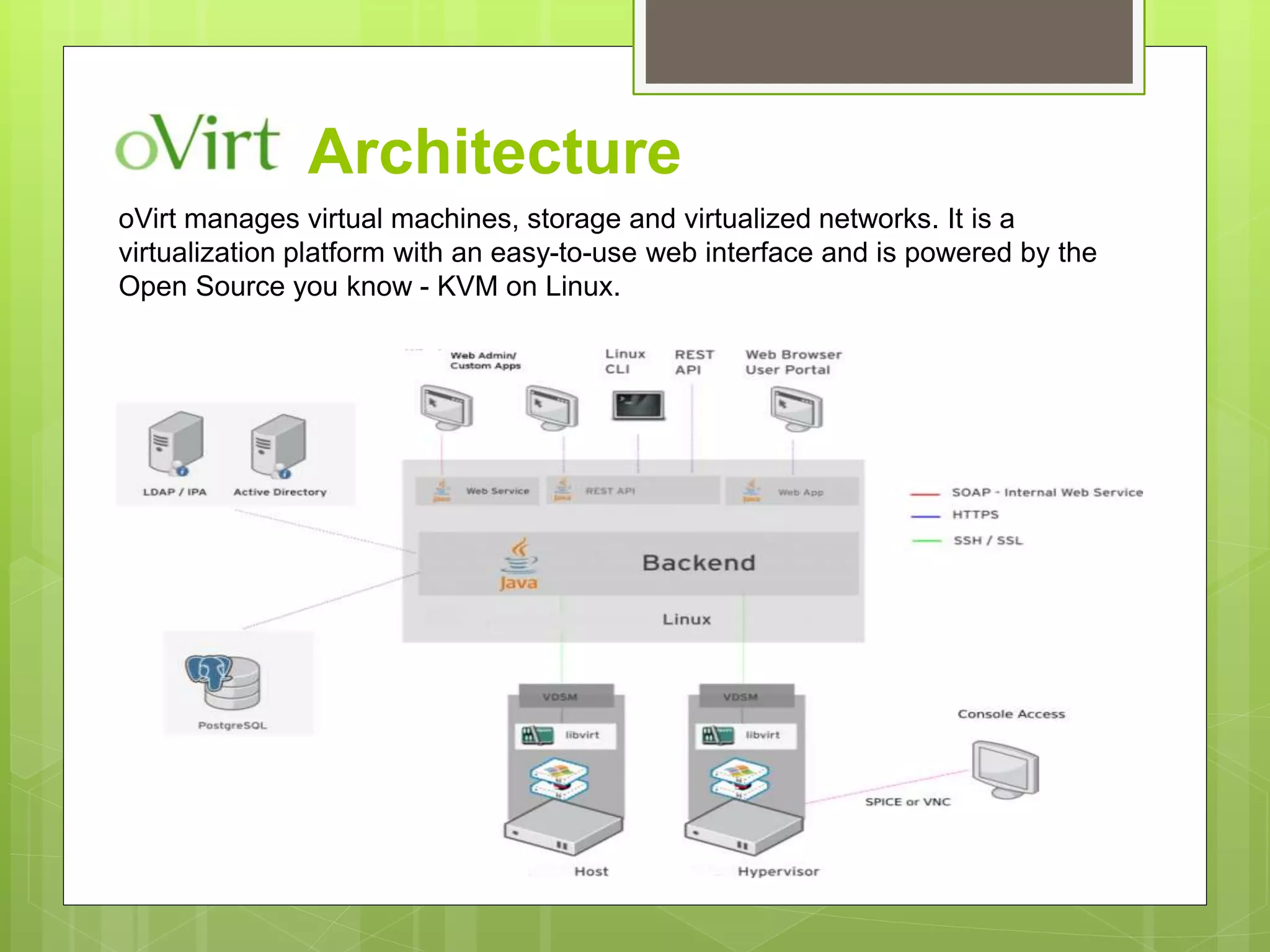
Architecture
oVirt manages virtual machines, storage and virtualized networks. It is a
virtualization platform with an easy-to-use web interface and is powered by the
Open Source you know - KVM on Linux.
Reference Documentation Links:
 http://www.linux-kvm.org/page/Main_Page
 https://virt-manager.org/
 http://www.ovirt.org/
Questions ??

Drive into kvm

  • 1.
  • 2.
    Agenda:  Virtualization withKVM & oVirt  KVM vs Xen architecture  Combination of Qemu & KVM  Libvirt architecture  KVM userspace tools  virt-manager  oVirt  Questions ?
  • 7.
    Qemu + KVM Qemu (userspace tool)  KVM (Hypervisor)
  • 8.
    Libvirt as aninterface between user space and kernel space. The below image indicates all the supported tools in user and kernel spaces. Refer: http://wiki.libvirt.org/page/Main_Page
  • 10.
    CentOS 6 64-BitEPEL repo: # wget http://download.fedoraproject.org/pub/epel/6/x86_64/epel-release-6-8.noarch.rpm # rpm -ivh epel-release-6-8.noarch.rpm Check Hardware Virtualization Supoort: KVM requires hardware virtualization support such as Intel VT or AMD's AMD-V, which are instruction set extensions for hardware-assisted virtualization. Check if hardware virtualization support is available on CentOS host machine: $ egrep -i 'vmx|svm' --color=always /proc/cpuinfo If CPU flags contain "vmx" or "svm", it means hardware virtualization support is available. Install KVM, QEMU and user-space tools: a) Install KVM, virt-manager and virtinst (a tool to create VMs) as follows: # yum install kvm libvirt python-virtinst qemu-kvm virt-manager qemu-system-x86 openssh-askpass libcanberra-devel virt-install virsh b) Start libvirtd daemon, and set it to auto-start: # service libvirtd start # chkconfig libvirtd on Then use virt-manager tool to start the virtual machine creation.
  • 11.
    Architecture oVirt manages virtualmachines, storage and virtualized networks. It is a virtualization platform with an easy-to-use web interface and is powered by the Open Source you know - KVM on Linux.
  • 12.
    Reference Documentation Links: http://www.linux-kvm.org/page/Main_Page  https://virt-manager.org/  http://www.ovirt.org/
  • 13.