APACHE - KUDU
WELCOME TO DEMO SESSION TO WORK WITH APACHE - KUDU
Part of defining NDX Strategic Architecture
Version: 0.2. – Status: draft, Date: 9/28/2016
Author: Ravi Kumar Itha & ZTV Team, Reviewers: Manjunatha Prabhu, Felix Shulman, Garry Steedman, Mara Preotescu
Participating teams: Nielsen, Kogentix, and Cloudera
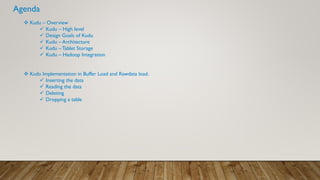
Agenda
 Kudu – Overview
 Kudu – High level
 Design Goals of Kudu
 Kudu – Architecture
 Kudu –Tablet Storage
 Kudu – Hadoop Integration
 Kudu Implementation in Buffer Load and Rawdata load.
 Inserting the data
 Reading the data
 Deleting
 Dropping a table
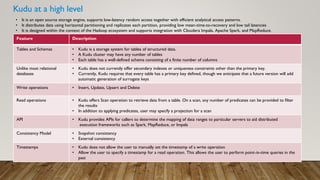
Kudu at a high level
• It is an open source storage engine, supports low-latency random access together with efficient analytical access patterns.
• It distributes data using horizontal partitioning and replicates each partition, providing low mean-time-to-recovery and low tail latencies
• It is designed within the context of the Hadoop ecosystem and supports integration with Cloudera Impala, Apache Spark, and MapReduce.
Feature Description
Tables and Schemas • Kudu is a storage system for tables of structured data.
• A Kudu cluster may have any number of tables
• Each table has a well-defined schema consisting of a finite number of columns
Unlike most relational
databases
• Kudu does not currently offer secondary indexes or uniqueness constraints other than the primary key.
• Currently, Kudu requires that every table has a primary key defined, though we anticipate that a future version will add
automatic generation of surrogate keys
Write operations • Insert, Update, Upsert and Delete
Read operations • Kudu offers Scan operation to retrieve data from a table. On a scan, any number of predicates can be provided to filter
the results
• In addition to applying predicates, user may specify a projection for a scan
API • Kudu provides APIs for callers to determine the mapping of data ranges to particular servers to aid distributed
execution frameworks such as Spark, MapReduce, or Impala
Consistency Model • Snapshot consistency
• External consistency
Timestamps • Kudu does not allow the user to manually set the timestamp of a write operation
• Allow the user to specify a timestamp for a read operation. This allows the user to perform point-in-time queries in the
past
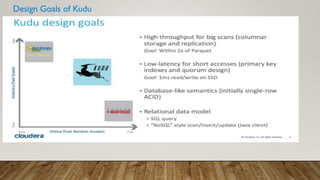
Design Goals of Kudu
 Strong performance for both scan and random access to help customers simplify complex hybrid architectures
 High CPU efficiency in order to maximize the return on investment that our customers are making in modern processors
 High IO efficiency in order to leverage modern persistent storage
 The ability to update data in place, to avoid extraneous processing and data movement
 The ability to support active-active replicated clusters that span multiple data centers in geographically distant locations
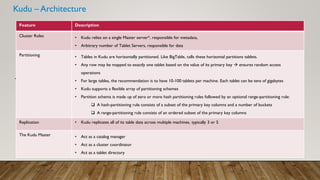
Kudu – Architecture
• Reference Material:
Feature Description
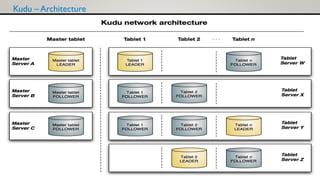
Cluster Roles • Kudu relies on a single Master server*, responsible for metadata,
• Arbitrary number of Tablet Servers, responsible for data
Partitioning • Tables in Kudu are horizontally partitioned. Like BigTable, calls these horizontal partitions tablets.
• Any row may be mapped to exactly one tablet based on the value of its primary key  ensures random access
operations
• For large tables, the recommendation is to have 10-100 tablets per machine. Each tablet can be tens of gigabytes
• Kudu supports a flexible array of partitioning schemes
• Partition schema is made up of zero or more hash partitioning rules followed by an optional range-partitioning rule:
 A hash-partitioning rule consists of a subset of the primary key columns and a number of buckets
 A range-partitioning rule consists of an ordered subset of the primary key columns
Replication • Kudu replicates all of its table data across multiple machines, typically 3 or 5
The Kudu Master • Act as a catalog manager
• Act as a cluster coordinator
• Act as a tablet directory
Kudu – Architecture
Kudu –Tablet Storage
Feature Description
Objectives behind the
design
• Fast columnar scans
• Low-latency random updates
• Consistency of performance
RowSets • Tablets in Kudu are themselves subdivided into smaller units called RowSets
• Two types of RowSets: MemRowSets, DiskRowSets
• MemRowSets – RowSets exist in memory are called
• DiskRowSets – RowSets exist in a combination of disk and memory
Other features that make
Kudu perform better in
data read / write and data
management
Kudu has implemented the below processes efficiently by following some best techniques such as Immutable B-tree indexes,
LRU (Least Recently Used ) page caches, Bloom filters, MVCC (Multi-version concurrency control), encoding techniques.
• INSERT path
• Read path
• Lazy Materialization
• Delta Compaction
• RowSet Compaction
• Scheduling maintenance
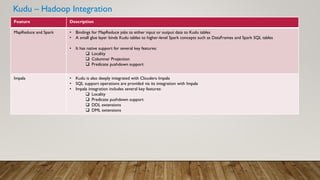
Kudu – Hadoop Integration
Feature Description
MapReduce and Spark • Bindings for MapReduce jobs to either input or output data to Kudu tables
• A small glue layer binds Kudu tables to higher-level Spark concepts such as DataFrames and Spark SQL tables
• It has native support for several key features:
 Locality
 Columnar Projection
 Predicate pushdown support
Impala • Kudu is also deeply integrated with Cloudera Impala
• SQL support operations are provided via its integration with Impala
• Impala integration includes several key features:
 Locality
 Predicate pushdown support
 DDL extensions
 DML extensions
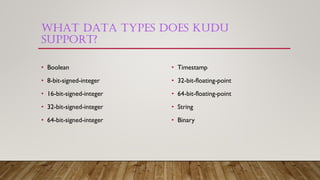
WHAT DATA TYPES DOES KUDU
SUPPORT?
• Boolean
• 8-bit-signed-integer
• 16-bit-signed-integer
• 32-bit-signed-integer
• 64-bit-signed-integer
• Timestamp
• 32-bit-floating-point
• 64-bit-floating-point
• String
• Binary
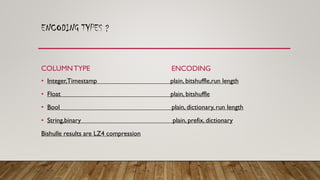
ENCODING TYPES ?
COLUMNTYPE
• Integer,Timestamp plain, bitshuffle,run length
• Float plain, bitshuffle
• Bool plain, dictionary, run length
• String,binary plain, prefix, dictionary
Bishulle results are LZ4 compression
ENCODING
HOWTO CREATE A TABLE IN KUDU ?
• You can user Impala
• You can use scala.
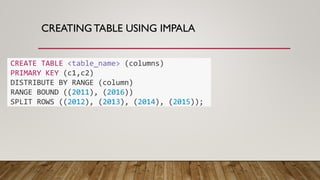
CREATINGTABLE USING IMPALA
CREATE TABLE <table_name> (columns)
PRIMARY KEY (c1,c2)
DISTRIBUTE BY RANGE (column)
RANGE BOUND ((2011), (2016))
SPLIT ROWS ((2012), (2013), (2014), (2015));
CREATINGTABLE USING SCALA
• Create kuducontext
• val columnList = new ArrayList[ColumnSchema]()
columnList.add(new ColumnSchemaBuilder("nc_periodid",Type.INT32).key(true).build())
columnList.add(new ColumnSchemaBuilder("ac_nshopid",Type.STRING).key(true).build())
columnList.add(new ColumnSchemaBuilder("ac_lbatchtype",Type.STRING).key(false).build())
val schema = new Schema(columnList)
val cto = new CreateTableOptions()
distrubutionList.add("nc_periodid")
cto.addHashPartitions(distrubutionList, numberOfBuckets)
kuduClient.createTable(tableName, schema, cto).setRepilica(3)
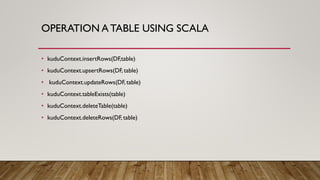
OPERATION ATABLE USING SCALA
• kuduContext.insertRows(DF,table)
• kuduContext.upsertRows(DF, table)
• kuduContext.updateRows(DF,table)
• kuduContext.tableExists(table)
• kuduContext.deleteTable(table)
• kuduContext.deleteRows(DF, table)
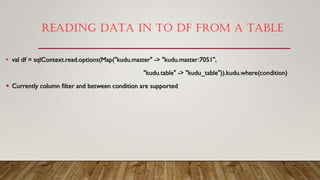
READING DATA IN TO DF FROM A TABLE
• val df = sqlContext.read.options(Map("kudu.master" -> "kudu.master:7051",
"kudu.table" -> "kudu_table")).kudu.where(condition)
 Currently column filter and between condition are supported
Kudu demo
Kudu demo

Kudu demo

  • 1.
    APACHE - KUDU WELCOMETO DEMO SESSION TO WORK WITH APACHE - KUDU Part of defining NDX Strategic Architecture Version: 0.2. – Status: draft, Date: 9/28/2016 Author: Ravi Kumar Itha & ZTV Team, Reviewers: Manjunatha Prabhu, Felix Shulman, Garry Steedman, Mara Preotescu Participating teams: Nielsen, Kogentix, and Cloudera
  • 2.
    Agenda  Kudu –Overview  Kudu – High level  Design Goals of Kudu  Kudu – Architecture  Kudu –Tablet Storage  Kudu – Hadoop Integration  Kudu Implementation in Buffer Load and Rawdata load.  Inserting the data  Reading the data  Deleting  Dropping a table
  • 3.
    Kudu at ahigh level • It is an open source storage engine, supports low-latency random access together with efficient analytical access patterns. • It distributes data using horizontal partitioning and replicates each partition, providing low mean-time-to-recovery and low tail latencies • It is designed within the context of the Hadoop ecosystem and supports integration with Cloudera Impala, Apache Spark, and MapReduce. Feature Description Tables and Schemas • Kudu is a storage system for tables of structured data. • A Kudu cluster may have any number of tables • Each table has a well-defined schema consisting of a finite number of columns Unlike most relational databases • Kudu does not currently offer secondary indexes or uniqueness constraints other than the primary key. • Currently, Kudu requires that every table has a primary key defined, though we anticipate that a future version will add automatic generation of surrogate keys Write operations • Insert, Update, Upsert and Delete Read operations • Kudu offers Scan operation to retrieve data from a table. On a scan, any number of predicates can be provided to filter the results • In addition to applying predicates, user may specify a projection for a scan API • Kudu provides APIs for callers to determine the mapping of data ranges to particular servers to aid distributed execution frameworks such as Spark, MapReduce, or Impala Consistency Model • Snapshot consistency • External consistency Timestamps • Kudu does not allow the user to manually set the timestamp of a write operation • Allow the user to specify a timestamp for a read operation. This allows the user to perform point-in-time queries in the past
  • 4.
    Design Goals ofKudu  Strong performance for both scan and random access to help customers simplify complex hybrid architectures  High CPU efficiency in order to maximize the return on investment that our customers are making in modern processors  High IO efficiency in order to leverage modern persistent storage  The ability to update data in place, to avoid extraneous processing and data movement  The ability to support active-active replicated clusters that span multiple data centers in geographically distant locations
  • 5.
    Kudu – Architecture •Reference Material: Feature Description Cluster Roles • Kudu relies on a single Master server*, responsible for metadata, • Arbitrary number of Tablet Servers, responsible for data Partitioning • Tables in Kudu are horizontally partitioned. Like BigTable, calls these horizontal partitions tablets. • Any row may be mapped to exactly one tablet based on the value of its primary key  ensures random access operations • For large tables, the recommendation is to have 10-100 tablets per machine. Each tablet can be tens of gigabytes • Kudu supports a flexible array of partitioning schemes • Partition schema is made up of zero or more hash partitioning rules followed by an optional range-partitioning rule:  A hash-partitioning rule consists of a subset of the primary key columns and a number of buckets  A range-partitioning rule consists of an ordered subset of the primary key columns Replication • Kudu replicates all of its table data across multiple machines, typically 3 or 5 The Kudu Master • Act as a catalog manager • Act as a cluster coordinator • Act as a tablet directory
  • 6.
  • 7.
    Kudu –Tablet Storage FeatureDescription Objectives behind the design • Fast columnar scans • Low-latency random updates • Consistency of performance RowSets • Tablets in Kudu are themselves subdivided into smaller units called RowSets • Two types of RowSets: MemRowSets, DiskRowSets • MemRowSets – RowSets exist in memory are called • DiskRowSets – RowSets exist in a combination of disk and memory Other features that make Kudu perform better in data read / write and data management Kudu has implemented the below processes efficiently by following some best techniques such as Immutable B-tree indexes, LRU (Least Recently Used ) page caches, Bloom filters, MVCC (Multi-version concurrency control), encoding techniques. • INSERT path • Read path • Lazy Materialization • Delta Compaction • RowSet Compaction • Scheduling maintenance
  • 8.
    Kudu – HadoopIntegration Feature Description MapReduce and Spark • Bindings for MapReduce jobs to either input or output data to Kudu tables • A small glue layer binds Kudu tables to higher-level Spark concepts such as DataFrames and Spark SQL tables • It has native support for several key features:  Locality  Columnar Projection  Predicate pushdown support Impala • Kudu is also deeply integrated with Cloudera Impala • SQL support operations are provided via its integration with Impala • Impala integration includes several key features:  Locality  Predicate pushdown support  DDL extensions  DML extensions
  • 9.
    WHAT DATA TYPESDOES KUDU SUPPORT? • Boolean • 8-bit-signed-integer • 16-bit-signed-integer • 32-bit-signed-integer • 64-bit-signed-integer • Timestamp • 32-bit-floating-point • 64-bit-floating-point • String • Binary
  • 10.
    ENCODING TYPES ? COLUMNTYPE •Integer,Timestamp plain, bitshuffle,run length • Float plain, bitshuffle • Bool plain, dictionary, run length • String,binary plain, prefix, dictionary Bishulle results are LZ4 compression ENCODING
  • 11.
    HOWTO CREATE ATABLE IN KUDU ? • You can user Impala • You can use scala.
  • 12.
    CREATINGTABLE USING IMPALA CREATETABLE <table_name> (columns) PRIMARY KEY (c1,c2) DISTRIBUTE BY RANGE (column) RANGE BOUND ((2011), (2016)) SPLIT ROWS ((2012), (2013), (2014), (2015));
  • 13.
    CREATINGTABLE USING SCALA •Create kuducontext • val columnList = new ArrayList[ColumnSchema]() columnList.add(new ColumnSchemaBuilder("nc_periodid",Type.INT32).key(true).build()) columnList.add(new ColumnSchemaBuilder("ac_nshopid",Type.STRING).key(true).build()) columnList.add(new ColumnSchemaBuilder("ac_lbatchtype",Type.STRING).key(false).build()) val schema = new Schema(columnList) val cto = new CreateTableOptions() distrubutionList.add("nc_periodid") cto.addHashPartitions(distrubutionList, numberOfBuckets) kuduClient.createTable(tableName, schema, cto).setRepilica(3)
  • 14.
    OPERATION ATABLE USINGSCALA • kuduContext.insertRows(DF,table) • kuduContext.upsertRows(DF, table) • kuduContext.updateRows(DF,table) • kuduContext.tableExists(table) • kuduContext.deleteTable(table) • kuduContext.deleteRows(DF, table)
  • 15.
    READING DATA INTO DF FROM A TABLE • val df = sqlContext.read.options(Map("kudu.master" -> "kudu.master:7051", "kudu.table" -> "kudu_table")).kudu.where(condition)  Currently column filter and between condition are supported