Kubernetes HA
Montreal Kubernetes Meetup
October 12
Hello, my name is Alexandre
@alex_gervais
alexgervais
AppDirect background
- Chef provisioning
- Centos 7
- Multiple deployments
- AWS
- On-premise
- Automation, automation, automation!
- Packer
- Terraform
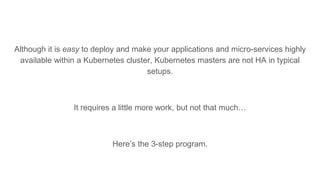
Although it is easy to deploy and make your applications and micro-services highly
available within a Kubernetes cluster, Kubernetes masters are not HA in typical
setups.
It requires a little more work, but not that much…
Here’s the 3-step program.
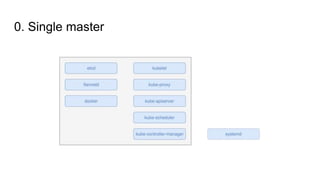
0. Single master
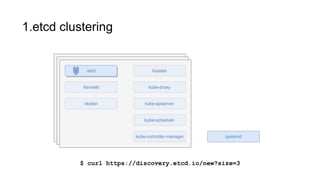
1.etcd clustering
$ curl https://discovery.etcd.io/new?size=3
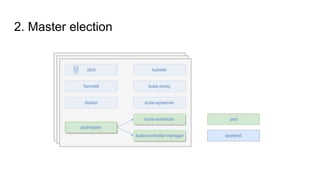
2. Master election
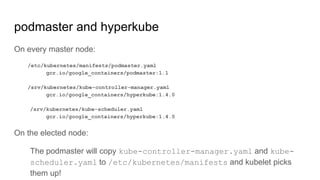
podmaster and hyperkube
On every master node:
/etc/kubernetes/manifests/podmaster.yaml
gcr.io/google_containers/podmaster:1.1
/srv/kubernetes/kube-controller-manager.yaml
gcr.io/google_containers/hyperkube:1.4.0
/srv/kubernetes/kube-scheduler.yaml
gcr.io/google_containers/hyperkube:1.4.0
On the elected node:
The podmaster will copy kube-controller-manager.yaml and kube-
scheduler.yaml to /etc/kubernetes/manifests and kubelet picks
them up!
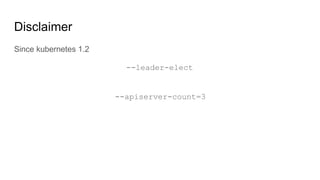
Disclaimer
Since kubernetes 1.2
--leader-elect
--apiserver-count=3
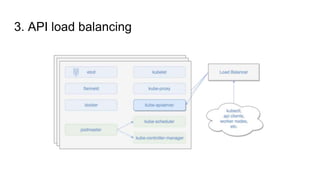
3. API load balancing
🎉
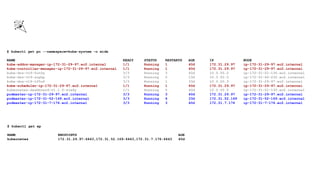
$ kubectl get po --namespace=kube-system -o wide
NAME READY STATUS RESTARTS AGE IP NODE
kube-addon-manager-ip-172-31-29-97.ec2.internal 1/1 Running 1 40d 172.31.29.97 ip-172-31-29-97.ec2.internal
kube-controller-manager-ip-172-31-29-97.ec2.internal 1/1 Running 1 40d 172.31.29.97 ip-172-31-29-97.ec2.internal
kube-dns-v19-5ut0y 3/3 Running 3 40d 10.0.55.2 ip-172-31-51-130.ec2.internal
kube-dns-v19-srphp 3/3 Running 0 13d 10.0.50.5 ip-172-31-46-232.ec2.internal
kube-dns-v19-tf5u6 3/3 Running 1 33d 10.0.20.3 ip-172-31-29-97.ec2.internal
kube-scheduler-ip-172-31-29-97.ec2.internal 1/1 Running 1 40d 172.31.29.97 ip-172-31-29-97.ec2.internal
kubernetes-dashboard-v1.1.0-zta4y 1/1 Running 0 40d 10.0.55.5 ip-172-31-51-130.ec2.internal
podmaster-ip-172-31-29-97.ec2.internal 3/3 Running 3 40d 172.31.29.97 ip-172-31-29-97.ec2.internal
podmaster-ip-172-31-52-169.ec2.internal 3/3 Running 6 33d 172.31.52.169 ip-172-31-52-169.ec2.internal
podmaster-ip-172-31-7-176.ec2.internal 3/3 Running 3 40d 172.31.7.176 ip-172-31-7-176.ec2.internal
$ kubectl get ep
NAME ENDPOINTS AGE
kubernetes 172.31.29.97:6443,172.31.52.169:6443,172.31.7.176:6443 40d
Cluster-wide upgrades
- Chef(ing)
- Rolling upgrades of existing nodes
- Terraform(ing)
- Replace nodes, one-by-one
- Datadog monitoring
References
- etcd clustering
https://coreos.com/etcd/docs/latest/clustering.html
- hyperkube
https://github.com/kubernetes/kubernetes/tree/master/cluster/images/hyperkube
- Master node deployments
https://coreos.com/kubernetes/docs/latest/deploy-master.html
- Kubernetes HA recipe
http://kubernetes.io/docs/admin/high-availability/
AppDirect Shameless Plug

Kubernetes HA @ AppDirect - Montreal Kubernetes Meetup

  • 1.
  • 2.
    Hello, my nameis Alexandre @alex_gervais alexgervais
  • 3.
    AppDirect background - Chefprovisioning - Centos 7 - Multiple deployments - AWS - On-premise - Automation, automation, automation! - Packer - Terraform
  • 4.
    Although it iseasy to deploy and make your applications and micro-services highly available within a Kubernetes cluster, Kubernetes masters are not HA in typical setups. It requires a little more work, but not that much… Here’s the 3-step program.
  • 5.
  • 6.
    1.etcd clustering $ curlhttps://discovery.etcd.io/new?size=3
  • 7.
  • 8.
    podmaster and hyperkube Onevery master node: /etc/kubernetes/manifests/podmaster.yaml gcr.io/google_containers/podmaster:1.1 /srv/kubernetes/kube-controller-manager.yaml gcr.io/google_containers/hyperkube:1.4.0 /srv/kubernetes/kube-scheduler.yaml gcr.io/google_containers/hyperkube:1.4.0 On the elected node: The podmaster will copy kube-controller-manager.yaml and kube- scheduler.yaml to /etc/kubernetes/manifests and kubelet picks them up!
  • 9.
  • 10.
    3. API loadbalancing
  • 11.
    🎉 $ kubectl getpo --namespace=kube-system -o wide NAME READY STATUS RESTARTS AGE IP NODE kube-addon-manager-ip-172-31-29-97.ec2.internal 1/1 Running 1 40d 172.31.29.97 ip-172-31-29-97.ec2.internal kube-controller-manager-ip-172-31-29-97.ec2.internal 1/1 Running 1 40d 172.31.29.97 ip-172-31-29-97.ec2.internal kube-dns-v19-5ut0y 3/3 Running 3 40d 10.0.55.2 ip-172-31-51-130.ec2.internal kube-dns-v19-srphp 3/3 Running 0 13d 10.0.50.5 ip-172-31-46-232.ec2.internal kube-dns-v19-tf5u6 3/3 Running 1 33d 10.0.20.3 ip-172-31-29-97.ec2.internal kube-scheduler-ip-172-31-29-97.ec2.internal 1/1 Running 1 40d 172.31.29.97 ip-172-31-29-97.ec2.internal kubernetes-dashboard-v1.1.0-zta4y 1/1 Running 0 40d 10.0.55.5 ip-172-31-51-130.ec2.internal podmaster-ip-172-31-29-97.ec2.internal 3/3 Running 3 40d 172.31.29.97 ip-172-31-29-97.ec2.internal podmaster-ip-172-31-52-169.ec2.internal 3/3 Running 6 33d 172.31.52.169 ip-172-31-52-169.ec2.internal podmaster-ip-172-31-7-176.ec2.internal 3/3 Running 3 40d 172.31.7.176 ip-172-31-7-176.ec2.internal $ kubectl get ep NAME ENDPOINTS AGE kubernetes 172.31.29.97:6443,172.31.52.169:6443,172.31.7.176:6443 40d
  • 12.
    Cluster-wide upgrades - Chef(ing) -Rolling upgrades of existing nodes - Terraform(ing) - Replace nodes, one-by-one - Datadog monitoring
  • 13.
    References - etcd clustering https://coreos.com/etcd/docs/latest/clustering.html -hyperkube https://github.com/kubernetes/kubernetes/tree/master/cluster/images/hyperkube - Master node deployments https://coreos.com/kubernetes/docs/latest/deploy-master.html - Kubernetes HA recipe http://kubernetes.io/docs/admin/high-availability/
  • 14.

Editor's Notes

  • #2 Welcome to this talk on setuping an Highly Available kubernetes cluster This is not a beginners talk, so I assume you know what Kubernetes can do for you and hopefully you already scheduled some pods in your own cluster or minikube
  • #3 Backend software engineer, turned fullstack software dev, turned devops. Unicorn tech startup based in SF AppDirect’s mission has always been to help people find, buy and use the software. Whitelabel marketplace -- think appstore or shopify for cloud. As developers, we started our container infrastructure a while ago, and it lead us to Kubernetes.
  • #4 The existing Ops team of sysadmins had constraints... On-prem: softlayer, openstack, bare-metal Launching a new cluster takes roughly 10 minutes Still call our worker nodes “minions”
  • #5 Even if the master would die, your application/service would survive… the running containers on minions won’t disappear! It just makes it less reliable to update your deployment, scale or orchestrate in case of cluster-wide failures.
  • #6 3 dependant services 5 kubernetes process/components For us, these are all running under systemd supervision Kubelet, kube-proxy and kube-apiserver are stateless -- YAY! But kube-scheduler and kube-controller-manager are not… we would not want the scheduler to “double create” or “double destroy” a running pod because of a race-condition… we will need to figure out a way around this.
  • #7 Etcd is the underlying Kubernetes datastore Etcd is meant to be clustered, therefore it’s easy to bootstrap with etcd built-in discovery There are many more ways to cluster your Etcd store.
  • #8 Kubelet has a “manifest” mechanism, which will load any pod definition from a specific folder on the host independently of the apiserver, scheduler and controller-manager Every master node has a podmaster manifest; so we can expect 3 podmaster pods. Each podmaster pod runs 2 containers. Each of those container are responsible for the election of either kube-scheduler or kube-controller-manager. The election is achieved using a the underlying etcd store “CompareAndSwap” functionality.
  • #9 Podmaster does the election Hyperkube is released for every version, and bundles the kubernetes binaries. All elections are independent; kube-scheduler could win the election on the first node and kube-scheduler win the election on the second node.
  • #10 New “leader-elect” flag added to controller-manager and scheduler Although it went pretty much undocumented, the flag allow leader election using the kube-apiserver without the need for podmaster. Using this flags allow 3 controller-manager or scheduler to run in parallel, but a single execution of the logic loop at any given time. Also, kube-apiserver added the “apiserver-count” flag so all 3 of our masters are available in the dns-resolvable “kubernetes” endpoint
  • #11 kube-apiserver is active-active-active Every client of kube-apiservice must go through load-balancing
  • #12 Here we see our podmaster running on each master node. The controller-manager and scheduler being schedule on a single master. We also did the same with the newly-added addon-manager. kube-apiserver and etcd could also run as docker processes instead of systemd; we just chose not to. Master-nodes are also “cordoned” so no pod is scheduled on these nodes except for manifests. This allows us to run kubernetes master components on cheaper hardware
  • #13 Now that we have achieved HA and we are resilient to failure! Let’s put it to good use… like live cluster upgrades Run chef-client on existing master nodes to bring them up to date. Since it’s HA, we don’t mind losing 1 master processes during upgrade Just like `kubectl rolling-update` we spawn new minions with pre-backed ami into the cluster and destroy old ones.
  • #15 We are recruiting! Whether you are a frontend or backend developer, that you are passionate about security or do performance testing, if you are a 10x talent, we have a place for you!