




S U M M I T
A NA HE IM
© 2019, Amazon Web Services, Inc. or its affiliates. All rights reserved.S U M M I T
Getting started withAmazon EKS
Vicky Tanya Seno
Professor – YouTuber - A Cloud Guru
Santa Monica College
D E V 1 0
S U M M I T © 2019, Amazon Web Services, Inc. or its affiliates. All rights reserved.
© 2019, Amazon Web Services, Inc. or its affiliates. All rights reserved.S U M M I T
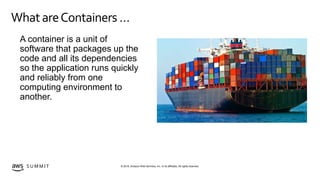
WhatareContainers …
A container is a unit of
software that packages up the
code and all its dependencies
so the application runs quickly
and reliably from one
computing environment to
another.
© 2019, Amazon Web Services, Inc. or its affiliates. All rights reserved.S U M M I T
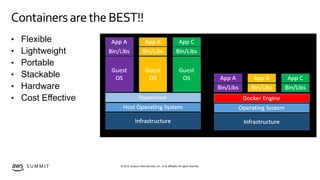
Containers aretheBEST!!
• Flexible
• Lightweight
• Portable
• Stackable
• Hardware
• Cost Effective
© 2019, Amazon Web Services, Inc. or its affiliates. All rights reserved.S U M M I T
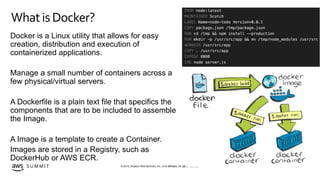
Docker is a Linux utility that allows for easy
creation, distribution and execution of
containerized applications.
Manage a small number of containers across a
few physical/virtual servers.
A Dockerfile is a plain text file that specifics the
components that are to be included to assemble
the Image.
A Image is a template to create a Container.
Images are stored in a Registry, such as
DockerHub or AWS ECR.
Whatis Docker?
Container/Docker Review
© 2019, Amazon Web Services, Inc. or its affiliates. All rights reserved.S U M M I T
TheProblem…
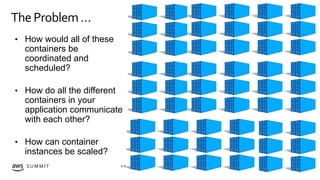
• How would all of these
containers be
coordinated and
scheduled?
• How do all the different
containers in your
application communicate
with each other?
• How can container
instances be scaled?
S U M M I T © 2019, Amazon Web Services, Inc. or its affiliates. All rights reserved.
© 2019, Amazon Web Services, Inc. or its affiliates. All rights reserved.S U M M I T
Whatis Kubernetes
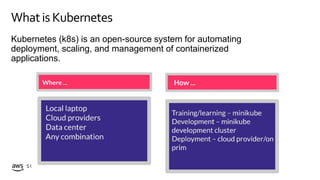
Kubernetes (k8s) is an open-source system for automating
deployment, scaling, and management of containerized
applications.
© 2019, Amazon Web Services, Inc. or its affiliates. All rights reserved.S U M M I T
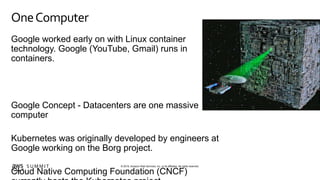
OneComputer
Google worked early on with Linux container
technology. Google (YouTube, Gmail) runs in
containers.
Google Concept - Datacenters are one massive
computer
Kubernetes was originally developed by engineers at
Google working on the Borg project.
Cloud Native Computing Foundation (CNCF)
© 2019, Amazon Web Services, Inc. or its affiliates. All rights reserved.S U M M I T
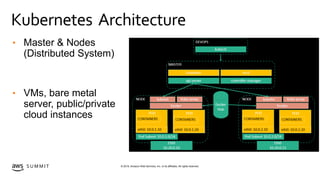
Kubernetes Architecture
• Master & Nodes
(Distributed System)
• VMs, bare metal
server, public/private
cloud instances
© 2019, Amazon Web Services, Inc. or its affiliates. All rights reserved.S U M M I T
MasterNode
Master node provide the cluster control plane
Multiple components run on the master node
API Server – user interface to controlling the cluster
Scheduler – deployment of pods and services to nodes
Controller Manager – daemon that manages core components to reach the desired state
etcd – distributed key value datastore
© 2019, Amazon Web Services, Inc. or its affiliates. All rights reserved.S U M M I T
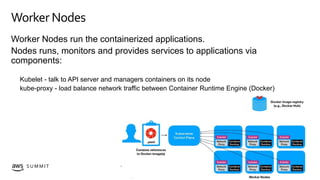
Worker Nodes
Worker Nodes run the containerized applications.
Nodes runs, monitors and provides services to applications via
components:
Kubelet - talk to API server and managers containers on its node
kube-proxy - load balance network traffic between Container Runtime Engine (Docker)
© 2019, Amazon Web Services, Inc. or its affiliates. All rights reserved.S U M M I T
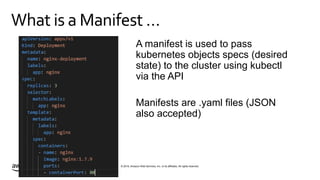
What is a Manifest …
Kubernetes Architecture
A manifest is used to pass
kubernetes objects specs (desired
state) to the cluster using kubectl
via the API
Manifests are .yaml files (JSON
also accepted)
© 2019, Amazon Web Services, Inc. or its affiliates. All rights reserved.S U M M I T
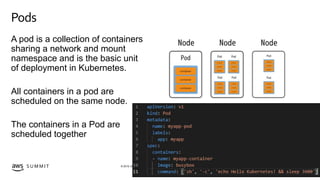
Pods
A pod is a collection of containers
sharing a network and mount
namespace and is the basic unit
of deployment in Kubernetes.
All containers in a pod are
scheduled on the same node.
The containers in a Pod are
scheduled together
© 2019, Amazon Web Services, Inc. or its affiliates. All rights reserved.S U M M I T
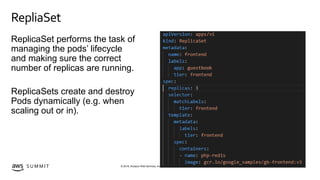
RepliaSet
ReplicaSet performs the task of
managing the pods’ lifecycle
and making sure the correct
number of replicas are running.
ReplicaSets create and destroy
Pods dynamically (e.g. when
scaling out or in).
© 2019, Amazon Web Services, Inc. or its affiliates. All rights reserved.S U M M I T
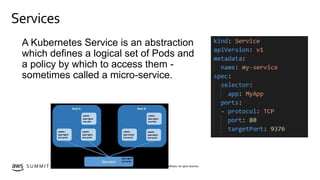
Services
Kubernetes Architecture
A Kubernetes Service is an abstraction
which defines a logical set of Pods and
a policy by which to access them -
sometimes called a micro-service.
© 2019, Amazon Web Services, Inc. or its affiliates. All rights reserved.S U M M I T
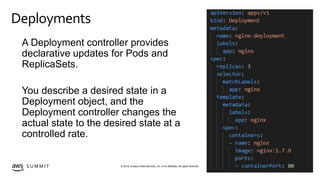
Deployments
Kubernetes Architecture
A Deployment controller provides
declarative updates for Pods and
ReplicaSets.
You describe a desired state in a
Deployment object, and the
Deployment controller changes the
actual state to the desired state at a
controlled rate.
© 2019, Amazon Web Services, Inc. or its affiliates. All rights reserved.S U M M I T
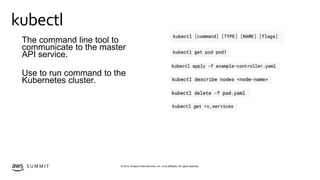
kubectl
Kubernetes Architecture
The command line tool to
communicate to the master
API service.
Use to run command to the
Kubernetes cluster.
S U M M I T © 2019, Amazon Web Services, Inc. or its affiliates. All rights reserved.
© 2019, Amazon Web Services, Inc. or its affiliates. All rights reserved.S U M M I T
Whatis EKS?
Amazon Elastic Container Service for Kubernetes - Amazon EKS
Easier deployment, management, and scaling containerized applications using Kubernetes on
AWS.
Amazon EKS manage the Kubernetes control plan (master node) infrastructure, customers
manage worker nodes
Amazon EKS fully compatible with applications running on any Kubernetes environment
© 2019, Amazon Web Services, Inc. or its affiliates. All rights reserved.S U M M I T
AWS & EKS
Amazon EKS is incorporated into various AWS services
to provide scalability and security for your applications.
EKS provides a native upstream Kubernetes experience.
Services:
• ELB, ALB, NLB
• IAM
• VPC
• Auto Scaling
© 2019, Amazon Web Services, Inc. or its affiliates. All rights reserved.S U M M I T
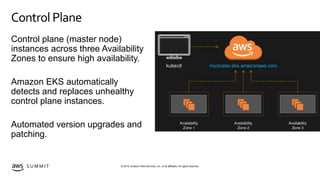
Control Plane
Control plane (master node)
instances across three Availability
Zones to ensure high availability.
Amazon EKS automatically
detects and replaces unhealthy
control plane instances.
Automated version upgrades and
patching.
© 2019, Amazon Web Services, Inc. or its affiliates. All rights reserved.S U M M I T
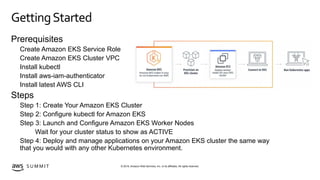
GettingStarted
Prerequisites
Create Amazon EKS Service Role
Create Amazon EKS Cluster VPC
Install kubectl
Install aws-iam-authenticator
Install latest AWS CLI
Steps
Step 1: Create Your Amazon EKS Cluster
Step 2: Configure kubectl for Amazon EKS
Step 3: Launch and Configure Amazon EKS Worker Nodes
Wait for your cluster status to show as ACTIVE
Step 4: Deploy and manage applications on your Amazon EKS cluster the same way
that you would with any other Kubernetes environment.
S U M M I T © 2019, Amazon Web Services, Inc. or its affiliates. All rights reserved.
© 2019, Amazon Web Services, Inc. or its affiliates. All rights reserved.S U M M I T
Thank you!
S U M M I T © 2019, Amazon Web Services, Inc. or its affiliates. All rights reserved.
Vicky Tanya Seno
seno_vicky@smc.edu
YouTube: https://www.youtube.com/sysadmgirl
Twitter: @SysAdmGirl

Amazon EKS: Getting Started

  • 1.
    S U MM I T A NA HE IM
  • 2.
    © 2019, AmazonWeb Services, Inc. or its affiliates. All rights reserved.S U M M I T Getting started withAmazon EKS Vicky Tanya Seno Professor – YouTuber - A Cloud Guru Santa Monica College D E V 1 0
  • 3.
    S U MM I T © 2019, Amazon Web Services, Inc. or its affiliates. All rights reserved.
  • 4.
    © 2019, AmazonWeb Services, Inc. or its affiliates. All rights reserved.S U M M I T WhatareContainers … A container is a unit of software that packages up the code and all its dependencies so the application runs quickly and reliably from one computing environment to another.
  • 5.
    © 2019, AmazonWeb Services, Inc. or its affiliates. All rights reserved.S U M M I T Containers aretheBEST!! • Flexible • Lightweight • Portable • Stackable • Hardware • Cost Effective
  • 6.
    © 2019, AmazonWeb Services, Inc. or its affiliates. All rights reserved.S U M M I T Docker is a Linux utility that allows for easy creation, distribution and execution of containerized applications. Manage a small number of containers across a few physical/virtual servers. A Dockerfile is a plain text file that specifics the components that are to be included to assemble the Image. A Image is a template to create a Container. Images are stored in a Registry, such as DockerHub or AWS ECR. Whatis Docker? Container/Docker Review
  • 7.
    © 2019, AmazonWeb Services, Inc. or its affiliates. All rights reserved.S U M M I T TheProblem… • How would all of these containers be coordinated and scheduled? • How do all the different containers in your application communicate with each other? • How can container instances be scaled?
  • 8.
    S U MM I T © 2019, Amazon Web Services, Inc. or its affiliates. All rights reserved.
  • 9.
    © 2019, AmazonWeb Services, Inc. or its affiliates. All rights reserved.S U M M I T Whatis Kubernetes Kubernetes (k8s) is an open-source system for automating deployment, scaling, and management of containerized applications.
  • 10.
    © 2019, AmazonWeb Services, Inc. or its affiliates. All rights reserved.S U M M I T OneComputer Google worked early on with Linux container technology. Google (YouTube, Gmail) runs in containers. Google Concept - Datacenters are one massive computer Kubernetes was originally developed by engineers at Google working on the Borg project. Cloud Native Computing Foundation (CNCF)
  • 11.
    © 2019, AmazonWeb Services, Inc. or its affiliates. All rights reserved.S U M M I T Kubernetes Architecture Kubernetes Architecture • Master & Nodes (Distributed System) • VMs, bare metal server, public/private cloud instances
  • 12.
    © 2019, AmazonWeb Services, Inc. or its affiliates. All rights reserved.S U M M I T MasterNode Master node provide the cluster control plane Multiple components run on the master node API Server – user interface to controlling the cluster Scheduler – deployment of pods and services to nodes Controller Manager – daemon that manages core components to reach the desired state etcd – distributed key value datastore
  • 13.
    © 2019, AmazonWeb Services, Inc. or its affiliates. All rights reserved.S U M M I T Worker Nodes Worker Nodes run the containerized applications. Nodes runs, monitors and provides services to applications via components: Kubelet - talk to API server and managers containers on its node kube-proxy - load balance network traffic between Container Runtime Engine (Docker)
  • 14.
    © 2019, AmazonWeb Services, Inc. or its affiliates. All rights reserved.S U M M I T What is a Manifest … Kubernetes Architecture A manifest is used to pass kubernetes objects specs (desired state) to the cluster using kubectl via the API Manifests are .yaml files (JSON also accepted)
  • 15.
    © 2019, AmazonWeb Services, Inc. or its affiliates. All rights reserved.S U M M I T Pods A pod is a collection of containers sharing a network and mount namespace and is the basic unit of deployment in Kubernetes. All containers in a pod are scheduled on the same node. The containers in a Pod are scheduled together
  • 16.
    © 2019, AmazonWeb Services, Inc. or its affiliates. All rights reserved.S U M M I T RepliaSet ReplicaSet performs the task of managing the pods’ lifecycle and making sure the correct number of replicas are running. ReplicaSets create and destroy Pods dynamically (e.g. when scaling out or in).
  • 17.
    © 2019, AmazonWeb Services, Inc. or its affiliates. All rights reserved.S U M M I T Services Kubernetes Architecture A Kubernetes Service is an abstraction which defines a logical set of Pods and a policy by which to access them - sometimes called a micro-service.
  • 18.
    © 2019, AmazonWeb Services, Inc. or its affiliates. All rights reserved.S U M M I T Deployments Kubernetes Architecture A Deployment controller provides declarative updates for Pods and ReplicaSets. You describe a desired state in a Deployment object, and the Deployment controller changes the actual state to the desired state at a controlled rate.
  • 19.
    © 2019, AmazonWeb Services, Inc. or its affiliates. All rights reserved.S U M M I T kubectl Kubernetes Architecture The command line tool to communicate to the master API service. Use to run command to the Kubernetes cluster.
  • 20.
    S U MM I T © 2019, Amazon Web Services, Inc. or its affiliates. All rights reserved.
  • 21.
    © 2019, AmazonWeb Services, Inc. or its affiliates. All rights reserved.S U M M I T Whatis EKS? Amazon Elastic Container Service for Kubernetes - Amazon EKS Easier deployment, management, and scaling containerized applications using Kubernetes on AWS. Amazon EKS manage the Kubernetes control plan (master node) infrastructure, customers manage worker nodes Amazon EKS fully compatible with applications running on any Kubernetes environment
  • 22.
    © 2019, AmazonWeb Services, Inc. or its affiliates. All rights reserved.S U M M I T AWS & EKS Amazon EKS is incorporated into various AWS services to provide scalability and security for your applications. EKS provides a native upstream Kubernetes experience. Services: • ELB, ALB, NLB • IAM • VPC • Auto Scaling
  • 23.
    © 2019, AmazonWeb Services, Inc. or its affiliates. All rights reserved.S U M M I T Control Plane Control plane (master node) instances across three Availability Zones to ensure high availability. Amazon EKS automatically detects and replaces unhealthy control plane instances. Automated version upgrades and patching.
  • 24.
    © 2019, AmazonWeb Services, Inc. or its affiliates. All rights reserved.S U M M I T GettingStarted Prerequisites Create Amazon EKS Service Role Create Amazon EKS Cluster VPC Install kubectl Install aws-iam-authenticator Install latest AWS CLI Steps Step 1: Create Your Amazon EKS Cluster Step 2: Configure kubectl for Amazon EKS Step 3: Launch and Configure Amazon EKS Worker Nodes Wait for your cluster status to show as ACTIVE Step 4: Deploy and manage applications on your Amazon EKS cluster the same way that you would with any other Kubernetes environment.
  • 25.
    S U MM I T © 2019, Amazon Web Services, Inc. or its affiliates. All rights reserved.
  • 27.
    © 2019, AmazonWeb Services, Inc. or its affiliates. All rights reserved.S U M M I T Thank you! S U M M I T © 2019, Amazon Web Services, Inc. or its affiliates. All rights reserved. Vicky Tanya Seno seno_vicky@smc.edu YouTube: https://www.youtube.com/sysadmgirl Twitter: @SysAdmGirl

Editor's Notes

  • #6 Flexible: Even the most complex applications can be containerized. Lightweight: Containers leverage and share the host kernel. Interchangeable: You can deploy updates and upgrades on-the-fly. Portable: You can build locally, deploy to the cloud, and run anywhere. Scalable: You can increase and automatically distribute container replicas. Stackable: You can stack services vertically and on-the-fly. Hardware: Improve utilization Cost Effective
  • #7 Docker is a Linux utility that allows for easy creation, distribution and execution of containerized applications. Great for managing a small number of containers across a few physical/virtual servers. A Dockerfile is a plain text file that specifics the components that are to be included to assemble the Image. A Image is a template to create a Container. A Docker container image is a lightweight, standalone, executable package of software that includes everything needed to run an application: code, runtime, system tools, system libraries and settings Images are stored in a Registry, such as DockerHub or AWS ECR (Elastic Container Register). Tanya: Containers has been around for a very long time but it wasn't it till docker was create that allowed for easy creation , distribution and execution of containerized applications. now it allows for easy management. If yo uhave heard of container you have have heard of docker. they are almost simanulus now. Docker main three components include the docker engine that, it allows you run containers on a single host, the docker redistry that allow you to store and distrubite images and command line tools to amanage and view logs. This is great to manage a hand full of container on a few host. But what happens when you start expaning. You need to scale out quickly, doing this by hand it becomes very tendious. that is where containers orchestration comes into play, it is values to manage a large distribution of containers running on the docker engine. Package apps into a unit. Run the package the same on any platform. Production application deals with dozens of containers running across hundreds of machines
  • #11 treating their Data Center as one massive computer.
  • #12 Master Node: The main machine that controls the nodes Main entrypoint for all administrative tasks It handles the orchestration of the worker nodes Worker Node: It is a worker machine in Kubernetes (used to be known as minion) This machine performs the requested tasks. Each Node is controlled by the Master Node Runs containers inside pods This is where the Docker engine runs and takes care of downloading images and starting containers Master: The machine that controls Kubernetes nodes. This is where all task assignments originate. Node: These machines perform the requested, assigned tasks. The Kubernetes master controls them. Pod: A group of one or more containers deployed to a single node. All containers in a pod share an IP address, IPC, hostname, and other resources. Pods abstract network and storage away from the underlying container. This lets you move containers around the cluster more easily. Replication controller:  This controls how many identical copies of a pod should be running somewhere on the cluster. Service: This decouples work definitions from the pods. Kubernetes service proxies automatically get service requests to the right pod—no matter where it moves to in the cluster or even if it’s been replaced. Kubelet: This service runs on nodes and reads the container manifests and ensures the defined containers are started and running. kubectl: This is the command line configuration tool for Kubernetes. How you’re using containers in your environment? A rudimentary application of Linux containers treats them as efficient, fast virtual machines. Once you scale this to a production environment and multiple applications, it's clear that you need multiple, colocated containers working together to deliver the individual services. This significantly multiplies the number of containers in your environment and as those containers accumulate, the complexity also grows. Kubernetes fixes a lot of common problems with container proliferation—sorting containers together into a ”pod.” Pods add a layer of abstraction to grouped containers, which helps you schedule workloads and provide necessary services—like networking and storage—to those containers. Other parts of Kubernetes help you load balance across these pods and ensure you have the right number of containers running to support your workloads. With the right implementation of Kubernetes—and with the help of other open source projects like Atomic Registry, Open vSwitch, heapster, OAuth, and SELinux— you can orchestrate all parts of your container infrastructure.
  • #14 Each node has three main components runningthat maintains running pods and provides kuberenets a runtime environment. Kubelet is a agent that runs on each node and ensure that containers are running in a pod. Kube-proxy maintains the networking abstraction layer by maintain network rules on the host node and does the required port forwarding. And each node need a container runtime software, we will be using Docker but other runtimes are supported such as rkt (rocket), runc. Node agent that interprets the YAML manifests to run the containers as defined This service runs on nodes and reads the container manifests and ensures the defined containers are started and running. A Kubelet node agent periodically checks the health of the containers in a pod. In addition, it ensures that the volume is mounted as per manifest, and it downloads the sensitive information required to run the container. It also How you’re using containers in your environment? A rudimentary application of Linux containers treats them as efficient, fast virtual machines. Once you scale this to a production environment and multiple applications, it's clear that you need multiple, colocated containers working together to deliver the individual services. This significantly multiplies the number of containers in your environment and as those containers accumulate, the complexity also grows. Kubernetes fixes a lot of common problems with container proliferation—sorting containers together into a ”pod.” Pods add a layer of abstraction to grouped containers, which helps you schedule workloads and provide necessary services—like networking and storage—to those containers. Other parts of Kubernetes help you load balance across these pods and ensure you have the right number of containers running to support your workloads. With the right implementation of Kubernetes—and with the help of other open source projects like Atomic Registry, Open vSwitch, heapster, OAuth, and SELinux— you can orchestrate all parts of your container infrastructure.
  • #15 How you’re using containers in your environment? A rudimentary application of Linux containers treats them as efficient, fast virtual machines. Once you scale this to a production environment and multiple applications, it's clear that you need multiple, colocated containers working together to deliver the individual services. This significantly multiplies the number of containers in your environment and as those containers accumulate, the complexity also grows. Kubernetes fixes a lot of common problems with container proliferation—sorting containers together into a ”pod.” Pods add a layer of abstraction to grouped containers, which helps you schedule workloads and provide necessary services—like networking and storage—to those containers. Other parts of Kubernetes help you load balance across these pods and ensure you have the right number of containers running to support your workloads. With the right implementation of Kubernetes—and with the help of other open source projects like Atomic Registry, Open vSwitch, heapster, OAuth, and SELinux— you can orchestrate all parts of your container infrastructure.
  • #16 Pod placement depends on each node's resources availability and on each pod's recourse requirements
  • #18 Service define a set of pods and a policy on how the pods should be access. Service: This decouples work definitions from the pods. Kubernetes service proxies automatically get service requests to the right pod—no matter where it moves to in the cluster or even if it’s been replaced. https://kubernetes.io/docs/concepts/services-networking/service/
  • #19 How you’re using containers in your environment? A rudimentary application of Linux containers treats them as efficient, fast virtual machines. Once you scale this to a production environment and multiple applications, it's clear that you need multiple, colocated containers working together to deliver the individual services. This significantly multiplies the number of containers in your environment and as those containers accumulate, the complexity also grows. Kubernetes fixes a lot of common problems with container proliferation—sorting containers together into a ”pod.” Pods add a layer of abstraction to grouped containers, which helps you schedule workloads and provide necessary services—like networking and storage—to those containers. Other parts of Kubernetes help you load balance across these pods and ensure you have the right number of containers running to support your workloads. With the right implementation of Kubernetes—and with the help of other open source projects like Atomic Registry, Open vSwitch, heapster, OAuth, and SELinux— you can orchestrate all parts of your container infrastructure.
  • #20 kubectl is a command line interface for running commands against Kubernetes clusters. This overview covers kubectl syntax, describes the command operations, and provides common examples.
  • #22 Whether running in on-premises data centers or public clouds This means that you can easily migrate any standard Kubernetes application to Amazon EKS without any code modification required.
  • #25 Deploy and manage applications on your Amazon EKS cluster the same way that you would with any other Kubernetes environment.