5 Painless Demos to
Get You Started with
Kubernetes
Jakub Nowakowski
Automation | Test Lead @ Amartus
jnowakowski8
What’s On
1. A short story of containers
2. Containers orchestration
3. Why Kubernetes?
4. Cluster components
5. Pod >> Deployment >> Service
6. Networking
7. Cluster bootstrapping
8. Time for some action!
A Short Story of Containers
• Packages with application, dependencies, binaries
and configurations
• Consistent on all environments
• Lightweight and isolated
• Infrastructure-agnostic
• Way to handle microservices
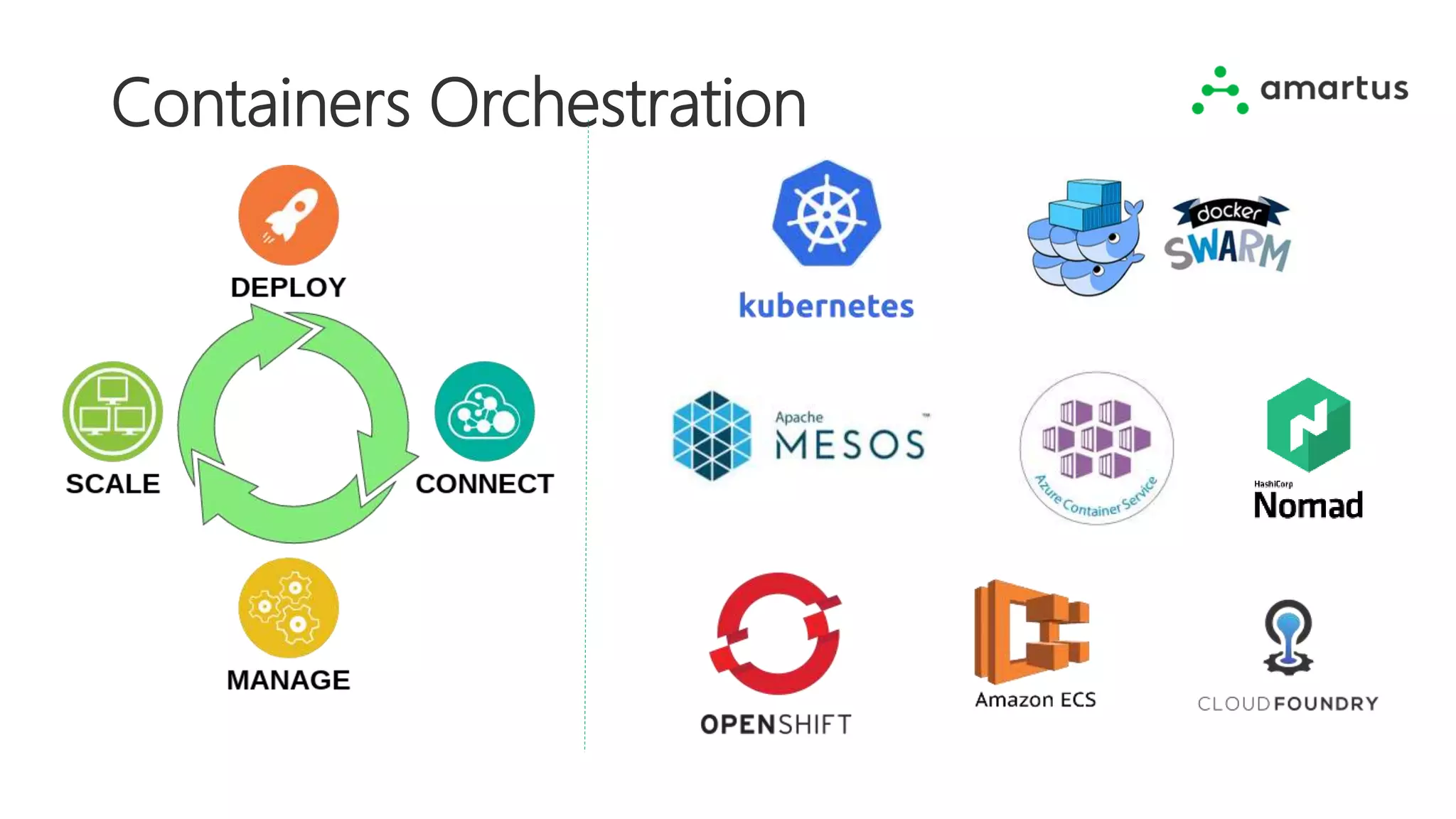
Containers Orchestration
Photo by Axel Ahoi on Unsplash
Kubernetes
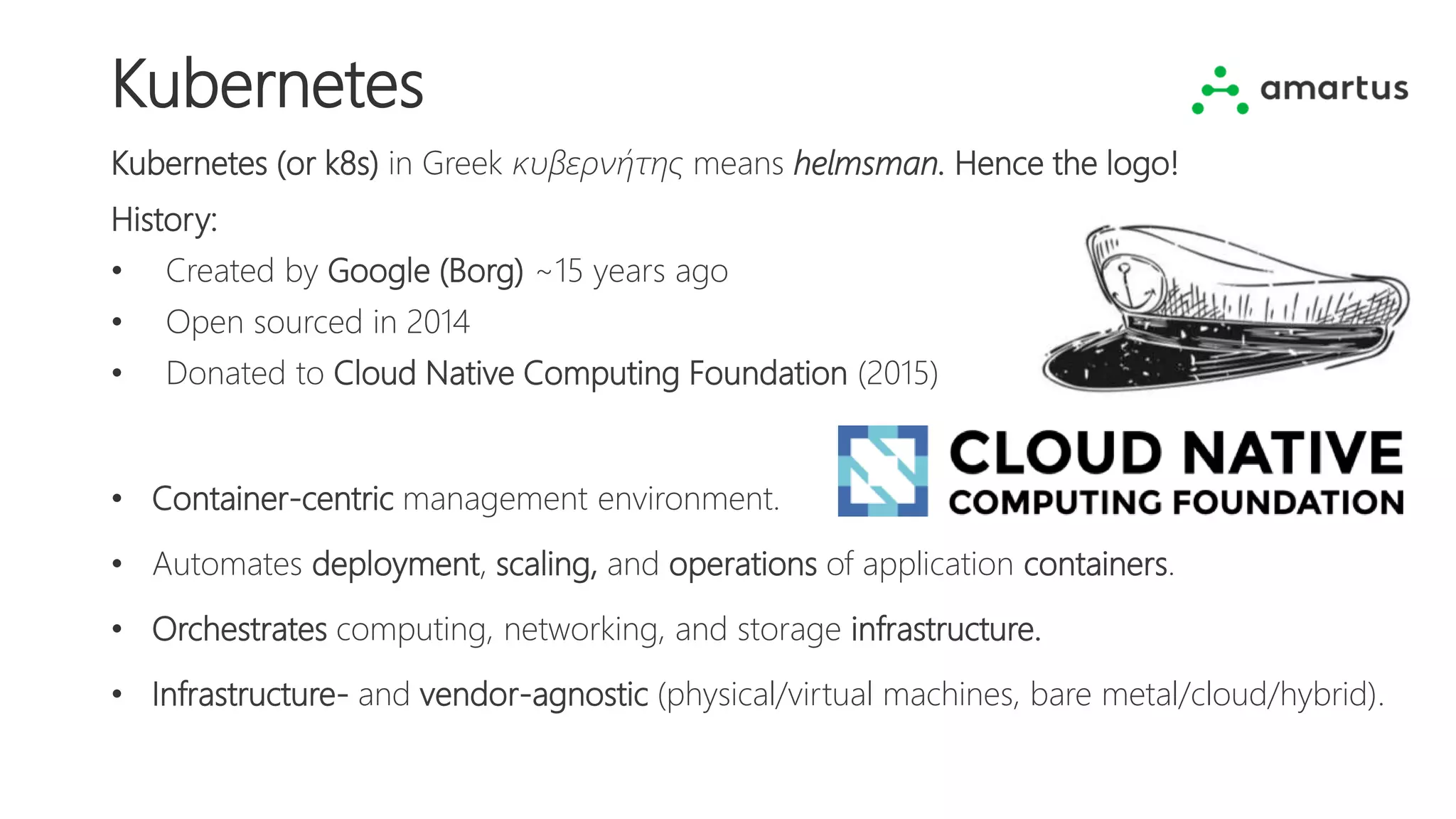
Kubernetes (or k8s) in Greek κυβερνήτης means helmsman. Hence the logo!
History:
• Created by Google (Borg) ~15 years ago
• Open sourced in 2014
• Donated to Cloud Native Computing Foundation (2015)
• Container-centric management environment.
• Automates deployment, scaling, and operations of application containers.
• Orchestrates computing, networking, and storage infrastructure.
• Infrastructure- and vendor-agnostic (physical/virtual machines, bare metal/cloud/hybrid).
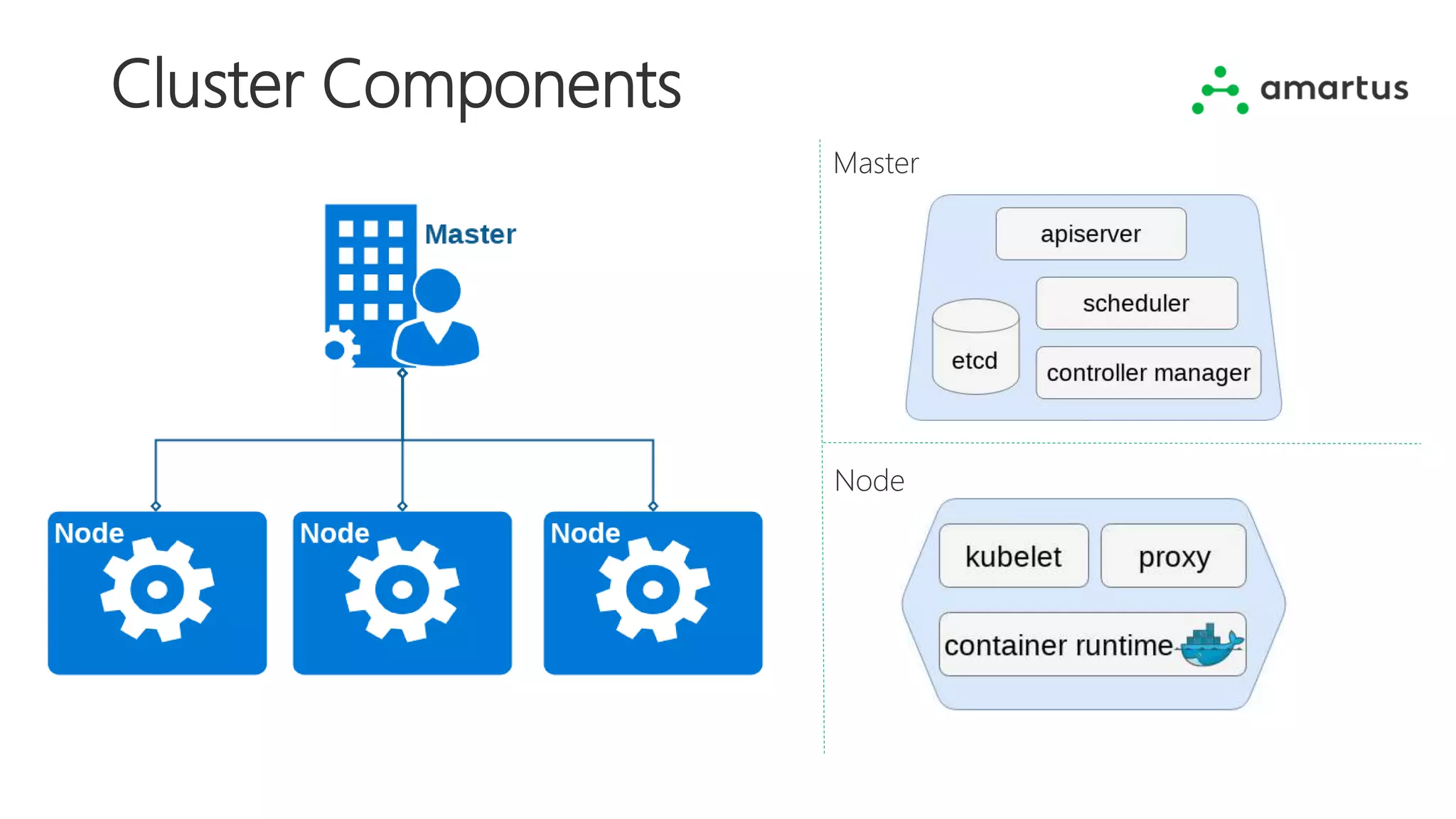
Cluster Components
Master
Node
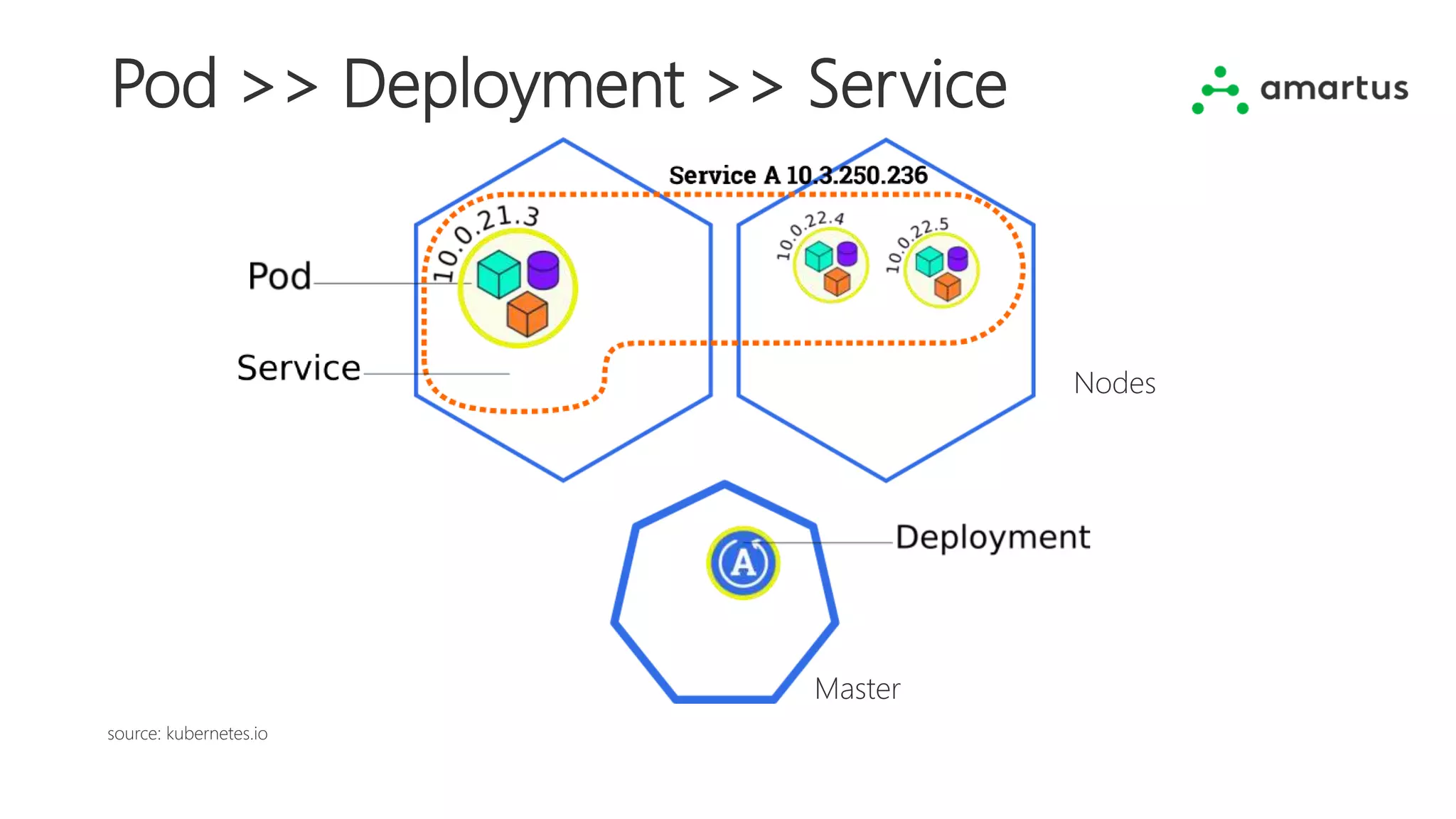
Pod >> Deployment >> Service
source: kubernetes.io
Master
Nodes
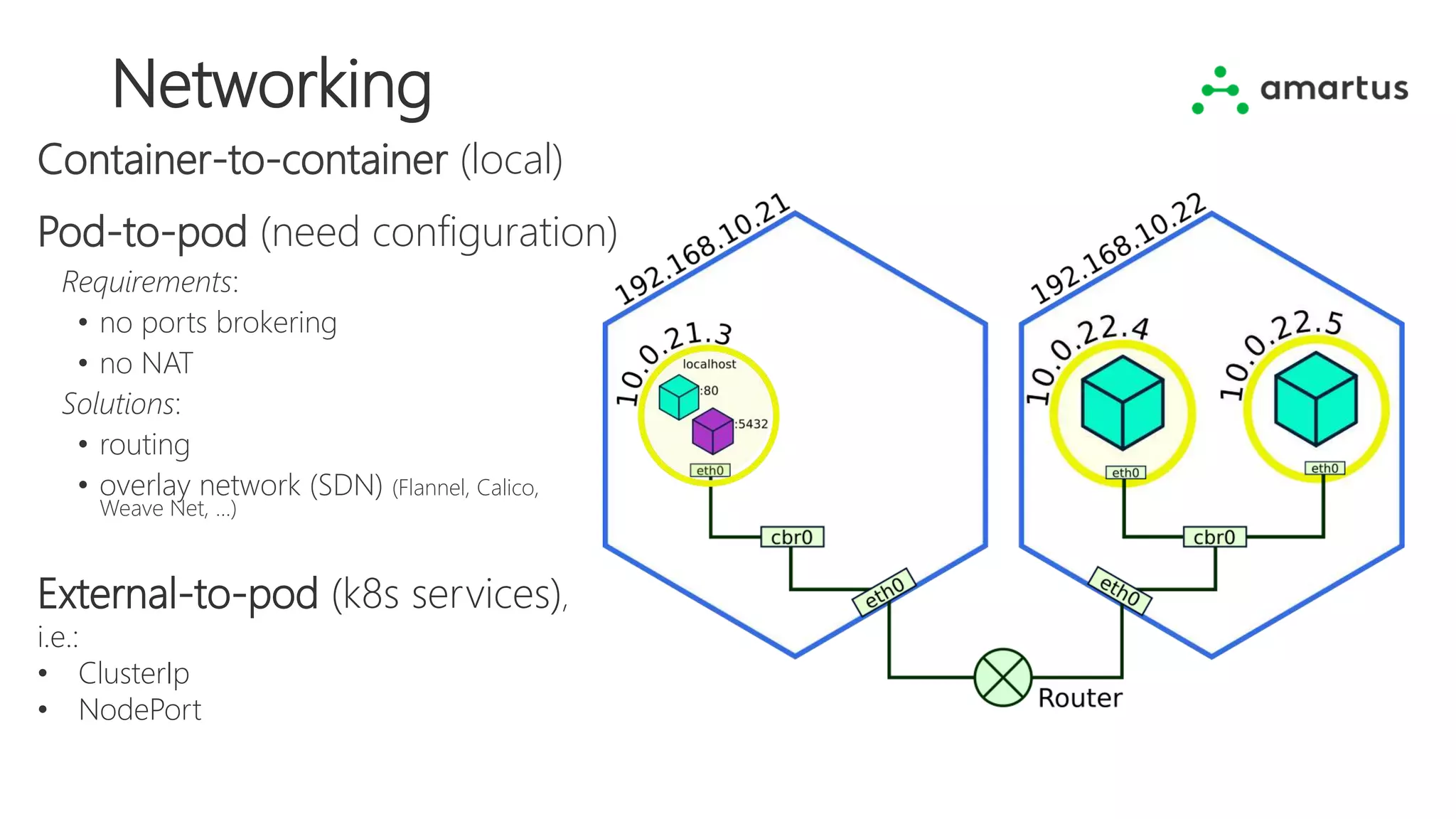
Networking
Pod-to-pod (need configuration)
Container-to-container (local)
External-to-pod (k8s services),
i.e.:
• ClusterIp
• NodePort
Requirements:
• no ports brokering
• no NAT
Solutions:
• routing
• overlay network (SDN) (Flannel, Calico,
Weave Net, ...)
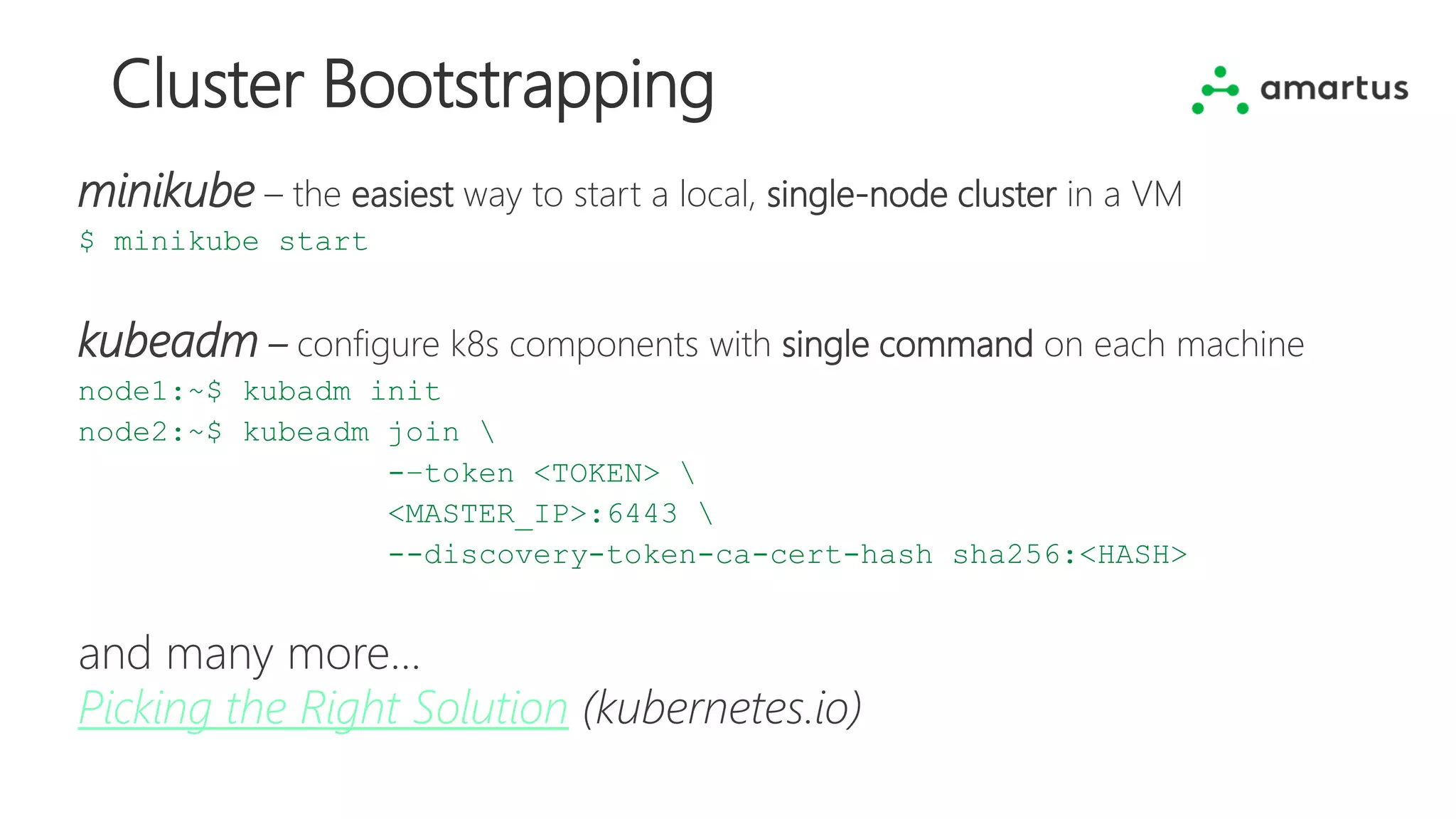
Cluster Bootstrapping
minikube – the easiest way to start a local, single-node cluster in a VM
$ minikube start
kubeadm – configure k8s components with single command on each machine
node1:~$ kubadm init
node2:~$ kubeadm join 
-–token <TOKEN> 
<MASTER_IP>:6443 
--discovery-token-ca-cert-hash sha256:<HASH>
and many more...
Picking the Right Solution (kubernetes.io)
11 2-Mar-18
Photo by Mitchell Orr on Unsplash
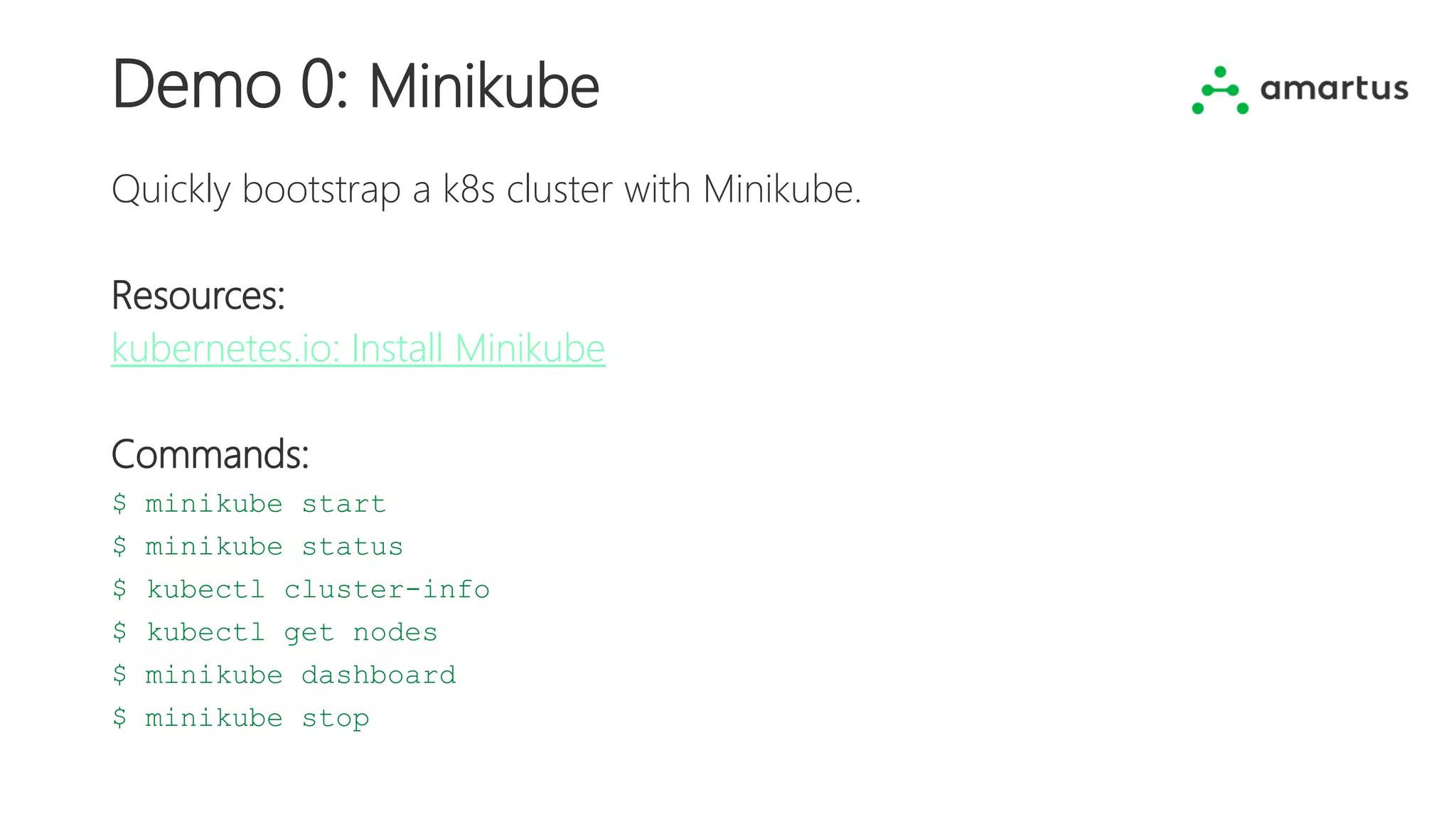
Demo 0: Minikube
Quickly bootstrap a k8s cluster with Minikube.
Resources:
kubernetes.io: Install Minikube
Commands:
$ minikube start
$ minikube status
$ kubectl cluster-info
$ kubectl get nodes
$ minikube dashboard
$ minikube stop
Demo 1: Pod, Deployment, Service
Use kubectl CLI
Create a deployment and expose it outside the cluster as a NodePort service.
Perform operations with kubectl CLI.
Commands:
$ kubectl get pods,deployments,services
$ kubectl create deployment --image=<IMAGE> <NAME>
$ kubectl expose deployment <NAME> --type=NodePort --port=<PORT>
Demo 2: Scaling and updates
YAML manifests
Create a deployment and a service with an YAML manifest file.
Scale it and update an image of the container.
Commands:
$ kubectl apply -f <FILE>
$ kubectl scale deployment <NAME> --replicas=<NUMBER>
$ kubectl set image deployment/<NAME> <CONTAINER>=<IMAGE>
Demo 3: Multiple containers in a pod
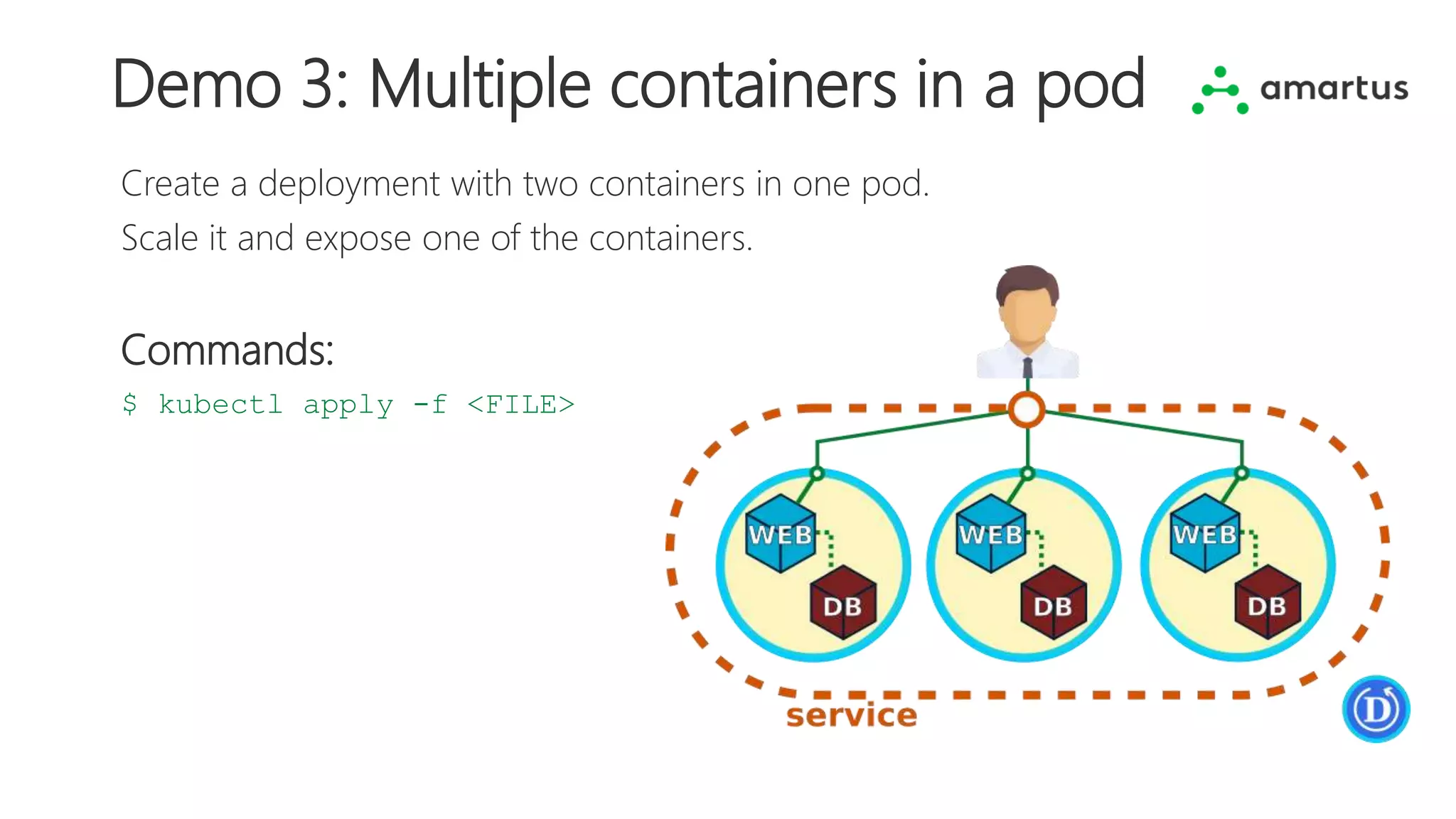
Create a deployment with two containers in one pod.
Scale it and expose one of the containers.
Commands:
$ kubectl apply -f <FILE>
Demo 4: Multiple pods
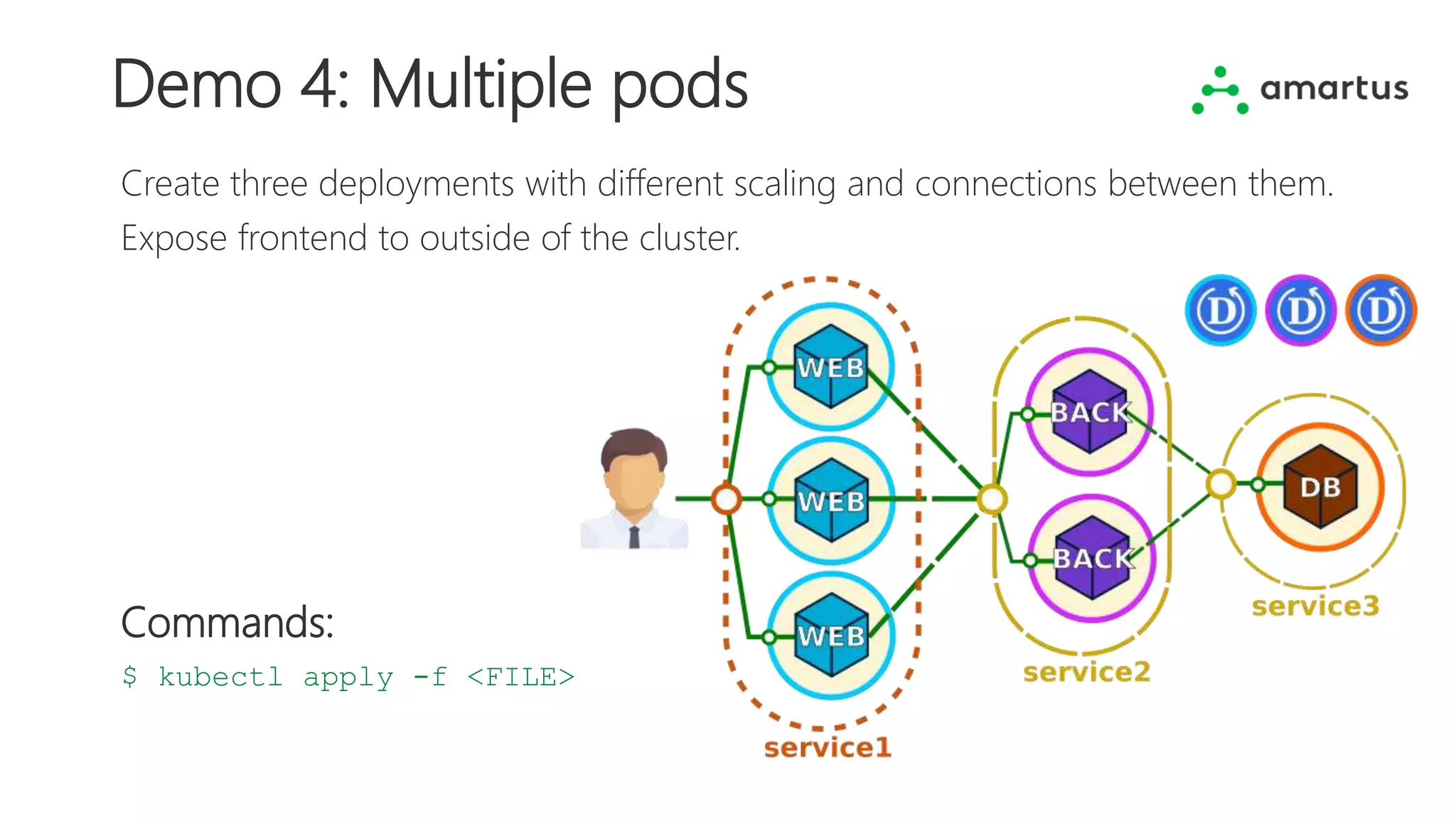
Create three deployments with different scaling and connections between them.
Expose frontend to outside of the cluster.
Commands:
$ kubectl apply -f <FILE>
Confidential | Copyright@2018 Amartus
info@amartus.com @amartus_com company/amartus
www.amartus.com
Questions?

5 Painless Demos to Get You Started with Kubernetes

  • 1.
    5 Painless Demosto Get You Started with Kubernetes Jakub Nowakowski Automation | Test Lead @ Amartus jnowakowski8
  • 2.
    What’s On 1. Ashort story of containers 2. Containers orchestration 3. Why Kubernetes? 4. Cluster components 5. Pod >> Deployment >> Service 6. Networking 7. Cluster bootstrapping 8. Time for some action!
  • 3.
    A Short Storyof Containers • Packages with application, dependencies, binaries and configurations • Consistent on all environments • Lightweight and isolated • Infrastructure-agnostic • Way to handle microservices
  • 4.
  • 5.
    Photo by AxelAhoi on Unsplash
  • 6.
    Kubernetes Kubernetes (or k8s)in Greek κυβερνήτης means helmsman. Hence the logo! History: • Created by Google (Borg) ~15 years ago • Open sourced in 2014 • Donated to Cloud Native Computing Foundation (2015) • Container-centric management environment. • Automates deployment, scaling, and operations of application containers. • Orchestrates computing, networking, and storage infrastructure. • Infrastructure- and vendor-agnostic (physical/virtual machines, bare metal/cloud/hybrid).
  • 7.
  • 8.
    Pod >> Deployment>> Service source: kubernetes.io Master Nodes
  • 9.
    Networking Pod-to-pod (need configuration) Container-to-container(local) External-to-pod (k8s services), i.e.: • ClusterIp • NodePort Requirements: • no ports brokering • no NAT Solutions: • routing • overlay network (SDN) (Flannel, Calico, Weave Net, ...)
  • 10.
    Cluster Bootstrapping minikube –the easiest way to start a local, single-node cluster in a VM $ minikube start kubeadm – configure k8s components with single command on each machine node1:~$ kubadm init node2:~$ kubeadm join -–token <TOKEN> <MASTER_IP>:6443 --discovery-token-ca-cert-hash sha256:<HASH> and many more... Picking the Right Solution (kubernetes.io)
  • 11.
    11 2-Mar-18 Photo byMitchell Orr on Unsplash
  • 12.
    Demo 0: Minikube Quicklybootstrap a k8s cluster with Minikube. Resources: kubernetes.io: Install Minikube Commands: $ minikube start $ minikube status $ kubectl cluster-info $ kubectl get nodes $ minikube dashboard $ minikube stop
  • 13.
    Demo 1: Pod,Deployment, Service Use kubectl CLI Create a deployment and expose it outside the cluster as a NodePort service. Perform operations with kubectl CLI. Commands: $ kubectl get pods,deployments,services $ kubectl create deployment --image=<IMAGE> <NAME> $ kubectl expose deployment <NAME> --type=NodePort --port=<PORT>
  • 14.
    Demo 2: Scalingand updates YAML manifests Create a deployment and a service with an YAML manifest file. Scale it and update an image of the container. Commands: $ kubectl apply -f <FILE> $ kubectl scale deployment <NAME> --replicas=<NUMBER> $ kubectl set image deployment/<NAME> <CONTAINER>=<IMAGE>
  • 15.
    Demo 3: Multiplecontainers in a pod Create a deployment with two containers in one pod. Scale it and expose one of the containers. Commands: $ kubectl apply -f <FILE>
  • 16.
    Demo 4: Multiplepods Create three deployments with different scaling and connections between them. Expose frontend to outside of the cluster. Commands: $ kubectl apply -f <FILE>
  • 17.
    Confidential | Copyright@2018Amartus info@amartus.com @amartus_com company/amartus www.amartus.com Questions?

Editor's Notes

  • #4 Container = A package that contains everything the software needs to run (application binaries, system libraries, dependencies, configurations). Allow applications to be deployed easily and consistently regardless of the target environment (developer laptop, testing environment or a production data center). Containers are lightweight (no additional OS needed). Processes running in separate containers are isolated from one another. Many containers can run on a single machine. Containers can be installed on any compute unit, regardless of hardware, OS, or software. They run on premise, in the cloud or in hybrid solutions. Containerized modules provide a great way to implement and run applications developed with microservices architecture (applications developed as a set of small components, each running its own processes and usually communicating via HTTP API calls).
  • #5 Containers orchestration is the automated process of: Deploying multiple containers and rescheduling them in case of failure. Integrating containers and exposing services to be accessible externally. Managing and configuring running containers, handling rolling updates. Scaling in and scaling out containers depending on traffic.
  • #6 Although there are different container orchestrators available, Kubernetes is by far the most popular and fastest-growing one. It’s a highly-extensible solution for fully-automated containerized applications clusters management. Let’s meet our hero.
  • #7 Kubernetes – helmsman in Greek. Created by Google about 15 years ago. Developed and used internally over the time. In 2014, open sourced and one year later donated to the community (which is pretty impressive: > 2000 contributors, >60 000 commits, one of most popular projects on github). Kubernetes provides a container-centric management environment to automate operations on applications delivered as containers. It orchestrates computing, networking, and storage infrastructure. It’s an infrastructure- and provider-agnostic solution, which can be run on physical or virtual machines, bare metal servers located in a company, in the cloud, or on hybrid solutions.
  • #8 A Cluster is a group of one or more virtual or physical machines that provide resources to run applications. There are two types of machines in the cluster: - Master (provides the control plane for the cluster) - makes global decisions about the cluster (for example, scheduling) and detects and responds to cluster events (e.g., starting a new application instance when another is down). - Node (Worker) - provides runtime environment for applications on designated machines. ------------------------------------------ Master components: - apiserver – exposes Kubernetes API to provide front-end for Kubernetes configuration - etcd – key value store for all cluster data - scheduler – assigns pods to nodes - controller manager – monitors the current state of the cluster and performs operations to meet the desired state Node components: - kubelet – agent running on each node; makes sure that containers are running - kube-proxy – maintains network rules on the host and performs connection forwarding - container runtime – software responsible for running containers (e.g., Docker or rkt)
  • #9 POD A Pod is a Kubernetes abstraction that represents a group of one or more application containers, and some shared resources for those containers. Those resources include: Shared storage, as Volumes Networking, as a unique cluster IP address Information about how to run each container, such as the container image version or specific ports to use DEPLOYMENT Deployment Controller is responsible for running and monitoring pods,. For instance, if a node holding the pod is going down or is deleted, the controller will boot a new instance to replace it. SERVICE If we have multiple pods running, how do we ensure that there is a single endpoint to access them? A service takes care of that. It provides a unified way to route traffic to a cluster and eventually to a list of pods.
  • #10 There are three challenges in network connectivity across the cluster: Container-to-container communication – containers within the same pod share IP address and localhost, so they can easily communicate with each other within the same pod. Pod-to-pod networking – that's the main challenge, as this connection is not configured out-of-the-box in Kubernetes, and requires some additional planning and configuration Pods should communicate without port forwarding or mapping, and should reach one another without NAT. One solution is to configure static routing in the network topology with appropriate paths to reach pods. Another solution is an Overlay Network, which can set up a virtual network over the physical one to handle communication that will tunnel the traffic between pods. Packets going from a pod will be encapsulated on the node and tunneled to the destination node. There is a number of plugins available to support this solutions. External-to-pod communciation is handled by Kubernetes Services (e.g., ClusterIp – exposing the service to cluster only, NodePort – exposing the service to external of the cluster).
  • #11 Minikube: The recommended method for creating a local, single-node Kubernetes cluster for development and testing. Setup is completely automated and doesn’t require a cloud provider account. Kubeadm: Expects the user to bring a machine to execute on; type doesn’t matter (laptop, VM, physical/cloud server or Raspberry Pi).
  • #12 Demos are shared on GitHub: https://github.com/nkuba/k8s-intro-demos
  • #13 Please visit: https://github.com/nkuba/k8s-intro-demos/tree/master/demo0
  • #14 Please visit: https://github.com/nkuba/k8s-intro-demos/tree/master/demo1
  • #15 Please visit: https://github.com/nkuba/k8s-intro-demos/tree/master/demo2
  • #16 Please visit: https://github.com/nkuba/k8s-intro-demos/tree/master/demo3
  • #17 Please visit: https://github.com/nkuba/k8s-intro-demos/tree/master/demo4
  • #18 Questions? Enquiries? Help needed? Get in touch with us at info@amartus.com Follow us at @amartus_com | www.linkedin.com/company/Amartus/ Are you interested in becoming a certified Kubernetes Admin? I’ve been there, check my Medium post for some tips: https://medium.com/@jnowakowski/k8s-admin-exam-tips-22961241ba7d