Kubernetes (Kubectl) Cheat
Sheet
To view the live version of the
page, click here.
© Copyright by Interviewbit
Learn Kubernetes: Basics to Advanced Concepts
1. Kubernetes Terminology
2. Kubernetes Commands
3. Changing Resource Attributes
4. For Cluster Introspection
5. Interacting with Deployments and Services
6. Copy files and directories to and from containers
Frequently Asked Questions
7. How can containers within a pod communicate with each other?
8. If a node is tainted is there a way to still schedule the pods to that node?
9. What’s the init container and when it can be used?
10. What is the role of Load Balance in Kubernetes?
Page 1 © Copyright by Interviewbit
Contents
Introduction
If you are a student who is just starting off with their journey with DevOps or you are a
professional who wishes to switch to DevOps or you are a learner looking to enhance
their knowledge about Kubernetes, then you are at the right place. Kubernetes aka
K8s is one of the buzzing technologies now, before moving onto the cheat sheet it is
essential to brush up on your basics by understanding what Kubernetes is, what are
its uses and how does it help?
Let's start with the formal definition first, Kubernetes is a portable, extensible, open-
source platform for managing containerization workloads and services that
facilitates both declarative configuration and automation, letting you run distributed
systems resiliently with scaling and failover for your application.
Page 2 © Copyright by Interviewbit
Let's get Started
Kubernetes (Kubectl) Cheat Sheet
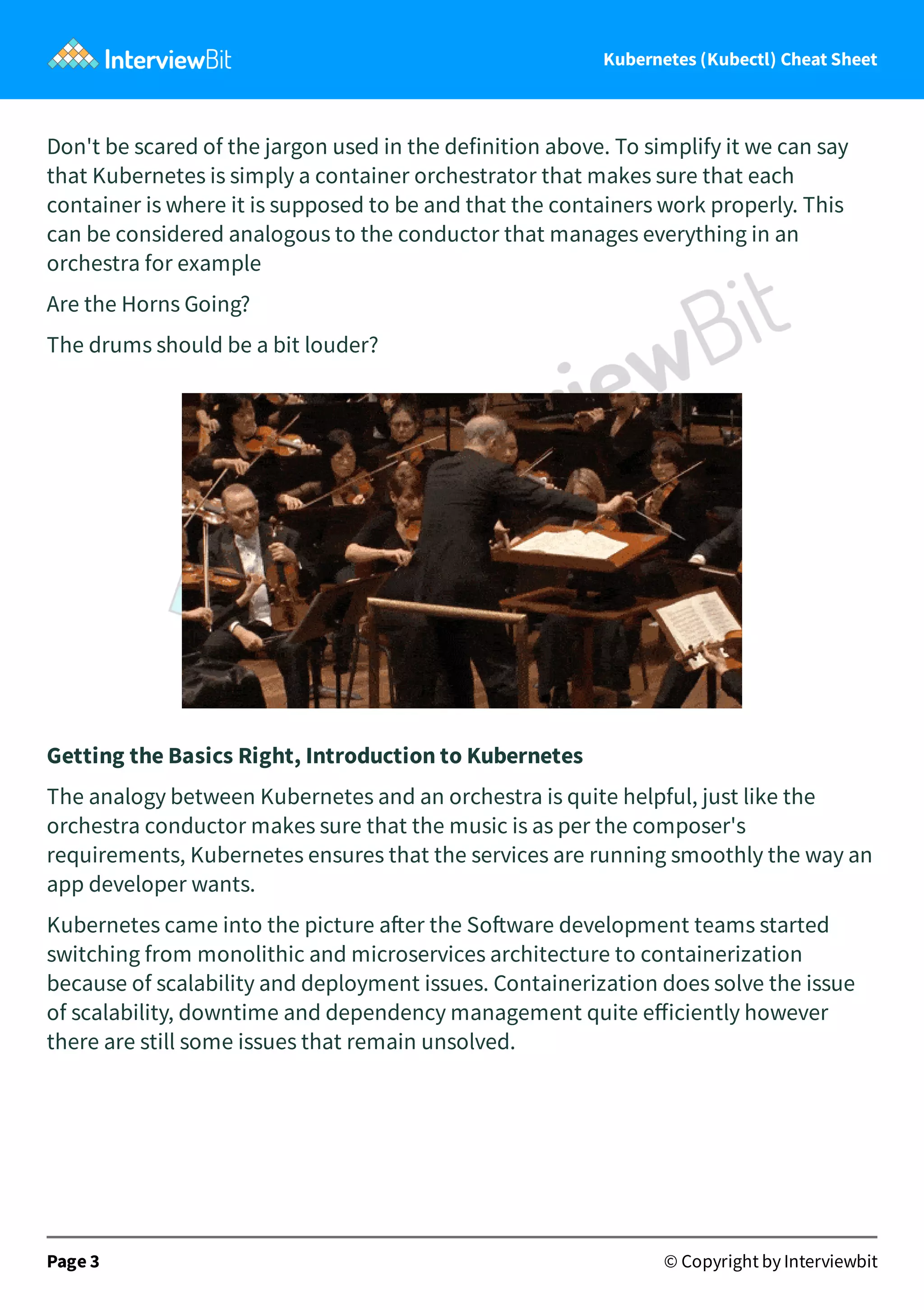
Don't be scared of the jargon used in the definition above. To simplify it we can say
that Kubernetes is simply a container orchestrator that makes sure that each
container is where it is supposed to be and that the containers work properly. This
can be considered analogous to the conductor that manages everything in an
orchestra for example
Are the Horns Going?
The drums should be a bit louder?
Getting the Basics Right, Introduction to Kubernetes
The analogy between Kubernetes and an orchestra is quite helpful, just like the
orchestra conductor makes sure that the music is as per the composer's
requirements, Kubernetes ensures that the services are running smoothly the way an
app developer wants.
Kubernetes came into the picture a er the So ware development teams started
switching from monolithic and microservices architecture to containerization
because of scalability and deployment issues. Containerization does solve the issue
of scalability, downtime and dependency management quite efficiently however
there are still some issues that remain unsolved.
Page 3 © Copyright by Interviewbit
Kubernetes (Kubectl) Cheat Sheet
Upgrading the container is quite easy, you can simply create a new version of the
container and deploy it in place of the old one, however, the problem is how to do
upgrades without downtime? how do the containers communicate with each other,
and how can the app developer debug issues?
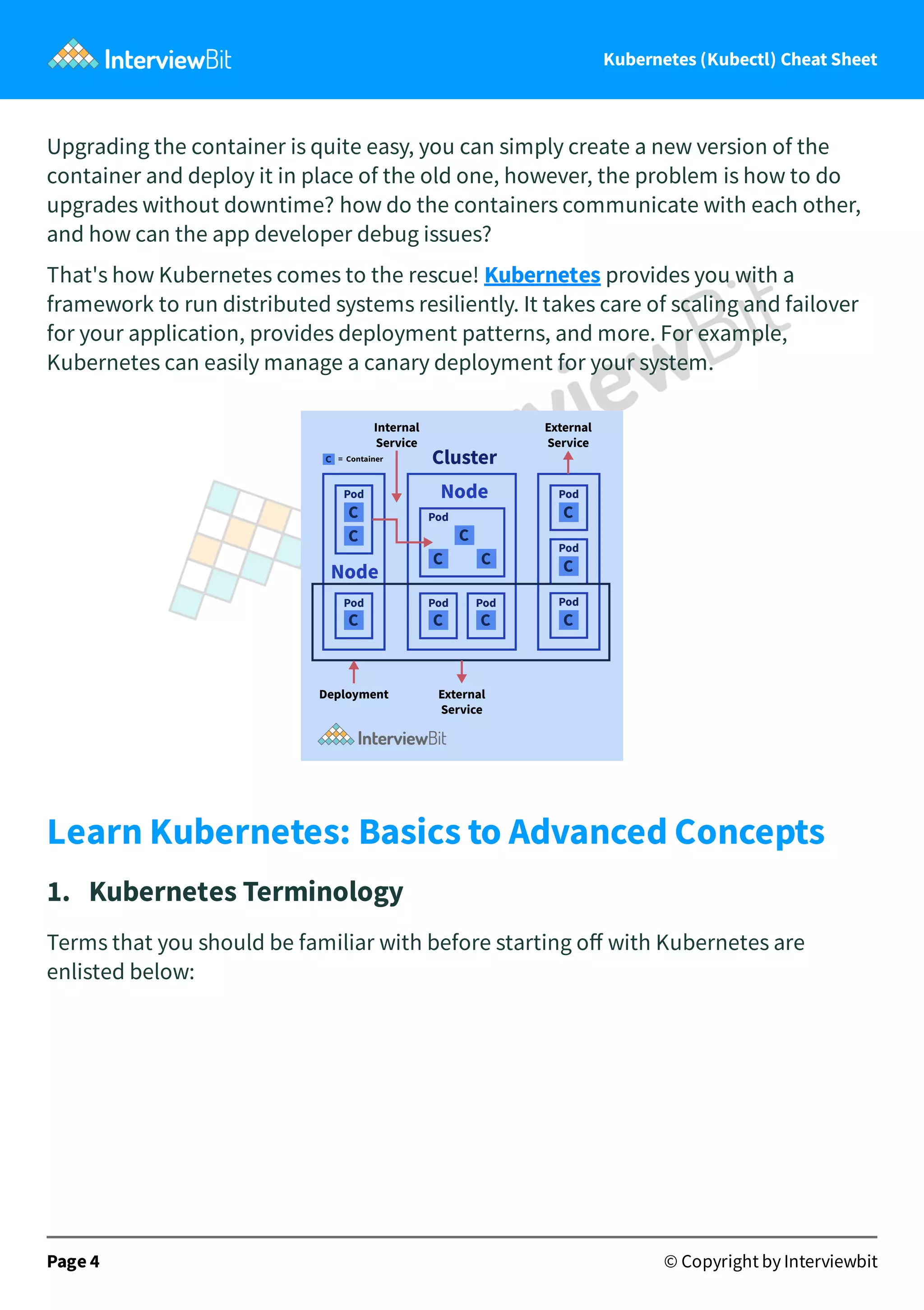
That's how Kubernetes comes to the rescue! Kubernetes provides you with a
framework to run distributed systems resiliently. It takes care of scaling and failover
for your application, provides deployment patterns, and more. For example,
Kubernetes can easily manage a canary deployment for your system.
Learn Kubernetes: Basics to Advanced Concepts
1. Kubernetes Terminology
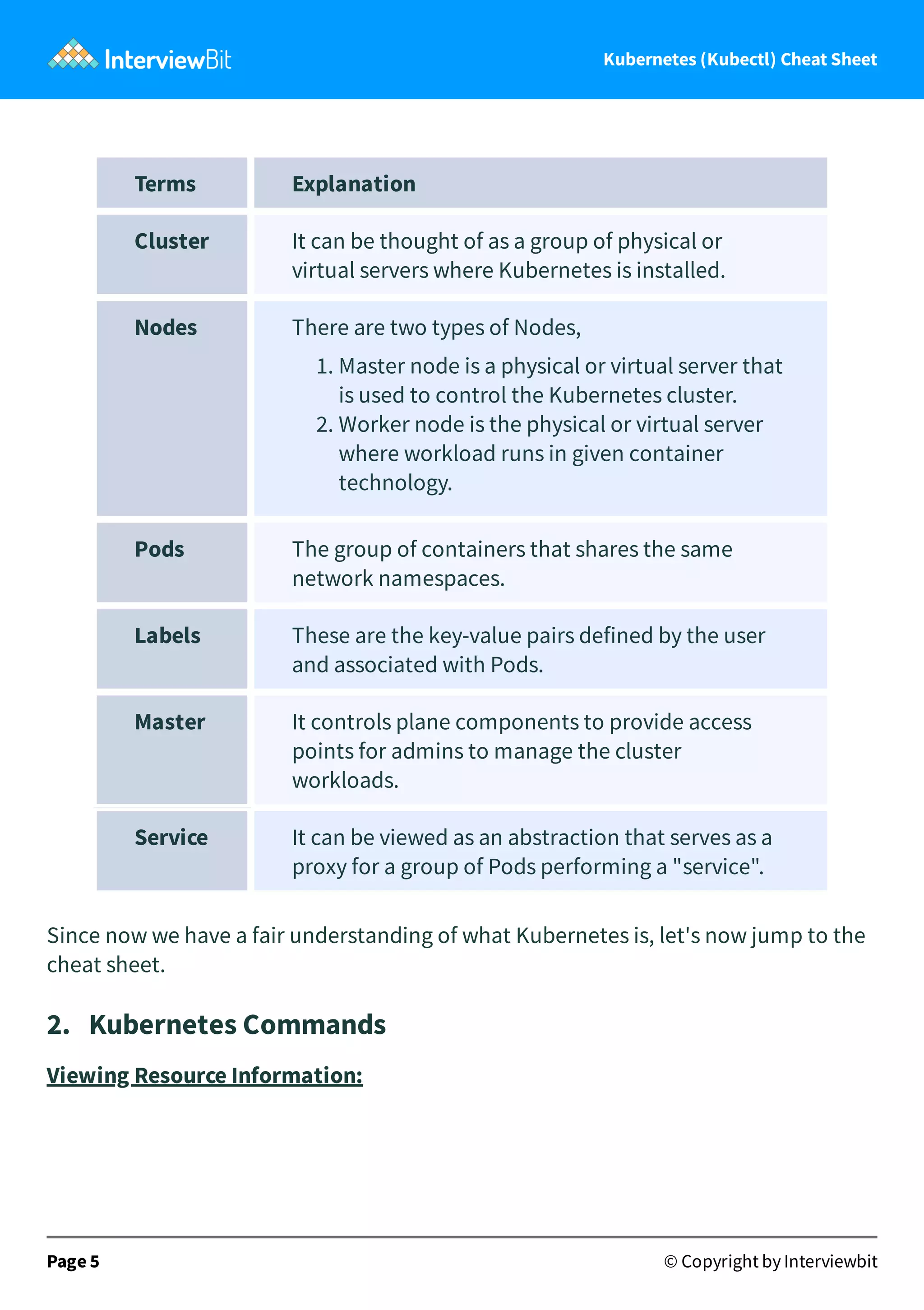
Terms that you should be familiar with before starting off with Kubernetes are
enlisted below:
Page 4 © Copyright by Interviewbit
Kubernetes (Kubectl) Cheat Sheet
Terms Explanation
Cluster It can be thought of as a group of physical or
virtual servers where Kubernetes is installed.
Nodes There are two types of Nodes,
1. Master node is a physical or virtual server that
is used to control the Kubernetes cluster.
2. Worker node is the physical or virtual server
where workload runs in given container
technology.
Pods The group of containers that shares the same
network namespaces.
Labels These are the key-value pairs defined by the user
and associated with Pods.
Master It controls plane components to provide access
points for admins to manage the cluster
workloads.
Service It can be viewed as an abstraction that serves as a
proxy for a group of Pods performing a "service".
Since now we have a fair understanding of what Kubernetes is, let's now jump to the
cheat sheet.
2. Kubernetes Commands
Viewing Resource Information:
Page 5 © Copyright by Interviewbit
Kubernetes (Kubectl) Cheat Sheet
1. Nodes:
ShortCode = no
A Node is a worker machine in Kubernetes and may be either a virtual or a physical
machine, depending on the cluster. Each Node is managed by the control plane. A
Node can have multiple pods, and the Kubernetes control plane automatically
handles scheduling the pods across the Nodes in the cluster.
Page 6 © Copyright by Interviewbit
Kubernetes (Kubectl) Cheat Sheet
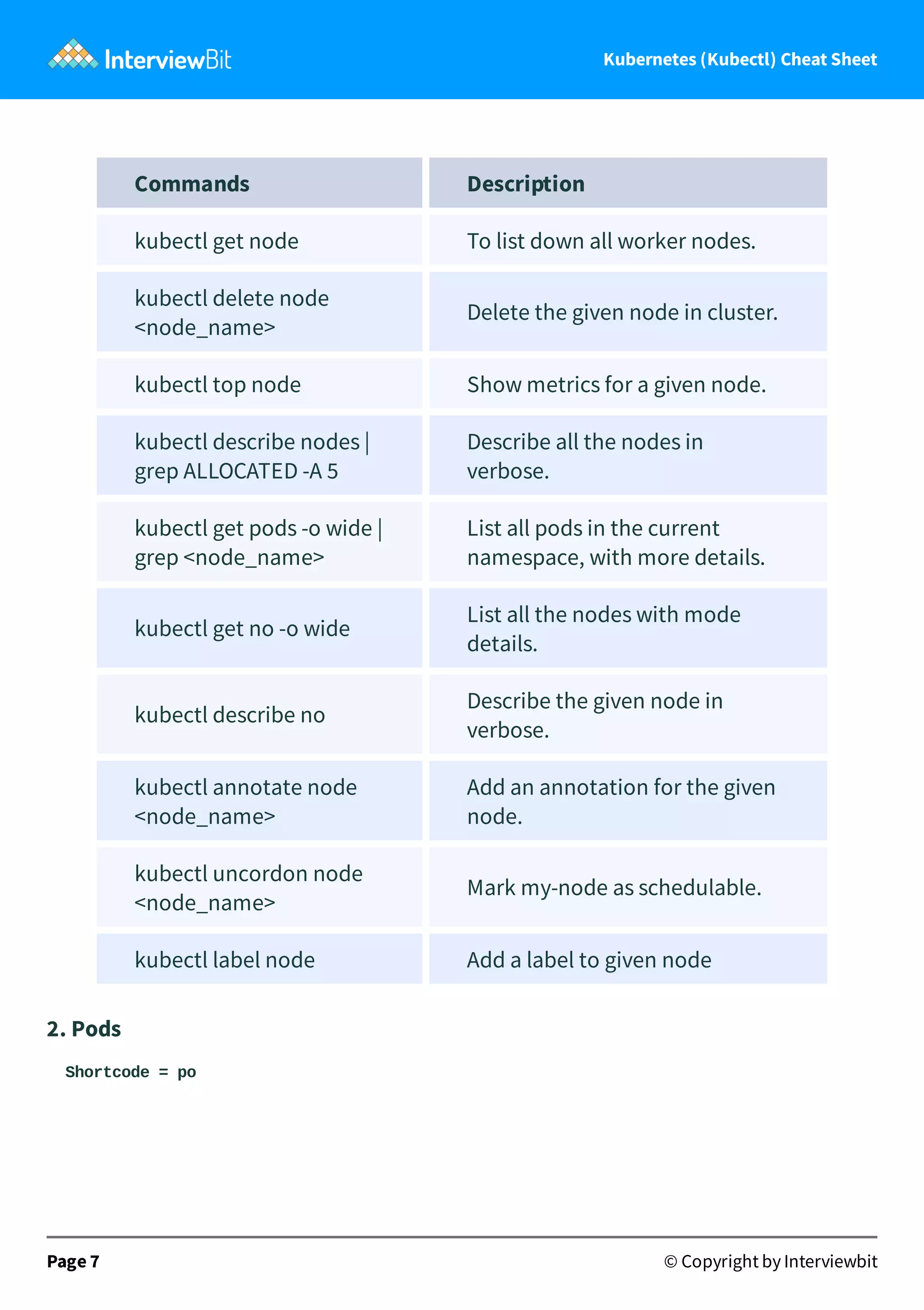
Commands Description
kubectl get node To list down all worker nodes.
kubectl delete node
<node_name>
Delete the given node in cluster.
kubectl top node Show metrics for a given node.
kubectl describe nodes |
grep ALLOCATED -A 5
Describe all the nodes in
verbose.
kubectl get pods -o wide |
grep <node_name>
List all pods in the current
namespace, with more details.
kubectl get no -o wide
List all the nodes with mode
details.
kubectl describe no
Describe the given node in
verbose.
kubectl annotate node
<node_name>
Add an annotation for the given
node.
kubectl uncordon node
<node_name>
Mark my-node as schedulable.
kubectl label node Add a label to given node
2. Pods
Shortcode = po
Page 7 © Copyright by Interviewbit
Kubernetes (Kubectl) Cheat Sheet
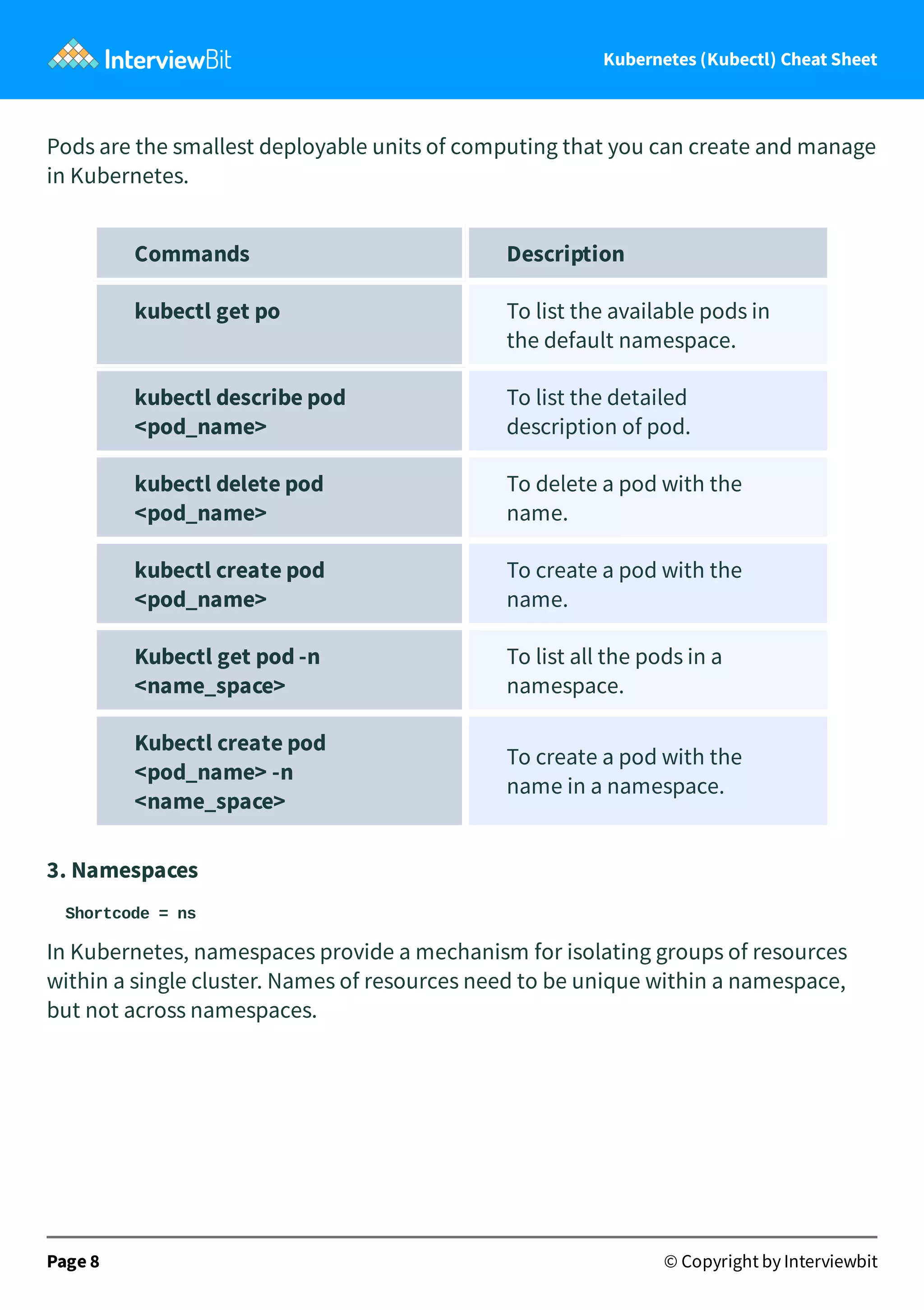
Pods are the smallest deployable units of computing that you can create and manage
in Kubernetes.
Commands Description
kubectl get po To list the available pods in
the default namespace.
kubectl describe pod
<pod_name>
To list the detailed
description of pod.
kubectl delete pod
<pod_name>
To delete a pod with the
name.
kubectl create pod
<pod_name>
To create a pod with the
name.
Kubectl get pod -n
<name_space>
To list all the pods in a
namespace.
Kubectl create pod
<pod_name> -n
<name_space>
To create a pod with the
name in a namespace.
3. Namespaces
Shortcode = ns
In Kubernetes, namespaces provide a mechanism for isolating groups of resources
within a single cluster. Names of resources need to be unique within a namespace,
but not across namespaces.
Page 8 © Copyright by Interviewbit
Kubernetes (Kubectl) Cheat Sheet
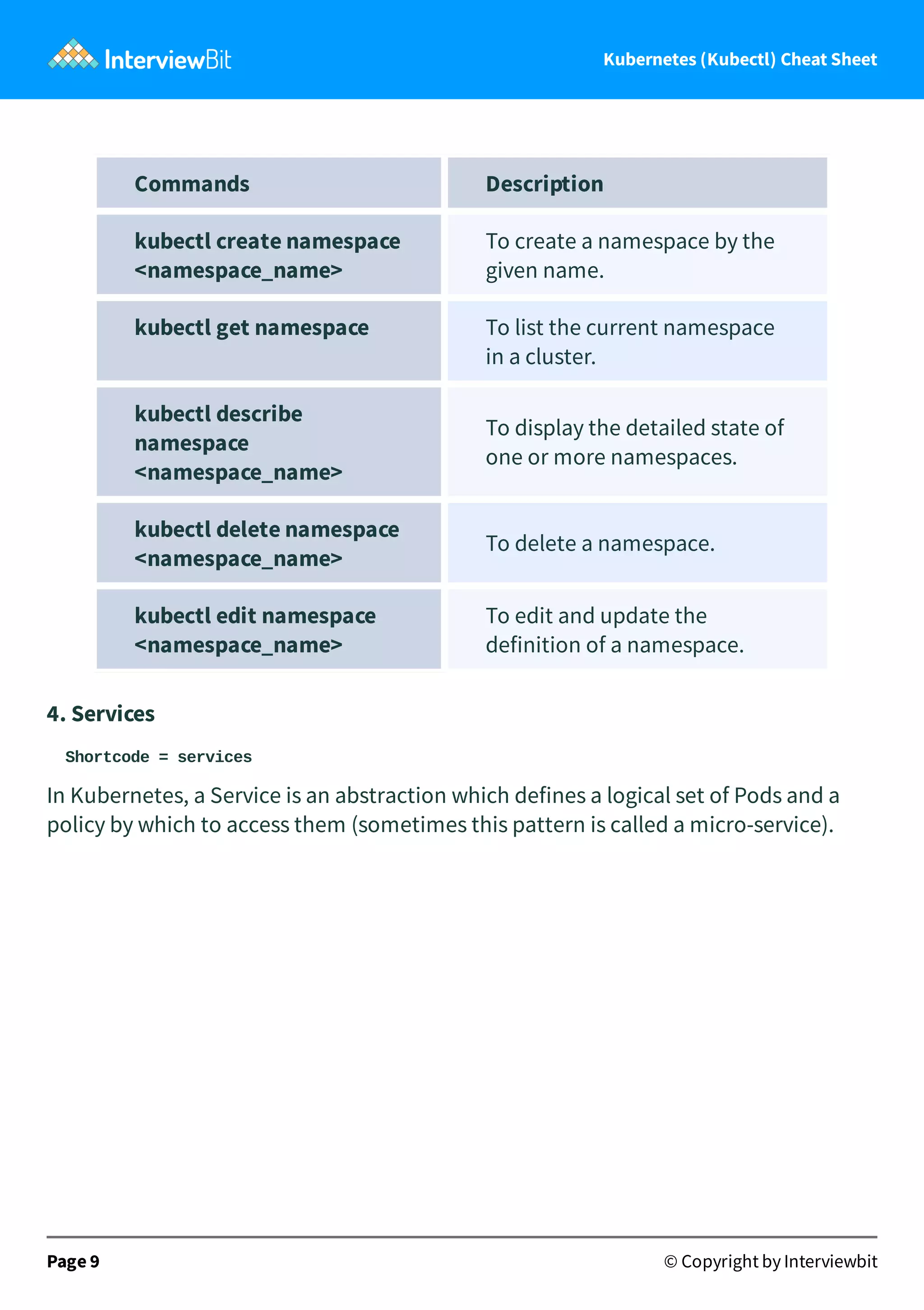
Commands Description
kubectl create namespace
<namespace_name>
To create a namespace by the
given name.
kubectl get namespace To list the current namespace
in a cluster.
kubectl describe
namespace
<namespace_name>
To display the detailed state of
one or more namespaces.
kubectl delete namespace
<namespace_name>
To delete a namespace.
kubectl edit namespace
<namespace_name>
To edit and update the
definition of a namespace.
4. Services
Shortcode = services
In Kubernetes, a Service is an abstraction which defines a logical set of Pods and a
policy by which to access them (sometimes this pattern is called a micro-service).
Page 9 © Copyright by Interviewbit
Kubernetes (Kubectl) Cheat Sheet
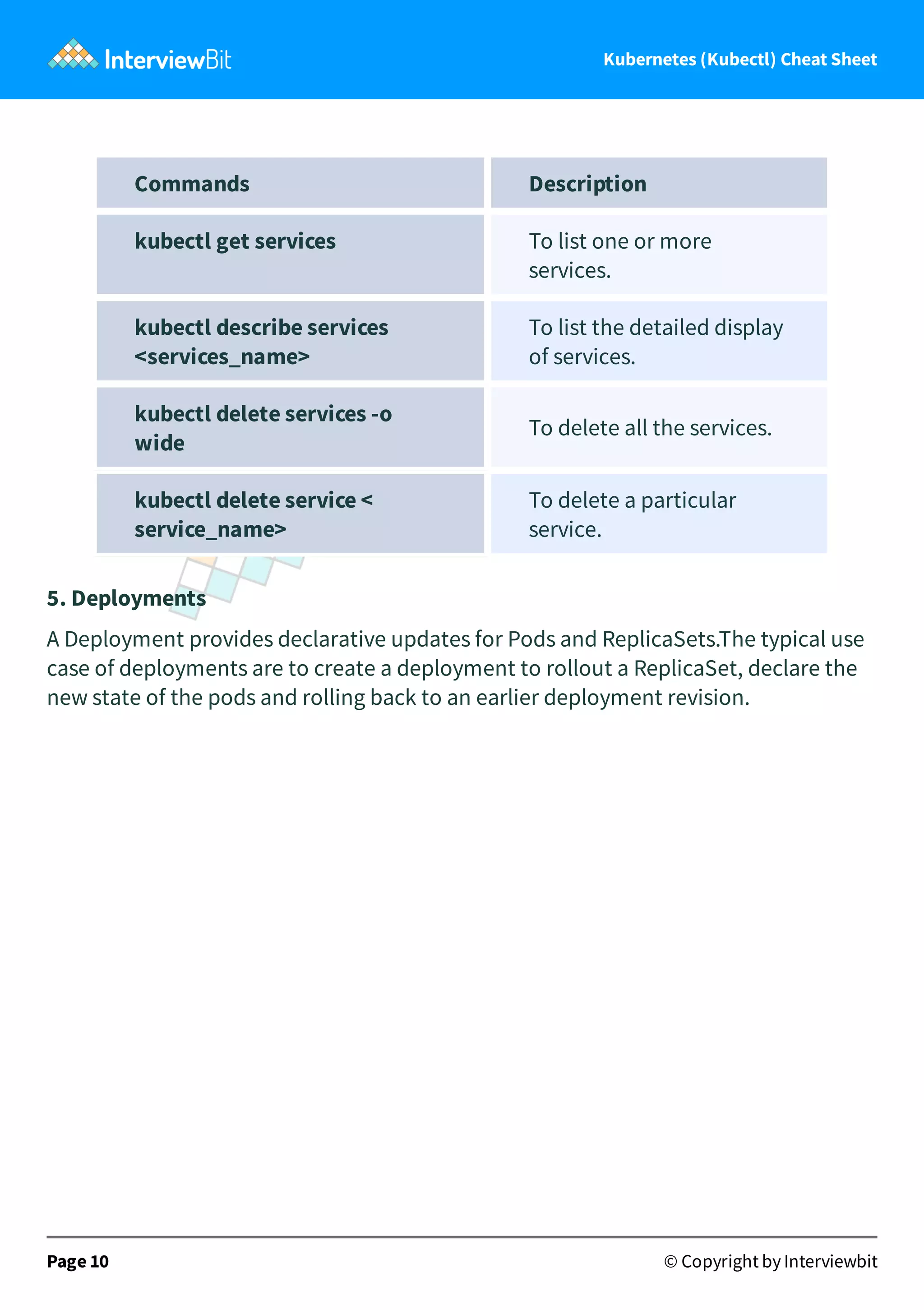
Commands Description
kubectl get services To list one or more
services.
kubectl describe services
<services_name>
To list the detailed display
of services.
kubectl delete services -o
wide
To delete all the services.
kubectl delete service <
service_name>
To delete a particular
service.
5. Deployments
A Deployment provides declarative updates for Pods and ReplicaSets.The typical use
case of deployments are to create a deployment to rollout a ReplicaSet, declare the
new state of the pods and rolling back to an earlier deployment revision.
Page 10 © Copyright by Interviewbit
Kubernetes (Kubectl) Cheat Sheet
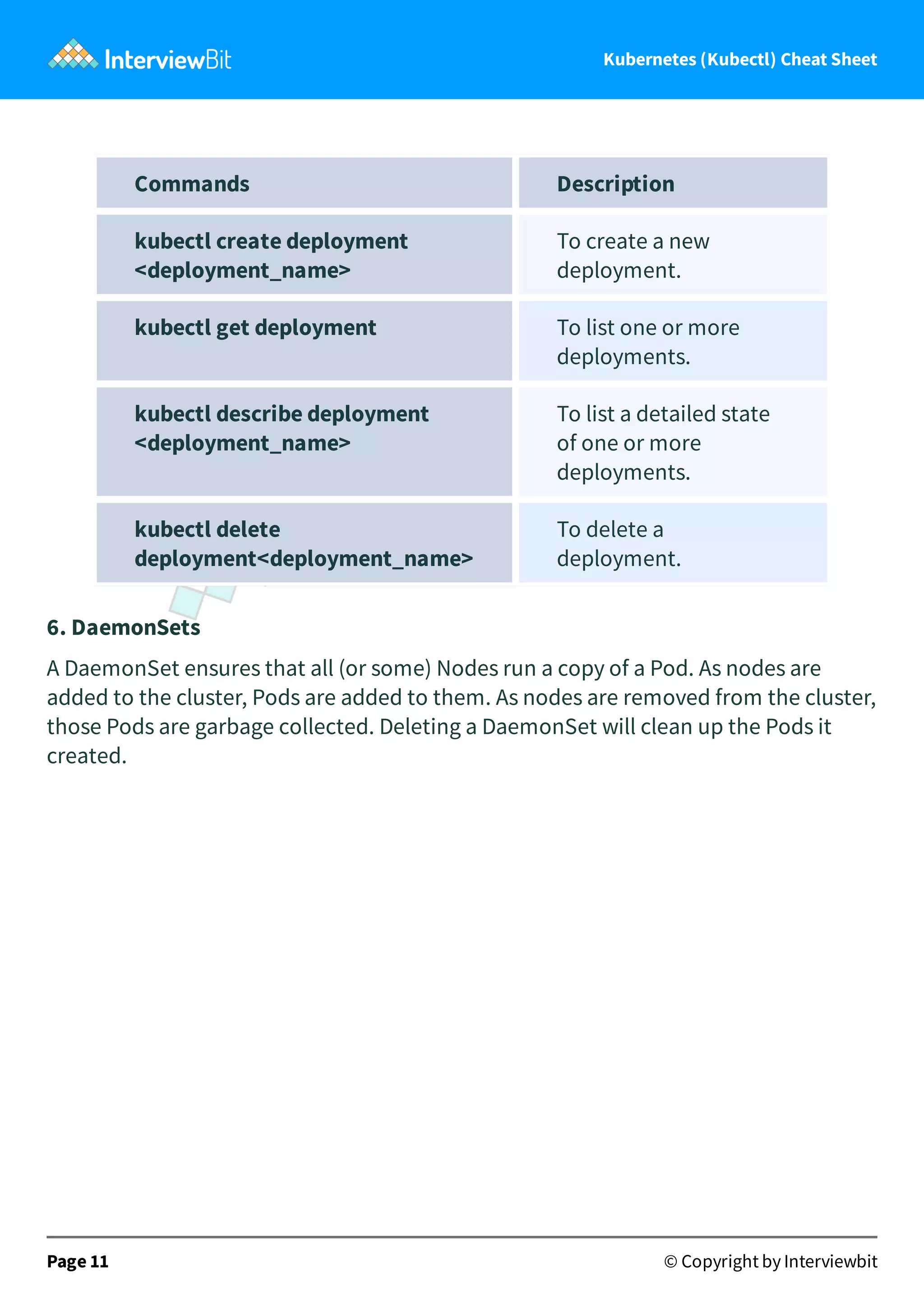
Commands Description
kubectl create deployment
<deployment_name>
To create a new
deployment.
kubectl get deployment To list one or more
deployments.
kubectl describe deployment
<deployment_name>
To list a detailed state
of one or more
deployments.
kubectl delete
deployment<deployment_name>
To delete a
deployment.
6. DaemonSets
A DaemonSet ensures that all (or some) Nodes run a copy of a Pod. As nodes are
added to the cluster, Pods are added to them. As nodes are removed from the cluster,
those Pods are garbage collected. Deleting a DaemonSet will clean up the Pods it
created.
Page 11 © Copyright by Interviewbit
Kubernetes (Kubectl) Cheat Sheet
Command Description
kubectl get ds To list out all the daemon sets.
kubectl get ds -all-
namespaces
To list out the daemon sets in a
namespace.
kubectl describe ds
[daemonset_name]
[namespace_name]
To list out the detailed
information for a daemon set
inside a namespace.
7. Events
Kubernetes events allow us to paint a performative picture of the clusters.
Commands Description
kubectl get events To list down the recent
events for all the resources in
the system.
kubectl get events --field-
selector
involvedObject.kind != Pod
To list down all the events
except the pod events.
kubectl get events --field-
selector type != Normal
To filter out normal events
from a list of events.
8. Logs
Page 12 © Copyright by Interviewbit
Kubernetes (Kubectl) Cheat Sheet
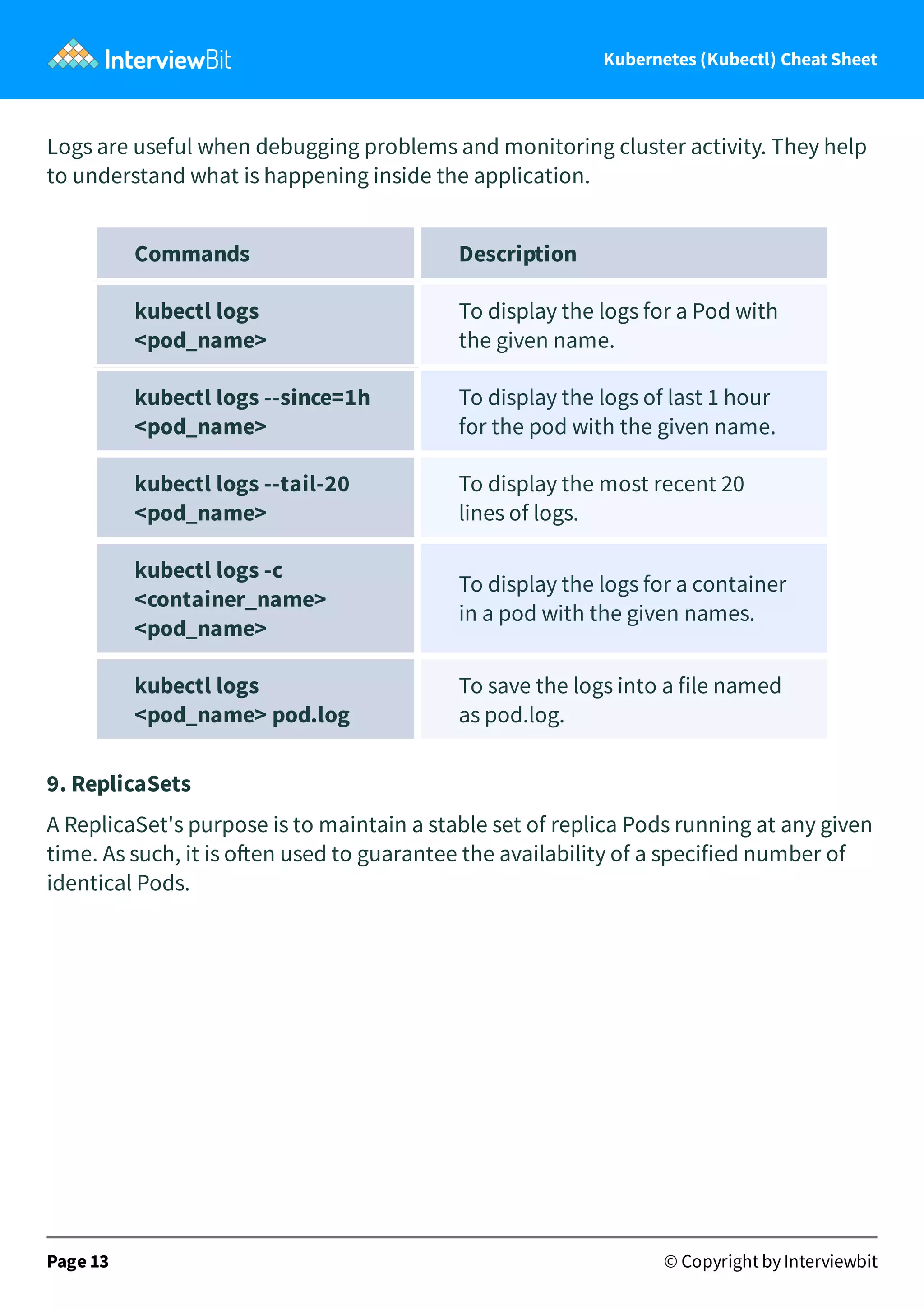
Logs are useful when debugging problems and monitoring cluster activity. They help
to understand what is happening inside the application.
Commands Description
kubectl logs
<pod_name>
To display the logs for a Pod with
the given name.
kubectl logs --since=1h
<pod_name>
To display the logs of last 1 hour
for the pod with the given name.
kubectl logs --tail-20
<pod_name>
To display the most recent 20
lines of logs.
kubectl logs -c
<container_name>
<pod_name>
To display the logs for a container
in a pod with the given names.
kubectl logs
<pod_name> pod.log
To save the logs into a file named
as pod.log.
9. ReplicaSets
A ReplicaSet's purpose is to maintain a stable set of replica Pods running at any given
time. As such, it is o en used to guarantee the availability of a specified number of
identical Pods.
Page 13 © Copyright by Interviewbit
Kubernetes (Kubectl) Cheat Sheet
Commands Description
kubectl get replicasets To List down the ReplicaSets.
kubectl describe
replicasets
<replicaset_name>
To list down the detailed state
of one or more ReplicaSets.
kubectl scale --replace=
[x]
To scale a replica set.
10. Service Accounts
A service account provides an identity for processes that run in a Pod.
Commands Description
kubectl get
serviceaccounts
To List Service Accounts.
kubectl describe
serviceaccounts
To list the detailed state of one or
more service accounts.
kubectl replace
serviceaccounts
To replace a service account.
kubectl delete
serviceaccounts
<name>
To delete a service account.
3. Changing Resource Attributes
Page 14 © Copyright by Interviewbit
Kubernetes (Kubectl) Cheat Sheet
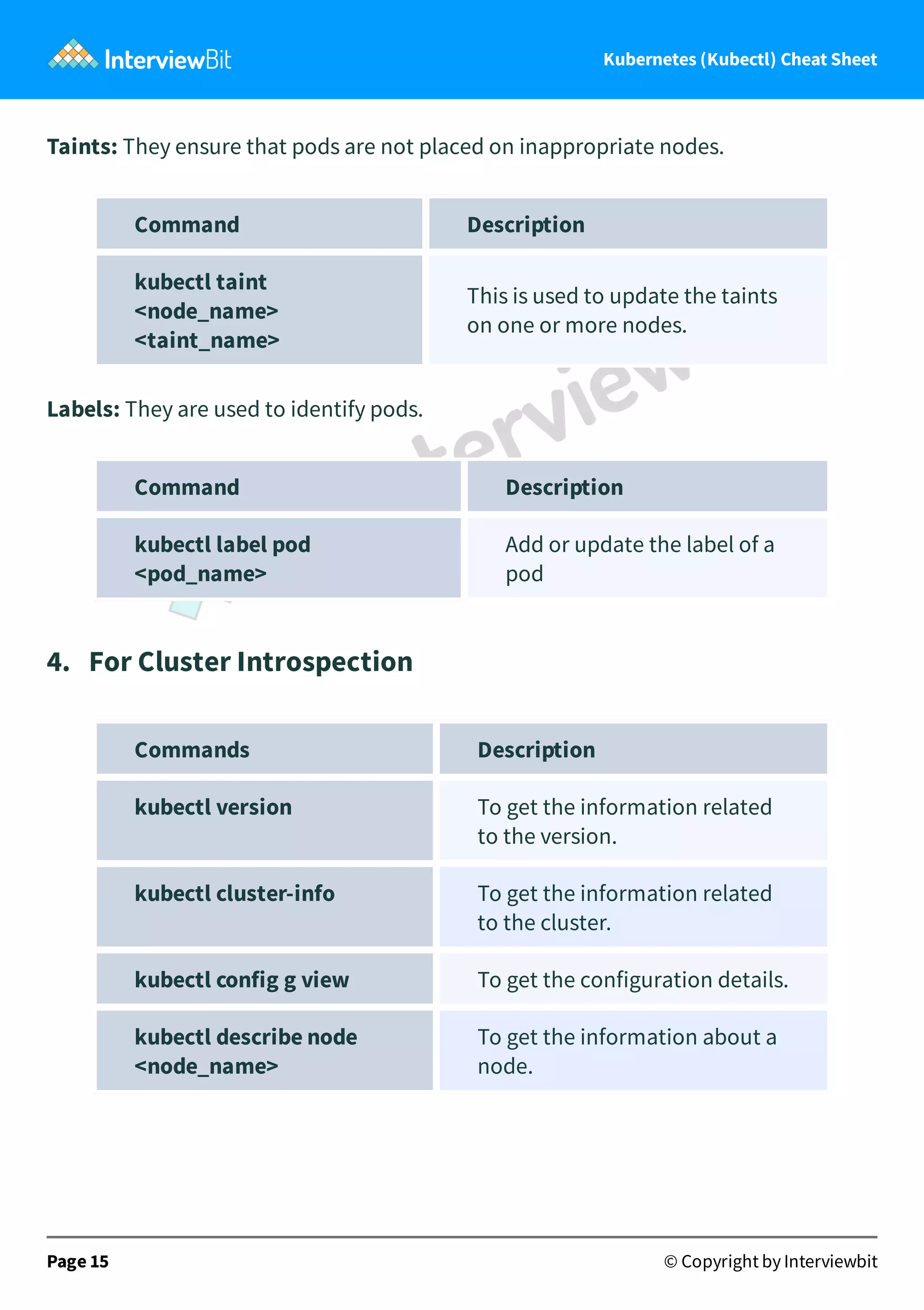
Taints: They ensure that pods are not placed on inappropriate nodes.
Command Description
kubectl taint
<node_name>
<taint_name>
This is used to update the taints
on one or more nodes.
Labels: They are used to identify pods.
Command Description
kubectl label pod
<pod_name>
Add or update the label of a
pod
4. For Cluster Introspection
Commands Description
kubectl version To get the information related
to the version.
kubectl cluster-info To get the information related
to the cluster.
kubectl config g view To get the configuration details.
kubectl describe node
<node_name>
To get the information about a
node.
Page 15 © Copyright by Interviewbit
Kubernetes (Kubectl) Cheat Sheet
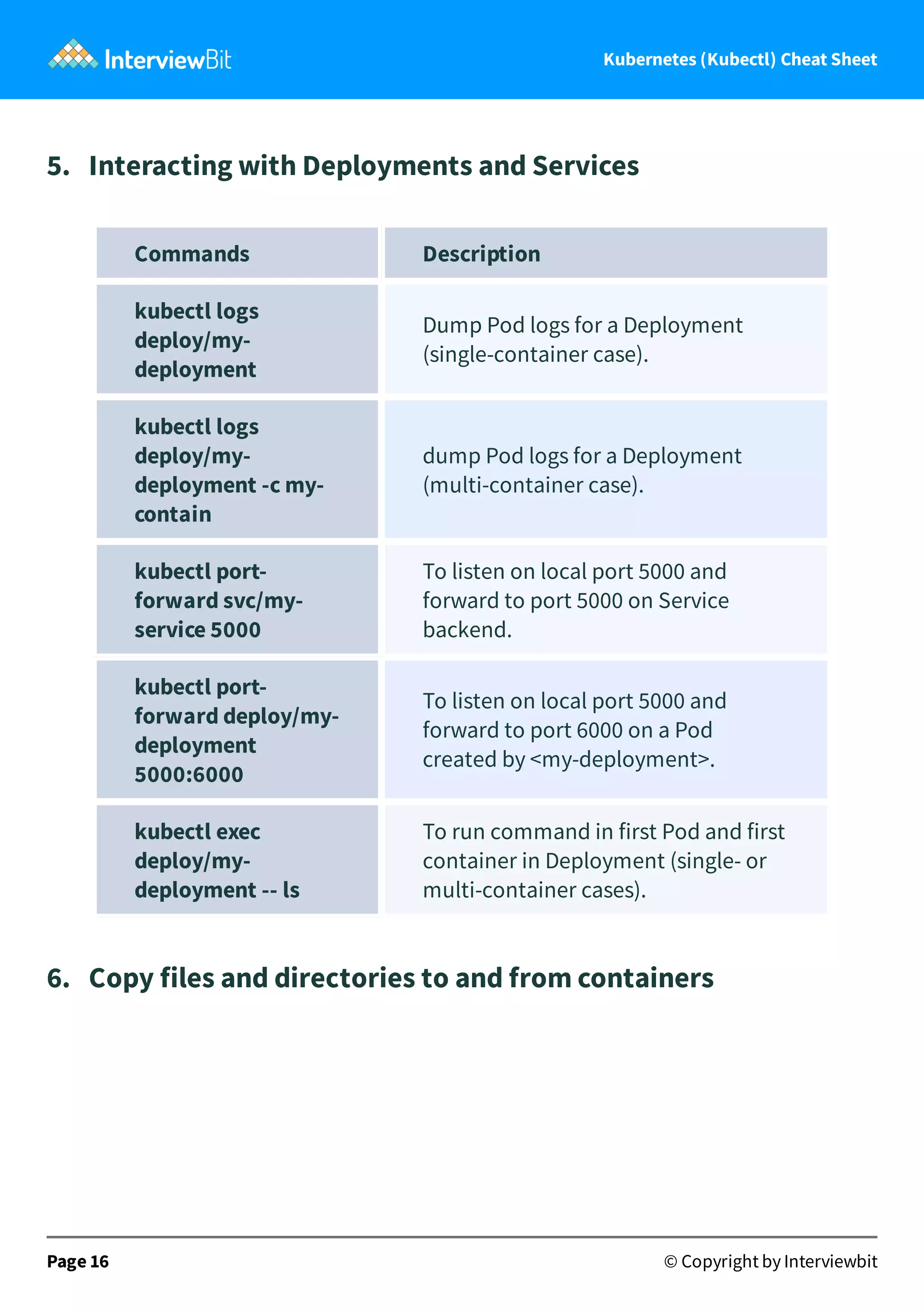
5. Interacting with Deployments and Services
Commands Description
kubectl logs
deploy/my-
deployment
Dump Pod logs for a Deployment
(single-container case).
kubectl logs
deploy/my-
deployment -c my-
contain
dump Pod logs for a Deployment
(multi-container case).
kubectl port-
forward svc/my-
service 5000
To listen on local port 5000 and
forward to port 5000 on Service
backend.
kubectl port-
forward deploy/my-
deployment
5000:6000
To listen on local port 5000 and
forward to port 6000 on a Pod
created by <my-deployment>.
kubectl exec
deploy/my-
deployment -- ls
To run command in first Pod and first
container in Deployment (single- or
multi-container cases).
6. Copy files and directories to and from containers
Page 16 © Copyright by Interviewbit
Kubernetes (Kubectl) Cheat Sheet
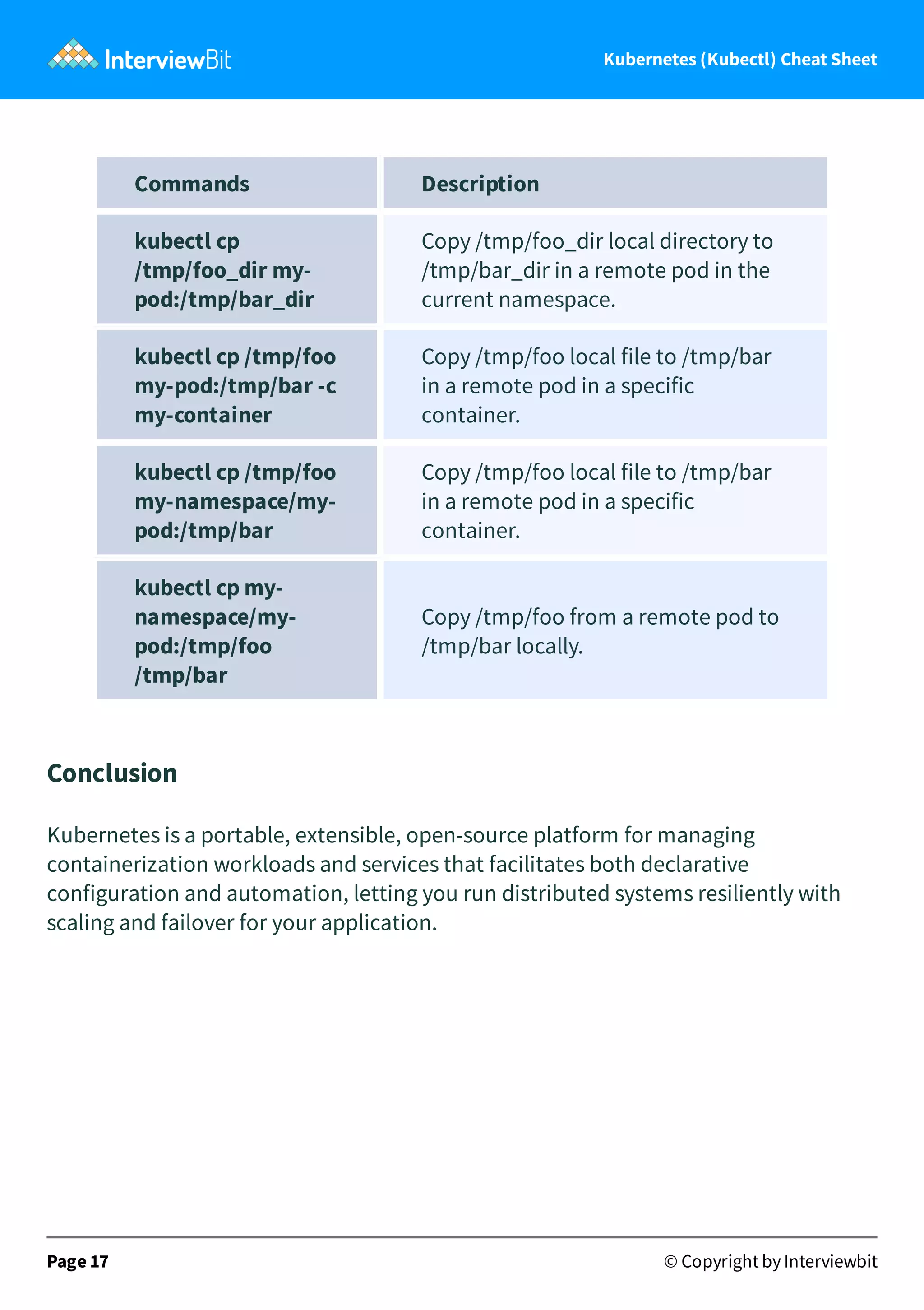
Commands Description
kubectl cp
/tmp/foo_dir my-
pod:/tmp/bar_dir
Copy /tmp/foo_dir local directory to
/tmp/bar_dir in a remote pod in the
current namespace.
kubectl cp /tmp/foo
my-pod:/tmp/bar -c
my-container
Copy /tmp/foo local file to /tmp/bar
in a remote pod in a specific
container.
kubectl cp /tmp/foo
my-namespace/my-
pod:/tmp/bar
Copy /tmp/foo local file to /tmp/bar
in a remote pod in a specific
container.
kubectl cp my-
namespace/my-
pod:/tmp/foo
/tmp/bar
Copy /tmp/foo from a remote pod to
/tmp/bar locally.
Conclusion
Kubernetes is a portable, extensible, open-source platform for managing
containerization workloads and services that facilitates both declarative
configuration and automation, letting you run distributed systems resiliently with
scaling and failover for your application.
Page 17 © Copyright by Interviewbit
Kubernetes (Kubectl) Cheat Sheet
Knowing Kubernetes is a must-have skill whether you are a developer, a tester or a
DevOps engineer, I hope this article has helped you out. If you are preparing for your
interviews as a fresher or if you are an experienced person looking to switch jobs,
then InterviewBit is the right place to start. It has several tracks including
Programming, System Design, Puzzles and Scripting along with company-specific
preparation guides and fast track courses.
Useful Resources
Technical Interview Questions
Coding Interview Questions
InterviewBit Blog
Mock Interview
Frequently Asked Questions
7. How can containers within a pod communicate with each
other?
In Kubernetes, each Pod has an IP address. A Pod can communicate with another Pod
by directly addressing its IP address, but the recommended way is to use Services. A
Service is a set of Pods, which can be reached by a single, fixed DNS name or IP
address.
8. If a node is tainted is there a way to still schedule the pods to
that node?
By default, The pods don't get scheduled when a node is tainted, however, you can
start applying tolerations to the pod spec using the command
kubectl taint nodes node1 key=value:NoSchedule
9. What’s the init container and when it can be used?
Page 18 © Copyright by Interviewbit
Kubernetes (Kubectl) Cheat Sheet
The init containers will set a stage for you before running the actual POD.
Wait for some time before starting the app Container with a command like sleep
60.
Clone a git repository into a volume.
10. What is the role of Load Balance in Kubernetes?
Load balancing is a way to distribute the incoming traffic into multiple backend
servers, which is useful to ensure the application available to the users.
Page 19 © Copyright by Interviewbit
C Interview Questions Php Interview Questions C Sharp Interview Questions
Web Api Interview
Questions
Hibernate Interview
Questions
Node Js Interview Questions
Cpp Interview Questions Oops Interview Questions Devops Interview Questions
Machine Learning Interview
Questions
Docker Interview Questions Mysql Interview Questions
Css Interview Questions Laravel Interview Questions Asp Net Interview Questions
Django Interview Questions Dot Net Interview Questions Kubernetes Interview
Questions
Operating System Interview
Questions
React Native Interview
Questions
Aws Interview Questions
Git Interview Questions Java 8 Interview Questions Mongodb Interview
Questions
Dbms Interview Questions Spring Boot Interview
Questions
Power Bi Interview Questions
Pl Sql Interview Questions Tableau Interview
Questions
Linux Interview Questions
Ansible Interview Questions Java Interview Questions Jenkins Interview Questions
Page 20 © Copyright by Interviewbit
Links to More Interview
Questions

Kubernetes cheetsheet.pdf

  • 1.
    Kubernetes (Kubectl) Cheat Sheet Toview the live version of the page, click here. © Copyright by Interviewbit
  • 2.
    Learn Kubernetes: Basicsto Advanced Concepts 1. Kubernetes Terminology 2. Kubernetes Commands 3. Changing Resource Attributes 4. For Cluster Introspection 5. Interacting with Deployments and Services 6. Copy files and directories to and from containers Frequently Asked Questions 7. How can containers within a pod communicate with each other? 8. If a node is tainted is there a way to still schedule the pods to that node? 9. What’s the init container and when it can be used? 10. What is the role of Load Balance in Kubernetes? Page 1 © Copyright by Interviewbit Contents
  • 3.
    Introduction If you area student who is just starting off with their journey with DevOps or you are a professional who wishes to switch to DevOps or you are a learner looking to enhance their knowledge about Kubernetes, then you are at the right place. Kubernetes aka K8s is one of the buzzing technologies now, before moving onto the cheat sheet it is essential to brush up on your basics by understanding what Kubernetes is, what are its uses and how does it help? Let's start with the formal definition first, Kubernetes is a portable, extensible, open- source platform for managing containerization workloads and services that facilitates both declarative configuration and automation, letting you run distributed systems resiliently with scaling and failover for your application. Page 2 © Copyright by Interviewbit Let's get Started
  • 4.
    Kubernetes (Kubectl) CheatSheet Don't be scared of the jargon used in the definition above. To simplify it we can say that Kubernetes is simply a container orchestrator that makes sure that each container is where it is supposed to be and that the containers work properly. This can be considered analogous to the conductor that manages everything in an orchestra for example Are the Horns Going? The drums should be a bit louder? Getting the Basics Right, Introduction to Kubernetes The analogy between Kubernetes and an orchestra is quite helpful, just like the orchestra conductor makes sure that the music is as per the composer's requirements, Kubernetes ensures that the services are running smoothly the way an app developer wants. Kubernetes came into the picture a er the So ware development teams started switching from monolithic and microservices architecture to containerization because of scalability and deployment issues. Containerization does solve the issue of scalability, downtime and dependency management quite efficiently however there are still some issues that remain unsolved. Page 3 © Copyright by Interviewbit
  • 5.
    Kubernetes (Kubectl) CheatSheet Upgrading the container is quite easy, you can simply create a new version of the container and deploy it in place of the old one, however, the problem is how to do upgrades without downtime? how do the containers communicate with each other, and how can the app developer debug issues? That's how Kubernetes comes to the rescue! Kubernetes provides you with a framework to run distributed systems resiliently. It takes care of scaling and failover for your application, provides deployment patterns, and more. For example, Kubernetes can easily manage a canary deployment for your system. Learn Kubernetes: Basics to Advanced Concepts 1. Kubernetes Terminology Terms that you should be familiar with before starting off with Kubernetes are enlisted below: Page 4 © Copyright by Interviewbit
  • 6.
    Kubernetes (Kubectl) CheatSheet Terms Explanation Cluster It can be thought of as a group of physical or virtual servers where Kubernetes is installed. Nodes There are two types of Nodes, 1. Master node is a physical or virtual server that is used to control the Kubernetes cluster. 2. Worker node is the physical or virtual server where workload runs in given container technology. Pods The group of containers that shares the same network namespaces. Labels These are the key-value pairs defined by the user and associated with Pods. Master It controls plane components to provide access points for admins to manage the cluster workloads. Service It can be viewed as an abstraction that serves as a proxy for a group of Pods performing a "service". Since now we have a fair understanding of what Kubernetes is, let's now jump to the cheat sheet. 2. Kubernetes Commands Viewing Resource Information: Page 5 © Copyright by Interviewbit
  • 7.
    Kubernetes (Kubectl) CheatSheet 1. Nodes: ShortCode = no A Node is a worker machine in Kubernetes and may be either a virtual or a physical machine, depending on the cluster. Each Node is managed by the control plane. A Node can have multiple pods, and the Kubernetes control plane automatically handles scheduling the pods across the Nodes in the cluster. Page 6 © Copyright by Interviewbit
  • 8.
    Kubernetes (Kubectl) CheatSheet Commands Description kubectl get node To list down all worker nodes. kubectl delete node <node_name> Delete the given node in cluster. kubectl top node Show metrics for a given node. kubectl describe nodes | grep ALLOCATED -A 5 Describe all the nodes in verbose. kubectl get pods -o wide | grep <node_name> List all pods in the current namespace, with more details. kubectl get no -o wide List all the nodes with mode details. kubectl describe no Describe the given node in verbose. kubectl annotate node <node_name> Add an annotation for the given node. kubectl uncordon node <node_name> Mark my-node as schedulable. kubectl label node Add a label to given node 2. Pods Shortcode = po Page 7 © Copyright by Interviewbit
  • 9.
    Kubernetes (Kubectl) CheatSheet Pods are the smallest deployable units of computing that you can create and manage in Kubernetes. Commands Description kubectl get po To list the available pods in the default namespace. kubectl describe pod <pod_name> To list the detailed description of pod. kubectl delete pod <pod_name> To delete a pod with the name. kubectl create pod <pod_name> To create a pod with the name. Kubectl get pod -n <name_space> To list all the pods in a namespace. Kubectl create pod <pod_name> -n <name_space> To create a pod with the name in a namespace. 3. Namespaces Shortcode = ns In Kubernetes, namespaces provide a mechanism for isolating groups of resources within a single cluster. Names of resources need to be unique within a namespace, but not across namespaces. Page 8 © Copyright by Interviewbit
  • 10.
    Kubernetes (Kubectl) CheatSheet Commands Description kubectl create namespace <namespace_name> To create a namespace by the given name. kubectl get namespace To list the current namespace in a cluster. kubectl describe namespace <namespace_name> To display the detailed state of one or more namespaces. kubectl delete namespace <namespace_name> To delete a namespace. kubectl edit namespace <namespace_name> To edit and update the definition of a namespace. 4. Services Shortcode = services In Kubernetes, a Service is an abstraction which defines a logical set of Pods and a policy by which to access them (sometimes this pattern is called a micro-service). Page 9 © Copyright by Interviewbit
  • 11.
    Kubernetes (Kubectl) CheatSheet Commands Description kubectl get services To list one or more services. kubectl describe services <services_name> To list the detailed display of services. kubectl delete services -o wide To delete all the services. kubectl delete service < service_name> To delete a particular service. 5. Deployments A Deployment provides declarative updates for Pods and ReplicaSets.The typical use case of deployments are to create a deployment to rollout a ReplicaSet, declare the new state of the pods and rolling back to an earlier deployment revision. Page 10 © Copyright by Interviewbit
  • 12.
    Kubernetes (Kubectl) CheatSheet Commands Description kubectl create deployment <deployment_name> To create a new deployment. kubectl get deployment To list one or more deployments. kubectl describe deployment <deployment_name> To list a detailed state of one or more deployments. kubectl delete deployment<deployment_name> To delete a deployment. 6. DaemonSets A DaemonSet ensures that all (or some) Nodes run a copy of a Pod. As nodes are added to the cluster, Pods are added to them. As nodes are removed from the cluster, those Pods are garbage collected. Deleting a DaemonSet will clean up the Pods it created. Page 11 © Copyright by Interviewbit
  • 13.
    Kubernetes (Kubectl) CheatSheet Command Description kubectl get ds To list out all the daemon sets. kubectl get ds -all- namespaces To list out the daemon sets in a namespace. kubectl describe ds [daemonset_name] [namespace_name] To list out the detailed information for a daemon set inside a namespace. 7. Events Kubernetes events allow us to paint a performative picture of the clusters. Commands Description kubectl get events To list down the recent events for all the resources in the system. kubectl get events --field- selector involvedObject.kind != Pod To list down all the events except the pod events. kubectl get events --field- selector type != Normal To filter out normal events from a list of events. 8. Logs Page 12 © Copyright by Interviewbit
  • 14.
    Kubernetes (Kubectl) CheatSheet Logs are useful when debugging problems and monitoring cluster activity. They help to understand what is happening inside the application. Commands Description kubectl logs <pod_name> To display the logs for a Pod with the given name. kubectl logs --since=1h <pod_name> To display the logs of last 1 hour for the pod with the given name. kubectl logs --tail-20 <pod_name> To display the most recent 20 lines of logs. kubectl logs -c <container_name> <pod_name> To display the logs for a container in a pod with the given names. kubectl logs <pod_name> pod.log To save the logs into a file named as pod.log. 9. ReplicaSets A ReplicaSet's purpose is to maintain a stable set of replica Pods running at any given time. As such, it is o en used to guarantee the availability of a specified number of identical Pods. Page 13 © Copyright by Interviewbit
  • 15.
    Kubernetes (Kubectl) CheatSheet Commands Description kubectl get replicasets To List down the ReplicaSets. kubectl describe replicasets <replicaset_name> To list down the detailed state of one or more ReplicaSets. kubectl scale --replace= [x] To scale a replica set. 10. Service Accounts A service account provides an identity for processes that run in a Pod. Commands Description kubectl get serviceaccounts To List Service Accounts. kubectl describe serviceaccounts To list the detailed state of one or more service accounts. kubectl replace serviceaccounts To replace a service account. kubectl delete serviceaccounts <name> To delete a service account. 3. Changing Resource Attributes Page 14 © Copyright by Interviewbit
  • 16.
    Kubernetes (Kubectl) CheatSheet Taints: They ensure that pods are not placed on inappropriate nodes. Command Description kubectl taint <node_name> <taint_name> This is used to update the taints on one or more nodes. Labels: They are used to identify pods. Command Description kubectl label pod <pod_name> Add or update the label of a pod 4. For Cluster Introspection Commands Description kubectl version To get the information related to the version. kubectl cluster-info To get the information related to the cluster. kubectl config g view To get the configuration details. kubectl describe node <node_name> To get the information about a node. Page 15 © Copyright by Interviewbit
  • 17.
    Kubernetes (Kubectl) CheatSheet 5. Interacting with Deployments and Services Commands Description kubectl logs deploy/my- deployment Dump Pod logs for a Deployment (single-container case). kubectl logs deploy/my- deployment -c my- contain dump Pod logs for a Deployment (multi-container case). kubectl port- forward svc/my- service 5000 To listen on local port 5000 and forward to port 5000 on Service backend. kubectl port- forward deploy/my- deployment 5000:6000 To listen on local port 5000 and forward to port 6000 on a Pod created by <my-deployment>. kubectl exec deploy/my- deployment -- ls To run command in first Pod and first container in Deployment (single- or multi-container cases). 6. Copy files and directories to and from containers Page 16 © Copyright by Interviewbit
  • 18.
    Kubernetes (Kubectl) CheatSheet Commands Description kubectl cp /tmp/foo_dir my- pod:/tmp/bar_dir Copy /tmp/foo_dir local directory to /tmp/bar_dir in a remote pod in the current namespace. kubectl cp /tmp/foo my-pod:/tmp/bar -c my-container Copy /tmp/foo local file to /tmp/bar in a remote pod in a specific container. kubectl cp /tmp/foo my-namespace/my- pod:/tmp/bar Copy /tmp/foo local file to /tmp/bar in a remote pod in a specific container. kubectl cp my- namespace/my- pod:/tmp/foo /tmp/bar Copy /tmp/foo from a remote pod to /tmp/bar locally. Conclusion Kubernetes is a portable, extensible, open-source platform for managing containerization workloads and services that facilitates both declarative configuration and automation, letting you run distributed systems resiliently with scaling and failover for your application. Page 17 © Copyright by Interviewbit
  • 19.
    Kubernetes (Kubectl) CheatSheet Knowing Kubernetes is a must-have skill whether you are a developer, a tester or a DevOps engineer, I hope this article has helped you out. If you are preparing for your interviews as a fresher or if you are an experienced person looking to switch jobs, then InterviewBit is the right place to start. It has several tracks including Programming, System Design, Puzzles and Scripting along with company-specific preparation guides and fast track courses. Useful Resources Technical Interview Questions Coding Interview Questions InterviewBit Blog Mock Interview Frequently Asked Questions 7. How can containers within a pod communicate with each other? In Kubernetes, each Pod has an IP address. A Pod can communicate with another Pod by directly addressing its IP address, but the recommended way is to use Services. A Service is a set of Pods, which can be reached by a single, fixed DNS name or IP address. 8. If a node is tainted is there a way to still schedule the pods to that node? By default, The pods don't get scheduled when a node is tainted, however, you can start applying tolerations to the pod spec using the command kubectl taint nodes node1 key=value:NoSchedule 9. What’s the init container and when it can be used? Page 18 © Copyright by Interviewbit
  • 20.
    Kubernetes (Kubectl) CheatSheet The init containers will set a stage for you before running the actual POD. Wait for some time before starting the app Container with a command like sleep 60. Clone a git repository into a volume. 10. What is the role of Load Balance in Kubernetes? Load balancing is a way to distribute the incoming traffic into multiple backend servers, which is useful to ensure the application available to the users. Page 19 © Copyright by Interviewbit
  • 21.
    C Interview QuestionsPhp Interview Questions C Sharp Interview Questions Web Api Interview Questions Hibernate Interview Questions Node Js Interview Questions Cpp Interview Questions Oops Interview Questions Devops Interview Questions Machine Learning Interview Questions Docker Interview Questions Mysql Interview Questions Css Interview Questions Laravel Interview Questions Asp Net Interview Questions Django Interview Questions Dot Net Interview Questions Kubernetes Interview Questions Operating System Interview Questions React Native Interview Questions Aws Interview Questions Git Interview Questions Java 8 Interview Questions Mongodb Interview Questions Dbms Interview Questions Spring Boot Interview Questions Power Bi Interview Questions Pl Sql Interview Questions Tableau Interview Questions Linux Interview Questions Ansible Interview Questions Java Interview Questions Jenkins Interview Questions Page 20 © Copyright by Interviewbit Links to More Interview Questions