KMEM 3116:
 INSTRUMENTATION AND
MEASUREMENT TECHNIQUES


ACTIVE LEARNING 1 REPORT


NAME          : AHMAD ALIFF BIN AZMI
MATRIC NO.    : KEB090001
QUESTION: Build a VI that continuously measure the temperature one per second
and display the temperature on a chart in a scope mode. If the temperature goes
above or below the preset limits, the VI turns on the front panel LED. The chart should
plot the temperature, as well as the upper and lower temperature limits. You should
be able to set the limits from the front panel. The VI front panel should also include
controls to vary the amplitude of the signals generated.


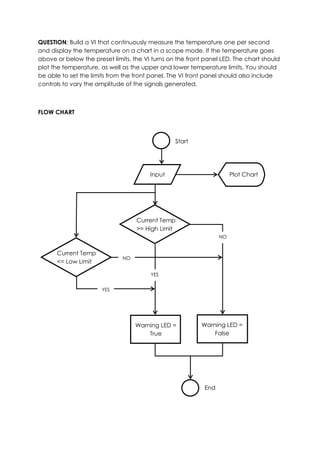
FLOW CHART


                                                 Start


                                        Input                         Plot Chart


                                   Current Temp
                                   >= High Limit
                                                                 NO


      Current Temp
                              NO
      <= Low Limit

                                        YES


                      YES


                                   Warning LED =          Warning LED =
                                       True                   False


                                                           End
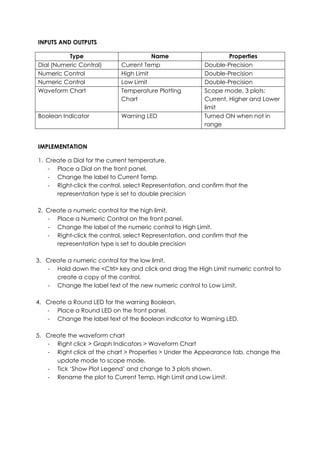
INPUTS AND OUTPUTS

          Type                          Name                      Properties
Dial (Numeric Control)       Current Temp                Double-Precision
Numeric Control              High Limit                  Double-Precision
Numeric Control              Low Limit                   Double-Precision
Waveform Chart               Temperature Plotting        Scope mode, 3 plots:
                             Chart                       Current, Higher and Lower
                                                         limit
Boolean Indicator            Warning LED                 Turned ON when not in
                                                         range


IMPLEMENTATION

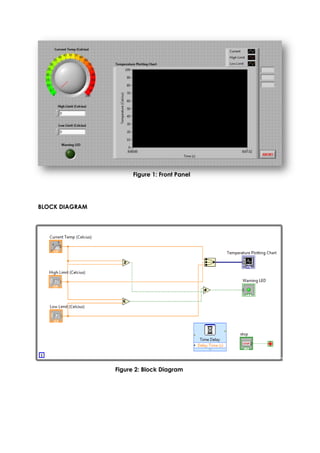
1. Create a Dial for the current temperature.
   - Place a Dial on the front panel.
   - Change the label to Current Temp.
   - Right-click the control, select Representation, and confirm that the
      representation type is set to double precision

2. Create a numeric control for the high limit.
   - Place a Numeric Control on the front panel.
   - Change the label of the numeric control to High Limit.
   - Right-click the control, select Representation, and confirm that the
      representation type is set to double precision

3. Create a numeric control for the low limit.
   - Hold down the <Ctrl> key and click and drag the High Limit numeric control to
      create a copy of the control.
   - Change the label text of the new numeric control to Low Limit.

4. Create a Round LED for the warning Boolean.
   - Place a Round LED on the front panel.
   - Change the label text of the Boolean indicator to Warning LED.

5. Create the waveform chart
   - Right click > Graph Indicators > Waveform Chart
   - Right click at the chart > Properties > Under the Appearance tab, change the
      update mode to scope mode.
   - Tick ‘Show Plot Legend’ and change to 3 plots shown.
   - Rename the plot to Current Temp, High Limit and Low Limit.
Figure 1: Front Panel


BLOCK DIAGRAM


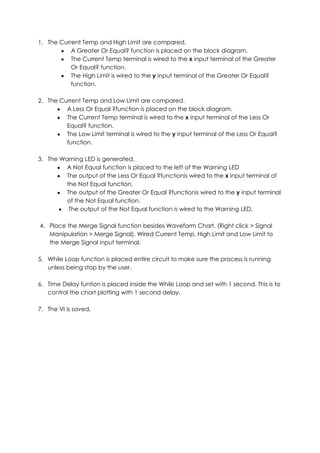
                Figure 2: Block Diagram
1. The Current Temp and High Limit are compared.
           A Greater Or Equal? function is placed on the block diagram.
           The Current Temp terminal is wired to the x input terminal of the Greater
           Or Equal? function.
           The High Limit is wired to the y input terminal of the Greater Or Equal?
           function.

2. The Current Temp and Low Limit are compared.
         A Less Or Equal ?function is placed on the block diagram.
         The Current Temp terminal is wired to the x input terminal of the Less Or
         Equal? function.
         The Low Limit terminal is wired to the y input terminal of the Less Or Equal?
         function.

3. The Warning LED is generated.
         A Not Equal function is placed to the left of the Warning LED
         The output of the Less Or Equal ?functionis wired to the x input terminal of
         the Not Equal function.
         The output of the Greater Or Equal ?functionis wired to the y input terminal
         of the Not Equal function.
          The output of the Not Equal function is wired to the Warning LED.

4. Place the Merge Signal function besides Waveform Chart. (Right click > Signal
   Manipulation > Merge Signal). Wired Current Temp, High Limit and Low Limit to
   the Merge Signal input terminal.

5. While Loop function is placed entire circuit to make sure the process is running
   unless being stop by the user.

6. Time Delay funtion is placed inside the While Loop and set with 1 second. This is to
   control the chart plotting with 1 second delay.

7. The VI is saved.

Kmem 3116 al1 report (keb090001)

  • 1.
    KMEM 3116: INSTRUMENTATIONAND MEASUREMENT TECHNIQUES ACTIVE LEARNING 1 REPORT NAME : AHMAD ALIFF BIN AZMI MATRIC NO. : KEB090001
  • 2.
    QUESTION: Build aVI that continuously measure the temperature one per second and display the temperature on a chart in a scope mode. If the temperature goes above or below the preset limits, the VI turns on the front panel LED. The chart should plot the temperature, as well as the upper and lower temperature limits. You should be able to set the limits from the front panel. The VI front panel should also include controls to vary the amplitude of the signals generated. FLOW CHART Start Input Plot Chart Current Temp >= High Limit NO Current Temp NO <= Low Limit YES YES Warning LED = Warning LED = True False End
  • 3.
    INPUTS AND OUTPUTS Type Name Properties Dial (Numeric Control) Current Temp Double-Precision Numeric Control High Limit Double-Precision Numeric Control Low Limit Double-Precision Waveform Chart Temperature Plotting Scope mode, 3 plots: Chart Current, Higher and Lower limit Boolean Indicator Warning LED Turned ON when not in range IMPLEMENTATION 1. Create a Dial for the current temperature. - Place a Dial on the front panel. - Change the label to Current Temp. - Right-click the control, select Representation, and confirm that the representation type is set to double precision 2. Create a numeric control for the high limit. - Place a Numeric Control on the front panel. - Change the label of the numeric control to High Limit. - Right-click the control, select Representation, and confirm that the representation type is set to double precision 3. Create a numeric control for the low limit. - Hold down the <Ctrl> key and click and drag the High Limit numeric control to create a copy of the control. - Change the label text of the new numeric control to Low Limit. 4. Create a Round LED for the warning Boolean. - Place a Round LED on the front panel. - Change the label text of the Boolean indicator to Warning LED. 5. Create the waveform chart - Right click > Graph Indicators > Waveform Chart - Right click at the chart > Properties > Under the Appearance tab, change the update mode to scope mode. - Tick ‘Show Plot Legend’ and change to 3 plots shown. - Rename the plot to Current Temp, High Limit and Low Limit.
  • 4.
    Figure 1: FrontPanel BLOCK DIAGRAM Figure 2: Block Diagram
  • 5.
    1. The CurrentTemp and High Limit are compared. A Greater Or Equal? function is placed on the block diagram. The Current Temp terminal is wired to the x input terminal of the Greater Or Equal? function. The High Limit is wired to the y input terminal of the Greater Or Equal? function. 2. The Current Temp and Low Limit are compared. A Less Or Equal ?function is placed on the block diagram. The Current Temp terminal is wired to the x input terminal of the Less Or Equal? function. The Low Limit terminal is wired to the y input terminal of the Less Or Equal? function. 3. The Warning LED is generated. A Not Equal function is placed to the left of the Warning LED The output of the Less Or Equal ?functionis wired to the x input terminal of the Not Equal function. The output of the Greater Or Equal ?functionis wired to the y input terminal of the Not Equal function. The output of the Not Equal function is wired to the Warning LED. 4. Place the Merge Signal function besides Waveform Chart. (Right click > Signal Manipulation > Merge Signal). Wired Current Temp, High Limit and Low Limit to the Merge Signal input terminal. 5. While Loop function is placed entire circuit to make sure the process is running unless being stop by the user. 6. Time Delay funtion is placed inside the While Loop and set with 1 second. This is to control the chart plotting with 1 second delay. 7. The VI is saved.