Course Development
            Kick-Off Meeting


Online Student Experience
 Welcome and Introductions
         Agenda
                      Big Questions in Course
                      Design

                      Course Mapping


                      Course Development
                      Resources

                      Quality Matters Overview


                      Peer Review Process


Clipart from          Schedule of Events
blogtrepreneur.com
Big Questions in Course Design
 Where are we?
    Who is your audience?
    What skills do they already have?


 Where are we going?
    Course Learning Outcomes?
    What skills and knowledge?


 How are we going to get there?
    Objectives, Activities, Projects,
     Discussions


 How will we know when we get           Photo by Aram Bhusal

 there?                                  arambhusal.sulekha.com/.../slideshow/230411.ht
                                         m
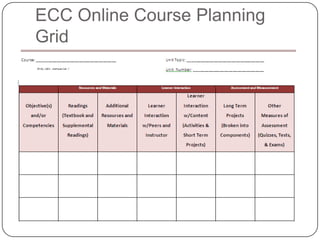
ECC Online Course Planning
Grid
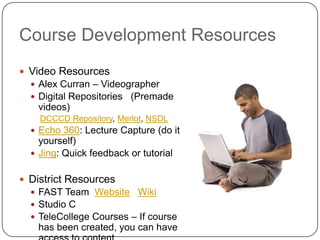
Course Development Resources
 Video Resources
   Alex Curran – Videographer
   Digital Repositories (Premade
    videos)
    DCCCD Repository, Merlot, NSDL
   Echo 360: Lecture Capture (do it
    yourself)
   Jing: Quick feedback or tutorial


 District Resources
   FAST Team Website Wiki
   Studio C
   TeleCollege Courses – If course
    has been created, you can have
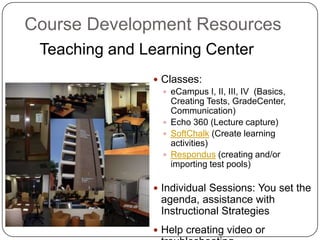
Course Development Resources
 Teaching and Learning Center
                Classes:
                  eCampus I, II, III, IV (Basics,
                   Creating Tests, GradeCenter,
                   Communication)
                  Echo 360 (Lecture capture)
                  SoftChalk (Create learning
                   activities)
                  Respondus (creating and/or
                   importing test pools)

                Individual Sessions: You set the
                 agenda, assistance with
                 Instructional Strategies
                Help creating video or
Project Ideas
 Video Introductions Examples
     Glenda Easter Welcome
     Luke Barber Welcome
     Pat Spence Welcome
     Video Tips for Faculty

 Lecture Capture
 Orientation (Start Here)
 Creating test pools or importing tests
 Creating Thought Provoking Discussion Topics
 Creating Effective Assessments


                                            Online
                                            Student
Quality Matters Standards
 Course Overview and
  Introduction
 Learning Objectives
  (Competencies)
 Assessment & Measurement
 Instructional Materials
 Learner Interaction and
  Engagement
 Course Technology
 Learner Support
Sample QM Course
 Accessibility
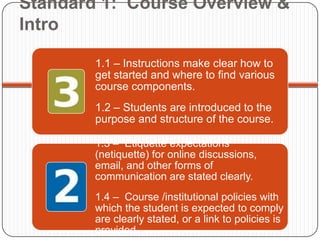
Standard 1: Course Overview &
Intro

        1.1 – Instructions make clear how to
        get started and where to find various
        course components.
        1.2 – Students are introduced to the
        purpose and structure of the course.

        1.3 – Etiquette expectations
        (netiquette) for online discussions,
        email, and other forms of
        communication are stated clearly.
        1.4 – Course /institutional policies with
        which the student is expected to comply
        are clearly stated, or a link to policies is
        provided.
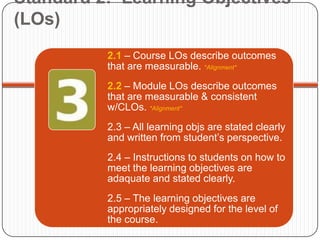
Standard 2: Learning Objectives
(LOs)
          2.1 – Course LOs describe outcomes
          that are measurable. *Alignment*
          2.2 – Module LOs describe outcomes
          that are measurable & consistent
          w/CLOs. *Alignment*
          2.3 – All learning objs are stated clearly
          and written from student’s perspective.
          2.4 – Instructions to students on how to
          meet the learning objectives are
          adaquate and stated clearly.
          2.5 – The learning objectives are
          appropriately designed for the level of
          the course.
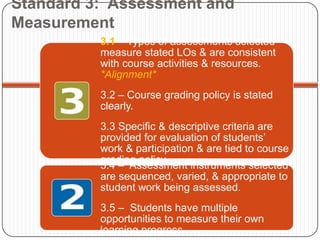
Standard 3: Assessment and
Measurement
          3.1 – Types of assessments selected
          measure stated LOs & are consistent
          with course activities & resources.
          *Alignment*
          3.2 – Course grading policy is stated
          clearly.
          3.3 Specific & descriptive criteria are
          provided for evaluation of students’
          work & participation & are tied to course
          grading policy.
          3.4 – Assessment instruments selected
          are sequenced, varied, & appropriate to
          student work being assessed.
          3.5 – Students have multiple
          opportunities to measure their own
          learning progress.
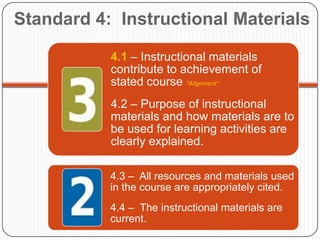
Standard 4: Instructional Materials

           4.1 – Instructional materials
           contribute to achievement of
           stated course *Alignment*
           4.2 – Purpose of instructional
           materials and how materials are to
           be used for learning activities are
           clearly explained.

           4.3 – All resources and materials used
           in the course are appropriately cited.
           4.4 – The instructional materials are
           current.
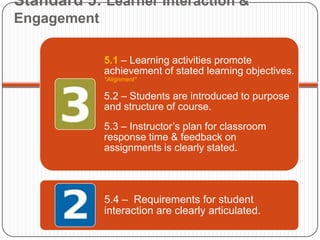
Standard 5: Learner Interaction &
Engagement

             5.1 – Learning activities promote
             achievement of stated learning objectives.
             *Alignment*

             5.2 – Students are introduced to purpose
             and structure of course.
             5.3 – Instructor’s plan for classroom
             response time & feedback on
             assignments is clearly stated.


             5.4 – Requirements for student
             interaction are clearly articulated.
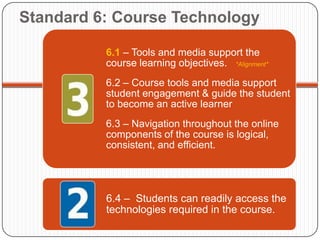
Standard 6: Course Technology

          6.1 – Tools and media support the
          course learning objectives. *Alignment*
          6.2 – Course tools and media support
          student engagement & guide the student
          to become an active learner
          6.3 – Navigation throughout the online
          components of the course is logical,
          consistent, and efficient.


          6.4 – Students can readily access the
          technologies required in the course.
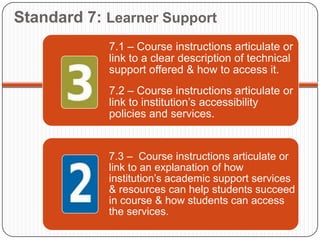
Standard 7: Learner Support
            7.1 – Course instructions articulate or
            link to a clear description of technical
            support offered & how to access it.
            7.2 – Course instructions articulate or
            link to institution’s accessibility
            policies and services.


            7.3 – Course instructions articulate or
            link to an explanation of how
            institution’s academic support services
            & resources can help students succeed
            in course & how students can access
            the services.
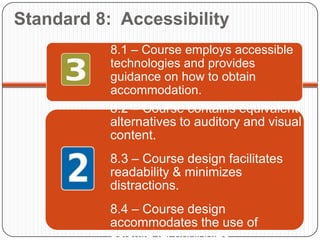
Standard 8: Accessibility
           8.1 – Course employs accessible
           technologies and provides
           guidance on how to obtain
           accommodation.
           8.2 – Course contains equivalent
           alternatives to auditory and visual
           content.
           8.3 – Course design facilitates
           readability & minimizes
           distractions.
           8.4 – Course design
           accommodates the use of
           asistive technologies.
Quality Matters Rubric Goals
Be able to answer ‘Yes’ to all 3 point
questions


Earn   81+      points overall


Use the Instructor Worksheet to plan
activities and elements of your
course and how they relate to Quality
Matters
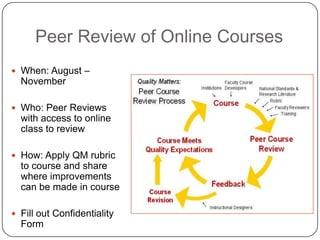
Peer Review of Online Courses
 When: August –
  November

 Who: Peer Reviews
  with access to online
  class to review

 How: Apply QM rubric
  to course and share
  where improvements
  can be made in course

 Fill out Confidentiality
  Form
Schedule of Events

 May: Start Development, meet w/Mentor


 July: Call for Peer Reviewers, meet w/Mentor


 Aug - Nov: Peer review of online course and revisions
 if needed

 Revisions can go into Spring semester if needed


 Complete payment will be made after successful
 completion of peer review
How can we help?

                                      Mentor Meetings
                                          Summer: May, June, July,
                                           August

                                      I would like to learn more
                                      about?
                                          Creating videos: Intro, Short
                                           Lectures, Tutorials
                                          Using Softchalk to develop
                                           class activities
                                          Quality Matters
                                          ?


                                      How else?
whitetailresort.wordpress.com/.../

Kick off meeting_course_dev_sp2012

  • 1.
    Course Development Kick-Off Meeting Online Student Experience
  • 2.
     Welcome andIntroductions Agenda  Big Questions in Course Design  Course Mapping  Course Development Resources  Quality Matters Overview  Peer Review Process Clipart from  Schedule of Events blogtrepreneur.com
  • 3.
    Big Questions inCourse Design  Where are we?  Who is your audience?  What skills do they already have?  Where are we going?  Course Learning Outcomes?  What skills and knowledge?  How are we going to get there?  Objectives, Activities, Projects, Discussions  How will we know when we get Photo by Aram Bhusal there? arambhusal.sulekha.com/.../slideshow/230411.ht m
  • 4.
    ECC Online CoursePlanning Grid
  • 5.
    Course Development Resources Video Resources  Alex Curran – Videographer  Digital Repositories (Premade videos) DCCCD Repository, Merlot, NSDL  Echo 360: Lecture Capture (do it yourself)  Jing: Quick feedback or tutorial  District Resources  FAST Team Website Wiki  Studio C  TeleCollege Courses – If course has been created, you can have
  • 6.
    Course Development Resources Teaching and Learning Center  Classes:  eCampus I, II, III, IV (Basics, Creating Tests, GradeCenter, Communication)  Echo 360 (Lecture capture)  SoftChalk (Create learning activities)  Respondus (creating and/or importing test pools)  Individual Sessions: You set the agenda, assistance with Instructional Strategies  Help creating video or
  • 7.
    Project Ideas  VideoIntroductions Examples  Glenda Easter Welcome  Luke Barber Welcome  Pat Spence Welcome  Video Tips for Faculty  Lecture Capture  Orientation (Start Here)  Creating test pools or importing tests  Creating Thought Provoking Discussion Topics  Creating Effective Assessments Online Student
  • 8.
    Quality Matters Standards Course Overview and Introduction  Learning Objectives (Competencies)  Assessment & Measurement  Instructional Materials  Learner Interaction and Engagement  Course Technology  Learner Support Sample QM Course  Accessibility
  • 9.
    Standard 1: CourseOverview & Intro 1.1 – Instructions make clear how to get started and where to find various course components. 1.2 – Students are introduced to the purpose and structure of the course. 1.3 – Etiquette expectations (netiquette) for online discussions, email, and other forms of communication are stated clearly. 1.4 – Course /institutional policies with which the student is expected to comply are clearly stated, or a link to policies is provided.
  • 10.
    Standard 2: LearningObjectives (LOs) 2.1 – Course LOs describe outcomes that are measurable. *Alignment* 2.2 – Module LOs describe outcomes that are measurable & consistent w/CLOs. *Alignment* 2.3 – All learning objs are stated clearly and written from student’s perspective. 2.4 – Instructions to students on how to meet the learning objectives are adaquate and stated clearly. 2.5 – The learning objectives are appropriately designed for the level of the course.
  • 11.
    Standard 3: Assessmentand Measurement 3.1 – Types of assessments selected measure stated LOs & are consistent with course activities & resources. *Alignment* 3.2 – Course grading policy is stated clearly. 3.3 Specific & descriptive criteria are provided for evaluation of students’ work & participation & are tied to course grading policy. 3.4 – Assessment instruments selected are sequenced, varied, & appropriate to student work being assessed. 3.5 – Students have multiple opportunities to measure their own learning progress.
  • 12.
    Standard 4: InstructionalMaterials 4.1 – Instructional materials contribute to achievement of stated course *Alignment* 4.2 – Purpose of instructional materials and how materials are to be used for learning activities are clearly explained. 4.3 – All resources and materials used in the course are appropriately cited. 4.4 – The instructional materials are current.
  • 13.
    Standard 5: LearnerInteraction & Engagement 5.1 – Learning activities promote achievement of stated learning objectives. *Alignment* 5.2 – Students are introduced to purpose and structure of course. 5.3 – Instructor’s plan for classroom response time & feedback on assignments is clearly stated. 5.4 – Requirements for student interaction are clearly articulated.
  • 14.
    Standard 6: CourseTechnology 6.1 – Tools and media support the course learning objectives. *Alignment* 6.2 – Course tools and media support student engagement & guide the student to become an active learner 6.3 – Navigation throughout the online components of the course is logical, consistent, and efficient. 6.4 – Students can readily access the technologies required in the course.
  • 15.
    Standard 7: LearnerSupport 7.1 – Course instructions articulate or link to a clear description of technical support offered & how to access it. 7.2 – Course instructions articulate or link to institution’s accessibility policies and services. 7.3 – Course instructions articulate or link to an explanation of how institution’s academic support services & resources can help students succeed in course & how students can access the services.
  • 16.
    Standard 8: Accessibility 8.1 – Course employs accessible technologies and provides guidance on how to obtain accommodation. 8.2 – Course contains equivalent alternatives to auditory and visual content. 8.3 – Course design facilitates readability & minimizes distractions. 8.4 – Course design accommodates the use of asistive technologies.
  • 17.
    Quality Matters RubricGoals Be able to answer ‘Yes’ to all 3 point questions Earn 81+ points overall Use the Instructor Worksheet to plan activities and elements of your course and how they relate to Quality Matters
  • 18.
    Peer Review ofOnline Courses  When: August – November  Who: Peer Reviews with access to online class to review  How: Apply QM rubric to course and share where improvements can be made in course  Fill out Confidentiality Form
  • 19.
    Schedule of Events May: Start Development, meet w/Mentor  July: Call for Peer Reviewers, meet w/Mentor  Aug - Nov: Peer review of online course and revisions if needed  Revisions can go into Spring semester if needed  Complete payment will be made after successful completion of peer review
  • 20.
    How can wehelp?  Mentor Meetings  Summer: May, June, July, August  I would like to learn more about?  Creating videos: Intro, Short Lectures, Tutorials  Using Softchalk to develop class activities  Quality Matters  ?  How else? whitetailresort.wordpress.com/.../