SESSION – 2
By→ Anuj Kumar Singh
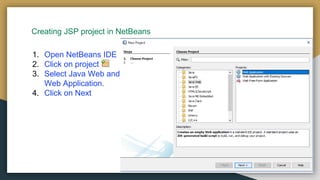
Creating JSP project in NetBeans
1. Open NetBeans IDE
2. Click on project
3. Select Java Web and
Web Application.
4. Click on Next
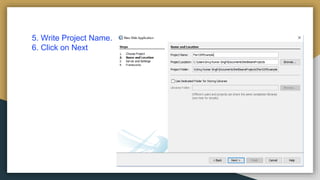
5. Write Project Name.
6. Click on Next
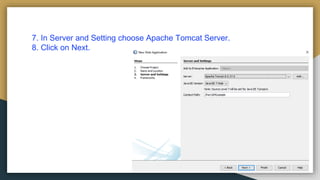
7. In Server and Setting choose Apache Tomcat Server.
8. Click on Next.
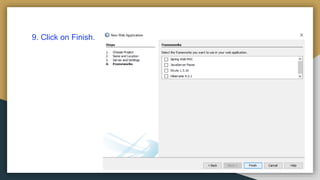
9. Click on Finish.
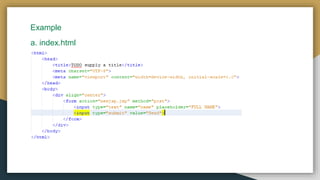
Example
a. index.html
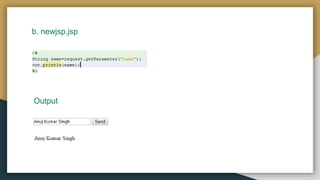
b. newjsp.jsp
Output
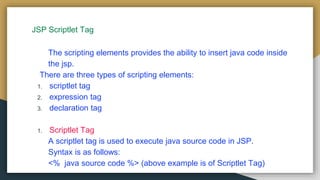
JSP Scriptlet Tag
The scripting elements provides the ability to insert java code inside
the jsp.
There are three types of scripting elements:
1. scriptlet tag
2. expression tag
3. declaration tag
1. Scriptlet Tag
A scriptlet tag is used to execute java source code in JSP.
Syntax is as follows:
<% java source code %> (above example is of Scriptlet Tag)
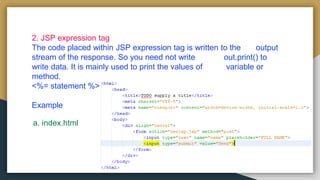
2. JSP expression tag
The code placed within JSP expression tag is written to the output
stream of the response. So you need not write out.print() to
write data. It is mainly used to print the values of variable or
method.
<%= statement %>
Example
a. index.html
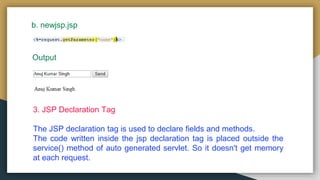
b. newjsp.jsp
Output
3. JSP Declaration Tag
The JSP declaration tag is used to declare fields and methods.
The code written inside the jsp declaration tag is placed outside the
service() method of auto generated servlet. So it doesn't get memory
at each request.
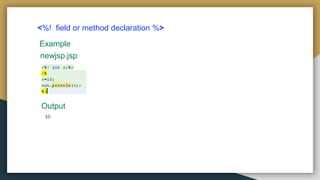
<%! field or method declaration %>
Example
newjsp.jsp
Output
Difference between JSP Scriptlet Tag and JSP Declaration Tag
Jsp Scriptlet Tag Jsp Declaration Tag
The jsp scriptlet tag can only
declare variables.
The jsp declaration tag can declare
variables as well as methods.
The declaration of scriptlet tag is
placed inside the _jspService()
method.
The declaration of jsp declaration
tag is placed outside the
_jspService() method.
Jsp   session 2

Jsp session 2

  • 1.
    SESSION – 2 By→Anuj Kumar Singh
  • 2.
    Creating JSP projectin NetBeans 1. Open NetBeans IDE 2. Click on project 3. Select Java Web and Web Application. 4. Click on Next
  • 3.
    5. Write ProjectName. 6. Click on Next
  • 4.
    7. In Serverand Setting choose Apache Tomcat Server. 8. Click on Next.
  • 5.
    9. Click onFinish.
  • 6.
  • 7.
  • 8.
    JSP Scriptlet Tag Thescripting elements provides the ability to insert java code inside the jsp. There are three types of scripting elements: 1. scriptlet tag 2. expression tag 3. declaration tag 1. Scriptlet Tag A scriptlet tag is used to execute java source code in JSP. Syntax is as follows: <% java source code %> (above example is of Scriptlet Tag)
  • 9.
    2. JSP expressiontag The code placed within JSP expression tag is written to the output stream of the response. So you need not write out.print() to write data. It is mainly used to print the values of variable or method. <%= statement %> Example a. index.html
  • 10.
    b. newjsp.jsp Output 3. JSPDeclaration Tag The JSP declaration tag is used to declare fields and methods. The code written inside the jsp declaration tag is placed outside the service() method of auto generated servlet. So it doesn't get memory at each request.
  • 11.
    <%! field ormethod declaration %> Example newjsp.jsp Output
  • 12.
    Difference between JSPScriptlet Tag and JSP Declaration Tag Jsp Scriptlet Tag Jsp Declaration Tag The jsp scriptlet tag can only declare variables. The jsp declaration tag can declare variables as well as methods. The declaration of scriptlet tag is placed inside the _jspService() method. The declaration of jsp declaration tag is placed outside the _jspService() method.