SESSION – 5
By→ Anuj Kumar Singh
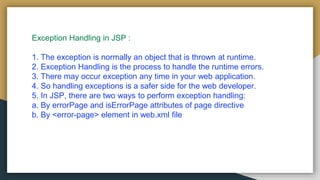
Exception Handling in JSP :
1. The exception is normally an object that is thrown at runtime.
2. Exception Handling is the process to handle the runtime errors.
3. There may occur exception any time in your web application.
4. So handling exceptions is a safer side for the web developer.
5. In JSP, there are two ways to perform exception handling:
a. By errorPage and isErrorPage attributes of page directive
b. By <error-page> element in web.xml file
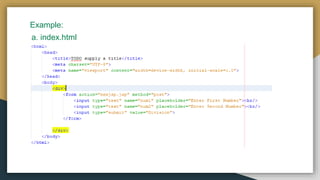
Example:
a. index.html
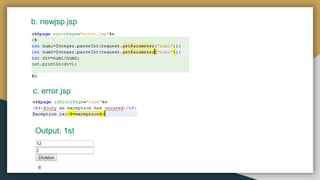
b. newjsp.jsp
c. error.jsp
Output: 1st
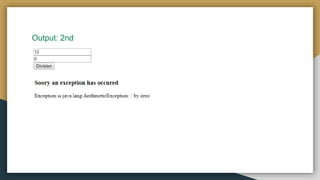
Output: 2nd
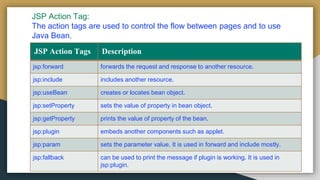
JSP Action Tag:
The action tags are used to control the flow between pages and to use
Java Bean.
JSP Action Tags Description
jsp:forward forwards the request and response to another resource.
jsp:include includes another resource.
jsp:useBean creates or locates bean object.
jsp:setProperty sets the value of property in bean object.
jsp:getProperty prints the value of property of the bean.
jsp:plugin embeds another components such as applet.
jsp:param sets the parameter value. It is used in forward and include mostly.
jsp:fallback can be used to print the message if plugin is working. It is used in
jsp:plugin.
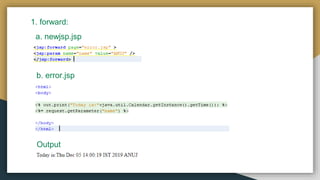
1. forward:
a. newjsp.jsp
b. error.jsp
Output
2. include:
1. The jsp:include action tag is used to include the content of another
resource it may be jsp, html or servlet.
2. The jsp include action tag includes the resource at request time so it
is better for dynamic pages because there might be changes in future.
The jsp:include tag can be used to include static as well as dynamic
pages.
Advantage of jsp:include action tag
Code reusability : We can use a page many times such as including
header and footer pages in all pages. So it saves a lot of time.
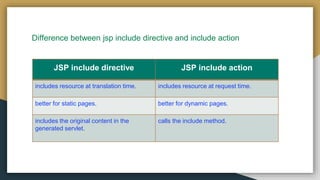
Difference between jsp include directive and include action
JSP include directive JSP include action
includes resource at translation time. includes resource at request time.
better for static pages. better for dynamic pages.
includes the original content in the
generated servlet.
calls the include method.
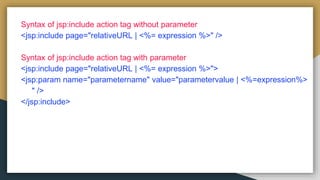
Syntax of jsp:include action tag without parameter
<jsp:include page="relativeURL | <%= expression %>" />
Syntax of jsp:include action tag with parameter
<jsp:include page="relativeURL | <%= expression %>">
<jsp:param name="parametername" value="parametervalue | <%=expression%>
" />
</jsp:include>
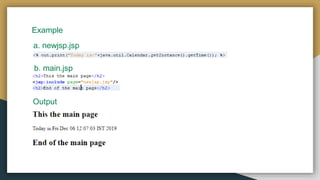
Example
a. newjsp.jsp
b. main.jsp
Output
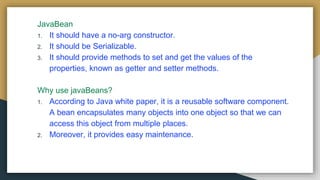
JavaBean
1. It should have a no-arg constructor.
2. It should be Serializable.
3. It should provide methods to set and get the values of the
properties, known as getter and setter methods.
Why use javaBeans?
1. According to Java white paper, it is a reusable software component.
A bean encapsulates many objects into one object so that we can
access this object from multiple places.
2. Moreover, it provides easy maintenance.
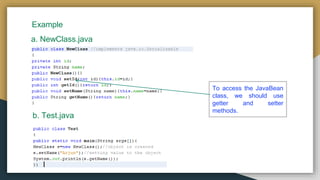
Example
a. NewClass.java
b. Test.java
To access the JavaBean
class, we should use
getter and setter
methods.
JavaBean Properties
1. A JavaBean property is a named feature that can be accessed by the
user of the object. The feature can be of any Java data type, containing
the classes that you define.
2. A JavaBean property may be read, write, read-only, or write-only.
1. getPropertyName ()
For example, if the property name is firstName, the method name would
be getFirstName() to read that property. This method is called the
accessor.
2. setPropertyName ()
For example, if the property name is firstName, the method name would
be setFirstName() to write that property. This method is called the
mutator.
Advantages of JavaBean
1. The JavaBean properties and methods can be exposed to another
application.
2. It provides an easiness to reuse the software components.
Disadvantages of JavaBean
1. JavaBeans are mutable. So, it can't take advantages of immutable
objects.
2. Creating the setter and getter method for each property separately may
lead to the boilerplate code.
Jsp   session 5

Jsp session 5

  • 1.
    SESSION – 5 By→Anuj Kumar Singh
  • 2.
    Exception Handling inJSP : 1. The exception is normally an object that is thrown at runtime. 2. Exception Handling is the process to handle the runtime errors. 3. There may occur exception any time in your web application. 4. So handling exceptions is a safer side for the web developer. 5. In JSP, there are two ways to perform exception handling: a. By errorPage and isErrorPage attributes of page directive b. By <error-page> element in web.xml file
  • 3.
  • 4.
  • 5.
  • 6.
    JSP Action Tag: Theaction tags are used to control the flow between pages and to use Java Bean. JSP Action Tags Description jsp:forward forwards the request and response to another resource. jsp:include includes another resource. jsp:useBean creates or locates bean object. jsp:setProperty sets the value of property in bean object. jsp:getProperty prints the value of property of the bean. jsp:plugin embeds another components such as applet. jsp:param sets the parameter value. It is used in forward and include mostly. jsp:fallback can be used to print the message if plugin is working. It is used in jsp:plugin.
  • 7.
  • 8.
    2. include: 1. Thejsp:include action tag is used to include the content of another resource it may be jsp, html or servlet. 2. The jsp include action tag includes the resource at request time so it is better for dynamic pages because there might be changes in future. The jsp:include tag can be used to include static as well as dynamic pages. Advantage of jsp:include action tag Code reusability : We can use a page many times such as including header and footer pages in all pages. So it saves a lot of time.
  • 9.
    Difference between jspinclude directive and include action JSP include directive JSP include action includes resource at translation time. includes resource at request time. better for static pages. better for dynamic pages. includes the original content in the generated servlet. calls the include method.
  • 10.
    Syntax of jsp:includeaction tag without parameter <jsp:include page="relativeURL | <%= expression %>" /> Syntax of jsp:include action tag with parameter <jsp:include page="relativeURL | <%= expression %>"> <jsp:param name="parametername" value="parametervalue | <%=expression%> " /> </jsp:include>
  • 11.
  • 12.
    JavaBean 1. It shouldhave a no-arg constructor. 2. It should be Serializable. 3. It should provide methods to set and get the values of the properties, known as getter and setter methods. Why use javaBeans? 1. According to Java white paper, it is a reusable software component. A bean encapsulates many objects into one object so that we can access this object from multiple places. 2. Moreover, it provides easy maintenance.
  • 13.
    Example a. NewClass.java b. Test.java Toaccess the JavaBean class, we should use getter and setter methods.
  • 14.
    JavaBean Properties 1. AJavaBean property is a named feature that can be accessed by the user of the object. The feature can be of any Java data type, containing the classes that you define. 2. A JavaBean property may be read, write, read-only, or write-only. 1. getPropertyName () For example, if the property name is firstName, the method name would be getFirstName() to read that property. This method is called the accessor. 2. setPropertyName () For example, if the property name is firstName, the method name would be setFirstName() to write that property. This method is called the mutator.
  • 15.
    Advantages of JavaBean 1.The JavaBean properties and methods can be exposed to another application. 2. It provides an easiness to reuse the software components. Disadvantages of JavaBean 1. JavaBeans are mutable. So, it can't take advantages of immutable objects. 2. Creating the setter and getter method for each property separately may lead to the boilerplate code.